iCloud Mail can filter or block incoming email from Gmail and other senders, so check the Junk folder, iCloud storage, mail rules, blocked contacts and forwarding, then ask Apple Support about a server-level rejection.
This guide shows how to check each one, how to read a Gmail bounce notice, and what to send Apple Support when the block sits on Apple's side.
How to fix iCloud Mail blocking incoming email from Gmail
Work through these checks in order at iCloud.com, because the web mailbox shows what actually reached your account.
- Go to
icloud.com/mailand sign in with your Apple Account. - Select Junk in the Mailboxes list. If the message is there, select it, choose Mark or the More button, then choose Move to Inbox.
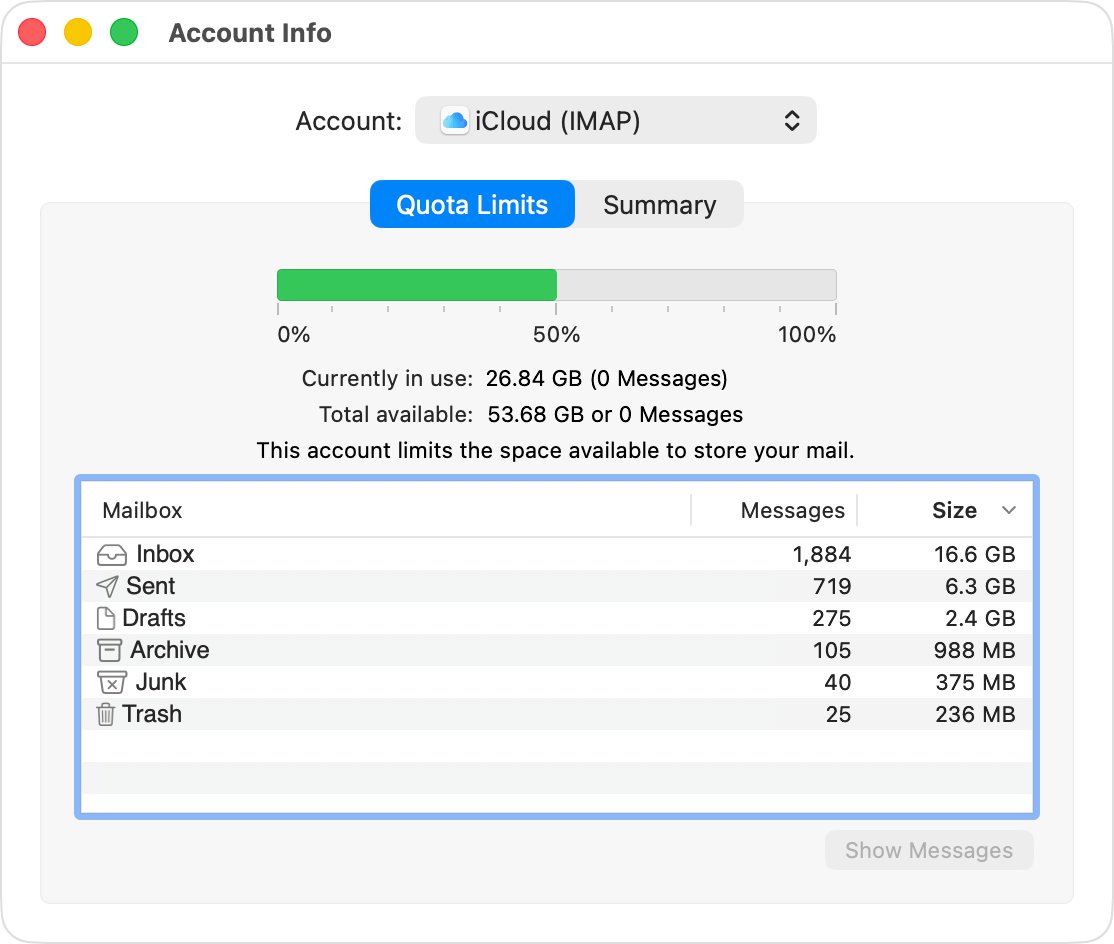
- Check your iCloud storage. A full account can't send or receive email with your iCloud address.
- Click the Settings button at the top of the Mailboxes list, choose Settings, then review Rules and Mail Forwarding for anything that moves or removes the sender's mail.
- On your iPhone, go to Settings > Privacy & Security > Blocked Contacts and remove the sender if listed.
- Ask the sender to send a new test email and forward any bounce notice to you.
- Send the bounce text to Apple Support if the test still doesn't arrive.
Apple states that a message sent without an alert but never received may have been blocked or filtered by iCloud Mail servers or by the recipient's server. Only Apple can act on a block at that level.
iCloud email blocking incoming mail: what each sign means
| What you see | Likely cause | What to do |
|---|---|---|
| Message is in the Junk folder | iCloud filtered it as junk | Choose Move to Inbox and add the sender to your contacts |
| No mail arrives from anyone, and you can't send either | iCloud storage is full | Free up space or add storage |
| Mail shows on iCloud.com but not on your iPhone or Mac | Device settings, not a block | Check Use on this iPhone and Push, or the Mail account status on Mac |
| One sender is missing and the sender got no bounce | Blocked contact, rule, forwarding or server filtering | Check Blocked Contacts, Rules and Mail Forwarding, then contact Apple Support |
| The sender got a bounce notice | The receiving server or Gmail refused delivery | Read the reason in the notice and send it to Apple Support if it names iCloud |
| Newsletters or listing alerts stop, and personal mail still arrives | The bulk sender fails iCloud's sender rules | Ask that company to review the iCloud Mail postmaster requirements |
How to recover email from Gmail in the iCloud Mail junk folder
iCloud filters junk before mail reaches your inbox, and legitimate messages sometimes get caught. Junk mail is deleted automatically after 30 days, so check this folder soon after a message goes missing.
- Go to
icloud.com/mailand sign in. - Select the Junk folder in the Mailboxes list.
- Click the email. On a Windows PC, Control-click to select several; on a Mac, Command-click.
- Choose Mark or the More button, then choose Move to Inbox.
- Add the sender to your iCloud contacts so later messages stay out of Junk.
Apple says email from people in your iCloud contacts or from recent conversations won't go to the Junk folder. iCloud Mail has no separate sender allow list, so contacts are the closest control you have.
iCloud storage full and not receiving email
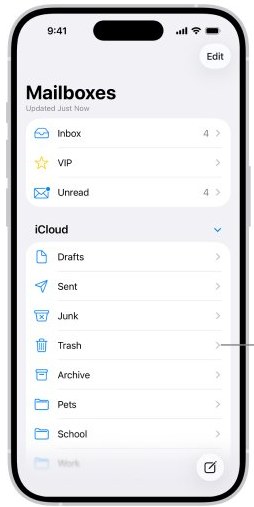
iCloud Mail uses your iCloud storage, which starts at 5GB free. Once you run out, you can't send or receive email with your iCloud address, and senders can't reach you until you free up space.
- On iPhone, open Settings, tap your name, then tap iCloud to see your storage.
- On a Mac, choose Apple menu > System Settings, click your name, click iCloud, then click Manage.
- Delete older iCloud Mail in bulk, starting with messages that carry attachments, since those take up the most space.
- Remove other data you no longer need, or move to a larger iCloud+ plan.
- Ask the sender to send the email again once space is free.
How to unblock email on iCloud Mail: blocked contacts and rules
A block set on one Apple device can stop mail far from where you set it. When you block a contact in Messages, that contact is also blocked in Mail, Phone, FaceTime and Calendar.
- On iPhone, open Settings, tap Privacy & Security, then tap Blocked Contacts.
- Swipe left on the sender's address, then tap Unblock.
- On a Mac, open System Settings, go to Privacy & Security > Blocked Contacts, and remove the address.
- Go to
icloud.com/mail, click the Settings button at the top of the Mailboxes list, then choose Settings. - Select Rules in the sidebar, then select any rule that matches the sender or the Gmail domain.
- Click Delete to remove that rule.
You can also unblock an address on any Apple device, including the Mail app on Mac and iPad.
How to turn off iCloud Mail forwarding
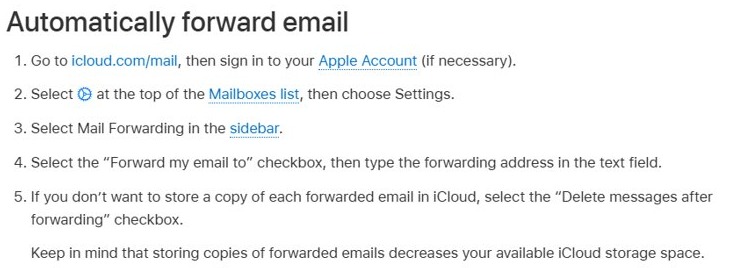
Forwarding can look like a block. With Delete messages after forwarding selected, iCloud keeps no copy, so incoming mail goes to the other address and never shows in your iCloud inbox.
- Go to
icloud.com/mailand sign in with your Apple Account. - Click the Settings button at the top of the Mailboxes list, then choose Settings.
- Select Mail Forwarding in the sidebar.
- Deselect the Forward my email to checkbox.
- Open the old forwarding address and look there for any messages that went missing.
Emails being blocked by Gmail: how to read the bounce message
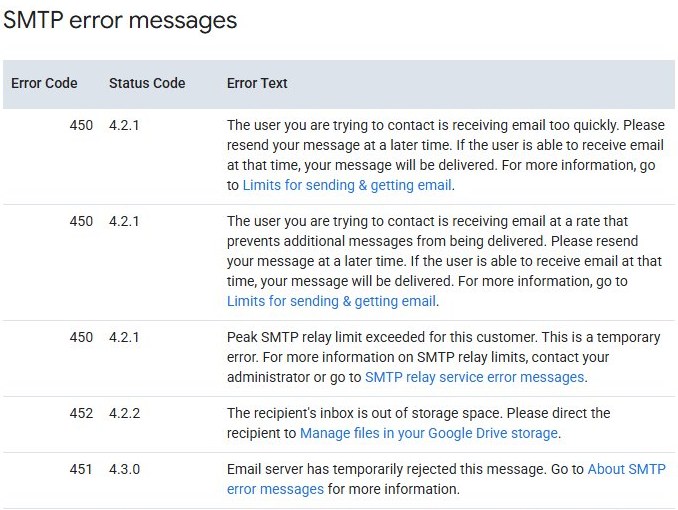
The sender holds the best evidence. When Gmail can't deliver a message, it returns a notice that states the reason, and that text tells you which side refused the mail.
- Ask the sender to check their sent emails in Gmail and confirm the address has no typo, stray dot or extra space.
- Ask them to search Inbox and Spam for a notice from Mail Delivery Subsystem (
[email protected]). - Look for the subject line Delivery Status Notification (Failure).
- Copy the whole error text, including any numeric code.
- Match the reason against the Gmail bounce table below.
Why is Gmail blocking my emails?
These are the reasons Google publishes for bounced, rejected and flagged Gmail messages. Personal Gmail reasons appear first, then the codes sent to domain owners.
| Gmail message or code | What it means | Fix |
|---|---|---|
| Address doesn't exist | Typo, stray quotation marks, extra dots or spaces in the address | Confirm the contact's current address |
| Flagged as spam or temporarily rejected | Links, requests for personal data, or a mailing to many people triggered filters | Remove the trigger, or use a Google Group for large mailings |
| Sending limit reached | More than 500 emails a day, or one email to more than 500 recipients | Wait up to 24 hours |
| Temporary problem with the recipient's inbox | The receiving server is busy or offline | Send again later |
| Recipient's inbox is out of storage | The receiving account has no space | Ask the recipient to free up storage |
| 5.7.26 | The message isn't authenticated with SPF, DKIM or DMARC | The domain owner fixes its DNS records |
| 550 5.7.1 | The sending IP is on a suspended list, often a shared IP with a poor reputation | The domain owner contacts its mail provider |
| 4.7.28 | A sending quota was exceeded | Stop sending for at least 10 minutes, then resume from a single connection |
How to get email delivered to iCloud: SPF, DKIM and DMARC
This section is for the company or administrator whose mail keeps failing. iCloud Mail offers no allow list and no feedback loop, so a sender can't apply to be let through. It scores senders on IP and domain reputation, content and user feedback.
| iCloud Mail requirement | What the sender does |
|---|---|
| Authentication | iCloud checks inbound mail with SPF and DKIM and honors a published DMARC policy |
| Subscribers | Mail only recipients who explicitly subscribed, and remove inactive addresses |
| Unsubscribe | Include an unsubscribe link that works immediately |
| Sending setup | Use reverse DNS on sending IPs and keep sending IPs, domains and the From name consistent |
| Mail streams | Keep marketing and transactional mail separate |
| Bounces | Track temporary and permanent SMTP errors from iCloud and remove addresses that keep bouncing |
| Forwarded mail | Include ARC headers |
| Escalation | Email [email protected] with company name, domain, server IP addresses, the SMTP errors and when the issue started |
Apple reserves that address for system administrators. Everyone else should go through Apple Support.
How to report iCloud blocking email to Apple Support
- Check the Apple System Status page for an iCloud Mail problem. If it's down, try again later.
- If Apple asks for headers, open a message at
icloud.com/mail, select the More button, then select Show All Headers. - Gather the sender's address, the time of the test email and the full bounce text.
- Go to Apple Support and describe the iCloud Mail problem.
- Ask Apple whether its servers rejected or filtered mail from that sender.
You can also reach Apple through Support Communities or direct contact if the first request stalls.
How to block emails on iCloud Mail
Blocking works per device app rather than from a single iCloud.com button, and Apple's iCloud.com guide offers filtering rules instead.
| Where you are | Steps | Result |
|---|---|---|
| iPhone | In Mail, tap a message from the sender, tap their email address, tap View Contact Card, then tap Block this Contact | The sender is blocked across Mail, Phone, FaceTime and Calendar |
| Mac | In Mail, select a message, move the pointer next to the sender's name, click the arrow, then choose Block Sender | A blocked icon and banner mark that sender's messages; up to 3,000 senders |
| iCloud.com | Open Settings > Rules, click +, name the rule, set Message and Action, then click Add | The rule acts on matching mail; up to 500 rules |
Blocked emails in Gmail: how to block and unblock a sender
If the mail is missing from a Gmail inbox instead of an iCloud one, look here. Future email from a blocked sender goes to Spam instead of your inbox.
- To block a sender, open a message from them on a computer, open the More menu near Reply, then choose the block option.
- To see your blocked emails list, open Settings, select See all settings, then go to Filters and Blocked Addresses.
- Check the box beside each sender you want to allow again.
- Click Unblock selected addresses.
- To rescue an earlier message, click More, then Spam, check the message and click Not spam.
How to add iCloud to Gmail
Gmail's browser option for other accounts needs POP, and iCloud Mail supports IMAP and SMTP but not POP. Google is also retiring POP fetching: new users lost it after the first quarter of 2026, and existing users keep it until January 2027.
| Route | How | Details |
|---|---|---|
| Forward iCloud to Gmail | At iCloud.com, open Settings > Mail Forwarding, select Forward my email to, and enter your Gmail address | Leave Delete messages after forwarding off to keep a copy in iCloud |
| Gmail app on a phone | Add the iCloud account in the Gmail app on Android, iPhone or iPad | Connects over IMAP and needs an app-specific password |
| Incoming server | imap.mail.me.com, port 993 |
Username is usually your iCloud name without the domain |
| Outgoing server | smtp.mail.me.com, port 587 |
Username is your full iCloud address |
How to tell if iCloud Mail is receiving Gmail again
- Ask the sender to send a new email from Gmail with a subject line and body text.
- Watch
icloud.com/mailfirst, since it shows the account itself without device settings in the way. - Open Junk as well as Inbox if it doesn't appear within a few minutes.
- Confirm with the sender that no Delivery Status Notification (Failure) came back.
- Open Mail on your iPhone or Mac and confirm the same message appears there.
iCloud Mail not receiving Gmail: other causes
Email from Gmail shows on iCloud.com but not on iPhone
The account is receiving mail, so the problem is on the device.
- Open Settings, tap your name, tap iCloud, tap Mail, then turn on Use on this iPhone.
- Turn off any VPN you have configured and test again.
- Go to Settings > Apps > Mail > Mail Accounts > Fetch New Data, then turn on Push.
- Turn the iPhone off and back on.
Email from Gmail shows on iCloud.com but not in Mail on Mac
The Mail app has an account or connection problem.
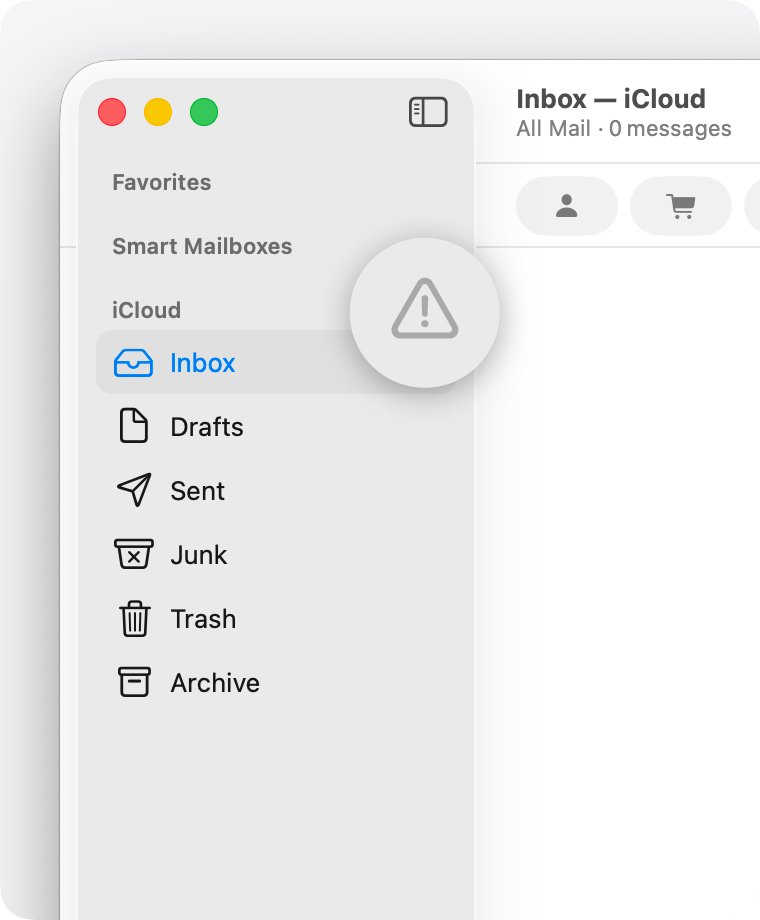
- Look for a warning symbol or lightning bolt beside the account in the Mail sidebar, then click it for details.
- Choose Mail > Settings, click Accounts, select your iCloud account, and confirm it is enabled and online.
- Check for a VPN or other software that interacts with your network connection.
- If Mail keeps asking for a password, reset your iCloud email password.
iCloud.com itself won't load your mail
Some networks block certain services, including iCloud Mail.
- Check your internet connection and the iCloud Mail system status.
- Update your browser and clear its cache.
- Try
icloud.com/mailfrom a different location or internet connection. - Contact your ISP or network administrator if it works elsewhere.
Large attachments from Gmail never arrive
iCloud Mail accepts incoming and outgoing messages up to 20MB.
- Ask the sender to compress the file or share a download link instead.
- Ask them to send a short test message without the attachment.
- Compare the results to confirm size is the reason.
iCloud blocking Gmail FAQ
Why is my email blocked on Gmail?
Gmail blocks or flags mail when the address is wrong, the content looks like spam, a sending limit is reached, or the domain fails SPF or DKIM checks. The bounce notice from Mail Delivery Subsystem states the specific reason, so read it before changing anything.
Can Gmail send to iCloud?
Yes. Gmail delivers to iCloud addresses like any other email address, as long as iCloud Mail accepts the message. iCloud can still route it to Junk or refuse it, and a refusal usually comes back to the sender as a delivery failure notice.
Where do blocked emails go in Gmail?
Blocked emails go to the Spam folder in Gmail. Google sends all future messages from a blocked sender there, and they stay out of your inbox until you unblock that sender from a message or from Filters and Blocked Addresses in settings.
What happens to blocked emails in Gmail after you unblock someone?
After you unblock a sender, their future emails return to your inbox. Earlier messages stay in Spam, so open Spam, check them and click Not spam. Blocked senders keep going to Spam even if you mark a message as not spam.
Can you get blocked on Gmail?
Yes. Any Gmail user can block your address, and your messages then land in their Spam folder. A sending limit can also pause you for up to 24 hours once you pass 500 emails a day on a personal account.
Does Gmail block certain emails?
Yes. Gmail moves spoofed, phishing and unconfirmed-sender messages to Spam and shows a warning that explains why. It can also reject unauthenticated mail with a 5.7.26 error, which the sending domain's owner has to fix through SPF and DKIM records.
Can I add iCloud to Gmail?
Yes, but not through Gmail's browser option, which needs POP, and iCloud Mail doesn't support POP. Forward your iCloud mail to Gmail from iCloud.com, or add the account in the Gmail mobile app over IMAP with an app-specific password.
Is iCloud connected to Gmail?
No. iCloud Mail and Gmail are separate services run by Apple and Google. They connect only when you set up forwarding or add one account to the other's app, and a problem in one doesn't change your settings in the other.
How do I block emails on iCloud Mail?
On iPhone, tap a message, tap the sender's address, tap View Contact Card, then tap Block this Contact. In Mail on a Mac, click the arrow beside the sender's name and choose Block Sender. At iCloud.com, create a filtering rule under Settings.