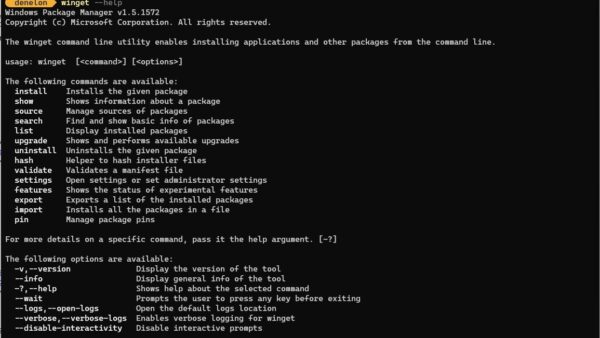
cmd.exe is the Windows Command Processor, the command interpreter that runs whenever you open Command Prompt, and the genuine file lives at C:\Windows\System32\cmd.exe.
This guide covers how to open it, where it sits, the startup switches, how to confirm a running copy is genuine, and when PowerShell or Windows Terminal is the better tool.
How to open cmd.exe in Windows 11 and Windows 10
The Run box is the quickest route to a normal Command Prompt window. Use the search route when a command needs administrator rights.
- Press Windows key + R to open the Run box.
- Type
cmdand press Enter to open a standard Command Prompt window. - For an elevated window, type
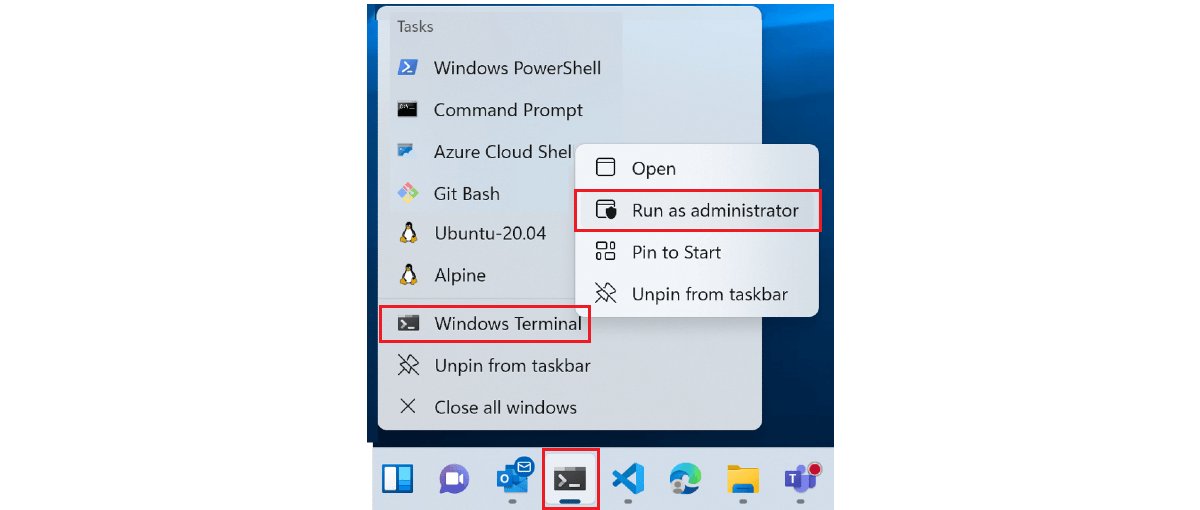
cmdin the Search box on the taskbar instead. - Right-click Command Prompt in the results and select Run as administrator.
- Approve the confirmation prompt, or type an administrator password if Windows asks for one.
Close an elevated window as soon as the admin task is done, so later commands do not run with full rights by accident.
What cmd.exe Is and How the Windows Command Processor Works
Microsoft describes cmd as the command that starts a new instance of the command interpreter, cmd.exe. Run on its own, it prints the Windows version and copyright line.
The Command shell was the first shell built into Windows. It automated routine jobs such as account management and nightly backups through batch (.bat) files.
| Part of the picture | What it means for you |
|---|---|
| cmd.exe | The shell itself: it reads what you type, runs Windows Commands and batch files, and returns exit codes. |
| Command Prompt | The Start menu name for a window running cmd.exe. The two names refer to the same program. |
| conhost.exe | The console host. When you run cmd.exe, Windows creates a conhost.exe instance to display it, unless a terminal such as Windows Terminal hosts it. |
| Windows Commands | Built-in Win32 console commands (dir, ipconfig, sfc and hundreds more) that cmd.exe can run. |
| PowerShell cmdlets | cmd.exe cannot run them. PowerShell runs both cmdlets and Windows Commands. |
| ComSpec variable | Tells programs where the command interpreter is. The expected value is C:\WINDOWS\system32\cmd.exe. |
| Command.com | The MS-DOS era interpreter. The ntcmdprompt command exists to switch back to Cmd.exe after a DOS-based program starts Command.com. |
| Exit code | A command that succeeds returns 0 or no exit code, which scripts can test with && and ||. |
Where cmd.exe fits in Windows: programs call it too. The C runtime system function, for example, uses the COMSPEC and PATH variables to find CMD.exe and hand it a command string.
Where cmd.exe is located in Windows
There is one genuine cmd.exe for each architecture, and both sit inside the Windows folder. To browse there, see 6 ways to open the System32 folder.
| Situation | Path | Note |
|---|---|---|
| 64-bit or 32-bit Windows, normal use | C:\Windows\System32\cmd.exe |
The value ComSpec should hold. %windir%\System32 is reserved for 64-bit programs on 64-bit Windows. |
| A 32-bit x86 program on 64-bit Windows asks for System32 | Redirected to %windir%\SysWOW64 |
The WOW64 file system redirector swaps the folder so 32-bit programs get 32-bit files. |
| A 32-bit program that needs the 64-bit folder | %windir%\Sysnative |
A virtual alias that skips redirection. 64-bit programs cannot use it. |
| Any other folder | Not a Windows copy | A cmd.exe in Downloads, AppData or Temp is not part of Windows. Check it before running it. |
To confirm the path from the command line, run where cmd in Command Prompt. It searches the current folder and every folder in PATH and lists each match.
How to check that a running cmd.exe is genuine
Task Manager shows the name only, and any file can be called cmd.exe. These PowerShell checks show the real path, the command line and the program that started it.
- Type
PowerShellin the Search box, right-click Windows PowerShell and select Run as administrator, so paths of processes you do not own are shown. - Run
Get-CimInstance -ClassName Win32_Process -Filter "Name='cmd.exe'" | Select-Object ProcessId, ParentProcessId, ExecutablePath, CommandLine. - Check that ExecutablePath reads
C:\Windows\System32\cmd.exeorC:\Windows\SysWOW64\cmd.exe. - Read CommandLine to see what the window was told to run, for example
/cfollowed by a script path. - Run
Get-Process -Id 1234, replacing 1234 with the ParentProcessId, to name the program that launched it. - Run
Get-AuthenticodeSignature -FilePath C:\Windows\System32\cmd.exeand confirm the Status column says Valid.
Process IDs are reused, so a parent that has already exited can show as missing or as an unrelated program. Compare creation times if the parent looks wrong.
How to run an .exe file from cmd
cmd.exe runs any program you name, as long as it can find the file. Quotes are required when a path contains spaces.
- Open Command Prompt with Windows key + R,
cmdand Enter. - Type the full path in double quotes, for example
"C:\Program Files\App\app.exe", and press Enter. - Or change to the program's folder with
cd "C:\Program Files\App", then typeapp.exe. - Add any arguments after the file name, separated by spaces.
- Use
start "" "C:\Program Files\App\app.exe"to launch it without tying up the current window. - Use
start /wait "" "C:\Program Files\App\app.exe"when a script must wait for the program to close.
You can drop the extension. cmd.exe tries the extensions listed in PATHEXT, which defaults to .COM;.EXE;.BAT;.CMD;.VBS;.VBE;.JS;.JSE;.WSF;.WSH;.MSC.
A 32-bit GUI program returns you to the prompt straight away when started interactively. Inside a command script, cmd.exe waits for it.
Common cmd.exe Commands and Everyday Use Cases
Every Windows Command accepts /?. Type ipconfig /? or help for the syntax before running anything unfamiliar.
| Command | Everyday use |
|---|---|
dir |
List the files and folders in the current directory. |
cd "C:\Folder Name" |
Change the current folder; quote paths with spaces. |
copy, move, del, md |
Copy, move, delete files and make folders. |
ipconfig |
Show the IP address, gateway and DNS details of each adapter. |
ping example.com |
Check whether a host answers on the network. |
tasklist |
List running processes, including every cmd.exe. |
where notepad |
Find where a program lives on PATH; add /t for size and date. |
start |
Open a program, file, folder or URL in its default app. |
set |
Show, create or clear environment variables. |
ver |
Print the Windows version and build. |
sfc /scannow |
Scan and repair protected system files (administrator). |
shutdown |
Shut down or restart the PC from the command line. |
cls and exit |
Clear the screen; close the window. |
Batch Files, Environment Variables, and Command-Line Scripting
A batch file is a text file of cmd.exe commands that runs top to bottom. For a walk-through, see how to create and run a batch file in Windows 10 and 11.
Environment variables in cmd.exe scripts come in two scopes. System variables apply to the whole PC and need admin rights to change, while local variables apply to the current cmd.exe window and anything it starts.
| Pattern | Syntax | What it does |
|---|---|---|
| Read a variable | echo %USERNAME% |
cmd.exe swaps %NAME% for its value once; substitution is not recursive. |
| Set or clear a variable | set Backup=D:\Backup / set Backup= |
Adds the variable to this session, or clears it. |
| Ask the user for input | set /p Name=Your name: |
Stores a typed line in a variable. |
| Do arithmetic | set /a Count=Count+1 |
Evaluates a numeric expression. |
| Read at run time | cmd /v:on, then !Count! |
Delayed expansion reads the current value inside loops and blocks. |
| Chain on success | command1 && command2 |
command2 runs only if command1 succeeded. |
| Chain on failure | command1 || command2 |
command2 runs only if command1 failed. |
| Run in sequence | command1 & command2 |
Runs both, whatever the result. |
| Pipe and redirect | dir | more, dir > list.txt |
Feed output to another command or write it to a file. |
| Escape a special character | set Title=New^&Name |
^ stops & < > | from being treated as operators. |
Limits: one variable can hold 8,192 bytes, and all variables in a process together can use 65,536 characters. Variable names are not case-sensitive.
Customization, Startup Options, and Configuration Settings
Useful cmd.exe startup switches go straight after cmd. The two that matter most are /c, which runs a command and closes, and /k, which runs it and keeps the window open.
| Switch or setting | Effect | Example |
|---|---|---|
| /c | Run the string, then exit cmd.exe. | cmd /c ver |
| /k | Run the string and keep the window open. | cmd /k ipconfig |
| /s | With /c or /k, strip only the first and last quote around the string. | cmd /s /c ""C:\My Tools\run.bat" -x" |
| /q | Turn echo off. | cmd /q |
| /d | Skip the AutoRun commands in the registry. | cmd /d |
| /a or /u | Format command output as ANSI or Unicode. | cmd /u /c dir > list.txt |
| /t:bf | Set background and foreground colour with two hex digits (0 black, 1 blue, 2 green, e light yellow, f bright white). | cmd /t:1f |
| /e:on or /e:off | Turn command extensions on or off for this window. | cmd /e:off |
| /f:on or /f:off | Turn file and folder name completion on; then Ctrl+F completes files and Ctrl+D folders. | cmd /f:on |
| /v:on or /v:off | Turn delayed variable expansion on or off. | cmd /v:on |
AutoRun, registry settings, and shortcuts: cmd.exe runs the AutoRun value under HKEY_LOCAL_MACHINE\Software\Microsoft\Command Processor or HKEY_CURRENT_USER\Software\Microsoft\Command Processor each time it starts, unless you use /d. The same keys hold EnableExtensions, CompletionChar and PathCompletionChar. User settings beat computer settings, and switches beat both. Back up the registry before editing it.
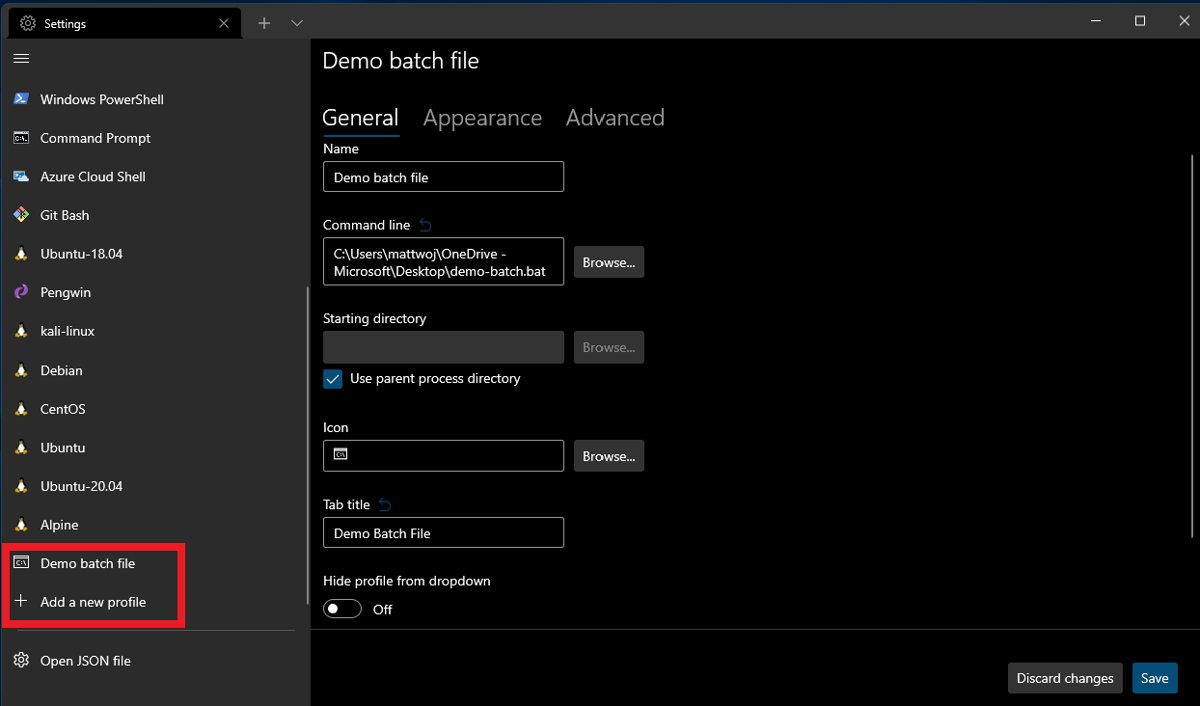
Console appearance and behavior in Windows Terminal come from the profile's commandline setting, which defaults to cmd.exe. Set it to cmd.exe /k path\to\script.bat to run a batch file every time that profile opens.
cmd.exe vs PowerShell vs Windows Terminal
Two of these are shells and one is a window. cmd.exe and PowerShell interpret commands; Windows Terminal is a host that displays either of them, plus WSL distributions, in tabs and panes.
| Your situation | Use this | Why |
|---|---|---|
| Running an old .bat or .cmd script | cmd.exe | Batch syntax is cmd.exe syntax; PowerShell reads it differently. |
| Following a guide that lists sfc, DISM, ipconfig or ping | cmd.exe or PowerShell | Both run Windows Commands the same way. |
| Writing new automation | PowerShell | Microsoft recommends it over Windows Commands for automation, and it runs cmdlets that cmd.exe cannot. |
| Working with several shells at once | Windows Terminal | Tabs, split panes, Unicode and UTF-8, and GPU text rendering, with a Command Prompt profile built in. |
| Opening an elevated shell quickly | Windows key + X, then Windows Terminal (Admin) | One menu, and admin and non-admin tabs are never mixed in one window. |
Windows Terminal is installed from the Microsoft Store, which keeps it updated. To open Command Prompt in a Terminal pane from PowerShell, run wt -p "Command Prompt".
Troubleshooting Windows Problems with cmd.exe
These cover the cmd.exe problems readers search for most, plus the standard repair commands that run from an elevated Command Prompt.
Windows features misbehave or system files look damaged
Protected system files are missing or corrupted.
- Open Command Prompt as administrator.
- Run
DISM.exe /Online /Cleanup-image /Restorehealthand wait for it to finish; it can take several minutes. - Run
sfc /scannowand keep the window open until verification reaches 100%. - Read the result: "did not find any integrity violations" means the files are fine; "found corrupt files and successfully repaired them" means the fix worked.
- If it reports files it could not fix, run
findstr /c:"[SR]" %windir%\Logs\CBS\CBS.log >"%userprofile%\Desktop\sfcdetails.txt"to list them.
cmd.exe starts at startup or keeps popping up
A program, script or AutoRun registry value launches it.
- Run the Get-CimInstance check from the section above while the window is open.
- Read CommandLine to see the script or command it was told to run.
- Look up ParentProcessId with
Get-Process -Idto name the launching program. - Check the AutoRun value under both
Command Processorregistry keys and note what it runs. - Uninstall or reconfigure the launching program rather than deleting cmd.exe.
cmd.exe is using high CPU or high RAM
The work belongs to the command or script it is running, not to cmd.exe itself.
- Run the Get-CimInstance check and read CommandLine for the busy process.
- Identify the parent program from ParentProcessId.
- Let a known task, such as
sfc /scannowor an installer, finish. - Close the window or end the parent program if the command is one you do not recognise, then scan the file it points to.
Command Prompt is disabled or will not open
The Prevent access to the command prompt policy is on, or ComSpec is missing.
- Press Windows key + R, type
gpedit.mscand press Enter. - Go to User Configuration > Administrative Templates > System.
- Open Prevent access to the command prompt, set it to Disabled or Not configured, and select OK.
- On editions without gpedit.msc, open Registry Editor, go to
HKEY_CURRENT_USER\Software\Policies\Microsoft\Windows\System, and set DisableCMD to 0 or delete it. - Search for Environment variables, select Edit the system environment variables, then Environment Variables, and confirm ComSpec under System variables is
C:\WINDOWS\system32\cmd.exe.
Common repair commands in one place: DISM.exe /Online /Cleanup-image /Restorehealth, then sfc /scannow. On a work PC, a policy set by IT may reapply after you change it.
Security Risks, Safe Usage, and Administrative Permissions
cmd.exe is a legitimate, signed part of Windows. The risk is in what it is told to run, especially from an elevated window.
| Risky command pattern to review carefully | Why it matters | Safer habit |
|---|---|---|
| Anything pasted from a web page into an admin window | An elevated command can change any file or setting. | Read each line first; use a standard window unless admin is required. |
del or rd with wildcards |
One loose pattern can remove far more than intended. | Run dir with the same pattern first to see what matches. |
reg add or reg delete |
Wrong registry edits can severely damage Windows. | Back up the key or the registry before changing it. |
| An unexpected AutoRun value | It runs silently every time cmd.exe starts. | Check both Command Processor keys; start with cmd /d to skip it. |
| A cmd.exe outside System32 or SysWOW64 | Malware often borrows system file names. | Check the path and run Get-AuthenticodeSignature before trusting it. |
| Takeown and icacls on system files | Changes ownership and permissions of protected files. | Use them only as Microsoft's repair steps describe, on the named file. |
Windows adds one protection of its own: when a command starts with a bare cmd, it is replaced with the ComSpec value, so a planted cmd.exe in the current folder is not picked up.
Frequently Asked Questions
What does cmd.exe do?
cmd.exe is the Windows command interpreter. It reads commands you type or that a batch file contains, runs Windows Commands such as ipconfig and sfc, launches programs, and reports exit codes. Other programs also start it in the background with /c to run a single command.
Is cmd.exe the same thing as Command Prompt?
Yes. Command Prompt is the name of the Start menu entry and window, and cmd.exe is the program running inside it. On its own, the window is drawn by conhost.exe; in Windows Terminal, the Command Prompt profile runs the same cmd.exe.
Where is cmd.exe located in Windows 10 and 11?
The genuine file is C:\Windows\System32\cmd.exe, the expected value of the ComSpec variable. On 64-bit Windows, 32-bit programs are redirected to the copy under C:\Windows\SysWOW64. Run where cmd in Command Prompt to list every cmd.exe on your PATH.
How do I get to cmd.exe?
Press Windows key + R, type cmd and press Enter. For admin rights, type cmd in the taskbar search box, right-click Command Prompt and select Run as administrator. Windows key + X also opens Windows Terminal (Admin) with a shell ready.
How do I run cmd.exe as an administrator?
Type cmd in the Search box, right-click Command Prompt, and select Run as administrator. Approve the User Account Control prompt. Commands that need elevation, such as sfc /scannow and DISM, will then run.
How do I run an exe from cmd?
Type the full path in double quotes and press Enter, for example "C:\Program Files\App\app.exe". Or cd into the folder and type the file name. Use start to launch it in a separate window, and start /wait when a script must wait for it.
Why is cmd.exe running on Windows 10?
Something started it: you, a batch file, an installer, or another program running a command with /c. The same is true on Windows 7 or XP. Check its CommandLine and ParentProcessId with Get-CimInstance to see what it is running and which program launched it.
Why is cmd.exe running so many processes?
Each command window or background script is a separate cmd.exe, and each one outside Windows Terminal gets its own conhost.exe. Many copies usually mean several scripts or tools are running commands. Check each copy's parent process to find the program responsible.
Can cmd.exe be dangerous to use?
cmd.exe itself is a signed Windows component, not malware. Commands run from an elevated window can delete files or break the registry, and malware may copy the name. Keep to System32 or SysWOW64 copies, and read commands before running them as administrator.
What is the difference between a .bat file and typing commands manually?
A .bat file is the same commands saved in a text file, run top to bottom by cmd.exe. Scripts can use variables, arguments, loops and conditions, and they repeat a job exactly. A script can also run unattended, for example from a Windows Terminal profile.
Should I still learn cmd.exe if PowerShell is more modern?
Learn the basics. Many support articles, repair steps and old scripts use cmd.exe syntax, and Windows Commands work in both shells. For new automation, Microsoft recommends PowerShell, which can run everything cmd.exe runs plus cmdlets.
Can I download cmd.exe?
No, and you should not. cmd.exe ships with every edition of Windows 10 and 11, so a downloaded copy is unnecessary and risky. If the file is damaged, run DISM and then sfc /scannow from an elevated window to restore it.
Bottom Line
Treat cmd.exe as a trusted Windows tool when it runs from System32 or SysWOW64, use it for batch files and repair commands, and move new automation to PowerShell inside Windows Terminal. cmd.exe is still the interpreter behind batch files, ComSpec and countless repair guides, but Microsoft points new scripting at PowerShell, and a copy anywhere else deserves the path and signature checks above.