To cancel Xbox Game Pass, sign in at account.microsoft.com/services with the Microsoft account that pays for it, select Manage next to your Game Pass plan, then select Cancel and follow the prompts.
You can also stop it from an Xbox console, a PC or a phone. The sections below cover each route, free trials, Game Pass Ultimate, refunds, and what to do when the cancel option is missing.
How to cancel Xbox Game Pass online (Microsoft account)
This works for every Game Pass plan billed by Microsoft: Essential, Premium, Ultimate and PC Game Pass. It works the same in any browser, on any device.
- Go to account.microsoft.com/services in a web browser.
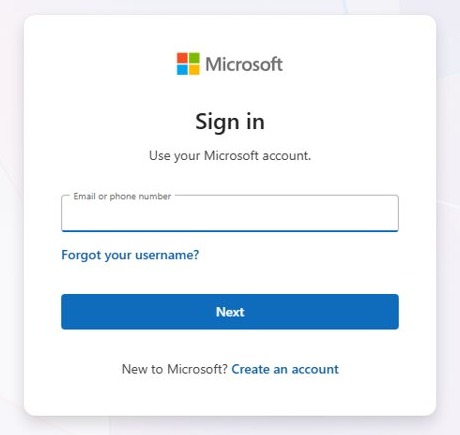
- Sign in with the Microsoft account you used to buy Game Pass. Another account will not show the subscription.
- Find your Game Pass plan under Services & subscriptions and select Manage.
- Select Cancel. Some subscriptions show Upgrade or Cancel instead.
- Read the offer to switch to another plan, if one appears, and continue past it to cancel.
- Follow the remaining prompts. Refund eligibility is checked automatically during cancellation.
- Return to Services & subscriptions. Turn on recurring billing next to Game Pass means it will not renew.
If Turn on recurring billing already shows at step 3, Game Pass is set to end on the date shown and you will not be charged again.
Cancel more than 2 days before the billing date. A cancellation closer to that date can still be followed by the next charge.
Which cancellation method should you use?
| Your situation | Do this | Why |
|---|---|---|
| You want to stop paying but keep playing until the paid time runs out | Turn off recurring billing | Game Pass benefits stay active until the expiration date |
| You want money back for the latest charge | Cancel at account.microsoft.com/services and accept the refund if offered | Eligibility is checked during cancellation, and not every charge can be refunded |
| You are at your Xbox with a controller | Profile & system > Settings > Account > Subscriptions | No browser or second device needed |
| You are on a PC, phone or tablet | Open account.microsoft.com/services in the browser | The same page works on every device |
| Game Pass is billed by Google Play, the Apple App Store, a retailer or another partner | Cancel with that company | Microsoft cannot change billing it does not run |
| You only want to pay less | Downgrade Ultimate or Premium to a lower plan | There is no immediate charge, and the new plan starts at the next renewal |
| You bought Game Pass in Germany and cannot sign in | Use Microsoft's German cancellation page | German purchases can be cancelled without signing in |
Cancelling vs. turning off recurring billing
Xbox treats these as two different actions. Turning off recurring billing stops future charges, while cancelling now ends the subscription early, with a refund where you qualify.
| Turn off recurring billing | Cancel now | |
|---|---|---|
| Future charges | Stopped | Stopped |
| Access to Game Pass | Continues until the expiration date | Ends when the cancellation goes through |
| Refund | None for time already paid | Only for eligible charges |
| How to undo it | Select Turn on recurring billing, Renew or Resubscribe before it expires | Buy Game Pass again |
| Best for | Free trials, breaks between games, and avoiding the next renewal | A renewal you did not want and want refunded |
If you cancel within 30 days of a charge, you may be able to get the most recent recurring charge refunded, once per Microsoft account per subscription product.
Prorated refunds on the last charge apply in Canada, Denmark, France, Israel, Korea and Türkiye. In Finland, Germany (purchases from March 1, 2022), the Netherlands, Poland and Portugal, they apply to the last renewal charge on terms longer than one month.
How to cancel Xbox Game Pass on your console
The console's Subscriptions page shows your plan, expiration date, billing history and status, and lets you manage the subscription without a browser.
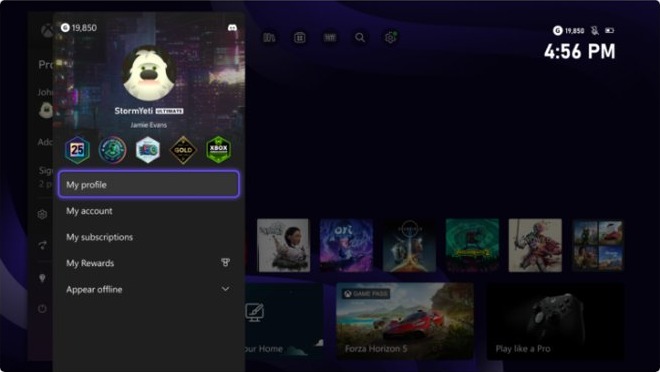
- Press the Xbox button on your controller to open the guide.
- Go to Profile & system > Settings > Account > Subscriptions.
- Select your Game Pass subscription.
- Check the plan and expiration date shown, so you know when access ends.
- Select the option to cancel, or to turn off recurring billing, and follow the on-screen prompts.
- Go back to Subscriptions and open Game Pass again to check its new status.
Sign in on the console with the profile whose Microsoft account pays for Game Pass before you open Subscriptions.
How to cancel Xbox Game Pass on PC
On Windows, the Xbox app installs and runs Game Pass games, but Microsoft's cancellation instructions cover the console and the web. On a PC, use the browser.
- Open Microsoft Edge or another browser on the PC.
- Go to account.microsoft.com/services and sign in with the account that pays for PC Game Pass or Game Pass Ultimate.
- Find the plan under Services & subscriptions and select Manage.
- Select Cancel, or Turn off recurring billing to keep playing until the end date.
- Follow the prompts until the cancellation is confirmed.
- Reload the page and check that Turn on recurring billing now appears next to the plan.
How to cancel Xbox Game Pass auto renewal
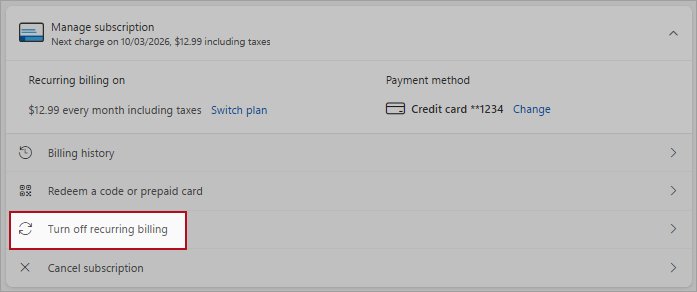
Recurring billing is switched on by default when you join Game Pass. Turning it off is the way to cancel the auto renewal while keeping the time you have paid for.
- Sign in at account.microsoft.com/services with the account that pays for Game Pass.
- Find Game Pass and select Manage.
- Select Turn off recurring billing.
- Read the explanation. You may be offered a switch to another subscription type.
- Confirm that you do not want the subscription to renew.
- Check that the plan now shows Turn on recurring billing and an end date.
On a console, the same setting is under Profile & system > Settings > Account > Subscriptions. A subscription paid with a prepaid code or card cannot have recurring billing turned on, so it simply ends.
How to cancel Xbox Game Pass free trial
A Game Pass trial or promotional first month continues automatically at the regular price when the offer period ends. Stop it at least 2 days before that date to avoid the first full charge.
- Sign in at account.microsoft.com/services with the account that started the trial.
- Find Game Pass under Services & subscriptions and note the date of the next charge.
- Select Manage.
- Select Turn off recurring billing to keep the rest of the trial, or Cancel to end it now.
- Follow the prompts until the change is confirmed.
- Check that Turn on recurring billing appears next to Game Pass.
The steps are the same for a trial started on a PC, a console or a phone, because every trial billed by Microsoft sits on the same Services & subscriptions page.
How to cancel Xbox Game Pass Ultimate
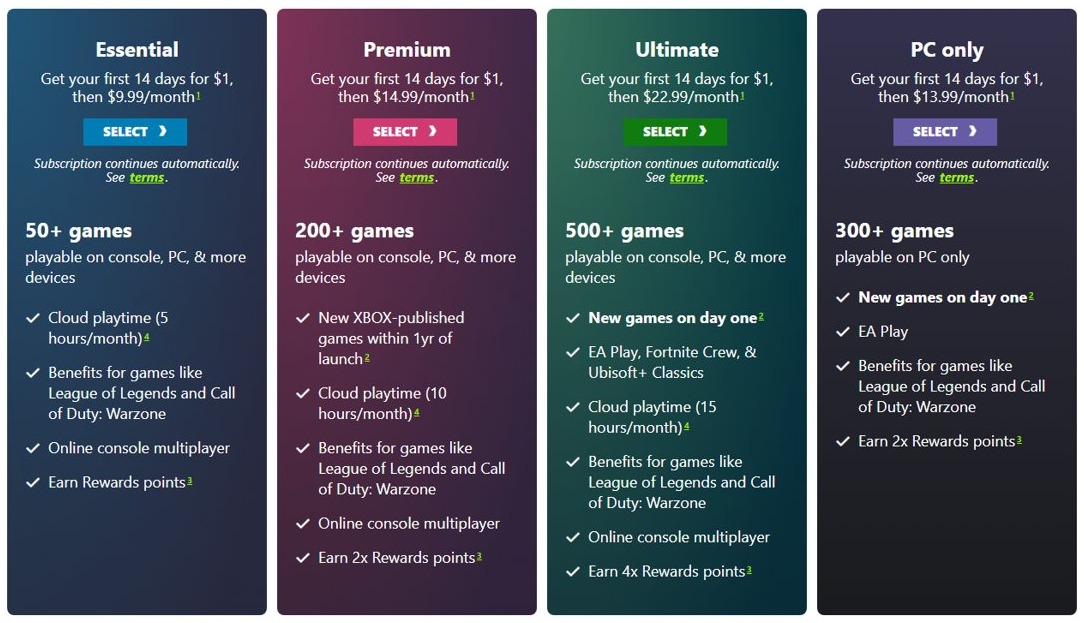
Ultimate cancels the same way as every other plan, online or on the console. Cancelling it also ends its online console multiplayer, EA Play, Fortnite Crew and Ubisoft+ Classics benefits, so a downgrade can be the better move.
| If you want to | Do this | What changes |
|---|---|---|
| Stop paying for Game Pass entirely | Cancel Ultimate at account.microsoft.com/services or on the console | All Ultimate benefits end when the subscription ends |
| Keep online console multiplayer for less | Downgrade to Game Pass Essential | No immediate charge; Essential starts on your next renewal date |
| Keep a large library without day-one releases | Downgrade to Game Pass Premium | Premium lists 200+ games, with Xbox-published games added within a year of launch |
| Finish the games you are playing, then stop | Turn off recurring billing | Ultimate stays active until its expiration date |
Other ways to cancel or pause Game Pass
Where you cancel depends on who bills you. The closest thing to pausing Game Pass is turning off recurring billing and turning it back on later.
| How you pay or what you want | Where to go | Notes |
|---|---|---|
| Phone or tablet | account.microsoft.com/services in the phone's browser | Same Manage and Cancel steps as on a PC |
| Billed by Google Play or the Apple App Store | That store's subscription settings or support | Microsoft sends these purchases to Google or Apple for cancellation and refunds |
| Bought from a retailer such as Amazon or Best Buy | Contact the retailer | Prepaid codes follow the retailer's own return policy |
| Included with a phone, broadband or other partner plan | Contact the partner that bills you | Microsoft cannot cancel billing that a third party runs |
| Bought in Germany | Microsoft's German cancellation page | You can cancel without signing in, but you need some purchase details |
| You want a break, not a cancellation | Turn off recurring billing now and select Turn on recurring billing later | Benefits last until the expiration date, then stop until you renew |
| You want a cheaper plan | Downgrade Ultimate or Premium | The current plan runs to the renewal date, then the lower plan starts |
What happens after you cancel Xbox Game Pass
| What | What happens |
|---|---|
| Future charges | Stop, as long as you cancelled more than 2 days before the billing date |
| Access after turning off recurring billing | Game Pass and its benefits stay active until the expiration date shown |
| Access after cancelling with a refund | Ends when the cancellation is processed |
| Game Pass library games | Playable until the subscription ends or the game leaves the Game Pass library, whichever comes first |
| Cloud gaming | Stops, because Xbox Cloud Gaming on PC and other devices needs Essential, Premium or Ultimate (or a supported free-to-play game) |
| Online console multiplayer | Stops when your last Essential, Premium or Ultimate plan ends |
| Coming back | Select Turn on recurring billing, Renew or Resubscribe on Services & subscriptions |
For refunds on digital game purchases rather than the subscription, the Microsoft and Xbox refund process works differently.
Tips for managing your Xbox Game Pass subscription
| Task | Where | Good to know |
|---|---|---|
| See your next charge date and price | account.microsoft.com/services, or Settings > Account > Subscriptions on the console | The price can rise when a trial or promotional rate renews at the full rate |
| Change the card or payment method | Manage > Change how you pay | Only available while recurring billing is on |
| Upgrade to a higher plan | Your subscription's change options online, on the console or in the Xbox app | You are charged at once, and prepaid time is converted to the new plan |
| Downgrade Ultimate or Premium | The same change options | No immediate charge; the lower plan starts at the next renewal |
| Switch to a different renewal period | The same change options, where your plan offers more than one | The new period and price start on the next renewal date |
| Avoid a locked subscription | Keep the payment method up to date | A failed renewal charge locks Game Pass and removes its benefits until the balance is paid |
| Check the April 2026 price change | Services & subscriptions | Ultimate and PC Game Pass prices dropped in select regions from the next renewal on or after April 22, 2026 |
How to check if Xbox Game Pass is cancelled
- Sign in at account.microsoft.com/services with the account that paid for Game Pass.
- Find Game Pass. Turn on recurring billing next to it means the subscription will not renew, and the date shown is when it ends.
- On the console, press the Xbox button and go to Profile & system > Settings > Account > Subscriptions.
- Select Game Pass and check its subscription status and expiration date.
- Open the billing history on the same console page, or Manage your payments in your Microsoft account, to check for any new charge.
Still cannot cancel Xbox Game Pass?
There is no cancel option for Game Pass
You are signed in to a different Microsoft account, a third party bills the subscription, or recurring billing is already off.
- Sign out of account.microsoft.com and sign back in with the account that bought Game Pass.
- If Turn on recurring billing shows next to Game Pass, nothing more is needed; it ends on the date shown.
- If Game Pass came from Google Play, the Apple App Store, Amazon, Best Buy or another seller, cancel it with that company.
- On a console, check Settings > Account > Subscriptions while signed in to the paying profile.
You can't cancel because of a past-due balance
A renewal charge failed and locked the subscription. Money owed must be paid before you can cancel.
- Sign in at account.microsoft.com/services and check the card on file has not expired.
- Select Manage > Change how you pay and add a working payment method.
- Pay the overdue amount.
- Return to Manage and cancel or turn off recurring billing.
How to cancel Xbox Game Pass without login
Cancelling needs the Microsoft account that pays for Game Pass, except for purchases made in Germany.
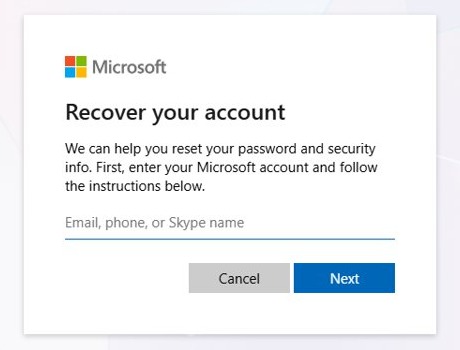
- Reset the Microsoft account password from the sign-in page if you cannot sign in.
- In Germany, use Microsoft's page for cancelling a Microsoft subscription acquired in Germany, which works without signing in.
- If you still cannot get in, go to Contact Microsoft Support, describe the problem, select Get Help, then Contact Support.
You were charged after cancelling Xbox Game Pass
The cancellation came 2 days or less before the billing date, or the charge belongs to another Microsoft account.
- Check the end date of Game Pass on Services & subscriptions.
- Review the charge on the Manage your payments page of your Microsoft account.
- If the charge is on another account, sign in to that account and cancel there.
- Cancel within 30 days of the charge to check whether it can be refunded.
Xbox Game Pass cancellation FAQ
Can I cancel Xbox Game Pass anytime?
Yes. Xbox lets you cancel a subscription at any time. Turning off recurring billing stops future charges and keeps Game Pass until the expiration date, and some charges can be refunded if you cancel now instead.
Why can't I cancel my Xbox Game Pass?
The usual causes are signing in with the wrong Microsoft account, a subscription billed by a third party such as Google Play or a retailer, an unpaid balance, or recurring billing that is already off. Each one has its own fix above.
How do I cancel Xbox Game Pass on Xbox?
Press the Xbox button to open the guide, then go to Profile & system > Settings > Account > Subscriptions. Select Game Pass, choose the option to cancel or turn off recurring billing, and follow the prompts.
How do I cancel Xbox Game Pass on PC?
Open a browser on the PC, go to account.microsoft.com/services and sign in with the paying account. Select Manage next to PC Game Pass or Game Pass Ultimate, then select Cancel and finish the prompts.
How do I cancel Xbox Game Pass auto renewal?
Select Manage next to Game Pass on account.microsoft.com/services, then select Turn off recurring billing. You keep Game Pass until the end date and are not charged again. Turn on recurring billing reverses it.
How do I cancel an Xbox Game Pass free trial?
Turn off recurring billing for the trial on account.microsoft.com/services at least 2 days before the trial ends. Otherwise the offer continues automatically at the regular price. Cancel ends the trial immediately instead.
Will I get a refund if I cancel Xbox Game Pass?
Possibly. Refund eligibility is checked when you cancel, and a recent recurring charge may be refunded within 30 days of payment, once per account per subscription. Some countries also give prorated refunds on the last charge.
Does cancelling Game Pass Ultimate cancel online multiplayer?
Yes, once Ultimate ends. Online console multiplayer comes with Game Pass Essential, Premium and Ultimate, so downgrading Ultimate to Essential keeps multiplayer at a lower price instead of losing it.
How do I cancel Xbox Game Pass through EE or another provider?
If a phone or broadband provider such as EE bills you for Game Pass, cancel the add-on with that provider. Microsoft can only cancel subscriptions it bills itself, and refers third-party purchases back to the seller.
Can I cancel Xbox Game Pass without logging in?
Only for subscriptions bought in Germany, which Microsoft lets you cancel without signing in. Everywhere else, sign in with the paying Microsoft account, and reset its password first if you have forgotten it.