Windows 11 Home includes the full Windows 11 desktop, Windows Security with Microsoft Defender Antivirus, device encryption, Windows Hello, Microsoft Edge, Copilot, Xbox gaming features, Windows Backup and the accessibility tools, but not Microsoft Office, BitLocker, Remote Desktop hosting or Hyper-V.
This guide lists what each part of Home contains, what it leaves out, the hardware it needs, and when upgrading to Pro is worth it.
What Windows 11 Home includes at a glance
| You want | Included in Home? | What you get |
|---|---|---|
| Antivirus and firewall | Yes | Windows Security with Microsoft Defender Antivirus and Windows Firewall |
| Disk encryption | Partly | Device encryption on supported PCs; full BitLocker is Pro only |
| Face or fingerprint sign-in | Yes | Windows Hello, on PCs with the right camera or reader |
| Web browser and AI assistant | Yes | Microsoft Edge and the Copilot app |
| Gaming | Yes | Xbox app, Game Bar, DirectX 12 Ultimate, Auto HDR, DirectStorage |
| Backup | Yes | Windows Backup with 5 GB of free OneDrive storage |
| Word, Excel, PowerPoint licence | No | Microsoft 365 is a separate subscription |
| Remote Desktop host, Hyper-V, Windows Sandbox, domain join | No | These need Windows 11 Pro |
What Windows 11 Home Is
Windows 11 Home is the consumer edition of Windows 11, sold preinstalled on most new PCs and as a $139 download from Microsoft for PCs that need a new licence. It is the only Windows 11 edition that supports S mode.
| Point | Windows 11 Home |
|---|---|
| Audience | Home users, students and families |
| Price from Microsoft | $139.00 for the download licence |
| Setup | Needs an internet connection and a Microsoft account on first use |
| S mode | Supported only on Home; switching out needs internet and cannot be reversed |
| Feature updates | One a year, each supported for 24 months |
The Windows 11 Interface and Everyday Experience
| Feature | What it does in Home |
|---|---|
| Start menu and taskbar | Centered Start without Live Tiles; the taskbar sits at the bottom of the screen only |
| Snap layouts and multitasking | Arrange windows in preset layouts; three-column layouts need a screen at least 1920 effective pixels wide |
| Virtual desktops | Separate desktops for work, school or games |
| Widgets | News, weather and other glanceable content from the Widgets icon, replacing News & Interests |
| File Explorer | The standard file manager, including right-click scanning with Microsoft Defender |
| Touch and pen | Works on PCs with a multi-touch screen; Tablet Mode was replaced by keyboard attach and detach postures |
Built-In Apps Included With Windows 11 Home
Home ships with the same app set as Pro. Some apps are installed when you first sign in, and the rest are free in the Microsoft Store.
| App | Notes |
|---|---|
| Microsoft Edge | Default browser, with Immersive Reader for easier reading |
| Microsoft Store | Source for free and paid apps, games and Windows upgrades |
| Photos, Paint and Snipping Tool | Snipping Tool replaced Snip & Sketch; extra AI tools in Paint and Photos need a Copilot+ PC |
| Outlook | Mail, Calendar and People support ended on December 31, 2024, so new Outlook is the email and calendar app |
| Microsoft Teams | Chat and video calls, with taskbar integration |
| Copilot | Microsoft's AI assistant app |
| Xbox app and Game Bar | PC gaming, Game Pass and an in-game overlay |
| Windows Security and Windows Backup | Protection and backup tools covered below |
Microsoft Account, OneDrive, and Cloud Features
| Feature | What Home includes |
|---|---|
| Microsoft account sign-in | Required to finish setup on Home; also used by Store, Xbox, OneDrive and Microsoft 365 |
| OneDrive integration | 5 GB of free cloud storage with a Microsoft account; more is sold as Microsoft 365 Basic at $19.99 a year for 100 GB |
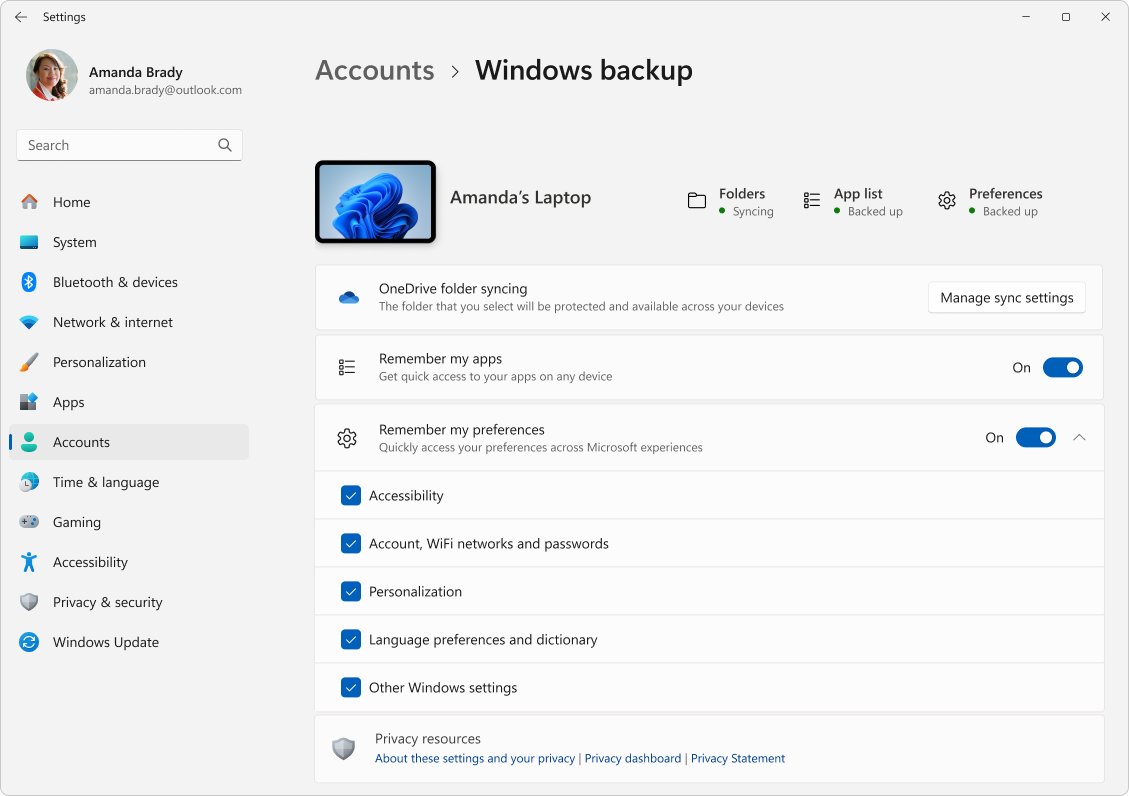
| Windows Backup | Backs up Desktop, Documents, Pictures, Videos and Music folders, plus settings, apps and Wi-Fi details, to your Microsoft account |
| Find my device | Locate a lost PC from your Microsoft account |
| Device encryption key | The recovery key is backed up to your Microsoft account automatically |
Windows Backup works with personal Microsoft accounts only, not work or school accounts.
Security Features Included in Windows 11 Home
| Feature | In Home | Notes |
|---|---|---|
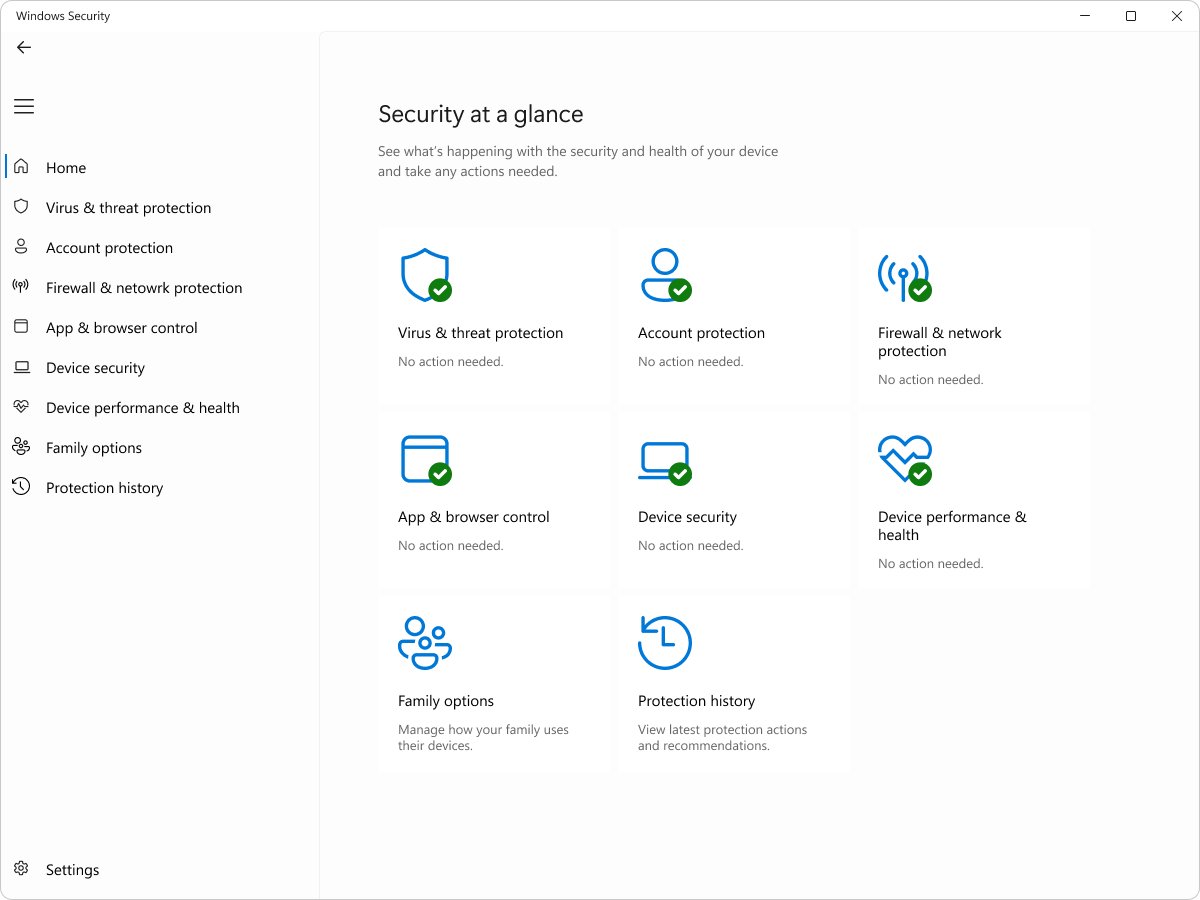
| Windows Security and Microsoft Defender Antivirus | Yes | Real-time protection built in from first start |
| Firewall and network protection | Yes | Monitors incoming and outgoing traffic |
| Windows Hello | Yes | Face, fingerprint or PIN sign-in, depending on hardware |
| Device encryption | Yes | Turns on automatically on eligible PCs; encrypts the OS and fixed drives, not USB drives |
| Smart App Control and reputation-based protection | Yes | Only on a clean install and in certain regions; blocks untrusted apps |
| Secure Boot and TPM 2.0 | Yes | Required hardware for Windows 11 |
| Parental controls | Yes | Family safety and content protection |
| BitLocker Drive Encryption and BitLocker to Go | No | Pro and above only |
Gaming Features Included in Windows 11 Home
Gaming features are identical in Home and Pro, so there is no gaming reason to pay for Pro.
| Feature | Requirement |
|---|---|
| Xbox app and PC Game Pass support | Microsoft account; Game Pass is a separate subscription |
| Game Bar | Press Windows logo key + G; many Xbox features need the Xbox app signed in |
| DirectX 12 Ultimate | Supported games and graphics chips |
| Auto HDR | An HDR monitor |
| DirectStorage | An NVMe SSD and a DirectX 12 GPU with Shader Model 6.0 |
| Automatic super resolution | Copilot+ PC with a Snapdragon X Series processor and supported games |
Productivity and School Features
| Tool | Use |
|---|---|
| Snap layouts and virtual desktops | Keep a document, browser and notes side by side |
| Focus sessions | Turns on Do Not Disturb and runs a timer with break reminders |
| Voice typing | Dictate documents and emails, with automatic punctuation |
| Immersive Reader in Edge | Removes clutter from web pages and adjusts spacing and color |
| Teams | Class and family video calls |
| Word, Excel, PowerPoint | Available as apps, but full use needs a Microsoft 365 subscription |
AI Features in Windows 11 Home
Every Home PC gets the Copilot app. The deeper on-device AI features depend on hardware, not on the edition.
| Feature | Available on |
|---|---|
| Copilot app | Any Windows 11 Home PC |
| Live captions with translation | Copilot+ PCs for translation from 40+ languages |
| Click to Do and improved Windows search | Copilot+ PCs |
| Recall (preview) | Copilot+ PCs with Windows Hello Enhanced Sign-in Security |
| Paint Cocreator, Photos Image creator and Restyle | Copilot+ PCs, with a Microsoft account and internet |
| Windows Studio Effects | PCs with a 10+ TOPS NPU and a compatible camera |
A Copilot+ PC needs an NPU of 40+ TOPS, 16 GB of RAM and a 256 GB SSD, such as AMD Ryzen AI 300 and 400, Intel Core Ultra 200V and 300V, or Snapdragon X series chips.
Updates and Support Included With Windows 11 Home
| Update type | How it works on Home |
|---|---|
| Monthly quality and security updates | Install automatically with an internet connection |
| Annual feature update | Released in the second half of each year with 24 months of support |
| Deferring feature updates | Not supported on Home, so new versions arrive before the old one ends |
| Current version | Version 26H2, released September 29, 2026, supported for Home until October 10, 2028 |
| Manual check | Start > Settings > Windows Update > Check for updates |
Accessibility Features Included in Windows 11 Home
| Need | Built-in feature |
|---|---|
| Vision | Narrator screen reader, Magnifier, contrast themes, color filters, text and cursor size |
| Hearing | Live captions, customizable captions, mono audio |
| Mobility | Voice access, eye control, voice typing |
| Focus and reading | Focus sessions and Immersive Reader in Edge |
Personalization Features
- Select Start > Settings > Personalization.
- Choose a theme, background, and light or dark mode under Colors.
- Use Start and Taskbar pages to pin apps and choose what appears.
- Pick a contrast theme under Accessibility if you need stronger color separation.
- Open Widgets from the taskbar to choose the content it shows.
Desktop wallpaper does not roam between PCs through a Microsoft account, so set it on each device.
Hardware Support and System Requirements
| Component | Minimum for Windows 11 Home |
|---|---|
| Processor | 1 GHz or faster, 2 or more cores, compatible 64-bit CPU or SoC |
| RAM | 4 GB |
| Storage | 64 GB or larger |
| Firmware | UEFI, Secure Boot capable |
| TPM | Version 2.0 |
| Graphics | DirectX 12 or later with a WDDM 2.0 driver |
| Display | 720p, larger than 9 inches diagonally, 8 bits per color channel |
| Setup | Internet connection and Microsoft account |
What Windows 11 Home Does Not Include
| Missing feature | What it is for | Where to get it |
|---|---|---|
| BitLocker Drive Encryption and BitLocker to Go | Full drive and USB encryption with management options | Windows 11 Pro |
| Remote Desktop host | Control the PC from another device | Windows 11 Pro |
| Domain or Microsoft Entra ID join | Work network and company account management | Windows 11 Pro |
| Client Hyper-V | Run virtual machines | Windows 11 Pro |
| Windows Sandbox | Test apps in a throwaway desktop | Windows 11 Pro |
| Microsoft Office licence | Full Word, Excel, PowerPoint | Microsoft 365 subscription |
| Extra power-user tools | Utilities such as FancyZones | Install Microsoft PowerToys free from Microsoft |
Windows 11 Home vs. Windows 11 Pro: Who Should Upgrade?
| Your situation | Choose | Why |
|---|---|---|
| Browsing, school, streaming, gaming | Home | Security, gaming and AI features match Pro |
| You carry a laptop with sensitive data and want USB encryption | Pro | BitLocker and BitLocker to Go are Pro only |
| You need to connect into this PC with Remote Desktop | Pro | Home cannot host Remote Desktop sessions |
| Your employer joins PCs to a domain or Entra ID | Pro | Home cannot join |
| You run virtual machines or Windows Sandbox | Pro | Hyper-V and Sandbox are not in Home |
| Your PC already has device encryption on | Home | Device encryption already protects the system drive |
Does Windows 11 Home Include Microsoft Office?
No. Windows 11 Home does not include a licence for the full Microsoft Office apps. Word, Excel and PowerPoint come with a Microsoft 365 subscription such as Microsoft 365 Personal at $99.99 a year, which also adds 1 TB of OneDrive storage.
Does Windows 11 Home Include Antivirus?
Yes. Windows 11 Home includes Microsoft Defender Antivirus inside the Windows Security app, switched on from first start. It gives real-time protection, the firewall and Smart App Control at no cost, so a separate antivirus is optional rather than required.
Does Windows 11 Home Include a Product Key?
| How you got Home | Product key or licence |
|---|---|
| New PC with Windows preinstalled | Key is preinstalled, in the packaging, or on the Certificate of Authenticity |
| Boxed copy from a retailer | Key on a label or card inside the box |
| Digital copy from Microsoft or a retailer | Key in the confirmation email or digital locker |
| Free upgrade from Windows 10 | Digital licence, no key needed |
Can You Upgrade From Windows 11 Home to Pro?
Yes. Microsoft recommends upgrading an activated Home installation through the Microsoft Store, and the Home to Pro upgrade guide covers each case in detail.
- Select Start > Settings > System > Activation.
- Check that Activation state shows Windows is activated.
- If you have a Pro key, select Change next to Change product key, enter the 25-character key and select Next.
- Without a key, expand Upgrade your edition of Windows and select Open Store.
- Buy Windows 11 Pro while signed in with your Microsoft account.
- Install the upgrade and restart when prompted.
How to check which edition you have
- Select Start > Settings > System > Activation.
- Read the edition name at the top of the page, next to the Windows logo.
- Check Activation state to confirm the licence is active.
Frequently Asked Questions
What is Microsoft Windows 11 Home?
Windows 11 Home is the consumer edition of Windows 11. It includes the full desktop, built-in security, gaming and AI features, and needs a Microsoft account and internet to set up.
Does Windows 11 Home include Microsoft Office?
No. Full Word, Excel and PowerPoint need a Microsoft 365 subscription. Windows 11 Home includes Edge, Outlook, Teams, Copilot and other apps, but not an Office licence.
Is Windows 11 Home good enough for most people?
Yes. Home has the same security basics, gaming features and AI tools as Pro. Pro only matters if you need BitLocker, Remote Desktop hosting, domain join, Hyper-V or Windows Sandbox.
Can Windows 11 Home be set up without a Microsoft account?
Microsoft states that Windows 11 Home requires an internet connection and a Microsoft account to complete setup on first use.
How much does Windows 11 Home cost?
Microsoft sells the Windows 11 Home download for $139. It is meant for PCs that need a new licence and meet the Windows 11 requirements.
Does Windows 11 Home have encryption?
Yes. Home includes device encryption, which turns on automatically on eligible PCs and backs up the recovery key to your Microsoft account. Full BitLocker management is Pro only.
Why get Windows 11?
Windows 10 support ended on October 14, 2025, so it no longer gets security updates. Windows 11 keeps receiving monthly security fixes and annual feature updates.