To fix an app that misbehaves on a Snapdragon Windows laptop, install its native Arm64 version if one exists, update Windows so the Prism emulator is current, then adjust the app's emulation settings.
If none of that works, the cause is usually a driver, an anti-cheat component or a shell extension that was never built for Arm64. This guide shows how to tell which case you have.
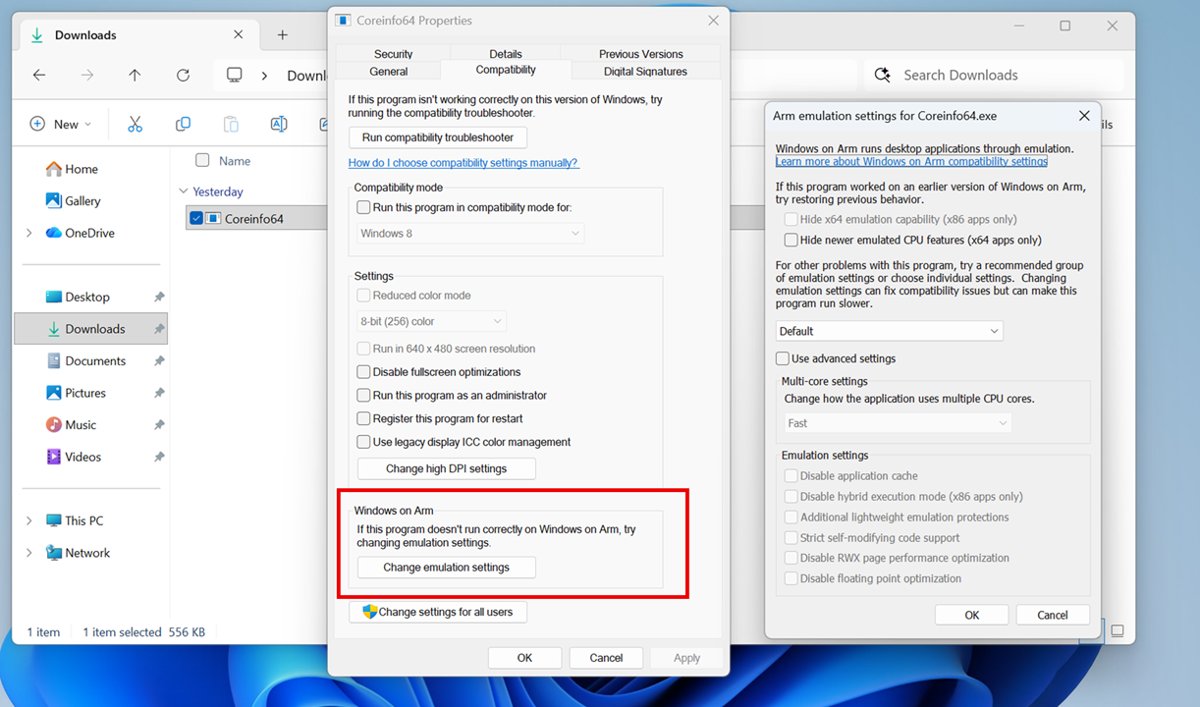
The fastest fix for an app that will not run on a Snapdragon laptop
Work through these in order. Each step either solves the problem or rules out a cause.
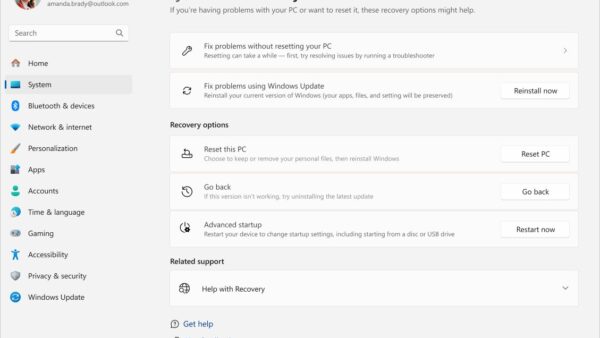
- Select Start > Settings > Windows Update > Check for Windows updates, then Download & install and restart.
- Uninstall the app, then download the Arm64 (or ARM) build from the developer's site or install it from the Microsoft Store.
- If there is no Arm64 build, install the x64 version; if that fails, try the x86 (32-bit) version.
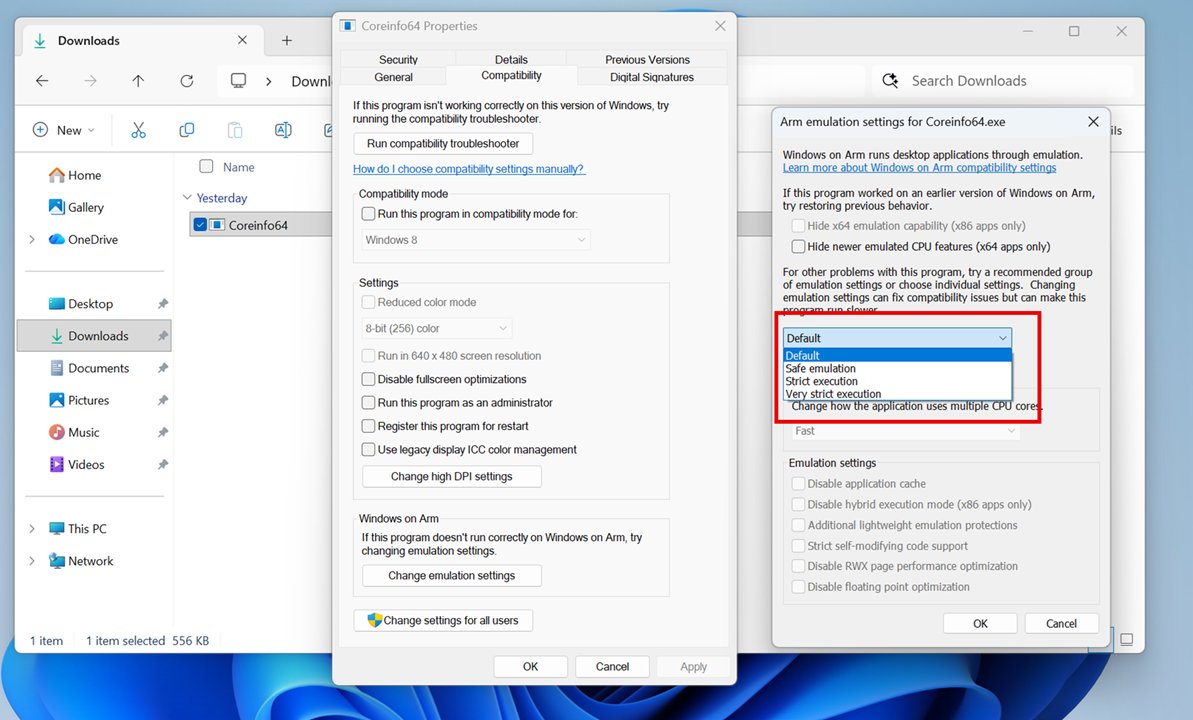
- Right-click the app's .exe, select Properties > Compatibility, and under Windows on Arm select Change emulation settings.
- Choose Safe, select OK and test; move to Strict or Very strict only if the problem remains.
- If the app still fails, check whether it needs a driver, anti-cheat or shell extension (see the troubleshooting section below).
What is a Snapdragon processor? Understanding ARM architecture and Windows on ARM
A Snapdragon processor is an Arm64 chip, so a Snapdragon laptop runs Windows on Arm instead of the x86 or x64 Windows found on Intel and AMD PCs. That difference in architecture is the root of every app compatibility problem on these laptops.
| Term | What it means on a Snapdragon laptop |
|---|---|
| Snapdragon X series | The Arm-based processor in many Copilot+ PCs, with an NPU rated at 45 trillion operations per second (TOPS) |
| Arm64 (AArch64) | The 64-bit Arm architecture these chips use; apps must be built for it to run natively |
| System on a chip (SoC) | Arm chips often combine the CPU, GPU, Wi-Fi, mobile data and an NPU for AI workloads in one package |
| Power-frugal design | The Arm architecture uses less power, which gives longer battery life |
| Windows on Arm | The Arm64 edition of Windows 11; runs Arm64 apps natively and x86 and x64 apps through emulation |
| Prism | The emulator built into Windows 11 version 24H2 that translates x86 and x64 app code to Arm64 |
| What cannot be emulated | Drivers and other kernel-mode code, which must be built for Arm64 |
In practice, an app falls into one of three groups on Windows on Arm: native Arm64, emulated x86 or x64, or blocked because it depends on a driver. The sections below show how to tell which group an app is in and what to do about it.
Start with the Snapdragon hardware baseline
Snapdragon laptops use Arm64 processors, not x86. Windows runs Arm64 apps natively and runs x86 and x64 apps through emulation, so what you can run depends on your Windows version as much as the chip.
| Item | What it means for app compatibility |
|---|---|
| Processor | Arm64 Snapdragon; Copilot+ PCs use the Snapdragon X series with a 45 TOPS NPU |
| Windows 11 version 24H2 or later | Includes Prism, the faster emulator with lower CPU use |
| Snapdragon X series | Some Prism performance features need hardware found only in this series |
| Windows 11 (any Arm version) | Runs x86 and x64 apps under emulation |
| Windows 10 on Arm | Runs x86 apps only; no x64 emulation and no Arm64EC |
| Kernel-mode drivers | Never emulated; must be built for Arm64 |
| Drivers and firmware | Delivered through Windows Update on Arm devices |
To confirm the CPU architecture, select Start > Settings > System > About and read System type under Device specifications. Microsoft also changes Arm behaviour in feature updates, such as Windows 11 26H2 on Copilot+ PCs, so keep the laptop current.
Identifying ARM vs x86 app binaries on Snapdragon devices
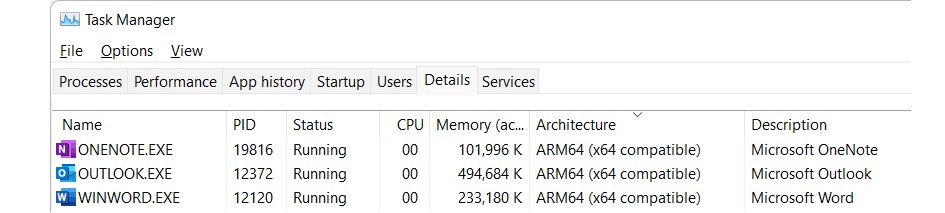
Task Manager shows whether each running app is native or emulated. Native apps give the best speed and battery life.
- Start the app you want to check.
- Press Ctrl + Shift + Esc to open Task Manager and select Details.
- Right-click any column header, choose Select columns, tick Architecture and select OK.
- Find the app's process and read the Architecture value.
- Read ARM64 as native, ARM64 (x64 compatible) as Arm64EC, and x64 or x86 as fully emulated.
Developers can also run link /dump /headers app.exe in a developer command prompt. 8664 machine (x64) (ARM64X) means part of an x64 binary was rebuilt as Arm64EC; AA64 machine (ARM64) means native Arm64.
Deploying native ARM64 builds and ARM64EC packages
Many top apps already ship Arm64 builds, including Microsoft 365, Teams, Chrome, Slack, Spotify, Zoom, WhatsApp, Blender, Affinity and DaVinci Resolve. The Microsoft Store picks the Arm64 package automatically when the developer offers one.
| What the developer offers | What to install | Why |
|---|---|---|
| Arm64 build | Arm64 | Runs natively with no emulation overhead |
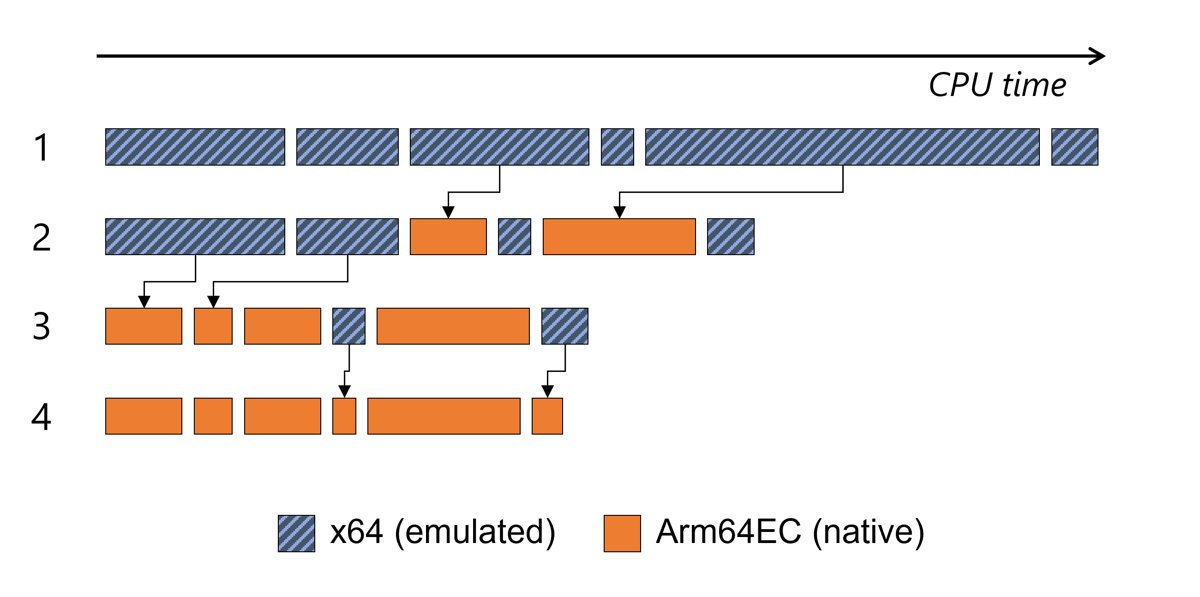
| Arm64EC or Arm64X build | That build | Native code runs at full speed and x64 plug-ins still load |
| x64 only | x64 on Windows 11 | Runs under Prism; not possible on Windows 10 on Arm |
| x64 build fails | x86 (32-bit) build | Microsoft notes most apps also offer an x86 version |
| Microsoft 365 apps | Microsoft 365 from your account | Installs the Arm-optimized Outlook, Word, Excel and PowerPoint |
| Perpetual Office (such as Office 2021) | 32-bit version | Microsoft's guidance for Arm devices |
| App with plug-ins or add-ins | Arm64EC or x64 | A pure Arm64 process cannot load x64 plug-ins |
The plug-in row matters for audio, video and design tools. An Arm64 host cannot load x64 or Arm64EC DLLs, while an x64 or Arm64EC host can load both.
Enabling and tuning Prism emulation performance
Prism is built into Windows 11 version 24H2 and turns on automatically for every x86 and x64 app. There is nothing to install or enable; you only tune it per app when one misbehaves.
Higher settings trade speed for compatibility, and Microsoft warns that changes can make an app crash or refuse to start.
| Emulation setting | When to try it |
|---|---|
| Safe, Strict, Very strict | Step up one level at a time when an app crashes or corrupts data under Default |
| Hide x64 emulation capability | An x86 installer wrongly tries to install an x64 build |
| Hide newer emulated CPU features | An app worked before 24H2 but fails since AVX, AVX2, FMA and similar features appeared |
| Show newer emulated CPU features | A 32-bit x86 app needs AVX-class instructions to run |
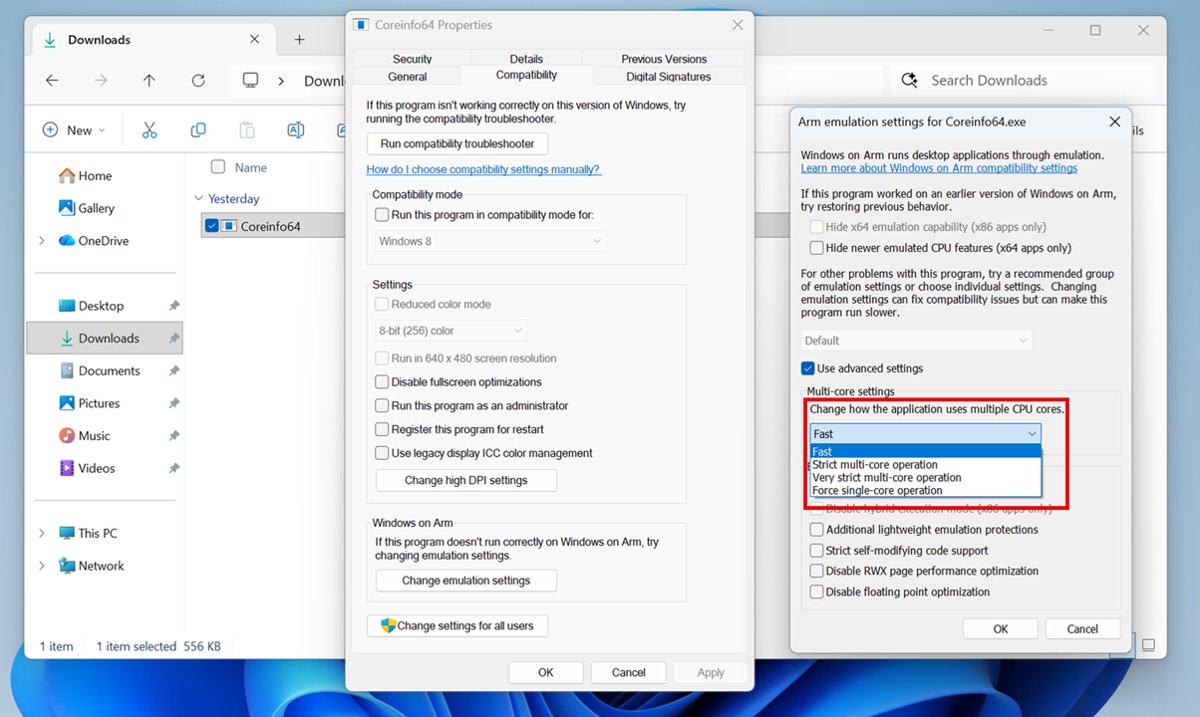
| Strict multi-core operation / Very strict | Random crashes or hangs in multithreaded apps |
| Force single-core operation | Last resort for threading bugs; the app runs on one core |
| Disable application cache | A corrupted translation cache is suspected; the app recompiles every run |
| Disable hybrid execution mode (x86 only) | An x86 app clashes with hybrid CHPE system binaries |
| Strict self-modifying code support | Apps that patch their own code, such as some older games and protectors |
| Disable floating point optimization | Old x87 math software gives wrong results; uses full 80-bit precision |
Open these options from the app's .exe: Properties > Compatibility > Windows on Arm > Change emulation settings, then pick a preset or Use advanced settings.
Check whether a Snapdragon app fix worked
- Start the app and repeat the action that failed before.
- Open Task Manager > Details and confirm the Architecture column shows the build you meant to install.
- Watch the CPU column during normal use; a native build should use less CPU than the emulated one did.
- If you changed emulation settings, note them so you can return to Default after the developer ships an update.
Troubleshooting persistent compatibility failures in Windows 11 ARM
Game will not launch or closes at start
The game uses an anti-cheat driver that has no Arm64 version, or OpenGL above 3.3.
- Check the game publisher's support page for Windows on Arm support.
- Switch the game to its DirectX renderer if it offers one; x86 apps using DirectX 9 to 12 work on Arm.
- If anti-cheat is the blocker, wait for an Arm64 version from the publisher; emulation settings cannot help a driver.
Printer, scanner, VPN or other device does not work
The device's driver is x86 or x64 only; kernel, UMDF and print drivers cannot be emulated.
- Run Windows Update, because Arm devices receive drivers and firmware through it.
- Add the printer from Settings without the maker's installer; most printers, including Mopria-certified ones, work with the built-in driver.
- Check the device maker's or VPN provider's site for an Arm64 driver or client.
App installs but crashes, freezes or shows glitches
A Prism optimization conflicts with how the app runs.
- Open the app's Change emulation settings and select Safe.
- Test again, then try Strict and Very strict.
- If the app broke after a Windows update, try Hide newer emulated CPU features.
- Return to Default if nothing changes, so you do not lose speed for no gain.
Cloud storage icons, right-click entries or a keyboard IME are missing
These features load DLLs into Windows processes, and those DLLs must be Arm64.
- Update the app to its newest version.
- Install the developer's Arm64 build if one exists.
- Ask the developer for Arm64 support if the feature still does not appear.
Antivirus or security software will not install
Some third-party antivirus products are not built for Arm-based PCs.
- Check the vendor's site for an Arm64 version.
- Keep Windows Security running in the meantime; it protects Arm PCs for the device's supported lifetime.
Work or school app still fails after every fix
A line-of-business app may rely on a driver or code generation that emulation does not support.
- Ask your IT team to contact Microsoft App Assure, which helps eligible organizations fix Arm compatibility at no extra cost.
- Use a Cloud PC or Azure Virtual Desktop for the app until it is fixed, if your organization offers one.
Hardware vetting checklist for ARM laptop owners
Check these before you buy a Snapdragon laptop, or before you rely on one for a specific job.
| Check | What to confirm |
|---|---|
| Windows version | Windows 11 version 24H2 or later, for Prism |
| Must-have apps | An Arm64 build exists, or the x64 build runs under emulation |
| Games | No Arm-incompatible anti-cheat and no need for OpenGL above 3.3 |
| Printers and scanners | Built-in Windows driver, Mopria support or an Arm64 driver from the maker |
| VPN and security software | The vendor ships an Arm64 client |
| Accessibility tools and IMEs | The vendor confirms Arm support |
| Virtualization | The tools you use support Arm64; kernel components cannot be emulated |
| Fax | Windows Fax and Scan is not available on Arm PCs |
| Cellular | Settings > Network & internet > Cellular exists if the PC has a SIM or eSIM |
Key advantages of Snapdragon processors in laptops
Microsoft describes Windows 11 Arm-based PCs as built for mobility, with longer battery life and power-efficient performance compared with traditional PCs. These are the gains you weigh against the app limits covered above.
| Advantage | What it means in daily use |
|---|---|
| Battery life beyond all-day | A typical work or school day without the charger; battery drain still depends on workload, and heavy apps use more |
| Turns on instantly | Press the power button to turn off the screen, then press it again to get back to work without waiting for a boot |
| Always connected | Most Arm-based PCs can use a cellular data connection through a physical SIM, an eSIM or both |
| Built-in NPU | Snapdragon X series chips include a 45 TOPS NPU for Copilot+ PC AI features |
| Native apps run fast | Arm64 builds of Microsoft 365, Teams, Chrome, Slack, Spotify, Zoom and others run without emulation |
| Faster emulation | Prism reduces CPU use for x86 and x64 apps compared with earlier Arm emulation |
Who should consider ARM laptops with Snapdragon processors?
Whether a Snapdragon laptop suits you depends on the apps and devices you rely on, not on the chip's speed.
| If you mainly | Snapdragon laptop fit | Why |
|---|---|---|
| Work in Microsoft 365, browsers, chat and video calls | Good fit | These apps ship native Arm64 builds |
| Travel and work away from a charger | Good fit | Longer battery life, instant-on and optional cellular data |
| Edit photos, video or 3D in tools with Arm64 builds | Good fit | Blender, Affinity and DaVinci Resolve run natively |
| Play online games with anti-cheat | Check first | Anti-cheat drivers without an Arm64 version block the game |
| Depend on a specific printer, scanner, VPN or security product | Check first | The vendor must provide an Arm64 driver or client |
| Use input method editors, assistive tech or cloud storage add-ons | Check first | These customization apps must be built for Arm64 |
| Need Windows Fax and Scan | Poor fit | It is not available on Arm-based PCs |
Snapdragon laptop app compatibility FAQ
Does Snapdragon run Windows?
Yes. Snapdragon laptops run the Arm64 edition of Windows 11, and many Copilot+ PCs use Snapdragon X series chips. Most Windows apps install as usual and do not have to come from the Microsoft Store.
Are Snapdragon laptops Arm laptops?
Yes. Snapdragon processors are Arm64 chips, so these laptops run Windows on Arm. Arm64 apps run natively, while x86 and x64 apps run through the built-in Prism emulator.
Can Snapdragon Windows laptops run x86 and x64 programs?
Yes, on Windows 11. Prism emulates both x86 and x64 apps without extra software. Windows 10 on Arm emulates x86 apps only. Apps that need x86 or x64 drivers still fail, because drivers cannot be emulated.
Can Snapdragon laptops run games?
Many games run, but games that rely on anti-cheat drivers without an Arm64 version will not, and games needing OpenGL above 3.3 can fail. Check the publisher's support page before you buy a game for an Arm laptop.
How do I check if an app will run on Snapdragon?
Check the developer's download page for an Arm64 build, or Microsoft's Windows on Arm Ready Software listing. On your PC, Task Manager's Architecture column shows whether a running app is native ARM64 or emulated x64 or x86.
Does Prism need to be enabled manually?
No. Prism is part of Windows 11 version 24H2 and applies to every x86 and x64 app automatically. You only open emulation settings to tune a single app that misbehaves.
Do compatibility mode settings force Prism?
No. The classic Windows compatibility modes do not switch emulation on or off. On Arm PCs the Compatibility tab adds a Change emulation settings button that adjusts how Prism runs that one app.
Should I always download the x64 version on a Snapdragon laptop?
No. Download the Arm64 version first, because it runs natively. Use x64 only when no Arm64 build exists, and try the x86 version if the x64 one fails.
What is Snapdragon on a laptop?
Snapdragon is Qualcomm's family of Arm-based processors. Arm systems on a chip often combine the CPU, GPU, NPU and wireless radios, and the Arm design is power-frugal, which gives these laptops long battery life.