On Windows, open Settings > System > About and read System type: an x64-based processor means AMD64, and an ARM-based processor means ARM64.
This guide covers the same check on macOS, Linux, Android and iPhone, what the different names mean, and which download to pick once you know the answer.
The fastest way to check AMD64 or ARM64 on any device
Each platform shows the answer in one place. Find your system in the left column and read the value it shows.
| Your device | Where to look | AMD64 result | ARM64 result |
|---|---|---|---|
| Windows 11 or Windows 10 PC | Start > Settings > System > About, then System type under Device specifications | x64-based processor | ARM-based processor |
| Mac | Apple menu > About This Mac | An item labeled Processor with an Intel name | An item labeled Chip with an Apple chip name |
| Debian, Ubuntu or Linux Mint | Terminal: dpkg --print-architecture |
amd64 |
arm64 |
| Any other Linux distribution | Terminal: uname -m |
x86_64 |
aarch64 |
| Android phone or tablet | The device's supported ABI list | x86_64 |
arm64-v8a |
| iPhone or iPad | Nothing to check | Not used | Apple-designed chip; the App Store picks the build |
What AMD64 and ARM64 Mean
AMD64 and ARM64 are two different 64-bit instruction sets. Software compiled for one does not run natively on the other, which is why download pages list them separately.
The confusing part is the naming. Each architecture goes by several labels depending on who wrote the download page.
| Label you see | Architecture | Where the label comes from |
|---|---|---|
| AMD64 | AMD64 | Windows environment variables and Debian or Ubuntu package names |
| x64 | AMD64 | Microsoft's umbrella term; it includes both AMD64 and Intel 64, whose instruction sets are almost identical |
| x86_64 or x86-64 | AMD64 | Linux kernels, macOS binaries and Android ABIs |
| Intel 64 | AMD64 | Intel's name for the same 64-bit extension of x86 |
| ARM64 | ARM64 | Windows downloads and environment variables |
| arm64 | ARM64 | Debian and Ubuntu packages; Apple silicon Mac binaries |
| AArch64 or aarch64 | ARM64 | The upstream toolchain name for 64-bit Armv8, printed by uname -m on Linux |
| arm64-v8a | ARM64 | Android's ABI name for 64-bit Arm CPUs |
| x86 or i386 | 32-bit x86 | Older 32-bit PCs; not AMD64 |
AMD64 is not limited to AMD processors. Debian's amd64 port covers AMD's 64-bit chips and Intel processors with Intel 64 support, including the Core and Xeon series.
Why Your Device Architecture Matters
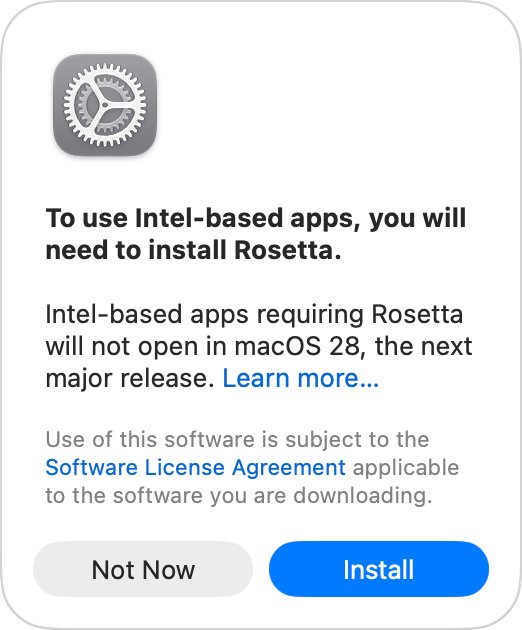
Most apps now run on either architecture, natively or through translation. The things that break are the parts that cannot be translated.
| What you install | On an ARM64 Windows PC | On an Apple silicon Mac |
|---|---|---|
| Regular desktop apps | Arm64 builds run natively; x86 and x64 apps run through emulation on Windows 11 | Apple silicon or Universal apps run natively; Intel apps run through Rosetta |
| Hardware drivers | Must be native Arm64; emulation does not cover kernel-mode or print drivers | Rosetta does not translate kernel extensions |
| Antivirus | Some third-party products cannot be installed unless built for Arm; Microsoft Defender is included | Check with the vendor |
| Games with anti-cheat | May not work if the anti-cheat driver is not made for Arm | Depends on the publisher |
| Virtual machines | Use an Arm64 guest, such as Windows 11 on Arm in Hyper-V | Rosetta does not translate apps that virtualize x86_64 PCs |
| Windows 10 on Arm | Only x86 apps are emulated; 64-bit x64 apps do not work | Not applicable |
Emulation also costs speed and battery. Microsoft recommends the Arm-native build of an app wherever one exists.
How to Check Architecture on Windows
Windows 11 is 64-bit only, so the question on a modern PC is whether the processor is x64 or Arm. The System type line answers both halves at once.
- Select Start, then select Settings.
- Select System, then scroll down and select About.
- Under Device specifications, find System type.
- Read the processor part of the value: x64-based processor means your PC is AMD64, and ARM-based processor means it is ARM64.
- For a second opinion, select Start, type System Information and open it.
- Check System Type in the right pane: x64-based PC means AMD64, and X86-based PC means 32-bit Windows.
The same System type line tells you whether Windows itself is 32-bit or 64-bit, which only matters on Windows 10, because Windows 11 has no 32-bit version.
Check from Command Prompt or PowerShell
Windows stores the architecture in the PROCESSOR_ARCHITECTURE environment variable. Open Windows PowerShell from the Start menu and run the line below.
$env:PROCESSOR_ARCHITECTUREPrints the architecture of the process running the command. In Command Prompt, the equivalent is echo %PROCESSOR_ARCHITECTURE%. A 32-bit process always sees x86 here, and the real value is then stored in PROCESSOR_ARCHITEW6432.
You should see: AMD64 means an x64 PC, ARM64 means an Arm PC, and x86 means you are in a 32-bit shell or on 32-bit Windows.
Treat this as a quick check, not the final word. An x86 or x64 program running under emulation on an Arm PC receives the emulated processor's details, so the System type line in Settings is the reliable source.
How to Check Architecture on macOS
Apple moved the Mac from Intel processors to Apple silicon starting with models introduced in late 2020. Apple silicon Macs are ARM64, and Intel Macs are AMD64.
- Click the Apple menu in the corner of the screen.
- Choose About This Mac.
- Look for an item labeled Chip: if it is there, followed by an Apple chip name, the Mac has Apple silicon and runs ARM64.
- If the item is labeled Processor and names an Intel processor, the Mac is Intel-based and runs AMD64 (x86_64).
- For the full report, choose Apple menu > System Settings, click General, click About, then click System Report.
Apple lists which models use Apple silicon: MacBook Pro from 2021 plus the 13-inch M1 model from 2020, MacBook Air from 2022 plus the M1 model from 2020, iMac from 2021, Mac mini from 2020, Mac Studio from 2022, Mac Pro from 2023, and MacBook Neo.
How to Check Architecture on Linux
Linux reports the architecture under two naming schemes. Package managers on Debian-based systems use amd64 and arm64, while the kernel uses x86_64 and aarch64.
- Open Terminal.
- On Debian, Ubuntu or Linux Mint, run
dpkg --print-architecture; the result isamd64orarm64. - On any distribution, run
uname -m(orarch, which prints the same machine hardware name); the result isx86_64for AMD64 oraarch64for ARM64. - For more detail, run
lscpuand read the Architecture line along with the CPU model name. - Match the result to the package name on the download page:
amd64andx86_64are the same thing, as arearm64andaarch64.
Inside a virtual machine, these commands report the guest's configuration, not the host hardware. lscpu documents this directly, so run the check on the host if you need the physical processor.
How to Check Architecture on Android and iOS
Phones and tablets rarely need a manual check, because their stores deliver the right build automatically. The question comes up when you install an APK by hand or build an app.
| Device | How to tell | What it means |
|---|---|---|
| Android, installing from Google Play | No check needed | The package manager unpacks only the machine code that matches the device |
| Android, installing an APK yourself | Check the phone maker's specifications page for the processor, or read the device's supported ABI list | arm64-v8a is ARM64; x86_64 is the 64-bit Intel and AMD ABI; armeabi-v7a is 32-bit Arm |
| Android, as a developer | Read Build.SUPPORTED_ABIS in your app |
It returns an ordered list of the ABIs the device supports, primary first |
| iPhone or iPad | No check needed | Every model runs an Apple-designed chip, and the App Store installs the matching build |
There is no AMD64 iPhone or iPad. Apple's own documentation confirms that unmodified iPhone and iPad apps run on Apple silicon Macs, but not on Intel Macs, because the two chip families differ.
Choosing the Right Software Download
Once you know the architecture, match it to the label on the download page. When a page offers several builds, pick the first row that fits your device.
| Your result | Download this | Why |
|---|---|---|
| Windows, x64-based processor | x64, AMD64 or 64-bit | Runs natively; ARM64 builds will not install |
| Windows 11, ARM-based processor | ARM64 if offered; otherwise x64 | Arm64 is native and fastest; x64 runs through emulation |
| Windows 10, ARM-based processor | ARM64 if offered; otherwise x86 (32-bit) | Windows 10 on Arm emulates only x86 apps |
| Any Arm PC, a driver or hardware utility | ARM64 only | Drivers cannot run under emulation |
| Mac with a Chip item | Apple silicon or Universal | Runs natively; Intel builds need Rosetta |
| Mac with a Processor item | Intel or Universal | Apple silicon builds will not run on Intel |
| Linux, amd64 or x86_64 | amd64 or x86_64 package | Matches the kernel and package manager |
| Linux, arm64 or aarch64 | arm64 or aarch64 package | Same architecture under two names |
| Office 2021 or another perpetual Office on an Arm PC | 32-bit version | Microsoft's guidance for perpetual Office on Arm-based Surface devices |
Microsoft 365 on an Arm PC is the exception to hunting for a build: its installer sets up Outlook, Word, Excel and PowerPoint optimized for Arm processors.
How to confirm an installed app matches your architecture
Checking the device is half the job. These steps confirm the app you installed is running natively rather than through translation.
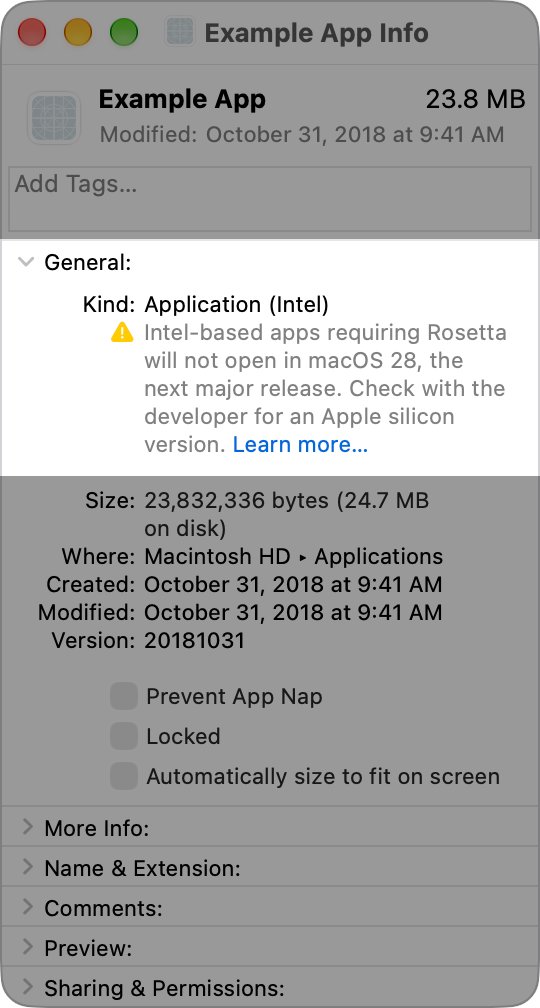
- On a Mac, select the app in Finder and press Command-I to open Get Info.
- Read the value after Kind: Application (Apple silicon) or Application (Universal) runs natively on Apple silicon, while Application (Intel) runs through Rosetta.
- On macOS 27 or later, choose Apple menu > System Settings > General > About, then click Details next to Intel-based Apps to list every Intel app at once.
- On Debian or Ubuntu, run
dpkg --print-architectureand confirm the package you installed carries the same suffix. - On Windows, open the app's About screen or the vendor's download page and confirm the build says ARM64 on an Arm PC, or x64 on an x64 PC.
Interpreting common Windows results that look wrong
The command prints x86 on a 64-bit PC
The shell is a 32-bit process, and Windows gives every 32-bit process PROCESSOR_ARCHITECTURE=x86.
- In the same window, run
echo %PROCESSOR_ARCHITEW6432%in Command Prompt or$env:PROCESSOR_ARCHITEW6432in PowerShell. - Read the real architecture from that value:
AMD64orARM64. - Confirm it in Settings > System > About under System type.
The command prints AMD64, but the PC has a Snapdragon or other Arm chip
The shell or tool you used is an x64 program running under emulation, and emulated programs see the emulated processor.
- Open Settings > System > About and read System type.
- If it says ARM-based processor, trust that result over the command.
- Download ARM64 builds for this PC, even though the emulated tool reported AMD64.
What happens if I download the wrong architecture version?
The build does not match the processor, or it depends on a driver that cannot be emulated.
- Uninstall the mismatched app.
- Recheck your architecture with the table at the top of this guide.
- Download the matching build from the vendor's page, using the download table above.
- If no Arm64 driver exists for a device or antivirus product, contact the hardware maker or software vendor; emulation cannot run it.
Frequently Asked Questions
Is AMD64 the same as x64 or x86-64?
Yes. AMD64, x64, x86-64, x86_64 and Intel 64 all describe the same 64-bit extension of the x86 instruction set. Microsoft uses x64 as the umbrella term covering both AMD64 and Intel 64, whose instruction sets are almost identical.
How do I know whether my Windows PC needs the AMD64 or ARM64 download?
Open Settings > System > About and read System type. If it shows an x64-based processor, download the x64 or AMD64 build. If it shows an ARM-based processor, download ARM64 when the vendor offers it.
Does an Apple Silicon Mac use AMD64 or ARM64?
An Apple silicon Mac uses ARM64, which Apple labels arm64 in its binaries. Intel Macs use x86_64, the AMD64 architecture. About This Mac shows Chip on Apple silicon and Processor on Intel models.
Can I install AMD64 software on an ARM64 device?
Usually, yes. Windows 11 on Arm runs x64 apps through emulation, and Apple silicon Macs run Intel apps through Rosetta. Drivers, kernel extensions and some anti-cheat or antivirus software cannot be translated and need a native ARM64 version.
What happens if I download the wrong architecture version?
An ARM64 build will not install or run on an AMD64 PC. An AMD64 build on an ARM64 device often runs through emulation but slower, and it fails outright if it installs a driver. Uninstall it and download the matching build.
Is AMD64 only for computers with AMD processors?
No. AMD64 is the name of the architecture, not the brand of the chip. Intel Core and Xeon processors with Intel 64 support run the same AMD64 software, which is why a single x64 download works on both brands.
What does aarch64 mean in Linux?
aarch64 is the upstream name for the 64-bit Armv8 architecture, and it is what uname -m prints on an ARM64 Linux system. Debian and Ubuntu call the same architecture arm64 in package names, so both labels point to the same download.
How do I check device information on Windows?
Open Settings > System > About. The Device specifications section lists the processor, installed RAM and System type, which shows both the Windows bitness and whether the processor is x64 or Arm. For more detail, search the Start menu for System Information and check System Type.
How do I see what my device is on a Mac?
Choose Apple menu > About This Mac. The window names the Mac model, the chip or processor and the macOS version. For a full hardware report, open System Settings > General > About and click System Report.
Do iPhones and iPads run AMD64 or ARM64?
Neither needs a choice from you. Every iPhone and iPad uses an Apple-designed Arm chip, and the App Store installs the matching build automatically. There is no AMD64 iPhone or iPad.
Bottom Line
Read the platform's own label first: System type on Windows, Chip or Processor on a Mac, and dpkg --print-architecture or uname -m on Linux. Then download the native build for that result whenever one exists. The built-in label reflects the real hardware, while command output can reflect an emulated process. Native builds avoid emulation overhead, and drivers only work when they match the processor.

![Java JRE latest version: Download & Install [32-bit, 64-bit]](https://techdows.com/wp-content/uploads/2026/10/Java-JRE-latest-version-Download-Install-32-bit-64-bit-1-600x338.jpg)