Microsoft does not make a desktop Outlook app for Linux, but Outlook on the web runs on Linux in Firefox or Chrome, and you can install it as a web app or add your mailbox to a Linux email client.
This guide covers what works on Linux, four ways to use Outlook on Ubuntu, Linux Mint and other distributions, how to keep your calendar in sync, and what to do when something fails.
Does Outlook work on Linux?
Yes, through the browser. Microsoft lists Linux as a supported system for Outlook on the web and Outlook.com when you use Firefox or Chrome, with a note that some features may be unavailable.
- Open the latest version of Firefox or Google Chrome on your Linux PC.
- Go to
outlook.office.comfor a work or school account, oroutlook.live.comfor a personal Outlook.com, Hotmail or Live account. - Select Sign in and enter your Microsoft account email address and password.
- Approve any two-step verification prompt on your phone.
- Wait for your Inbox to load, then use the left rail to switch between Mail, Calendar and People.
That is the whole setup for most people. If you use Outlook on Windows as well, the web version shows the same mail, calendar and contacts because they live on the server, not on the PC.
Outlook for Linux fundamental concepts: core features and Linux compatibility
Outlook comes in several forms, and only some of them reach Linux. Knowing which one you are using explains most of the limits you will hit.
| Outlook version | Available on Linux? | What you get |
|---|---|---|
| Classic Outlook (desktop) | No | A Windows desktop app; Microsoft offers no Linux build |
| New Outlook for Windows | No | A Windows app; on Linux the closest match is Outlook on the web |
| Outlook on the web (Microsoft 365 work or school) | Yes, in Firefox or Chrome | Mail, calendar, contacts and tasks from your organization's mailbox |
| Outlook.com (personal accounts) | Yes, in Firefox or Chrome | The free Outlook.com, Hotmail and Live mailbox with calendar and contacts |
| Outlook installed as a web app | Yes, from Microsoft Edge or Chrome | Outlook on the web in its own window with a launcher icon |
| Outlook mailbox in a Linux email client | Yes, over Exchange protocols or IMAP | Mail inside a native client such as Thunderbird |
Microsoft's minimum requirements for Outlook on the web are modest: a 1.6 GHz processor, 1 GB of RAM, a 1024 x 768 screen and an active Microsoft account.
Outlook on Linux usage methods: comparison table
Each method below reaches the same mailbox on Ubuntu, Linux Mint or any other distribution. The difference is where it opens and how much of Outlook you keep, so choose the setup that fits your work.
| Your situation | Use this method | Why |
|---|---|---|
| You want every Outlook feature, including calendar and rules | Outlook on the web in Firefox or Chrome | It is the version Microsoft supports on Linux |
| You want Outlook in its own window with a launcher icon | Outlook as a progressive web app (PWA) | Same web Outlook, pinned like a desktop app and usable offline |
| You prefer a native Linux email client for a Microsoft 365 mailbox | Thunderbird with Exchange support | Native mail access without add-ons; calendar is not supported yet |
| You have a personal Outlook.com account and a client you already like | IMAP and SMTP in any modern client | Works with any client that supports OAuth2 sign-in |
| You need classic Outlook features such as PST files and COM add-ons | A Windows PC or virtual machine | Those features exist only in the Windows desktop app |
Outlook on Linux works best for everyday mail, calendar and contacts on a Microsoft 365 or Outlook.com account. It falls short only when your work depends on PST files or COM add-ons.
Method 1: Using Outlook via web browser on Linux
Microsoft supports Firefox and Chrome on Linux. Microsoft Edge is also available for Linux as a .deb package if you prefer it for Microsoft 365 sign-ins.
- Update Firefox or Chrome to the latest version from your distribution's software manager.
- Open
outlook.office.com(work or school) oroutlook.live.com(personal) and sign in. - Select the bookmark star in the address bar to save the page for one-click access.
- Select Settings (the gear icon) to set your signature, reading pane and notifications.
- Turn off any ad blocker or pop-up blocker for the Outlook site if pages fail to load.
Old browsers are blocked outright: since late August 2024, Outlook.com shows an upgrade page to Chrome 79, Firefox 78, Opera 76 and earlier.
Method 2: Installing Outlook as a progressive web app (PWA)
A progressive web app gives Outlook its own window and launcher entry, so it behaves like an installed program. Microsoft documents the install from Microsoft Edge and Google Chrome, both of which run on Linux.
In Microsoft Edge
Edge installs any site as an app from its main menu.
- Sign in to Outlook on the web or Outlook.com in Microsoft Edge.
- Open the Settings and more menu at the top of the window.
- Select Apps, then Install this site as an app.
- Launch Outlook from your applications menu or pin it to your dock.
In Google Chrome
Chrome offers an Outlook-specific install entry once you are signed in.
- Sign in to Outlook on the web or Outlook.com in Google Chrome.
- Open the Customize and control Google Chrome menu at the top of the window.
- Select Install Outlook.
- Open the new Outlook entry from your applications menu.
Microsoft says the installed app can be pinned and lets you reach your account while offline.
Method 3: Using third-party email clients like Thunderbird with Exchange
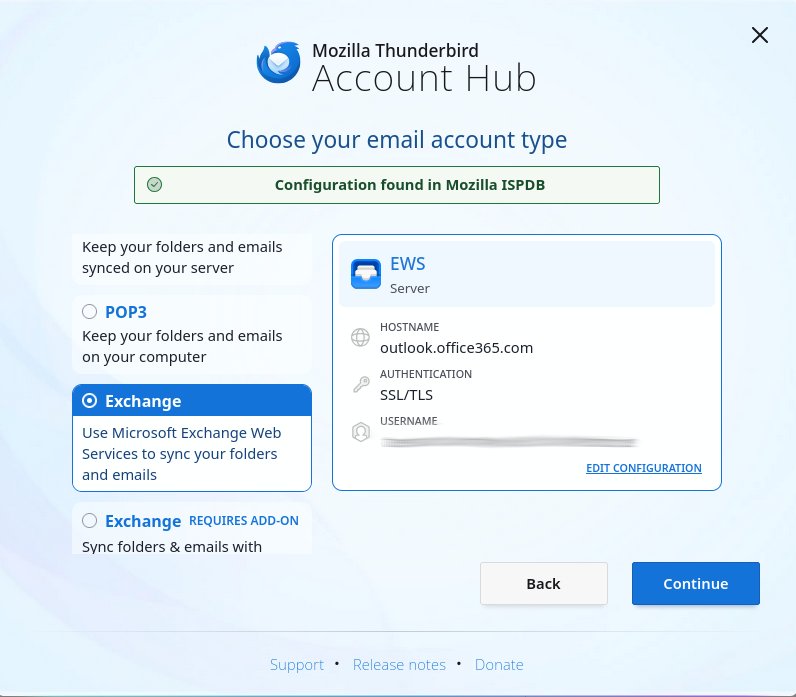
Thunderbird 145 added native Microsoft Exchange email support over Exchange Web Services (EWS), so no add-on is needed. Thunderbird 154 on the Release channel added Microsoft Graph support for Microsoft 365 accounts.
- Install or update Thunderbird to the current Release version from thunderbird.net or your distribution.
- Open Thunderbird and start a new account to bring up the Account Hub.
- Enter your name and Microsoft 365 email address.
- Choose the Exchange account type and let Thunderbird detect the settings.
- Complete the Microsoft sign-in window, including two-step verification.
- Wait for your folders to sync, then send a test message.
Know the limits before you switch. Calendar and address book support for Exchange accounts is still on Thunderbird's roadmap, and Microsoft is phasing out EWS on Microsoft 365 from October 2026, with full shutdown planned for 2027. Microsoft 365 users should add the account with Graph, since Thunderbird does not convert an existing EWS or IMAP account.
Method 4: Connect Outlook.com to a Linux email client over IMAP
Any Linux client that supports IMAP with OAuth2 (Modern Auth) can read an Outlook.com mailbox. IMAP and POP are off by default, so turn them on first.
- Sign in to Outlook.com and select Settings > Mail > Forwarding and IMAP.
- Turn on IMAP access and select Save.
- In your Linux email client, add a new account with your full Outlook.com address as the username.
- Set the incoming server to
outlook.office365.com, port 993, encryption SSL/TLS. - Set the outgoing server to
smtp-mail.outlook.com, port 587, encryption STARTTLS. - Choose OAuth2 as the authentication method and complete the Microsoft sign-in window.
Outlook.com does not accept basic password sign-in for IMAP, POP or SMTP, so a client without OAuth2 support will fail. POP uses outlook.office365.com on port 995 with SSL/TLS if you want mail downloaded rather than synced.
Install the current unofficial Outlook snap on Linux
The Snap Store lists community-made Outlook packages that wrap Outlook on the web in their own window. Microsoft does not publish them and does not list them as a supported way to use Outlook, so treat them as a convenience, not a replacement for the browser.
Installation takes one terminal command; this quick start checks the publisher first.
- Open a terminal and run
snap find outlookto list the Outlook packages in the store. - Read the publisher column; a green check mark after a publisher name means the Snap Store has verified that publisher.
- Run
snap info <snap-name>to see the publisher, summary and available channels before you install. - Install it with
sudo snap install <snap-name>; with no extra options it tracks the stable channel with strict security confinement. - Run
snap connections <snap-name>to see which interfaces, such as network or desktop access, the sandboxed app is connected to. - Launch the app from your applications menu and sign in with your Microsoft account.
- Remove it later with
sudo snap remove <snap-name>if it stops working or you switch to the installed web app.
A wrapper still loads Outlook on the web, so it offers the same mail, calendar and contacts and nothing the PWA from Method 2 lacks.
Common practices for Outlook email management on Linux
Some Outlook tasks only work in certain methods. Plan where you do each job so nothing goes missing.
| Task | Where to do it on Linux | Note |
|---|---|---|
| Read, send and file mail | Any method | Folders and read status sync with the server |
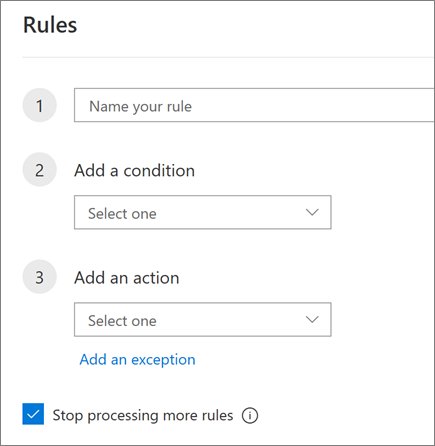
| Create inbox rules | Outlook on the web | Server-side rules run even when no client is open |
| Set automatic replies | Outlook on the web | Applies to every device signed in to the mailbox |
| Address with Cc and Bcc | Any method | Hide recipients with Bcc the same way as on Windows |
| Check unsent messages | Outlook on the web or your client | Messages stuck in a client's outbox have not reached the server |
| Open PST data files | A Windows PC | Outlook on the web has no PST import |
Calendar and task synchronization for Outlook on Linux
Outlook on the web and the PWA show your full calendar and tasks. To see an Outlook.com calendar in a Linux calendar app, publish it as an ICS link and subscribe to that link.
- In Outlook.com, open Calendar, then select Settings (the gear icon).
- Select Calendar > Shared calendars.
- Under Publish a calendar, choose the calendar and how much detail to show.
- Select Publish.
- Copy the ICS link.
- In your Linux calendar app, subscribe to a network or internet calendar and paste the ICS link.
A subscribed ICS calendar is read-only and refreshes on the calendar app's schedule. Importing the .ics file instead adds the events once and never updates them. To stop sharing, return to Publish a calendar and select Unpublish.
Best practices for Outlook security and performance on Linux
Outlook on Linux runs inside a browser or a third-party client, so the browser and the client carry the security load.
| Practice | Why it matters |
|---|---|
| Keep the browser on its latest version | Microsoft supports only current browser versions and blocks old ones |
| Use two-step verification on your Microsoft account | Protects the mailbox whichever client signs in |
| Use OAuth2 sign-in in email clients | Outlook.com rejects basic password sign-in for IMAP and SMTP |
| Review sign-in activity after adding a new client | Microsoft suggests account.live.com/activity when IMAP clients hit connection errors |
| Allow the Outlook site in ad and pop-up blockers | Blockers such as AdBlock and uBlock can stop Outlook.com from loading |
| Keep one IMAP client per account where possible | Several IMAP clients on one account can trigger connection errors |
| Close unused Outlook tabs and use the installed web app | One window uses less memory than several open tabs |
How to check Outlook is working on Linux
Verify the setup before you depend on it for work or personal mail.
- Send a test message from your Linux browser, web app or client to another address you own.
- Reply to it from that address and confirm the reply arrives on Linux.
- Open Outlook on another device and confirm the sent item appears in Sent Items.
- Create a calendar event on Linux and confirm it shows on your phone or Windows PC.
- Close and reopen the installed web app to confirm you stay signed in.
Fix Outlook on Linux when it does not work
Outlook.com will not load in the browser
An ad blocker or pop-up blocker is stopping the page, or the browser is too old.
- Pause AdBlock, uBlock or any similar extension for the Outlook site.
- Update Firefox or Chrome to the latest version.
- Reload the page and sign in again.
The email client rejects your password
Outlook.com requires OAuth2 (Modern Auth) and refuses basic password sign-in.
- Open the account settings in your client.
- Change the authentication method to OAuth2.
- Sign in through the Microsoft window when it appears.
IMAP connects but keeps showing connection errors
The same account is set up over IMAP in several clients, or Microsoft flagged the sign-in.
- Go to
account.live.com/activityand sign in. - Find the recent sign-in from your Linux client and mark it as yours.
- Remove the account from clients you no longer use.
IMAP will not sync for a custom-domain Outlook.com address
IMAP syncing may not work for addresses outside live.com, hotmail.com and outlook.com.
- Remove the IMAP account from your client.
- Add it again as a POP account using
outlook.office365.com, port 995, SSL/TLS.
Thunderbird shows Exchange mail but no calendar
Thunderbird does not support Exchange calendars or address books yet.
- Use Outlook on the web or the installed Outlook web app for calendar work.
- For a read-only view, publish the calendar as an ICS link and subscribe to it.
Outlook for Linux frequently asked questions
Does Outlook run on Linux?
Outlook runs on Linux as Outlook on the web. Microsoft supports Firefox and Chrome on Linux for Outlook on the web and Outlook.com, though some features may be unavailable. There is no native desktop Outlook for Linux.
Is there an Outlook app for Linux?
There is no official Outlook desktop app for Linux. The closest option is installing Outlook on the web as a progressive web app from Microsoft Edge or Chrome, which gives it its own window and launcher icon.
Is there an Outlook client for Linux?
Microsoft does not publish one, but Linux email clients can open an Outlook mailbox. Thunderbird supports Microsoft Exchange mail natively, and any client with OAuth2 support can connect to Outlook.com over IMAP and SMTP.
Can I download Outlook for Linux?
No Linux download of Outlook exists from Microsoft. Use Outlook on the web in a supported browser, or install it as a web app, which needs no separate download.
Is there Outlook for Linux Mint or Ubuntu?
Not as a native app. Linux Mint and Ubuntu users get Outlook through Outlook on the web in Firefox or Chrome. Microsoft Edge for Linux is also available as a .deb package, which installs on both.
Does the new Outlook work on Linux?
The new Outlook for Windows is a Windows app and does not install on Linux. Outlook on the web offers a very similar interface, and it runs in Firefox or Chrome on Linux.
What is the best Outlook client for Linux?
For full features, Outlook on the web installed as a web app is the best fit, since it is the version Microsoft supports. For a native client, Thunderbird handles Microsoft 365 and Exchange mail but not Exchange calendars yet.
Is there an Outlook alternative for Linux?
Thunderbird is the main native alternative, and it can still connect to your Outlook mailbox. It reads Exchange mail directly and handles Outlook.com accounts over IMAP with OAuth2 sign-in.
Can I use Outlook offline on Linux?
Microsoft says Outlook installed as a web app lets you access your account while offline. A Thunderbird or other IMAP client also keeps downloaded mail available without a connection.
Why do many Linux users prefer Outlook on the web over native apps?
Outlook on the web is the version Microsoft supports on Linux, so it keeps the full calendar, rules and contacts that native clients only partly handle. It also needs nothing installed beyond a current browser.
Conclusion: the best way to use Outlook on Linux
Install Outlook on the web as a web app from Microsoft Edge or Chrome, and add Thunderbird only if you want native mail handling. Outlook on the web is the only Outlook Microsoft supports on Linux, it keeps calendar, rules and contacts intact, and the web app gives it a desktop-style window without unofficial wrappers.