An iPhone that shows a purchase date of April 1978 and no warranty has a wrong estimated date in Apple's coverage records, and you fix it by sending Apple the original sales receipt through Correct the purchase date for your device.
This guide covers the correction steps, where to find the serial and model numbers Apple asks for, how to tell whether a "new" iPhone was used before, and what the one-year warranty covers once the date is fixed.
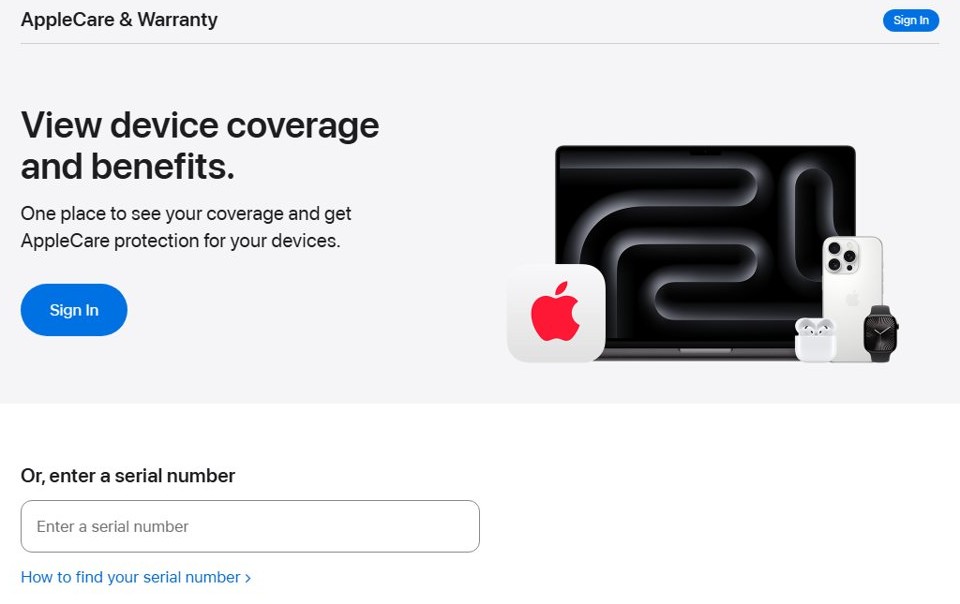
How to fix the wrong purchase date on Apple check coverage
Apple's coverage system estimates the purchase date from the records it holds for each serial number, and Apple says that estimate can be wrong. A date decades before the iPhone existed is that kind of error, so the warranty clock looks expired on a phone you just bought.
Apple corrects the date only from the original proof of purchase, so have the receipt ready before you start.
- Find the original sales receipt or invoice for the iPhone, from the shop that sold it to you.
- Check that the receipt shows the device description, purchase date, invoice number, price, the seller's contact details and the iPhone's serial number.
- Open Apple's Update your device purchase date with your proof of purchase page at support.apple.com/102261.
- Select Correct the purchase date for your device.
- Follow the onscreen steps to pick the iPhone and send Apple the receipt.
- Keep a copy of the receipt, because Apple can ask for it again when you book a repair.
If the seller cannot give you a receipt with the serial number on it, Apple has nothing to correct the date from. Return the iPhone to the seller instead.
Apple warranty check shows wrong purchase date: what each result means
| What you see | What it means | What to do |
|---|---|---|
| Purchase date in a year before the model existed, such as April 1978 | The estimated date in Apple's records is wrong | Send the original receipt to correct the date |
| Coverage shown as expired on an iPhone bought days ago | The warranty is counted from the wrong date | Send the receipt; the one-year term runs from the original retail sale |
| Purchase date earlier than the day you bought the phone | Apple's records hold an earlier date than your sale | Send the receipt, and ask the seller to confirm the phone is new |
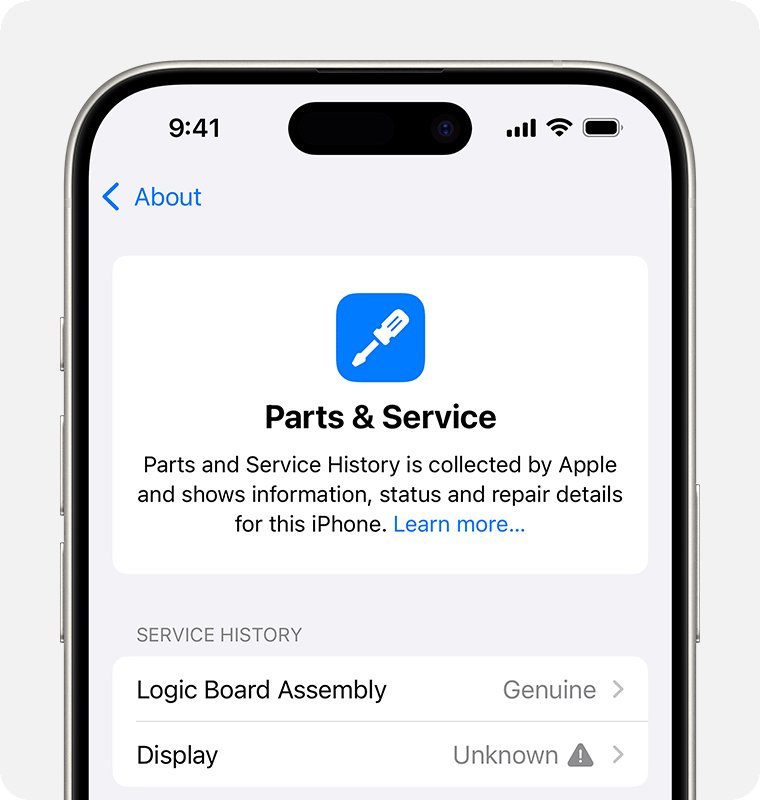
| Parts and Service History appears under About | The iPhone has been repaired at least once | Check each part's label, then decide whether to keep the phone |
| The setup screen asks for someone else's Apple Account | Activation Lock is still on from a previous owner | Hand it back to the seller; do not take ownership |
| Correct date and the right expiry | Records match your purchase | Nothing to fix |
How to check iPhone warranty status in Settings
The quickest check runs on the iPhone itself and shows your AppleCare or Limited Warranty end date.
- Open Settings on the iPhone.
- Tap General.
- Tap AppleCare & Warranty.
- Tap the iPhone in the device list to see its coverage and expiration date.
- To check from a browser instead, go to checkcoverage.apple.com, type the serial number in Enter a serial number, complete the CAPTCHA and select Submit.
- Sign in at mysupport.apple.com to see the same device with its repair and support eligibility.
How to find iPhone serial number before and after setup
Apple's correction form and the coverage page both need the serial number, and the receipt must show the same one.
Apple serial numbers use the digits 0 and 1, never the letters O or I. A barcode scan of the box may add a leading S, which is not part of the serial number.
- On a set-up iPhone, open Settings, tap General, then tap About and read Serial Number.
- Touch and hold the serial number to copy it for Apple's forms.
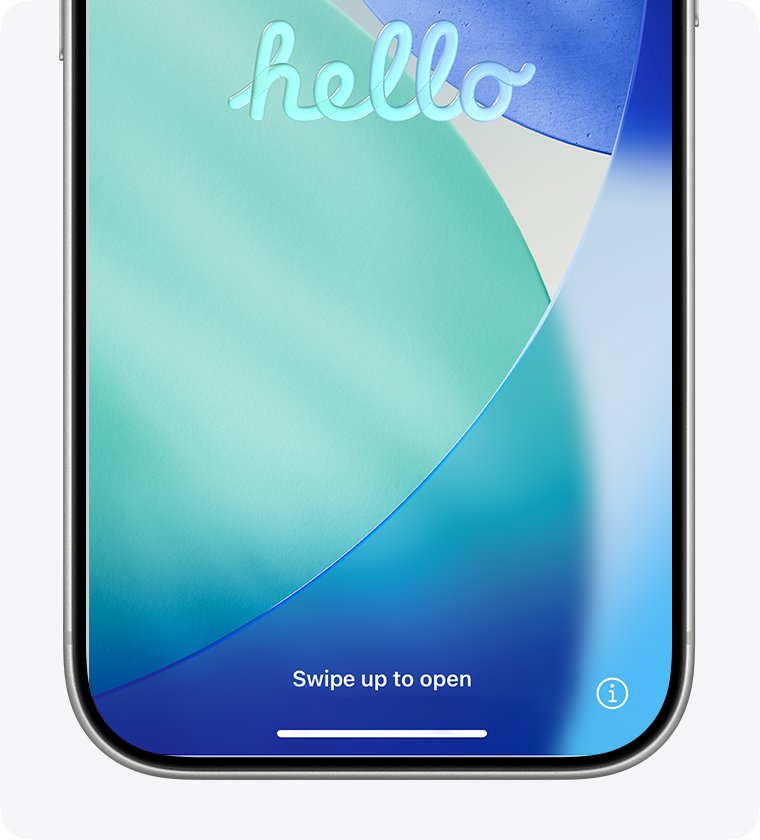
- On an iPhone that is not set up yet, turn it on and wait for the Hello screen.
- Tap the Info button in the bottom-right corner to show the serial number without activating the phone.
- If the iPhone will not start, read the serial number from the barcode label on the original box.
- Compare the serial number on the phone with the one on the box and the receipt. All three must match.
You can also find it at account.apple.com under Devices, or in the Finder, Apple Devices app or iTunes when the iPhone is connected to a computer. Write it down and keep it with the receipt: Apple needs it for repairs, although a serial number alone cannot track a lost iPhone.
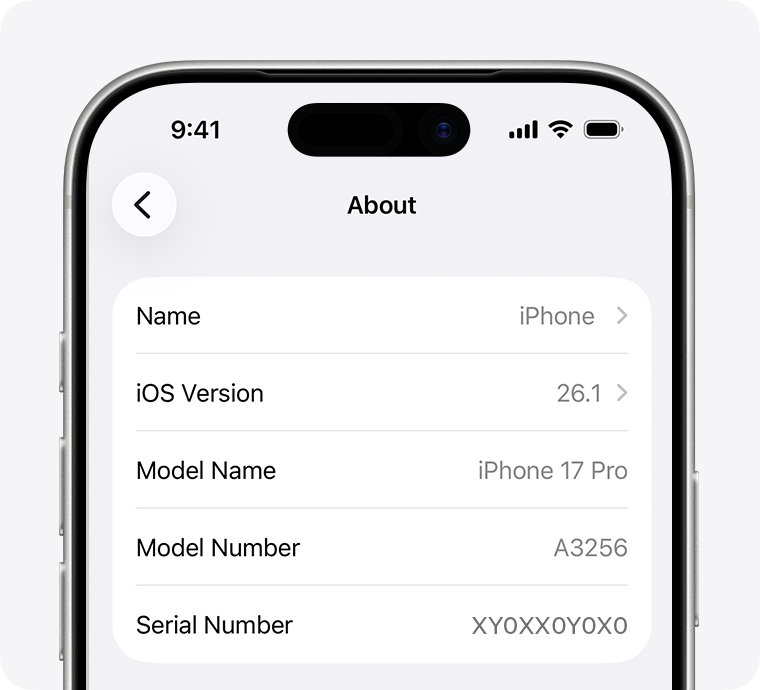
How to find iPhone model number in Settings
The Model Number line in Settings first shows a part number, which is a different string from the A-number Apple uses to name the model. A part number that starts with unfamiliar characters, such as 5G, is still a part number and does not show the model on its own.
- Open Settings and tap General.
- Tap About.
- Find Model Number. The value to its right is the part number.
- Tap the part number once. It changes to the model number, which starts with A, such as A2342.
- Look up that A-number on Apple's Identify your iPhone model page to confirm the model and the region it was made for.
- Give both the part number and the A-number to Apple Support if you want to know what the part number says about the unit.
On an iPhone 8 or later with a SIM tray, the model number is also printed inside the SIM slot, on the side facing the display. Use bright light to read it. On iPhone 7 and earlier it is printed on the back, among the regulatory marks such as CE0682.
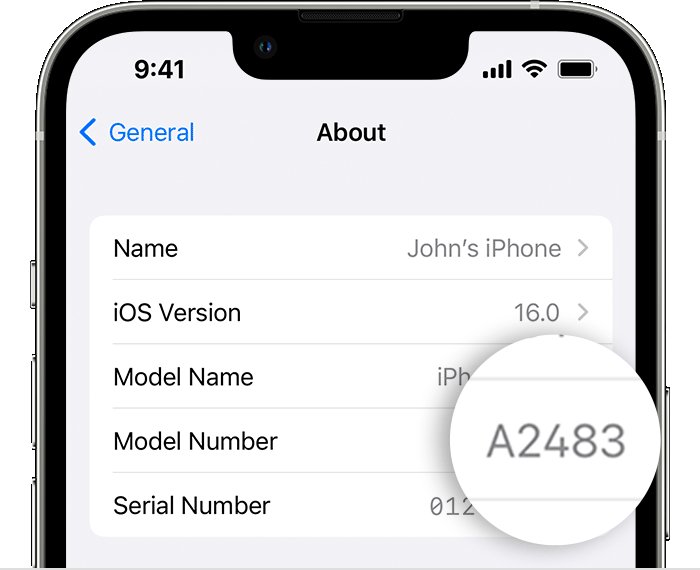
iPhone 12 Pro Max model numbers by region
The phone in the original report was an iPhone 12 Pro Max. These are the A-numbers Apple lists for it, so you can match the number in Settings to the market it was built for.
| Model number | Region Apple lists |
|---|---|
| A2342 | United States |
| A2410 | Canada, Japan |
| A2412 | China mainland, Hong Kong, Macao |
| A2411 | Other countries and regions |
Region matters for warranty service: Apple may limit iPhone warranty service to the country where Apple or its Authorized Distributors first sold the device. For other models, check which region your iPhone is from using the same A-number.
What proof of purchase does Apple accept for warranty?
| Detail on the receipt | Why Apple needs it |
|---|---|
| A clear description of the device | Ties the receipt to an iPhone, not another product |
| The date of purchase | Sets the start of the one-year Limited Warranty |
| An invoice or receipt number | Lets Apple trace the sale |
| The price of the device | Shows it was a retail sale |
| The reseller's contact information | Identifies who sold it |
| The serial number of the device | Links the sale to your exact iPhone |
Apple may also ask for the sales receipt or an AppleCare Proof of Coverage document when you book a repair, even if the iPhone is registered. Registration does not change the warranty.
How to see the updated iPhone warranty date
Apple notes that recently submitted information may not show in its coverage records straight away, so recheck after Apple replies to your request.
- Open Settings, tap General, then tap AppleCare & Warranty.
- Tap the iPhone and read the coverage expiration date.
- Confirm the date is about one year after the purchase date on your receipt.
- Run the serial number through checkcoverage.apple.com and check that it shows the same date.
- If the date is still wrong after Apple has replied, contact Apple Support from the same request with your receipt.
If someone calls you unprompted, claiming to be Apple and offering to fix the warranty date, hang up: it fits the pattern of fake Apple Support calls.
How to tell if a new iPhone is really new
A wrong purchase date is usually a records problem, but a seller's "never opened" claim is worth testing before the return window closes.
- Turn on the iPhone. A phone ready for a new owner starts at the Hello screen.
- If you see a passcode Lock Screen or a Home Screen, the iPhone was not erased and has been used.
- Start setup. If it asks for a previous owner's Apple Account, or shows iPhone Locked to Owner, Activation Lock is still on.
- After setup, open Settings > General > About and look for a Parts and Service History section. It appears only if the iPhone has been repaired.
- Check that the serial number in About matches the box and the receipt.
- If any check fails, return the iPhone to the seller with the receipt.
Apple says not to take ownership of any iPhone that is protected by Activation Lock or that has not been erased.
iPhone Parts and Service History labels explained
With iOS 15.2 and later, a repaired iPhone lists its replaced parts under Settings > General > About. Each label tells you how the part got there.
| Label | What Apple says it means |
|---|---|
| Genuine | The repair used genuine Apple parts and processes |
| Used | The part was already used or installed in another iPhone |
| Unknown | The part may not be genuine, may not work as expected, or was not verified after the repair |
| Unverified | The logic board was replaced, which can affect features such as Apple Pay |
| Finish Repair | The part still needs calibration through Repair Assistant |
A previously used part taken from another device that had Activation Lock on is not eligible for service under the Apple Limited Warranty or an AppleCare plan.
Apple one year limited warranty for iPhone explained
| Term | What the warranty says |
|---|---|
| Length | One year from the date of original retail purchase by the end-user purchaser |
| What is covered | Defects in materials and workmanship in normal use, plus the Apple accessories in the original box |
| What is not covered | Accidents, liquid contact, cosmetic damage, wear and tear, and repairs by anyone other than Apple or an Apple Authorized Service Provider |
| Serial number removed | No coverage if any serial number has been removed or defaced |
| Replacement devices | Keep the remaining warranty term or 90 days, whichever is longer |
| Country | Apple may restrict iPhone service to the country where it was first sold |
| Türkiye | Two years of Limited Warranty coverage |
Consumer law in your country or state can give you more than this, and California law can extend the warranty for days the iPhone spent in repair.
Can you add AppleCare+ to an iPhone with a wrong purchase date?
In the United States, AppleCare+ with Theft and Loss can be added to a new iPhone within 60 days of purchase. A wrong date can push the phone outside that window on paper, so fix the date first.
- Correct the purchase date with your receipt, as in the first section.
- Open Settings, tap General, then tap AppleCare & Warranty.
- Tap the iPhone and follow the onscreen steps to add coverage.
- Complete the remote device check or photo check if Apple asks for one. Photos need a second iPhone or iPad on iOS 18.5 or iPadOS 18.5 or later.
- If the offer still does not appear, contact Apple Support with the receipt.
iPhone coverage expired on a new phone
Coverage shows expired on an iPhone you just bought
The warranty is being counted from a wrong estimated purchase date.
- Copy the serial number from Settings > General > About.
- Check it matches the serial number on the receipt.
- Send the receipt through Correct the purchase date for your device.
- Recheck AppleCare & Warranty after Apple replies.
Purchase date shows an impossible year such as 1978
Apple's coverage records hold no valid sale date for that serial number.
- Do not rely on the shown expiry date for repair planning.
- Gather the original receipt with the serial number on it.
- Submit it to Apple to set the correct date.
- Keep the receipt with the phone for future repairs.
The serial number check asked you to activate the iPhone first
The check ran before the iPhone was set up.
- Read the serial number from the Info button on the Hello screen and keep it.
- Finish setup until you reach the Home Screen.
- Open Settings > General > AppleCare & Warranty and check the coverage there.
- If the date is wrong, send Apple your receipt.
The model number starts with letters you do not recognise
Settings shows the part number first, not the A-number model.
- Open Settings > General > About.
- Tap the value next to Model Number to switch to the A-number.
- Match the A-number on Apple's Identify your iPhone model page.
- Ask Apple Support about the part number if the model or region looks wrong.
iPhone purchase date and warranty FAQ
Why does my iPhone show a purchase date of April 1978?
The date is an estimate in Apple's coverage records, and Apple says that estimate can be wrong. A year before the iPhone existed means the records hold no valid sale date for your serial number. Send Apple the original receipt to correct it.
Why is the warranty expired on my brand new iPhone?
Apple counts the one-year Limited Warranty from the purchase date in its records. If that date is wrong, the warranty looks expired. Correct the date with the original receipt, then check Settings > General > AppleCare & Warranty again.
How do I change the purchase date on my iPhone warranty?
Open Apple's Update your device purchase date with your proof of purchase page, select Correct the purchase date for your device, choose the iPhone and upload the original receipt. The receipt must show the serial number, price, date, invoice number and seller.
What does a model number starting with 5G mean on an iPhone?
The value first shown next to Model Number in Settings is a part number, not the model. Tap it once to see the A-number, such as A2342, and match it on Apple's Identify your iPhone model page. Apple Support can explain the part number itself.
Can Apple fix the purchase date without a receipt?
No. Apple asks for the original proof of purchase to correct the date. Without a receipt that names the device and its serial number, ask the seller for one or return the iPhone.
How do I check if my iPhone is under warranty?
Open Settings, tap General, tap AppleCare & Warranty, then tap the iPhone. You can also enter the serial number at checkcoverage.apple.com or sign in at mysupport.apple.com.
Does registering my iPhone change the warranty?
No. Apple says the warranty is the same whether or not you register the device. Apple can still ask for the sales receipt or proof of coverage before a warranty repair.
How do I know if an iPhone sold as new was used before?
A new iPhone starts at the Hello screen and never asks for another person's Apple Account. After setup, a Parts and Service History section under About means it has been repaired. Return it if either check fails.
Should you keep an iPhone with an April 1978 purchase date?
Keep the iPhone only if Apple accepts your receipt and the coverage page then shows a one-year warranty from your purchase date. A matching serial number on the phone, box and receipt plus a corrected date restores your full warranty. If the seller cannot give a receipt, or the phone shows Activation Lock or repair history, return it while you still can.