Control-click an album in the Photos sidebar and choose Start Slideshow to play it at once, or export the album's photos and build a PowerPoint deck from them.
This guide covers instant slideshows, saved slideshow projects, exporting a slideshow as a video, and two routes from a Photos album to a .pptx file.
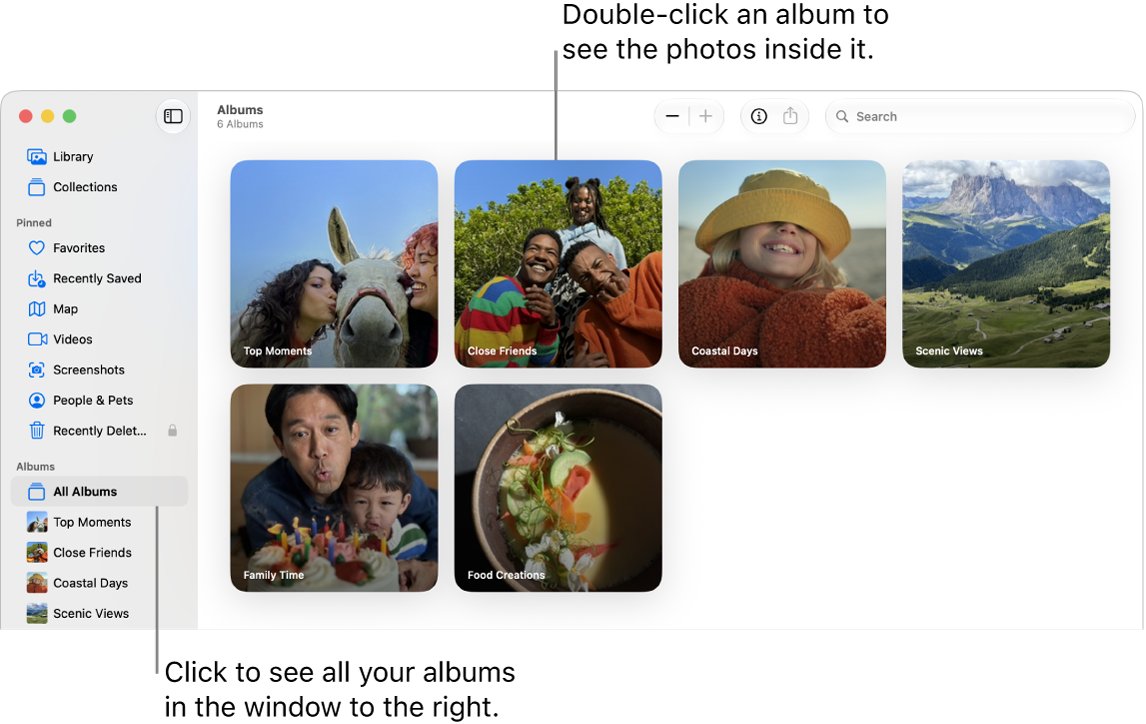
Play a Photos album as a slideshow on Mac
An instant slideshow plays the album as it is, with no project to save.
- Open the Photos app on your Mac.
- Control-click the album in the sidebar.
- Choose Start Slideshow.
- Click Customize, then Transition & Duration to change the transition and speed.
- Click Music, then Choose Song to pick a track.
- Turn on Loop if the slideshow should repeat when it ends.
To play only some photos, select them in the library and choose File > Play Slideshow instead.
Photos slideshow vs PowerPoint photo album
| What you need | Use this | Result |
|---|---|---|
| Show the album once on your Mac | Start Slideshow on the album | Plays now, nothing saved |
| A reusable slideshow with a theme and music | Slideshow project in Photos | Saved under Projects |
| A video file to share or play on a TV | Export Slideshow | Video at 480p, 720p or 1080p |
| An editable .pptx on a Mac without PowerPoint for Windows | Keynote, then Export To PowerPoint | PowerPoint file with one photo per slide |
| A .pptx with captions and frame shapes | PowerPoint Photo Album from exported photos | New presentation built from the pictures |
Create a slideshow project from an album in Photos
A slideshow project keeps your theme, music and timing, so you can edit and export it later.
- Open the album, then select the photos and videos you want. Press Command + A to select them all.
- Choose File > Create > Slideshow > Photos.
- Click the Slideshow pop-up menu, choose New Slideshow, type a name and click OK.
- Click the Themes button and pick a theme. The theme sets text position, fonts and transitions.
- Click the Music button, click the down arrow next to Music Library, and select one or more songs.
- Click the Duration button and choose Fit to Music or Custom, then set the Transition option.
- Select Scale photos to fit screen so every slide fills the display.
- Click Preview to check it, then click Play. Press Esc to stop.
To add more pictures, click the Add button in the thumbnail row, choose Add Photos, select them and click Add. Choose Add Text from the same button to put a title on a slide.
Export a Photos slideshow as a video
Photos cannot save a slideshow as a PowerPoint file, but it can save one as a movie you can play anywhere or insert into a deck.
- Click the slideshow under Projects in the Photos sidebar.
- Click Export in the toolbar, or choose File > Export > Export Slideshow.
- Type a name in the Save As field.
- Open the Format pop-up menu and choose Standard definition (480p), 720p or 1080p.
- Choose a location and click Save.
Export album photos from Photos for PowerPoint
Both PowerPoint routes start with the album's photos saved as ordinary image files. JPEG keeps the file size down; PNG and TIFF are lossless.
- Open the album in Photos and press Command + A to select every photo.
- Choose File > Export > Export [number] Photos.
- Open the Photo Kind pop-up menu and choose JPEG.
- Click the down arrow beside Photo Kind and set JPEG Quality and Size.
- Open the File Name pop-up menu and choose Sequential so the files stay in album order.
- Set Subfolder Format to None.
- Click Export, choose a folder, and click Export again.
A Live Photo exported with Export Unmodified Original becomes two files, a still and a video, so use the standard export for slides.
Export a Photos album to PowerPoint with Keynote
Keynote is Apple's free presentation app and saves directly to the .pptx format that PowerPoint opens and edits.
- Open Keynote and create a new presentation.
- Click the Insert Media button in the toolbar and choose Choose Photos or Videos.
- Pick a photo from the album and add it to the slide. Repeat on a new slide for each photo, or drag the exported files onto slides.
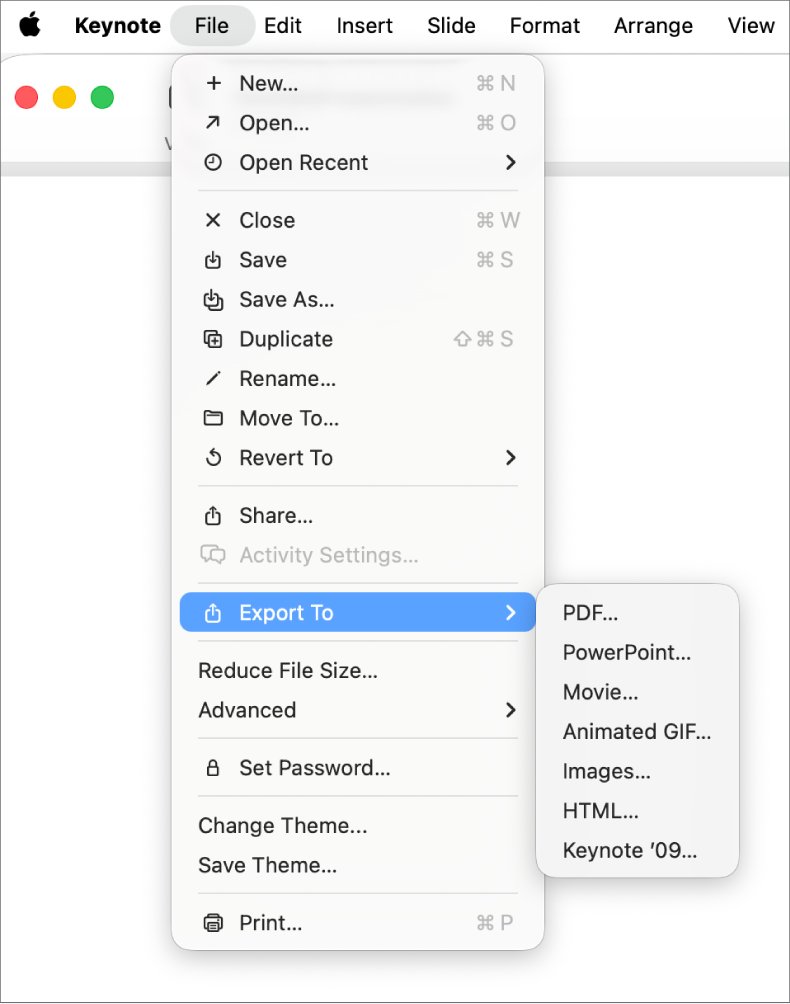
- Choose File > Export To > PowerPoint.
- Click Save and type a name without an extension.
- Click the Where pop-up menu, choose a location, and click Export.
The exported .pptx is a copy, so later edits in PowerPoint do not change the Keynote file. Keynote can also export the deck as a movie, PDF or images from the same Export To menu.
Create a photo album in PowerPoint from exported photos
The Photo Album command builds a full presentation from a folder of pictures. Microsoft documents it for PowerPoint for Microsoft 365, 2024, 2021, 2019 and 2016 on Windows, so copy the exported folder to a Windows PC or OneDrive first.
- Open PowerPoint and go to the Insert tab.
- Click the arrow under Photo Album and choose New Photo Album.
- Under Insert picture from, click File/Disk.
- Open the exported folder, select all the pictures and click Insert.
- Select a file under Pictures in album and use the arrow buttons to change its position.
- Choose a Picture layout and Frame shape under Album Layout.
- Click Create.
Add captions and a theme to a PowerPoint photo album
Open the dialog with Insert > Photo Album > Edit Photo Album, make the change, then click Update.
| Change | Where in Edit Photo Album | Note |
|---|---|---|
| Captions | Picture Options > Captions below ALL pictures | Pick a Picture layout first if it is greyed out; the file name becomes the placeholder caption |
| Theme | Album Layout > Theme > Browse | Choose one in the Choose Theme box |
| Black and white | Picture Options > ALL pictures black and white | Applies to every picture |
| Rotate, brightness, contrast | Pictures in album list, buttons under the preview | Select one picture first |
| Remove a picture | Pictures in album > Remove | Deletes it from the album only |
To match the look of other decks, you can also format the slide background after the album is built.
Check the exported slideshow or PowerPoint file
- Look under Projects in the Photos sidebar and confirm the slideshow name is listed.
- Open the folder you exported to and play the movie file; the music and transitions should match the preview.
- Open the Keynote .pptx in PowerPoint and confirm each photo sits on its own slide.
- In a PowerPoint photo album, confirm the pictures appear in the order set under Pictures in album.
Photos slideshow and photo album problems
Captions below ALL pictures is greyed out in PowerPoint
The default Fit to slide layout has no room for captions.
- Open Insert > Photo Album > Edit Photo Album.
- Choose a Picture layout under Album Layout.
- Select Captions below ALL pictures and click Update.
Slideshow projects do not appear in the sidebar
iCloud Shared Photo Library is showing only one library.
- Open the Library pop-up menu in Photos.
- Choose Both Libraries.
- Look under Projects in the sidebar again.
Some music or duration options are missing
Not every option is available with every slideshow theme.
- Click the Themes button.
- Choose a different theme.
- Open Duration again to see the options.
Photos album slideshow and PowerPoint FAQ
How do I make a photo album in Photos on Mac?
Select the photos, then choose File > New Album with Selection and type a name. The album appears under Albums in the sidebar, and you can play it as a slideshow by Control-clicking it and choosing Start Slideshow.
How do I put photos in an album?
Drag the selected photos onto the album name in the Photos sidebar. The photos stay in your library; the album only groups them, so removing one from the album does not delete it from the library.
How do I add music to an album slideshow?
In an instant slideshow, click Customize, then Music and Choose Song. In a slideshow project, click the Music button and pick songs from Music Library or Theme Songs, then drag them to set the order.
How do I play an album as a slideshow?
Control-click the album in the Photos sidebar and choose Start Slideshow. Press Esc to stop, the arrow keys to move between slides, and the Space bar to pause.
Can Photos export a slideshow directly to PowerPoint?
No. Photos exports a slideshow only as a video. Insert that video into a PowerPoint slide, or build the deck in Keynote and use File > Export To > PowerPoint to get an editable .pptx file.
How do I create an album in PowerPoint?
Go to Insert, click the arrow under Photo Album and choose New Photo Album. Click File/Disk, select your pictures, set the layout and click Create. PowerPoint builds a new presentation from the pictures.
How do I make an album slideshow for free?
Photos and Keynote both come free on a Mac. Photos plays and exports slideshows with themes and music, and Keynote turns the same pictures into a presentation that saves as a PowerPoint file.