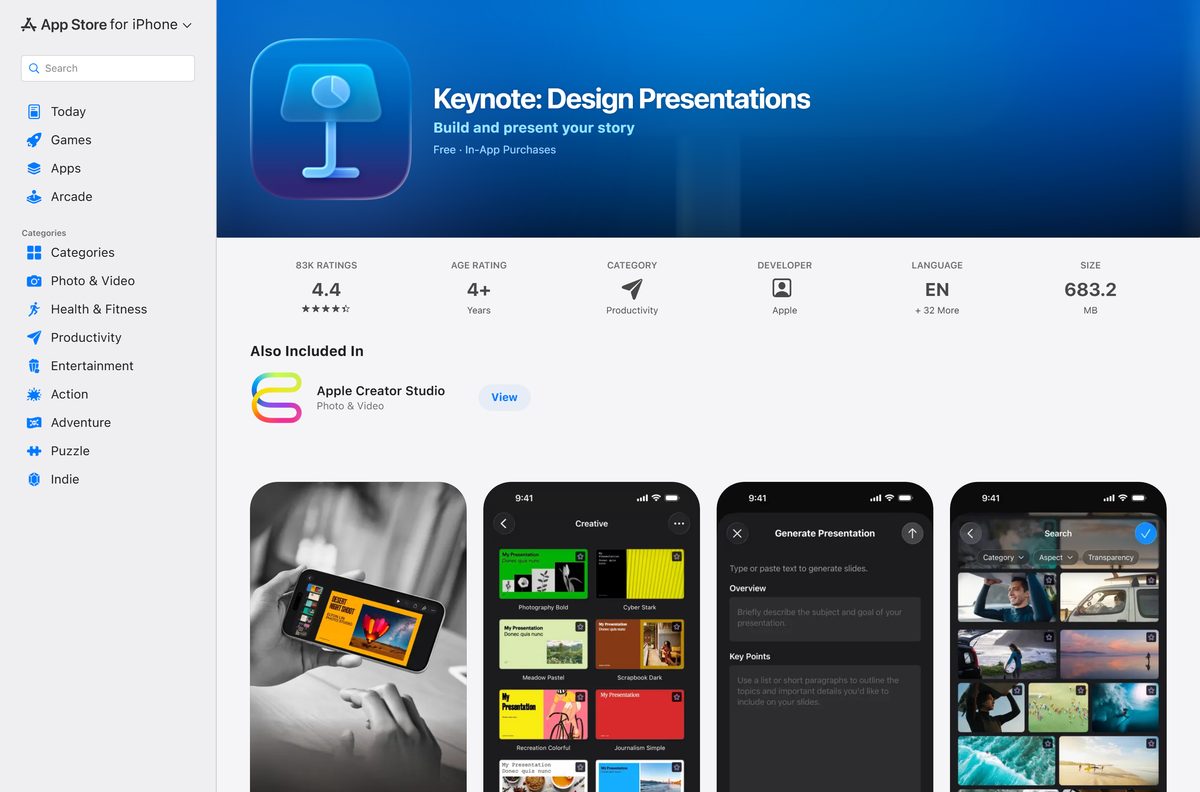
Apple Keynote download links live in the App Store, and the presentation app costs nothing on Mac, iPhone, iPad, Apple Vision Pro and Apple Watch. One listing, named Keynote: Design Presentations, serves every one of those devices.
A Windows 11 or Windows 10 PC gets the same slides through Keynote for iCloud. Sign in at icloud.com in Microsoft Edge or Google Chrome and the whole editor opens in the tab.
Below: the right route for your device, install steps, PowerPoint import and export, the iPhone remote, fixes and clean removal.
Which Apple Keynote download do you need?
Every Apple device pulls from one App Store listing. A PC downloads nothing at all.
| Your device | What to open | Size | What you get |
|---|---|---|---|
| Mac on macOS 15.6 or later | App Store listing | 369.2 MB | The full slide editor and presenter display |
| iPhone on iOS 18.0 or later | App Store listing | 683.2 MB | Editing, plus remote control for a Mac slideshow |
| iPad on iPadOS 18.0 or later | App Store listing | 683.2 MB | Apple Pencil drawing and motion paths |
| Apple Vision Pro on visionOS 2.4 or later | App Store listing | 683.2 MB | Rehearsal in a Conference Room or Theater space |
| Windows 11 or Windows 10 PC | Keynote for iCloud | Nothing to download | The editor in an Edge or Chrome tab |
Apple ships no exe, msi or apk here. A setup file offered under this name elsewhere did not come from Apple.
Download Apple Keynote from Apple’s own pages
- Keynote: Design Presentations on the App Store — 683.2 MB · Version 15.3, seller Apple Inc., category Productivity
- Keynote for iCloud — Sign in with an Apple Account, nothing installs on the PC
- Keynote Support and user guides — Separate guides for Mac, iPad, iPhone and iCloud
Check the Apple Keynote system requirements before you install
| Field | Detail |
|---|---|
| Software | Keynote: Design Presentations |
| Developer | Apple Inc. |
| Latest version | 15.3 |
| Released | 30 June 2026 |
| License / price | Free, with an optional Apple Creator Studio subscription |
| Download size | 683.2 MB on the iPhone view, 369.2 MB on the Mac view |
| Supported OS | macOS 15.6, iOS 18.0, iPadOS 18.0, visionOS 2.4 or watchOS 11.0 and later |
| Architecture | Apple silicon and Intel Macs; no x64 or ARM64 Windows build |
| Windows route | Keynote for iCloud in Microsoft Edge or Google Chrome |
| Category | Productivity, also listed under Business |
| Official download source | App Store |
| Offline installer | No |
| Last verified | 22 September 2026 |
How to install Apple Keynote on a Mac, iPhone or iPad
One listing covers all three devices, so the sequence changes only in the button labels.
- Open the App Store from the Dock on a Mac, or from the Home Screen on an iPhone or iPad.
- Search for Keynote, then open the result named Keynote: Design Presentations.
- Check that the seller line reads Apple Inc. and the price reads Free.
- Select Get, then select Install.
- Sign in with your Apple Account, or confirm with Face ID or Touch ID.
- Wait for the transfer to finish. The button then reads Open.
- Open the app, then double-click a theme in the theme chooser to start a deck.
- Turn on iCloud Drive for the app so the same deck opens on your other devices.
The in-app purchases belong to Apple Creator Studio. Ignore them and the slide editor still works.
How to run Apple Keynote on Windows 11 and Windows 10
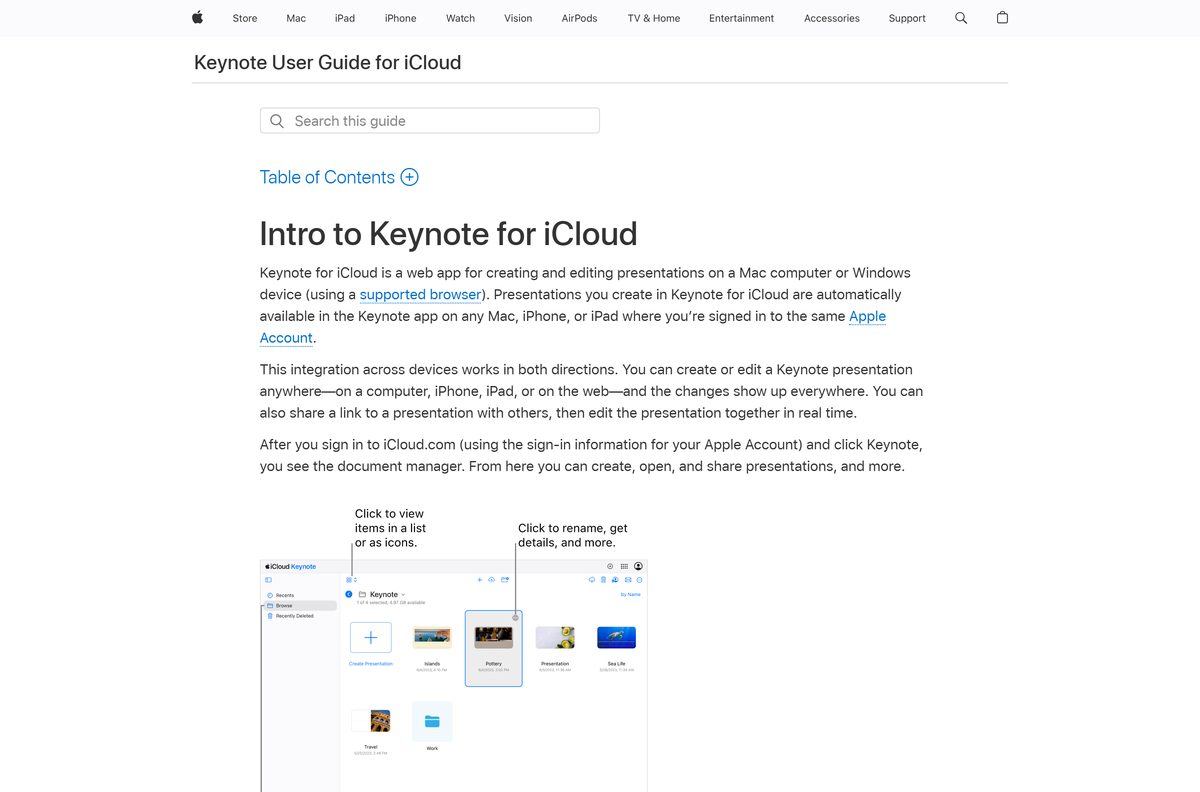
Apple calls this a web app for creating and editing presentations on a Mac computer or a Windows device. It needs a supported browser and an Apple Account, and it puts no files on the PC.
- Open Microsoft Edge or Google Chrome. Those are the two browsers Apple supports on a Windows device.
- Go to icloud.com and sign in with your Apple Account.
- Click Keynote to open the document manager.
- Click the Create Presentation button in the toolbar.
- Choose Standard (4:3) from the pop-up menu at the top right if you need the narrow aspect ratio.
- Double-click a theme, then double-click the placeholder text on the title slide and type.
- Click the presentation name at the top, type a new name, then press Enter.
- Drag a PowerPoint file from the PC onto the document manager to bring an existing deck in.
- Click the play button in the toolbar to preview, then press Esc to stop.
There is no Save command; changes are written to iCloud as you make them. Apple’s own Windows lineup stops at Apple Music, Apple TV, Apple Devices and iTunes.
Which Apple Keynote route fits your Mac?
Click the Apple menu, then choose About This Mac to read the system version.
| Your Mac reports | What happens | Where to go |
|---|---|---|
| macOS 15.6 or later | The current release installs and runs | App Store listing |
| macOS 15.0 to 15.5 | Run Software Update first, then the install succeeds | App Store listing |
| macOS 14 Sonoma or older | The current release will not install | Keynote for iCloud |
| A Mac that cannot be updated | Build and present in the browser instead | Keynote for iCloud |
How to tell a genuine Apple Keynote download from a fake
There is no checksum to compare; the App Store signs and delivers the package. Check the listing details instead.
- Confirm the listing title reads Keynote: Design Presentations, not a longer marketing phrase.
- Scroll to Information and check the Seller line reads Apple Inc.
- Check the price reads Free and the category reads Productivity.
- Treat any exe, msi, dmg or apk offered under this name as somebody else’s file.
- On Windows, check the address bar reads icloud.com before you type your Apple Account password.
Is Apple Keynote free?
Yes. The App Store lists the price as Free, and building, viewing, editing and presenting need no subscription. The in-app purchases belong to Apple Creator Studio, a separate bundle at $12.99 per month or $129 per year after one free month, and $2.99 per month for students and educators. Skip it and every theme, transition, build and export still works.
Should you present from the Mac app or from the browser?
Present from the Mac app when the deck matters, and use the browser when the machine is not yours. The Mac app carries the presenter display, recorded narration and movie export, and an iPhone or iPad can drive the slideshow once you enable Remote in its settings and match the four-digit code. Keynote for iCloud covers building, editing and real-time collaboration on a borrowed PC where nothing can be installed.
How to check your Apple Keynote version and update it
The Mac user guide is written against release 15.3, which is the number to match.
- On a Mac, click Keynote in the menu bar, then choose About Keynote.
- Compare the number shown with the current release.
- Open the App Store, then click Updates in the sidebar.
- Click Update next to the app, or click Update All.
- On an iPhone or iPad, open the App Store and tap the My Account button.
- Tap App Updates, then tap Update next to the app.
- In a browser there is nothing to update, because iCloud serves the current build.
This release added shift, radial wipe and character blur transitions, and quicker image replacement from the Content Hub.
What Apple Keynote can import and export
PowerPoint travels in both directions, which decides most Windows handovers.
| Task | Where | Formats |
|---|---|---|
| Bring an existing deck in | Browser version, drag onto the document manager | Keynote for Mac and Microsoft PowerPoint |
| Hand a deck to a PowerPoint user | Mac app, File then Export To | PowerPoint (.pptx) |
| Send a read-only copy | Mac app, File then Export To | PDF, Images, HTML |
| Ship a self-running version | Mac app, File then Export To | Movie, Animated GIF |
| Reach an old copy of the app | Mac app, File then Export To | Keynote ’09, which opens in Keynote 5.0 to 5.3 |
| Lock the file | Browser version, More then Set Password | Encrypts the presentation |
A password on the original carries over to PDF, PowerPoint and Keynote ’09 copies. Apple states a forgotten one cannot be recovered.
Fix Apple Keynote not downloading, installing or presenting
The Get button does nothing
The device is not signed in to an Apple Account, or the storefront region changed.
- Open Settings, tap your name, and confirm the Apple Account is signed in.
- On a Mac, open the App Store, choose Store, then Sign In.
- Tap Get again and confirm with Face ID, Touch ID or your passcode.
- Toggle Wi-Fi off and on if the progress ring never fills.
The App Store will not install it on your Mac
The current release needs macOS 15.6 or later.
- Click the Apple menu and choose About This Mac to read the version.
- Open System Settings, select General, then Software Update.
- Install whatever macOS update is offered, then reopen the listing.
- Switch to the browser version on a Mac that cannot be updated.
The iPhone remote never links to the Mac
Local network access is off, or the two devices are on different Wi-Fi networks.
- Put the Mac and the iPhone on the same Wi-Fi network.
- On the iPhone, open Settings, tap Privacy, tap Local Network, then turn the app on.
- On the Mac, choose Keynote then Settings, click Remote, and select Enable.
- Click Link beside the device, check the four-digit codes match, then click Confirm.
iCloud.com will not open the editor on your PC
The browser is not one Apple supports for this web app.
- Switch to Microsoft Edge or Google Chrome on Windows.
- Update the browser, then reload icloud.com.
- Turn off any extension that blocks scripts on icloud.com.
- Open a private window and sign in again if the document manager stays empty.
How to uninstall Apple Keynote and keep your presentations
Removing the app leaves the files alone. They stay in iCloud Drive until you delete them.
- On a Mac, open Finder and click Applications in the sidebar.
- Drag the app to the Bin, then empty the Bin.
- On an iPhone or iPad, touch and hold the icon, tap Remove App, then tap Delete App.
- Open the Files app, or icloud.com, to confirm the decks are still listed.
- Delete the app’s iCloud Drive folder only when you want those files gone as well.
- Reinstall from the same App Store listing at any time, at no charge.
Which Apple Keynote alternative should a Windows user pick?
A PC has two workable routes, and only one of them is Apple’s.
| Option | Cost | Where it runs | Link |
|---|---|---|---|
| Keynote for iCloud | Free with an Apple Account | Edge or Chrome on Windows, Safari 13.1 or later on a Mac | icloud.com |
| Microsoft PowerPoint for Mac | Free to download, 1.08 GB, macOS 14.0 or later | Mac | App Store |
| Microsoft PowerPoint for iPhone and iPad | Free to download, 469.2 MB, iOS 18.0 or later | iPhone and iPad | App Store |
Stay with the browser editor when the deck already lives in iCloud. Move to PowerPoint when colleagues must edit the same .pptx on Windows.
Frequently asked questions
Is Apple Keynote free?
Yes. The App Store lists the price as Free, and creating, viewing, editing and real-time collaboration need no subscription. The in-app purchases belong to Apple Creator Studio, which costs $12.99 a month or $129 a year.
Is there an Apple Keynote download for Windows 11?
No installer, but the app itself works. Sign in at icloud.com in Microsoft Edge or Google Chrome and click Keynote. Apple’s Windows lineup stops at Apple Music, Apple TV, Apple Devices and iTunes.
What is the official Apple Keynote download page?
The App Store listing named Keynote: Design Presentations. It covers Mac, iPhone, iPad, Apple Vision Pro and Apple Watch from one page, and the seller line on it reads Apple Inc.
How big is the Apple Keynote download?
The App Store shows 683.2 MB on the iPhone view of the listing and 369.2 MB on the Mac view. The browser version downloads nothing at all, because it runs inside the tab.
Is there an offline installer?
No. Delivery runs through the App Store on Apple hardware and through the browser on Windows. Apple publishes no standalone package you can copy from one machine to another.
Which macOS version does Apple Keynote need?
macOS 15.6 or later for the current release. An iPhone needs iOS 18.0 or later, an iPad needs iPadOS 18.0 or later, Apple Vision Pro needs visionOS 2.4 and Apple Watch needs watchOS 11.0.
Can Apple Keynote open PowerPoint files?
Yes. Drag a .pptx file onto the document manager in the browser version, or open it in the Mac app. Exporting back to PowerPoint uses File, then Export To, and produces a .pptx file.
Is Apple Keynote safe to download?
Yes, from the App Store. Check the title reads Keynote: Design Presentations, the seller reads Apple Inc. and the price reads Free. Any exe, msi or apk under this name is not Apple’s work.
What is the latest Apple Keynote version?
Version 15.3, released on 30 June 2026. It added shift, radial wipe and character blur transitions, more builds, and faster image replacement from the Content Hub.
Is there a 64-bit or ARM64 build for a PC?
No. Apple ships no Windows binary in any architecture. On Apple hardware the app runs on Apple silicon and Intel Macs, plus iPhone, iPad, Apple Vision Pro and Apple Watch.
Which browsers work with Keynote for iCloud?
Microsoft Edge and Google Chrome on a Windows device, and Safari 13.1 or later or Google Chrome on a Mac. An unsupported browser leaves the document manager blank.
Can an iPhone control a slideshow on a Mac?
Yes. Put both on the same Wi-Fi network, enable Remote in the Mac app’s settings, then match the four-digit code. An Apple Watch paired with that iPhone can advance slides too.
Why will Apple Keynote not install on my Mac?
Usually the macOS version. The current release needs macOS 15.6 or later, so run Software Update first. A Mac that cannot be updated still opens the browser version at icloud.com.