To type an accented e, press and hold the E key on a Mac, iPhone, iPad, Android phone or Chromebook and pick é, è, ê or ë from the menu; on Windows, hold Alt and type 0233 on the numeric keypad for é.
This guide covers Windows Alt codes, the emoji and symbols panel, the US-International layout, Mac Option-key shortcuts, phones, Word, Google Docs, and fixes for when the accent will not appear.
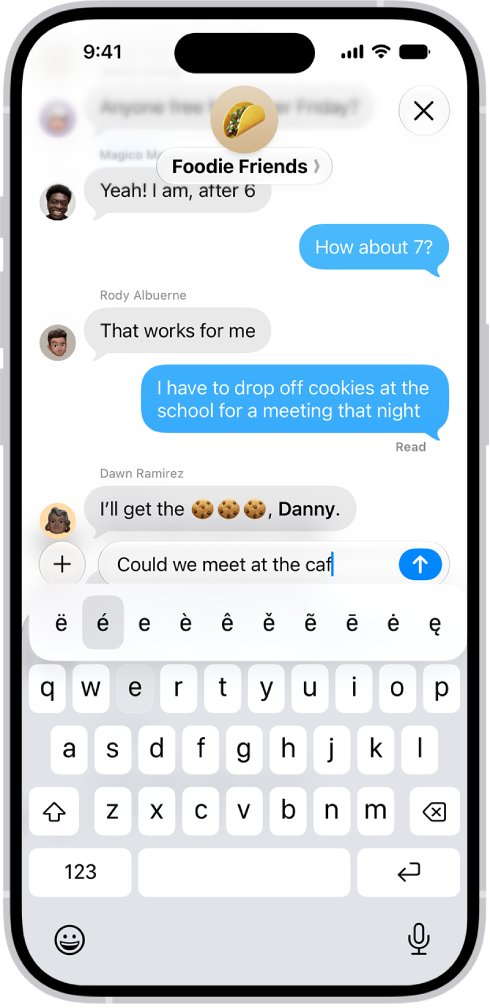
Fastest Method by Device
Find your device in the left column and use the method beside it. Each one types the accented letter straight into the text box you are working in.
| Your device | Fastest method | Why it is fastest |
|---|---|---|
| Windows PC with a numeric keypad | Hold Alt, type 0233 (é), 0232 (è), 0234 (ê) or 0235 (ë) on the keypad, release Alt | Works in almost any app once you know the four codes |
| Windows laptop without a keypad | Press Windows logo key + . and pick the letter under Symbols | No number pad needed |
| Microsoft Word or Outlook on Windows | Ctrl + ' then e gives é | Easy-to-remember shortcuts built into Office |
| Mac | Press and hold E, then press the number under the accent | Built in, nothing to set up |
| iPhone or iPad | Touch and hold e, slide to the accent, release | Built into the Apple keyboard |
| Android with Gboard | Touch and hold e, slide to the accent, release | Built into Gboard |
| Chromebook | Hold the E key, then pick from the accents menu | Works with the default keyboard |
Quick Reference: E Accent Characters
Each accent has a name, and the name decides which shortcut you need. The table puts the four lowercase letters side by side with the shortcut for each platform.
| Letter | Accent name | Windows Alt code | Word / Outlook | Mac | Phone or tablet |
|---|---|---|---|---|---|
| é | Acute | Alt + 0233 (or Alt + 130) | Ctrl + ' then e | Option-E then E | Hold e, pick é |
| è | Grave | Alt + 0232 (or Alt + 138) | Ctrl + ` then e | Option-` then E | Hold e, pick è |
| ê | Circumflex | Alt + 0234 (or Alt + 136) | Ctrl + Shift + ^ then e | Option-I then E | Hold e, pick ê |
| ë | Diaeresis (umlaut) | Alt + 0235 (or Alt + 137) | Ctrl + Shift + : then e | Option-U then E | Hold e, pick ë |
For capitals, Microsoft lists Alt + 144 for É and Alt + 0200 for È. In Word and Outlook, use the same Ctrl shortcut and type a capital E to get É, È, Ê or Ë.
How to Type É, È, Ê, and Ë on Windows
Alt codes are the classic Windows method. They need the numeric keypad; the number row above the letters does not work, which rules out most small laptops.
- Click where you want the letter to appear.
- Turn on Num Lock if your keyboard needs it for the keypad to type numbers.
- Press and hold the Alt key.
- On the numeric keypad, type 0233 for é, 0232 for è, 0234 for ê or 0235 for ë.
- Release Alt. The accented letter appears at the cursor.
- For a capital, hold Alt and type 144 for É or 0200 for È.
If your laptop has no keypad, use the symbols panel in the next section instead. The same keypad rule applies to other Alt codes, such as those in the forward slash guide.
Use the Windows Emoji and Symbols Panel
The emoji panel also holds a Symbols tab with accented letters. It works on laptops without a numeric keypad and covers the capital letters too.
- Click in the text box where you want the letter.
- Press Windows logo key + . (period) to open the emoji panel.
- Select Symbols in the panel.
- Scroll through the symbols to the accented letters.
- Click é, è, ê, ë or one of their capitals to insert it.
- Close the panel when you are done.
Use the US-International Keyboard on Windows
If you type accents every day, a second keyboard layout is quicker than codes. Windows calls it United States-International, and it turns some punctuation keys into accent keys. The same process adds any layout, as in the Dvorak keyboard guide.
- Open Start > Settings > Time & language > Language & region.
- Select the … button next to your display language, then Language options.
- Under Keyboards, select Add a keyboard.
- Choose United States-International from the list.
- Press Windows logo key + Spacebar to switch to the new layout.
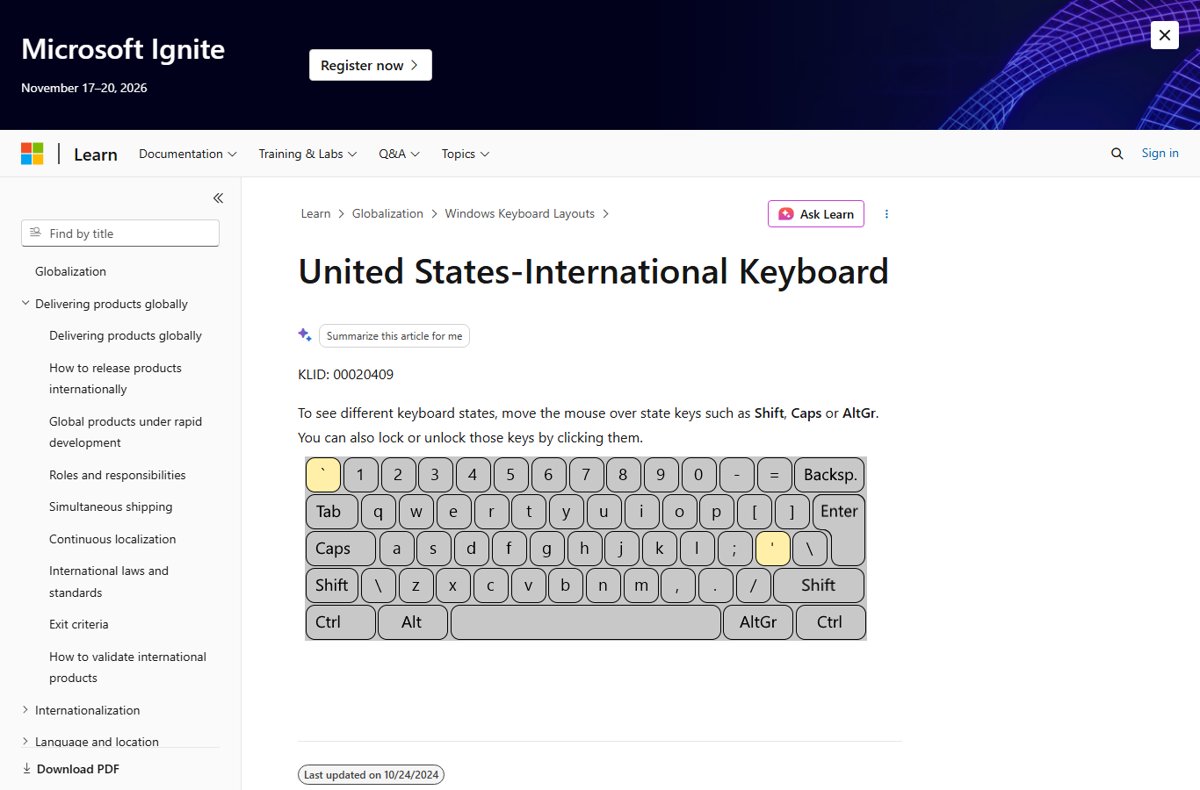
- Press the accent key, then e: ' for é, ` for è, Shift + 6 for ê, or Shift + ' for ë.
Microsoft publishes an interactive map of the United States-International layout. Hover over Shift or AltGr there to confirm which key gives each accent on your PC.
Use Character Map
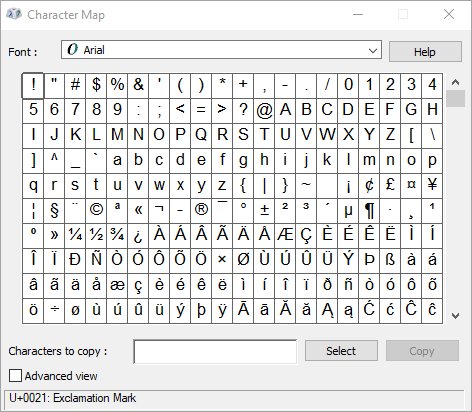
Character Map is built into Windows and shows every character in a font. It suits a one-off letter in a program that ignores the other methods.
- Type character in the taskbar search box and open Character Map.
- Choose the font you are using from the Font list.
- Click é, è, ê or ë in the grid.
- Click Select, then Copy.
- Right-click in your document where you want the letter and choose Paste.
How to Type E with an Accent on a Mac
Every Mac has a press-and-hold accent menu. Apple notes that the menu is not available in all apps, so the Option-key shortcuts below are the backup.
- Click in a text field, such as a document or an email.
- Press and hold the E key until the accent menu opens.
- Click the letter you want, such as é.
- Or press the number key shown under the letter.
- Or use the arrow keys to reach the letter, then press Space bar.
Use Mac Option-Key Shortcuts
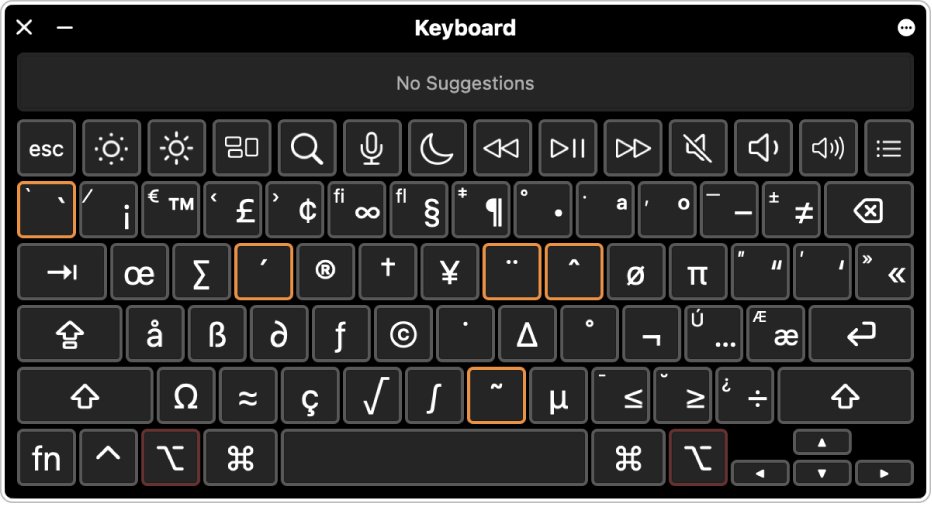
Option-key shortcuts are dead keys: the first combination types the accent, and the next letter receives it. They are faster than the menu once you know them.
| You want | Press first | Then type |
|---|---|---|
| é (acute) | Option-E | e (or Shift-E for É) |
| è (grave) | Option-` | e (or Shift-E for È) |
| ê (circumflex) | Option-I | e (or Shift-E for Ê) |
| ë (diaeresis) | Option-U | e (or Shift-E for Ë) |
To see the dead keys on your own layout, open the Keyboard Viewer and hold Option. An orange outline marks each dead key.
Use the Character Viewer on Mac
The Character Viewer lists every accented letter and inserts it with a click. It helps when an app has no accent menu.
- Click where you want the letter.
- Press Fn/Globe-E, or choose Edit > Emoji & Symbols.
- Type e or accent in the search field.
- Click the letter to add it to your text, or double-click it if the viewer is expanded.
How to Type Accented E on a Chromebook
ChromeOS has an accents menu for the physical keyboard, so most Chromebooks need no setup at all.
- Click in a text field.
- Hold down the E key until the accents menu opens.
- Press Tab or the right arrow to enter the menu.
- Use the arrow keys to highlight é, è, ê or ë.
- Press Enter or Space to insert it, or type the number shown under the letter.
For heavy accent typing, add the English (US) with International keyboard under Settings > Keyboard > Change input settings. On it, press ' then e for é, ` then e for è, Shift + 6 then e for ê, and Shift + ' then e for ë. The right Alt key (AltGr) plus e also gives é.
How to Type E with an Accent on iPhone and iPad
The onscreen keyboard on iPhone and iPad hides accents behind each letter. The steps are identical on both devices.
- Tap in any text field to open the keyboard.
- Touch and hold the e key.
- Slide your finger to é, è, ê or ë in the row that appears.
- Release your finger to insert the letter.
- Tap Shift first if you need a capital É, È, Ê or Ë.
With a Magic Keyboard attached, press Option-E, Option-`, Option-I or Option-U, then e. Apple documents these for the Spanish (Mexico) keyboard and the U.S. International — PC layout under Settings > General > Keyboard > Hardware Keyboard.
How to Type E with an Accent on Android
Gboard, the default keyboard on most Android phones, shows accents when you touch and hold a key.
- Tap in a text field to open Gboard.
- Touch and hold the e key.
- Slide your finger to é, è, ê or ë.
- Lift your finger to insert the letter.
- Tap Shift before holding e for a capital letter.
If no accents appear, another keyboard may be active; the troubleshooting section below shows how to switch back to Gboard.
How to Type Accented E in Microsoft Word
Word and Outlook on Windows share a set of accent shortcuts. Press the Ctrl combination, release it, then type the letter.
| You want | Press | Then type |
|---|---|---|
| é or É | Ctrl + ' (apostrophe) | e or E |
| è or È | Ctrl + ` (grave accent) | e or E |
| ê or Ê | Ctrl + Shift + ^ (caret) | e or E |
| ë or Ë | Ctrl + Shift + : (colon) | e or E |
To use the menu instead, go to Insert > Symbol > More Symbols, pick the font, and double-click the letter. Word also converts a Unicode code to its character when you type the code and press Alt + X.
How to Type Accented E in Google Docs
Google Docs has a special characters picker that also works in Google Slides. You can search it by drawing the letter.
- Open your document and click where the letter goes.
- Click Insert > Symbols > Special characters.
- Draw an é in the box on the right, or search the categories.
- Click the matching letter to add it to your file.
- Close the dialog.
Google Sheets has no special characters menu. Type the letter with your device's method, or copy it from Docs and paste it into the cell.
How to Type Accented E in Web Browsers, Email, and Social Media
Browsers, webmail and social apps have no accent shortcuts of their own. Use the method your device already provides, and it works in any text box.
| Where you are typing | Use this | Note |
|---|---|---|
| Any browser on Windows | Windows logo key + . or an Alt code | Works in address bars, Gmail and social posts |
| Classic or new Outlook on Windows | Ctrl + ' then e, or an Alt code | Microsoft documents both for Outlook |
| Any app on a Mac | Press and hold E | Fall back to Option-E then E if no menu appears |
| Social apps on a phone | Touch and hold e | The keyboard is the same in every app |
| A site that strips accents | Paste the letter from this page | If it still vanishes, the site does not accept it |
When to Use É, È, Ê, and Ë
The four marks change pronunciation or spelling, so they are not interchangeable. French uses all four, and English borrows words from it.
| Letter | Name | What it signals | Example words |
|---|---|---|---|
| é | Acute accent | A closed "ay" sound | café, résumé, fiancé |
| è | Grave accent | An open "eh" sound | crème, frère, très |
| ê | Circumflex | Often marks a lost letter s | fête, forêt, tête |
| ë | Diaeresis (umlaut) | Say this vowel separately | Noël, Citroën |
How to check you typed the right accent
Accent marks are small, and é and è are easy to confuse at normal text size.
- Zoom in with Ctrl and + on Windows or Command and + on a Mac.
- Check the direction of the mark: é rises to the right, è falls to the right.
- Check ê for a small hat and ë for two dots.
- Compare the letter with the quick reference table above.
- In Word, select the letter and confirm the font shows it, not an empty box.
Fix accented E when it does not work
The Alt code types nothing or the wrong character
Alt codes only work from the numeric keypad, and Num Lock must be on.
- Press Num Lock so the keypad types numbers.
- Hold Alt and type the code on the keypad, not the number row.
- Type all four digits of the code, including the leading zero in 0233.
- On a laptop without a keypad, press Windows logo key + . and use Symbols instead.
Your keyboard types é instead of a question mark
A second keyboard layout, such as a French one, is active.
- Press Windows logo key + Spacebar to cycle to your usual layout.
- Check the language code next to the clock shows the layout you expect.
- To stop it happening again, open Settings > Time & language > Language & region > Language options.
- Under Keyboards, select … next to the extra layout and choose Remove.
If Accents Do Not Appear on Android
Another keyboard is active, or Gboard was switched off after an update.
- Open a text app such as Gmail or Keep and tap in a text field.
- At the bottom of the keyboard, touch and hold Globe and tap Gboard.
- If Gboard is missing, open Settings > System > Keyboard > On-screen keyboard and turn on Gboard.
- Touch and hold e again.
Holding E on a Mac repeats the letter instead of showing accents
Apple notes the accent menu is not available in all apps.
- Try the same key in TextEdit to confirm the menu works there.
- In the app that fails, press Option-E and then e.
- Or open Edit > Emoji & Symbols and pick the letter.
Holding E on a Chromebook shows no menu
Accents and special characters are turned off for the physical keyboard.
- Select the time at the bottom right, then Settings.
- Under Device, select Keyboard > Change input settings.
- Next to English (US), select More.
- Under Physical keyboard, turn on accents and special characters.
Frequently Asked Questions
How do you type e with an accent on a keyboard?
On Windows, hold Alt and type 0233 on the numeric keypad for é, or press Windows logo key + period and choose it under Symbols. On a Mac or Chromebook, press and hold the E key and pick the accent from the menu that opens.
How do you type e with an accent on Windows?
Hold Alt and type 0233 (é), 0232 (è), 0234 (ê) or 0235 (ë) on the numeric keypad with Num Lock on. Without a keypad, press Windows logo key + period, open the Symbols tab and click the letter.
How do you type e with an acute accent?
The acute accent gives é. Use Alt + 0233 on Windows, Ctrl + ' then e in Word or Outlook, Option-E then E on a Mac, or touch and hold e on a phone and slide to é.
How do you type e with an umlaut?
The e with two dots is ë, called a diaeresis in French. Use Alt + 0235 on Windows, Ctrl + Shift + : then e in Word, Option-U then E on a Mac, or touch and hold e on a phone and choose ë.
How do you type e with an accent in Word?
Press Ctrl + ' then e for é, Ctrl + ` then e for è, Ctrl + Shift + ^ then e for ê, and Ctrl + Shift + : then e for ë. Type a capital E for the uppercase letter. Insert > Symbol also works.
How do you type e with an accent in Excel?
Use an Alt code on the numeric keypad, such as Alt + 0233 for é, while editing the cell. On a laptop without a keypad, press Windows logo key + period and pick the letter from Symbols. The Ctrl accent shortcuts are documented for Word and Outlook.
How do you type e with an accent on Canva?
Click into the Canva text box and use your device's own method: Windows logo key + period or an Alt code on Windows, press and hold E on a Mac, or touch and hold e on a phone. You can also paste the letter from another document.
How do you type different e's on a keyboard?
Each accented e has its own shortcut. On Windows, the Symbols tab in the Windows logo key + period panel lists every e variant, including ones with a line or other marks. On a Mac, Fn/Globe-E opens the Character Viewer, where you can search for them.
What is the Alt code for a capital É?
Microsoft lists Alt + 144 for É, typed on the numeric keypad. For È it lists Alt + 0200. In Word or Outlook, Ctrl + ' followed by Shift + E also gives É.