To turn Core isolation memory integrity on or off in Windows 11, open Windows Security > Device security > Core isolation details, flip the Memory integrity switch, and restart the PC.
This guide also covers the registry and Group Policy routes, how to prove the feature is running, and how to fix incompatible drivers, a greyed-out toggle and boot problems.
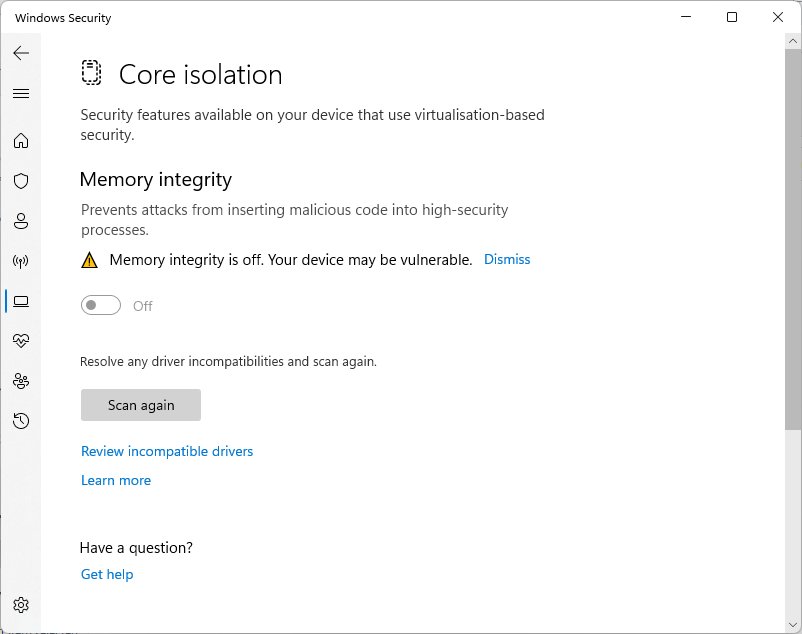
How to turn on memory integrity in Windows 11
The Windows Security app is the standard switch for home and work PCs alike. The same page exists on Windows 10.
- Select Start, type Windows Security and open the app.
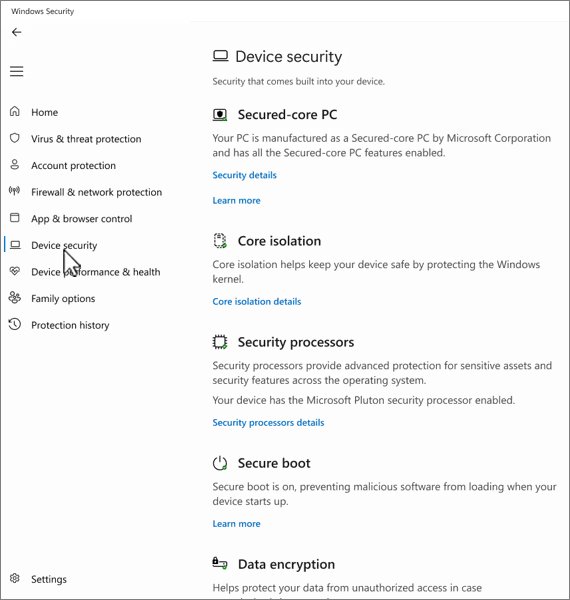
- Select Device security in the left pane.
- Under Core isolation, select Core isolation details.
- Set Memory integrity to On.
- Select Yes if User Account Control asks for permission.
- Restart the PC so the change takes effect.
To reach the same page from Settings, open Start > Settings > Privacy & security > Windows Security > Device security, then select Core isolation details under Core isolation.
If Windows refuses and names an incompatible driver, jump to the driver fixes further down before trying again.
How to turn off memory integrity in Windows 11
Microsoft's own advice is to turn it off only when a needed driver cannot load and no updated driver exists. On a Secured-core PC, turning it off takes the device out of its Secured-core state.
- Open Windows Security from the Start menu.
- Select Device security, then Core isolation details.
- Set Memory integrity to Off.
- Confirm the User Account Control prompt.
- Restart the PC.
- Check Windows Update or the device maker's site for a compatible driver, then switch the feature back on once it is installed.
Turning it off makes sense in three cases: a driver you depend on is blocked, a third-party hypervisor such as VMware or VirtualBox has to own the virtualization hardware, or the PC became unstable right after enabling it.
What is Core isolation memory integrity in Windows 11?
Memory integrity is a virtualization-based security (VBS) feature. It runs the kernel's code integrity checks inside an isolated environment created by the Windows hypervisor, so malware that reaches the kernel cannot tamper with them.
| Term | What it means |
|---|---|
| Core isolation | The Windows Security page that groups kernel protections running in a virtualized environment |
| Memory integrity | The main switch on that page; also called Hypervisor-protected Code Integrity (HVCI) |
| What it blocks | Kernel-mode code without a valid signature, and kernel memory pages that are both writable and executable |
| Extra protection | Guards the Control Flow Guard bitmap for kernel drivers and the kernel code integrity process itself |
| Device Guard | The old name; it still labels the Group Policy and registry locations for the setting |
| Vulnerable driver blocklist | Turns on automatically whenever memory integrity is on |
Should you turn memory integrity on or off?
| Your situation | Setting | Why |
|---|---|---|
| Everyday PC with compatible drivers | On | Kernel attacks through drivers become much harder, at little cost on modern CPUs |
| Windows Security warns that memory integrity is off | On | Windows 11 22H2 and later flag the off state as a security gap |
| A required device or app driver is blocked | Off until a fixed driver ships | The device will not work while its driver is blocked |
| You run VMware or VirtualBox VMs at full speed | Off, together with Hyper-V | Only one component can use the CPU's virtualization extensions |
| Older CPU (before Intel Kaby Lake or AMD Zen 2) | On, but watch performance | These CPUs emulate a missing feature, so the overhead is higher |
| Work PC managed by IT | Leave as set | The setting is controlled by policy and may be locked |
Memory integrity requirements: before you start
| Requirement | Details |
|---|---|
| Hardware virtualization | Must be enabled in the PC's UEFI or BIOS settings |
| Compatible drivers | Every kernel driver on the system must work with memory integrity, or the switch will refuse to turn on |
| Administrator account | Changing the switch, the registry or Group Policy needs admin rights |
| A restart | The change applies only after the next reboot |
| A recovery path | Know how to reach Windows Recovery Environment in case a driver fails at boot |
Clean installs of Windows 11 turn memory integrity on by default when the hardware qualifies: an Intel 8th-generation or newer CPU (on 22H2 and later), AMD Zen 2 or newer, or Snapdragon 8180 or newer, plus 8 GB of RAM on x64, a 64 GB SSD and virtualization enabled. Upgraded PCs keep whatever state they had.
Default enablement also covers every Secured-core PC. On a PC that misses the automatic enablement thresholds, the feature is simply off, and you can opt in with any method below.
How to turn memory integrity on or off using the Registry
The registry route helps when the Windows Security page will not open or you are scripting several PCs. Run each line in an elevated Command Prompt.
- Select Start, type cmd, right-click Command Prompt and choose Run as administrator.
- To turn VBS on, run
reg add "HKLM\SYSTEM\CurrentControlSet\Control\DeviceGuard" /v "EnableVirtualizationBasedSecurity" /t REG_DWORD /d 1 /f. - To require Secure Boot for VBS, run
reg add "HKLM\SYSTEM\CurrentControlSet\Control\DeviceGuard" /v "RequirePlatformSecurityFeatures" /t REG_DWORD /d 1 /f. - To turn memory integrity on, run
reg add "HKLM\SYSTEM\CurrentControlSet\Control\DeviceGuard\Scenarios\HypervisorEnforcedCodeIntegrity" /v "Enabled" /t REG_DWORD /d 1 /f. - To keep it unlocked so it can be switched off later, run
reg add "HKLM\SYSTEM\CurrentControlSet\Control\DeviceGuard\Scenarios\HypervisorEnforcedCodeIntegrity" /v "Locked" /t REG_DWORD /d 0 /f. - To turn memory integrity off instead, run the same
Enabledcommand with/d 0in place of/d 1. - Restart the PC.
If the Windows Security switch is greyed out with This setting is managed by your administrator after a registry change, run reg add HKLM\SYSTEM\CurrentControlSet\Control\DeviceGuard\Scenarios\HypervisorEnforcedCodeIntegrity /v "WasEnabledBy" /t REG_DWORD /d 2 /f to make the switch behave normally again.
Avoid setting Locked to 1 on a home PC. With the UEFI lock, turning the feature off later means disabling Secure Boot in firmware first.
To use a REG file instead, set the values on one PC, then run reg export "HKLM\SYSTEM\CurrentControlSet\Control\DeviceGuard" memint.reg /y in the elevated Command Prompt. Copy memint.reg to the other PC and run reg import memint.reg as administrator, or double-click the file and approve the prompts, then restart.
How to manage memory integrity with Group Policy or MDM
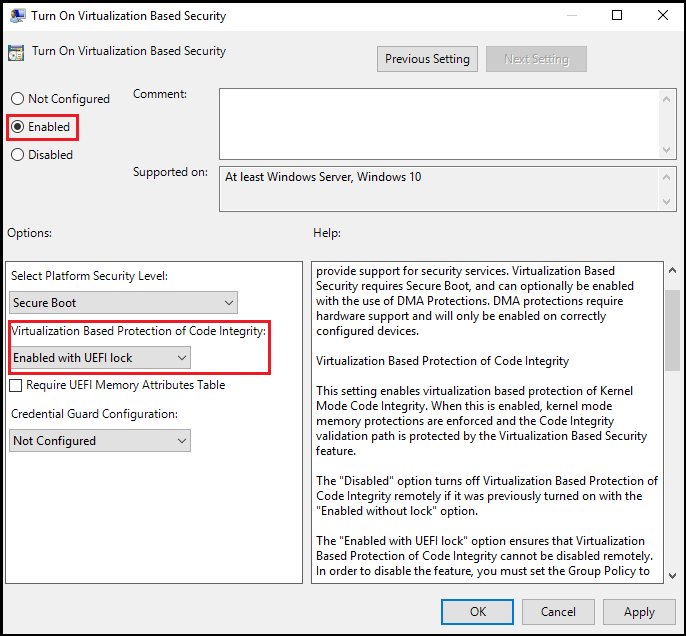
Use Group Policy on editions that include the Local Group Policy Editor, such as Windows 11 Pro, Enterprise and Education. Policy settings override the Windows Security switch.
- Press Win + R, type
gpedit.mscand press Enter. - Go to Computer Configuration > Administrative Templates > System > Device Guard.
- Double-click Turn on Virtualization Based Security.
- Select Enabled.
- Under Virtualization Based Protection of Code Integrity, choose Enabled without UEFI lock.
- Select OK, then restart or run
gpupdate /forcein an elevated Command Prompt. - To turn the feature off by policy, set the same policy to Disabled and restart.
In Microsoft Intune, use the settings catalog entry Virtualization Based Technology > Hypervisor Enforced Code Integrity, or the HypervisorEnforcedCodeIntegrity node in the VirtualizationBasedTechnology CSP.
If the PC belongs to an organization and the switch says it is managed, the change has to come from the IT administrator, not from the local machine.
Memory integrity deployment in virtual machines
Memory integrity protects a Hyper-V virtual machine the same way it protects a physical PC, and you turn it on inside the guest with the same switch.
- Check that the Hyper-V host runs Windows 10 version 1607, Windows Server 2016 or later.
- Use a Generation 2 virtual machine running Windows 10, Windows Server 2016 or later.
- Inside the virtual machine, open Windows Security > Device security > Core isolation details and set Memory integrity to On.
- Restart the virtual machine.
- To opt a VM out from the host instead, run
Set-VMSecurity -VMName <VMName> -VirtualizationBasedSecurityOptOut $truein an elevated PowerShell window on the host.
Inside a VM, memory integrity guards against malware running in the guest, not against the host administrator. Virtual Fibre Channel adapters and pass-through disks set with AllowFullSCSICommandSet are not compatible, so opt the VM out with Set-VMSecurity before adding them. Nested virtualization can stay on alongside memory integrity.
How to check whether memory integrity is actually running
A switch set to On only means the feature is configured. These checks show whether it is running after the restart.
- Open Windows Security > Device security and confirm Memory integrity reads On under Core isolation details.
- Scroll to the bottom of Device security; Your device meets the requirements for enhanced hardware security means memory integrity is on.
- Press Win + R, type
msinfo32and press Enter to open System Information. - In System Summary, find Virtualization-based security Services Running and check that it lists Hypervisor enforced Code Integrity.
- For a scriptable check, open PowerShell as administrator and run
Get-CimInstance -ClassName Win32_DeviceGuard -Namespace root\Microsoft\Windows\DeviceGuard. - Look for the value 2 in SecurityServicesRunning; that number means memory integrity is running.
In the same output, VirtualizationBasedSecurityStatus reads 2 when VBS is enabled and running, and 1 when it is enabled but not running.
What to do if memory integrity will not turn on
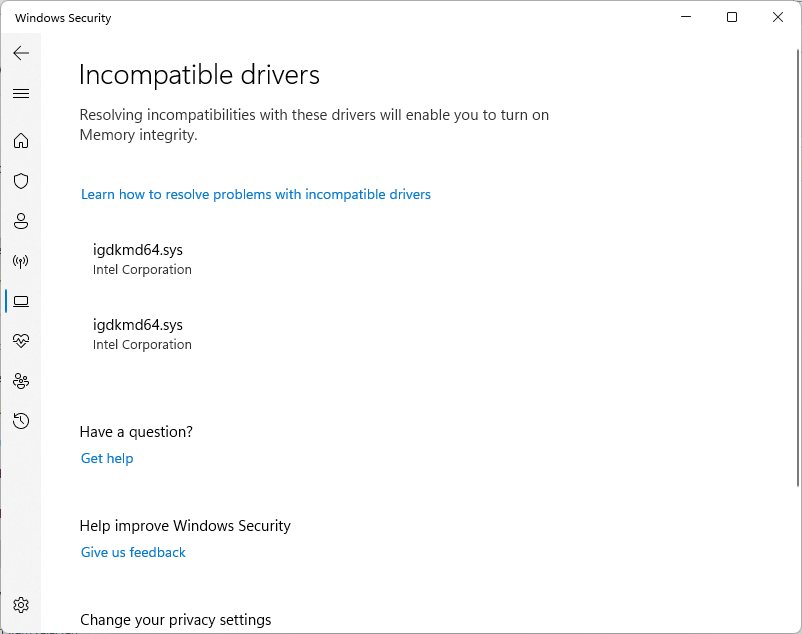
The usual reason the switch flips back to Off is an incompatible kernel driver. Windows lists the offending driver on the Core isolation page.
Memory integrity can't be turned on because of an incompatible driver
An installed driver is not compatible with hypervisor-protected code integrity.
- Open Core isolation details and note the driver name and publisher shown under the incompatible drivers list.
- Run Windows Update and install any offered driver updates, including optional ones.
- Check the device maker's support site for a newer driver and install it.
- Restart and try the Memory integrity switch again.
The incompatible driver belongs to software you no longer use
Uninstalled apps or old hardware can leave a driver package in the driver store.
- Open Settings > Apps > Installed apps and uninstall the app or utility that installed the driver.
- Right-click Start, select Terminal (Admin) (or open an elevated Command Prompt) and run
pnputil /enum-driversto list third-party driver packages. - Find the
oem#.infentry whose original name matches the driver Windows flagged. - Run
pnputil /delete-driver oem#.inf /uninstall, replacingoem#.infwith the real name. - Restart, then turn Memory integrity on.
Memory integrity is off and no driver is listed
Hardware virtualization is disabled in the UEFI or BIOS.
- Restart into the PC's UEFI or BIOS setup using the key from the manufacturer's manual.
- Enable the Intel VT-x or AMD-V virtualization option and save.
- Boot Windows and turn Memory integrity on.
Memory integrity still will not turn on after driver updates
A third-party startup app or service has not been ruled out yet.
- Search for
msconfigand open System Configuration. - On the Services tab, select Hide all Microsoft services, then Disable all, then Apply.
- On the Startup tab, select Open Task Manager and disable each enabled item on Startup apps, noting which ones you changed.
- Restart and try the Memory integrity switch again in the clean boot.
- Return to normal: on the General tab of System Configuration select Normal startup, clear Hide all Microsoft services, select Enable all, and re-enable the startup apps.
Why the memory integrity toggle is missing or greyed out
The switch is greyed out with "This setting is managed by your administrator"
Group Policy, Intune or a registry value is controlling memory integrity.
- On a work or school PC, ask the IT administrator; the policy will reapply any local change.
- On a personal PC, open
gpedit.mscand set Turn on Virtualization Based Security to Not Configured. - If the policy was never set, add the
WasEnabledByvalue of 2 shown in the registry section. - Restart and reopen Core isolation details.
Memory integrity is not showing up at all
The PC does not meet the hardware or firmware requirements, so Windows hides the feature.
- Scroll to the bottom of Device security and read the hardware security message.
- If it says Standard hardware security not supported, check Secure Boot, TPM 2.0 and virtualization in the firmware.
- Update the UEFI or BIOS firmware from the PC or motherboard maker's support site.
- Reopen Windows Security after the next boot.
The switch turns itself off again after a restart
Another security feature or policy controls it, or Windows switched it off after a boot crash.
- Check for a Device Guard policy in
gpedit.mscor an App Control policy pushed by your organization. - Open Event Viewer > Applications and Services Logs > Microsoft > Windows > CodeIntegrity > Operational to see blocked drivers.
- Update or remove each driver named in those events.
- Turn Memory integrity on again and restart.
Common errors and fixes
"A driver can't load on this device"
Memory integrity is blocking a driver with a known weakness.
- Note the driver and company name in the notification.
- Check Windows Update and the manufacturer's site for a compatible version.
- If the device is essential and no update exists, turn Memory integrity off and restart.
- Contact the manufacturer and turn the feature back on once a fixed driver is released.
Blue screen or boot loop after turning memory integrity on
A boot-critical driver is incompatible.
- Disable any Group Policy that turns on VBS, if one is used.
- Boot into Windows Recovery Environment and open Command Prompt from the advanced options.
- Run
reg add "HKLM\SYSTEM\CurrentControlSet\Control\DeviceGuard\Scenarios\HypervisorEnforcedCodeIntegrity" /v "Enabled" /t REG_DWORD /d 0 /f. - Restart the PC; if UEFI lock was used, Secure Boot must be turned off first.
VMware or VirtualBox VMs will not start or run slowly
Memory integrity depends on Hyper-V, which takes the CPU's virtualization extensions.
- Turn Memory integrity off in Core isolation details.
- Open Turn Windows features on or off, expand Hyper-V > Hyper-V Platform and clear Hyper-V Hypervisor.
- Restart the PC.
Does memory integrity affect performance?
Yes, slightly, and the size depends on the processor. Microsoft notes that CPUs without hardware support for one key feature fall back to emulation with a bigger performance cost.
| Processor | Hardware support | Expected impact |
|---|---|---|
| Intel Kaby Lake (7th gen) and newer | Mode-Based Execution Control (MBEC) | Lower overhead |
| AMD Zen 2 and newer | Guest Mode Execute Trap (GMET) | Lower overhead |
| Older Intel and AMD chips | Restricted User Mode emulation | Higher overhead |
| Snapdragon 8180 and newer | Qualifies for automatic enablement | Designed to run with it on |
To see whether your CPU has the hardware feature, run the Win32_DeviceGuard command above; a value of 7 in AvailableSecurityProperties means MBEC or GMET is available.
Memory integrity and gaming
Games themselves run in user mode, so the main gaming conflicts come from kernel drivers: older anti-cheat modules, RGB and fan utilities, and overclocking tools.
Keep memory integrity on for gaming PCs, and update or remove the specific driver if a game, launcher or utility gets blocked. On a recent Intel or AMD CPU the overhead is small, and turning the feature off removes protection against the exact kind of signed-driver attack that cheats and malware use. Switch it off only when a required driver has no compatible version, and test the game before and after so the decision rests on your own results.
Best practices for using memory integrity
| Practice | Why it matters |
|---|---|
| Update drivers before enabling it | Most refusals come from old drivers that have compatible replacements |
| Use Enabled without UEFI lock at home | The UEFI lock makes the feature hard to switch off later |
| Test on one PC before a fleet rollout | Microsoft recommends a pilot group because an incompatible driver can stop boot |
| Turn it back on after a driver fix | Leaving it off after the problem is solved keeps the protection gap open |
| Check the CodeIntegrity log after new hardware | Blocked drivers are recorded there with their file names |
| Do not turn off virtualization in UEFI or BIOS to clear a warning | Memory integrity cannot run without it, and Windows hides the switch |
Memory integrity quick reference
| Task | Where or what to run |
|---|---|
| Turn it on or off | Windows Security > Device security > Core isolation details > Memory integrity |
| Registry value | HKLM\SYSTEM\CurrentControlSet\Control\DeviceGuard\Scenarios\HypervisorEnforcedCodeIntegrity, Enabled = 1 (on) or 0 (off) |
| Group Policy | Computer Configuration > Administrative Templates > System > Device Guard > Turn on Virtualization Based Security |
| Check it is running | msinfo32 > Virtualization-based security Services Running, or SecurityServicesRunning = 2 in Win32_DeviceGuard |
| Find blocked drivers | Event Viewer > Microsoft > Windows > CodeIntegrity > Operational |
| Remove a leftover driver | pnputil /delete-driver oem#.inf /uninstall |
| Opt a Hyper-V VM out | Set-VMSecurity -VMName <VMName> -VirtualizationBasedSecurityOptOut $true |
Core isolation memory integrity FAQ
What does memory integrity do?
Memory integrity checks kernel-mode drivers and code inside a hypervisor-isolated environment before Windows lets them run. That makes it hard for malicious or vulnerable drivers to take over the Windows kernel, even if malware already has a foothold.
Where is memory integrity in Windows 11?
Memory integrity is in the Windows Security app under Device security > Core isolation details. You can also reach it from Settings > Privacy & security > Windows Security > Device security.
Where is memory integrity in Windows 10?
Windows 10 uses the same path: open Windows Security, select Device security, then select Core isolation details. The Memory integrity switch sits at the top of that page.
Is memory integrity on by default in Windows 11?
Memory integrity is on by default on clean installs of Windows 11 when the hardware qualifies, and on all Secured-core PCs. PCs upgraded from Windows 10 keep their previous state, so many of them show it as off.
Is memory integrity good to turn on?
Yes, for most PCs. It blocks a whole class of kernel attacks at a small performance cost on modern processors. Turn it on unless a driver you need is incompatible and no update exists.
Can I turn memory integrity off?
Yes. Set the Memory integrity switch to Off in Windows Security > Device security > Core isolation details and restart. If it is greyed out, a policy controls it and must be changed first.
Why does memory integrity keep turning off?
Memory integrity usually turns itself off when a boot-critical driver crashes Windows, or when a policy sets it off. Check the CodeIntegrity Operational log in Event Viewer and update the drivers it names.
Why can't I see memory integrity?
Windows hides memory integrity when the PC lacks hardware virtualization support or has it disabled in firmware. Enable Intel VT-x or AMD-V in the UEFI or BIOS and the option should appear.
Does memory integrity slow down a PC?
Memory integrity adds a small overhead that is lowest on Intel 7th-generation and AMD Zen 2 or newer processors. Older chips emulate the missing hardware feature, so they see a larger slowdown.
Does memory integrity affect gaming?
Memory integrity has little effect on frame rates on modern CPUs. The bigger gaming issue is older anti-cheat or hardware utility drivers that it blocks; updating those drivers usually solves it.
Bottom line: should memory integrity stay on in Windows 11?
Leave memory integrity on, and treat turning it off as a temporary step while you wait for a compatible driver. The switch takes seconds to change in Windows Security, the overhead on current processors is small, and the protection covers driver-based attacks that antivirus scanning alone does not stop.

![8 best music players for Windows 11 [2026 updated]](https://techdows.com/wp-content/uploads/2026/10/8-best-music-players-for-Windows-11-2026-updated-600x338.jpg)