A .pkg file is a macOS installer package, and Windows 11 cannot install one — but 7-Zip opens it and extracts everything inside.
This page covers unpacking a .pkg with 7-Zip, reading the Payload, using a Mac when the software must actually be installed, and what PlayStation and device-management packages are.
Method 1: Open a .pkg file with 7-Zip
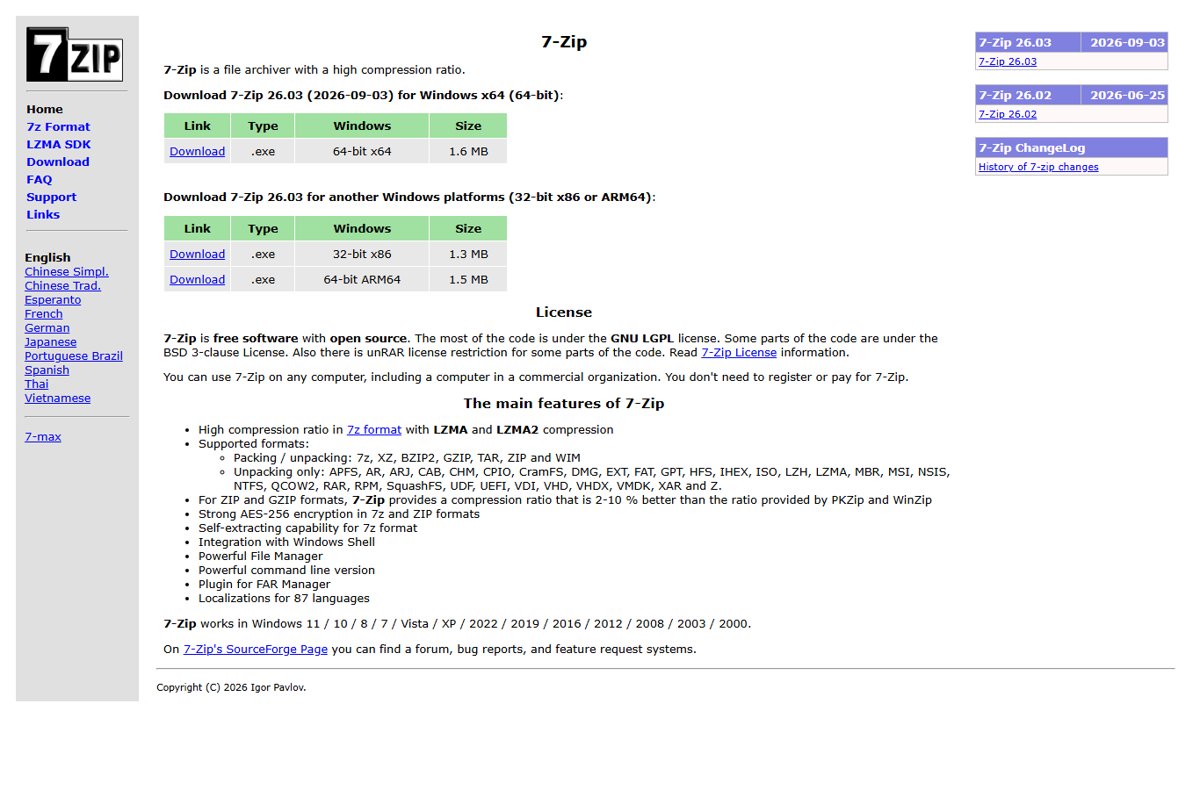
7-Zip extracts XAR archives, the container a macOS flat package uses, so nothing else is needed on Windows 11.
- Install 7-Zip from 7-zip.org. The current release is 7-Zip 26.03.
- Open 7-Zip File Manager from the Start menu.
- Browse to the folder holding the
.pkgfile and double-click the file. 7-Zip lists its contents instead of trying to run it. - Double-click Payload if you see one, and keep going until a folder tree appears.
- Select the folders you want and drag them into a File Explorer window to extract them.
The same routine works on any archive 7-Zip supports, including the newer RAR format covered in How to Create, Open and Identify RAR 5 Archive File.
Which method should you use?
| Your situation | Use this | Why |
|---|---|---|
| You only want the files inside the package | 7-Zip on Windows 11 | XAR, GZIP and CPIO are all on its extraction list, which covers every layer of a macOS package |
| You were told to try Universal Extractor 2 | 7-Zip, one level deeper | A .pkg needs no special wrapper; Universal Extractor 2 unpacks the same layers 7-Zip already reads |
| The software has to end up installed | A Mac, or the vendor's Windows build | A package installs macOS files; Windows 11 has no installer that accepts them |
| The file came off a PlayStation console | Your PlayStation library on the console | Console packages are built for console hardware and Sony ships no Windows tool for them |
| You deploy Mac software at work | Microsoft Intune | Intune uploads the .pkg and installs it on Macs it manages |
| You do not trust the file yet | 7-Zip plus Microsoft Defender | You can list every file and scan the package before anything runs |
What is a .pkg file?
| Property | Detail |
|---|---|
| What it is | An installer package for macOS, opened by the macOS Installer |
| What it holds | One or more apps, and optionally other content that installs outside /Applications |
| Structures in use | Flat packages, nonflat packages with a hierarchical structure, and component packages |
| Signing | For distribution through a device management service the package must carry a signature the Mac can verify |
| Packages with no files | Some packages have no payload at all and only carry scripts |
| Windows 11 support | None. No Windows component reads or installs a .pkg |
| Why 7-Zip can read it | 7-Zip lists XAR, CPIO and GZIP among the formats it extracts |
Can you install a .pkg file on Windows 11?
No. Windows 11 cannot install a .pkg, and 7-Zip only extracts its contents. Windows installs software through Windows Installer packages (.msi), .exe setups and MSIX. A .pkg targets the macOS Installer instead, so unpacking it gives you files, never an installed application.
Before you open a .pkg file: check what it is
- Open File Explorer, then select View > Show > File name extensions.
- Confirm the name really ends in
.pkg, and not.pkg.exeor.pkg.zip. - Check the source. A vendor's own download page, a management console and a console backup produce very different files with the same extension.
- Right-click the file, select Show more options, then select Scan with Microsoft Defender.
- Wait for the scan to report no threats before you unpack anything.
If File Explorer itself is behaving oddly, How to Get Help with File Explorer in Windows 11/10 covers the built-in help path.
Method 2: Extract the Payload file
A macOS package keeps its files in an entry named Payload, and that entry is itself an archive.
- Open the
.pkgin 7-Zip File Manager. - Double-click Payload.
- If 7-Zip shows one entry with no extension, double-click that too. 7-Zip unwraps the GZIP layer first and reads the CPIO archive underneath it.
- Keep going until you see folder names such as
Applications,Libraryorusr. - Drag those folders into a File Explorer window.
- Check that the destination folder now holds files, not another single archive.
Method 3: Open Apple .pkg files with command-line tools
Apple's own command-line installer runs the package properly, but it runs on macOS.
sudo installer -pkg /Users/admin/Downloads/example.pkg -target /installer is the macOS command-line installer. -pkg names the package and -target / installs it on the startup volume. Run it in Terminal on a Mac.
You should see: Terminal returns to the prompt without an error and the installed app appears in Applications.
On the Windows side, wsl --install in an administrator PowerShell window enables Windows Subsystem for Linux and installs Ubuntu, which gives you a Linux shell for archive work. It needs Windows 11, or Windows 10 version 2004 (build 19041) or higher. If the command prints the WSL help text, WSL is already present: run wsl --list --online, then wsl --install -d <DistroName>.
Method 4: Use a Mac to open the package properly
- Copy the
.pkgto the Mac on a USB drive or through OneDrive or iCloud Drive. - In Finder, locate the file and open it.
- Select Continue.
- Review the Software License Agreement, select Continue, then select Agree.
- On the Destination Select page, choose the installation disk and select Continue. To use a different disk, select Change Install Location….
- Select Install, enter the local administrator password when prompted, then select Install Software.
Method 5: Find the Windows version instead
- Open the software vendor's own download page.
- Switch the platform selector from macOS to Windows.
- Look for a file ending in
.exe,.msior.msix. Those are the Windows installers. - If only Mac builds are listed, search the Microsoft Store for the same product.
- Install the Windows build, then delete the
.pkg.
How to install files extracted from a .pkg
- Open the extracted folder and sort it by type so the usable files group together.
- To add fonts, right-click a
.ttfor.otffile and select Install. Windows supports TrueType and OpenType fonts. - If a font is still packed in a
.zip, right-click the zip folder, select Extract, then install the fonts inside it. - Double-click images, PDFs and documents. Windows 11 opens those formats whether or not the package installs.
- Copy any
.exe,.msior.msixfile out of the folder and run it; those are Windows installers. - Leave
.appbundles, Mach-O binaries and shell scripts where they are. Windows 11 cannot run them.
Other Mac and legacy formats behave the same way on Windows — see How to open chm file in Windows 11 for a Windows help format with its own quirks.
How to check the extraction worked
- Open the destination folder and confirm it is not empty.
- Check that you have a folder tree, not a single item still named Payload. A lone Payload means one archive layer is still packed.
- Open one image or PDF from the folder. It should display normally in the Windows 11 app that owns that format.
- Right-click the folder, select Properties, and compare Size with the size of the original
.pkg. The extracted contents take more space than the packed package. - Right-click the folder, select Show more options, then select Scan with Microsoft Defender before you open anything you did not expect to find.
What if Windows says it cannot open the .pkg file?
Windows shows a "How do you want to open this file?" dialog
Windows 11 registers no app for the .pkg extension, so the shell asks you to pick one.
- Close the dialog. Choosing an app here will not make the package install.
- Install 7-Zip, then open the file from 7-Zip File Manager instead of double-clicking it.
- If something was already associated with
.pkgby mistake, clear it using How to Reset “Open With” Settings in Windows 10.
7-Zip reports that it cannot open the file as an archive
The download is incomplete, or the package is a nonflat bundle rather than a flat archive.
- Compare the file size on disk with the size the vendor's page states.
- Download the package again over a stable connection and retry.
- If the size matches and 7-Zip still refuses, treat it as a nonflat package and open it on a Mac.
The package opens but every folder inside is empty
The package carries no payload and only runs installation scripts.
- Look for a scripts entry at the top level of the package in 7-Zip.
- Drag a script out and open it in Notepad to read what it would do.
- Do not try to run it on Windows 11. These are shell scripts written for macOS.
You cannot tell whether the file is really a .pkg
File Explorer hides extensions for known file types, so the real ending is not shown.
- Open File Explorer.
- Select View > Show > File name extensions.
- Read the full file name and check that nothing follows
.pkg.
Special case: PlayStation .pkg files
| Question | Answer |
|---|---|
| Is it the same format as a macOS package? | No. A PlayStation .pkg is console content and has nothing to do with the macOS Installer |
| Will 7-Zip open one? | No. PlayStation packages are not among the formats 7-Zip lists |
| Does Sony publish a Windows tool for them? | No official Sony tool exists for opening console packages on a PC |
| How do you install one? | From the console itself, through your PlayStation library or the PlayStation Store |
| Can it be converted for the PC? | No. The content is built for console hardware |
Special case: enterprise and device-management .pkg files
A work Mac gets its software from a management service, and Microsoft Intune states exactly what it accepts.
| Item | Requirement |
|---|---|
| Where the file is uploaded | Intune admin center: Apps > All Apps > Create > macOS > macOS app (PKG) |
| Maximum size | The PKG file must be smaller than 8 GB |
| Agent version | Microsoft Intune management agent for macOS 2308.006 or greater |
| The package must | Run successfully using the installer command in Terminal |
| Package types accepted | Nonflat, component, unsigned, payload-free, packages that install outside /Applications, and custom packages with scripts |
| Install scripts | Pre-install and post-install scripts under 15360 characters each, with agent 2309.007 or greater |
| Device requirement | The Mac must already be managed by Intune |
How to tell what is inside a macOS .pkg file
- Open the
.pkgin 7-Zip File Manager so you can read it without extracting anything. - Note the top-level entries. Plain-text and XML entries hold the package metadata; Payload holds the files.
- Drag an XML entry out to the desktop and open it in Notepad to read the package identifier and version.
- Double-click Payload and unwrap it until the folder tree appears.
- Read the top folder names:
Applicationsmeans an app,Librarymeans support files,usrmeans command-line tools. - Check whether a scripts entry exists. A package with scripts runs commands on a Mac during installation.
Can you convert a .pkg file to .exe or .msi?
No. There is no conversion from a macOS .pkg to a Windows .exe or .msi. An .msi is a Windows Installer database and an .exe is a Windows executable. Both carry Windows binaries and installer instructions that a macOS package simply does not contain, so there is nothing for a converter to translate.
Can you run macOS software from a .pkg on Windows 11?
No. Mac applications do not run on Windows 11, extracted or not. The binaries inside the package are compiled for macOS and call macOS frameworks. Windows 11 has no loader for them, and unpacking the package changes nothing about that.
What to know before you run anything out of a .pkg
Extract a .pkg freely, but never run a script or binary out of one on Windows 11. Shell scripts and Mach-O binaries in a package are written for macOS and can be altered by whoever repackaged the file. Scan the package with Microsoft Defender first, then use only the documents, images and fonts inside it.
Troubleshooting tips
The same file will not open on Windows 10 either
Windows 10 has no .pkg handler either, because the format is not a Windows format.
- Install 7-Zip on the Windows 10 PC.
- Open the
.pkgfrom 7-Zip File Manager. - Extract the folders you need. The result is identical on Windows 10 and Windows 11.
The only PC available is running Windows 7
Windows 7 is out of support and receives no security updates, which matters when the file came from the internet.
- Copy the
.pkgto a Windows 11 PC with current Microsoft Defender protection. - Scan the file there with Scan with Microsoft Defender.
- Extract it on the Windows 11 PC and copy only the files you need back.
The package is extracted but you do not know how to use a pkg file
A .pkg is an installer, not a document, so most of its contents only mean something on macOS.
- Open the extracted folder and list which file types are actually there.
- Use fonts, images, PDFs and documents directly on Windows 11.
- Install the vendor's Windows build for anything the package was meant to set up.
Double-clicking the file does nothing at all
No app is registered for the extension, so the shell takes no action.
- Confirm the extension with View > Show > File name extensions in File Explorer.
- Open the file from inside 7-Zip File Manager rather than double-clicking it.
- Remove any association that a previous app created for
.pkg, then try again.
Best tool to open a .pkg file on Windows 11
Use 7-Zip. It is the only tool needed to open a .pkg file on Windows 11. XAR, CPIO and GZIP are all on its extraction list, which covers every layer of a macOS package, and it costs nothing. Keep a Mac or the vendor's Windows build for the cases where the software has to be installed rather than inspected.
Frequently asked questions
How do you open a pkg file on Windows 11?
Install 7-Zip, open 7-Zip File Manager, then double-click the .pkg file to list its contents. Open the Payload entry, keep unwrapping until a folder tree appears, and drag the folders you want into File Explorer.
How do you open a pkg file on Windows 10?
The same way as on Windows 11. 7-Zip runs on both versions and extracts the same XAR, GZIP and CPIO layers, so the contents you get out of the package are identical.
How do you open a .pkg file on Windows without extra software?
You cannot. Windows 11 ships no handler for .pkg, so double-clicking one either does nothing or opens the dialog asking which app to use. An extraction tool such as 7-Zip is required.
How do you use a pkg file?
On macOS you open it and the macOS Installer places the files. On Windows 11 you only extract it, then use the parts Windows understands: fonts, images, PDFs and documents. Everything else needs a Mac.
How do you open a pkg file on Windows 7?
Move the file to a Windows 11 PC instead. Windows 7 is out of support and receives no security updates, which matters for a file downloaded from the internet. Extract it on the supported machine.
Is a .pkg file the same as a .png file?
No. A .png is an image that Windows 11 opens by double-clicking it. A .pkg is a macOS installer package that Windows cannot open at all without an extraction tool. Turn on file name extensions to tell them apart.
Does 7-Zip open every .pkg file?
It opens flat macOS packages, because XAR is on its extraction list. A nonflat package with a hierarchical structure, and console packages such as PlayStation content, are not formats 7-Zip handles.
Can Windows 11 install software from a .pkg?
No. Windows installs from Windows Installer packages, .exe setups and MSIX. A .pkg is read by the macOS Installer, so extracting it on Windows gives you loose files rather than an installed program.
What is inside a .pkg file?
Metadata files describing the package, an optional scripts entry, and a Payload archive holding the actual files. A package can install one or several apps plus content that lands outside the Applications folder.
Is it safe to open a .pkg file on Windows 11?
Listing and extracting one is safe, because nothing inside runs on Windows. Scan the file with Microsoft Defender first, then open only documents, images and fonts, and leave scripts and Mac binaries alone.