To open an ODS file in MS Office, start Excel, select File > Open > Browse, choose the .ods file and select Open.
This guide covers the desktop steps, making Excel the default app for .ods files, opening one in Excel for the web, saving it as an .xlsx workbook, and which Excel features do not survive the trip.
Step by step tutorial to open an ODS in MS Office
Excel is the Office app that reads OpenDocument Spreadsheet (.ods) files, the format used by LibreOffice Calc, OpenOffice Calc and other spreadsheet apps. No add-in or converter is needed in Excel 2010 or any later version, including Excel for Microsoft 365.
- Open Excel from the Start menu and start a blank workbook, or open any workbook.
- Select File > Open > Browse.
- In the file type list next to the File name box, select OpenDocument Spreadsheet (*.ods) so only .ods files are shown.
- Go to the folder that holds the file and select it.
- Select Open. The sheets, formulas and data load in Excel.
Microsoft warns that an .ods file may not keep the exact formatting it had in the app that created it. Data and formulas come through; some styles and advanced features do not.
How to open an ODS file in Windows 10 and Windows 11 by double-clicking
If double-clicking an .ods file opens another program, or Windows asks which app to use, set Excel as the default app for the .ods file type. The same Settings page exists in Windows 10 and Windows 11.
- Open Settings and select Apps > Default apps.
- In the search box at the top, type
.ods. - Select the .ods result that appears.
- Choose Excel from the list of apps.
- Double-click any .ods file in File Explorer. It now opens straight in Excel.
To go the other way, repeat the steps and pick LibreOffice Calc or another spreadsheet app for .ods instead.
How to open an ODS file online in Excel for the web
Excel for the web lists OpenDocument Spreadsheet (.ods) among its supported formats, so a free Microsoft account is enough to view and edit one in a browser. This also works on a PC with no desktop Office installed.
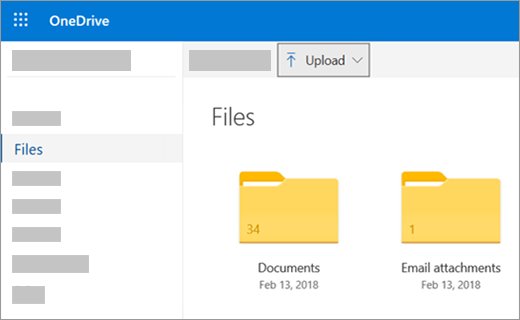
- Sign in with your Microsoft account at onedrive.com.
- Browse to the folder where you want to keep the file.
- Select Upload, pick the .ods file and select Open. You can also drag it from File Explorer onto the OneDrive page.
- Select the uploaded .ods file. It opens in Excel for the web.
Co-authoring is not supported for .ods files in Excel for the web, so only one person should edit the file at a time. Save it as .xlsx first if several people need to work on it together.
How to open ODS files without Excel
Two free routes handle .ods files when MS Office is not available. LibreOffice Calc uses .ods as its native format, and Google Sheets in your browser imports it.
| Your situation | Use this | How |
|---|---|---|
| Windows, macOS or Linux PC without Office | LibreOffice Calc | Install LibreOffice and double-click the .ods file; ODF Spreadsheet is Calc's own format |
| Linux desktop | LibreOffice Calc | Open the file from the file manager or with File > Open in Calc |
| Any browser, nothing installed | Google Sheets | Open a sheet, select File > Import, and choose the .ods file |
| Any browser with a Microsoft account | Excel for the web | Upload the file to OneDrive and select it |
You can download LibreOffice for Windows free if you also receive other OpenDocument files, such as drawings. Google Sheets accepts only files that are not password protected.
How to save an ODS file as an Excel XLSX workbook
Saving a copy as .xlsx keeps every Excel feature you add after opening the file. Microsoft recommends the Open XML formats (.xlsx, .docx, .pptx) unless you have a specific reason to stay in ODF.
- With the .ods file open in Excel, select File > Save As > Browse.
- In the Save as type list, select Excel Workbook (*.xlsx).
- Type a file name and select Save.
- Keep the original .ods file if the sender still works in LibreOffice or OpenOffice.
How to save an Excel file in ODS format
Send the file back in the format it arrived in when the other person uses an OpenDocument app. Microsoft advises saving an .xlsx copy first so the Excel version stays intact.
- Save the workbook as Excel Workbook (*.xlsx) first.
- Select File > Save As > Browse.
- In the Save as type list, select OpenDocument Spreadsheet (*.ods).
- Name the file and select Save.
- Close the file and open the .ods copy again to see how the recipient will see it.
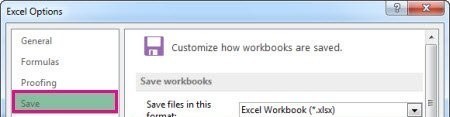
To make Excel save every new workbook as .ods, go to File > Options > Save and pick the format in the Save files in this format list.
What is an ODS file
ODS stands for OpenDocument Spreadsheet, part of the OpenDocument Format (ODF) family that was built for OpenOffice-based suites. Its sister formats are .odt for text and .odp for presentations, which Word and PowerPoint open the same way Excel opens .ods.
| Detail | Answer |
|---|---|
| Full name | OpenDocument Spreadsheet (.ods) |
| Apps that create it | LibreOffice Calc, OpenOffice Calc, Google Sheets export |
| Office app that opens it | Excel (desktop, Excel for the web) |
| ODF version in Office LTSC 2024 and Microsoft 365 | ODF 1.4, used by default when saving |
| ODF version in Office LTSC 2021 | ODF 1.3 |
| Older ODF files | Still open; Office LTSC 2024 saves them back as ODF 1.4 |
Drawings saved as .odg are the exception: Office has no OpenDocument Graphics support, so you need to open an ODG drawing through LibreOffice first.
Pros of opening an ODS in MS Office
| Advantage | What it means for you |
|---|---|
| Built in, no plugin | Excel opens .ods from File > Open with no add-in or converter |
| Data and formulas carry over | Formulas, cell formatting, row heights, column widths, hyperlinks and cell styles are fully supported |
| Charts and objects mostly survive | Shapes, text boxes, pictures, SmartArt and trendlines are supported; SmartArt becomes a group of shapes |
| Grouping and print setup | Group and Outline, print ranges and page breaks are kept |
| Works in a browser | Excel for the web opens .ods from OneDrive without desktop Office |
| Two-way | Excel saves back to .ods, so you can return the file to a LibreOffice user |
Cons of opening an ODS in MS Office
Microsoft publishes a feature list for the .ods format. These are the parts that are lost or changed when a workbook goes through .ods.
| Feature | Support in .ods | What happens |
|---|---|---|
| Dates before 1 January 1900 | Not supported | Pre-1900 dates do not save correctly |
| Table styles and total rows | Not supported | Styling and total rows are dropped |
| Threaded comments | Not supported | Converted to legacy notes |
| Password-protected sheets | Partially supported | Protection without a password works; a password-protected sheet cannot be saved or opened |
| Encryption, IRM and sensitivity labels | Not supported | Encrypted or IRM files cannot be saved; labels are removed |
| PivotTable styles and calculated fields | Not supported | Some layouts and grouping are only partly kept |
| Power Query and REGEX functions | Not supported | Use Advanced Filter in place of regular expressions |
| PivotCharts, chart sheets, Pie of Pie | Not supported | These chart types do not round-trip |
| WordArt and themes | Partly / not supported | WordArt becomes a plain text box; themes are lost |
| ActiveX and form controls | Not supported | Not kept in the .ods file |
How to tell if an ODS file opened correctly in Excel
- Check that the workbook opened without an error message and shows the expected file name.
- Click through every sheet tab and check that each one has data.
- Select a few formula cells and read the formula in the formula bar to confirm it calculates.
- Scroll to any dates before 1900, PivotTables and charts, the areas Microsoft lists as partly supported.
- Save a copy as .xlsx and open both side by side if the file matters, then compare them visually.
ODS file not opening in Excel
Can't find the ODS file in the Excel Open dialog
The file type filter is set to Excel files only, or the file is in another folder.
- Select File > Open > Browse.
- Set the file type list to OpenDocument Spreadsheet (*.ods) or All Files.
- Search File Explorer for
*.odsif you still cannot find the folder. - Check the Downloads folder and email attachment save location.
ODS file opens in the wrong program when double-clicked
Another app is set as the default for the .ods file type.
- Open Settings > Apps > Default apps.
- Type
.odsin the search box and select the result. - Choose Excel.
Formatting looks different after opening the ODS in Excel
Excel and OpenDocument apps support different formatting features and options.
- Compare against the cons table above to see which feature changed.
- Ask the sender to save the file as .xlsx from LibreOffice Calc if the layout matters.
- Rebuild table styles, themes or WordArt in Excel, then save as .xlsx.
Password-protected ODS file will not open in Excel
Excel cannot open or save .ods files with a password-protected sheet.
- Open the file in the app that created it, such as LibreOffice Calc.
- Remove the sheet password there.
- Save as .xlsx, then open that copy in Excel and add sheet protection again there if needed.

Opening ODS files in Excel FAQ
How do I open an ODS file in Excel?
Select File > Open > Browse in Excel, set the file type list to OpenDocument Spreadsheet (*.ods), choose the file and select Open. Excel 2010 and every later version, including Excel for Microsoft 365, opens .ods files without an add-in.
How do I open an ODS file in Windows 10?
Open it from Excel with File > Open, or make Excel the default app. In Settings > Apps > Default apps, type .ods in the search box, select the result and choose Excel. Without Office, install LibreOffice Calc or use Excel for the web.
What is an ODS application?
An ODS application is any spreadsheet program that reads OpenDocument Spreadsheet files. LibreOffice Calc and OpenOffice Calc use .ods as their native format, and Microsoft Excel and Google Sheets can open or import it.
What does ODS mean in technology?
In file formats, ODS means OpenDocument Spreadsheet, the .ods extension in the OpenDocument Format family. Other fields use the same letters for unrelated things, so check that the file ends in .ods before following spreadsheet steps.
How do I open an ODS file in Linux?
Open it in LibreOffice Calc, which runs on Linux and uses ODF Spreadsheet as its native format. Double-click the file in the file manager or use File > Open in Calc. Google Sheets also imports .ods in a browser.
Can I open an ODS file online for free?
Yes. Upload the file to OneDrive with a free Microsoft account and select it to open it in Excel for the web. Google Sheets also imports .ods with File > Import, as long as the file is not password protected.
Can I edit an ODS file in MS Office?
Yes. Excel opens .ods files fully editable, and you can save the changes back as .ods or as an .xlsx workbook. Save as .xlsx if you add Excel-only features such as table styles, threaded comments or Power Query.
Will I lose any data when opening an ODS file in Excel?
Text and numbers come through, but some formatting and features can change. Microsoft lists pre-1900 dates, table styles, PivotTable styles, some chart types, themes and password-protected sheets as unsupported or partly supported in .ods.
Do I need a special plugin or software to open an ODS file in MS Office?
No. ODS support is built into Excel, so File > Open handles it directly. If you have no Office at all, you can install Office Professional Plus 2019 or newer, or use the free Excel for the web.
Can I save the file as an ODS after editing it in MS Office?
Yes. Select File > Save As > Browse, choose OpenDocument Spreadsheet (*.ods) in the Save as type list and save. Microsoft suggests saving an .xlsx copy first so you keep a full Excel version.