You cannot charge an Apple Watch with no charger at all, because it only charges from a magnetic charging connector on its back, but you can charge it without the wall adapter: plug the watch's charging cable into an iPhone 15 or later, a laptop or computer USB port, use a MagSafe Duo Charger, or use a power bank.
This guide gives the steps for each of those four methods, explains why an ordinary wireless phone pad is not on Apple's list, and covers what to check when the watch still will not charge.
How to charge an Apple Watch without a charger
As a quick summary, each method replaces the missing power adapter, not the magnetic connector. Pick the row for the gear you have with you.
| Method | What you need | Good to know |
|---|---|---|
| 1. Charge from your iPhone | iPhone 15 or later and the watch's USB-C charging cable | iPhone supplies up to 4.5 watts, so charging is slow |
| 2. Charge from a laptop or computer | A free USB-C or USB port and the watch's charging cable | Works with a Mac or Windows PC |
| 3. Use a MagSafe Duo Charger | MagSafe Duo, its cable and a USB-C power source | Works with all Apple Watch models; no fast charging for Series 7, Series 8 or the first Ultra |
| 4. Use a power bank or third-party charger | A power bank with the watch cable, or a compatible Apple Watch charger | Use chargers that meet USB 2.0 or later and safety standards |
Which method should you use?
| Your situation | Use this | Why |
|---|---|---|
| Travelling with your iPhone but no wall plug | Method 1: charge Apple Watch with your iPhone | No extra gear beyond the cable |
| At a desk or in a hotel with a laptop | Method 2: computer USB port | Leaves the iPhone battery untouched |
| You also need to charge an iPhone 12, 13 or 14 | Method 3: MagSafe Duo Charger | Charges the iPhone and watch together |
| Away from any computer or outlet | Method 4: power bank | Portable power for the watch cable |
| Your magnetic charging cable is lost | Borrow another Apple Watch charger | Every method needs a magnetic charger of some kind |
Why you cannot just use any wireless charger
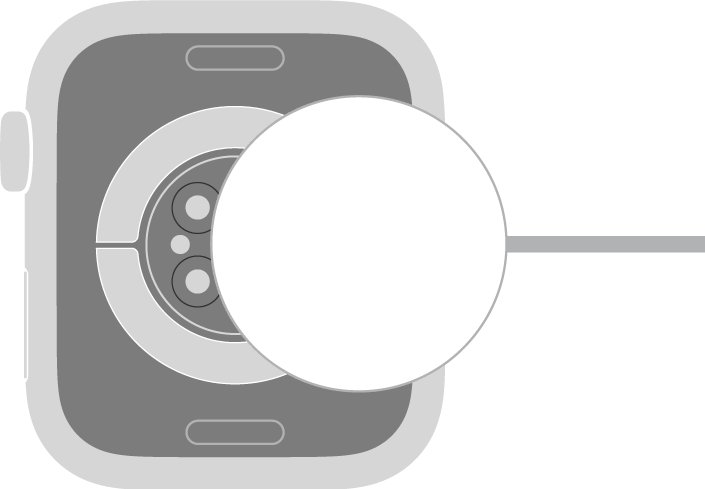
Apple Watch charges by induction through its back, and the charger's concave magnetic end snaps onto that sensor to line the two up. Apple lists only these chargers for it.
| Charger | Charges Apple Watch? | Notes |
|---|---|---|
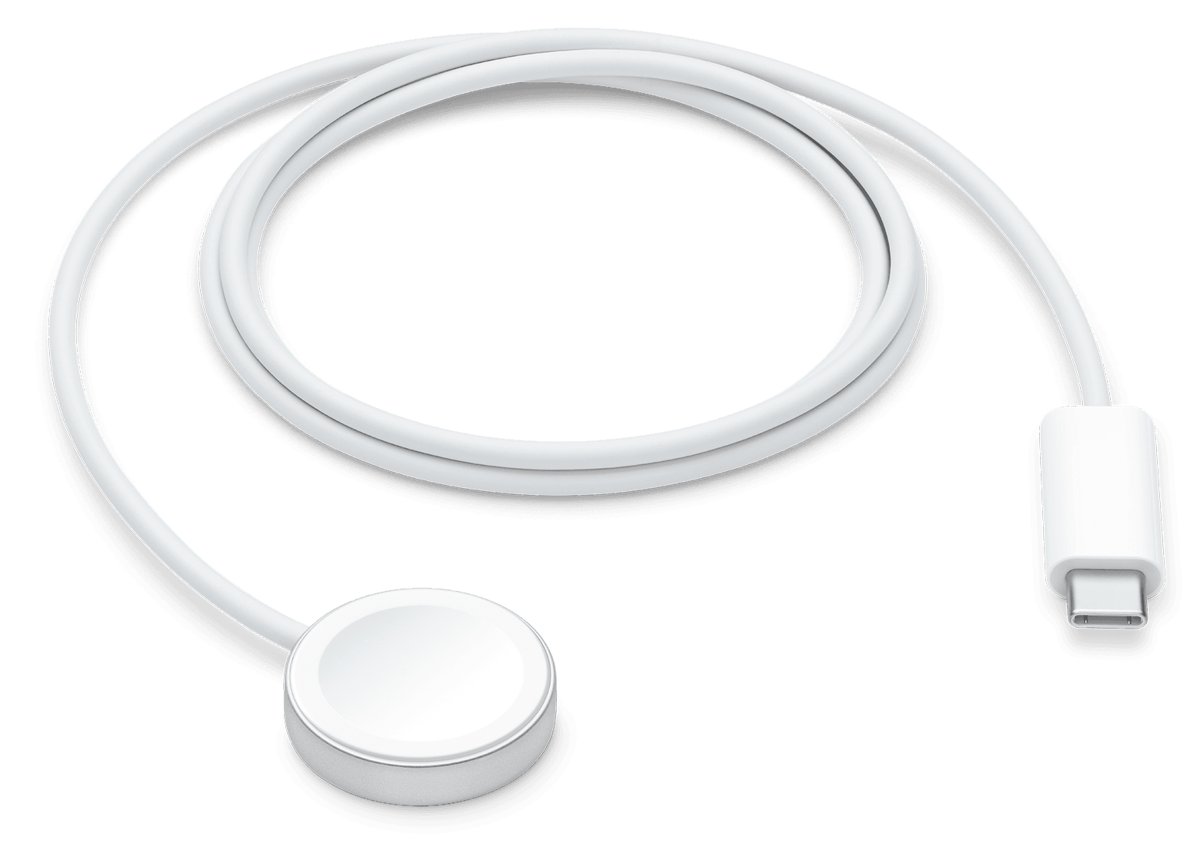
| Apple Watch magnetic charger or USB-C Magnetic Fast Charging Cable | Yes | Apple's recommended option; the fast-charging cable has a USB-C plug and aluminum around the puck |
| MagSafe Duo Charger | Yes | Has a dedicated Apple Watch charging connector beside the iPhone pad |
| Compatible third-party Apple Watch charger | Yes | Must meet USB 2.0 or later and regional safety standards |
| Standard Qi wireless phone pad | Not on Apple's list | It has no Apple Watch magnetic charging connector |
| WPT-compliant charger bought in China or Indonesia | Only with compatible models | An incompatible watch shows "Unable to charge. This is a country-specific charger." |
Method 1: charge Apple Watch with your iPhone
iPhone 15 and later models have a USB-C port that can charge AirPods, Apple Watch or another small device that supports USB Power Delivery, at up to 4.5 watts.
- Unlock your iPhone 15 or later and check it has enough battery to share.
- Plug the USB-C end of the Apple Watch Magnetic Fast Charger to USB-C Cable into the iPhone's USB-C port.
- If you have the older Magnetic Charging Cable with a USB-A plug, connect it through the Apple USB-C to USB Adapter instead.
- Lay the watch on a flat surface and place its back on the magnetic connector.
- Wait for the charging symbol and chime on the watch to confirm power is flowing.
- Check both batteries now and then, because the iPhone is giving up its own charge.
iPhone 14 and earlier models with a Lightning port are not on Apple's list for charging other devices this way.
Method 2: charge Apple Watch from a laptop or computer USB port
The watch's charging cable plugs into a computer as easily as into a power adapter. Use a USB-C port for the USB-C cable, or a USB-A port for the older cable.
- Turn on the Mac or Windows PC and keep it plugged in to mains power if you can.
- Plug the Apple Watch charging cable into a free USB-C or USB port on the computer.
- Place the computer and cable in a well-ventilated area, then lay the watch on a flat surface.
- Position the back of the watch on the magnetic connector until it snaps into place.
- Check for the charging symbol on the watch face.
- Keep the computer switched on until the watch reaches the charge you need.
Method 3: charge Apple Watch with a MagSafe Duo Charger
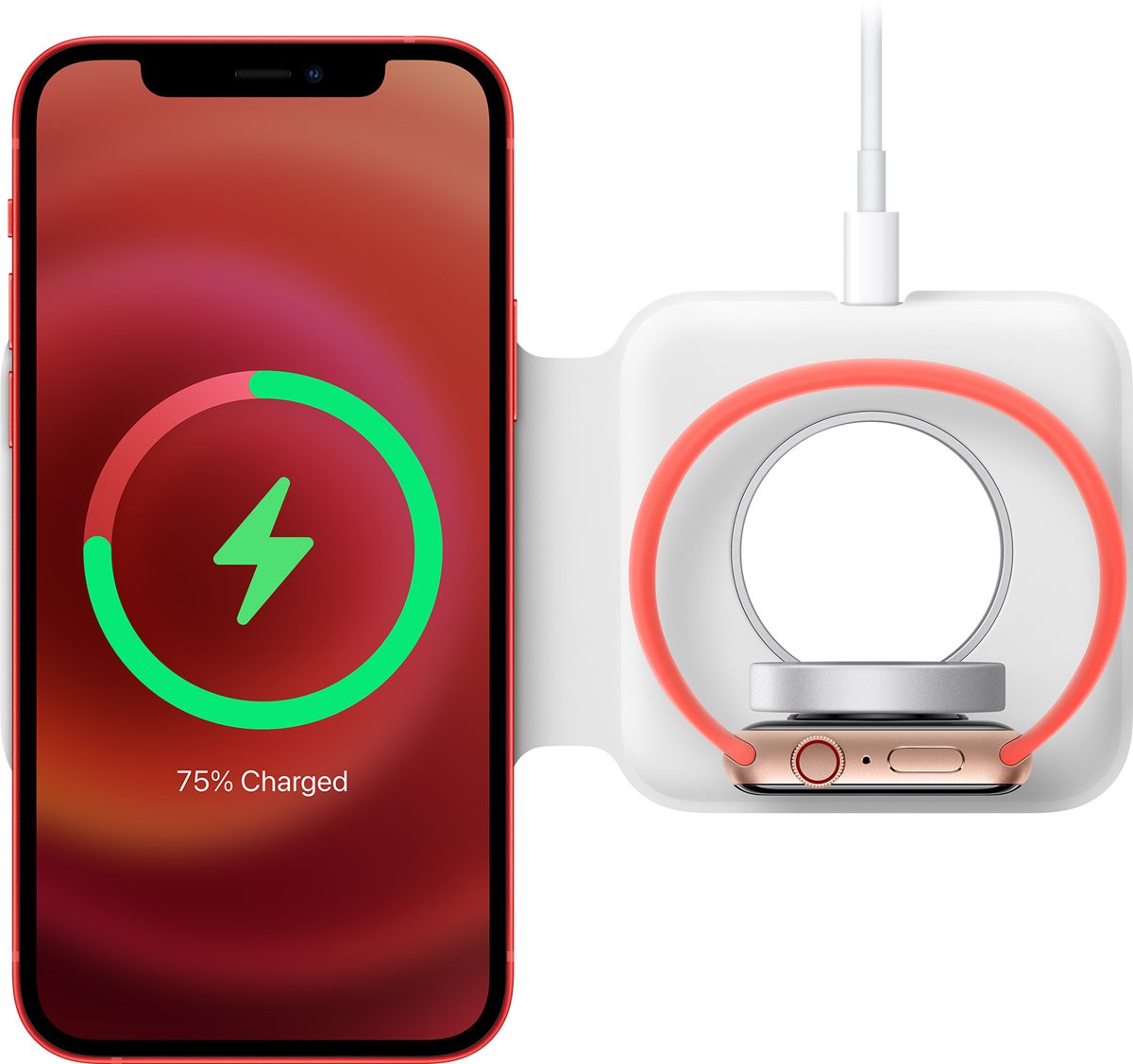
MagSafe Duo is a folding charger with an iPhone pad and an Apple Watch connector. Apple designed it to work with all Apple Watch models.
- Plug the MagSafe Duo into a 20-watt or greater Apple USB-C power adapter, a compatible third-party USB-C adapter, or a USB-C port on a Mac or PC.
- Unfold the MagSafe Duo and place it face up on a flat surface clear of metal objects.
- Lift the Apple Watch charging connector upright, or leave it flat.
- Place the back of your Apple Watch on the connector, with the band open if it is lying flat.
- Watch for the charge indicator on the display.
- If you have a 44mm, 45mm or 49mm watch and nothing happens, change the connector's angle or lay it flat; on Apple Watch Ultra, take the band off.
The Apple 29W USB-C Power Adapter does not work with the MagSafe Duo. To charge the iPhone and watch together it needs at least 15 watts, and MagSafe Duo does not fast charge Apple Watch Series 7, Series 8 or the first Apple Watch Ultra.
Method 4: charge Apple Watch with a power bank or third-party charger
A power bank stands in for the wall adapter, so the watch's own magnetic cable plugs straight into it. Some power banks and stands also build in an Apple Watch charger.
- Charge the power bank before you leave, so it has power to give.
- Choose a power bank or charger that complies with USB 2.0 or later and with regional safety standards.
- Plug the Apple Watch charging cable into the power bank's USB-C or USB port, or use its built-in Apple Watch connector.
- Snap the back of the watch onto the magnetic connector on a flat surface.
- Check for the charging symbol before you put the power bank away.
- Keep the power bank and watch out of bags, blankets and pillows while they charge, so heat can escape.
Apple warns that adapters that do not meet safety standards could pose a risk of death or injury, so avoid unbranded chargers with no safety markings.
How to tell if Apple Watch is charging
Whichever method you use, the watch shows the same signs once power reaches it.
- Look for the charging symbol on the watch face and listen for the chime, which does not play in Silent Mode.
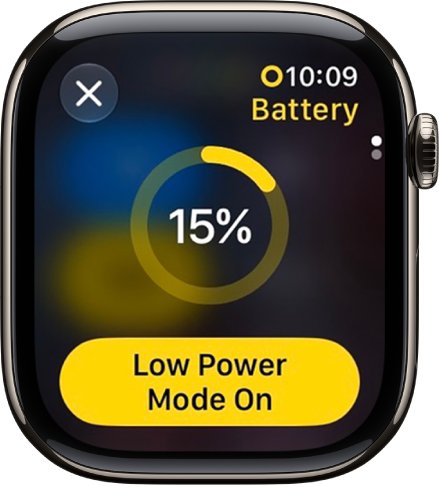
- If the charging symbol is yellow, the watch is in Low Power Mode, which turns off once it reaches 80 percent.
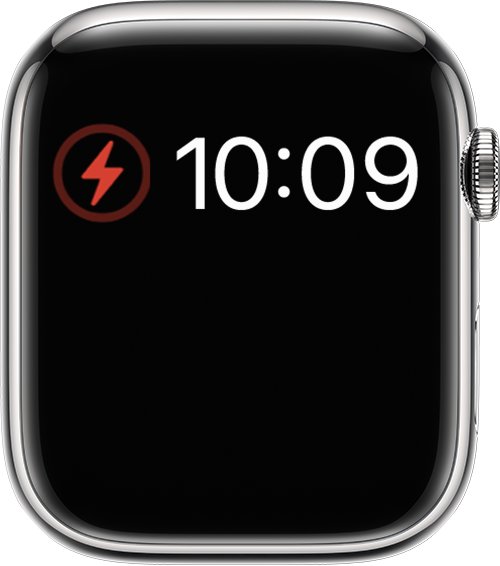
- If a red lightning bolt shows inside a ring, the battery was too low to turn on and is now charging.
- If the screen stays blank, leave it on the charger for up to 30 minutes before you treat it as an Apple Watch black screen problem.
- Press the side button to open Control Center and check the battery percentage rise.
How to turn on Low Power Mode on Apple Watch
If you will be without a charger for a while, Low Power Mode stretches the battery by turning off Always On Display, background heart rate and blood oxygen readings, and heart rate notifications.
- Press the side button to open Control Center.
- Tap the battery percentage.
- Tap Low Power Mode.
- Tap Turn On, or tap Turn On For and choose a duration.
- To save more power, open Settings > General > Background App Refresh and turn it off.
In Low Power Mode, some notifications are delayed, emergency alerts may not arrive and cellular stays off until you need it.
Alternative solutions worth keeping in your bag
| Option | Why it helps | Watch out for |
|---|---|---|
| A spare Apple Watch USB-C Magnetic Fast Charging Cable | Plugs into a phone, laptop, power bank or adapter | Needs an 18W or greater USB-C adapter to fast charge |
| A pocket USB-C charging puck from a third party | Small enough for a keyring or wallet | Buy one that meets USB 2.0 or later and safety standards |
| A multi-device charging stand | Charges watch, phone and earbuds together at home | Must include an Apple Watch-compatible charger, not just a Qi pad |
| MagSafe Duo Charger | Folds flat for travel and charges an iPhone too | Fast charging is not supported for Series 7, Series 8 or the first Ultra |
| Borrowing someone else's charger | Any Apple Watch magnetic charger works for a top-up | WPT-compliant chargers from China or Indonesia only work with compatible models |
Charging safety and battery health tips
| Tip | Why |
|---|---|
| Charge in a well-ventilated area | The watch, charger and adapter get warm while charging |
| Do not sleep on the watch or charger, or cover them with a blanket or pillow | Long contact with warm surfaces can cause discomfort or injury |
| Never charge with damaged cables or when moisture is present | This can cause fire, electric shock or injury |
| Push the cable fully into the adapter before you plug the adapter into the outlet | Apple's safety instructions call for it |
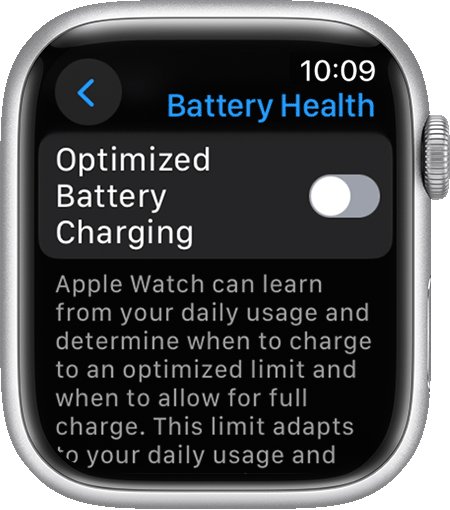
| Turn on Optimized Battery Charging or Optimized Charge Limit | The watch waits to finish past 80 percent until you need it, which reduces battery aging |
| Avoid very hot or cold places | Fast charging may not work in extreme temperatures |
| Keep the watch and charger 6 inches (15 cm) or more from pacemakers and defibrillators | Their magnets can interfere with medical devices |
Apple Watch still not charging? Try these checks
If the watch still shows no charging symbol, find the symptom below. Most Apple Watch charging failures come down to magnet alignment, a dirty charger or a power source that is off.
Apple Watch not charging at all
The magnets are not lined up, the charger is dirty, or the power source is off.
- Reposition the back of the watch on the charger until the lightning bolt appears.
- Clean the back of the watch and the charger, and remove any plastic wrap from both sides of the charger.
- Push the cable fully into the adapter, computer or power bank, and check that source has power.
- Try a different Apple Watch charging cable and a different USB power adapter.
- Force restart the watch: press and hold the side button and Digital Crown for at least 10 seconds, until the Apple logo appears.
Apple Watch doesn't charge on a MagSafe Duo or dock
Larger cases (44mm, 45mm, 49mm) can sit at the wrong angle on the connector.
- Adjust the charger to a different angle, or lay it completely flat.
- On Apple Watch Ultra, remove the band before you place the watch on the charger.
Apple Watch not fully charging
Optimized charging holds the battery at 80 percent until it predicts you need the watch.
- Open Settings on the watch and tap Battery > Battery Health.
- Check whether Optimized Battery Charging or Optimized Charge Limit is on.
- Leave it on to protect the battery, or turn it off if you need a full charge right now.
Apple Watch not keeping a charge
Features such as Always On Display and background app refresh drain the battery, or the battery has aged.
- Open Settings > Battery > Battery Health to check the battery's condition.
- Turn on Low Power Mode from Control Center when you will be away from power.
- Turn off Background App Refresh in Settings > General for apps you do not need updated.
- Contact Apple for service if the battery still drains quickly.
"Unable to charge. This is a country-specific charger"
A WPT-compliant charger bought in China or Indonesia is being used with an incompatible watch.
- Switch to a standard Apple Watch magnetic charger or USB-C Magnetic Fast Charging Cable.
- Place the watch on the new charger and check for the charging symbol.
If the watch still will not respond, a hard reset of the Apple Watch is the next step before you book a repair.
Charge Apple Watch without charger FAQ
Can you charge an Apple Watch without the charger?
Not without a magnetic charger of some kind, because Apple Watch charges only through a magnetic connector on its back. You can skip the wall adapter, though, by plugging the charging cable into an iPhone 15 or later, a computer or a power bank.
Can you charge Apple Watch with your phone?
Yes, with iPhone 15 and later. Plug the Apple Watch Magnetic Fast Charger to USB-C Cable into the iPhone's USB-C port, or use the Magnetic Charging Cable with Apple's USB-C to USB Adapter. The iPhone supplies up to 4.5 watts.
How do I charge my Apple Watch without the adapter?
Plug the watch's charging cable into a USB-C or USB port on a laptop or desktop computer, an iPhone 15 or later, or a power bank. The cable's magnetic connector still has to snap onto the back of the watch.
Can you charge an Apple Watch wirelessly?
Yes. Apple Watch already charges wirelessly by induction, but only from a charger with an Apple Watch magnetic connector, such as its own charging cable, the MagSafe Duo or a compatible third-party Apple Watch charger.
Can I charge my Apple Watch with a regular Qi wireless phone charger?
A standard Qi phone pad is not one of the chargers Apple lists for Apple Watch. Use the Apple Watch magnetic charger, a MagSafe Duo, or a third-party charger that includes an Apple Watch-compatible connector.
How do I charge Apple Watch without the cable?
Use a charger with a built-in Apple Watch connector, such as the MagSafe Duo, an Apple Watch charging dock, or a compatible third-party stand or power bank. Without any of these, borrow another Apple Watch magnetic charger.
How long does it take to charge an Apple Watch without the original charger?
It depends on the power source. With a fast charger, Series 10 and later reach 80 percent in about 30 minutes; from an iPhone, which supplies up to 4.5 watts, expect it to take noticeably longer.
Do all Apple Watch chargers work with all Apple Watch models?
Apple Watch magnetic chargers and the MagSafe Duo work across Apple Watch models, but fast charging needs a supported model and the USB-C Magnetic Fast Charging Cable. WPT-compliant chargers from China or Indonesia work only with compatible models.