When a hotspot connects but there is no internet, the phone's own cellular data or carrier hotspot service is usually the problem, so test the data on the phone first, then restart both devices and rejoin the network.
This guide covers iPhone Personal Hotspot, Android hotspots, Windows laptops and Macs that show connected with no internet, plus the fixes for a hotspot that will not connect at all.
How to fix hotspot connected but no internet
Try connecting again after each step. Most cases clear by step 4.
- On the phone sharing the hotspot, turn off Wi-Fi and open a web page. If it does not load over cellular, the hotspot has no internet to share; fix the phone's data or contact your carrier first.
- On an iPhone, open Settings > Cellular and make sure Cellular Data is on.
- Open Settings > Personal Hotspot and turn Allow Others to Join off and back on. Stay on this screen while the other device joins.
- Restart the phone that provides the hotspot and the device that connects to it.
- On the connecting device, turn Wi-Fi off and back on, then pick the network with the phone's name.
- On iPhone 12 or later, turn on Maximize Compatibility in Settings > Personal Hotspot, then rejoin.
- Update the phone, then reset network settings on the iPhone as a last step: Settings > General > Transfer or Reset iPhone > Reset > Reset Network Settings.
Reset Network Settings also erases saved Wi-Fi networks and passwords, cellular settings, and VPN and APN settings, so note any you need before you tap it.
Why is my hotspot not giving internet?
Match what you see to a row. The connecting device can only get the internet the phone itself has.
| What you see | Likely cause | Fix |
|---|---|---|
| Web pages fail on the phone too, with Wi-Fi off | No cellular data, no signal or data roaming off abroad | Turn on Cellular Data, check signal, or contact your carrier |
| Phone browses fine, connected devices get nothing | Hotspot session stuck or the connecting device kept old settings | Toggle Allow Others to Join, restart both devices, forget and rejoin the network |
| Personal Hotspot is dimmed or missing | Cellular Data off, or the carrier has not enabled hotspot on the plan | Turn on Cellular Data, then ask the carrier to add Personal Hotspot |
| Windows shows No internet under the hotspot name | No IP address from the phone, a stale DNS cache or a manual proxy | Renew the IP, flush DNS, turn off the proxy |
| Older laptop cannot join an iPhone 12 or later hotspot | Device does not handle the newer hotspot settings | Turn on Maximize Compatibility |
| Mac on USB says connected but nothing loads | iPhone USB network service is stuck | Make the iPhone USB service inactive, then active again |
| Internet works but iCloud backup or photo uploads do not | Some features wait for a Wi-Fi connection while on a hotspot | Run the backup or upload on regular Wi-Fi later |
iPhone hotspot connects but no internet
Personal Hotspot only shares the iPhone's cellular data. An iPhone cannot join a Wi-Fi network and pass that Wi-Fi on to another device.
- Open Settings > Cellular and turn on Cellular Data.
- Abroad, tap Cellular Data Options and check Data Roaming; with it off, there is no data outside your carrier's network.
- With Dual SIM, check that the line selected for cellular data is the one with a data plan, because Personal Hotspot uses that line.
- Open Settings > Personal Hotspot, turn on Allow Others to Join and note the Wi-Fi Password shown.
- On iPhone 12 or later, turn on Maximize Compatibility.
- Install the latest iOS from Settings > General > Software Update.
- If the hotspot still gives no internet, use Reset Network Settings from Settings > General > Transfer or Reset iPhone > Reset.
Maximize Compatibility can lower speed and Wi-Fi security for connected devices, so turn it back off once older devices no longer need it. Apple also says Personal Hotspot must be enabled by your carrier and supported by your plan, and extra fees may apply.
If the iPhone cannot load pages over cellular even with the hotspot off, fix its cellular data before you troubleshoot the hotspot.
If you are setting the feature up for the first time, start by turning on Personal Hotspot and choosing a password.
Laptop connects to hotspot but no internet on Windows 11 and 10
Windows shows No internet under the network name when it cannot reach a test server on the internet, even though the Wi-Fi link to the phone is up.
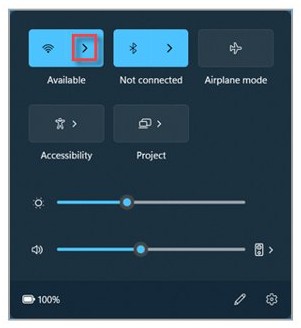
- Select the Network icon on the taskbar and check that the hotspot shows Connected.
- Open Settings > Network & internet > Airplane mode and make sure it is off.
- Open Settings > Network & internet > Wi-Fi > Manage known networks, select the hotspot and click Forget.
- Rejoin the hotspot from the Network icon and enter the password shown on the phone.
- Open Settings > Network & internet > Proxy and turn off any manual proxy setup.
- Run the TCP/IP and DNS reset commands in the next section.
- If nothing helps, open Settings > Network & internet > Advanced network settings > Network reset on Windows 11 (Status > Network reset on Windows 10), then select Reset now.
Network reset removes and reinstalls every network adapter and may require you to set up VPN software again. For no-internet errors that also hit your home Wi-Fi, work through these Windows Wi-Fi and network fixes as well.
Reset TCP/IP and DNS for hotspot no internet connection on Windows
Search for command prompt on the taskbar, select Run as administrator and then Yes. Run the commands in this order.
netsh winsock reset
netsh int ip reset
ipconfig /release
ipconfig /renew
ipconfig /flushdns
The first two commands reset the Winsock catalogue and the TCP/IP stack. The ipconfig commands drop and request a fresh IP address from the hotspot, then clear the DNS resolver cache.
You should see: After ipconfig /renew, the Wi-Fi adapter lists an IPv4 address and a Default Gateway that is not 169.254.x.x. Restart the PC after the netsh resets, then rejoin the hotspot.
Mac connected to iPhone hotspot but no internet
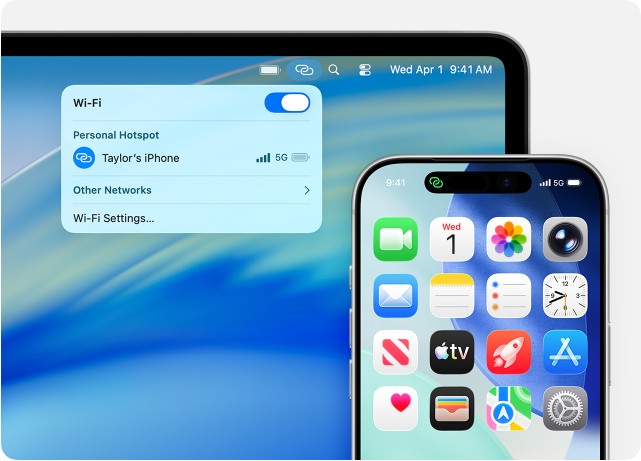
A Mac can join an iPhone hotspot over Wi-Fi, USB or Bluetooth. The fix depends on which one you use.
- Over Wi-Fi, turn Wi-Fi off and back on, then click Wi-Fi in the menu bar and choose the iPhone's name.
- Over USB, update macOS and connect the iPhone with a cable; tap Trust on the iPhone and click Allow on the Mac if asked.
- Open Apple menu > System Settings > Network and find iPhone USB in the list of services.
- On macOS Ventura or later, click iPhone USB, click Make Inactive, then click Make Active.
- On earlier macOS, select iPhone USB, choose Make Service Inactive from the More button, click Apply, then choose Make Service Active and click Apply.
- Over Bluetooth, keep Settings > Bluetooth open on the iPhone and select the iPhone in System Settings > Bluetooth on the Mac.
If iPhone USB is missing from the list, add it as a new network service in Network settings. Personal Hotspot stays active while the iPhone is plugged in, so the Mac may use cellular data whenever it charges from the computer.
Mobile hotspot connected but no internet on Android
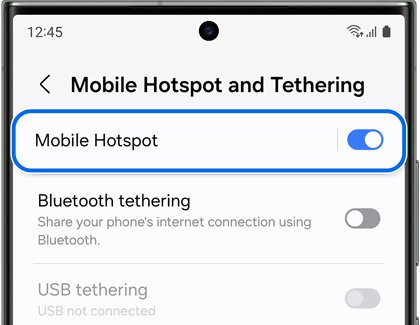
Android shares mobile data over Wi-Fi, Bluetooth or USB. Some carriers limit or charge extra for tethering, which can leave a hotspot with a connection but no data.
- Turn off Wi-Fi on the Android phone and load a web page to check mobile data works on the phone.
- Swipe down from the top of the screen and tap Hotspot to turn it off, then tap it again to turn it on.
- Touch and hold Hotspot to open its settings and note the hotspot name and password.
- On the other device, forget the hotspot network, then pick the phone's hotspot name and enter the password again.
- Ask your carrier whether your plan allows tethering if the phone browses but connected devices still get nothing.
An Android Wi-Fi hotspot can share mobile data with up to 10 other devices. Some steps in Google's instructions apply to Android 14 and up.
How to check if hotspot internet is working
- On an Apple device, look for the Personal Hotspot icon in place of the Wi-Fi icon; it shows the device joined the hotspot.
- On Windows, select the Network icon: Connected under the hotspot name means internet access, while No internet means the link is up but data is not getting through.
- Open Command Prompt, type
ipconfigand press Enter. A Wi-Fi address starting with 169.254 means the PC got no IP address from the phone. - Note the Default Gateway in the ipconfig output and run
pingfollowed by that address. Replies mean the PC reaches the phone, so the gap is the phone's cellular data. - On the phone, open Settings > Cellular and check the data used by Personal Hotspot climbs while the other device loads pages.
Hotspot is not connecting: how to fix it
Hotspot is not connecting at all
Allow Others to Join is off, the wrong network is selected, or the device is too far away.
- Open Settings > Personal Hotspot on the iPhone and turn on Allow Others to Join.
- Keep both devices within about 30 feet (10 meters) with Wi-Fi and Bluetooth on.
- Choose the network that has the phone's name, which is the hotspot name.
- Restart both devices and try again.
Wrong password when joining the hotspot
The password on the connecting device does not match the one the phone shows.
- Open Settings > Personal Hotspot on the iPhone and read the Wi-Fi Password.
- Forget the network on the connecting device and enter the password again.
- To set a new password, tap Wi-Fi Password and use at least eight ASCII characters.
Personal Hotspot greyed out or missing on iPhone
Cellular Data is off, or the carrier has not enabled Personal Hotspot.
- Open Settings > Cellular and turn on Cellular Data.
- Look for Set Up Personal Hotspot under Cellular; if it is not there, contact your carrier to add it to your plan.
Hotspot connected but no internet on Windows 11 or 10
Windows has no valid IP address or DNS from the phone, or a proxy is blocking traffic.
- Forget the hotspot in Manage known networks and rejoin it.
- Turn off any manual proxy in Settings > Network & internet > Proxy.
- Run
ipconfig /release,ipconfig /renewandipconfig /flushdnsfrom an administrator Command Prompt. - Update Windows from Settings > Windows Update and restart the PC.
PC hotspot connected but no internet
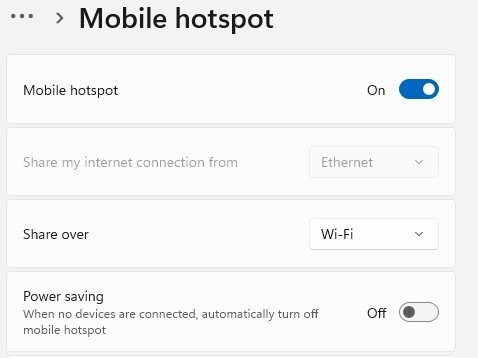
The Windows PC sharing its own connection has no working internet itself, or its Mobile hotspot settings share the wrong adapter.
- Check that the PC loads web pages over its own Wi-Fi or Ethernet first.
- Open Settings > Network & internet > Mobile hotspot and check that Share my internet connection from names the connection that has internet.
- Turn Mobile hotspot off and on, then rejoin from the phone or laptop.
VPN on, hotspot joins but drops or fails
A VPN configuration that blocks local networking can interfere with Instant Hotspot between Apple devices.
- Check the VPN app's settings for an option that allows local network access.
- Disconnect the VPN, rejoin the hotspot and test, then reconnect the VPN.
When a Windows PC is the hotspot rather than the phone, these Windows 11 mobile hotspot fixes cover the adapter and driver side.
Hotspot no internet FAQ
Why does my hotspot say no internet?
Your hotspot says no internet when the device joined the phone's Wi-Fi but data is not reaching it. The usual causes are cellular data being off or out of signal on the phone, a carrier plan without hotspot service, or a stale IP address on the connecting device.
Why is my hotspot not giving internet?
A hotspot only passes on the phone's mobile data. If the phone cannot load pages over cellular, or the carrier blocks tethering on your plan, connected devices get nothing. Test the phone with Wi-Fi off, then restart both devices and rejoin.
Why can't I connect to a hotspot?
You usually cannot connect because Allow Others to Join is off, the password is wrong, or the device is out of range. On iPhone 12 or later, turning on Maximize Compatibility helps older laptops and phones join the hotspot.
Why won't my hotspot connect?
Restart the phone and the other device, update both, and keep the Personal Hotspot screen open while you join. If it still will not connect, Reset Network Settings on the iPhone clears corrupted network settings, along with saved Wi-Fi passwords and VPN settings.
Can you use a hotspot without internet?
No internet reaches connected devices unless the phone has a working cellular data connection. An iPhone cannot take a Wi-Fi connection and share it through Personal Hotspot, so the phone needs mobile data and a plan that allows hotspot use.
Why does my laptop connect to the hotspot but have no internet?
The laptop has a Wi-Fi link to the phone but no working IP address, DNS or route to the internet. On Windows, forget the network, rejoin, turn off any manual proxy and run ipconfig /release, ipconfig /renew and ipconfig /flushdns.
Why does my iPhone hotspot connect but have no internet?
Check Cellular Data is on, Data Roaming is on when abroad, and the Dual SIM line used for data has a plan. Then toggle Allow Others to Join, restart both devices, and confirm with your carrier that Personal Hotspot is enabled.