Windows cannot open a DMG file on its own, but the free 7-Zip archiver lists DMG among the formats it can unpack, so you can open one and copy out the files inside.
Set expectations first: most DMG files are Mac app installers, and the app inside will not run on Windows even after you extract it. This guide covers what a DMG holds, how to extract one, the DMG-to-ISO question, and fixes for the errors people hit.
The fastest way to open a DMG file on Windows
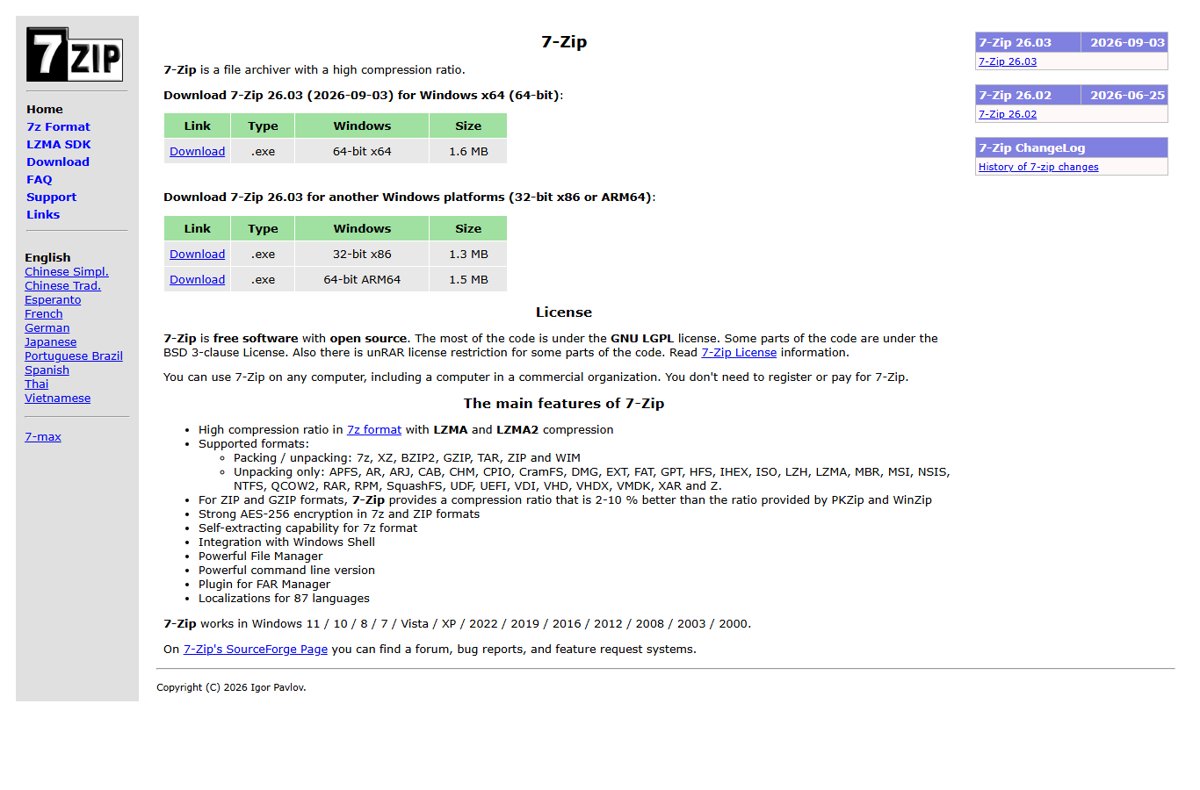
7-Zip is free, runs on Windows 11, 10, 8 and 7, and its official format list includes DMG, HFS and APFS for unpacking. Get it only from 7-zip.org.
- Go to 7-zip.org and install the build that matches your PC: 64-bit x64 for most PCs, 64-bit ARM64 for Arm laptops, or 32-bit x86 for old 32-bit Windows.
- Open 7-Zip File Manager from the Start menu.
- Browse to the folder that holds your .dmg file and double-click the file to open it like a folder.
- Select the files or folders you want, then select Extract.
- Choose a destination folder and confirm. The copied files appear there as normal Windows files.
If the DMG opens to a single inner item instead of files, double-click that item to go one level deeper. A DMG wraps a whole disk volume, so the real contents can sit a layer down.
What Is a DMG File?
A DMG is an Apple disk image: one file that contains other files and folders, formatted like a real disk. On a Mac, double-clicking it mounts it as a drive, and Apple's own install steps start with double-clicking the downloaded disk image.
| What a DMG can contain | Typical source | Useful on Windows? |
|---|---|---|
| A Mac app, usually with a shortcut to the Applications folder | Software downloads for macOS | No. The app is built for macOS and will not run on Windows |
| A .pkg installer package | Mac drivers and larger Mac programs | No. It installs only on a Mac |
| Documents, photos, audio or video | A Mac user packing files to send or archive | Yes. Extract them and open them with normal Windows apps |
| An encrypted, password-protected volume | Disk Utility's Encryption option on a Mac | Only after it is decrypted on a Mac |
| An APFS or Mac OS Extended volume | The default formats Disk Utility offers Mac users | Readable through 7-Zip, which lists APFS and HFS |
| An MS-DOS (FAT) or ExFAT volume | Images Apple suggests for use with a Mac or Windows computer | Yes. 7-Zip lists FAT, and the files are ordinary Windows files |
Can Windows Open DMG Files Natively?
No. Windows mounts ISO, VHD and VHDX images as drives, and Microsoft's Mount-DiskImage documentation lists only those types. DMG is not on the list, so double-clicking a .dmg in File Explorer finds no app to open it on either Windows 11 or Windows 10.
| Image type | Windows 11 and Windows 10 without extra software | With 7-Zip |
|---|---|---|
| ISO | Mounts as a read-only drive | Opens and extracts |
| VHD / VHDX | Mounts as a disk (administrator rights needed for VHD) | Opens and extracts |
| DMG | Not supported, no built-in app | Opens and extracts (unpack only) |
| HFS or APFS volume inside a DMG | Not readable | Listed for unpacking |
| Mac .app program inside a DMG | Cannot run | Can be copied out, still cannot run |
Best Tools to Open DMG Files on Windows
The right tool depends on what the DMG holds and whether you have a Mac nearby. Match your case to a row.
| Your situation | Use this | Why |
|---|---|---|
| You need documents, media or other data from the DMG | 7-Zip on Windows | Free, open source, and DMG is in its documented unpack list |
| The DMG is a Mac app you want to use on your PC | The developer's Windows version of the app | Extracting a Mac app gives you files Windows cannot run |
| The DMG is password-protected | Disk Utility on a Mac | Disk Utility can convert the image and change its encryption |
| You need an ISO-style image rather than loose files | Disk Utility on a Mac | Its hybrid image format combines HFS, ISO and UDF standards |
| You only need to move files between a Mac and a PC | Ask the sender for a ZIP or an ExFAT disk image | 7-Zip packs and unpacks ZIP, and Apple recommends FAT or ExFAT for images used with Windows |
Windows has no built-in DMG tool, and File Explorer's image mounting covers only ISO, VHD and VHDX. 7-Zip also unpacks CHM help files, though Windows opens those itself, as opening a CHM file in Windows 11 shows.
How to Extract a DMG File on Windows
This is the full route with 7-Zip, including a test pass that catches a damaged download before you copy anything. Extract to an empty folder so the Mac files do not mix with your own.
- Create an empty folder, for example DMG-extract on your desktop.
- Open 7-Zip File Manager and browse to the .dmg file.
- Select the .dmg file and choose the Test command. A clean result means 7-Zip read every file without a Data Error or CRC Error.
- Double-click the .dmg file to open it, then open inner folders until you see the files you need.
- Select those files and choose Extract.
- Set the destination to your empty folder and confirm.
- Open the folder in File Explorer and open each file with the matching Windows app.
Use the Extract command rather than dragging files into File Explorer. 7-Zip's FAQ explains that drag-and-drop goes through temporary files first, while Extract writes straight to the folder you choose.
After extraction, files ending in .app or .pkg are Mac software and cannot be installed on Windows. Delete them once you have what you need, and look on the developer's site for a Windows download.
How to Convert DMG to ISO
Neither Windows nor 7-Zip converts DMG to ISO. 7-Zip creates only 7z, XZ, BZIP2, GZIP, TAR, ZIP and WIM files, and Windows has no image converter. The documented conversion tool is Disk Utility on a Mac.
Apple's Hybrid image (HFS+/ISO/UDF) option builds an image that works with several file system standards. Apple does not document how Windows handles the result, so check it on your PC before relying on it.
- On a Mac, double-click the .dmg file so it mounts in the Finder sidebar.
- Open the Disk Utility app on the Mac.
- Choose File > New Image > Image from Folder.
- Select the mounted DMG volume and click Open.
- Enter a filename and choose where to save it.
- Click the Image Format pop-up menu and choose Hybrid image (HFS+/ISO/UDF).
- Click Save, then click Done, and copy the new image to your Windows PC.
If you only need the files, skip conversion. Extracting with 7-Zip gets the same data onto your PC with fewer steps.
How to check the extraction worked
A finished extraction leaves real files in the destination folder that open in Windows apps.
- Open the destination folder in File Explorer and confirm the files are there with sizes above 0 KB.
- Open one document, image or video with its usual Windows app. If it opens, the data came through intact.
- Run the 7-Zip Test command on the .dmg again if any file refuses to open. Errors there point to a damaged download, not a Windows problem.
- Scan the folder with Microsoft Defender, using the command in the safety section below.
Common Problems When Opening DMG Files
Double-clicking the DMG in Windows 10 or Windows 11 does nothing useful
Windows has no app registered for .dmg files and can mount only ISO, VHD and VHDX images.
- Install 7-Zip from 7-zip.org.
- Open 7-Zip File Manager and browse to the .dmg file.
- Double-click the file inside 7-Zip rather than in File Explorer.
The DMG file is encrypted or password-protected
The image was created with Disk Utility's Encryption option, and Apple warns that the files cannot be opened without the password.
- Ask the sender for the password, or ask them to send the files unencrypted.
- On a Mac, open Disk Utility and choose Images > Convert.
- Select the DMG and click Choose, then change the Encryption pop-up menu.
- Enter a name in Save As, click Save, then open the converted copy with 7-Zip on Windows.
The image uses an unsupported macOS file system
7-Zip's unpack list names APFS, HFS and FAT, and a volume format outside that list will not open.
- Install the current 7-Zip release from 7-zip.org if yours is old.
- Open the DMG again in 7-Zip File Manager.
- If it still fails, ask the sender to re-create the image as MS-DOS (FAT) (32 GB or less) or ExFAT in Disk Utility, the formats Apple suggests for use with Windows.
The DMG file is corrupted or incomplete
An interrupted download leaves a truncated file, and 7-Zip reports Data Error or CRC Error, or cannot open the file as an archive.
- Compare the file size with the size shown on the download page.
- Delete the file and download it again from the original source.
- Run the 7-Zip Test command on the new copy before extracting.
Extracted files are not usable on Windows
The DMG held a Mac app (.app) or installer (.pkg), which is software built for macOS.
- Check the developer's website for a Windows version of the same app.
- Download the Windows installer from that site and install it normally. If the browser asks what to do with it, Microsoft Edge's Open, Save as and Save options let you keep a copy.
- Delete the extracted Mac files.
File names, permissions, or hidden files look unusual
Mac volumes carry macOS system folders and metadata that Windows shows as ordinary items.
- Ignore folders and files you do not recognise; the documents you need sit alongside them.
- Copy only the files you need out of the extraction folder.
- Delete the remaining extraction folder when you are done.
Safety Tips Before Opening DMG Files
A DMG is a container, so anything inside it deserves the same caution as any other download. Microsoft Defender's real-time protection checks files as they are opened, and an on-demand custom scan checks a specific folder.
- Check the source before extracting: download only from the developer's own site or a sender you know.
- Extract into a dedicated empty folder, never into Documents or the desktop root.
- Open Windows PowerShell and run
Start-MpScan -ScanType CustomScan -ScanPath "C:\Users\<you>\Desktop\DMG-extract", replacing the path with your folder. - Open only data files, such as PDFs, images and media, from the extracted folder.
- Delete the folder and the .dmg file once you have copied what you need.
Start-MpScan accepts a file or folder in -ScanPath, and CustomScan limits the scan to that location, so it finishes far faster than a full scan.
Frequently Asked Questions
Can you open DMG files on Windows?
Yes, but not with Windows alone. Install 7-Zip from 7-zip.org, which lists DMG among the formats it can unpack. You can then browse the image and extract its files. You cannot run a Mac app that you find inside it.
How do I open DMG files on Windows 10?
Install 7-Zip, open 7-Zip File Manager, browse to the .dmg file and double-click it. Select the files you need and choose Extract. Windows 10 itself mounts only ISO, VHD and VHDX images, so File Explorer cannot open a DMG.
How do I open DMG files on Windows 11?
The steps match Windows 10: install 7-Zip, open the .dmg in 7-Zip File Manager, and extract the files you need. Windows 11 has no DMG support of its own, and its built-in mounting still covers only ISO, VHD and VHDX files.
Can I open a DMG file on Windows 7?
Yes. 7-Zip states it works on Windows 11, 10, 8, 7, Vista and XP, and DMG is in its unpack list. Install the 32-bit x86 build if your Windows 7 PC is 32-bit, then open the file in 7-Zip File Manager.
How do I use a DMG file in Windows?
You can only use the data inside it. Extract documents, images or media with 7-Zip and open them in Windows apps. If the DMG is a Mac app installer, download the developer's Windows version instead, because macOS apps do not run on Windows.
Can I install a Mac app from a DMG on Windows?
No. A DMG from a software download usually holds a macOS app or a .pkg installer, and both are built for macOS. 7-Zip can copy those files out, but Windows cannot run or install them. Look for a Windows release on the developer's site.
Is a DMG file the same as an ISO file?
No. Both are disk images, but DMG is Apple's format and often uses Mac file systems such as APFS or HFS. Windows mounts ISO files natively and does not mount DMG files. 7-Zip opens both.
Can 7-Zip convert DMG to ISO?
No. 7-Zip only unpacks DMG, and the formats it can create are 7z, XZ, BZIP2, GZIP, TAR, ZIP and WIM. To make an ISO-style image, use Disk Utility's Hybrid image (HFS+/ISO/UDF) option on a Mac.
Is a DMP file the same as a DMG file?
No. A .dmp file is a Windows memory dump that records why a PC crashed, and it is read with Microsoft's debugging tools such as WinDbg. A .dmg file is an Apple disk image. The two extensions differ by one letter and are unrelated.
Is it safe to open a DMG file on Windows?
Opening it in 7-Zip only reads the image, so browsing it is low risk. The files inside carry the same risk as any download. Extract them to an empty folder and scan that folder with Microsoft Defender before opening anything.
Bottom Line
Use 7-Zip to extract the data from a DMG on Windows, and get a Windows version of any Mac app you find inside. 7-Zip is free, documents DMG, HFS and APFS support, and runs on every current Windows version, while Windows itself mounts only ISO, VHD and VHDX. No extraction tool can make a macOS app run on a PC.