Windows Live Mail stops working for one of two reasons: the mail provider now refuses its password-only sign-in (Hotmail and Outlook.com completely, Gmail and Yahoo unless you use an app password), or the program itself is frozen, damaged or struggling on a newer version of Windows.
This guide shows how to tell which one you have, the account settings that still work, how to repair or reinstall Windows Essentials 2012, and which supported mail apps replace it.
Why is my Windows Live Mail not working
Match what you see to a row. The account rows matter most, because no setting inside Windows Live Mail can bring back a sign-in method the mail provider has switched off.
| What you see | Cause | Fix |
|---|---|---|
| A Hotmail, Live.com or Outlook.com account keeps asking for the password, or will not send or receive | Microsoft removed Basic Authentication for every Outlook.com account on September 16, 2024; Outlook.com now accepts only OAuth2 (Modern Auth) | Move that account to new Outlook or Thunderbird |
| A Gmail account shows Invalid username, Invalid password or Unable to log in | Google blocks apps that sign in with only a user name and password | Use a 16-digit Google app password, which needs 2-Step Verification |
| A Yahoo Mail account rejects the correct password | Yahoo requires a generated app password in email apps that do not use its sign-in page | Create an app password on the Yahoo Account Security page |
| Mail arrives but nothing sends | Wrong outgoing (SMTP) server, port or encryption, or authentication is off for sending | Re-enter the SMTP values from the settings table below |
| Windows Live Mail will not open, freezes on start or stops responding | A copy is still running in the background, or the program files are damaged | End the task, then repair Windows Essentials 2012 |
| It broke after a Windows upgrade | The 2012 program was never updated for newer Windows releases | Run the Program Compatibility Troubleshooter |
| It broke right after an update, driver or new program | A recent system change | Roll back with System Restore |
| No account connects, yet the same mailbox opens in a browser | A firewall rule or security app is blocking the program | Allow Windows Live Mail through Windows Firewall |
Is Windows Live Mail still supported?
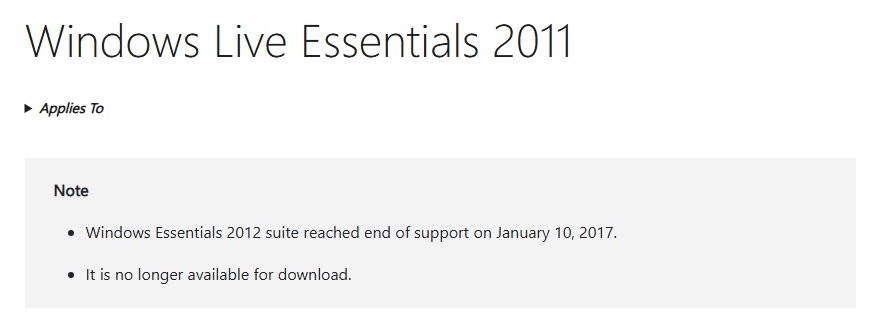
No. Windows Live Mail shipped as part of Windows Essentials 2012, and Microsoft ended support for that suite on January 10, 2017. Since then, the big mail providers have changed how apps sign in.
| What changed | Date | Effect on Windows Live Mail |
|---|---|---|
| Windows Essentials 2012 (Mail, Photo Gallery, Movie Maker, Writer and others) reached end of support | January 10, 2017 | No more updates or fixes, and Microsoft no longer offers the suite for download |
| Outlook.com retired Basic Authentication | September 16, 2024 | Hotmail, Live.com and Outlook.com accounts cannot connect from an app that sends only a password |
| Gmail stopped accepting the Google password from third-party apps | In force now; Google Workspace accounts from May 1, 2025 | Gmail works only with an app password, and work or school accounts may not offer one |
| Windows Mail and Calendar, the built-in successor, reached end of support | December 31, 2024 | Not a fallback: it can no longer send or receive, and Microsoft points users to new Outlook |
How to fix Windows Live Mail not working
Start with a clean restart when the program freezes, will not open or stops responding. Close every running copy before you open it again.
- Right-click Start and select Task Manager.
- Select Processes in the left menu.
- Under Apps, right-click Windows Live Mail and select End task.
- Scroll to Background processes and end any Windows Live Mail entry left there as well.
- Restart the PC if Task Manager cannot end the task.
- Open Windows Live Mail again and check whether each account downloads new mail.
If the Start menu is frozen too, other Task Manager shortcuts open the same window. If the program opens but one account still fails, the cause is that account's sign-in, not the program.
Windows Live Mail not working with Hotmail or Outlook.com
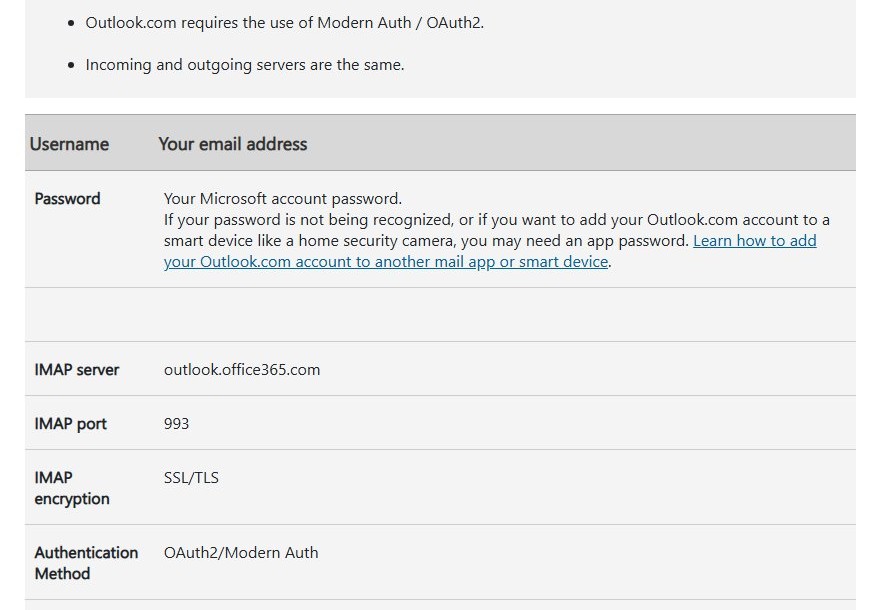
There is no fix inside Windows Live Mail for these accounts. Microsoft lists OAuth2/Modern Auth as the only sign-in method for Outlook.com IMAP, POP and SMTP, and Windows Live Mail stopped receiving updates long before that change.
Retyping the password or changing ports does nothing. Move the mailbox into an app that signs in with OAuth2; Microsoft's own recommendation is the free new Outlook for Windows.
- Open Microsoft Store, search for Outlook, and install the new Outlook for Windows.
- Open Outlook. On the View tab, select View settings.
- Select Accounts > Your accounts.
- Under Email accounts, select Add Account.
- Enter your Hotmail, Live.com or Outlook.com address and select Continue.
- Sign in with your Microsoft account password and approve the request if two-step verification is on.
- Wait for the folders to sync, then send yourself a test message.
Messages stored on the Outlook.com server appear in the new app once it syncs. Prefer a desktop client from another developer? Microsoft names Mozilla Thunderbird as an app that supports OAuth2 for Outlook.com, and you can download Thunderbird for free.
Unsure which Outlook to pick? Compare new Outlook and classic Outlook before you move years of mail.
Windows Live Mail settings for Gmail and Yahoo Mail
Use these values when you set up or repair an account. Both Gmail and Yahoo require encrypted connections and an app password; your normal account password is refused.
| Setting | Gmail | Yahoo Mail | Outlook.com / Hotmail |
|---|---|---|---|
| Account type | IMAP | IMAP | IMAP or POP |
| Incoming server | imap.gmail.com |
imap.mail.yahoo.com |
outlook.office365.com |
| Incoming port and encryption | 993, SSL | 993, SSL | 993 (IMAP) or 995 (POP), SSL/TLS |
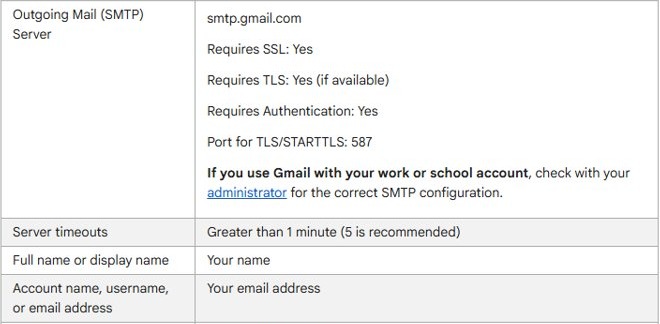
| Outgoing (SMTP) server | smtp.gmail.com |
smtp.mail.yahoo.com |
smtp-mail.outlook.com |
| Outgoing port and encryption | 587 with TLS, or 465 with SSL | 465 or 587, SSL | 587, STARTTLS |
| Outgoing server requires authentication | Yes | Yes | Yes |
| User name | Full Gmail address | Full email address | Full email address |
| Password | 16-digit Google app password | Yahoo app password | None works: OAuth2/Modern Auth only |
Outlook.com also turns POP and IMAP access off by default. Switching it on under Settings > Mail > Forwarding and IMAP helps other apps, but not Windows Live Mail, because the password sign-in itself is refused.
How to set up Gmail in Windows Live Mail
Google accepts Windows Live Mail only with an app password, and an app password needs 2-Step Verification on the Google Account. Work or school accounts, accounts with Advanced Protection and accounts that use only security keys may not show the option.
- Turn on 2-Step Verification in your Google Account if it is off.
- Go to
myaccount.google.com/apppasswordsand sign in. - Create an app password and copy the 16-digit code Google shows.
- In Windows Live Mail, open the Gmail account's properties, or remove the account and add it again with manual server settings.
- Enter
imap.gmail.com, port993and SSL for incoming mail. - Enter
smtp.gmail.comwith port587(TLS) or465(SSL) for outgoing mail, and turn on authentication for the outgoing server. - Replace the saved password with the app password, then send and receive.
For Yahoo Mail, sign in to the Yahoo Account Security page, select Create app password under External connections, and use that code with the Yahoo values above. A Yahoo app password stays valid after you change your main password, so delete it there if you stop using Windows Live Mail.
Removing and re-adding an IMAP account is safe for mail kept on the server, which downloads again. A POP account keeps downloaded mail only on the PC, so keep any messages you need before you remove it.
Run Windows Live Mail as admin in compatibility mode
Windows Live Mail dates from 2012, and Microsoft notes that older programs can stop working properly after a Windows upgrade. The Program Compatibility Troubleshooter tests older-Windows settings and applies the ones that work.
- Select Start > Settings > System > Troubleshoot > Other troubleshooters.
- Find Program Compatibility Troubleshooter and select Run.
- Pick Windows Live Mail when the troubleshooter asks which program has problems.
- Apply the suggested settings, test the program, and keep the settings if it starts normally.
- To give it administrator rights for one session, right-click the Windows Live Mail shortcut and select Run as administrator.
Running as administrator does not change how the mail provider treats the sign-in, so it never fixes a Hotmail, Gmail or Yahoo password error.
Allow Windows Live Mail through Windows Firewall
Try this when no account connects at all while the same mailbox opens normally in a browser.
- Right-click the Windows Live Mail shortcut, select Open file location, and note the folder.
- Open the Windows Security app and select Firewall & network protection.
- Select Allow an app through firewall.
- Select Change settings and confirm the administrator prompt.
- Tick Windows Live Mail in the list, or select Allow another app and browse to the program in the folder from step 1.
- Select OK, then reopen Windows Live Mail and test an account.
Microsoft warns that each allowed app makes the device less secure, so allow only the real Windows Live Mail program and never a file you do not recognise. A third-party security suite keeps its own firewall list, which needs the same change.
Repair Windows Essentials 2012
Windows Live Mail installs as part of Windows Essentials 2012, so the repair runs on the suite from Programs and Features. Try it when the program crashes, closes on start or shows missing-file errors.
- Close Windows Live Mail.
- Type control panel in the taskbar search box and select Control Panel.
- Select Programs > Programs and Features.
- Right-click Windows Essentials 2012 and select Repair, or Change if Repair is not available.
- Choose the repair option for the Windows Essentials programs and follow the directions on the screen.
- Restart the PC and open Windows Live Mail again.
Reinstall Windows Essentials 2012
Microsoft no longer offers Windows Essentials 2012 for download, so a reinstall works only if you still have the original setup file. A reinstall also cannot restore Hotmail or Outlook.com access.
- Make sure you still have the Windows Essentials 2012 setup file before you remove anything.
- Open Control Panel > Programs > Programs and Features.
- Right-click Windows Essentials 2012, select Uninstall or Change, and follow the directions to remove it.
- Restart the PC.
- Run the saved setup file and install Mail again.
- Open Windows Live Mail and add your accounts with the settings table above.
The saved file runs the same setup screens as a first Windows Live Mail install on Windows 10.
Use System Restore to fix Windows Live Mail
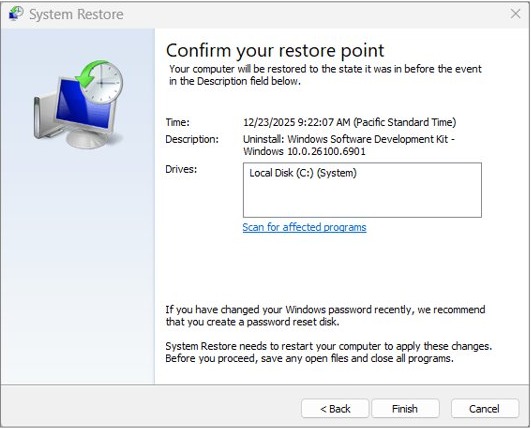
System Restore returns system files, registry settings and installed programs to an earlier restore point without touching personal files. Use it when Windows Live Mail broke right after an update, a driver or a new program.
- Press Windows + R, type
rstrui.exeand press Enter. - Select Next in the Restore system files and settings box.
- Pick a restore point dated before the problem began; tick Show more restore points if it is not listed.
- Select Scan for affected programs to see which programs the restore changes.
- Select Next, then Finish.
- Let Windows restart, then open Windows Live Mail.
Programs installed after the chosen point are rolled back too. If the list is empty, fix missing restore points before you rely on this step.
Windows Live Mail alternatives for Windows 11 and 10
Pick the replacement by the accounts you need. Each option below signs in with OAuth, the method Windows Live Mail lacks.
| Your situation | Use this | Why |
|---|---|---|
| You want a free Microsoft app | New Outlook for Windows from Microsoft Store | No subscription needed; Outlook.com, Gmail and Yahoo accounts sit in one inbox |
| You pay for Microsoft 365 or own Outlook 2021 | Classic Outlook | Builds 11601.10000 and later connect to Outlook.com with OAuth |
| You want a free desktop client from another developer | Mozilla Thunderbird | Supports OAuth2 for Outlook.com, and Google lists it as a Gmail client |
| You only need Hotmail or Outlook.com mail | Outlook.com in a browser | Nothing to install or configure |
| You planned to fall back on the old Windows Mail app | Not an option | Mail and Calendar stopped sending and receiving after December 31, 2024 |
Windows Live Mail keeps asking for password or won't send
Windows Live Mail keeps asking for the password on a Hotmail or Outlook.com account
Outlook.com refuses Basic Authentication, so even the correct password fails and the prompt returns.
- Close the prompt instead of retyping the password.
- Sign in at Outlook.com in a browser to confirm the password itself is correct.
- Add the account to new Outlook or Thunderbird, which sign in with OAuth2.
Gmail shows Invalid password or Unable to log in
Google blocks apps that send only the Google account password.
- Turn on 2-Step Verification for the Google Account.
- Create an app password at
myaccount.google.com/apppasswords. - Replace the saved password in Windows Live Mail with the 16-digit code.
- Create a new app password after any change to your Google password, because the change revokes the old ones.
Yahoo Mail rejects the password
Third-party email apps need a Yahoo app password.
- Sign in to the Yahoo Account Security page.
- Select Create app password under External connections and follow the prompts.
- Use the code as the password for the incoming and outgoing servers.
Windows Live Mail receives email but will not send
The outgoing server name, port, encryption or authentication setting is wrong.
- Open the account's properties in Windows Live Mail.
- Check the SMTP server and port against the settings table above.
- Turn on authentication for the outgoing server, using the same app password.
- Send a test message to yourself.
Windows Live Mail closes as soon as it opens
Damaged program files, or a compatibility problem after a Windows upgrade.
- End every Windows Live Mail task in Task Manager.
- Repair Windows Essentials 2012 from Programs and Features.
- Run the Program Compatibility Troubleshooter.
- Use System Restore if the crashes began after a recent change.
Windows Live Mail FAQ
Does Windows Live Mail still work?
Only in part. Hotmail, Live.com and Outlook.com accounts can no longer connect, because Outlook.com requires OAuth2 sign-in. Gmail and Yahoo accounts connect only with an app password. Microsoft ended support for Windows Essentials 2012, which includes Mail, on January 10, 2017.
Can Windows Live Mail connect to Hotmail or Outlook.com?
No. Since September 16, 2024, Outlook.com accepts only OAuth2 (Modern Auth) sign-in for POP, IMAP and SMTP, and Windows Live Mail never gained that support. Use new Outlook, Outlook.com in a browser or Mozilla Thunderbird for those accounts instead.
Does Windows Live Mail work with Gmail?
Yes, over IMAP with a 16-digit Google app password. The Google Account needs 2-Step Verification, and work or school accounts may not offer app passwords. Use imap.gmail.com on port 993 with SSL, and smtp.gmail.com on port 587 with TLS.
Does Windows Live Mail work on Windows 11?
Microsoft does not support it there. Support for Windows Essentials 2012 ended in January 2017, years before Windows 11 was released, so the program was never updated for it. Microsoft's free mail app for Windows 11 is the new Outlook for Windows.
Can I still download Windows Live Mail from Microsoft?
No. Microsoft states that Windows Essentials 2012, the suite that contained Windows Live Mail, is no longer available for download. Only a setup file you saved earlier can reinstall it, and copies offered on download sites are not official Microsoft files.
What replaced Windows Live Mail?
The new Outlook for Windows, a free app from Microsoft Store, is Microsoft's current mail app for Windows. The Windows Mail and Calendar app that came in between lost support on December 31, 2024 and can no longer send or receive email.
Why does Windows Live Mail keep asking for my password?
On a Hotmail or Outlook.com account, the prompt repeats because Outlook.com no longer accepts password-only sign-in, so the correct password still fails. On Gmail or Yahoo, the provider wants an app password instead of your normal account password.
Is it safe to keep using Windows Live Mail?
It receives no security fixes, because support ended on January 10, 2017. The accounts it can still reach depend on app passwords, which Google says are not recommended. Move your mail to a supported client such as new Outlook or Thunderbird when you can.