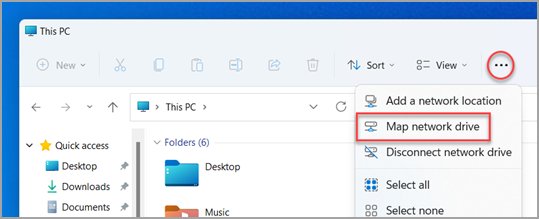
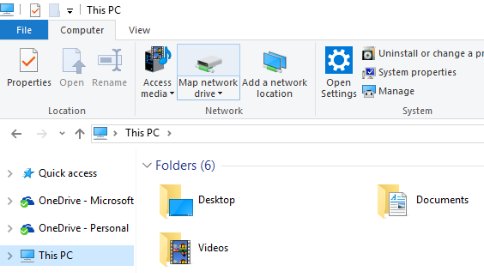
To map WebDAV in File Explorer, open This PC, choose Map network drive, paste the server's full https:// address into the Folder box and select Finish.
This guide covers the steps for Windows 11 and Windows 10, the net use alternative, the WebClient service that makes it work, registry limits, and fixes for the common connection errors.
Step-by-step guide to map WebDAV in Windows 10 and Windows 11
The wizard is the same one you use to map a network drive to a shared folder; only the address in the Folder box differs. Have the server URL, your user name and your password ready before you start. The address usually looks like https://dav.example.com/files; your hosting provider or admin supplies it.
- Open File Explorer and select This PC in the left pane.
- On Windows 11, select More on the command bar and choose Map network drive. On Windows 10, open the Computer tab and select Map network drive.
- Pick a free letter in the Drive list.
- Type the full WebDAV URL, including
https://, in the Folder box. - Tick Reconnect at sign-in if the drive should come back after every restart.
- Select Finish.
- Enter your user name and password when Windows asks for them, then select OK.
The share opens in a new File Explorer window and appears under This PC with the letter you picked. If Windows returns an error instead, jump to the troubleshooting section below.
What is WebDAV and why use it?
WebDAV (Web Distributed Authoring and Versioning) is an extension to HTTP that defines how file operations such as copy, move, delete and create work over the web. Windows talks to a WebDAV server through its WebDAV redirector, which runs as the WebClient service.
| Question | Answer |
|---|---|
| How does WebDAV work? | The client sends extra HTTP methods (PROPFIND for folder listings, PUT for uploads, LOCK for editing) to a web server that has WebDAV enabled. |
| Which ports does it use? | The same as a website: 80 for http:// and 443 for https://, unless the server uses a custom port. |
| Benefits of using WebDAV | Files on a web server open in File Explorer like a normal drive, so you can drag, drop, rename and save straight from apps. |
| Typical use cases | Publishing website files, reaching a NAS or self-hosted cloud remotely, and sharing a folder across the internet where SMB is blocked. |
| What Windows uses to connect | The built-in WebDAV redirector (WebClient service); no extra client is needed on Windows 10 or Windows 11. |
| Is it still supported? | Microsoft lists the WebClient (WebDAV) service as deprecated since November 2023. It is no longer actively developed and might be removed in a future update, but it still works today. |
Prerequisites for mapping WebDAV in Windows
| Requirement | What to check | Why it matters |
|---|---|---|
| WebDAV server URL | The exact address, for example https://dav.example.com/files, including any port |
Windows maps exactly the path you type |
| User name and password | The account the server admin created for WebDAV access | Wrong or missing credentials return System error 5 |
| HTTPS on the server | The address starts with https:// and the certificate name matches the host |
Windows sends Basic authentication only over SSL by default |
| WebClient service | WebClient can start in the Services app | It isn't started by default; if it is disabled, mapping fails with System error 67 |
| WebDAV enabled on the server | The site has WebDAV authoring turned on and your account has an authoring rule | Without it Windows returns error 67 or 1920 |
| Server editions | Windows Server needs the WebDAV redirector installed; older versions shipped it in the Desktop Experience feature | Windows 10 and 11 desktop editions already include the redirector |
WebDAV in File Explorer or net use: which way to connect
| Your situation | Use this | Why |
|---|---|---|
| You want a drive letter that comes back after restart | Map network drive with Reconnect at sign-in | Point-and-click and persistent |
| You script logins or map drives for several PCs | net use in Command Prompt |
One line that also runs from a batch file |
| The files live in SharePoint or OneDrive | The OneDrive sync app (Sync or Add shortcut to OneDrive) | Microsoft no longer recommends WebDAV-based View in File Explorer for SharePoint |
| You need files over 50 MB or folders with thousands of items | Raise the WebClient limits, or use the server vendor's own sync client | The built-in redirector has conservative defaults |
Alternative methods to access WebDAV
The net use command maps the same share from Command Prompt. Replace the URL and user name with your own; the asterisk after the user name makes Windows ask for the password instead of showing it.
net use * https://dav.example.com/files /user:yourname * /persistent:yesThe first * assigns the next free drive letter. /user: sets the account to sign in with, the second * prompts for the password, and /persistent:yes restores the mapping at the next sign-in. Add /savecred to store the password for reuse. Windows also accepts the UNC form \\dav.example.com@SSL\files, where @SSL requests an HTTPS connection and @port can follow it for a non-standard port.
You should see: The next available drive letter is mapped to the share, and running net use on its own lists that letter next to the WebDAV address.
Other routes: type the UNC form straight into the File Explorer address bar to open the share without a letter, or use the OneDrive sync app for SharePoint libraries. To remove a mapping, run net use Z: /delete with your letter.
How to check the WebDAV drive is working
- Open This PC and confirm the new drive letter is listed.
- Open the drive and check that the server's folders are listed.
- Create a small text file on the drive, then rename and delete it to prove you have write access.
- Open Command Prompt, type
net useand press Enter; the list of connections should include your letter and the WebDAV address. - Restart the PC and confirm the drive reconnects if you ticked Reconnect at sign-in.
Pin a folder from the drive to Quick Access for one-click access, after you turn Quick Access back on if that pane is hidden.
Additional WebDAV configuration and troubleshooting
Windows stores the WebDAV redirector's limits under HKEY_LOCAL_MACHINE\SYSTEM\CurrentControlSet\Services\WebClient\Parameters. Back up the registry before you change anything, and restart the WebClient service afterwards.
| Value (DWORD unless noted) | Default | What it controls | When to change it |
|---|---|---|---|
| FileSizeLimitInBytes | 50,000,000 (50 MB) | Largest file the WebClient service will transfer | Copies of larger files fail |
| FileAttributesLimitInBytes | 1,000,000 (1 MB) | Total size of file properties in one folder, roughly 1,000 files | Big folders look empty or show "Disk is not formatted"; Microsoft's example uses 20000000 for 20,000 files |
| BasicAuthLevel | 1 | 0 = Basic off, 1 = Basic over SSL only, 2 = Basic over SSL and plain HTTP | Leave at 1; Microsoft strongly discourages 2 because passwords travel in clear text |
| AuthForwardServerList (Multi-String) | Not set | Server URLs that receive your Windows credentials automatically | Repeated password prompts on an internal FQDN site |
| InternetServerTimeoutInSec | 30 | Connection timeout for internet servers | Slow remote servers time out |
| SendReceiveTimeoutInSec | 60 | Wait after a request such as an upload | Large uploads time out |
| SupportLocking | 1 | Whether WebClient uses WebDAV locks | Only if the server vendor tells you to |
Apply the change by opening Command Prompt as administrator and running net stop webclient followed by net start webclient, or restart the PC.
How to disconnect or disable WebDAV
- Open Command Prompt and run
net use Z: /delete, replacingZ:with your letter, to remove the mapping. - To stop Windows using WebDAV entirely, open Command Prompt as administrator.
- Run
net stop webclientto stop the service now. - Run
sc.exe config webclient start= disabledto keep it from starting again; the space afterstart=is required. - To turn it back on later, run
sc.exe config webclient start= demandand thennet start webclient.
Fix WebDAV mapping errors in Windows 10 and 11
Most failures show a numbered System error from net use or the same text in a File Explorer dialog. Match the message to the group below.
"System error 67 has occurred. The network name cannot be found."
The WebClient service is not running, WebDAV is off on the server, or Basic authentication is being tried over plain HTTP.
- Open Command Prompt as administrator and run
net start webclient. - If it reports the service is disabled, run
sc.exe config webclient start= demandand start it again. - Change the address from
http://tohttps://if the server uses Basic authentication. - Ask the server admin to confirm WebDAV is enabled for the site, then map the drive again.
"System error 5 has occurred. Access is denied."
The account does not exist, the password is wrong, or the account lacks permission on the content.
- Type the user name in the form the server expects, such as
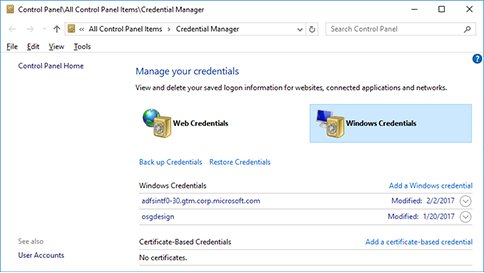
DOMAIN\nameorname@domain. - Open Credential Manager, select Windows Credentials, and check whether an old saved entry for the server is being reused.
- Map again with
net use * https://server/path /user:name *so Windows prompts for a fresh password. - If it still fails, ask the admin to check your authoring rule and permissions.
Windows keeps asking for a password on a company site with dots in its name
WebClient sends Windows credentials automatically only to intranet names without dots, so dav.contoso.com is treated as an internet site.
- Select Start, type
regeditand press Enter. - Go to
HKEY_LOCAL_MACHINE\SYSTEM\CurrentControlSet\Services\WebClient\Parameters. - Select Edit > New > Multi-String Value and name it AuthForwardServerList.
- Double-click it and enter the site, for example
https://*.contoso.com; never end an entry with an asterisk or a slash. - Run
net stop webclientandnet start webclient, then map the drive again.
"System error 224 has occurred. Access Denied. Before opening files in this location, you must first add the web site to your trusted sites list"
The WebDAV redirector does not trust the site.
- Open Control Panel and select Internet Options.
- On the Security tab, select Trusted sites and then Sites.
- Type the site's URL in Add this website to the zone and select Add.
- Select Close, then OK, and map the drive again.
A Select Certificate dialog appears when you connect over HTTPS
The server's SSL certificate was issued to a different name than the one you typed.
- Check the name on the certificate with the server admin.
- Map the drive using exactly that host name.
- If the name is right, ask the admin to reissue the certificate for the address you use.
Large files fail to copy, or big folders show as empty or "Disk is not formatted"
The WebClient defaults cap transfers at 50 MB and folder properties at 1 MB.
- Open
regeditand go toHKEY_LOCAL_MACHINE\SYSTEM\CurrentControlSet\Services\WebClient\Parameters. - Set FileSizeLimitInBytes (DWORD, decimal) above your largest file size.
- For big folders, set FileAttributesLimitInBytes, for example
20000000for about 20,000 files. - Run
net stop webclientandnet start webclient.
"System error 58" or "System error 59" when mapping
Error 58 means the server lacks a binding for the host name you typed; error 59 means the site or its application pool is stopped.
- Try the exact host name the site is published under, for example with or without
www. - If the server name will not resolve at all, check for a stale entry in the hosts file.
- Ask the server admin to add the host binding or start the site.
WebDAV best practices and security considerations
| Practice | Why |
|---|---|
Always connect with https:// (or @SSL in UNC paths) |
Plain HTTP sends file contents, and with Basic authentication your password, unencrypted |
| Keep BasicAuthLevel at its default of 1 | Setting 2 allows clear-text passwords over HTTP, which Microsoft strongly discourages |
| Keep AuthForwardServerList as narrow as possible | Every matching server receives your Windows credentials; there is no deny list |
| Use unique file names that differ by more than letter case | Linux WebDAV servers are case-sensitive and can overwrite or hide files Windows sees as one |
| Disable WebClient on PCs that never use WebDAV | The service is deprecated and not started by default, so leaving it off removes an unused network path |
| Plan a replacement for long-term use | A deprecated component might be removed in a future Windows update |
WebDAV in Windows FAQ
How do I use WebDAV on Windows 10?
Open This PC in File Explorer, select Map network drive on the Computer tab, paste the server's https:// address in the Folder box and select Finish. Sign in when prompted. The share then behaves like a normal drive letter.
How do I set up a WebDAV connection?
Get the server URL and account from your provider, then map it with Map network drive in File Explorer or run net use * https://server/path /user:name * in Command Prompt. Use HTTPS, because Windows only allows Basic authentication over SSL by default.
How do I send files via WebDAV?
Map the WebDAV share to a drive letter, then drag files onto it in File Explorer or save to it from any app. Uploads over 50 MB fail by default until you raise FileSizeLimitInBytes under the WebClient registry key.
What is a WebDAV server?
A WebDAV server is a web server with the WebDAV extension enabled, so clients can create, copy, move and delete files over HTTP. Examples include IIS with WebDAV Publishing, many NAS devices and self-hosted cloud storage products.
How does WebDAV work?
WebDAV adds file-management methods to HTTP, such as PROPFIND to list folders and LOCK to reserve a file for editing. On Windows, the WebClient service translates File Explorer actions into those requests and shows the results as a drive.
How do I set up a WebDAV server on Windows?
Turn on WebDAV Publishing under Internet Information Services > World Wide Web Services > Common HTTP Features in Turn Windows features on or off. Then in IIS Manager, open WebDAV Authoring Rules, select Enable WebDAV and add an authoring rule for your account.
What are WebDAV server settings?
They are the address, port, protocol and account a client needs: for example https://dav.example.com:443/files plus a user name and password. On the server side they include which users may read, write or see source through authoring rules.
How do I disable WebDAV in Windows?
Run net stop webclient and then sc.exe config webclient start= disabled in an administrator Command Prompt. That stops the WebClient service and prevents it from starting again. Reverse it with start= demand.
Is WebDAV deprecated in Windows 11?
Yes. Microsoft marked the WebClient (WebDAV) service as deprecated in November 2023. It is no longer actively developed and might be removed in a future update, but it still works in current Windows 10 and Windows 11 releases.
Should you map WebDAV in File Explorer?
Map WebDAV with Map network drive over HTTPS and tick Reconnect at sign-in; use net use when you need to script it. It needs no extra software and keeps passwords encrypted, but because Microsoft has deprecated the WebClient service, pick a vendor sync client or OneDrive for anything you will rely on for years.