The legitimate way to get Windows 11 free is to upgrade a PC that runs genuine Windows 10 and meets the Windows 11 hardware requirements, through Settings and Windows Update.
This guide covers that upgrade, the Windows Insider Program, licenses from PC makers and schools, using Windows before you activate, the 90-day Enterprise evaluation, free alternatives, and fixes when the upgrade or activation fails.
Upgrade from Windows 10 to Windows 11 for free
Microsoft states that upgrades from Windows 10 to Windows 11 are free. Your PC must run Windows 10, version 2004 or later, and meet the Windows 11 minimum requirements.
The upgrade keeps your files, apps and settings, and Windows 11 activates with a digital license tied to your hardware.
- On Windows 10, select Start, then Settings, then Update & Security, then Windows Update.
- Select Check for updates and install any pending Windows 10 updates, then restart.
- When Windows Update reports that Windows 11 is ready, select Download and install.
- Read the license terms and select Accept and install.
- When the status reads Pending restart, select Restart now and let the PC restart several times.
- Sign in at the Windows 11 sign-in screen to finish.
If Windows Update has not offered it yet, you can install free Windows 11 with the Installation Assistant or from a USB drive instead. The upgrade itself is free, but your provider may charge for the large download on a metered connection.
Understand the basics of Windows 11 licensing
Windows 11 needs either a digital license or a 25-character product key to activate. Whether you pay depends on how the license reaches your PC.
| How you got Windows 11 | Cost to you | Activation method |
|---|---|---|
| Free upgrade from genuine Windows 10 on an eligible PC | Free | Digital license |
| New or refurbished PC sold with Windows 11 | Included in the PC price | Product key from the PC maker or refurbisher |
| Windows Insider build on a PC already running activated Windows 11 | Free | Existing digital license carries over |
| Windows 11 for Education through a school's Microsoft licensing | Free to eligible students and faculty | Provided by the school's agreement |
| Windows 11 Enterprise evaluation from the Microsoft Evaluation Center | Free for 90 days | No product key needed during the evaluation |
| PC built yourself, or one that never had Windows | Paid | Buy a digital license in Microsoft Store or a product key from an authorized retailer |
Windows 10 support ended on October 14, 2025. Windows 10 PCs still run, but they no longer get free security fixes from Windows Update.
Why should you get Windows 11 legally?
Activation pairs your product key or digital license with your hardware. When it fails, Windows reports that it is not genuine, and Microsoft limits what that PC receives.
| Issue | What happens with non-genuine Windows |
|---|---|
| Updates | Critical security updates still arrive, but many other updates and downloads are reserved for genuine Windows |
| Validation | Windows checks your key or digital license when it downloads updates and flags the copy as non-genuine if it is invalid |
| Notifications | Messages that Windows might not be genuine appear until you activate properly or buy a license |
| Counterfeit copies | Validation fails, and the only fix is buying a genuine copy |
| Used or auction-site keys | A key already used on more PCs than the license terms allow will not activate |
Legitimate ways to get Windows 11 for free
| Your situation | Free route | What you get |
|---|---|---|
| Genuine Windows 10 on hardware that passes PC Health Check | Free upgrade through Windows Update | Full Windows 11, permanently activated |
| Already on activated Windows 11 and curious about new features | Windows Insider Program | Free preview builds on top of your existing license |
| Buying a new laptop or desktop | Windows 11 preinstalled by the PC maker | A license included in the price of the PC |
| Student or faculty member at an eligible institution | School licensing or Azure for Students | Windows 11 for Education, or Windows 11 virtual machines in Azure |
| Installing on a PC with no license, and you plan to buy one | Install without a product key, activate later | Working Windows 11 that shows as not activated until you buy |
| IT professional testing Windows 11 for an organization | Windows 11 Enterprise evaluation | A full-featured copy for 90 days |
| No license and no budget | A free operating system such as Ubuntu or ChromeOS Flex | A different OS, not Windows |
Join the Windows Insider Program for free preview builds
Registration is free with a Microsoft account. The program does not license Windows for you: Microsoft requires a licensed version of Windows 11 before you install Insider Preview builds.
Activated PCs stay activated on new Insider builds. You must be an administrator to see the setting.
- Register on the Windows Insider website with your Microsoft account and accept the Program Agreement.
- On your PC, select Start, then Settings, then Windows Update, then Windows Insider Program.
- If prompted, select Open Diagnostics & feedback, turn on Send optional diagnostic data, and return to the Insider page.
- Select Get started, link the Microsoft account you registered with, and select Continue.
- Choose the channel you want builds from, then accept the agreement.
- Select Restart now, then go to Settings > Windows Update and select Check for updates.
Preview builds can change substantially before release. Switching to another channel later may require a clean install of Windows.
Get Windows 11 free with a new PC from OEM manufacturers
A PC sold with Windows 11 includes the license in its price. The product key is preinstalled, included in the packaging or printed on a Certificate of Authenticity (COA).
For a refurbished PC, the refurbisher, not Microsoft, must give you the product key.
- Finish setup on the new PC and connect it to the internet.
- Select Start, then Settings, then System, then Activation.
- If the status reads Windows is not activated, select Change product key.
- Type the 25-character key from the COA card or label and follow the prompts.
- On the same page, select Add an account and sign in so your digital license links to your Microsoft account.
A linked Microsoft account lets you reactivate with the Activation troubleshooter after a major hardware change, such as a new motherboard. Install your PC maker's tools, such as MyASUS on an ASUS laptop, for drivers and warranty checks.
Redeem Windows 11 via educational or organizational licenses
Schools with a Microsoft Volume Licensing agreement can offer Windows 11 for Education through Azure Dev Tools for Teaching. Students sign in with school credentials and use the software at no cost for learning and research.
Azure for Students is open to full-time students at accredited, degree-granting two- to four-year universities. It includes $100 of Azure credit for 12 months and lets you run Windows 10 and Windows 11 virtual machines without a Windows 11 Enterprise license.
- Ask your school's IT department whether it offers Windows 11 for Education through Azure Dev Tools for Teaching.
- If it does, sign in to the Azure portal with the school credentials it gives you.
- Open the Azure Education Hub and download Windows 11 for Education from its software list.
- If your school does not offer it, sign up for Azure for Students and verify your status with your school email address.
- Create a Windows 11 virtual machine in Azure and connect to it from your own PC.
- At work, ask IT about Windows Enterprise, which organizations license through Microsoft 365 subscriptions.
Azure Dev Tools for Teaching stopped accepting new administrator sign-ups on August 15, 2025, so only schools already enrolled can offer it. Software from it cannot be used commercially.
Free Windows 11 keys from promotional giveaway events
A legitimate free Windows 11 license comes from the Windows 10 upgrade, your PC maker, or a school or employer agreement. Judge any giveaway against where its license actually comes from.
| Offer you see | What it usually means |
|---|---|
| A free or very cheap key from an auction site or marketplace seller | Microsoft notes validation failure is common for copies bought this way |
| A used PC with Windows already installed | The seller may have used one key on more PCs than the license allows; ask for the COA and original media |
| A promotion run by your PC maker or retailer | Legitimate when the license ships with the device and activates in Settings > System > Activation |
| A tool that claims to activate Windows without a key | Not a license; the copy is not genuine and will fail validation |
If you received counterfeit software, Microsoft's How to Tell website lets you file a confidential report.
Use Windows 11 without activation (trial mode)
Windows 11 has no consumer trial mode. Microsoft does let you install it without a product key, finish setup, and buy a digital license afterwards from Microsoft Store.
Until you buy, the Activation page reads Windows is not activated. Activation is still required by the license terms; this route only lets you install first and pay later.
- Start Windows Setup from Microsoft's Windows 11 installation media.
- When asked for a product key, select I don't have a product key.
- Choose the edition you plan to buy, such as Windows 11 Home, and finish setup.
- When ready to activate, select Start, then Settings, then System, then Activation.
- Select Go to Store (or Open Store) and buy a digital license, or select Change product key to enter one you bought.
If this PC ran activated Windows 10 or 11 before, select I don't have a product key and install the same edition. Windows reactivates on its own from your digital license.
Windows 11 Enterprise evaluation: free 90-day version
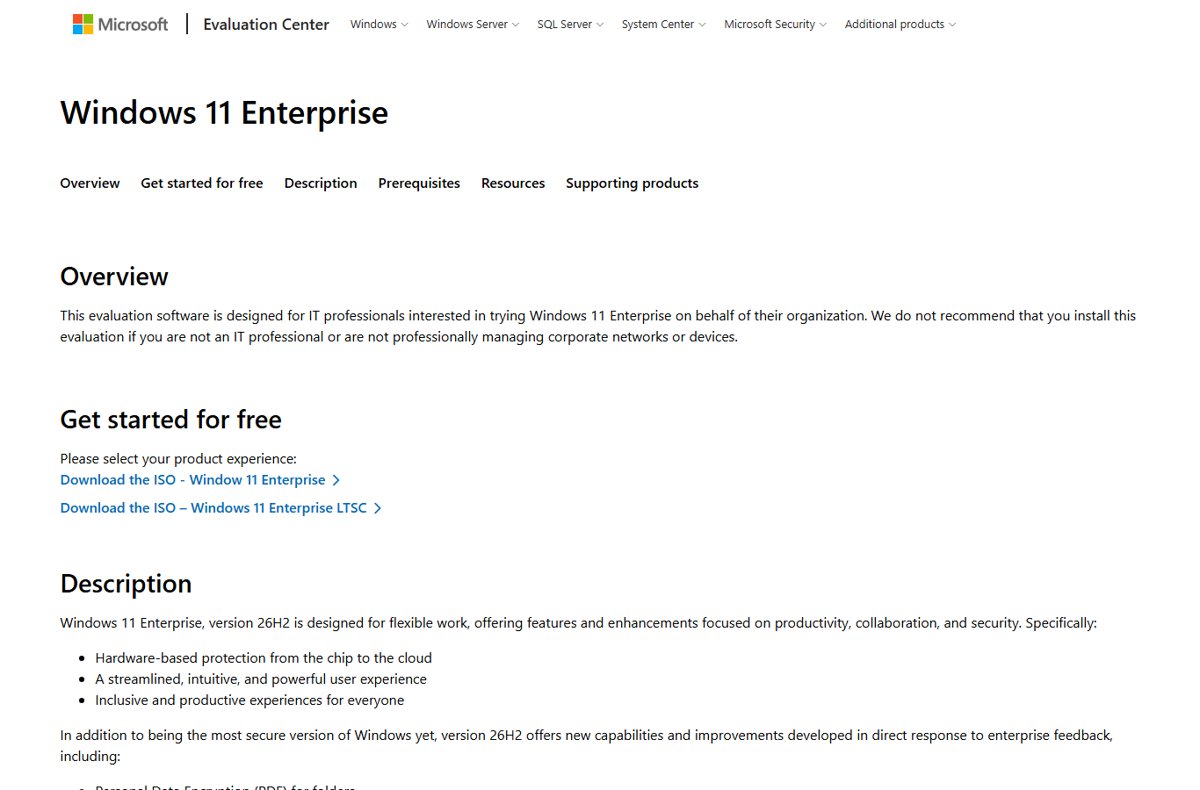
The Microsoft Evaluation Center offers a free, full-featured 90-day evaluation of Windows 11 Enterprise. Microsoft designs it for IT professionals and does not recommend it for home users.
A virtual machine is the safest place for it. Once installed on a PC, the evaluation cannot be uninstalled, and going back needs a clean install of your old system.
- Open the Windows 11 Enterprise page on the Microsoft Evaluation Center.
- Under Get started for free, register, then pick the Windows 11 Enterprise ISO or the Windows 11 Enterprise LTSC ISO.
- Back up your files and settings before you install.
- Install from the ISO, preferably into a virtual machine; no product key is required.
- Sign in with a Microsoft account when setup asks, as the evaluation requires one.
When the 90 days end, the desktop background turns black, a not-genuine notice stays on screen, and the PC shuts down every hour. Microsoft's old developer virtual machine page now redirects to its developer tools, so the Evaluation Center is the current trial route.
Free alternative operating systems to Windows 11
If your PC has no Windows license, or fails the Windows 11 requirements, a free operating system keeps it usable without paying. A PC that fails the requirements but ran Windows 10 before can get Windows 10 free again with its digital license, though support has ended.
| Operating system | Cost | Support and install |
|---|---|---|
| Ubuntu Desktop LTS (Canonical) | Free | Five years of free security and maintenance updates; Ubuntu Pro adds more and is free for personal use on up to five machines |
| ChromeOS Flex (Google) | Free of charge | Installs on existing PCs and Macs from a USB drive and updates automatically in the background |
Neither runs Windows apps natively. Check that your essential software has a version for the system you pick.
Check Windows 11 activation status in Settings
- Select Start, then Settings, then System, then Activation.
- Read the line next to Activation status.
- Windows is activated with a digital license linked to your Microsoft account means you are fully set.
- Windows is activated with a digital license means you are activated; select Add an account to link it.
- Windows is not activated means you still need a valid key or digital license.
- Select System, then About, and confirm the edition reads Windows 11 Home or Pro.
Free Windows 11 upgrade not showing or not activating
Windows Update never offers the free Windows 11 upgrade
Pending Windows 10 updates, an old Windows 10 version, or hardware that fails the requirements.
- Install every pending Windows 10 update, restart, and select Check for updates again.
- Confirm Windows 10 is version 2004 or later.
- Run the PC Health Check app to see which requirement fails.
- If the PC passes, use the Windows 11 Installation Assistant instead of waiting.
"What needs your attention" appears during the upgrade
The PC may not meet the minimum system requirements, or an app has a known problem.
- Read the item named in the message.
- Compare the PC against the requirements: 4 GB RAM, 64 GB storage, TPM 2.0, UEFI with Secure Boot, and a compatible 64-bit processor.
- Update or remove the named app, then run the upgrade again.
Windows 11 is not activated after a reinstall
A different edition was installed, or the PC never had a Windows license.
- Open Settings > System > Activation and read the error.
- Reinstall the edition that matches your license, such as Home for Home.
- Sign in with the Microsoft account linked to your digital license.
- If the PC never had a license, select Go to Store or Change product key.
Free Windows 11 Pro upgrade did not happen
The free upgrade keeps your edition, so Windows 10 Home becomes Windows 11 Home.
- Check your edition under Settings > System > Activation.
- To move from Home to Pro, use the Windows 11 Pro upgrade in Microsoft Store, which is paid.
- If you own a Pro key, select Change product key and enter it.
Messages say Windows might not be genuine
Windows was not activated properly, a repair used a different key, or the copy is counterfeit.
- Select the notification and follow the repair steps.
- If a technician reinstalled Windows, re-enter your original product key.
- If the copy turns out to be counterfeit, buy a genuine license.
Final tips for legitimacy and safety with free Windows 11
| Do | Why |
|---|---|
| Download Windows 11 only from Microsoft's own site | Installation media from Microsoft is genuine and needs no key for PCs with a digital license |
| Link your Microsoft account on the Activation page | It lets you reactivate after replacing a motherboard or drive |
| Back up files before any upgrade or clean install | An upgrade keeps files by default, but a clean install erases the drive |
| Buy keys only from Microsoft Store or an authorized retailer | Keys from other sources often fail validation |
| Keep one license per PC | Installing one copy on more PCs than the license allows blocks activation |
| Go back within 10 days if you dislike Windows 11 | After 10 days, returning to Windows 10 needs a clean install |
Free Windows 11 FAQ
Can I get Windows 11 for free?
Yes, if your PC runs genuine Windows 10 and meets the Windows 11 hardware requirements. Microsoft states the upgrade from Windows 10 is free. A PC with no Windows license needs a paid digital license or product key.
How can I get a free upgrade to Windows 11?
Open Settings, Update & Security, Windows Update on Windows 10 and select Check for updates. When Windows 11 is ready, select Download and install, accept the terms, and restart. The Installation Assistant is the alternative if the offer has not appeared.
Where can I get the free Windows 11 upgrade?
Get it from Windows Update on your Windows 10 PC, or from Microsoft's Download Windows 11 page, which offers the Installation Assistant and installation media. Microsoft's own site is the only source you need.
How do I get free Windows 11 Pro?
Windows 11 Pro is free only when your PC already has a Windows 10 Pro license, because the upgrade keeps your edition. Moving from Home to Pro uses the paid Windows 11 Pro upgrade in Microsoft Store.
Is the free Windows 11 download legal?
Yes. Downloading Windows 11 from Microsoft is legal, and installation media needs no key on a PC with a digital license. Using it long term still requires a valid license, either from the free upgrade or a purchase.
Is the Windows 11 update free?
Yes. Upgrades from Windows 10 to Windows 11 are free, and later Windows 11 updates arrive free through Windows Update. Your internet provider may still charge for the large download on a metered connection.
Why isn't Windows 11 free for everyone?
The free offer is an upgrade for devices that already hold a Windows 10 license. A new self-built PC has no license to upgrade, so it needs a Windows 11 digital license or product key.
Why buy Windows 11 when it's free?
You only need to buy Windows 11 if your PC has no existing license, such as a self-built PC or one that never ran Windows. If it already runs genuine Windows 10, the upgrade costs nothing.
Can I upgrade to Windows 11 free after Windows 10 support ended?
Yes. Microsoft's upgrade FAQ still states that upgrades from Windows 10 are free. Windows 10 support ended on October 14, 2025, and Microsoft recommends moving eligible PCs to Windows 11.
Conclusions: the best free route to Windows 11
Upgrade through Windows Update if your PC runs genuine Windows 10 and passes PC Health Check; otherwise buy a license or use a free alternative OS. The Windows 10 upgrade is the only route that gives a permanent, activated Windows 11 at no cost. Insider builds need an existing license, education offers depend on your school, and the evaluation stops working after 90 days.