To fix HTTP error 503 Service Unavailable, the site owner has to bring the overloaded, crashed or paused server back into service; if you are only visiting the site, all you can do is wait a few minutes and reload.
This guide splits the two cases: a short list for visitors, then six steps for site owners covering load, logs, maintenance mode, plugins, CDN and load balancer settings, plus how a 503 affects search rankings.
The fastest way to fix a 503 error
A 503 is a server-side status code, so the fix depends on which side of the connection you are on. Match your situation to a row.
| Your situation | Do this first | Why |
|---|---|---|
| You are visiting someone else's site | Wait a few minutes, then reload the page | The server is overloaded or under maintenance. Nothing on your device caused it. |
| You own the site and it went down suddenly | Check your host's resource usage, then restart the stopped service or application pool (Steps 2 and 3) | Overload and crashed workers are the two most common causes |
| The 503 started right after an update or a new plugin | Take the site out of maintenance mode and deactivate the newest plugin or theme (Step 4) | An interrupted update or a broken extension keeps the app from serving pages |
| The error page mentions cloudflare or cloudflare-nginx | Collect the details Cloudflare asks for and contact its support (Step 5) | Cloudflare says that page means a connectivity issue in one of its data centers |
| The page reads HTTP Error 503. The service is unavailable. on IIS | Start the stopped application pool (Step 3) | IIS returns 503.0 when the target application pool is stopped or disabled |
What Does HTTP Error 503 Service Unavailable Mean?
HTTP 503 Service Unavailable means the server is not ready to handle the request. MDN lists maintenance and overload as the common causes, and the code is meant for temporary conditions.
A server under pressure may reject requests with a 503 once memory, CPU or connection pool limits are reached. That backpressure keeps a busy server from failing completely.
| What you see | Who sent it | What it usually means |
|---|---|---|
| 503 Service Unavailable (generic browser or server page) | The origin web server | Overloaded or down for maintenance |
| Error 503: service temporarily unavailable, with cloudflare in the page | Cloudflare | A connectivity problem in a Cloudflare data center |
| HTTP Error 503. The service is unavailable. (IIS 503.0) | Microsoft IIS | The application pool is stopped or disabled |
| IIS 503.2 | Microsoft IIS | Concurrent requests exceeded the appConcurrentRequestLimit value |
| IIS 503.3 or 503.4 | Microsoft IIS | The ASP.NET queue or the FastCGI queue is full |
| A branded maintenance page | Your CMS or host | Maintenance mode is switched on or stuck on |
A 503 with a Retry-After header tells browsers and crawlers roughly when the service should return. If requests from one client are being throttled, the correct code is 429 Too Many Requests, not 503.
Before You Start: If You’re Just Visiting the Website
A 503 comes from the server, not your browser, so a visitor's options are limited. These steps rule out a stale page and confirm the outage, and that is all they can do.
- Wait two or three minutes, then reload the page. Many 503s clear once a traffic spike passes or an update finishes.
- Open the same page on another device, such as a phone on mobile data. If it fails there too, the site itself is down.
- Check the service's official status page or social account if it has one. Roblox, for example, publishes its status at
status.roblox.com. - Close any extra tabs that keep auto-refreshing the site. Repeated requests add load to a server that is already struggling.
- Try again later. If the page stays down for hours, contact the site owner through another channel, because only they can fix it.
Restarting your router or reinstalling your browser will not fix a real 503. 403 Forbidden is a different, access-related problem, and fixing the 403 error takes different steps.
Step 1: Confirm the Error and Check Whether It’s Widespread
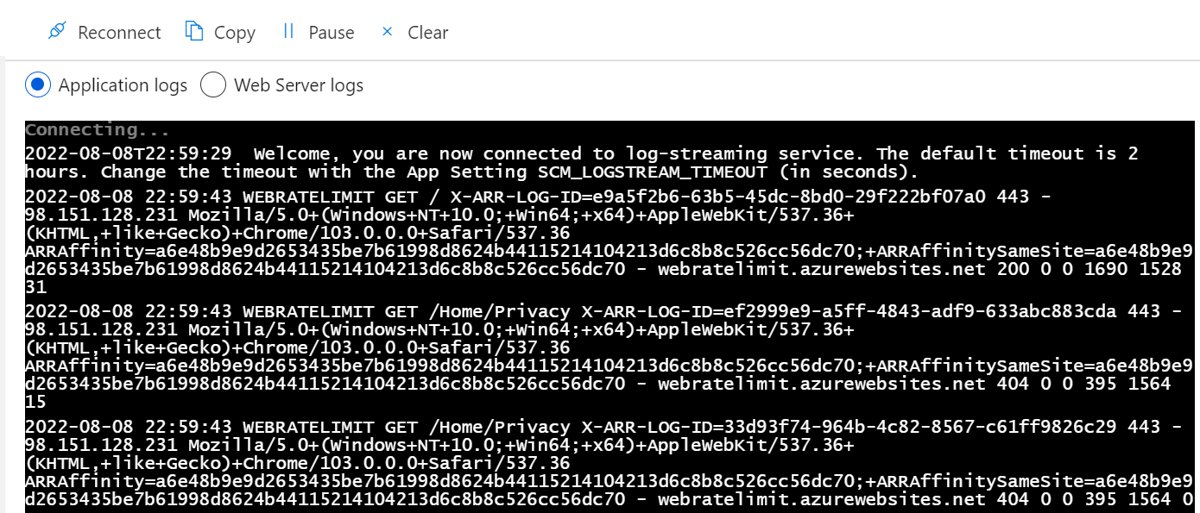
Before changing anything, prove the 503 is real, find out how many pages it affects, and identify which layer sent it.
- Load the site from a second network, such as a phone on mobile data, to test from multiple locations.
- Run
curl -I -X GET "https://www.example.com/"with your own address. The first line shows the real status code, even when a custom error page hides it. - Request a few different URLs, including a static file such as an image. If static files load but pages do not, the web server is up and the application behind it is failing.
- Check your uptime and monitoring tools for the exact start time. Match that time to deployments, updates or traffic changes.
- Identify who is returning the 503: view the error page's source. If it contains cloudflare or cloudflare-nginx, Cloudflare generated it; otherwise your origin server did.
- Note the full error text, the time with its timezone, and the failing URL. Your host or CDN will ask for all three.
Step 2: Check Server Load, Hosting Limits, and Traffic Spikes
Overload is the most common origin-side cause. Servers deliberately return 503 once memory, CPU or connection limits are hit.
- Open your hosting control panel's resource or usage page and check CPU, memory, disk and process usage at the time of the error.
- Compare that against your plan's limits. Shared hosting plans often cap processes or concurrent connections, and hitting the cap produces 503s.
- Review traffic sources in your analytics. A sudden spike from one referrer, crawler or IP range points to a bot flood rather than real visitors.
- If you use Cloudflare, go to the HTTP Traffic page, select Add filter, choose Edge status code or Origin status code, and pick 503 to see which URLs fail.
- On IIS, read the substatus: 503.2 means the concurrent request limit was exceeded, while 503.3 and 503.4 mean the ASP.NET or FastCGI queue filled up.
- Apply immediate relief: turn on page caching, pause heavy scheduled jobs, and block or rate-limit abusive clients.
- If legitimate traffic outgrew the plan, ask your host whether it rate-limits requests to your server, and move to a larger plan if so.
Step 3: Restart Failed Services and Inspect Error Logs
A crashed worker process or a stopped service returns 503 until something restarts it. Restart it, then read the logs so it does not crash again.
- Check service status in your host's panel and restart the web server or application service it lists as stopped.
- On IIS, open an elevated Command Prompt and run
%systemroot%\system32\inetsrv\APPCMD list apppoolsto see each application pool with its state. - Start a stopped pool in PowerShell with
Start-WebAppPool -Name "DefaultAppPool", replacing the name with your pool's name. - Read the right logs. On IIS, the substatus field (
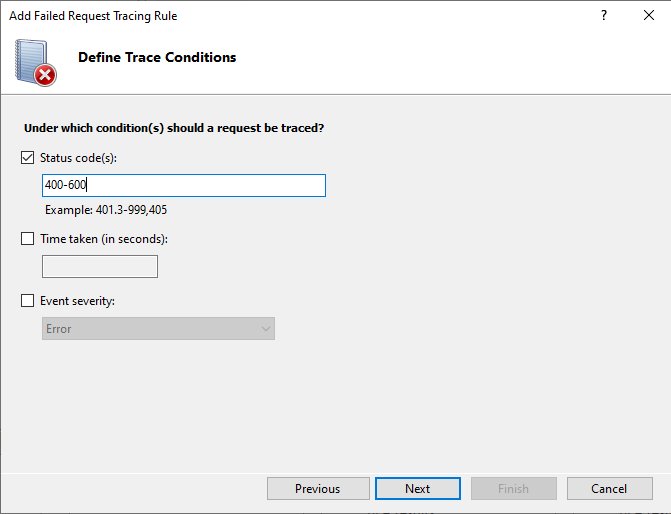
sc-substatus) in the IIS logs or thes-reasonfield in the HTTPERR logs points to the cause. - Open Event Viewer, expand Windows Logs and select Application. Look for errors from the failing app around the time the 503 began.
- Check recent changes: a deployment, a runtime update or a configuration edit made just before the first 503 is the prime suspect.
- Reload the site. If the pool stops again within minutes, IIS rapid-fail protection is stopping it, and the crash itself needs fixing.
IIS enables rapid-fail protection by default. It takes every application in a pool out of service after 5 worker process crashes within 5 minutes, which is why a restarted pool can stop again on its own.
Step 4: Disable Maintenance Mode, Plugins, Themes, and Extensions
Content management systems return a 503 on purpose while they update. An update that dies halfway, or a plugin that crashes on load, can leave that state in place.
- Confirm whether maintenance mode is on in your platform's settings or your host's panel, and switch it off once any update has finished.
- Fix WordPress 503 errors by opening Plugins in the dashboard and deactivating the plugin you installed or updated most recently.
- Switch to a default theme if the error began after a theme update.
- Reload the site after each change so you know which one cleared the error.
- If the dashboard also returns 503, use your host's file manager or support team to disable plugins, because you cannot reach the admin screens.
- For other platforms, turn off extensions, modules or add-ons in the same newest-first order.
- Re-enable items one at a time. The one that brings the 503 back is the cause; update it, replace it or report it to its developer.
Step 5: Check CDN, DNS, Firewall, and Load Balancer Settings
Every layer between the visitor and your server can generate or pass on a 503. Cloudflare notes that the cause is not always in the origin's logs, so check the logs of load balancers, caches, proxies and firewalls too.
- If the Cloudflare error page contains cloudflare or cloudflare-nginx, send Cloudflare support your domain, the time and timezone of the error, and the output of
www.example.com/cdn-cgi/tracefrom the affected browser. - Bypass or test the CDN: in the Cloudflare dashboard, open your domain's Overview and choose Advanced Actions > Pause Cloudflare on Site. Traffic then goes straight to your origin within about five minutes.
- To bypass a single hostname instead, go to DNS > Records, select Edit on the record and turn Proxy Status off.
- Check DNS changes: after a host migration, confirm your records point to the server that is actually running the site.
- Review firewall and bot protection rules. On Cloudflare, check Security > Events for active mitigations around the time of the error.
- If you run Cloudflare Workers, check the Workers dashboard. A Worker that exceeds its CPU time or memory limit also produces a 503.
- Inspect load balancer health checks. A pool whose backends all fail their checks has nowhere to send traffic.
- Re-enable the Cloudflare proxy once testing is done, because a paused domain loses its WAF, rules and SSL/TLS certificates.
On IIS behind a load balancer, the loadBalancerCapabilities setting defaults to HttpLevel, which returns a 503. Microsoft notes that a load balancer that is not HTTP aware reads that as a healthy node and keeps sending traffic to it; TcpLevel closes the connection instead.
Step 6: Fix the Root Cause and Prevent the Error from Returning
Restarting clears the symptom. These changes stop the next spike or update from producing the same outage.
- Increase capacity where it matters: upgrade the plan, add memory, or add servers behind the load balancer if logs showed resource exhaustion.
- Optimize slow endpoints. Pages that run heavy database queries hold workers longer and fill the request queue first.
- Cache pages and static files at the CDN or server so repeat visits never reach the application.
- Configure maintenance mode correctly: return 503 with a Retry-After header, serve a static HTML page, and keep inline CSS and images light.
- Never return 503 for
robots.txtduring maintenance, because Google stops crawling the whole site when that file fails. - Stop the 503 page from being cached. MDN warns that a cached 503 keeps showing visitors an error page after the fix is live.
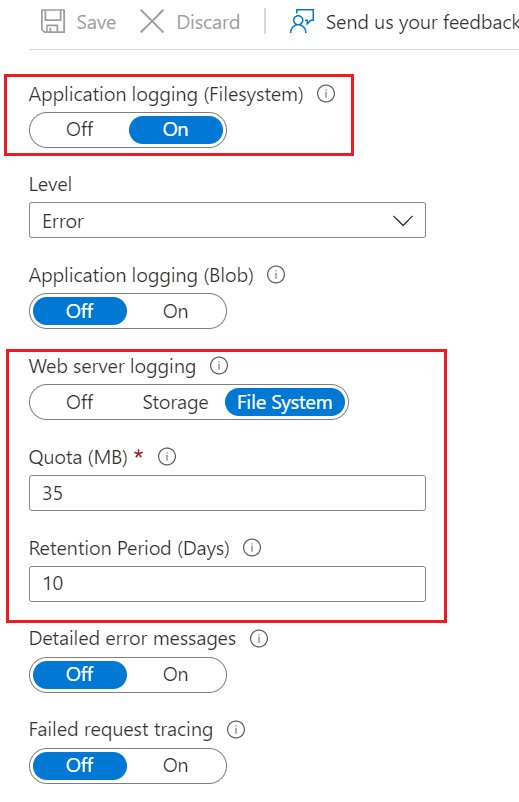
- Add monitoring and alerts that check the real status code every few minutes, so you hear about the next 503 before visitors do.
How to check the 503 is fixed
A page that looks fine in your browser can still be a cached copy. Check the status code the server actually returns.
curl -I -X GET "https://www.example.com/"Replace the address with your own page. -I prints only the response headers, and -X GET sends a normal page request instead of a HEAD request. Repeat it for a few key URLs and from a second network.
You should see: A first line with a 200 status, such as HTTP/1.1 200 OK. If it still reads 503 Service Unavailable, the fix has not reached that layer yet; in Cloudflare, the HTTP Traffic filter for status 503 should also drop to zero.
Quick Troubleshooting Checklist
Work down the list in order. Each row names the check, the tool, and which step to revisit if it fails.
| Check | How | If it fails, go to |
|---|---|---|
| Is it down for everyone? | Second network plus curl -I |
Step 1 |
| Is the server out of CPU, memory or connections? | Host resource panel, IIS substatus | Step 2 |
| Is a service or application pool stopped? | Host panel, APPCMD list apppools |
Step 3 |
| Did it start after an update or new plugin? | Deactivate newest first | Step 4 |
| Does the error page mention Cloudflare? | View page source | Step 5 |
| Does it return after a restart? | Event Viewer, application logs | Steps 3 and 6 |
When to Contact Your Hosting Provider
On shared or managed hosting you cannot see the physical server, so some 503 causes are only visible to the host. Contact them in these cases.
| Situation | What to send them |
|---|---|
| The 503 page has no Cloudflare branding and you use Cloudflare | Ask whether they rate-limit requests to your server; Cloudflare recommends exactly this |
| Resource usage is maxed out and you cannot find the cause | The error code, time with timezone, and failing URL |
| The web server or PHP service will not restart from your panel | The service name and the last error message you saw |
| Your dashboard is also returning 503 | A request to disable plugins or maintenance mode on the server |
| The 503 lasts more than an hour with no change on your side | Ask whether there is a server-wide outage or maintenance |
Common 503 Error Scenarios and What They Usually Mean
"HTTP Error 503. The service is unavailable." on an IIS site
The request went to an application pool that is stopped or disabled (IIS 503.0).
- Run
%systemroot%\system32\inetsrv\APPCMD list apppoolsand find the pool whose state is not Started. - Start it with
Start-WebAppPool -Name "YourPoolName". - If it stops again, check Event Viewer > Windows Logs > Application for the crash behind rapid-fail protection.
The 503 page mentions cloudflare or cloudflare-nginx
A connectivity issue occurred in a Cloudflare data center.
- Open
www.example.com/cdn-cgi/traceon your own domain in the affected browser and save the output. - Note the time and timezone of the error.
- Send both, plus your domain name, to Cloudflare support.
503s appear only in Cloudflare logs or analytics
Cloudflare says these come from unsuccessful Speed Brain prefetches and visitors never see them.
- Confirm real visitors load the page with
curl -I. - Ignore the logged 503s, or disable Speed Brain for the zone if they clutter your reports.
503 right after a plugin, theme or core update
The update was interrupted or the new code crashes on load, leaving the site in maintenance mode.
- Switch off maintenance mode once the update process has ended.
- Deactivate the updated plugin or theme.
- Reload the site, then reinstall or roll back the item that failed.
503 only during traffic peaks or sales
The server hits its memory, CPU or connection limits and sheds requests.
- Check resource graphs for the peak time.
- Turn on page caching and a CDN for static files.
- Upgrade the plan or add capacity before the next planned peak.
HTTP error in Roblox or another online game or app
The game's servers are overloaded or in maintenance; your device is rarely the cause.
- Check the official status page, such as
status.roblox.comfor Roblox. - Wait and retry once the status page shows the service as operational.
- If only you are affected, restart the app and check your own connection.
How 503 Errors Affect SEO
A short 503 is the least harmful way to take a site offline, because search engines treat it as temporary. A long one does real damage.
| Duration or setup | What Google does | What to do |
|---|---|---|
| Any 503 or other 5xx | Temporarily slows crawling and ignores the page content | Fix the cause; crawling speeds back up gradually once pages return 200 |
| Planned closure of 1-2 days | Keeps indexed pages; Google recommends a 503 page for this case | Serve a static 503 page with a Retry-After header |
| 503 lasting longer | Indexed URLs are eventually dropped | Serve an indexable 200 placeholder page instead |
robots.txt returns 503 |
Blocks all crawling of the site | Always let robots.txt load normally |
| Page returns 503 while you edit titles or metadata | Cannot refresh titles, descriptions or structured data | Make SEO changes while the page returns 200 |
Google calls disabling a whole site an extreme measure to use for a few days at most. Using 403, 404, 410 or noindex for a temporary closure removes URLs from Search, so 503 is the right code for short outages.
Frequently Asked Questions
What is an HTTP error?
An HTTP error is a status code from 400 to 599 that a web server returns when a request fails. Codes from 400 to 499 point to a problem with the request, such as a missing page, while codes from 500 to 599, including 503, mean the server itself failed.
What are HTTP error codes?
HTTP status codes come in five classes: informational (100-199), successful (200-299), redirection (300-399), client errors (400-499) and server errors (500-599). The error codes are the last two groups, for example 403 Forbidden, 404 Not Found, 500 Internal Server Error and 503 Service Unavailable.
How do I fix an HTTP error?
Read the number first. For a 4xx error, check the address, your sign-in or your permissions. For a 5xx error such as 503, the server is at fault, so a visitor should wait and reload, while the site owner checks load, logs and recent updates.
Is a 503 error my fault?
Almost never, if you are a visitor. A 503 means the website's server is overloaded or under maintenance. Clearing your cache or restarting your router will not change it. Waiting a few minutes and reloading the page is the only useful action on your side.
How long does a 503 error last?
Most 503s caused by traffic spikes or updates clear within minutes. A server can send a Retry-After header that states the expected recovery time. An outage caused by a crashed service lasts until the site owner restarts it, which can take hours.
What is the difference between a 503 and a 500 or 502 error?
A 500 means the server hit a condition it could not handle, and 502 means a gateway got an invalid response from the server behind it. A 503 means the server is temporarily not ready, usually through overload or maintenance, and is expected to recover.
What is the difference between 503 and 403 Forbidden?
A 503 means the server cannot handle any request right now. A 403 means the server is working but refuses you access to that resource. The 403 Forbidden error needs a completely different fix.
Why does Roblox say HTTP error?
An HTTP error in Roblox usually means a request to Roblox's servers failed because a service is overloaded or down. Check status.roblox.com. If it lists an incident, wait for it to clear; if everything shows Operational, restart Roblox and check your internet connection.
How do I fix the HTTPS "Not secure" error?
"Not secure" in Chrome is not an HTTP status error. It means the site did not establish a secure, private HTTPS connection. As a visitor, avoid entering passwords or payment details there. Only the site owner can fix it, by serving the site over HTTPS.
Why is HTTP bad compared with HTTPS?
Plain HTTP does not set up a secure, private connection between your browser and the site, so what you send is not protected in transit. Chrome marks such sites as Not secure and, with Always use secure connections turned on, warns before loading them.





![Java JRE latest version: Download & Install [32-bit, 64-bit]](https://techdows.com/wp-content/uploads/2026/10/Java-JRE-latest-version-Download-Install-32-bit-64-bit-1-600x338.jpg)
What causes error 502? Common Bad Gateway causes and fixes - Techdows
[…] on screen, but each points at a different place in the request chain. A 503 has its own causes and fixes for a 503 Service Unavailable error, mostly maintenance and […]
What does 504 Gateway Timeout mean and how to fix it - Techdows
[…] on screen. The difference tells you where the request broke, and whether you need the fixes for a 503 Service Unavailable error or a 500 Internal Server Error […]