You cannot rename an existing onmicrosoft.com domain, but you can add a new onmicrosoft.com domain in the Microsoft 365 admin center and make it your fallback domain.
This guide covers both admin center steps, moving user sign-in names to the new domain, renaming SharePoint and OneDrive URLs with PowerShell, and the limits that cannot be undone.
Can you change the onmicrosoft.com domain name?
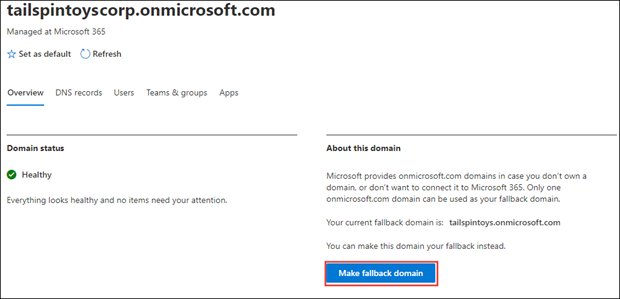
Add a new onmicrosoft.com domain from Settings > Domains > your current onmicrosoft.com domain > Add onmicrosoft domain, then open the new domain and select Make fallback domain. Microsoft does not rename or delete onmicrosoft.com domains. Changing the fallback domain swaps the default for new usernames, group aliases and email routing, but existing SharePoint and OneDrive URLs keep the old name until you run a separate SharePoint domain rename.
Which onmicrosoft domain change do you need?
The word "change" covers three different jobs in Microsoft 365. Match what you want people to see to the right fix.
| What you want to change | Do this | Why |
|---|---|---|
| The default domain for new usernames and group aliases | Add a new onmicrosoft.com domain and make it the fallback domain | Only one onmicrosoft.com domain can be the fallback at a time |
| Existing users' sign-in names | Edit each user's username under Manage username and email | Changing the fallback domain does not rename existing accounts |
| SharePoint and OneDrive URLs such as contoso.sharepoint.com | Run a SharePoint domain rename in PowerShell | SharePoint URLs stay on the original onmicrosoft.com name even after a fallback change |
| Email addresses that show your brand, such as [email protected] | Add a custom domain you own | Microsoft recommends onmicrosoft.com domains only for testing, not regular email |
Onmicrosoft domain limits and admin roles
| Requirement or limit | Detail |
|---|---|
| Admin role | Domain Name Administrator on a business or enterprise plan; custom admin roles and regular users cannot add or change domains |
| Maximum onmicrosoft.com domains | Five per Microsoft 365 tenant, including the original |
| Deleting an onmicrosoft.com domain | Not possible once it is created |
| Fallback domains | Only one onmicrosoft.com domain can be the fallback domain |
| Scope of the change | The whole tenant, not one user |
| Role for the SharePoint rename | At least SharePoint Administrator |
| Role to edit usernames | User Administrator or higher |
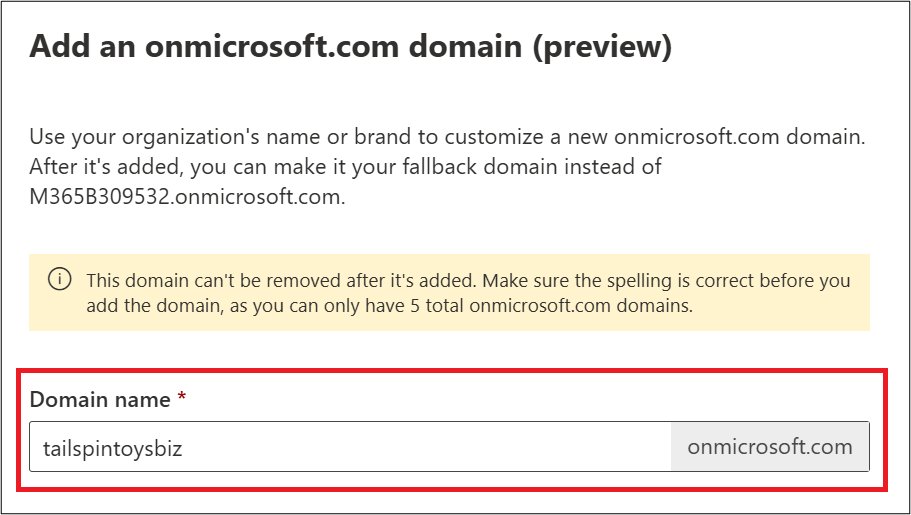
Check the spelling of the new name twice before you add it. A typo uses up one of your five slots for good.
Step 1. Add onmicrosoft.com domain in Microsoft 365
If you also plan to rename SharePoint, first check that the name is free: open https://newname.sharepoint.com in a browser. A not-found (404) message usually means it is available, while a sign-in page means someone already uses it.
- Sign in to the Microsoft 365 admin center at
admin.microsoft.com. - In the left navigation, select … Show all, then expand Settings.
- Under Settings, select Domains.
- Select your current onmicrosoft.com domain in the list.
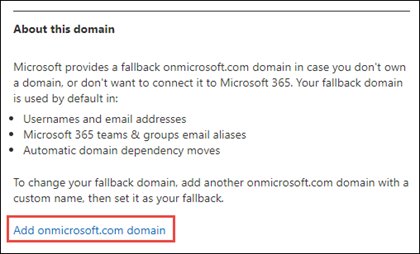
- In the About this domain section, select Add onmicrosoft domain.
- In the Domain name box, type the new name.
- Select Add domain and wait for the message confirming the domain was added.
Do not use the Add domain button at the top of the Domains page for this. That button adds a custom domain and does not create an onmicrosoft.com domain.
Step 2. Change your onmicrosoft.com domain in Microsoft 365
This step makes the new domain the fallback domain. If you want to rename SharePoint to the same name, skip this step for now: Microsoft's SharePoint rename steps say not to make that domain the fallback domain.
- In the Microsoft 365 admin center, select … Show all > Settings > Domains.
- Select the new onmicrosoft.com domain you added in step 1.
- On the domain's property page, select Make fallback domain.
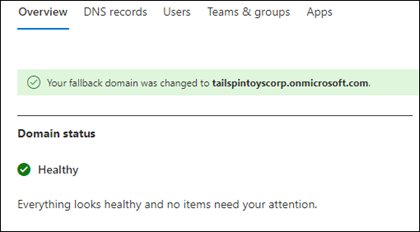
- Wait for the message that says your fallback domain changed to the new domain.
Change user sign-in names to the new onmicrosoft.com domain
A new fallback domain does not rename people who already have accounts. Edit each username you want on the new domain.
- In the Microsoft 365 admin center, go to Users > Active users.
- Select the user's name.
- On the Account tab, select Manage username and email.
- Edit the Username if needed, then pick the new onmicrosoft.com domain in the Domains box.
- Select Done.
- Repeat for every user who should sign in with the new domain.
For accounts synced from on-premises Active Directory, Microsoft notes that some details can only be edited in the local directory. Microsoft Graph PowerShell can update the UPN with Update-MgUser -UserId old@domain -UserPrincipalName new@domain.
Rename the SharePoint onmicrosoft.com domain with PowerShell
SharePoint and OneDrive URLs are built from the original onmicrosoft.com name and do not follow a fallback change. Microsoft renames them with the SharePoint Online Management Shell, which runs on Windows only.
Add the new onmicrosoft.com domain first (step 1), confirm it shows as Healthy on the Domains page, then connect with Connect-SPOService -Url "https://contoso-admin.sharepoint.com" using your current admin URL.
Start-SPOTenantRename -DomainName "fabrikam" -ScheduledDateTime "2026-11-07T22:00:00"-DomainName is the part before sharepoint.com or onmicrosoft.com. -ScheduledDateTime must be at least 24 hours and no more than 30 days ahead, in your computer's local time. Run Stop-SPOTenantRename to cancel before it starts.
You should see: The rename is scheduled without an error, and Get-SPOTenantRenameStatus shows the job and its scheduled time.
The rename can take hours to days. Sites on the old domain are inaccessible until each one moves, so schedule it for a weekend or other quiet period.
Check the new onmicrosoft.com fallback domain
- Open Settings > Domains in the Microsoft 365 admin center.
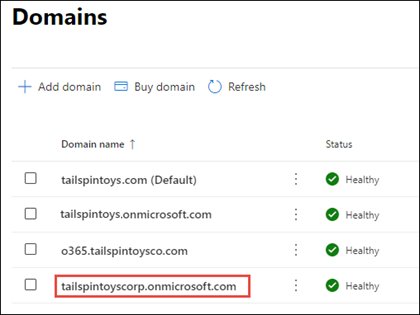
- Confirm the new onmicrosoft.com domain is listed with a Healthy status.
- Confirm the success message from step 2 named the new domain as your fallback domain.
- Create a test user and confirm the new domain appears as the default in the Domains box.
- If you scheduled a SharePoint rename, run
Get-SPOTenantRenameStatusin a new PowerShell window and compare renamed sites with the total. - Check the Attention Required count; for failed sites, run
Get-SPOSiteRenameState -ParentOperationID <RenameJobID> -State Failed.
Fallback onmicrosoft.com domain
Every Microsoft 365 tenant gets an onmicrosoft.com domain at sign-up, such as tailspintoys.onmicrosoft.com. It is a real domain that Microsoft owns and hosts for you.
| Question | Answer |
|---|---|
| Where it is used by default | Usernames and email addresses, Microsoft 365 group and team email aliases, and automatic domain dependency moves |
| Email routing role | Keeps mail flowing to mailboxes if you remove a custom domain |
| SharePoint link | New SharePoint and OneDrive URLs use the original onmicrosoft.com name |
| Sending limit | From October 15, 2025, Microsoft began limiting onmicrosoft.com sending to 100 external recipients per 24 hours |
| Recommended use | Testing only; use a custom domain for regular email |
| Common reasons to change it | The company name was unknown or wrong at sign-up, or SharePoint URLs show an old name |
SharePoint domain rename limits to check first
| Limit | What it means |
|---|---|
| Site count | The standard rename supports up to 10,000 sites, OneDrive accounts and SharePoint Embedded containers combined; larger tenants need Advanced Tenant Rename in SharePoint Advanced Management |
| Number of renames | Two per tenant lifetime, with at least 30 days between them |
| Going back | Renaming back to the original name is not supported |
| Redirects | Old URLs redirect for one year after the rename |
| Blocked tenants | Multi-Geo, GCC, GCC High, DoD, .de tenants and vanity domains cannot rename |
| The SharePoint rename does not change email addresses | |
| Deleted sites | Sites deleted before the change cannot be restored afterwards, so restore any you need first |
| Power BI and workflows | Reports with SharePoint data sources and in-flight SharePoint 2013 workflows break and need reconnecting or republishing |
Onmicrosoft domain troubleshooting
You cannot remove or delete an onmicrosoft.com domain
Microsoft does not allow onmicrosoft.com domains to be deleted once created.
- Leave the unwanted domain in place.
- Make the domain you do want the fallback domain under Settings > Domains.
- Move users off the old domain with Manage username and email.
SharePoint and OneDrive URLs still show the old onmicrosoft name
A fallback domain change does not rename SharePoint.
- Install the latest SharePoint Online Management Shell.
- Connect with
Connect-SPOServiceas a SharePoint Administrator. - Schedule the rename with
Start-SPOTenantRename. - Track it with
Get-SPOTenantRenameStatus.
"We're sorry, the user couldn't be edited" when changing a username
Your account is not in an admin role that can change usernames.
- Ask a Global Administrator to assign you the User Administrator role.
- Sign out and back in to the admin center.
- Retry Manage username and email.
Start-SPOTenantRename is not found or returns nothing
An older SharePoint Online Management Shell is installed.
- Run
Uninstall-Module Microsoft.Online.SharePoint.PowerShell -Force -AllVersions. - Install the latest SharePoint Online Management Shell.
- Reconnect with
Connect-SPOServiceand run the command again.
Onmicrosoft domain FAQ
How do I change my onmicrosoft domain name?
You cannot rename it in place. In the Microsoft 365 admin center, go to Settings > Domains, select your onmicrosoft.com domain, choose Add onmicrosoft domain, then open the new domain and select Make fallback domain.
How do I create an onmicrosoft domain?
A Domain Name Administrator opens Settings > Domains, selects the existing onmicrosoft.com domain, chooses Add onmicrosoft domain, types a name and selects Add domain. A tenant can hold up to five onmicrosoft.com domains.
How do I add an onmicrosoft domain to my tenant?
Use the Add onmicrosoft domain link in the About this domain section of your current onmicrosoft.com domain. The Add domain button at the top of the Domains page adds a custom domain instead.
How do I remove an onmicrosoft domain?
You cannot. Microsoft does not allow onmicrosoft.com domains to be deleted once created. Make a different onmicrosoft.com domain the fallback and move users off the old one instead.
What is an onmicrosoft domain?
It is the free domain Microsoft gives every Microsoft 365 tenant at sign-up, such as contoso.onmicrosoft.com. It serves as the fallback domain for usernames, group aliases and email routing when you do not use your own domain.
Is onmicrosoft a domain?
Yes. onmicrosoft.com is a real domain owned by Microsoft, and each tenant gets its own subdomain of it. Microsoft provides it automatically, so you do not register it yourself.
What is a Microsoft domain email?
It is an address ending in yourname.onmicrosoft.com that Microsoft 365 assigns before you add your own domain. Microsoft recommends using it only for testing and limits its sending to external recipients.
How do I find my onmicrosoft domain?
Sign in to the Microsoft 365 admin center and open Settings > Domains. Your onmicrosoft.com domains are listed there, and a user's username under Users > Active users also shows the domain they sign in with.
Does changing the fallback domain change SharePoint URLs?
No. Existing SharePoint and OneDrive URLs keep the original name. Renaming them needs the Start-SPOTenantRename PowerShell cmdlet, which has its own limits, including two renames per tenant lifetime.
Does changing the onmicrosoft.com domain change email addresses?
Not for existing users. New users default to the new fallback domain, but you must edit existing usernames yourself. A SharePoint domain rename never changes email addresses.