To add uBlock Origin to Edge, open the Microsoft Edge Add-ons store, search for uBlock Origin, select Get, then select Add extension.
This guide covers the install, what to check first, the Chrome Web Store and uBlock Origin Lite, the settings worth changing, updates, and fixes when the install fails.
Step-by-Step Guide to Adding uBlock Origin to Microsoft Edge
uBlock Origin is listed in Microsoft's own Edge Add-ons store, so desktop Edge needs no change to its store settings.
- Open Microsoft Edge on your computer.
- Select Extensions to the right of the address bar, then select Get Extensions for Microsoft Edge.
- Search the Edge Add-ons store for uBlock Origin.
- Select the uBlock Origin extension in the results and check the listing is by Raymond Hill.
- Select Get to add it to Edge.
- Review the permissions, then confirm with Add extension to install.
- Select Extensions again to see uBlock Origin and manage its settings.
If the Extensions button is missing, open Settings and more > Extensions instead.
Pre-requisites for Installing uBlock Origin on Edge
| Requirement | What to check |
|---|---|
| Update Microsoft Edge | Select Settings and more > Help and feedback > About Microsoft Edge. Edge also updates itself on restart |
| Enable extension support | Extensions are on by default in desktop Edge. A work or school PC can block them by policy |
| Use a compatible version of Edge | The current desktop Edge on Windows or macOS. uBlock Origin is a Manifest V2 extension, which Edge still runs for now |
| Stable internet connection | Needed to download the extension and its filter lists |
| Basic knowledge of extension installation | Knowing where the Extensions button and Manage extensions page are is enough |
uBlock Origin or uBlock Origin Lite: which should you install?
Chrome stopped running Manifest V2 extensions with Chrome 139, and the Chrome Web Store removed them. Edge has not reached that point yet.
| Your situation | Install this | Why |
|---|---|---|
| Desktop Edge, personal PC | uBlock Origin from Edge Add-ons | The full extension is still listed and runs in Edge |
| You want the Manifest V3 version that will outlast the phase-out | uBlock Origin Lite | A Manifest V3 build by the same developer, published on the Chrome Web Store |
| Managed work PC from early 2027 | uBlock Origin Lite | Microsoft expects Manifest V2 deprecation for enterprise customers to begin then |
| Chrome | uBlock Origin Lite | Chrome 138 was the last version to support Manifest V2 extensions |
| Firefox, including Firefox for Android | uBlock Origin from Firefox Add-ons | The full extension is listed for both |
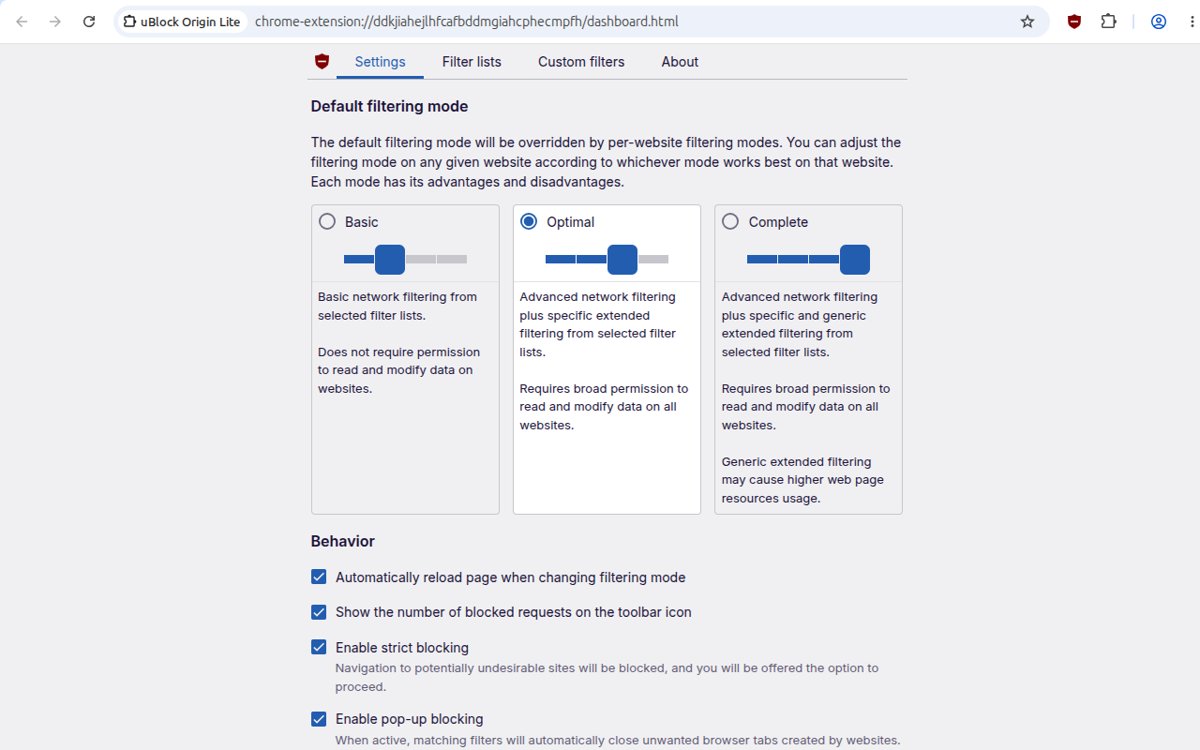
Install from the Chrome Web Store
Edge can install extensions from the Chrome Web Store. The full uBlock Origin is no longer listed there, so this route installs uBlock Origin Lite.
- In Edge, navigate to the Chrome Web Store and open the uBlock Origin Lite page.
- Select Get extension on the banner at the top of the page, or the Get button.
- If Edge asks, select Allow extensions from other stores.
- Review the permissions and select Add extension.
- Confirm the extension appears under Extensions.
Configuring uBlock Origin Settings for Optimal Performance
uBlock Origin works the moment it installs. These settings control where it runs and which lists it uses.
- Select Extensions, then … More actions next to uBlock Origin and hover over This can read and change site data.
- Keep On all sites so it can block on every page, or choose When you click the extension to limit it.
- Open Extensions > Manage extensions, then Details under uBlock Origin.
- Under Site access, turn on Allow in InPrivate if you want blocking in InPrivate windows.
- Leave Allow access to file URLs off unless you need it on local files.
- Open uBlock Origin's own options page from Details to add filter lists such as EasyList Cookie or Fanboy Annoyances.
The default lists are EasyList, EasyPrivacy, Peter Lowe's Ad server list, the Online Malicious URL Blocklist and uBlock Origin's own lists. Adding many more lists rarely helps and uses more memory.
How to check uBlock Origin is working
- Select Extensions and confirm uBlock Origin is listed.
- Open Manage extensions and check its toggle is on.
- Visit a site that normally shows ads and reload it.
- Confirm the ad slots are now empty or gone, then open the same page in an InPrivate window to compare if you turned on Allow in InPrivate.
Troubleshooting Common Issues During Installation of uBlock Origin on Edge
The Get button does nothing or the install fails
Edge is out of date or the connection dropped mid-install. Ensure browser compatibility first.
- Select Settings and more > Help and feedback > About Microsoft Edge and install any update.
- Restart Edge.
- Open the Edge Add-ons page again and select Get.
Chrome Web Store extensions will not install
Edge blocks other stores until you allow them, which is how extensions from outside the Microsoft store are enabled.
- Select Get extension on the Chrome Web Store page.
- Select Allow extensions from other stores when Edge asks.
- Select Add extension.
Pages still show ads
A conflicting ad-blocking extension, or limited site permissions.
- Open Extensions > Manage extensions and turn off other ad blockers to check for conflicting extensions.
- Verify extension permissions: set This can read and change site data to On all sites.
- Turn on Allow in InPrivate if the ads appear only in InPrivate windows.
uBlock Origin was turned off by itself
Edge turns off extensions that try to change default settings without permission, or shows a Manifest V2 warning.
- Select Settings and more > Extensions > Manage extensions.
- Find uBlock Origin and turn its toggle back on.
- If Edge keeps showing a Manifest V2 deprecation warning, install uBlock Origin Lite.
You cannot install any extension on a work PC
Your organisation manages Edge and restricts extensions.
- Check for a message that your browser is managed by your organisation.
- Ask your IT administrator to allow the extension.
Updating and Managing uBlock Origin Extensions in Edge
Store extensions update along with their store listing, so checking for extension updates is rarely needed. These steps cover manual updates and removal.
- Update Edge itself from Settings and more > Help and feedback > About Microsoft Edge.
- To update uBlock Origin manually, remove it and add it again from Edge Add-ons, which installs the current listed version.
- To pause it, open Extensions > Manage extensions and turn its toggle off.
- To remove it, right-click the uBlock Origin icon and select Remove from Microsoft Edge > Remove.
- To manage extension settings later, open Manage extensions and select Details.
Additional Tips for Enhancing Browser Security and Privacy
| Tip | Reason |
|---|---|
| Install only the listing by Raymond Hill | Copycat blockers with similar names have been pulled from the Edge store, such as the fake uBlock Adblock Plus extension |
| Run one content blocker, not several | Overlapping blockers conflict and make pages harder to troubleshoot |
| Limit site access for other extensions | When you click the extension stops an add-on reading every page |
| Turn off extensions you no longer use | Each one can read site data you allowed it to |
| Keep Edge updated | Edge updates on restart unless a metered connection blocks it |
Frequently asked questions
How do I add uBlock Origin to Microsoft Edge?
Select Extensions > Get Extensions for Microsoft Edge, search for uBlock Origin, select Get, then Add extension. It starts blocking straight away.
How do I add uBlock Origin to Chrome?
The full uBlock Origin no longer runs in Chrome, because Chrome 138 was the last version to support Manifest V2 extensions. Install uBlock Origin Lite from the Chrome Web Store instead.
How do I add uBlock Origin to Firefox?
Open the uBlock Origin page on Firefox Add-ons and select Add to Firefox. Firefox still runs the full extension. Background on the original port is in the uBlock Origin WebExtension for Firefox post.
How do I add uBlock Origin to Edge mobile?
uBlock Origin is published for desktop Edge in the Edge Add-ons store. On Android, the officially listed mobile version is for Firefox for Android.
How do I update uBlock Origin?
It updates along with its store listing. To force the current version, remove it from Edge and add it again from Edge Add-ons. Keep Edge itself updated from About Microsoft Edge.
How do I open uBlock Origin?
Select Extensions to the right of the address bar and select uBlock Origin. For its settings, open Manage extensions and select Details under the extension.
Why is uBlock Origin not working?
It is usually turned off in Manage extensions, limited to When you click the extension, or blocked in InPrivate. Turn it on, set site access to On all sites and turn on Allow in InPrivate.
How does uBlock Origin work?
It blocks requests that match its filter lists, such as EasyList for ads and EasyPrivacy for tracking. It describes itself as a wide-spectrum content blocker rather than just an ad blocker.
Should I use uBlock Origin?
In Edge and Firefox, the full extension still runs and is free and open source. Edge plans to phase out Manifest V2, so switch to uBlock Origin Lite when Edge stops supporting it.
Conclusion and final recommendations
Install uBlock Origin from the Edge Add-ons store, leave its default lists on, and move to uBlock Origin Lite when Edge's Manifest V2 support ends. The Edge store route needs no extra permissions, and Microsoft has started showing Manifest V2 deprecation warnings, with enterprise deprecation expected from early 2027.






Microsoft Edge Addons Site (beta) goes live with Search function and 162 extensions - Techdows
[…] limited number of add-ons (123 to be precise) from ad-blockers and password managers such as Ublock Origin, LastPass and Dashlane to Microsoft’s OneNote Web […]