To fix Assassin's Creed Odyssey when it will not launch on Windows, close Ubisoft Connect completely, start it as administrator, and verify the game files from its Library.
If the game still refuses to start, the six steps below cover Windows Security blocks, Visual C++ and DirectX runtimes, a recent Windows update, a clean Ubisoft Connect reinstall, and what to send Ubisoft support.
Assassin's Creed Odyssey not launching on Windows 11 or 10
Most launch failures come from a stuck launcher process, missing permissions or a damaged game file, so this short routine fixes the largest share of cases.
- Press Ctrl + Shift + Esc to open Task Manager.
- On the Processes tab, select every Ubisoft Connect entry and select End task.
- Right-click the Ubisoft Connect shortcut and select Run as administrator, then select Yes.
- Open the Library tab and select Assassin's Creed Odyssey.
- Select the cog icon next to Play and choose Verify files.
- When the check finishes, select Play and wait for the game window.
Ubisoft lists running as administrator and verifying files as two of its standard PC fixes, because both clear crashes and start-up failures caused by missing rights or corrupted files.
Step 1: Verify the integrity of game files
Verification compares your install with the current release and downloads anything missing or corrupted. Run it in the launcher you bought the game from.
- In Ubisoft Connect, select the Library tab.
- Choose Assassin's Creed Odyssey.
- Next to the Play button, select the cog icon.
- Choose Verify files and let the scan finish.
- Download any repaired files the launcher offers, then select Play.
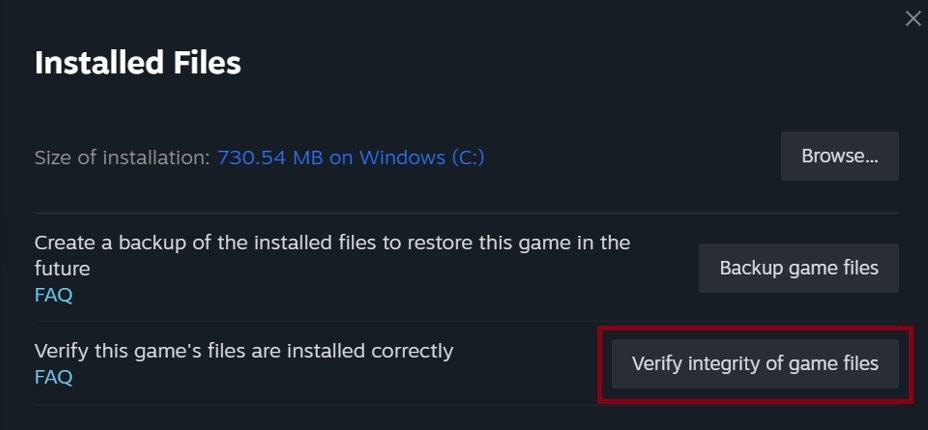
On Steam, restart the PC, right-click the game in your Library, select Properties, open Installed Files and select Verify integrity of game files.
Steam often reports that one or more files failed to verify. Those are local configuration files, so you can ignore that message. Do not verify while a virus scan is running.
Step 2: Exclude Odyssey from Windows Security (Defender)
Ubisoft advises adding the Ubisoft Connect and game .exe files to the Windows Security exclusions list when security software blocks a game. Do this only for files you installed from Ubisoft, Steam or Epic.
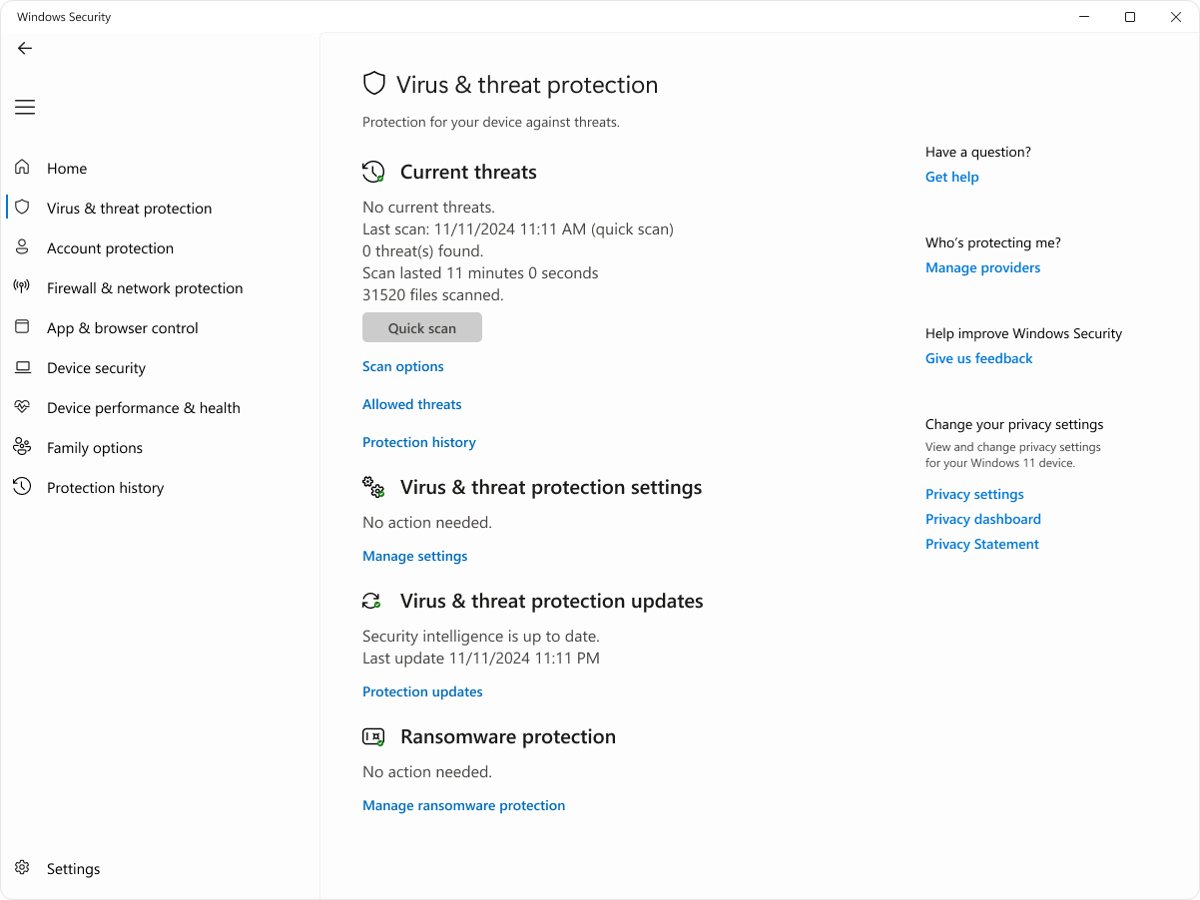
Check Protection history in Windows Security first. If it shows a quarantined Odyssey or Ubisoft file, the block is confirmed and the exclusion is justified.
- Open Windows Security from the Start menu.
- Select Virus & threat protection, then under Virus & threat protection settings select Manage settings.
- Scroll to Exclusions and select Add or remove exclusions, then select Yes in the User Account Control prompt.
- Add a File exclusion and browse to the game's .exe in its installation folder. Ubisoft's default games folder is
C:\Program Files (x86)\Ubisoft\Ubisoft Game Launcher\games. - Add a second File exclusion for the Ubisoft Connect .exe in its own install folder.
- Restart Ubisoft Connect and launch the game.
Microsoft warns that excluded files are no longer scanned in real time, so keep the list to these two files. An exclusion is still far safer than turning real-time protection off, which this guide never recommends.
To undo it, return to Add or remove exclusions, select the entry and select Remove.
Step 3: Update Visual C++ redistributables
Many Windows games depend on the Microsoft Visual C++ runtime libraries. A damaged or outdated runtime often shows up as an error naming a missing VCRUNTIME or MSVCP DLL.
- Open Microsoft Learn's Latest supported Visual C++ Redistributable downloads page.
- Download the X64 package from the permalink
https://aka.ms/vc14/vc_redist.x64.exe. - Also download the X86 package from
https://aka.ms/vc14/vc_redist.x86.exe, because launchers and helper tools can still be 32-bit. - Run each installer, accept the license terms and complete the setup.
- Restart Windows, then launch the game from Ubisoft Connect.
The v14 package covers apps built with Visual Studio 2017 through 2026, and Microsoft supports it on Windows 10 and Windows 11. You can see the installed versions under Settings > Apps > Installed apps by searching for Visual C++.
Step 4: Install DirectX runtime components
Odyssey needs DirectX 11. Windows 10 and Windows 11 already include DirectX 11.3 and DirectX 12, and Microsoft ships DirectX updates only through Windows Update.
- Select Start, type
dxdiagand press Enter. - On the System tab, read DirectX Version under System Information.
- Open the Display tab and note the graphics card and driver details.
- Open Settings > Windows Update and install every pending update.
- If the game reports a missing file such as
d3dx9_35.dll, install the DirectX End-User Runtime from Microsoft's own DirectX help page.
The End-User Runtime adds the older DirectX helper libraries that some games still call. Microsoft states that it does not change your DirectX version, so it is safe on a current Windows build.
Step 5: Roll back Windows 11 24H2 update
If Odyssey launched fine until a Windows feature update such as 24H2 or a later version, rolling back the update is a temporary fix while Ubisoft or Microsoft patches the conflict. Windows keeps that option for about 10 days.
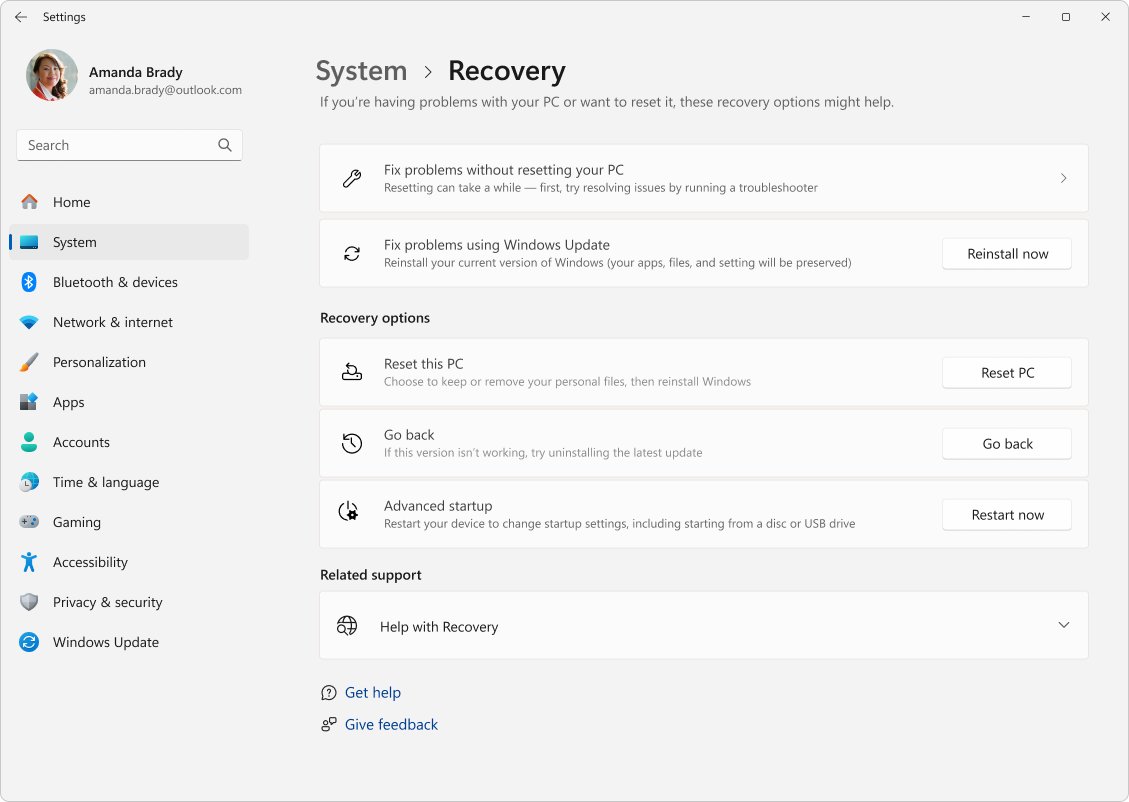
- Open Settings > System > Recovery.
- Under Recovery options, select Go back if it is available.
- Follow the on-screen prompts and let the PC restart into the earlier version.
- If Go back is missing, open Settings > Windows Update > Update history > Uninstall updates and remove the latest update instead.
- Launch the game and pause updates until a fixed build arrives.
Going back keeps your personal files but removes apps and drivers installed after the upgrade. It also needs the windows.old and $windows.~bt folders left in place, so do not run Disk Cleanup on previous Windows installations first.
Step 6: Reinstall Ubisoft Connect on your PC
A corrupted launcher install can block every Ubisoft game, even when the game files verify cleanly. Steam copies of Odyssey also need Ubisoft Connect for PC, so this step applies to them too.
- If your games sit in
C:\Program Files (x86)\Ubisoft\Ubisoft Game Launcher\games, copy that folder to another drive first so you do not need a 46 GB download again. - Open Settings > Apps > Installed apps.
- Find Ubisoft Connect, select More (the three dots) and select Uninstall.
- Restart Windows.
- Download Ubisoft Connect from
https://www.ubisoft.com/en-us/ubisoft-connect/downloadand run the installer. - Sign in with your Ubisoft account, then run Verify files on Odyssey before you select Play.
If Settings refuses to remove it, use Control Panel > Programs > Programs and Features, right-click Ubisoft Connect and select Uninstall.
Update graphics drivers for Assassin's Creed Odyssey
Ubisoft lists outdated graphics drivers among the common causes of crashes and failed starts on PC. Take the driver from the card maker's site, not from a third-party updater.
- Press Win + R, type
dxdiagand press Enter. - Select the Display tab and note the card name and driver version.
- Open the support site of the card maker: AMD, Intel or NVIDIA.
- Download the latest driver for that exact card and your Windows version.
- Install it, restart Windows, then launch the game.
Clean boot to stop apps blocking Assassin's Creed Odyssey
Overlays, RGB tools, recorders and VPN clients can stop a game from starting. A clean boot loads Windows with only Microsoft services, which shows whether one of them is the cause.
- Select Search, type
msconfigand open System Configuration. - On the Services tab, select Hide all Microsoft services, then select Disable all and Apply.
- On the Startup tab, select Open Task Manager.
- On Startup apps, select each enabled item and select Disable, noting what you changed.
- Close Task Manager, select OK and restart the PC.
- Start Ubisoft Connect and launch Odyssey.
If the game now starts, re-enable half the items at a time to find the culprit. Return to normal with System Configuration > General > Normal startup.
The prevalence and nature of launch issues
Odyssey launched in October 2018 and runs through Ubisoft Connect on every PC store, with Denuvo Anti-Tamper on top. That stack gives a launch failure several places to break.
| What you see | Likely cause | Step to try |
|---|---|---|
| Play button does nothing, or the game closes at once | Damaged or missing game files | Step 1 |
| Game file disappears or is blocked after an update | Windows Security quarantined it | Step 2 |
| Error naming VCRUNTIME140.dll or MSVCP140.dll | Visual C++ runtime missing or damaged | Step 3 |
| Error naming a d3dx9 or xinput DLL | Older DirectX helper files missing | Step 4 |
| Game broke right after a Windows feature update | Update conflict | Step 5 |
| Every Ubisoft game fails, or the launcher hangs | Broken Ubisoft Connect install | Step 6 |
| Black screen or crash at the logo | Old graphics driver or an overlay | Driver update, clean boot |
Assassin's Creed Odyssey system requirements for PC
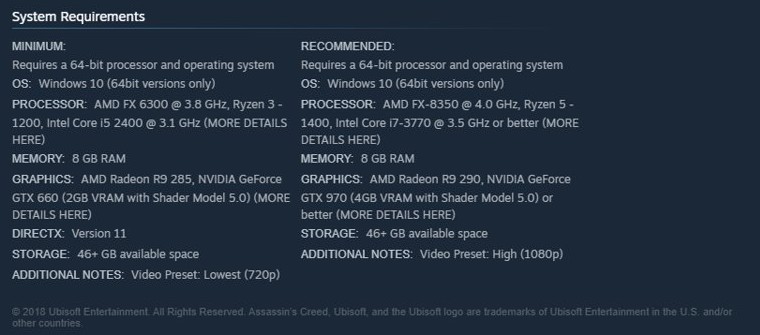
Ubisoft asks you to confirm the requirements before anything else, because support is limited on PCs below the minimum spec. The Steam listing names Windows 10 64-bit only.
| Part | Minimum | Recommended |
|---|---|---|
| Operating system | Windows 10, 64-bit | Windows 10, 64-bit |
| Processor | AMD FX 6300 at 3.8 GHz, Ryzen 3 1200 or Intel Core i5 2400 at 3.1 GHz | AMD FX-8350 at 4.0 GHz, Ryzen 5 1400 or Intel Core i7-3770 at 3.5 GHz |
| Memory | 8 GB RAM | 8 GB RAM |
| Graphics | AMD Radeon R9 285 or NVIDIA GeForce GTX 660, 2 GB VRAM, Shader Model 5.0 | AMD Radeon R9 290 or NVIDIA GeForce GTX 970, 4 GB VRAM |
| DirectX | Version 11 | Version 11 |
| Storage | 46 GB or more free | 46 GB or more free |
Strengths of the multi-step approach
The order runs from the cheapest, safest change to the most disruptive one, so you stop as soon as the game starts.
| Step | Time it takes | What it can change |
|---|---|---|
| Run as administrator and verify files | 5 to 20 minutes | Only the game's own files |
| Windows Security exclusion | 2 minutes | Real-time scanning of two files |
| Visual C++ and DirectX runtimes | 5 to 10 minutes | Shared libraries other games also use |
| Graphics driver and clean boot | 15 to 30 minutes | Driver and startup apps, both reversible |
| Roll back the Windows update | 20 to 60 minutes | Apps and drivers installed after the update |
| Reinstall Ubisoft Connect | 15 minutes plus downloads | The launcher and its settings |
Additional troubleshooting options
Ubisoft Connect opens in offline mode
Without an internet connection the launcher starts offline, which limits online features and can stop the game check.
- Check that Windows shows an active network connection.
- Open Server status on Ubisoft Help and check the Assassin's Creed Odyssey and Ubisoft Connect services.
- Restart Ubisoft Connect once the service is online, then launch the game.
The game starts, then closes without an error
A background app, an old graphics driver or a damaged file is the usual trigger.
- Run Verify files again from the Library tab.
- Update the graphics driver from the card maker's site.
- Do a clean boot and test again before you re-enable anything.
Progress or saves are lost after you play
Ubisoft Connect cannot write save files without the right permissions.
- Close Ubisoft Connect from Task Manager.
- Right-click its shortcut and select Run as administrator.
- Load your save and confirm it is still there after you quit and relaunch.
Odyssey fails only on the Steam copy
The Steam version still depends on Ubisoft Connect and a linked Ubisoft account.
- Verify the files in Steam under Properties > Installed Files.
- Open Ubisoft Connect on its own and sign in to the account linked to Steam.
- Launch the game from Steam again.
Potential risks and limitations
| Action | Risk | How to limit it |
|---|---|---|
| Windows Security exclusion | Excluded files are not scanned in real time | Exclude only the two .exe files and remove them if they do not help |
| Going back a Windows version | Apps and drivers added after the update are removed, and security fixes are lost | Use it only within the 10-day window and update again once a fix ships |
| Uninstalling an update | Some updates cannot be removed, and removing a security update lowers protection | Remove only the latest update and reinstall it later |
| Reinstalling Ubisoft Connect | Launcher settings reset and a large download may follow | Copy the games folder first |
| Clean boot | Some features stop working until you restore normal startup | Select Normal startup when you finish |
| Hardware below minimum spec | No step fixes an unsupported card or CPU | Compare your PC with the requirements table first |
User support: Ubisoft Help
If every step fails, open a case with Ubisoft Help. Ubisoft asks for your DxDiag and MSInfo reports with any performance or crash case.
- Press Win + R, type
dxdiag, press Enter and save the full report as a text file. - Type
cmdin Start search, right-click Command Prompt and select Run as administrator. - Run
msinfo32 /report C:\TEMP\msinfo.txtto save the System Information report (create theC:\TEMPfolder first if it does not exist). - Go to
https://www.ubisoft.com/en-us/helpand sign in with your Ubisoft account. - Select Contact us, pick the game and platform, and describe the exact error.
- Attach both reports and list the steps you have already tried.
Assassin's Creed Odyssey launch failures FAQ
Why won't Assassin's Creed Odyssey launch on my PC?
The usual causes are damaged game files, missing Visual C++ or DirectX libraries, Windows Security blocking the game, an outdated graphics driver or a broken Ubisoft Connect install. Run the launcher as administrator and verify the files first, because that clears most of them.
How do I verify Assassin's Creed Odyssey files in Ubisoft Connect?
Open the Library tab in Ubisoft Connect, choose Assassin's Creed Odyssey, select the cog icon next to Play and choose Verify files. The launcher then restores any missing or corrupted files before you play.
Does Assassin's Creed Odyssey work on Windows 11?
The official Steam requirements list Windows 10 64-bit only and do not mention Windows 11. If the game fails after a Windows 11 feature update, you can go back to the earlier build within about 10 days while waiting for a fix.
Do I need Ubisoft Connect to play Odyssey on Steam?
Yes. The Steam listing states that the game requires the Ubisoft Connect launcher and a Ubisoft account, which you can link to Steam. A broken Ubisoft Connect install therefore stops the Steam copy too.
Is it safe to exclude Odyssey from Microsoft Defender?
It is a limited risk if you exclude only the game's .exe and the Ubisoft Connect .exe from a legitimate install. Microsoft warns that excluded files are not scanned in real time, so remove the exclusion if it does not fix the launch.
Which Visual C++ version does Assassin's Creed Odyssey need?
Install the latest supported Visual C++ v14 Redistributable from Microsoft Learn, in both the x64 and x86 versions. The v14 package covers apps built with Visual Studio 2017 through 2026.
Does reinstalling DirectX fix Odyssey not starting?
Only when the error names an older DirectX file such as a d3dx9 DLL. Windows 10 and 11 already include DirectX 12, so the DirectX End-User Runtime adds legacy helper files without changing your DirectX version.
What should I send to Ubisoft support?
Send a description of the exact error, the steps you already tried, and your DxDiag and MSInfo reports. Ubisoft asks for both reports with any crash or performance case on PC.