When a battery suddenly drops to near zero, the cause is almost always a worn battery that can no longer hold its voltage under load, so check its health first and replace it if the health reading is low.
This guide covers iPhone, MacBook and Windows laptops: how to read battery health, why the percentage jumps, how to keep the estimate accurate, and what to do when the battery stays at 0.
Phone battery suddenly drops to 0: how to fix it
A battery that falls from 20 or 30 percent to almost nothing in minutes is usually showing its age, a cold environment, or both. These steps find the cause and fix the cases that software can fix.
- Plug the device into a wall outlet and let it charge to 100 percent without unplugging it.
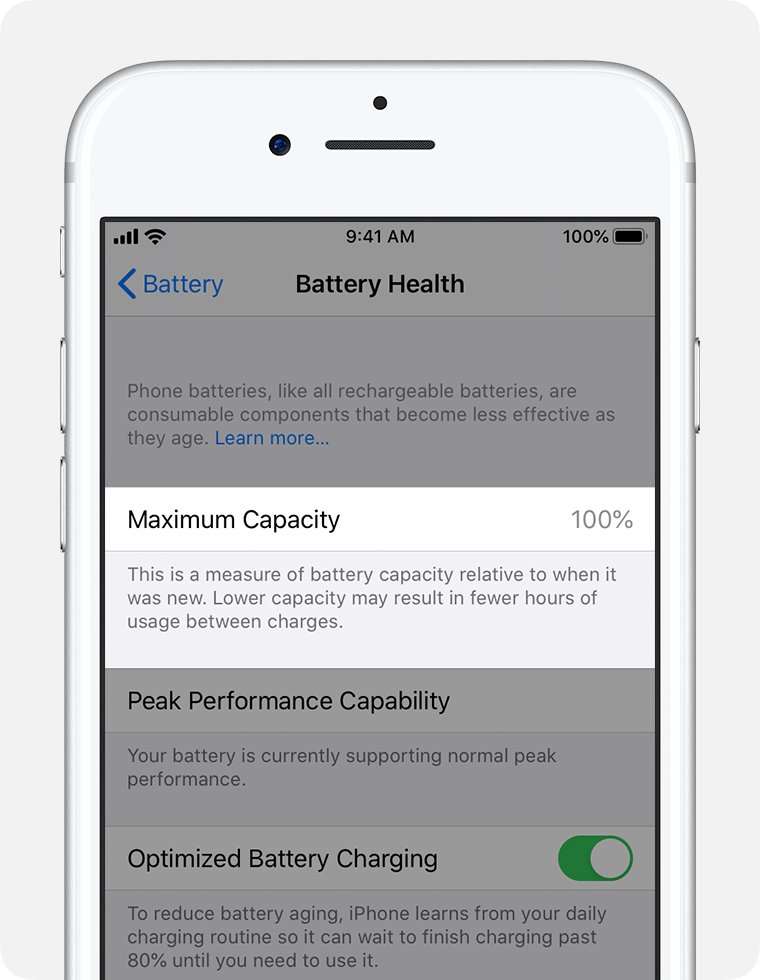
- On iPhone, open Settings, tap Battery, then tap Battery Health and read Maximum Capacity and Peak Performance Capability.
- On a Mac laptop, choose Apple menu > System Settings, click Battery and read Battery Health.
- Install any waiting update from Settings > General > Software Update on iPhone or System Settings > General > Software Update on a Mac.
- Keep the device between 16 and 22 C (62 to 72 F) where you can, and out of the cold, while you watch whether the drop happens again.
- If the health screen reports a degraded battery or Service recommended, book a battery replacement with Apple or an Apple Authorized Service Provider.
If the health reading is normal and the drop happened once, after an update or in the cold, it is usually temporary. If it keeps happening at a normal temperature, the battery is the part to replace.
Why does my phone battery drop suddenly?
Lithium-ion batteries develop higher internal resistance, called impedance, as they age. Apple explains that impedance also rises temporarily at a low state of charge and in cold temperatures, and that a high-impedance battery lets the voltage sag when the phone asks for a burst of power.
When the voltage falls below what the electronics need, the device shuts itself down to protect its components. From the outside, that looks like the percentage collapsing to zero.
| What you see | Likely cause | Is it permanent? |
|---|---|---|
| Drops from 20-30% to 0% and the phone turns off | Aged battery with high impedance at a low charge level | Yes, until the battery is replaced |
| Drops quickly only outdoors in winter | Cold raises impedance and cuts battery life | No, it recovers once the battery warms up |
| Shuts down while gaming, filming or using the flash | Peak power demand the worn battery cannot deliver | Yes, iPhone may apply performance management |
| Drains faster for a few days after an update | Update tasks still running in the background | No, battery life returns to normal |
| Percentage jumps around after weeks at a charge limit | State-of-charge estimate has drifted | No, a full charge to 100% refreshes it |
| Battery capacity much lower than when new | Normal chemical aging from charge cycles and heat | Yes, capacity does not come back |
How to check iPhone battery health
The Battery Health screen is the quickest proof of whether the battery itself is the problem. It exists on iPhone 6 and later.
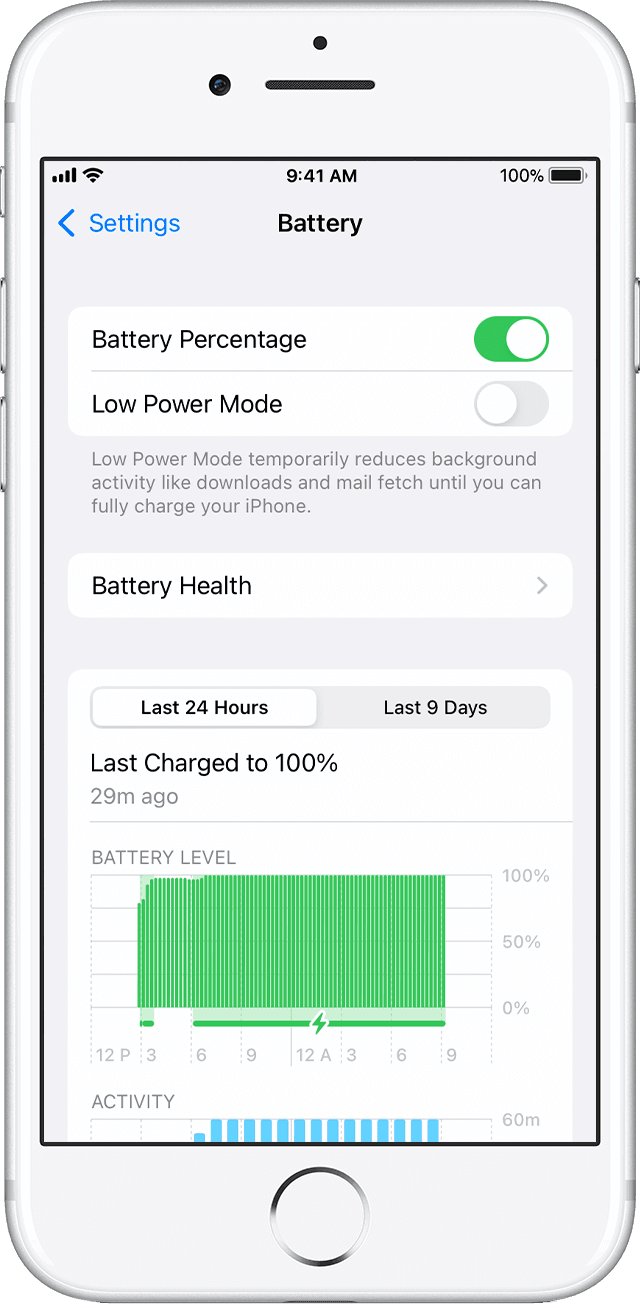
- Open the Settings app.
- Tap Battery.
- Tap Battery Health (on iPhone 14 and earlier the screen may be labelled Battery Health & Charging).
- Read Maximum Capacity, which compares the battery's capacity now with when it was new.
- Read the message under Peak Performance Capability and match it to the table in the next section.
Apple designs iPhone 14 and earlier batteries to keep 80 percent of their original capacity at 500 complete charge cycles, and iPhone 15 batteries at 1,000 cycles, under ideal conditions. A reading well below 80 percent goes a long way to explaining sudden drops.
iPhone peak performance capability messages explained
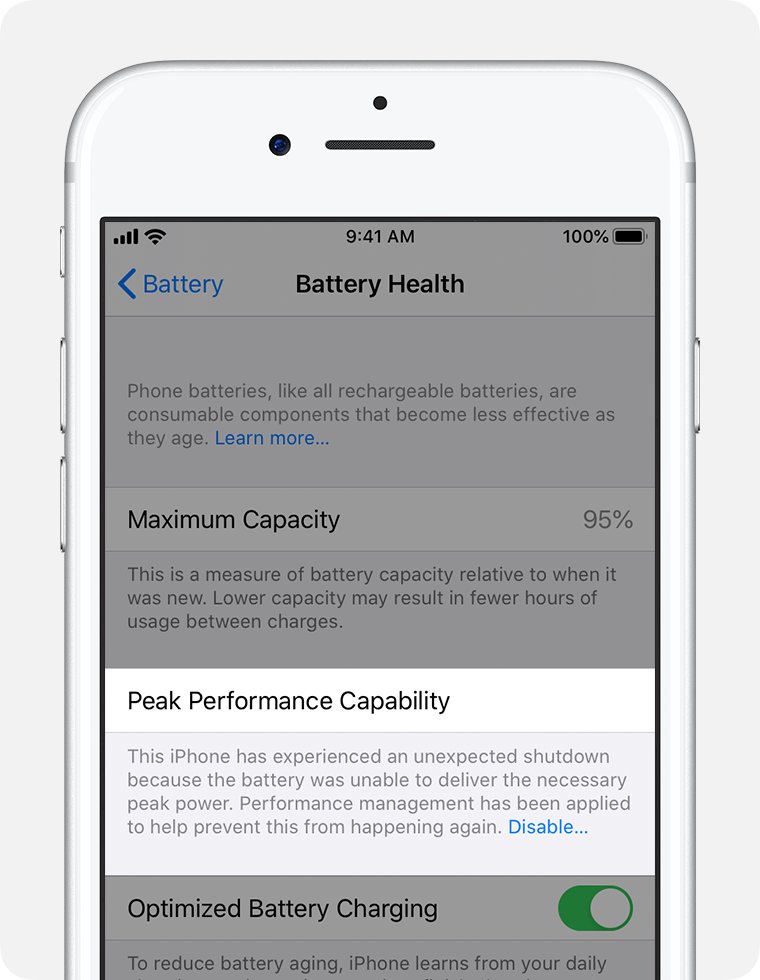
The message on the Battery Health screen tells you whether the iPhone has already shut down unexpectedly because the battery could not deliver peak power.
| Message | What it means | What to do |
|---|---|---|
| Your battery is currently supporting normal peak performance. | No unexpected shutdowns and no performance management | Look at temperature, updates and charging habits instead |
| This iPhone has experienced an unexpected shutdown… Performance management has been applied | The battery could not supply peak power and iOS now limits peak performance to prevent repeats | Plan a battery replacement; you can tap Disable but cannot turn it back on yourself |
| You have manually disabled performance management protections | Protection was switched off after a shutdown | Expect more shutdowns; iOS turns protection back on after the next one |
| Your battery's health is significantly degraded | Capacity and peak power are well below new | Replace the battery to restore full performance and capacity |
| Unable to verify this iPhone has a genuine Apple battery | The battery cannot be verified, so the health figures may not be accurate | Have the battery checked by Apple or an authorized provider |
Apple notes that the degraded message is not a safety warning. You can keep using the battery, but sudden drops and slowdowns become more noticeable.
MacBook battery suddenly drops to 0: how to check it
A Mac laptop shows its battery condition in System Settings and its charge cycle count in System Information. Together they show whether the battery has reached the end of its rated life.
- Choose Apple menu > System Settings, then click Battery in the sidebar.
- Read Battery Health: Normal means the battery is working normally, Service recommended means it holds less charge than when new.
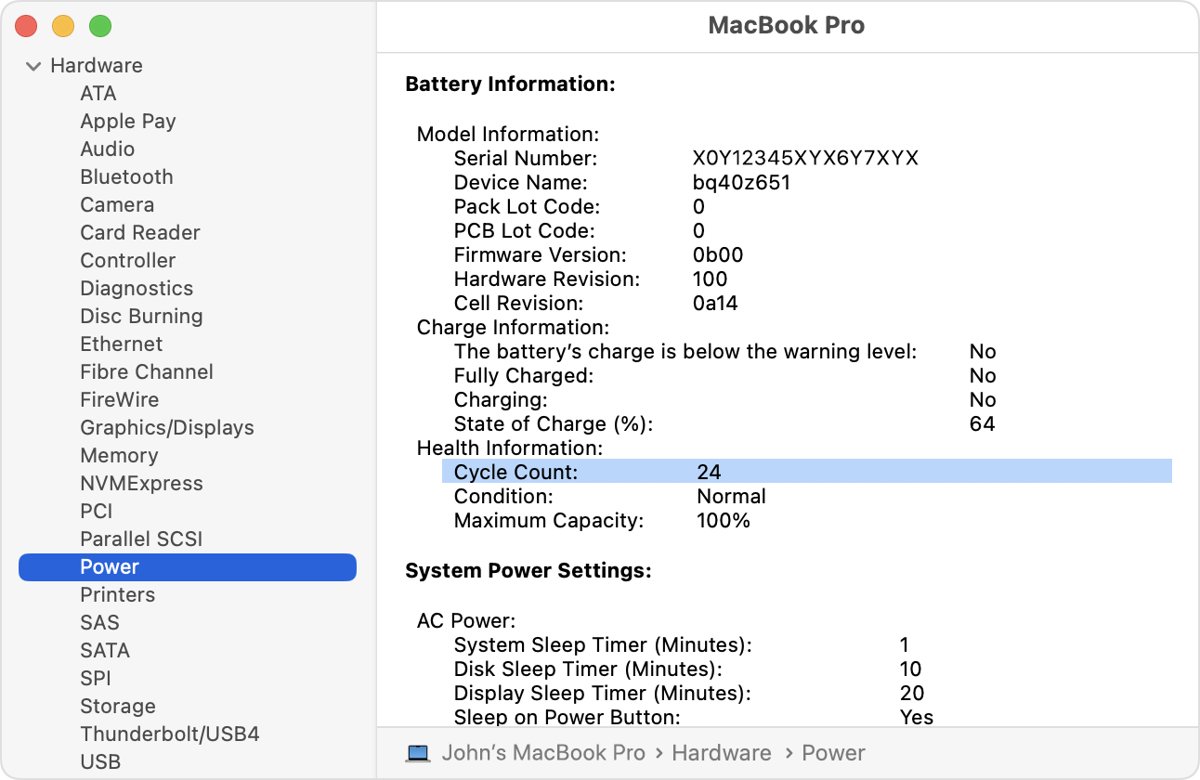
- Press and hold the Option key, then choose Apple menu > System Information.
- Select Power in the sidebar and find Cycle Count under Battery Information.
- Compare the count with the maximum for your model on Apple's cycle count page; most MacBook Air and MacBook Pro models from 2016 onward are rated for 1,000 cycles.
Apple designs Mac laptop batteries to keep up to 80 percent of their original capacity at the maximum cycle count. Past that point, sudden drops at low charge are expected, and a replacement is the fix.
Laptop battery suddenly drops to 0 on Windows: run a battery report
Windows laptops from Dell, Lenovo, HP and others share one built-in tool for this. The battery report shows the installed battery and how it has been used, so you can see whether capacity has fallen.
powercfg /batteryreport /output "C:\battery-report.html"Run it in Command Prompt opened as administrator. Windows writes an HTML battery report to the path after /output; without /output it saves battery-report.html in the current folder. Add /duration 7 to limit the usage history to the last seven days.
You should see: Command Prompt prints the path of the saved report. Open the file in a browser and read the Installed batteries, Recent usage and Battery usage sections.
Microsoft's Surface guidance divides full charge capacity by design capacity and treats a battery below 70 percent of its design capacity as a candidate for replacement. That is a useful rule of thumb for any laptop that keeps dropping to zero. If the battery is still healthy, the laptop battery draining fixes cover power settings and background apps.
How to calibrate battery percentage on iPhone and Mac
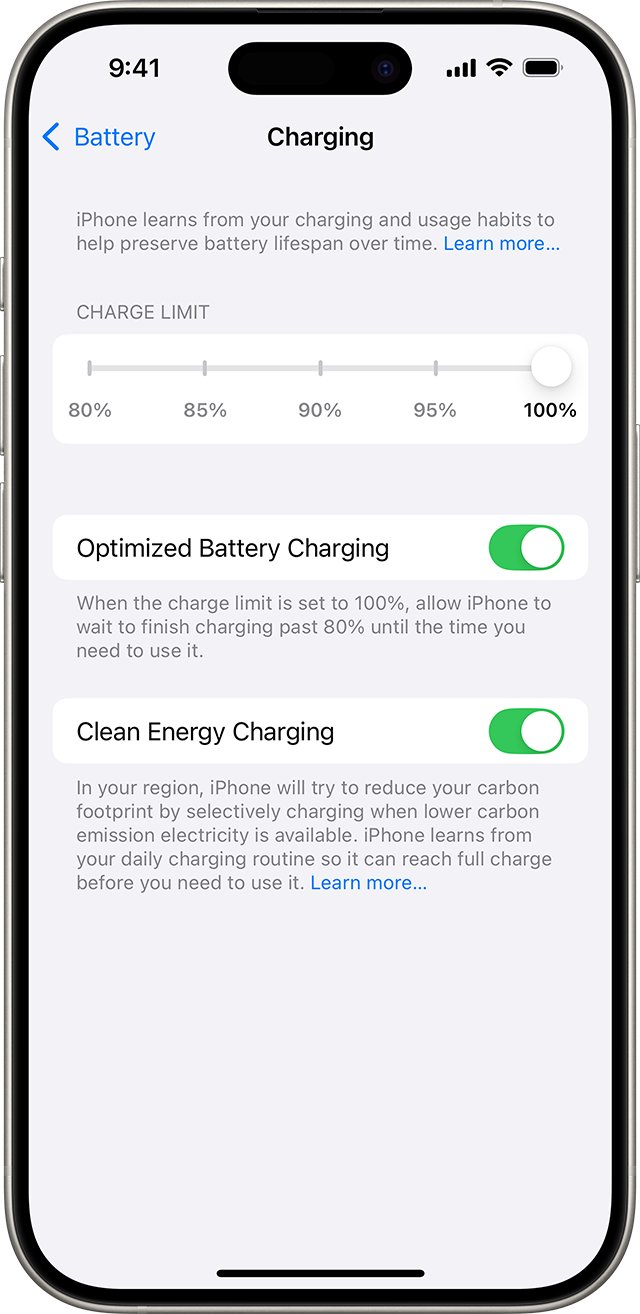
Apple does not publish a manual drain-and-charge calibration routine for current iPhone or Mac models. What it does say is that a device using a charge limit or Optimized Battery Charging occasionally charges to 100 percent to keep its state-of-charge estimate accurate.
If you keep a low charge limit and the percentage behaves oddly, let the battery reach a full charge now and then.
- On iPhone 15 and later, open Settings, tap Battery, then tap Charging and set the limit to 100% for a day.
- On iPhone 14 and earlier, open Settings > Battery > Battery Health & Charging and check whether Optimized Battery Charging is on.
- If an Optimized Battery Charging notice appears on the Lock Screen, touch and hold it and tap Charge Now to finish charging sooner.
- On a Mac, click the battery icon in the menu bar and choose Charge to Full Now when Charging On Hold or Charged to [%] Limit shows.
- Leave the device on its charger until it shows 100 percent, then unplug it and use it normally.
- Set your preferred charge limit again afterwards to protect the battery's lifespan.
Battery stuck at 0 or not going up: how to fix it
Match the symptom, then work through its steps in order.
Battery stays at zero and the iPhone will not turn on
The battery is fully depleted or the charging connection is not making contact.
- Plug the iPhone into a wall outlet with a cable and adapter that show no damage.
- Remove any debris from the charging port, then plug the cable in firmly.
- Let it charge for half an hour.
- If the screen stays black or shows a battery icon, force restart: press and release volume up, press and release volume down, then hold the side button until the Apple logo appears (iPhone 8 and later).
- Let it charge for another half hour. If it still will not turn on or charge, it needs service.
Battery is not going up past 80 percent
Optimized Battery Charging, a charge limit, or a warm battery is holding the charge.
- Move the iPhone and charger somewhere cooler; charging above 80 percent resumes when the temperature drops.
- On iPhone 15 and later, check Settings > Battery > Charging and raise the limit if it is below 100 percent.
- If the Lock Screen shows an Optimized Battery Charging notice, touch and hold it and tap Charge Now.
Battery running low much faster after an update
Update tasks keep running in the background for a while.
- Open Settings and tap Battery.
- Look above Daily Usage for the Ongoing iOS Update insight.
- Wait a few days, then check the Daily Usage chart again before deciding the battery is at fault.
Battery drops to 0 only in cold weather
Cold raises battery impedance, which cuts the power the battery can deliver.
- Keep the phone in an inside pocket when you are outdoors in winter.
- Let it warm up to room temperature before you charge it or rely on the percentage.
- Remember that iPhone works best between 0 and 35 C (32 to 95 F) and a MacBook between 10 and 35 C (50 to 95 F).
Mac shows Service recommended and dies at a low percentage
The battery holds noticeably less charge than when new.
- Check the cycle count under System Information > Power.
- Save your work early when the battery falls below 20 percent.
- Contact Apple or an Apple Authorized Service Provider to replace the battery.
If an iPhone that charges normally still drains quickly through the day, the iPhone battery draining fixes cover background activity and settings.

iPhone battery replacement when health drops below 80%
A battery that keeps dropping to near zero with a low health reading will not improve with settings. Replacement is the fix, and coverage depends on your plan.
| Situation | What Apple offers |
|---|---|
| AppleCare plan and capacity below 80% | Battery replacement at no extra charge |
| Within the one-year limited warranty, defective battery | Covered as a manufacturing defect; normal wear is not covered |
| Out of warranty | Battery service for a fee, in person or by mail |
| Mac laptop showing Service recommended | Battery service from Apple or an Apple Authorized Service Provider |
Apple warns that repairs by untrained people or with non-genuine parts can affect safety and how the device works. Use Apple or an authorized provider.
Battery suddenly drops to 0 FAQ
Why is my battery staying at 0?
A battery that stays at 0 is either fully depleted or not receiving power. Charge it from a wall outlet for half an hour with an undamaged cable, clean the port, then force restart. If it still shows 0 or will not turn on, the battery or charging hardware needs service.
Why does my phone battery drop suddenly?
An aged battery has higher internal resistance, so its voltage sags when the phone draws a burst of power at a low charge level. The phone shuts down to protect its parts. Cold weather makes this worse, and it can also follow a recent software update.
Why does my battery health go down?
Battery health falls because lithium-ion cells chemically age with every charge cycle and with exposure to heat. Apple designs iPhone 15 batteries to keep 80 percent capacity at 1,000 cycles, and iPhone 14 and earlier at 500 cycles, under ideal conditions.
My battery health is dropping fast. Is that normal?
Health drops faster when a device is charged or kept above 35 C (95 F), which Apple says can permanently reduce capacity. Keep it out of hot cars and direct sun, and use Optimized Battery Charging or a charge limit to reduce time spent at full charge.
Why is my battery not going up?
On iPhone, charging can pause at 80 percent because of Optimized Battery Charging, a charge limit, or a battery that is too warm. Move it somewhere cooler, check the charge limit in Settings, or tap Charge Now on the Lock Screen notice.
Why is my battery running low so quickly?
Open Settings, tap Battery and check the Daily Usage chart and the apps listed under App and System Activity Usage. Low signal, high brightness and background activity drain it faster, and battery life also dips for a few days after an update.
Why does a Lenovo or Dell laptop battery suddenly drop to 0?
Usually the battery has lost much of its capacity. Run powercfg /batteryreport from an administrator Command Prompt and open the report. A full charge capacity far below design capacity, under about 70 percent, means the battery should be replaced.
Can I turn off performance management on iPhone?
Yes. If it has been applied, tap Disable on the Battery Health screen. You cannot turn it back on manually, and iOS turns it back on automatically after the next unexpected shutdown.