To access Microsoft Exchange, sign in at outlook.office.com with your work or school account for Exchange Online, or open https://<ServerName>/owa for an Exchange Server mailbox.
This guide also covers the Outlook desktop and mobile apps, Exchange ActiveSync, IMAP and POP clients, Exchange Online PowerShell, the Exchange admin center, and the sign-in errors that block access.
How to log in to Microsoft Exchange email
Outlook on the web needs nothing installed, so it is the fastest way into an Exchange mailbox from any computer.
- Open a browser and go to outlook.office.com (Exchange Online) or the OWA address your IT team gave you (Exchange Server).
- Enter your work or school email address and password.
- Complete the multifactor authentication prompt if your organization uses it.
- Select Sign in.
- If you signed in at microsoft365.com instead, choose Outlook from the app launcher.
A personal Outlook.com or Hotmail address is not an Exchange work account. Sign out and use your work address if the wrong mailbox opens.
Understanding Microsoft Exchange
| Term | What it is |
|---|---|
| Microsoft Exchange | Microsoft's email, calendar and contacts server. Outlook and other apps are the clients that connect to it. |
| Exchange Online | The cloud version included with Microsoft 365 business plans. Users sign in with a work or school account. |
| Exchange Server | The on-premises version (2016, 2019 and Subscription Edition) that an organization runs on its own servers. |
| Outlook on the web | The browser client, formerly Outlook Web App (OWA). |
| Exchange ActiveSync | The protocol phones use to sync email, calendar, contacts and tasks with an Exchange mailbox. |
| Exchange admin center (EAC) | The web console admins use to manage mailboxes, groups and mail flow. |
Exchange Online vs Exchange Server access methods
| What you want | Exchange Online (Microsoft 365) | Exchange Server (on-premises) |
|---|---|---|
| Email in a browser | outlook.office.com | https://<ServerName>/owa, or the external URL from IT, such as https://mail.contoso.com/owa |
| Full desktop app | Outlook for Windows or Mac, signed in with the work account | Outlook for Windows or Mac, using Autodiscover or the server name from IT |
| Phone or tablet | Outlook for iOS and Android (recommended by Microsoft) | Outlook mobile or the built-in mail app with Exchange ActiveSync |
| Another email app | IMAP or POP with OAuth 2.0 support | IMAP or POP if the admin has enabled them |
| Admin tasks | Exchange admin center or Exchange Online PowerShell | Exchange Management Shell or the on-premises admin center |
Accessing Microsoft Exchange via Outlook desktop client
Outlook for Windows finds Exchange settings on its own through Autodiscover, so a work email address and password are usually enough.
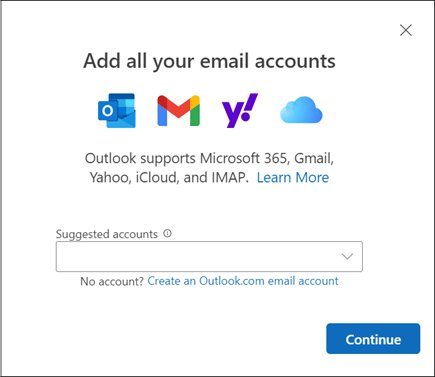
- New Outlook for Windows: open View settings on the View tab, then select Accounts > Your accounts.
- Under Email accounts, select Add Account, enter your work email address, and select Continue.
- Enter your password if prompted and select Done.
- Classic Outlook for Windows: select File > Add Account.
- Enter your work email address and select Connect.
- Enter your password again if prompted, then select OK > Finish.
Outlook 2007 and Outlook 2010 cannot use Modern authentication, so they cannot connect to Exchange Online. Use Outlook 2013 or later, and turn on Modern authentication if you still run Outlook 2013.
Accessing Microsoft Exchange via Outlook Web App (OWA)
Outlook Web App is now called Outlook on the web. The address depends on where the mailbox lives.
- For Exchange Online, open outlook.office.com in a supported browser.
- For Exchange Server inside the company network, open https://<ServerName>/owa, for example https://mailbox01.contoso.com/owa.
- From outside the network, use the external OWA address your admin configured, such as https://mail.contoso.com/owa.
- Sign in with your work account and complete any verification prompt.
- Clear Keep me signed in on a shared or public computer.
- Select Account manager > Sign out when you finish.
Unsupported browsers get the light version of Outlook on the web, which has fewer features. You can also sign in to Outlook on the web from microsoft365.com.
Accessing Microsoft Exchange via mobile devices
Microsoft recommends Outlook for iOS and Android for Exchange Online because it supports Modern authentication, Conditional Access and app protection policies.
- Install Outlook from the App Store or Google Play.
- Open it and tap Add Account (iPhone) or Get Started (Android).
- Enter your work email address and tap Continue.
- Enter your password, tap Sign In, and complete multifactor authentication.
- If your company manages devices with Intune, install Intune Company Portal and Microsoft Authenticator first, then tap Register when Outlook asks.
- If automatic setup fails on Android, tap Setup account manually, choose Exchange, and turn on Advanced Settings.
- Enter your full email address as the user name and outlook.office365.com as the server for Microsoft 365, or the server name from IT for Exchange Server.
Finish Intune enrollment in one session. Pausing for more than a few minutes usually forces you to start over.
Utilizing Microsoft Exchange ActiveSync on iPhone
Built-in mail apps on iPhone and Android connect to Exchange through ActiveSync. It syncs email, calendar, contacts and tasks, and keeps them available offline.
- On iPhone, open Settings, tap Apps > Mail > Mail Accounts, and tap Add Account.
- Select Microsoft Exchange.
- Enter your work email address and a description, then tap Next.
- Tap Sign In, or tap Configure Manually if your organization gave you server settings.
- Enter your password and tap Sign in or Next.
- Tap Accept or Allow if the app asks for permissions.
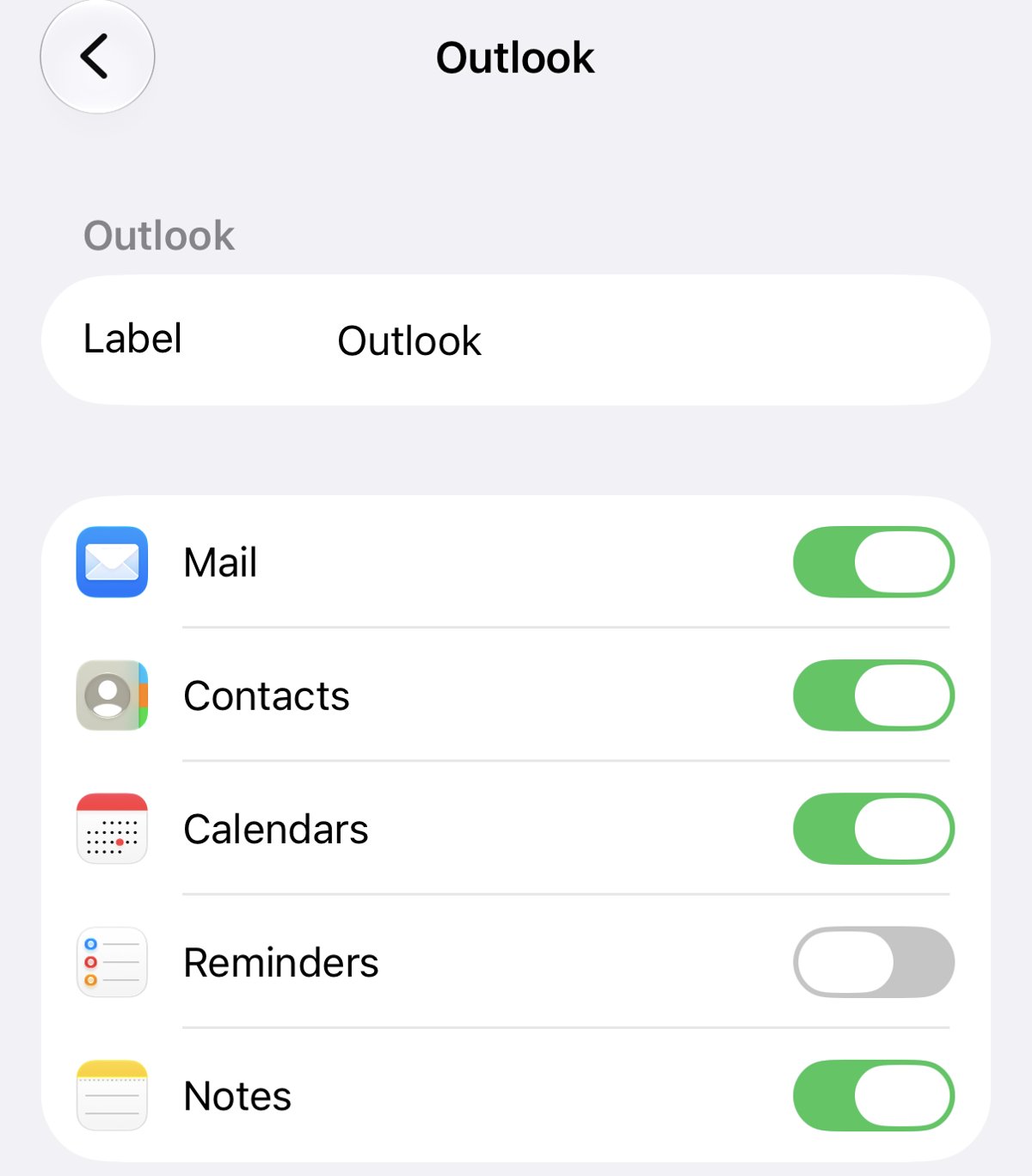
- Choose the services to sync, such as Mail, Contacts and Calendars, then tap Save.
ActiveSync does not support shared mailboxes or delegate access. Use Outlook on the web or the Outlook app for those.
Accessing Microsoft Exchange through third-party email clients
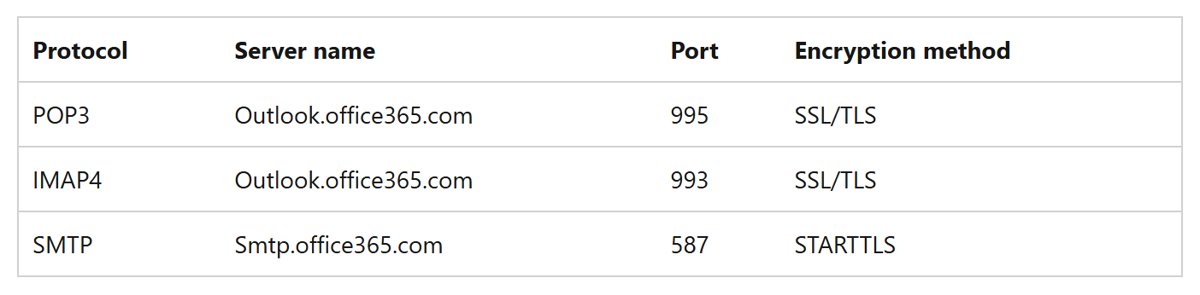
Apps such as Thunderbird reach Exchange Online over IMAP or POP and send through SMTP. Basic authentication is off in every Exchange Online tenant, so the app must support OAuth 2.0.
| Protocol | Server name | Port | Encryption |
|---|---|---|---|
| IMAP4 (incoming) | outlook.office365.com | 993 | SSL/TLS |
| POP3 (incoming) | outlook.office365.com | 995 | SSL/TLS |
| SMTP (outgoing) | smtp.office365.com | 587 | STARTTLS |
IMAP and POP carry email only: no Exchange calendar, contacts or rich features. Prefer IMAP over POP, because POP removes downloaded messages from the server by default.
Accessing Microsoft Exchange via PowerShell
Admins manage Exchange Online with the ExchangeOnlineManagement module, which works in Windows PowerShell 5.1 and PowerShell 7 and supports multifactor authentication.
Install it once from an elevated PowerShell window with Install-Module -Name ExchangeOnlineManagement. If scripts are blocked, run Set-ExecutionPolicy RemoteSigned in the same elevated window first.
Connect-ExchangeOnline -UserPrincipalName [email protected]Opens a sign-in window for that account (a browser tab in PowerShell 7), applies MFA if required, and loads the Exchange Online cmdlets your admin role allows.
You should see: No errors appear, and Get-AcceptedDomain returns your organization's domains. Run Disconnect-ExchangeOnline when you finish so the session does not stay open.
Module versions 3.10.0 and later need PowerShell 7.6.0 or later, so install PowerShell 7 or update it before you connect. For Exchange Server, open Start > Microsoft Exchange Server 2016 > Exchange Management Shell on the server or on a PC with the management tools.
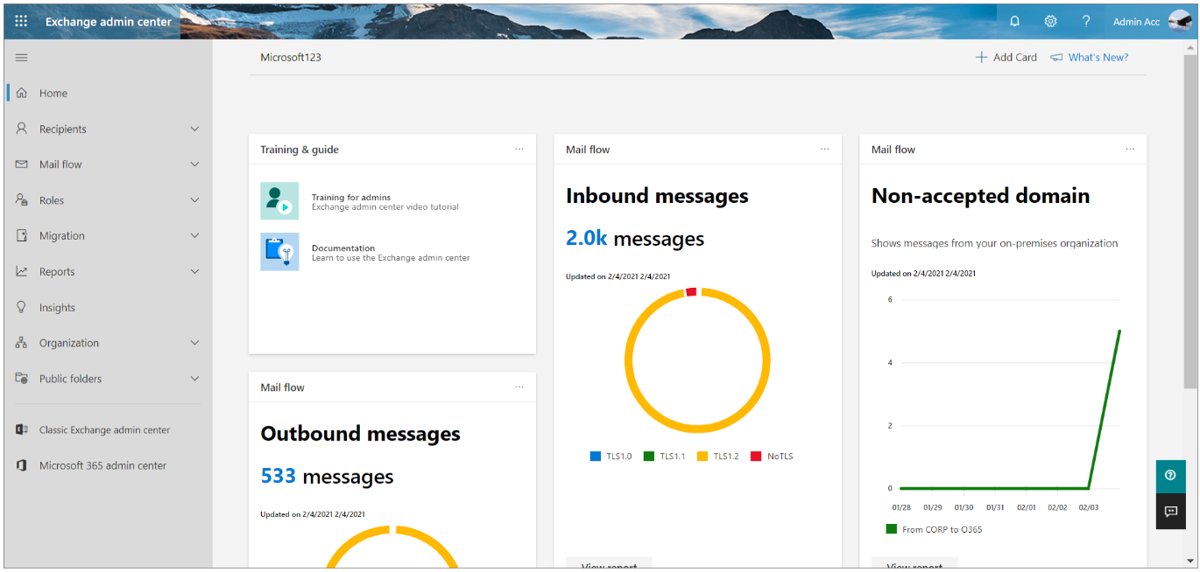
How to open the Exchange admin center
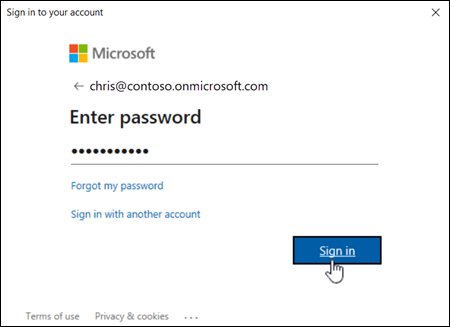
- Sign in with an account that holds an Exchange admin role.
- Open https://admin.cloud.microsoft/exchange#/homepage in a browser.
- Use the left navigation panel to reach Recipients, Mail flow or reports.
- Expect some pages to be missing if your role does not include them, because role-based access control decides what you see.
The Exchange admin center replaced the old Exchange Control Panel for Exchange Online. You can also reach it from the Microsoft 365 admin center.
How to find your Outlook on the web URL for Exchange
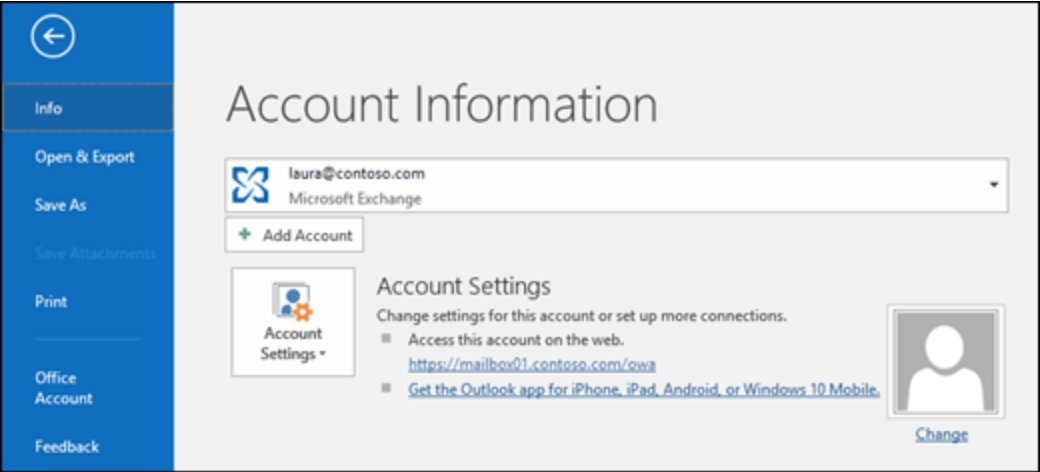
Classic Outlook already knows the OWA address of a connected Exchange Server mailbox, which also proves the account is connected.
- Open classic Outlook for Windows with the Exchange account added.
- Select File > Info.
- Look under Account Settings for the Outlook on the web link in the Account Information area.
- Open that link in a browser and sign in to confirm the mailbox loads.
- For Exchange Online, the address is always outlook.office.com.
Security considerations when accessing Microsoft Exchange
| Risk or control | What it means for access |
|---|---|
| Basic authentication is off | Exchange Online no longer accepts Basic authentication for ActiveSync, POP, IMAP, EWS, Remote PowerShell or Outlook. Nobody can turn it back on. |
| App passwords | They no longer work with apps that lack two-step verification support. |
| Security defaults | With security defaults on, POP3 and IMAP4 are disabled in Exchange Online automatically. |
| Multifactor authentication | Modern authentication makes MFA simple to enforce in Outlook, the mobile app and PowerShell. |
| Lost phone | Admins can send an ActiveSync remote wipe that erases the device, and set device PIN and encryption policies. |
| Shared computers | Clear Keep me signed in and sign out of Outlook on the web when you finish. |
| Encryption | ActiveSync traffic can be protected with SSL, and IMAP and POP use SSL/TLS on ports 993 and 995. |
Admins can review sign-in risks and alerts from the Microsoft 365 Defender portal.
Microsoft Exchange sign-in not working
Outlook on the web opens the wrong mailbox
You are signed in with a personal Microsoft account instead of the work account.
- Select Account manager > Sign out.
- Sign in again with your work or school email address.
Exchange password does not work
The password expired, changed, or was typed into the wrong account.
- Go to passwordreset.microsoftonline.com if your admin allows self-service password reset.
- Reset the password and sign in again.
- Contact your admin if self-service reset is not enabled.
Third-party email app cannot connect to Exchange Online
The app uses Basic authentication, or POP and IMAP are disabled.
- Update the app to a version that supports OAuth 2.0.
- Remove the account from the app and add it again so it signs in with OAuth.
- Ask the admin whether security defaults or a policy disabled IMAP or POP for your mailbox.
Phone mail app stopped syncing Exchange
The account on the phone still uses Basic authentication.
- Update the phone and its mail app.
- Remove the Exchange account from the phone.
- Add it back so it signs in with Modern authentication, or switch to Outlook for iOS and Android.
"Running scripts is disabled on this system" in PowerShell
The execution policy blocks the ExchangeOnlineManagement module.
- Open PowerShell with Run as administrator.
- Run
Set-ExecutionPolicy RemoteSigned. - Run
Connect-ExchangeOnlineagain.
Connect-ExchangeOnline fails with an Update-ModuleManifest error
The PowerShellGet and PackageManagement modules are missing.
- Install or update PowerShellGet.
- Close and reopen PowerShell.
- Connect again in a fresh window before you import other modules.
Microsoft Exchange access FAQ
Is Microsoft Exchange the same as Outlook?
No. Exchange is the server that stores email, calendars and contacts, and Outlook is a client app that connects to it. You can also reach an Exchange mailbox through Outlook on the web, phone mail apps and IMAP clients.
What is the Outlook Web App URL for Microsoft Exchange?
For Exchange Online, the address is outlook.office.com. For Exchange Server, Outlook on the web runs at https://<ServerName>/owa inside the network, and admins usually publish an external address such as https://mail.contoso.com/owa.
What is the Exchange server name for Microsoft 365?
Outlook for Android's manual Exchange setup uses outlook.office365.com as the server for Microsoft 365. IMAP and POP use the same host on ports 993 and 995, and outgoing SMTP uses smtp.office365.com on port 587.
Can I access Exchange email with Thunderbird or another IMAP app?
Yes, if the app supports OAuth 2.0 and IMAP is enabled for your mailbox. Basic authentication is disabled in all Exchange Online tenants, so older apps that only send a username and password cannot connect.
Does Exchange ActiveSync support shared mailboxes?
No. Exchange ActiveSync does not support shared mailboxes or delegate access. Open a shared mailbox in Outlook on the web, Outlook for Windows or the Outlook mobile app instead.
Can Outlook 2010 connect to Exchange Online?
No. Outlook 2007 and Outlook 2010 cannot use Modern authentication, which Exchange Online now requires. Outlook 2013 works once Modern authentication is turned on, and Outlook 2016 and later have it on by default.
How do I access Microsoft Exchange from home?
Use Outlook on the web at outlook.office.com for Exchange Online. For Exchange Server, use the external OWA address your admin configured, because https://<ServerName>/owa works only inside the company network.
Do I need admin rights to use Exchange Online PowerShell?
You need an account with PowerShell access and an Exchange role. Role-based access control decides which cmdlets and parameters you can run after Connect-ExchangeOnline signs you in.