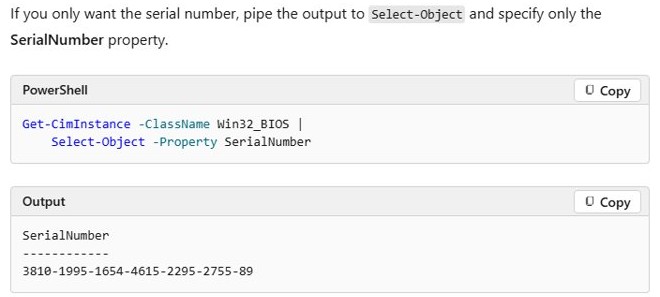
Run Get-CimInstance -ClassName Win32_BIOS | Select-Object -Property SerialNumber in PowerShell for the serial number, and (Get-CimInstance -Query 'select * from SoftwareLicensingService').OA3xOriginalProductKey in an elevated window for a product key stored in the firmware.
This guide covers each command, what a blank result means, the WMIC replacements, and how to collect these values from many PCs.
Quick summary: the commands that work now
Right-click Start and select Terminal for the commands that need no elevation, or Terminal (Admin) for the firmware key. Paste a command and press Enter. All of them work without WMIC.
| What you want | PowerShell CIM command | Run as administrator? |
|---|---|---|
| PC serial number or Dell Service Tag | (Get-CimInstance -ClassName Win32_BIOS -Property SerialNumber).SerialNumber |
No |
| Full product key held in the firmware | (Get-CimInstance -Query 'select * from SoftwareLicensingService').OA3xOriginalProductKey |
Yes |
| Last five characters of the installed key | Get-CimInstance -ClassName SoftwareLicensingProduct -Filter "PartialProductKey IS NOT NULL" | Select-Object Name, PartialProductKey, LicenseStatus |
No |
A blank firmware key result is normal on many PCs. It means the device has no firmware-embedded key, not that the command failed.
Background on Windows 11 serial numbers and product keys
CIM cmdlets arrived in PowerShell 3.0 and read Windows Management Instrumentation (WMI) classes. Each identifier lives in a different class, which is why no single command returns everything.
| CIM class | Property | What it returns |
|---|---|---|
Win32_BIOS |
SerialNumber |
The serial number stored in the firmware, up to 64 characters |
Win32_ComputerSystemProduct |
IdentifyingNumber, Name, Vendor, SKUNumber |
Product identification, model name, supplier and stock-keeping unit |
Win32_BaseBoard |
SerialNumber, Product |
The motherboard's own serial and part number |
SoftwareLicensingService |
OA3xOriginalProductKey |
The product key embedded in the firmware, when one exists |
SoftwareLicensingProduct |
PartialProductKey, LicenseStatus |
The last five characters of the installed key and its license state |
Why the difference between serial number, service tag, product key, and digital license matters
Each identifier answers a different request. Giving the wrong one wastes a support call, and running a key-finding command will never produce a warranty number.
| Your task | Identifier you need | Where to get it |
|---|---|---|
| Warranty claim, repair or driver lookup | Serial number or Dell Service Tag | Win32_BIOS, the case label or the firmware screen |
| Reinstall Windows on the same PC | Usually nothing, because a digital license or firmware key activates it | Settings > System > Activation |
| Confirm which key a PC is using | Partial product key | SoftwareLicensingProduct or slmgr /dli |
| Move a retail copy to another PC | Full 25-character key | The box, card or confirmation email |
| Reactivate after a hardware change | Digital license linked to a Microsoft account | The Activation troubleshooter |
Serial number vs. service tag vs. product key — what each one is
| Identifier | What it identifies | Format | Set by |
|---|---|---|---|
| Serial number | One physical device | A string of letters and numbers, or numbers only | The PC maker |
| Service Tag | One Dell device; PowerShell reports it as the serial number | A short string such as DDC2H2J |
Dell |
| Product key | A Windows license for one device | 25 characters: XXXXX-XXXXX-XXXXX-XXXXX-XXXXX |
Microsoft |
| Digital license | Activation with no key to type | No code; Settings shows it as a status | Windows activation |
The product ID on the Settings > System > About page is none of these, and it is not unique to one PC's key. You can find your PC's serial number with non-PowerShell routes too, including the case label.
Common confusions and why commands sometimes return “blank” or “NULL”
An empty result usually reports a real state of the PC. Read it against this table before you assume the command is broken.
| What you see | What it means |
|---|---|
OA3xOriginalProductKey is blank |
The device has no firmware-embedded activation key |
PartialProductKey is null |
No product key is installed for that license entry |
SerialNumber is blank or placeholder text |
The firmware field was never filled in, which is common on custom-built desktops |
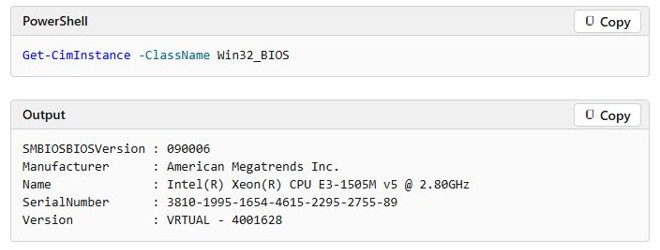
A long numeric string with dashes, such as 3810-1995-1654-4615-2295-2755-89 |
The system is a virtual machine, so this is not the host's label number |
| Partial key does not match the firmware key | By design: Windows can install a default key, so slmgr and the partial key show that instead |
| Partial key does not match your sticker | Windows is using a digital license or default key, not the sticker's key |
A digital license never appears as a 25-character key, because it does not require you to enter one.
Step-by-step: find the serial number and product key (with safe alternatives)
This order goes from the identifier everyone can read to the one that needs elevation. Every step only reads data, so nothing on the PC changes.
- Right-click Start and select Terminal (Admin), then select Yes at the prompt.
- Run
Get-CimInstance -ClassName Win32_BIOS | Select-Object -Property SerialNumberand note the value under SerialNumber. - Run
(Get-CimInstance -Query 'select * from SoftwareLicensingService').OA3xOriginalProductKeyand note the key if one prints. - Run
Get-CimInstance -ClassName SoftwareLicensingProduct -Filter "PartialProductKey IS NOT NULL" | Select-Object Name, PartialProductKey, LicenseStatus. - Find the row whose Name starts with Windows and read PartialProductKey.
- Read LicenseStatus:
1means Licensed and0means Unlicensed. - Open Settings > System > Activation and read the message next to Activation status.
If PowerShell is unavailable, the safe alternatives are the case label, the firmware screen and your purchase records. Avoid key-finder downloads, because the built-in commands read the same data.
Option A — Quick: Command Prompt (works now on many systems)
Command Prompt still works when it calls PowerShell or slmgr. Native wmic commands work only where WMIC is still present, such as Windows 10.
- Select Start, type
cmd, right-click Command Prompt and select Run as administrator. - For the serial number, run
powershell -NoProfile -Command "(Get-CimInstance Win32_BIOS).SerialNumber". - For the firmware key, run
powershell -NoProfile -Command "(Get-CimInstance -Query 'select * from SoftwareLicensingService').OA3xOriginalProductKey". - For the partial key and edition, run
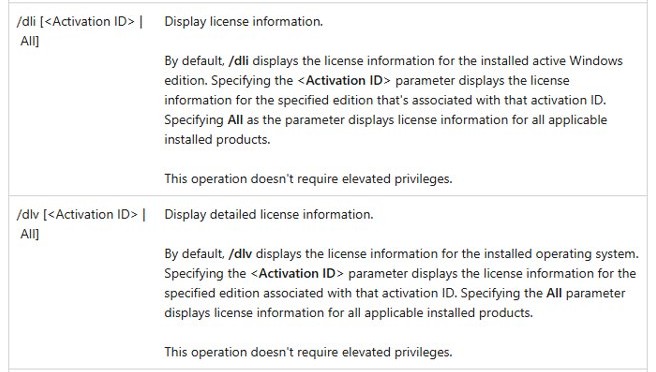
slmgr /dliand read the Windows Script Host window. - On a system that still includes WMIC, you can run
wmic bios get serialnumberfor the serial number. - On that same system,
wmic path SoftwareLicensingService get OA3xOriginalProductKeyreturns the firmware key.
You can also find the Windows product key from Command Prompt, where slmgr /dli, /dlv and /xpr add more license detail.
Option B — Recommended: PowerShell (modern and supported)
Microsoft says WMIC is superseded by PowerShell for WMI, and that the older WMI cmdlets such as Get-WmiObject are deprecated and missing from PowerShell 6 and later. Get-CimInstance works in Windows PowerShell 5.1 and in PowerShell 7 on Windows.
- Right-click Start and select Terminal.
- Run
Get-CimInstance -ClassName Win32_BIOSto see the full BIOS record, including Manufacturer, Version and SerialNumber. - Run
(Get-CimInstance -ClassName Win32_BIOS -Property SerialNumber).SerialNumberto return only the serial as text. - Run
Get-CimInstance -ClassName Win32_ComputerSystemProduct | Select-Object Vendor, Name, IdentifyingNumber, SKUNumberto add the maker and model. - Close the window and open Terminal (Admin) for the firmware key command.
The Property parameter retrieves only the values you name. That saves little on the local PC but cuts traffic when you query remote computers.
How to find Windows 11 product key with PowerShell Get-CimInstance
This is the command Microsoft documents for checking a firmware-embedded activation key. Most modern PCs sold with Windows have one. It needs an elevated PowerShell window.
(Get-CimInstance -Query 'select * from SoftwareLicensingService').OA3xOriginalProductKeyThe query reads the Software Licensing service through CIM, and the dotted property returns the key as plain text. It reads the key stored in the firmware, which can differ from the key Windows currently has installed.
You should see: A 25-character key in the format XXXXX-XXXXX-XXXXX-XXXXX-XXXXX, or an empty line if the firmware holds no key.
A firmware key matches the edition the PC shipped with. A key in the firmware of a Home PC will not activate a Pro installation.
How to get the motherboard serial number with PowerShell
The board has its own manufacturer-allocated number, separate from the PC's serial. This helps on custom-built desktops, where the BIOS serial field is often empty.
Get-CimInstance -ClassName Win32_BaseBoard | Select-Object Manufacturer, Product, SerialNumberWin32_BaseBoard represents the motherboard. Product is the maker's part number for the board, and SerialNumber identifies that physical board.
You should see: One row with the board maker, its part number and its serial number.
Option C — GUI alternatives (no command line)
These routes work without typing a command, and two of them work when Windows will not start.
| You need | Open this | What you get |
|---|---|---|
| Serial number from the firmware | The maker's power-on key, or Settings > System > Recovery > Advanced startup > Restart now when Windows runs | The serial on the firmware's system information page |
| Serial number, PC will not power on | The sticker or etching on the case or bottom cover | The number marked S/N, Serial or Service Tag |
| Dell Service Tag | SupportAssist from the Start menu | The Dell Service Tag on its main screen |
| Lenovo serial number | The label or BIOS, then the Lenovo serial lookup | A confirmed device match on the warranty page |
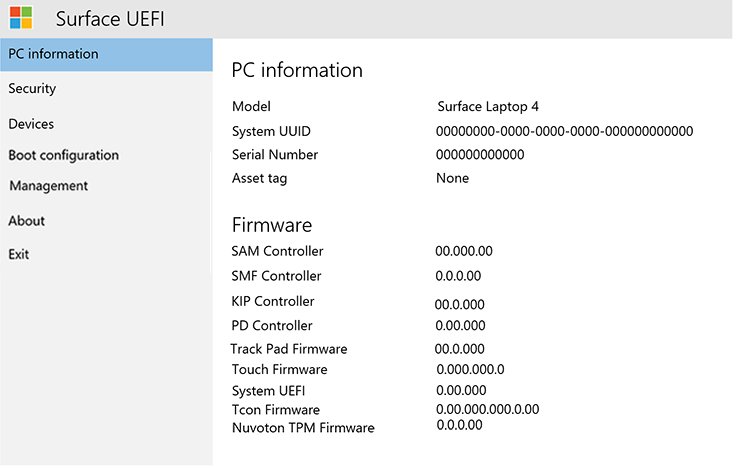
| Surface serial number | Surface UEFI: hold Volume-Up, then press and release Power | Serial number on the PC information page |
| Managed device serial | Intune admin center: Devices > All devices > the device > Device details | Serial number under the system details |
| Activation status | Settings > System > Activation | The digital license or activation message |
| Product key | Box, card, confirmation email, or your Microsoft account Order history | The full key for that purchase |
Microsoft keeps a record of product keys only for purchases made through its own online store.
What to do when the command returns nothing or “NOT FOUND”
The firmware key command prints an empty line
The device has no firmware-embedded key. Retail copies, digital licenses and many custom builds work this way.
- Confirm the window title says Administrator, then run the command again.
- Open Settings > System > Activation and read the status.
- If Windows is activated, no key is needed for a reinstall of the same edition.
- If you need the key itself, check the box, card or confirmation email.
'wmic' is not recognized as an internal or external command
WMIC is gone from your Windows version and cannot be added back as a Feature on Demand.
- Run the equivalent
Get-CimInstancecommand from the table in the WMIC section below. - From Command Prompt, wrap it as
powershell -NoProfile -Command "(Get-CimInstance Win32_BIOS).SerialNumber".
SerialNumber is blank or shows placeholder text
The firmware field was not programmed, or a replacement motherboard came without the original number.
- Read the label on the case.
- Run the
Win32_BaseBoardcommand to get the board's own serial. - Check the invoice or the original box.
- Contact the PC maker or builder if none of these has it.
No Windows row appears for the partial key
PartialProductKey is null when no key is installed, so the filter hides that entry.
- Open Settings > System > Activation.
- If it says Windows is not activated, select Change product key and enter your key.
Get-CimInstance : Access is denied
On a remote query, the account running PowerShell has no rights to read WMI on the target. Get-CimInstance has no Credential parameter of its own.
- Create a session with
$s = New-CimSession -ComputerName PC01 -Credential (Get-Credential). - Run
Get-CimInstance -CimSession $s -ClassName Win32_BIOS.
The client cannot connect to the destination specified in the request
WS-Management is not listening on the remote PC. The WinRM service is disabled by default on client versions of Windows.
- On the target PC, open an elevated PowerShell window and run
Enable-PSRemoting. - From your PC, run
Test-WSMan -ComputerName PC01and look for Stack: 3.0. - Run the query again.
WMIC is being retired — what that means for help desks and power users
WMIC was deprecated in Windows 10, version 21H1. Starting in August 2026, Windows 11, versions 24H2 and 25H2 no longer include it, and it cannot be added back as a Feature on Demand. WMI itself remains supported, so only the tool changes.
| Old WMIC command | PowerShell CIM replacement |
|---|---|
wmic bios get serialnumber |
(Get-CimInstance Win32_BIOS).SerialNumber |
wmic path SoftwareLicensingService get OA3xOriginalProductKey |
(Get-CimInstance -Query 'select * from SoftwareLicensingService').OA3xOriginalProductKey |
wmic path Win32_BaseBoard get SerialNumber |
(Get-CimInstance Win32_BaseBoard).SerialNumber |
wmic /node:PC01 bios get serialnumber |
Get-CimInstance -ClassName Win32_BIOS -ComputerName PC01 |
Help desks should replace WMIC in batch files, runbooks and support scripts now. Scripts built on Get-WmiObject still run in Windows PowerShell 5.1 but fail in PowerShell 7, so move them to the CIM cmdlets at the same time.
The remote behaviour also changes. The old WMI cmdlets use DCOM, which the firewall typically blocks on newer Windows, while Get-CimInstance -ComputerName uses WSMan.
Security and privacy: treat serials and keys carefully
A product key is unique to one device, and a shared key can stop working with error 0xC004C003. A serial number cannot read your personal data, but it can be used to attempt warranty claims.
| Item | Risk if exposed | How to handle it |
|---|---|---|
| Full product key | Someone else can use it, and the key can then be flagged as invalid | Never post it in a screenshot, forum or chat |
| Partial product key | Low: five characters cannot activate anything | Safe for tickets and audit records |
| Serial number or Service Tag | Warranty and support claims on your device | Share it with the maker or a repair shop, not publicly |
| Admin credentials in scripts | A password typed on a command line is visible | Use Get-Credential so PowerShell prompts for it |
| Key stored in the registry | Malicious code can steal it | Run slmgr /cpky as administrator after deploying a retail key |
Troubleshooting activation and serial/SKU mismatches
Error 0xC004F213: no product key was found on your device
Windows found no matching license, often after a hardware change such as a new motherboard.
- Sign in with the Microsoft account linked to your digital license.
- Open Settings > System > Activation and select Troubleshoot.
- If no linked license exists, select Change product key and enter a previously used key.
Error 0xC004C003: the key was used on more than one device
Product keys are assigned for a single device.
- Look for a paper copy of your 25-character key and enter it under Change product key.
- If you bought the key from a reseller, contact that reseller.
- If Windows came preinstalled, contact the PC maker.
Error 0xC004F210, or 0xC004F034: the key does not match your edition
The key belongs to a different edition or version than the one installed, for example a Home firmware key on a Pro installation.
- Compare
slmgr /dliName with the edition on your key. - Enter a key that matches the installed edition.
- Or reinstall the edition that matches your digital license.
The serial in PowerShell differs from the case label
A replacement motherboard was not programmed with the original number.
- Use the number on the label for warranty claims.
- Tell the maker's support that the board was replaced.
SKUNumber or model looks wrong for this PC
SKUNumber and Name come from values the maker stored, and repaired or custom systems can hold generic text.
- Run
Get-CimInstance -ClassName Win32_ComputerSystemProduct | Select-Object Vendor, Name, IdentifyingNumber, SKUNumber. - Compare IdentifyingNumber with
Win32_BIOSSerialNumber. - Check the maker's support site using the serial on the label.
Windows 10 uses Settings > Update & Security > Activation for the same fixes.
For IT admins: inventory and automation tips
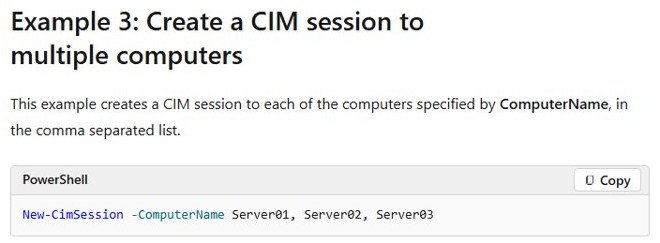
A CIM session is more efficient than naming a computer on each query, because it sets up the connection once. Get-CimInstance -ComputerName builds and tears down a temporary session every time.
- Confirm the target speaks WSMan with
Test-WSMan -ComputerName PC01. - Open sessions with
$s = New-CimSession -ComputerName PC01, PC02 -Credential (Get-Credential). - Query only the values you need, using the Property parameter to cut network traffic.
- Pass the session to each query with
-CimSession $s, and read PSComputerName to see which PC answered. - For an old system without WSMan 3.0, create
$dcom = New-CimSessionOption -Protocol Dcomand add-SessionOption $dcomtoNew-CimSession. - Export with
Select-ObjectandExport-Csv, never withFormat-Tablein the pipeline. - Add
-AppendtoExport-Csvto extend an existing file, because it otherwise replaces the contents without warning. - Run
Get-CimSession | Remove-CimSessionwhen finished.
Microsoft recommends the Volume Activation Management Tool (VAMT) or custom WMI scripts for managing activation on remote clients, not slmgr. Devices enrolled in Intune also show Serial number under Device details, refreshed every seven days.
PowerShell script to export serial numbers and license status to CSV
This script collects serials and partial keys from a list of PCs. It deliberately leaves out full firmware keys, so the file is safe to keep with your asset records.
$s = New-CimSession -ComputerName PC01, PC02 -Credential (Get-Credential)
Get-CimInstance -CimSession $s -ClassName Win32_BIOS -Property SerialNumber |
    Select-Object PSComputerName, SerialNumber |
    Export-Csv -Path .\serials.csv -NoTypeInformation
Get-CimInstance -CimSession $s -ClassName SoftwareLicensingProduct -Filter "PartialProductKey IS NOT NULL" |
    Select-Object PSComputerName, Name, PartialProductKey, LicenseStatus |
    Export-Csv -Path .\licenses.csv -NoTypeInformation
Get-CimSession | Remove-CimSession
Replace PC01, PC02 with your computer names. Get-Credential prompts for an account with rights on those PCs. NoTypeInformation removes the #TYPE header in Windows PowerShell 5.1 and is the default behaviour in PowerShell 6 and later.
You should see: serials.csv and licenses.csv in the current folder, with one row per PC or per installed license.
Best practices: store and manage identifiers safely
- Link your Microsoft account under Settings > System > Activation so a digital license survives hardware changes.
- Photograph the serial label, and keep the image with your warranty records.
- Keep full keys in a password manager or encrypted vault, with the edition noted beside each key.
- Keep order confirmation emails in a labelled folder.
- Use partial keys, not full keys, in tickets and shared spreadsheets.
- Restrict who can read inventory exports, and delete old copies.
Practical checklist — copy, paste, run
Run these one line at a time in Terminal (Admin). The steps also show what a good result looks like.
(Get-CimInstance Win32_BIOS).SerialNumbershould match the label on the case.(Get-CimInstance Win32_BaseBoard).SerialNumbergives the board serial as a fallback.(Get-CimInstance -Query 'select * from SoftwareLicensingService').OA3xOriginalProductKeyprints a key or an empty line.Get-CimInstance -ClassName SoftwareLicensingProduct -Filter "PartialProductKey IS NOT NULL" | Select-Object Name, PartialProductKey, LicenseStatusshould show a Windows row withLicenseStatus1.slmgr /dlishould show the same five characters as PartialProductKey.- Open Settings > System > Activation and confirm the status starts with Windows is activated.
The partial key and the last block of a sticker or firmware key do not have to match. On a default-key install, a mismatch alone is no sign of a problem.
Risks, limitations and when to escalate
| Limitation | Why it matters | Escalate to |
|---|---|---|
| Firmware key is not always the active key | It shows what the PC shipped with, not necessarily the current license | Your licensing admin, if audit records disagree |
| Documented commands do not show a retail key in full | Windows exposes the last five characters of an installed key | The retailer, for a lost retail key |
| Blank or incorrect serial in firmware | Warranty lookups can fail | The PC maker, with your proof of purchase |
| Key rejected as invalid | The key may have been used on another device | The reseller or PC maker |
| Lost Volume Licensing or MSDN key | Those keys are not on a sticker | Your program's web portal |
| Activation fails after a hardware repair | The hardware no longer matches the license | Microsoft support, after the Activation troubleshooter |
If you need a clean install rather than a recovered key, Microsoft's generic product keys for Windows 11 install an edition but do not replace a license.
Windows 11 serial number and product key FAQ
What is the PowerShell command to find a serial number in Windows 11?
Run Get-CimInstance -ClassName Win32_BIOS | Select-Object -Property SerialNumber. No administrator rights are needed. To return only the text, run (Get-CimInstance -ClassName Win32_BIOS -Property SerialNumber).SerialNumber.
What is the PowerShell command to find a Windows 11 product key?
In an elevated window, run (Get-CimInstance -Query 'select * from SoftwareLicensingService').OA3xOriginalProductKey. It prints the key embedded in the firmware. An empty result means the device has no firmware-embedded key.
Why is OA3xOriginalProductKey blank?
The device has no key stored in its firmware. This is normal for retail installations, digital licenses, many custom-built PCs and virtual machines. Windows can still be fully activated, so check Settings > System > Activation.
Is the service tag the same as the serial number?
On Dell PCs, yes. PowerShell returns the Service Tag in the SerialNumber property of Win32_BIOS. Other makers use the term serial number, and the value identifies one physical device.
Is the serial number the same as the product key?
No. The serial number identifies the hardware and is set by the PC maker. The product key is a 25-character code that activates Windows, and many PCs activate with a digital license instead.
Does Get-CimInstance replace WMIC?
Yes, for reading these values. Microsoft says WMIC is superseded by PowerShell for WMI, and Windows 11, versions 24H2 and 25H2 no longer include WMIC starting in August 2026. WMI itself remains supported.
Can I find the serial number of a remote computer with PowerShell?
Yes. Run Get-CimInstance -ClassName Win32_BIOS -ComputerName PC01. To use other credentials, create a session first with New-CimSession -ComputerName PC01 -Credential (Get-Credential) and pass it with the CimSession parameter.
Why does slmgr show different characters from my firmware key?
Windows can install a default product key instead of the key in the firmware, so slmgr /dli shows that default key's last five characters. Microsoft states this is by design and does not affect activation.
Final analysis: strengths and risks of the Command Prompt approach
| Command Prompt approach | Strength | Risk |
|---|---|---|
wmic commands |
Short and familiar, and still in older runbooks | Missing from Windows 11, versions 24H2 and 25H2 |
slmgr /dli |
Needs no elevation and shows edition and license status | Shows only five characters, which may belong to a default key |
powershell -Command from cmd |
Works from batch files on current Windows | Nested quotes are easy to break |
Native Get-CimInstance in PowerShell |
Returns objects you can filter, export and run remotely | Remote use needs WinRM and permissions set up |
Use PowerShell CIM for new work and keep Command Prompt for existing batch files that call PowerShell. The Get-CimInstance commands return the same identifiers WMIC did, and they keep working now that WMIC is gone.