Every Windows Update error code is a hexadecimal value, and its first four digits tell you which part of Windows failed: 0x8024 is the Windows Update Agent, 0x8007 is a standard Win32 error, 0x800F is the servicing stack, and 0xC1900 is Windows Setup.
This reference lists the codes Microsoft documents for Windows 11 and Windows 10, grouped by component, with the official fix for the errors people hit most often.
Where to find the Windows Update error code
Windows shows the code next to the failed update in Settings. The update history page keeps it after you close the window, so you can copy it later.
- Press Win + R to open Run.
- Type
ms-settings:windowsupdate-historyand press Enter to open View update history. - Find the update marked as failed and note the code shown with it, for example
0x800f081f. - On Windows 10, the same page is under Settings > Update & Security > Windows Update > View update history.
- Match the first four digits of the code to the prefix table in the next section, then look up the full code in the tables below.
If Settings shows no code, generate the readable WindowsUpdate.log with PowerShell and search it for the word FAILED. The log section further down shows the command.
Upgrade failures from Setup or the Windows Update Assistant can return only a result code such as 0xC1900101. Event Viewer can still hold the extended code in its Windows Error Reporting entries.
Decoding Windows Update error codes
Microsoft groups update errors by the component that raised them. The leading digits identify that component, and the trailing digits identify the exact failure.
For codes that start with 0x8007, the last four digits are a plain Win32 error. 0x80070070 ends in 0070, which is 112 in decimal: ERROR_DISK_FULL.
| Code starts with | Component | Message prefix | How to read it |
|---|---|---|---|
| 0x8024 | Windows Update Agent (scan, download, install engine) | WU_E_ | Look up the full code in the agent tables below |
| 0x8007 | Win32 system error passed up by Windows | ERROR_ | Take the last four digits and match them to the Win32 System Error Codes list |
| 0x800F | Component-Based Servicing (CBS), the servicing stack | CBS_E_ or PSFX_E_ | Usually component store corruption; repair with DISM and SFC |
| 0xC1900 | Windows Setup during a feature update or upgrade | MOSETUP_E_ | 0xC1900101 means a rollback, most often caused by a driver |
| 0x8020 | Background Intelligent Transfer Service (BITS) | BG_E_ | Download validation failed, often a filtering firewall |
| 0x80D0 | Delivery Optimization download path | DO_E_ | Download timed out or a proxy does not allow HTTP RANGE requests |
| 0x8007 2Exx / 2Fxx | WinINet network layer | WININET_E_ | Connection, timeout or TLS problem between the PC and the update servers |
| 0x0024 | Windows Update success codes | WU_S_ | Not an error; the operation finished, sometimes with a restart pending |
An upgrade result code beginning with 8 is a Win32 error, while one beginning with C is an NTSTATUS value. Both are decoded from their last four digits.
Common Windows Update errors
These are the codes Microsoft documents most often for home and business PCs, with the fix Microsoft gives for each.
| Error code | Meaning | Official fix |
|---|---|---|
| 0x80070002 | ERROR_FILE_NOT_FOUND: a file the update needs is missing | Restart, run the Windows Update troubleshooter and free up drive space |
| 0x80070003 | ERROR_PATH_NOT_FOUND: the servicing stack cannot reach a path | Restart and run the troubleshooter; admins search CBS.log for the error |
| 0x80070005 | E_ACCESSDENIED: file or registry permissions were changed | Sign in with an administrator account and retry |
| 0x8007000D | ERROR_INVALID_DATA: downloaded data is corrupt | Run the troubleshooter and clear the update cache, then download again |
| 0x80070020 | ERROR_SHARING_VIOLATION: a file is locked by another program | Restart, perform a clean boot and retry the installation |
| 0x80070057 | ERROR_INVALID_PARAMETER | Run sfc /scannow and the troubleshooter |
| 0x80070422 | ERROR_SERVICE_DISABLED: Windows Update service is not running | Set the Windows Update service to Automatic, start it and restart |
| 0x80070490 | ERROR_NOT_FOUND during a driver install in the update | Admins add the missing driver Arch value under the DriverOperations registry key |
| 0x800705B4 | Operation timed out | Check the connection, run the troubleshooter and restart |
| 0x8007371B | ERROR_SXS_TRANSACTION_CLOSURE_INCOMPLETE: component store corruption | Run DISM RestoreHealth, then sfc /scannow, then restart |
| 0x80073712 | ERROR_SXS_COMPONENT_STORE_CORRUPT | Run DISM RestoreHealth and sfc /scannow |
| 0x800F081F | CBS_E_SOURCE_MISSING: repair source not found | Run DISM RestoreHealth and sfc /scannow |
| 0x800F0831 | CBS_E_STORE_CORRUPTION: CBS store is corrupted | Run DISM RestoreHealth and sfc /scannow |
| 0x800F0922 | CBS_E_INSTALLERS_FAILED | Free up drive space, disconnect any VPN and perform a clean boot |
| 0x80240034 | WU_E_DOWNLOAD_FAILED: the update failed to download | Check the Windows Update service and run the troubleshooter |
| 0x80246007 | WU_E_DM_NOTDOWNLOADED: the update has not been downloaded | Reset the update services, run the troubleshooter and restart |
| 0x80248014 | WU_E_DS_UNKNOWNSERVICE | Run the troubleshooter and start the Windows Update service |
| 0x80072EE2 | WININET_E_TIMEOUT: cannot reach the update servers | Check that the PC can reach the Windows Update endpoints |
| 0x80072EFE | WININET_E_CONNECTION_ABORTED: the connection closed abnormally | Check proxy and network settings, then retry |
| 0x80072F8F | WININET_E_DECODING_FAILED: TLS 1.2 is not set up correctly | Install and configure TLS 1.2 on the client |
| 0xC1900101 | Generic rollback during a feature update | Update or reinstall network and graphics drivers, then clean boot |
Where Microsoft lists DISM and SFC as the fix, the repair commands are in the DISM section below. Keep your Windows Update settings at their defaults while you troubleshoot so a policy does not block the retry.
Windows Update Agent error codes by component
Every 0x8024 code falls in a range owned by one part of the Windows Update Agent. The range tells you whether the problem was the scan, the download or the install.
| Code range | Component | Typical meaning |
|---|---|---|
| 0x80240001 to 0x80240FFF | General Windows Update errors | Service, policy, network and metadata failures |
| 0x80241001 to 0x80241FFF | Windows Installer minor errors | Search may have missed updates because of Windows Installer |
| 0x80242000 to 0x80242FFF | Update Handler | The installer for the update failed or needs a restart |
| 0x80243001 to 0x80243FFF | Windows Update UI | Install results could not be read or shown |
| 0x80244000 to 0x80244FFF | Protocol Talker | Client-server sync and HTTP errors |
| 0x80245001 to 0x80245FFF | Redirector | The Wuredir.cab file could not be loaded or parsed |
| 0x80246001 to 0x80246FFF | Download Manager | BITS transfer and file hash failures |
| 0x80247001 to 0x80247FFF | Offline scan | The scan package was invalid or needs a newer agent |
| 0x80248000 to 0x80248FFF | Data Store | The local update database is locked, damaged or missing data |
| 0x80249001 to 0x80249005 | Inventory | Inventory rule parsing or upload failed |
| 0x8024A000 to 0x8024AFFF | Automatic Updates | Automatic Updates is paused or cannot service requests |
| 0x8024C001 to 0x8024CFFF | Driver Util | A driver update was skipped or is missing metadata |
| 0x8024D001 to 0x8024DFFF | Windows Update Agent setup | The agent could not update itself |
| 0x8024E001 to 0x8024EFFF | Expression evaluator | Applicability rules in the update could not be evaluated |
| 0x8024F001 to 0x8024FFFF | Reporter | The event cache or reporting to the server failed |
Windows Update error codes 0x80240001 to 0x80240FFF
| Error code | Message | Description |
|---|---|---|
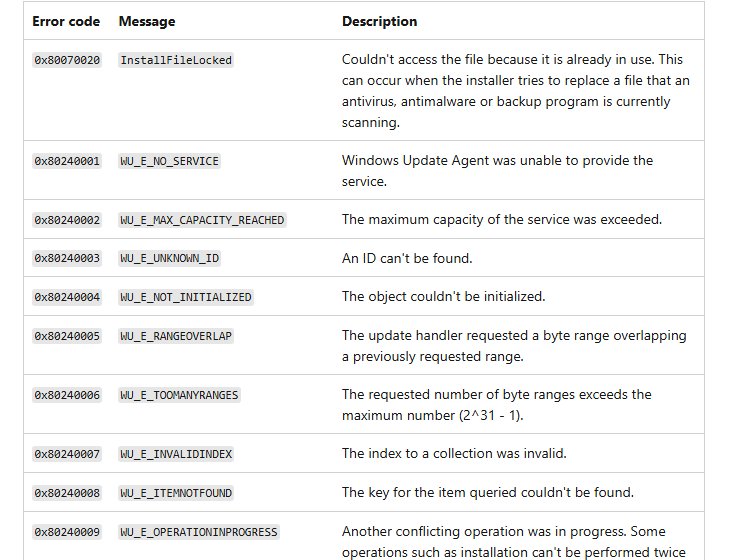
| 0x80240001 | WU_E_NO_SERVICE | Windows Update Agent could not provide the service |
| 0x80240002 | WU_E_MAX_CAPACITY_REACHED | The maximum capacity of the service was exceeded |
| 0x80240003 | WU_E_UNKNOWN_ID | An ID cannot be found |
| 0x80240004 | WU_E_NOT_INITIALIZED | The object could not be initialized |
| 0x80240005 | WU_E_RANGEOVERLAP | A requested byte range overlaps an earlier range |
| 0x80240006 | WU_E_TOOMANYRANGES | Too many byte ranges were requested |
| 0x80240007 | WU_E_INVALIDINDEX | The index to a collection was invalid |
| 0x80240008 | WU_E_ITEMNOTFOUND | The key for the queried item could not be found |
| 0x80240009 | WU_E_OPERATIONINPROGRESS | Another conflicting operation, such as an install, was running |
| 0x8024000A | WU_E_COULDNOTCANCEL | Cancelling the operation was not allowed |
| 0x8024000B | WU_E_CALL_CANCELLED | The operation was cancelled by the user or service |
| 0x8024000C | WU_E_NOOP | No operation was required |
| 0x8024000D | WU_E_XML_MISSINGDATA | Required information is missing from the update's XML data |
| 0x8024000E | WU_E_XML_INVALID | The update's XML data contains invalid information |
| 0x8024000F | WU_E_CYCLE_DETECTED | Circular update relationships were found in the metadata |
| 0x80240010 | WU_E_TOO_DEEP_RELATION | Update relationships were too deep to evaluate |
| 0x80240011 | WU_E_INVALID_RELATIONSHIP | An invalid update relationship was detected |
| 0x80240012 | WU_E_REG_VALUE_INVALID | An invalid registry value was read |
| 0x80240013 | WU_E_DUPLICATE_ITEM | A duplicate item was added to a list |
| 0x80240016 | WU_E_INSTALL_NOT_ALLOWED | Another install was running or a mandatory restart was pending |
| 0x80240017 | WU_E_NOT_APPLICABLE | There are no applicable updates |
| 0x80240018 | WU_E_NO_USERTOKEN | A required user token is missing |
| 0x80240019 | WU_E_EXCLUSIVE_INSTALL_CONFLICT | An exclusive update cannot install alongside other updates |
| 0x8024001A | WU_E_POLICY_NOT_SET | A policy value was not set |
| 0x8024001B | WU_E_SELFUPDATE_IN_PROGRESS | The Windows Update Agent is updating itself |
| 0x8024001D | WU_E_INVALID_UPDATE | An update contains invalid metadata |
| 0x8024001E | WU_E_SERVICE_STOP | The service or system was shutting down |
| 0x8024001F | WU_E_NO_CONNECTION | The network connection was unavailable |
| 0x80240020 | WU_E_NO_INTERACTIVE_USER | No interactive user is signed in |
| 0x80240021 | WU_E_TIME_OUT | The operation timed out |
| 0x80240022 | WU_E_ALL_UPDATES_FAILED | The operation failed for all updates |
| 0x80240023 | WU_E_EULAS_DECLINED | License terms for all updates were declined |
| 0x80240024 | WU_E_NO_UPDATE | There are no updates |
| 0x80240025 | WU_E_USER_ACCESS_DISABLED | Group Policy prevented access to Windows Update |
| 0x80240026 | WU_E_INVALID_UPDATE_TYPE | The type of update is invalid |
| 0x80240027 | WU_E_URL_TOO_LONG | The URL exceeded the maximum length |
| 0x80240028 | WU_E_UNINSTALL_NOT_ALLOWED | The uninstall request did not come from a WSUS server |
| 0x80240029 | WU_E_INVALID_PRODUCT_LICENSE | Search may have missed updates because of an unlicensed application |
| 0x8024002A | WU_E_MISSING_HANDLER | A component needed to detect updates was missing |
| 0x8024002B | WU_E_LEGACYSERVER | The operation needs a newer server version |
| 0x8024002C | WU_E_BIN_SOURCE_ABSENT | A delta update needed its source to install |
| 0x8024002D | WU_E_SOURCE_ABSENT | A full-file update needed its source to install |
| 0x8024002E | WU_E_WU_DISABLED | Access to an unmanaged server is not allowed |
| 0x8024002F | WU_E_CALL_CANCELLED_BY_POLICY | The DisableWindowsUpdateAccess policy was set |
| 0x80240030 | WU_E_INVALID_PROXY_SERVER | The proxy list format was invalid |
| 0x80240031 | WU_E_INVALID_FILE | The file is in the wrong format |
| 0x80240032 | WU_E_INVALID_CRITERIA | The search criteria string was invalid |
| 0x80240033 | WU_E_EULA_UNAVAILABLE | License terms could not be downloaded |
| 0x80240034 | WU_E_DOWNLOAD_FAILED | The update failed to download |
| 0x80240035 | WU_E_UPDATE_NOT_PROCESSED | The update was not processed |
| 0x80240036 | WU_E_INVALID_OPERATION | The object's current state did not allow the operation |
| 0x80240037 | WU_E_NOT_SUPPORTED | The operation is not supported |
| 0x80240038 | WU_E_WINHTTP_INVALID_FILE | The downloaded file has an unexpected content type |
| 0x80240039 | WU_E_TOO_MANY_RESYNC | The server asked the agent to resync too many times |
| 0x80240040 | WU_E_NO_SERVER_CORE_SUPPORT | The API method does not run on Server Core |
| 0x80240041 | WU_E_SYSPREP_IN_PROGRESS | The service is unavailable while Sysprep runs |
| 0x80240042 | WU_E_UNKNOWN_SERVICE | The update service is no longer registered with Automatic Updates |
| 0x80240043 | WU_E_NO_UI_SUPPORT | There is no support for the Windows Update UI |
| 0x80240FFF | WU_E_UNEXPECTED | A failure not covered by another error code |
Windows Update download and install error codes
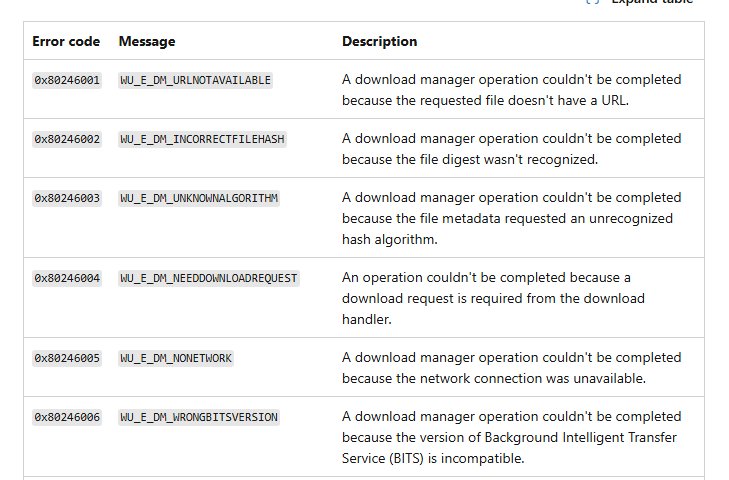
Download Manager codes (0x80246) and Update Handler codes (0x80242) cover the two stages where most failed updates stop.
| Error code | Message | Description |
|---|---|---|
| 0x80246001 | WU_E_DM_URLNOTAVAILABLE | The requested file has no URL |
| 0x80246002 | WU_E_DM_INCORRECTFILEHASH | The file digest was not recognized |
| 0x80246003 | WU_E_DM_UNKNOWNALGORITHM | The file metadata asked for an unknown hash algorithm |
| 0x80246004 | WU_E_DM_NEEDDOWNLOADREQUEST | A download request is required from the handler |
| 0x80246005 | WU_E_DM_NONETWORK | The network connection was unavailable |
| 0x80246006 | WU_E_DM_WRONGBITSVERSION | The BITS version is incompatible |
| 0x80246007 | WU_E_DM_NOTDOWNLOADED | The update has not been downloaded |
| 0x80246008 | WU_E_DM_FAILTOCONNECTTOBITS | The download manager could not connect to BITS |
| 0x80246009 | WU_E_DM_BITSTRANSFERERROR | An unspecified BITS transfer error occurred |
| 0x8024600A | WU_E_DM_DOWNLOADLOCATIONCHANGED | The download source moved; the download must restart |
| 0x8024600B | WU_E_DM_CONTENTCHANGED | The update content changed in a new revision |
| 0x80246017 | WU_E_DM_UNAUTHORIZED_LOCAL_USER | The local user was not authorized to download the content |
| 0x80242006 | WU_E_UH_INVALIDMETADATA | The update contains invalid metadata |
| 0x80242007 | WU_E_UH_INSTALLERHUNG | The installer exceeded the time limit |
| 0x80242008 | WU_E_UH_OPERATIONCANCELLED | The update handler operation was cancelled |
| 0x8024200A | WU_E_UH_CANREQUIREINPUT | The update needs user input to install |
| 0x8024200B | WU_E_UH_INSTALLERFAILURE | The installer failed to install or uninstall one or more updates |
| 0x8024200D | WU_E_UH_NEEDANOTHERDOWNLOAD | The update must be downloaded again |
| 0x80242012 | WU_E_UH_UNEXPECTEDCBSRESPONSE | The handler received an unexpected response from CBS |
| 0x80242014 | WU_E_UH_POSTREBOOTSTILLPENDING | The post-restart operation is still in progress; restart the PC |
| 0x80242015 | WU_E_UH_POSTREBOOTRESULTUNKNOWN | The result of the post-restart operation is unknown |
| 0x80242017 | WU_E_UH_NEW_SERVICING_STACK_REQUIRED | The servicing stack must be updated first |
Windows Update HTTP and connection error codes
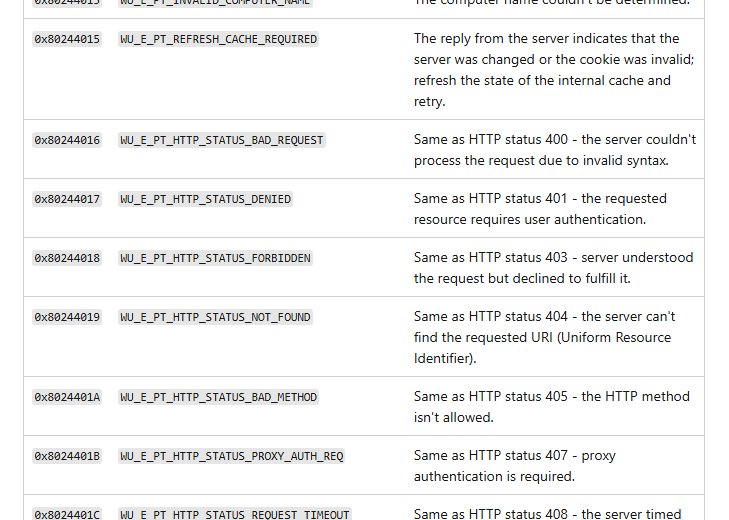
Protocol Talker codes mirror HTTP status codes from the update server or a proxy, so a 0x8024401x or 0x8024402x code points at the network path, not at Windows itself.
| Error code | Message | HTTP meaning |
|---|---|---|
| 0x80244016 | WU_E_PT_HTTP_STATUS_BAD_REQUEST | 400: invalid request syntax |
| 0x80244017 | WU_E_PT_HTTP_STATUS_DENIED | 401: user authentication required |
| 0x80244018 | WU_E_PT_HTTP_STATUS_FORBIDDEN | 403: the server refused the request |
| 0x80244019 | WU_E_PT_HTTP_STATUS_NOT_FOUND | 404: the requested URI was not found |
| 0x8024401B | WU_E_PT_HTTP_STATUS_PROXY_AUTH_REQ | 407: proxy authentication required |
| 0x8024401C | WU_E_PT_HTTP_STATUS_REQUEST_TIMEOUT | 408: the server timed out waiting for the request |
| 0x8024401F | WU_E_PT_HTTP_STATUS_SERVER_ERROR | 500: internal server error |
| 0x80244021 | WU_E_PT_HTTP_STATUS_BAD_GATEWAY | 502: bad response from an upstream server |
| 0x80244022 | WU_E_PT_HTTP_STATUS_SERVICE_UNAVAIL | 503: the service is temporarily overloaded |
| 0x80244023 | WU_E_PT_HTTP_STATUS_GATEWAY_TIMEOUT | Gateway timeout |
| 0x8024402C | WU_E_PT_WINHTTP_NAME_NOT_RESOLVED | The proxy or server name could not be resolved |
| 0x8024402F | WU_E_PT_ECP_SUCCEEDED_WITH_ERRORS | External cab processing finished with errors |
| 0x80244007 | WU_E_PT_SOAPCLIENT_SOAPFAULT | Windows cannot renew the cookies for Windows Update |
| 0x80072EFD | TIME_OUT_ERRORS | The connection timed out; check firewall rules and proxies |
| 0x80D02002 | TIME_OUT_ERRORS | The download timed out; check firewall rules and proxies |
| 0x80D05001 | DO_E_HTTP_BLOCKSIZE_MISMATCH | The proxy does not allow HTTP RANGE requests |
| 0x80200053 | BG_E_VALIDATION_FAILED | A firewall that filters downloads returned an incorrect response |
Windows Update corruption error codes 0x800F and 0x8007
Microsoft lists these codes as signs of a damaged component store or system file. All of them share one fix: DISM followed by SFC.
| Error code | Message | Description |
|---|---|---|
| 0x800F0906 | CBS_E_DOWNLOAD_FAILURE | Content download failed for a Feature on Demand or a corruption repair |
| 0x800F0982 | PSFX_E_MATCHING_COMPONENT_NOT_FOUND | No matching component could be found for hydration |
| 0x800F0984 | PSFX_E_MATCHING_BINARY_MISSING | The component folder exists but the binary is missing |
| 0x800F0986 | PSFX_E_APPLY_FORWARD_DELTA_FAILED | Applying a forward delta failed |
| 0x800F0821 | CBS_E_ABORT | A servicing operation exceeded the CBS timeout |
| 0x800F0825 | CBS_E_CANNOT_UNINSTALL | A package cannot be uninstalled because of a partly installed component |
| 0x800F0920 | CBS_E_HANG_DETECTED | Servicing stopped responding after a 0x800f0821 timeout |
| 0x80070570 | ERROR_FILE_CORRUPT | A file or directory is corrupted and unreadable |
| 0x80073701 | ERROR_SXS_ASSEMBLY_MISSING | A referenced assembly could not be found |
| 0x800736CC | ERROR_SXS_FILE_HASH_MISMATCH | A component file does not match its manifest |
| 0x8007370D | ERROR_SXS_IDENTITY_PARSE_ERROR | An identity string is malformed |
| 0x800705B9 | ERROR_XML_PARSE_ERROR | The requested XML data could not be parsed |
| 0x800B0100 | TRUST_E_NOSIGNATURE | No signature was present in the file |
| 0x800B0101 | CERT_E_EXPIRED | A required certificate is outside its validity period for the system clock |
| 0x80092003 | CRYPT_E_FILE_ERROR | Windows Update could not read or write a file |
CERT_E_EXPIRED is checked against the system clock, so a wrong date can trigger it on a healthy PC.
Windows upgrade error codes 0xC1900
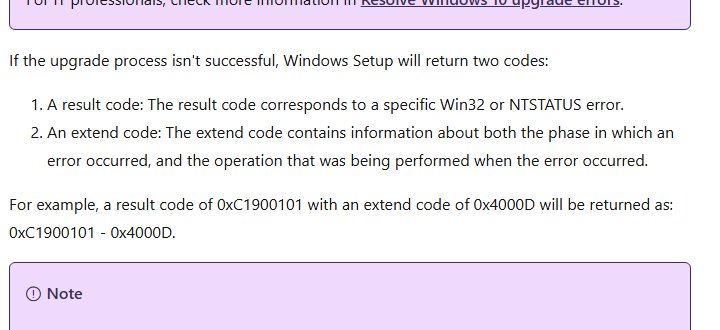
Feature updates and in-place upgrades run Windows Setup, which returns a result code and, when it can, an extend code that names the phase where it failed.
| Result code | Message | Meaning |
|---|---|---|
| 0xC1900101 | Rollback | Setup failed and rolled back; usually a driver compatibility issue |
| 0xC1900200 | MOSETUP_E_COMPAT_SYSREQ_BLOCK | The PC is not eligible for the target Windows version |
| 0xC1900204 | MOSETUP_E_COMPAT_MIGCHOICE_BLOCK | The chosen migration path is not available, for example Enterprise to Home |
| 0xC1900208 | MOSETUP_E_COMPAT_INSTALLREQ_BLOCK | An actionable compatibility issue, such as an incompatible app |
| 0xC190020E | MOSETUP_E_INSTALLDISKSPACE_BLOCK | Not enough free space to install |
| 0xC1900210 | MOSETUP_E_COMPAT_SCANONLY | Setup found no compatibility issue |
In an extend code such as 0x4000D, the first digit is the phase (4 is the OOBE boot) and the last two digits are the operation (0D is data migration).
Fix Windows Update corruption errors with DISM and SFC
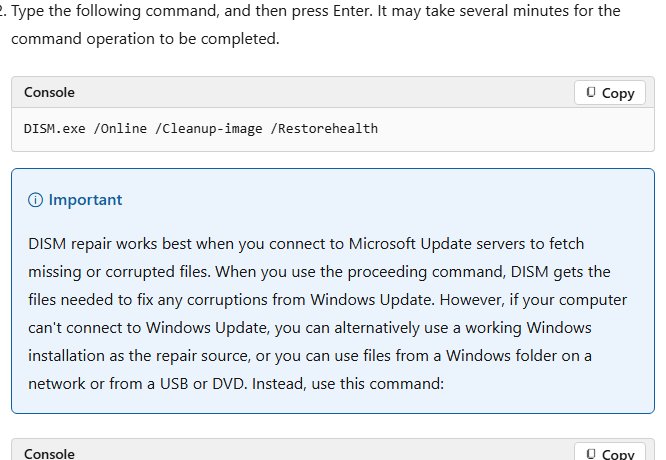
Microsoft's fix for 0x800F081F, 0x800F0831, 0x80073712, 0x8007371B and 0x80070570 is the same two commands. Open Command Prompt with Run as administrator first.
DISM.exe /Online /Cleanup-image /RestorehealthChecks the Windows component store against Microsoft Update and replaces damaged files. Run sfc /scannow straight after it to repair protected system files, then restart and check for updates again.
You should see: DISM reports "The restore operation completed successfully". If it fails, the details are in %windir%\Logs\CBS\CBS.log.
Reset Windows Update components to clear download errors
Codes such as 0x8007000D, 0x80242006 and 0x80246007 often come from a damaged download cache. Renaming the cache folders makes Windows download the update again.
- Open Command Prompt as administrator.
- Type
net stop wuauservand press Enter to stop the Windows Update service. - Type
net stop bitsand press Enter to stop BITS. - Type
ren %systemroot%\SoftwareDistribution SoftwareDistribution.oldand press Enter. - Type
ren %systemroot%\system32\catroot2 catroot2.oldand press Enter. - Type
net start bitsand thennet start wuauserv, pressing Enter after each. - Restart the PC and run Check for updates again.
If the check still returns nothing, you can force a Windows 11 update from the Microsoft Update Catalog or Command Prompt.
Read the Windows Update log with Get-WindowsUpdateLog
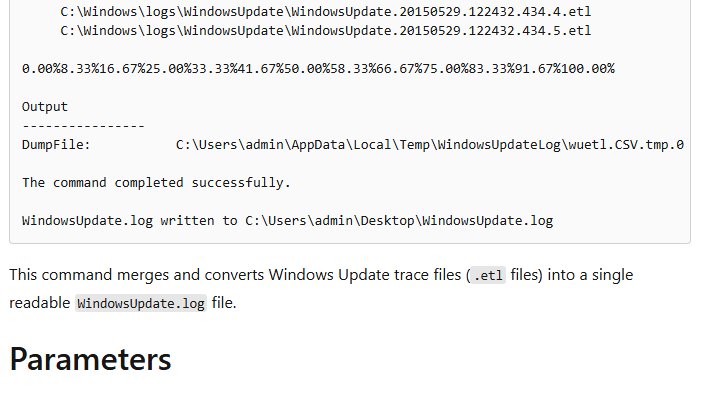
Windows writes update traces as .etl files that you cannot read directly. This PowerShell cmdlet merges them into one readable text file.
Get-WindowsUpdateLogConverts the trace files in C:\Windows\Logs\WindowsUpdate into WindowsUpdate.log on your desktop. Add -LogPath to save it somewhere else. The file is a snapshot, so run the cmdlet again after each new failure.
You should see: PowerShell prints "WindowsUpdate.log written to" followed by the desktop path. Open the file and search for FAILED or the error code.
Installation errors that start with 0x800F are written to %systemroot%\Logs\CBS\CBS.log instead, which is the servicing stack's own log.
Confirm a Windows update installed with Get-HotFix
- Open PowerShell.
- Type
Get-HotFix KB5000000, replacing the number with the KB number of the update that failed, and press Enter. - Read the InstalledOn column. A date there means the update is now installed.
- If PowerShell returns an error that the hotfix cannot be found, the update is still missing; open View update history again for the new code.
Windows Update error troubleshooting by symptom
Update stuck at 0% or 100%
A stalled download, a lost connection or a full drive stops the update between stages.
- Restart the PC and check the internet connection.
- Make sure the system drive has at least 20 GB free on 64-bit Windows.
- Run the Windows Update troubleshooter from Settings > System > Troubleshoot > Other troubleshooters.
- Select Check for updates again.
Error 0x80070422: Windows Update service disabled
The Windows Update service is stopped or its startup type was changed.
- Press Win + R, type
services.mscand press Enter. - Double-click Windows Update.
- Set Startup type to Automatic and select Start.
- Select OK, restart the PC and check for updates.
Error 0x80072EE2, 0x80072EFE or 0x8024401B: cannot connect
A proxy, firewall or network filter blocks the Windows Update endpoints.
- Open a site in your browser to confirm the connection works.
- Check the date and time under Settings > Time & language > Date & time and turn on automatic time.
- If a proxy is set only in user settings, open Command Prompt as administrator and run
netsh winhttp import proxy source=ie. - Disconnect any VPN and retry the update.
Error 0x80070005: access denied
The account or the servicing stack lacks permission to a file or registry key.
- Sign out and sign in with an administrator account.
- Run Check for updates again.
- If the error repeats, run DISM and SFC as shown above, then restart.
Error 0x80070020 or 0x80240022: file locked or all updates failed
Another program, often security or backup software, holds a file the update needs.
- Perform a clean boot so only Microsoft services start.
- Retry the installation.
- Restart normally once the update completes.
Error 0xC1900101 during a feature update
A driver, usually network or graphics, is not compatible with the new version.
- Disconnect external drives, docks and other hardware you do not need.
- Open Device Manager and update the network and graphics drivers from the hardware maker.
- Perform a clean boot and run the feature update again.
Windows Update error codes FAQ
Where is the full list of Windows Update error codes?
Microsoft publishes it on Microsoft Learn as Windows Update error codes by component. It groups every 0x8024 code by the agent component that raised it, and a separate common errors page adds the fix for the codes people hit most.
What does 0x8024 at the start of an error code mean?
It means the Windows Update Agent itself reported the failure. The next digit names the component: 0x80244 is server communication, 0x80246 is the download manager, 0x80242 is the update installer and 0x80248 is the local update database.
What does a 0x8007 Windows Update error mean?
A 0x8007 code wraps a standard Win32 system error. Take the last four digits and look them up in the Win32 System Error Codes list: 0x80070002 is file not found, 0x80070005 is access denied and 0x80070070 is a full disk.
How do I fix error 0x800f081f?
Error 0x800f081f means the servicing stack could not find a repair source because the component store is damaged. Run DISM with /Online /Cleanup-Image /RestoreHealth, then sfc /scannow from an administrator Command Prompt, restart the PC and install the update again.
What is error 0xC1900101?
0xC1900101 is a generic rollback code from Windows Setup during a feature update. Microsoft says the cause is usually a driver compatibility problem, so update network and graphics drivers, disconnect extra hardware and retry from a clean boot.
Where is the Windows Update log file?
Windows stores update traces in C:\Windows\Logs\WindowsUpdate as .etl files. Run Get-WindowsUpdateLog in PowerShell to turn them into a readable WindowsUpdate.log on your desktop. Installation errors are also written to CBS.log in C:\Windows\Logs\CBS.
Is a 0x00240005 code an error?
No. Codes that start with 0x0024 are Windows Update success codes. 0x00240005, WU_S_REBOOT_REQUIRED, means the update installed and Windows needs a restart to finish, so restart the PC rather than troubleshoot.
Does the Windows Update troubleshooter fix error codes?
It fixes many of them. Microsoft lists running the troubleshooter as a first step for codes such as 0x8007000d, 0x80240034, 0x80248014 and 0x80070002. On Windows 11 it is under Settings, System, Troubleshoot, Other troubleshooters.