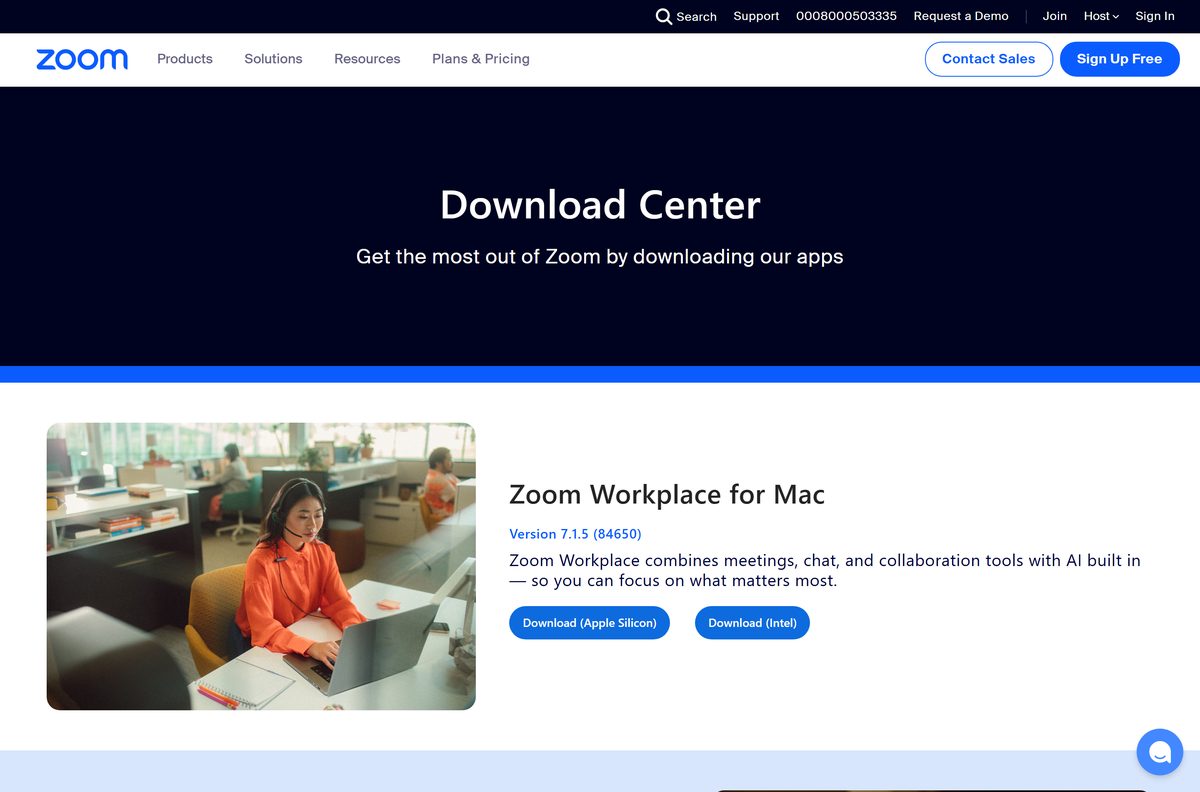
The Zoom download for Windows and Mac is free, and it comes from one page: the Zoom Download Center. Zoom Workplace 7.1.8 (46825) is the current Windows build, and 7.1.5 (84650) is the current Mac build.
Both files are complete packages rather than small web bootstrappers. The 64-bit Windows installer is 167.9 MB and the Apple silicon package for Mac is 195.5 MB.
This guide covers which file matches your machine, the Store and winget routes, the MSI for deployment, the free plan limits, the Mac builds and install fixes.
Which Zoom download do you need?
Match the machine you are installing on.
| Your machine | File to download | Size |
|---|---|---|
| Windows 11 or 10 on Intel or AMD | ZoomInstallerFull.exe, 64-bit | 167.9 MB |
| Windows on ARM, such as a Snapdragon laptop | ZoomInstallerFull.exe, ARM64 | 110.2 MB |
| A 32-bit copy of Windows | ZoomInstallerFull.exe, 32-bit | 112.8 MB |
| Mac with Apple silicon, M1 through M4 | zoomusInstallerFull.pkg, Apple silicon | 195.5 MB |
| Mac with an Intel processor | zoomusInstallerFull.pkg, Intel | 203.5 MB |
| Windows 7 or Windows 8.1 | ZoomInstallerFull.exe 5.17.15 (42285) | 82.6 MB |
| A PC in S Mode, or a Chromebook | Nothing. Join in the browser | 0 |
On Windows, press Windows + I and read System > About > System type. On a Mac, open the Apple menu and select About This Mac.
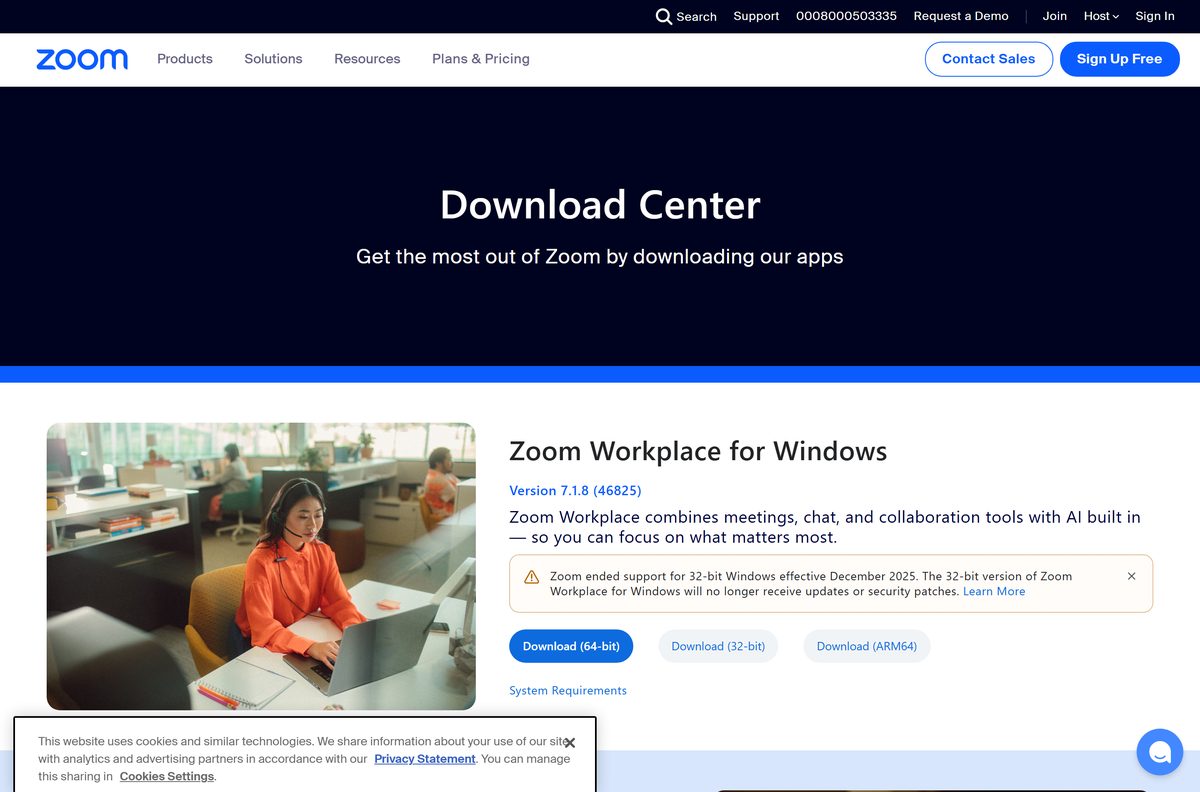
Download Zoom for Windows 11 and 10 from the official source
The Download Center guesses your platform from the browser. These links name the file instead.
- ZoomInstallerFull.exe (64-bit) — 167.9 MB
- ZoomInstallerFull.exe (ARM64) — 110.2 MB
- ZoomInstallerFull.exe (32-bit) — 112.8 MB · serves 6.6.11 (23272)
- Zoom Download Center — where those buttons live
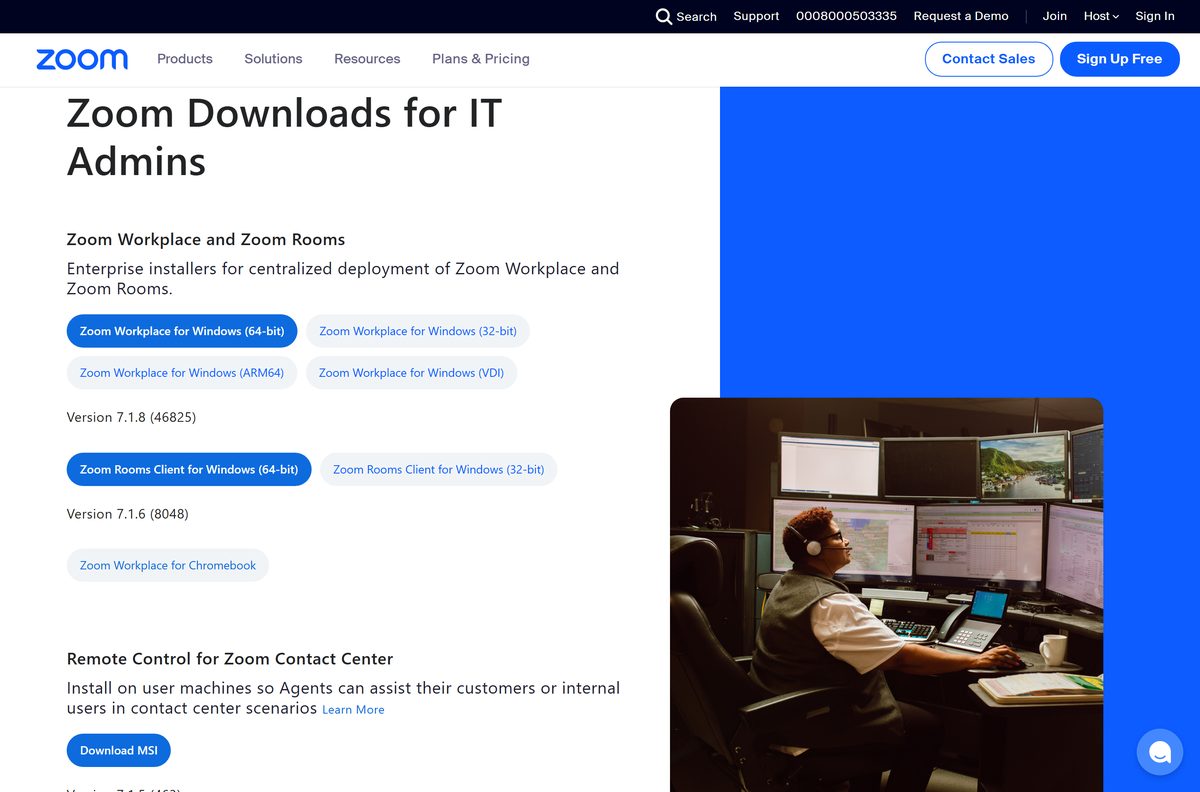
- Zoom downloads for IT admins — MSI packages and the VDI client
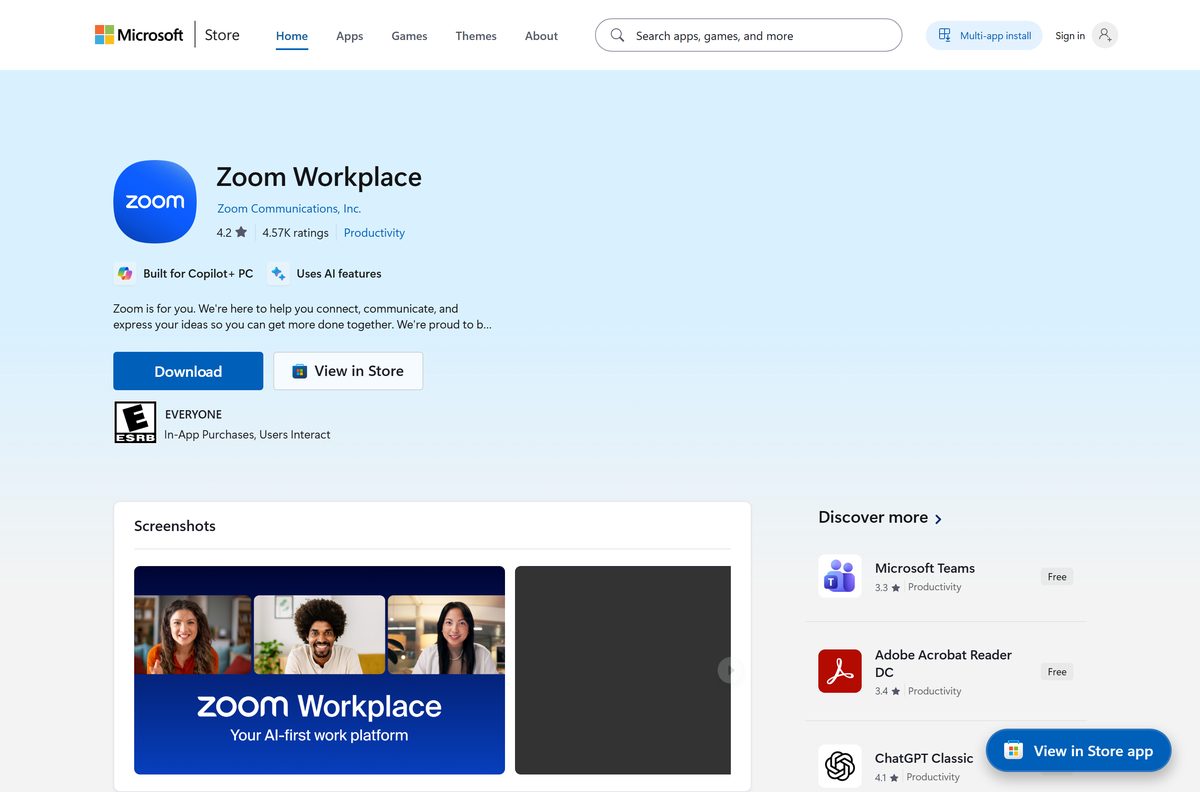
- Zoom Workplace on the Microsoft Store — product XP99J3KP4XZ4VV
The header reads Version 7.1.8 (46825), and every EXE link redirects to a Zoom path carrying that number.
Zoom ended 32-bit Windows support in December 2025. That build gets no updates or security patches, and its link still serves 6.6.11 (23272). Zoom names third-party download sites as a cause of failed installs.
How to install Zoom on Windows 11 and 10
The installer asks nothing: no folder picker, no component list.
- Open the Zoom Download Center in your browser.
- Under Zoom Workplace for Windows, select Download (64-bit), Download (32-bit) or Download (ARM64).
- Double-click ZoomInstallerFull.exe in your Downloads folder if the installer does not start on its own.
- Select Yes at the User Account Control prompt.
- Let the installer run until a Zoom icon appears on the desktop.
- Double-click the desktop icon to open Zoom.
- Select Join a Meeting to enter a meeting ID, or Sign In to host one.
A personal PC needs no administrator rights here. On a managed machine, use the MSI.
Install Zoom from the Microsoft Store or with winget
The Store entry is a Windows Package Manager listing, not a packaged app. Selecting Get runs Zoom’s own ZoomSilentInstaller.EXE, so you get the same desktop app.
- Open Microsoft Store and search for Zoom Workplace, or open product XP99J3KP4XZ4VV directly.
- Check the publisher line reads Zoom Communications, Inc.
- Select Get, then approve the User Account Control prompt.
- For a command line instead, open Terminal and run winget install Zoom.Zoom .
- Open Zoom afterwards and check the version from your profile menu.
The Store copy trails the Download Center: its 64-bit entry is 7.1.5 (43453), and its 32-bit and ARM64 entries read 6.6.11 (23272). Neither route works in S Mode, because both end in a Win32 installer.
Download the Zoom MSI package for deployment
The MSI is the same app installed machine-wide, with automatic updates off.
| Package | Architecture | Size |
|---|---|---|
| ZoomInstallerFull.msi | x64 | 202.2 MB |
| ZoomInstallerFull.msi | ARM64 | 146.0 MB |
| ZoomInstallerFull.msi | 32-bit x86 | 141.4 MB |
Zoom’s silent install is msiexec /i ZoomInstallerFull.msi /quiet /qn /norestart /log install.log . Add zNoDesktopShortCut=True to suppress the desktop icon, and MSIRestartManagerControl=Disable to make it wait for a meeting in progress.
ZConfig locks settings; ZRecommend sets defaults people can change. Test on one machine first, because a locked value cannot be changed by the person using the app.
How to verify the Zoom installer is genuine
Zoom signs its Windows installers.
- Right-click ZoomInstallerFull.exe and select Properties.
- Open the Digital Signatures tab.
- Select the signature in the list, then select Details.
- Confirm the signer name reads Zoom Communications, Inc.
- Select View Certificate and confirm the issuer is DigiCert Trusted G4 Code Signing RSA4096 SHA256 2021 CA1.
- In PowerShell instead, run Get-AuthenticodeSignature .\ZoomInstallerFull.exe and read the Status line.
The 64-bit installer returns a valid signature for Zoom Communications, Inc., with the file description Zoom Meetings Installer. No Digital Signatures tab means the file did not come from Zoom.
Which Zoom download do you need for your Mac?
Open the Apple menu and select About This Mac. A Chip line means Apple silicon; a Processor line naming Intel means the Intel build.
| Your Mac | Download | Size |
|---|---|---|
| Apple silicon, M1 through M4 | zoomusInstallerFull.pkg, Apple silicon | 195.5 MB |
| Intel processor | zoomusInstallerFull.pkg, Intel | 203.5 MB |
| Macs you manage centrally | ZoomInstallerIT.pkg | 346.2 MB |
| macOS 10.14 Mojave or older | Not supported since Zoom 7.0.0 | 0 |
The Mac page reads Version 7.1.5 (84650), one release behind Windows, with Download (Apple Silicon) and Download (Intel) buttons. macOS 10.15 or later is required.
Is Zoom free?
Yes. The Basic plan costs nothing and the app is never the thing you pay for. Basic gives you 100 participants and 40 minutes per meeting, and a host sitting alone is not cut off at 40 minutes. Pro and Business raise that to 30 hours, with 100 and 300 participants; Enterprise allows 1000. Zoom prices paid plans per user per month in your local currency. Any site charging for the installer is charging for a free file.
Should you install the Zoom app or join in a browser?
Install the app if you host meetings, share your screen or join more than occasionally. The Zoom web app needs no install and runs in Chrome 102, Edge 102, Firefox 105 and Safari 16.4 or later. That covers a locked-down work PC, S Mode and a Chromebook. Zoom puts its memory use at 1 GB to 1.5 GB during a meeting.
How to check your Zoom version and update it
Zoom updates itself from inside the app.
- Open Zoom and sign in.
- Select your profile picture in the top-right corner.
- Select Check for Updates.
- Let a newer build download and install if one is offered.
- To skip the app, download the current installer and run it over the existing copy.
Check for Updates is missing when the MSI installed the app, because that route turns automatic updates off.
Check the Zoom system requirements before you install
The operating system rules out more machines than the hardware does.
| Field | Value |
|---|---|
| Developer | Zoom Communications, Inc. |
| Latest version | 7.1.8 (46825) on Windows, released 31 August 2026; 7.1.5 (84650) on Mac |
| Price | Free Basic plan; paid Pro, Business and Enterprise licences |
| Supported OS | Windows 11; Windows 10 Home, Pro or Enterprise; macOS 10.15 or later |
| Not supported | Windows 10 in S Mode, Windows 7 and 8.1, macOS 10.14 and older |
| Architecture | x64, ARM64 and 32-bit x86 on Windows; Apple silicon and Intel on Mac |
| Hardware | Dual-core 2 GHz and 4 GB RAM minimum; quad-core 2.5 GHz and 16 GB recommended |
| Download size | 167.9 MB for the 64-bit Windows EXE, 195.5 MB for the Apple silicon package |
| Offline installer | Yes, ZoomInstallerFull.exe and ZoomInstallerFull.msi |
| Official download source | Zoom Download Center |
| Microsoft Store | Zoom Workplace, product XP99J3KP4XZ4VV, free |
| Last verified | 2026-09-10 |
Bandwidth matters more than the processor: 600 kbps up and down for one-to-one video, 1.2 Mbps for 720p.
Fix Zoom not installing on Windows 11 or 10
Installation error code 10002
Zoom names two causes: a broken installer source link, or antivirus software quarantining the downloaded files.
- Search for Control Panel, open Uninstall a Program and remove the existing Zoom entry.
- Download a fresh installer rather than reusing the file that failed.
- Open your antivirus quarantine, restore anything named Zoom, and allow Zoom’s download domain.
- Run the new installer and let it finish.
Installation error code 13003
The account lacks permission to install apps, or a driver conflicts with the install.
- Sign in with an administrator account, or ask an administrator to run the file.
- Remove the existing Zoom entry from Uninstall a Program first.
- Update audio and video drivers through Settings > Windows Update > Advanced options > Optional updates.
- Install the current build again.
Zoom will not install on a work laptop
Installing needs administrator rights, and managed machines withhold them.
- Ask whoever manages the machine to deploy the MSI package.
- Join meetings in the Zoom web app while you wait.
- In S Mode, stay in the browser: Zoom’s requirements exclude it.
The 32-bit build never updates
Zoom ended 32-bit Windows support in December 2025, so that build gets no updates.
- Open Settings > System > About and read the System type line.
- If it says 64-bit, uninstall the 32-bit copy and install the 64-bit build.
- If the hardware really is 32-bit, use the web app until the machine is replaced.
How to uninstall Zoom from Windows and Mac
The normal uninstall leaves settings behind. CleanZoom removes those too.
- On Windows, search for Control Panel and open it.
- Select Uninstall a Program, or Programs and Features in the icon views.
- Select Zoom Workplace, then select Uninstall. Builds before 6.0.0 carry Zoom’s older name.
- Select Yes to confirm.
- On a Mac, open Zoom, select Zoom Workplace in the menu bar, select Uninstall Zoom Workplace, then OK.
- For a complete removal on Windows, download CleanZoom.zip, 309 KB, and run the tool inside it.
CleanZoom also deletes cryptographic keys, which costs the ability to decrypt end-to-end encrypted Zoom Mail and Zoom Phone voicemail unless the account has escrow enabled. On a Mac, finish by deleting the Zoom Safe entries in Keychain Access, a job Techdows covers more widely in how to uninstall apps on Mac.
What you can use instead of Zoom
| Tool | Best for |
|---|---|
| Zoom web app | Joining with no install at all |
| Microsoft Teams | PCs already signed in to a Microsoft account |
| Google Meet | Meetings that start from a Google Calendar invite |
| Jitsi Meet | One-off calls with no account or time limit |
Techdows has separate download guides for Google Meet and Slack.
Frequently asked questions
Is Zoom free to download and use for personal meetings?
Yes. The app costs nothing on Windows and Mac, and the free Basic plan gives you 100 participants and 40 minutes per meeting with no card. Paid licences add length and capacity, not a different app.
What is the official Zoom download page?
The Zoom Download Center, linked from the Download menu on Zoom’s site. Administrators get the MSI packages and the VDI client on Zoom’s separate IT admin download page.
Does Zoom work on Windows 11?
Yes. Zoom supports Windows 11 and Windows 10 Home, Pro and Enterprise, on 64-bit, ARM64 and 32-bit processors. S Mode is excluded, because the installer is a Win32 program rather than a Store package.
How big is the Zoom download?
The 64-bit Windows installer is 167.9 MB, the ARM64 one is 110.2 MB and the 32-bit one is 112.8 MB. On Mac, the Apple silicon package is 195.5 MB and the Intel package is 203.5 MB.
Is there a Zoom offline installer?
Yes. ZoomInstallerFull.exe and ZoomInstallerFull.msi are full packages, which is why they run to 167.9 MB and 202.2 MB on 64-bit Windows. Copy one to a USB stick and it installs elsewhere.
How do you download Zoom for a Mac?
Open the Download Center on the Mac and pick Download (Apple Silicon) or Download (Intel). Check which you need in About This Mac. The Mac build needs macOS 10.15 or later.
Should you download the 64-bit, 32-bit or ARM64 Zoom?
Take 64-bit on any Intel or AMD PC, and ARM64 on a Windows on ARM laptop. The System type line under Settings, System, About says which you have. The 32-bit build stopped receiving updates in December 2025.
Is the Zoom download safe?
The file from the Download Center is signed by Zoom Communications, Inc. and issued by DigiCert. Right-click it, open Properties, then Digital Signatures to see that. Copies from other download sites carry no such guarantee.
Which Zoom version is current?
Zoom Workplace 7.1.8 (46825), released on 31 August 2026, on Windows. Mac runs one release behind at 7.1.5 (84650). The Microsoft Store copy is older again, at 7.1.5 (43453) for 64-bit.
Why is Zoom not installing on a laptop?
The common causes are missing administrator rights, an antivirus tool quarantining the downloaded files, and a broken installer copy. Error 10002 points to the antivirus or the source file; error 13003 points to permissions or drivers.