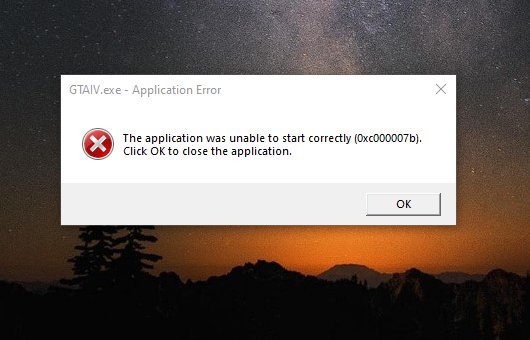
The 0xc000007b error means Windows tried to load a program file that is damaged or built for the wrong architecture, so the fix is to reinstall the app and the runtimes it depends on, usually both the x86 and x64 Visual C++ Redistributables.
This guide explains what the code means, the order of fixes that clears it for games and desktop apps, and what to do when it comes back.
Fastest fix for the 0xc000007b error
Microsoft's own description of this code tells you to reinstall the program from its original installer. Do that first, together with the Visual C++ runtimes most games and apps need.
- Select Start > Settings > Apps > Installed apps.
- Select the More icon next to the app or game that shows 0xc000007b, then select Uninstall.
- Install the latest Visual C++ Redistributable for both x86 and x64 from Microsoft's Visual C++ download page.
- Restart the PC.
- Download a fresh copy of the app or game from its publisher or store and install it.
- Launch it again and confirm it opens without the error.
If the error survives a clean reinstall, work through the methods below in order. Each one targets a different file that can trigger the same code.
What does error code 0xc000007b mean?
0xc000007b is the Windows status code STATUS_INVALID_IMAGE_FORMAT. Here an image means an executable file or DLL, not a picture.
| Item | Detail |
|---|---|
| Official name | STATUS_INVALID_IMAGE_FORMAT, shown as {Bad Image} |
| Microsoft's description | The file is either not designed to run on Windows or it contains an error |
| Microsoft's advice | Install the program again from the original installation media, or contact the software vendor |
| When you see it | The moment you open an app or game, before its window appears |
| Most common trigger | A 32-bit program loading a 64-bit DLL, or the reverse, often from a missing or mixed Visual C++ runtime |
| Other triggers | A corrupted game or app file, a missing legacy DirectX component, or a damaged Windows system file |
| Related codes | 0xc0000135 means a required DLL was not found; 0xc0000142 means a DLL failed to initialise |
Which 0xc000007b fix to try first
| Your situation | Try this | Why |
|---|---|---|
| Only one app or game fails | Repair or reinstall that app | Its own files are the likeliest bad image |
| Several games fail after a fresh Windows install | Install the x86 and x64 Visual C++ Redistributables | New installs often lack the runtime these programs were built with |
| An older game built on DirectX 9, 10 or 11 fails | Install the DirectX End-User Runtime | It adds the legacy D3DX, XInput and XAudio files those games call |
| Many programs fail, including Windows tools | Run DISM and SFC | Damaged Windows system files point to a wider problem |
| An old program fails after a Windows upgrade | Get an updated version or run the Program Compatibility Troubleshooter | The program may not support the current Windows version |
Repair or reinstall the app that shows 0xc000007b
Some apps offer a repair option that replaces damaged files without removing your settings. Try it before a full reinstall.
- Select Start > Settings > Apps > Installed apps.
- Select the More icon next to the app, then select Advanced options if it is listed.
- Select Repair. If that is missing or does not help, select Reset.
- For a classic desktop program, open Control Panel > Programs > Programs and Features.
- Right-click the program and select Repair, or Change if Repair is not offered, then follow the prompts.
- If neither option exists, uninstall the program and install a freshly downloaded copy.
For a game from a launcher such as Steam, Xbox or Epic, use the launcher's own file repair or verify option, which re-downloads only the damaged files.
Install the x86 and x64 Visual C++ Redistributables for 0xc000007b
Microsoft states that a Visual C++ Redistributable must match the architecture of the app that uses it. A 32-bit game on 64-bit Windows needs the x86 package, so install both on a 64-bit PC.
- Open Microsoft's Latest supported Visual C++ Redistributable downloads page on learn.microsoft.com.
- Download the X86 package from
https://aka.ms/vc14/vc_redist.x86.exe. - Download the X64 package from
https://aka.ms/vc14/vc_redist.x64.exe. - Run each installer and follow the prompts to install or repair the package.
- On a Windows on Arm PC, use the X64 package, which contains both the ARM64 and X64 files.
- Restart the PC and open the app again.
The v14 package covers apps built with Visual Studio 2015 through 2026. Some older games also ship the 2013 or earlier runtimes in their own install folder; those install side by side and do not replace the v14 package.
Install the DirectX End-User Runtime for older games
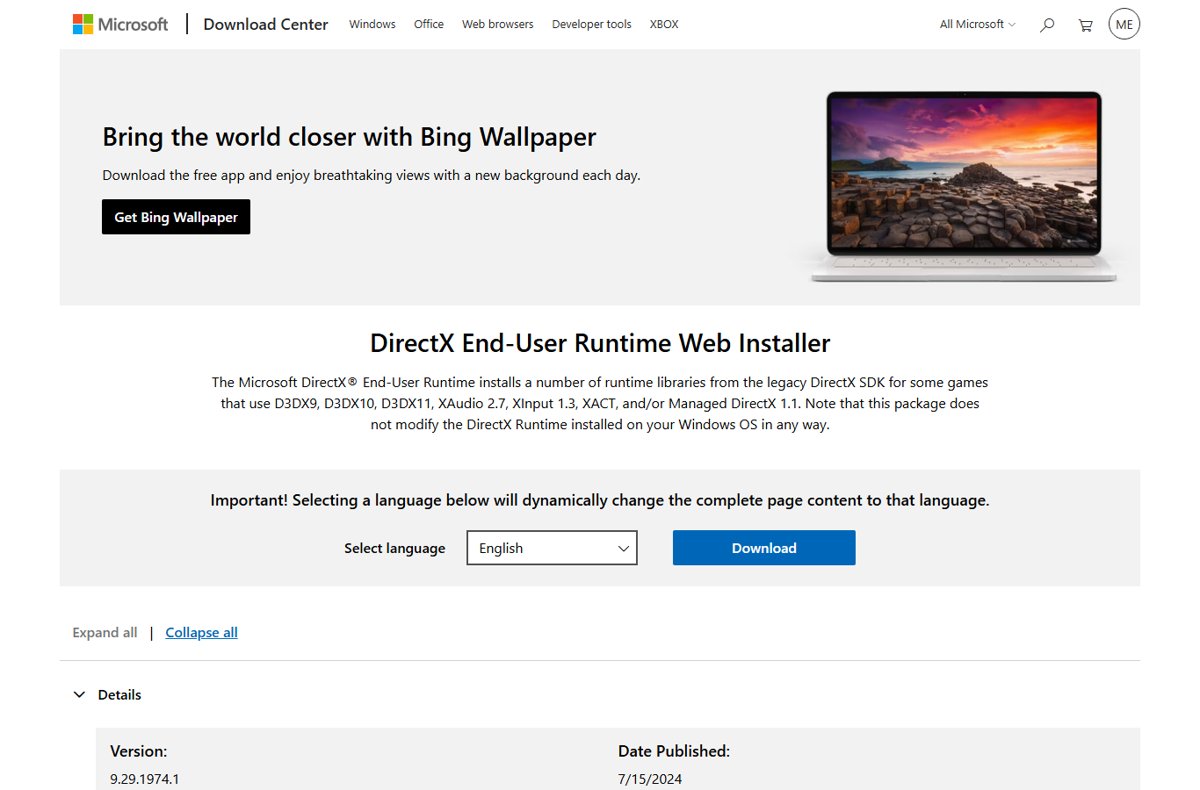
Windows 11 and 10 include DirectX itself, but not the optional legacy SDK files that many older games load. The DirectX End-User Runtime adds them without changing the Windows DirectX version.
- Open the DirectX End-User Runtime Web Installer page on the Microsoft Download Center.
- Select Download to get the
dxwebsetup.exeweb installer. - Run the installer and follow its prompts.
- Let it download and install the D3DX, XInput, XAudio and XACT components it lists.
- Restart the PC and launch the game.
Run DISM and SFC to repair Windows files behind 0xc000007b
Use this when several programs fail with the same code. Run DISM first, because it fetches the clean files that SFC then uses for repairs.
DISM.exe /Online /Cleanup-image /Restorehealth
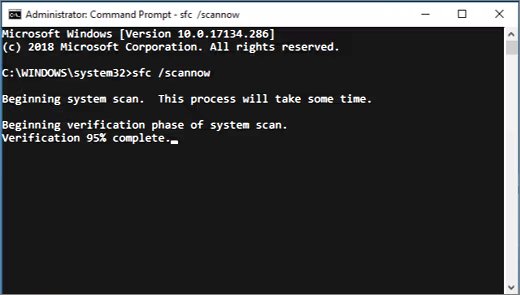
sfc /scannow
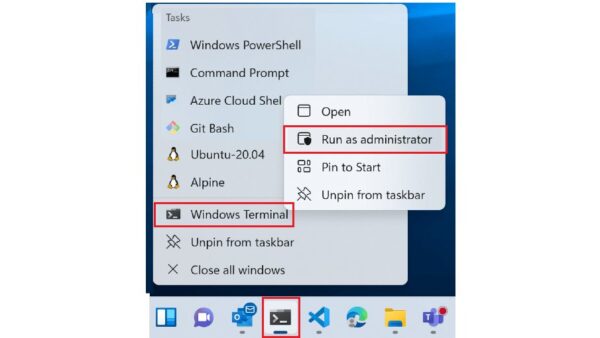
Type cmd in the taskbar search box, right-click Command Prompt and select Run as administrator. Run the DISM line first and wait for it to finish, then run sfc /scannow. DISM uses Windows Update as its source, and SFC checks every protected system file and replaces damaged ones. Keep the window open until verification reaches 100 percent.
You should see: SFC reports "Windows Resource Protection did not find any integrity violations" or "Windows Resource Protection found corrupt files and successfully repaired them". Restart the PC afterwards.
Update the program and run the Program Compatibility Troubleshooter
An older program can stop working after a Windows upgrade because it does not support changes in the operating system. A newer build from the publisher is the cleanest fix.
- For a Microsoft Store app, open Microsoft Store and install any available update for it.
- For any other program, download the newest version from the publisher's website.
- If no update exists, select Start > Settings > System > Troubleshoot > Other troubleshooters.
- Next to Program Compatibility Troubleshooter, select Run.
- Pick the failing program and follow the on-screen steps to test the suggested settings.
- Install pending updates in Settings > Windows Update, which also delivers updated device drivers.
How to check the 0xc000007b error is fixed
- Restart the PC so no old copy of a DLL stays loaded.
- Open the app or game from its normal shortcut, not from a copied folder.
- Confirm that the program window or launcher appears and no 0xc000007b message is shown.
- Open a second program that failed before, if there was one, and confirm it starts too.
- If SFC was part of the fix, run
sfc /scannowagain and confirm it reports no integrity violations.
0xc000007b error still appears: fixes by symptom
Only one game shows 0xc000007b after a mod or manual DLL copy
A DLL dropped into the game folder is the wrong architecture or a damaged copy.
- Remove the mod or any DLL you copied into the game folder by hand.
- Run the launcher's verify or repair option to restore the original files.
- Never download individual DLL files from DLL download sites; reinstall the official runtime package instead.
0xc000007b started after installing a Windows update or upgrade
The program or one of its runtimes does not match the new Windows build.
- Reinstall both the x86 and x64 Visual C++ Redistributables.
- Install the newest version of the program from its publisher.
- Run the Program Compatibility Troubleshooter for the program.
Many programs, including built-in tools, fail with 0xc000007b
Windows system files are damaged.
- Run
DISM.exe /Online /Cleanup-image /Restorehealthfrom an elevated Command Prompt. - Run
sfc /scannowand let it finish. - If SFC says it could not perform the operation, run the scan again in Safe Mode.
- If SFC cannot repair some files, use the Windows recovery options to reinstall Windows.
The Visual C++ installer fails or reports a newer version is installed
A newer v14 runtime is already present, or an earlier install is damaged.
- Run the installer again and choose to repair the existing package if it offers that.
- Restart and repeat for the other architecture.
- If the installer keeps failing, follow Microsoft's Visual C++ Redistributable installation troubleshooting guide on learn.microsoft.com.
0xc000007b error FAQ
What does error code 0xc000007b mean?
0xc000007b is the Windows status STATUS_INVALID_IMAGE_FORMAT. It means an executable or DLL that a program tried to load is either not designed to run on Windows or contains an error, often because 32-bit and 64-bit files are mixed.
What causes the 0xc000007b error in games?
In games, 0xc000007b usually comes from a missing or mismatched Visual C++ runtime, a corrupted game file, or a missing legacy DirectX component. Reinstalling the x86 and x64 Visual C++ Redistributables and repairing the game clears most cases.
Do I need the x86 Visual C++ Redistributable on 64-bit Windows?
Yes, if you run any 32-bit programs. Microsoft states that the redistributable must match the app's architecture, so a 32-bit game on 64-bit Windows needs the x86 package. Installing both x86 and x64 covers every case.
Does installing DirectX 12 fix 0xc000007b?
No. DirectX 12 is part of Windows 11 and Windows 10 and is updated through Windows Update. Older games need the separate DirectX End-User Runtime, which adds legacy D3DX, XInput and XAudio files without changing the Windows DirectX version.
Can SFC fix the 0xc000007b error?
SFC fixes 0xc000007b only when a damaged Windows system file causes it. Run DISM /Online /Cleanup-image /Restorehealth first, then sfc /scannow. If just one app fails, repairing or reinstalling that app is the faster fix.
Is 0xc000007b the same as 0xc0000135?
No. 0xc000007b means a file was found but is invalid or the wrong architecture. 0xc0000135, STATUS_DLL_NOT_FOUND, means a required DLL was not found at all. Both are often fixed by reinstalling the app and its runtimes.
Can I get 0xc000007b on Windows 11 with a 32-bit app?
Yes. Windows 11 is 64-bit only but still runs 32-bit apps, and those apps need 32-bit runtime files. If a 32-bit app picks up a 64-bit DLL, Windows stops it with 0xc000007b.
Bottom line on fixing 0xc000007b
Reinstall the failing app and both the x86 and x64 Visual C++ Redistributables first, then add the DirectX End-User Runtime for older games and run DISM and SFC only when several programs fail. 0xc000007b means a bad or mismatched program file, and Microsoft's own guidance for the code is to reinstall the program from its original installer; system repair tools matter only when the damage reaches Windows itself.