Windows 11 was released to the public on October 5, 2021, and Microsoft announced it on June 24, 2021.
This page carries every dated milestone since, from version 21H2 through version 26H1, with the OS build and support end date for each, checked against Microsoft's release-information and lifecycle pages on September 22, 2026.
The Windows 11 release date, in one table
Two dates are often mixed up. June 24, 2021 is the announcement; October 5, 2021 is the day anyone could install it.
| The date you are after | When it happened | Where Microsoft states it |
|---|---|---|
| Windows 11 announced | June 24, 2021 | Windows Experience Blog, Introducing Windows 11 |
| Public release, free upgrade opens | October 5, 2021 | Windows Experience Blog, Windows 11 available on October 5 |
| First shipping version, 21H2, OS build 22000.194 | October 4, 2021 | Windows 11 release information |
| Lifecycle start for Windows 11 Home and Pro | October 4, 2021, 8:00 AM Pacific | Microsoft Lifecycle |
| Newest version, 26H1, OS build 28000 | February 10, 2026 | Windows 11 release information |
Microsoft's release-information page dates the first build at October 4, 2021 because the build shipped a day before the public launch announcement date of October 5.
The Release Schedule
Windows 11 gets one feature update a year, named for the half of the year it lands in.
Every date and build below comes from Microsoft's Windows 11 release-information page and the Windows 11 Home and Pro lifecycle page, read on September 22, 2026.
| Version | Availability date | Initial OS build | Support status on September 22, 2026 |
|---|---|---|---|
| 21H2 | October 4, 2021 | 22000.194 | End of updates, all editions |
| 22H2 | September 20, 2022 | 22621.521 | End of updates, all editions |
| 23H2 | October 31, 2023 | 22631.2428 | Home and Pro finished; Enterprise, Education and IoT Enterprise until November 10, 2026 |
| 24H2 | October 1, 2024 | 26100.1742 | Home and Pro until October 13, 2026; Enterprise and Education until October 12, 2027 |
| 25H2 | September 30, 2025 | 26200.6584 | Home and Pro until October 12, 2027; Enterprise and Education until October 10, 2028 |
| 26H1 | February 10, 2026 | 28000.1 | New devices only; Home and Pro until March 14, 2028; Enterprise and Education until March 13, 2029 |
Version 26H1 breaks the annual pattern. Microsoft scoped it to new devices coming to market in early 2026 and does not offer it as an in-place update from 24H2 or 25H2.
There is also a Long-Term Servicing Channel build. Windows 11 Enterprise LTSC 2024, released October 1, 2024, runs to October 9, 2029, and Windows 11 IoT Enterprise LTSC 2024 runs to October 10, 2034.
Key Features of Windows 11
These are the changes Microsoft names in its own Windows 11 overview, not a wish list.
| Feature | What it does | Where it lives |
|---|---|---|
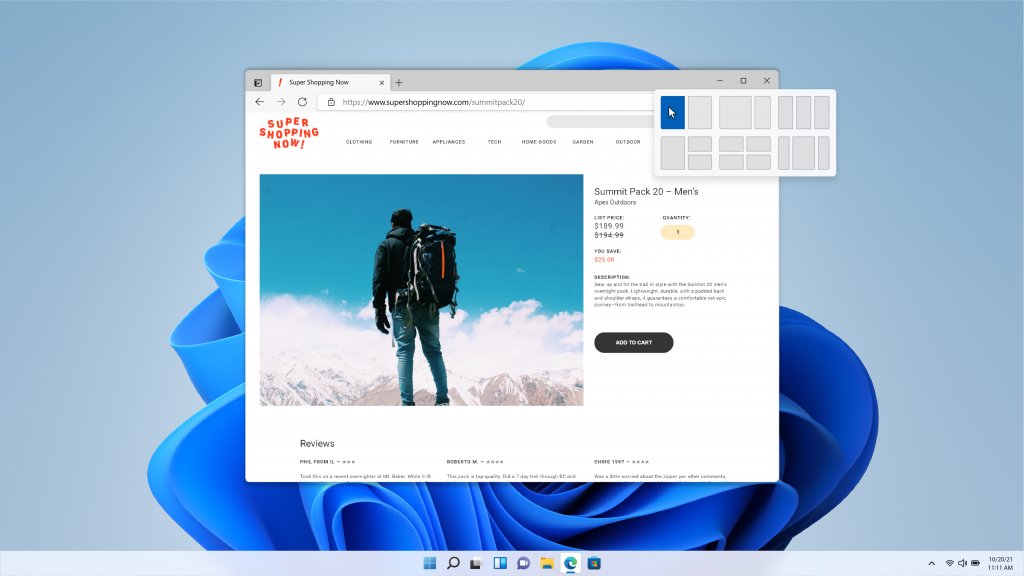
| Snap Layouts and Snap Groups | Hover the minimize or maximize button to drop an app into a preset layout, then recall the whole group from the taskbar | Settings > System > Multitasking |
| Redesigned Start menu | Pinned apps in a centred panel, with a policy for deploying a fixed layout | Settings > Personalization |
| Widgets | A taskbar feed for weather, calendar, stocks and news | Widgets icon on the taskbar |
| Virtual desktops | Separate desktops with their own open apps, switched from the taskbar | Settings > System > Multitasking |
| Windows Terminal built in | PowerShell, Command Prompt and Azure Cloud Shell in one tabbed window, no Store download | Start menu, Terminal |
| Microsoft Edge only | Internet Explorer is not available; sites that need it run in IE mode inside Edge | edge://settings/defaultBrowser |
| Windows Hello for Business | Replaces passwords with a PIN or biometric that stays on the device | Settings > Accounts > Sign-in options |
| Annual feature updates | One feature update a year instead of two, plus monthly quality updates | Start > Settings > Windows Update |
Dragging a window to the top of the screen to trigger snap layouts arrived later, in version 22H2.
Adoption and Compatibility
Windows 11 shipped with a hardware floor that Windows 10 never had. A PC that misses any line below is not offered the upgrade.
| Requirement | Minimum |
|---|---|
| Processor | 1 GHz or faster, 2 or more cores, on a compatible 64-bit processor or system on a chip |
| Memory | 4 GB |
| Storage | 64 GB or larger drive |
| System firmware | UEFI, Secure Boot capable |
| TPM | Trusted Platform Module version 2.0 |
| Graphics | DirectX 12 or later with a WDDM 2.0 driver |
| Display | High definition 720p, larger than 9 inches diagonally, 8 bits per colour channel |
| Account and network | Internet connection and a Microsoft account to complete setup on Home and Pro |
There is no 32-bit Windows 11. Microsoft ships the client only as 64-bit, so 32-bit Windows 10 machines cannot upgrade in place.
Microsoft's rollout was staged by device eligibility rather than by country, which is why two PCs bought in the same week were offered the upgrade months apart. Readers coming from the older release covered in Microsoft's Quick Guide for Windows 10 will recognise the phased pattern.
The Impact of Windows 11
The release reset several things that had held steady across the whole Windows 10 run.
| What changed | The dated fact |
|---|---|
| Windows 10 got an end date | Windows 10 Home and Pro reached end of support on October 14, 2025; version 22H2 was its final version |
| Update cadence halved | One annual feature update instead of the two-a-year Windows 10 pattern, plus monthly quality updates |
| Security baseline raised | TPM 2.0 and Secure Boot capable UEFI became minimum requirements rather than recommendations |
| Internet Explorer retired from the desktop | Internet Explorer is not available in Windows 11; IE mode inside Microsoft Edge replaces it |
| A new hardware class appeared | Copilot+ PCs, defined by a neural processing unit rated above 40 trillion operations per second, gained features other Windows 11 PCs do not get |
| Update packages shrank | Checkpoint cumulative updates, introduced in version 24H2, build each update from a previous cumulative update instead of from the original release |
Challenges and Critiques
Each row below is a documented change, not a complaint. They are the ones that generate the most support questions.
| The objection | What Microsoft's documentation says |
|---|---|
| Older PCs are shut out | TPM 2.0, Secure Boot capable UEFI and a 64-bit processor are minimum requirements, so many working Windows 10 machines never qualified |
| Setup demands a Microsoft account | An internet connection and a Microsoft account are required to complete setup on Windows 11 Home and Pro |
| Apps were removed | Version 24H2 removed WordPad, Windows Mixed Reality, AllJoyn and NTLMv1; version 25H2 removed PowerShell 2.0 and uninstalls the WMIC utility |
| Old network shares can stop working | Version 24H2 requires SMB signing by default for all connections on Home, Pro, Education and Enterprise |
| The newest version is not offered | Version 26H1 is scoped to new devices and is not offered as an in-place update from 24H2 or 25H2 |
| Enterprise features arrive switched off | Temporary enterprise feature control leaves features such as Click to Do and improved Windows search dormant on managed devices until the feature update turns them on |
Ongoing Updates and Future Developments
Two things decide how long your copy keeps getting fixes: the version number and the edition.
| Version | Latest build on September 14, 2026 | How it is delivered | Serviced for |
|---|---|---|---|
| 26H1 | 28000.2956 | Preinstalled on new devices; no in-place upgrade path | Pro 24 months, Enterprise 36 months |
| 25H2 | 26200.9457 | Enablement package on top of 24H2, or a full upgrade from Windows 10 | Pro 24 months, Enterprise 36 months |
| 24H2 | 26100.9457 | Full OS swap from 23H2 or 22H2, not an enablement package | Pro 24 months, Enterprise 36 months |
| 23H2 | 22631.7584 | Enablement package on top of 22H2 | Enterprise and Education only, to November 10, 2026 |
Hotpatching, which installs quarterly security updates without a restart on Enterprise clients, runs on 25H2 and 24H2. It is not available on version 26H1.
Microsoft publishes the next planned features on the Windows Roadmap rather than pre-announcing dated releases, so the next version number is the only reliable forward signal.
How to check which Windows 11 version your PC is running
The version number in Settings is what the table above is keyed to. Read it before deciding whether your PC still gets updates.
- Right-click the Start button and select Settings.
- Select System in the left pane.
- Select About.
- Read the Windows specifications block.
- Note the Edition, the Version (for example 25H2) and the OS build number.
- Match that version against the release schedule table to see when its updates stop.
A build number starting 26200 is version 25H2, 26100 is 24H2, 22631 is 23H2, 22621 is 22H2 and 22000 is 21H2.
Fix a Windows 11 version that does not match the release schedule
Windows Update never offers version 26H1
Version 26H1 is scoped to new devices coming to market in early 2026 and is not offered as an in-place update from 24H2 or 25H2.
- Open Settings > System > About and read the Version value.
- Treat 25H2 as the current version for an existing PC.
- Select Start > Settings > Windows Update and install any pending updates.
- Leave the PC on 25H2; its Home and Pro updates run to October 12, 2027.
About still shows version 22H2 or 21H2
Both versions reached end of updates, so no further monthly security updates arrive on that build.
- Select Start > Settings > Windows Update.
- Select Check for updates and install everything offered.
- Restart, then recheck Settings > System > About for a new Version value.
- If no feature update appears, compare the PC against the requirement table above; a device that misses TPM 2.0 or Secure Boot is not offered one.
A managed work PC is missing features the version notes list
Temporary enterprise feature control holds some features dormant on devices that take updates from Windows Update client policies or WSUS.
- Confirm the Version in Settings > System > About.
- Check whether the device receives updates from your employer rather than directly from Microsoft.
- Ask the administrator whether the feature update that activates those features has been approved.
- Wait for the feature update; the dormant features switch on when it installs.
Frequently Asked Questions
When was Windows 11 released to the public?
October 5, 2021. Microsoft announced the date on August 31, 2021 and opened the free upgrade for eligible Windows 10 PCs that day, rolling it out in stages based on device eligibility.
When did Windows 11 come out originally?
Windows 11 was announced on June 24, 2021 and released on October 5, 2021. The first shipping version was 21H2, OS build 22000.194, dated October 4, 2021 on Microsoft's release-information page.
When was Windows 11 released in India?
October 5, 2021, the same day as everywhere else. Microsoft published one worldwide availability date and staged the free upgrade by device eligibility and hardware age, not by country.
When was Windows 11 released in the UK?
October 5, 2021. There was no separate UK launch date. The phased rollout meant individual PCs were offered the upgrade at different times through to mid-2022.
When was Windows 11 released in Australia?
October 5, 2021, in line with the worldwide release. Local availability depended on when a given PC passed the eligibility checks, not on a country-specific launch.
When was Windows 11 Pro released?
October 5, 2021, alongside Home. Microsoft's lifecycle page lists Windows 11 Home and Pro as a single entry with a start date of October 4, 2021 at 8:00 AM Pacific.
When was Windows 11 24H2 released?
October 1, 2024, as OS build 26100.1742. It is a full operating system swap rather than an enablement package, and its Home and Pro updates run to October 13, 2026.
When was Windows 11 25H2 released?
September 30, 2025, as OS build 26200.6584. Devices on 24H2 receive it as an enablement package, and it reached WSUS and Configuration Manager on October 14, 2025.
When was Windows 10 released?
July 29, 2015. Windows 10 Home and Pro reached end of support on October 14, 2025, and version 22H2 was the final Windows 10 version.
Was Windows 11 officially released or just previewed in 2021?
Officially released. Preview builds went to the Windows Insider Program from late June 2021, and general availability followed on October 5, 2021 for eligible PCs and new hardware.
What is the newest version of Windows 11?
Version 26H1, OS build 28000, available from February 10, 2026. It is scoped to new devices and is not offered as an in-place update, so most existing PCs run 25H2.
How many versions of Windows 11 have been released?
Six: 21H2, 22H2, 23H2, 24H2, 25H2 and 26H1. Three of those, 24H2, 25H2 and 26H1, still receive updates on Home and Pro as of September 22, 2026.
Bottom line
Cite October 5, 2021 as the Windows 11 release date, and quote the version's own availability date when the question is really about a feature update. Microsoft's own blog names October 5, 2021 as general availability, while the release-information page dates each feature update separately, from 21H2 on October 4, 2021 to 26H1 on February 10, 2026.