UPnP is Universal Plug and Play, a set of protocols that lets any device on your home network ask the router to open a port for itself, and it performs no authentication before granting that request.
This guide shows how to check the setting, how to switch it off on NETGEAR, ASUS and Google Wifi hardware, what breaks when you do, and how to replace it with a manual rule.
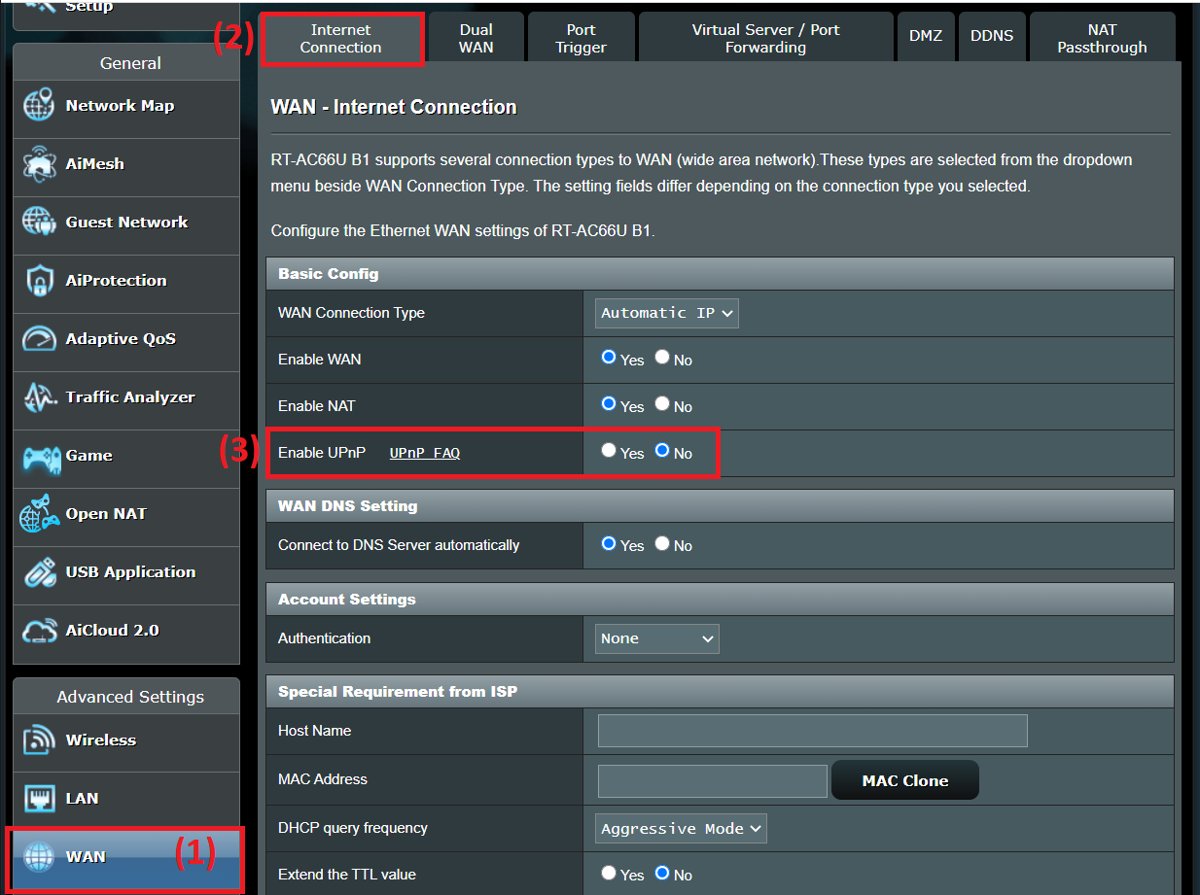
The fastest way to disable UPnP on your router
Every router keeps the switch in a different menu, so the brand-by-brand paths follow further down.
- Open a browser on a computer or phone connected to that router.
- Type the router's address in the address bar and press Enter.
- Sign in with the router's administrator account.
- Open the router's Advanced area and find the UPnP page.
- Clear or switch off the UPnP option.
- Click Apply or Save, then reconnect the devices that were using it.
On a NETGEAR router the page is ADVANCED > Advanced Setup > UPnP and the box is labelled Turn UPnP On.
Find your router's address from Command Prompt
The router's admin page sits at the address Windows reports as the default gateway.
ipconfigUsed without parameters, ipconfig displays the IPv4 and IPv6 addresses, subnet mask and default gateway for all adapters. Add /all for the full TCP/IP configuration.
You should see: A Default Gateway line under your active adapter, holding the address you type into the browser.
What Is UPnP?
UPnP is a networking standard, not a Windows feature and not a piece of hardware.
| Detail | What it is |
|---|---|
| What the letters stand for | Universal Plug and Play |
| Who maintains it | The UPnP Forum, founded in October 1999; the Open Connectivity Foundation has managed the work since 2016 |
| How devices are found | Simple Service Discovery Protocol (SSDP), multicast over UDP port 1900 |
| How devices are described and controlled | HTTP, XML and SOAP messages, with events carried by GENA |
| What it does on a router | The Internet Gateway Device (IGD) profile lets a local device read the external IP address and create a port mapping with the AddPortMapping action |
| Whether it checks who is asking | No. UPnP by default implements no authentication; Device Protection is an optional add-on |
| What Windows ships for it | Two COM APIs, the Control Point API for finding and controlling devices and the Device Host API for implementing one |
How UPnP Works on a Home Router
The router advertises itself as an Internet Gateway Device, and anything on the same network can take it up on the offer.
| Stage | What happens |
|---|---|
| Advertise | The router broadcasts its UPnP information on the local network at a set advertisement period, 30 minutes by default on NETGEAR hardware |
| Discover | A console, camera or app sends an SSDP search on UDP port 1900 and the router answers |
| Describe | The device fetches the router's XML description and learns which actions the gateway supports |
| Control | The device sends an AddPortMapping request naming an internal port, an external port and a protocol |
| Open | The router creates the forwarding rule. No admin password is asked for and no prompt appears on any screen |
| Example | A game console asks for an external port to be forwarded to itself, and the router opens it within seconds of the console booting |
A NETGEAR router also exposes a time to live value for UPnP packets, four hops by default.
Why UPnP Exists
| The problem it was built for | What UPnP does about it |
|---|---|
| A NAT router blocks unsolicited inbound connections | Lets the device behind the NAT punch a hole for itself on demand |
| Most people will never learn port forwarding | Removes the router admin page from the setup of a console or camera entirely |
| Home devices change IP addresses | Mappings are requested again each time the device starts, so they follow the new address |
| Devices need to find each other without a server | SSDP discovery lets a TV, a speaker and a phone list each other with no central directory |
| Consumer gear ships without a configuration screen | A camera or media box with no keyboard can still configure the network path it needs |
Why You Should Disable UPnP on Your Router
The design that removes the friction also removes the check on who is asking.
| Risk | What it means in practice |
|---|---|
| UPnP can open ports without your knowledge | Any device on the network can request a mapping and the router grants it silently, because the protocol carries no authentication by default |
| Malware can abuse UPnP | ESET states that with UPnP enabled the router is more vulnerable and the network can be accessed without authentication, so code running on one infected machine can open a path inward |
| Some routers have had serious UPnP vulnerabilities | CVE-2021-34991 is a stack buffer overflow in the UPnP service on NETGEAR devices including the R6400v2, letting an attacker already on the local network run code with root privileges. Rapid7 research in 2013 found millions of exposed devices, and the 2020 CallStranger flaw abused the UPnP event subscription mechanism for amplification, enumeration and data exfiltration |
| UPnP makes your network harder to audit | Google's own documentation puts it plainly: you do not know which devices or applications have asked for open ports |
| Your smart home devices may not be trustworthy | A budget camera or plug decides its own port mapping, and its firmware may never receive another security update |
ESET's guidance is direct: if UPnP is not a service you use, disable the option in router settings.
Does Disabling UPnP Break Anything?
Turning the setting off stops automatic port mappings. It does not switch off your internet connection, your Wi-Fi or local device discovery.
| What you use | What changes when UPnP is off | What to do |
|---|---|---|
| Online gaming on a console | The console may report a stricter NAT type or say UPnP was not successful | Reserve a fixed IP for the console, then forward the ports the game publisher lists to it |
| Media servers and streaming inside the house | Nothing. The router setting governs port mappings, not device-to-device discovery on the same network | Leave the setting off |
| Security cameras and NAS devices reached from outside | Remote access that relied on an automatic mapping stops | Use a VPN into the home network, or forward one port deliberately |
| Video calls and messaging apps | Usually nothing, because these apps open outbound connections and fall back to relay servers | Place a test call before changing anything else |
| Torrent clients and self-hosted servers | Incoming connections stop until a port is forwarded by hand | Forward the single port the application names |
| Smart plugs, bulbs and speakers | Nothing. These talk outbound to their vendor cloud | Leave the setting off |
How to Check Whether UPnP Is Enabled
UPnP ships on by default on most consumer routers, so read the current state before you change it.
- Type the default gateway address into a browser on a device connected to that router.
- Sign in with the administrator account. NETGEAR routers answer at
http://www.routerlogin.netwith the user name admin. - On a NETGEAR router, open ADVANCED > Advanced Setup > UPnP and read the Turn UPnP On check box. It is selected by default.
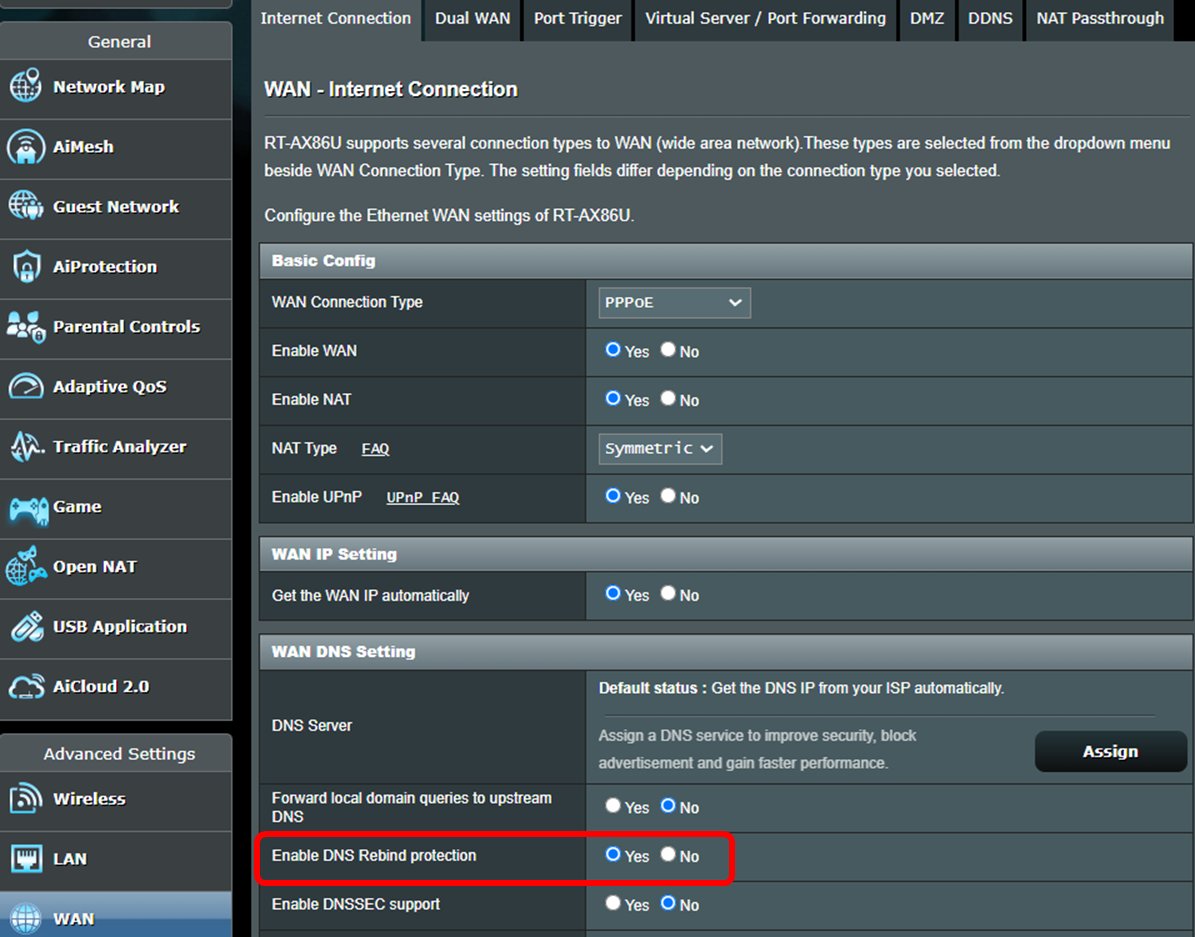
- On an ASUS router, open WAN > Internet Connection and read Enable UPnP. The same control sits at Advanced Settings > WAN > Basic Config.
- On Google Nest Wifi or Google Wifi, open the Google Home app and tap Wi-Fi > Settings > Advanced Networking. UPnP is enabled by default there.
- Write down the current state so you can put it back.
How to Disable UPnP on Popular Router Brands
The three paths below come from each maker's own documentation. Apply the change from a device that is connected to the router you are editing.
| Router | Where the setting lives | What to set |
|---|---|---|
| NETGEAR | Sign in at http://www.routerlogin.net, then ADVANCED > Advanced Setup > UPnP |
Clear Turn UPnP On and click Apply |
| ASUS | WAN > Internet Connection, or Advanced Settings > WAN > Basic Config | Set Enable UPnP to No and click Apply |
| Google Nest Wifi and Google Wifi | Google Home app: Wi-Fi > Settings > Advanced Networking | Switch UPnP off |
| TP-Link, Linksys, eero and other brands | The router's admin page or companion app, under its advanced or NAT section | Switch the option labelled UPnP off and save. Check the maker's own support site for the exact menu path on your model |
| ISP-provided routers and gateways | The ISP's management app, or the gateway's admin page | Switch UPnP off. If the control is greyed out, the ISP owns the setting and has to change it |
NETGEAR's own note on that page is that manual port forwarding is the safer option where a port genuinely has to be open.
How to Tell If UPnP Has Exposed Something
A NETGEAR router lists every mapping UPnP has created, which is the closest thing to an audit trail this protocol offers.
- Sign in to the router and open ADVANCED > Advanced Setup > UPnP.
- Read the UPnP Portmap Table before you change the setting.
- Check each row: the IP address of the device, the internal and external ports it opened, the port type, and whether the mapping is still active.
- Click Refresh to pull the current list.
- Match every address to hardware you recognise. An address you cannot account for is the reason to switch the feature off.
- Clear Turn UPnP On, click Apply, then reload the page. The table stops gaining new rows.
Open the router's port forwarding page as well, and delete leftover rules that no longer belong to a device you run.
What to Do After You Disable UPnP
- Restart the console, NAS, camera or media box that previously held a mapping.
- Test each service you actually use: a multiplayer match, a video call, remote access to the NAS.
- Reserve a fixed local IP address in the router's DHCP settings for any device that still needs an inbound connection.
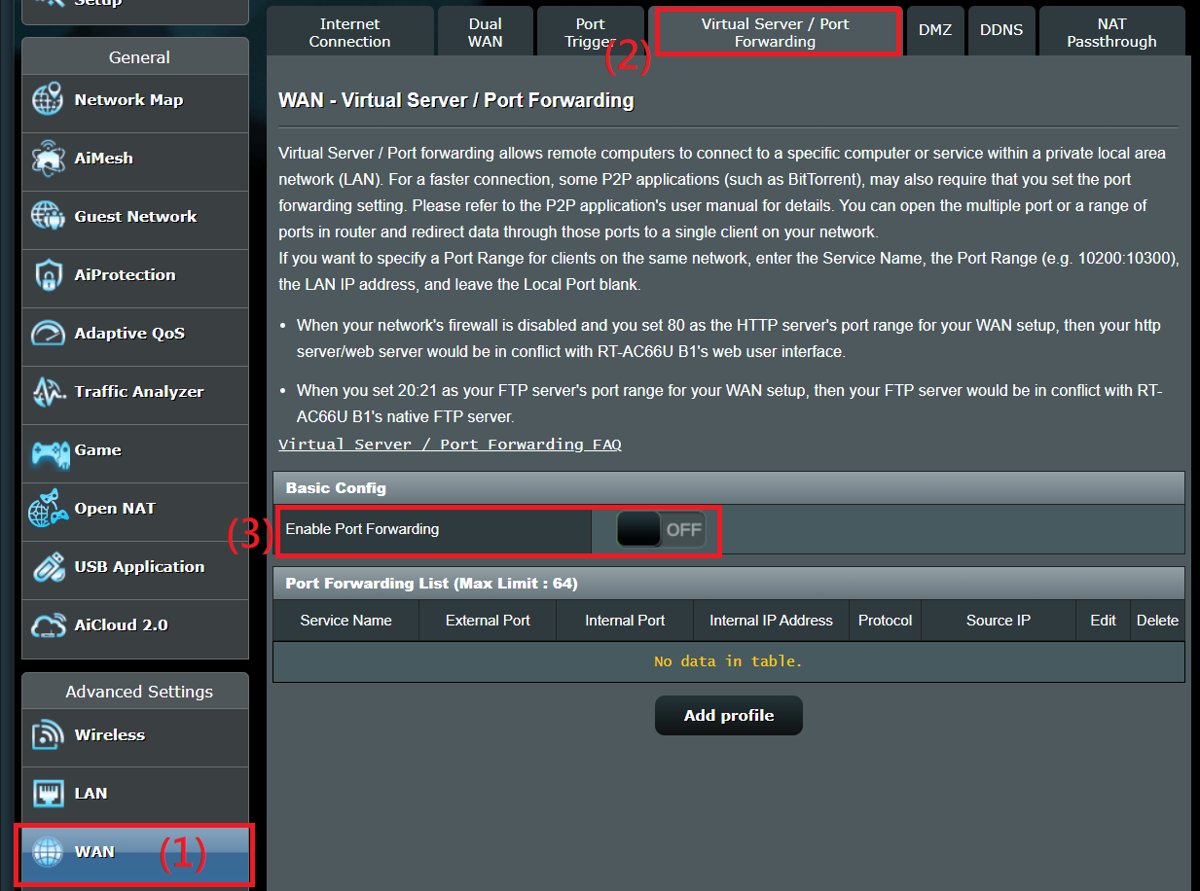
- Forward only the specific port that service needs to that reserved address, using the router's port forwarding or virtual server page.
- Reach cameras and NAS boxes over a VPN back into the home network instead of a forwarded port wherever the device supports it.
- Update the router firmware and leave automatic updates on, since the UPnP flaws that matter are fixed in firmware.
- Recheck the port forwarding list a week later and remove anything you did not add.
Should You Ever Leave UPnP Enabled?
Leave UPnP off, and turn it back on only for a device whose service you cannot restore with a manual port forwarding rule. ASUS states you can keep UPnP disabled if nothing goes wrong after disabling it, and a single manual rule gives the same result for one known device without leaving the router open to every other device on the network.
How to turn UPnP back on if something stops working
- Sign in to the router's admin page or open its companion app.
- On NETGEAR, open ADVANCED > Advanced Setup > UPnP, select Turn UPnP On and click Apply.
- On ASUS, open WAN > Internet Connection, set Enable UPnP to Yes and click Apply.
- On Google Nest Wifi or Google Wifi, open the Google Home app and switch UPnP on under Wi-Fi > Settings > Advanced Networking.
- Restart the device that needed the mapping.
- Switch the setting off again once you have replaced the mapping with a manual forwarding rule.
UPnP vs. Port Forwarding vs. NAT-PMP and PCP
Three of these four do the same job automatically. Only one of them asks permission.
| Method | Who opens the port | Authentication | Where it is controlled |
|---|---|---|---|
| UPnP (Internet Gateway Device) | Any device on the local network, automatically | None by default | The router's UPnP page |
| Manual port forwarding | You, once, for a named device | The router administrator sign-in | The router's port forwarding or virtual server page |
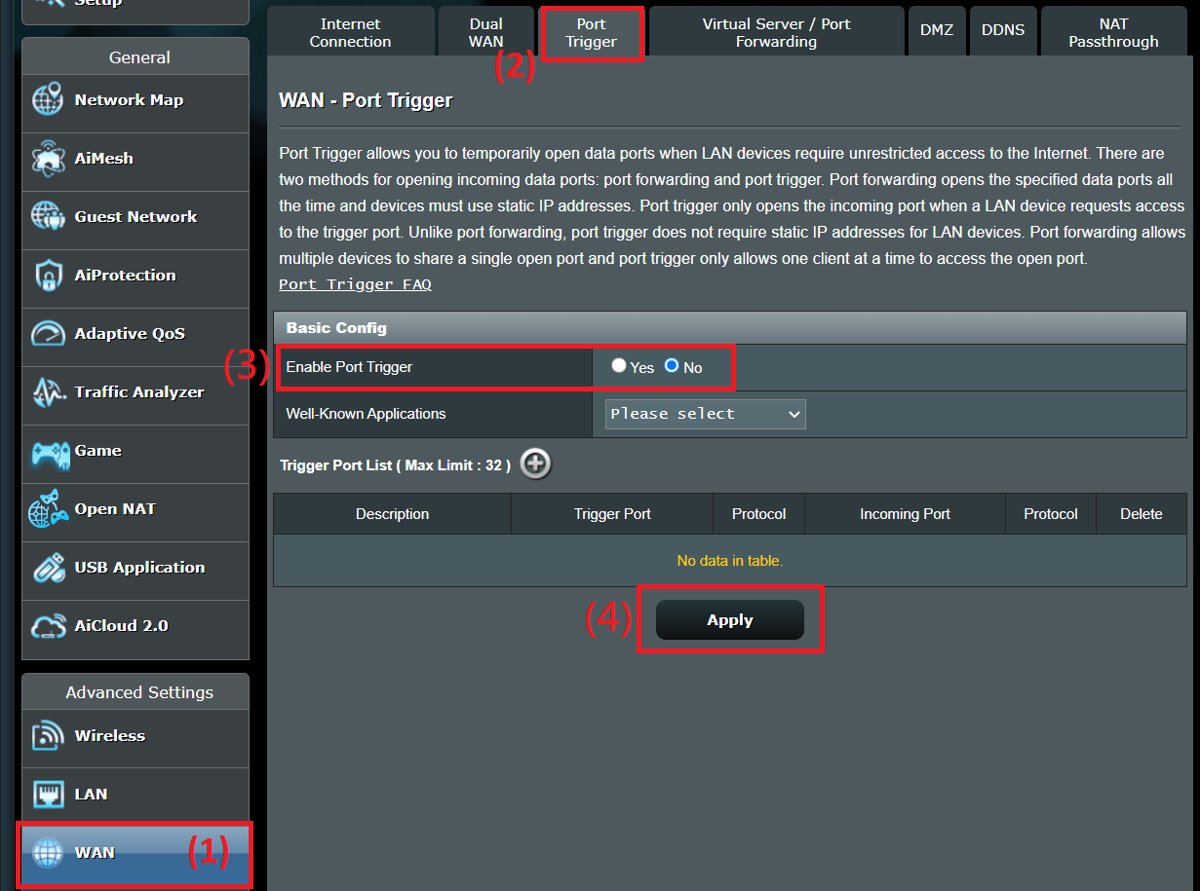
| NAT-PMP | Any device on the local network, automatically | None | Apple's 2005 protocol, server on UDP port 5351; ASUS presents it as the Port Trigger feature at WAN > Port Trigger |
| PCP (Port Control Protocol) | Any device on the local network, automatically | None | The successor to NAT-PMP, handled by the router firmware |
ASUS recommends turning UPnP, Port Trigger and Port Forwarding off at the same time, then adding back only the one rule you need.
Don’t Confuse UPnP With “Plug and Play” Hardware
The names overlap. The two technologies share nothing beyond the phrase.
| Point of comparison | Plug and Play (PnP) | UPnP |
|---|---|---|
| Scope | Hardware inside one computer | Devices across a network |
| What it does | Lets Windows adapt to hardware changes: recognises installed hardware, allocates resources such as I/O ports and interrupt requests, and loads the right drivers | Discovers devices on the network and lets them request port mappings from the router |
| Who runs it | The Windows PnP manager, with support from device hardware and drivers | Routers, consoles, televisions, cameras and NAS devices |
| Typical example | Docking a laptop and using the dock's keyboard, mouse and monitor with no manual configuration | A console opening an external port on the router seconds after it boots |
| Effect on router security | None | Can open inbound ports on the internet-facing side |
Extra Router Security Steps Worth Taking
These come from ASUS and ESET guidance on hardening a home router, and each one closes a path that does not depend on UPnP.
- Update the router firmware and keep automatic firmware updates enabled.
- Replace the default administrator password with a long, unique one of at least ten characters mixing cases, digits and symbols.
- Change the default network name so it no longer advertises the device model.
- Keep WAN access to the admin page disabled unless you genuinely manage the router remotely.
- Restrict the web interface to the local network, and switch the login page to HTTPS.
- Turn off Telnet and SSH when remote access is not in use.
- Use WPA3 encryption, or WPA2 on hardware that does not offer it.
- Turn on DNS Rebind Protection, leave the firewall enabled, and forward a single port rather than placing a device in the DMZ.
Fix UPnP problems after you change the setting
"UPnP Not Successful" appears on a game console
The console asked the router to create a port mapping and the router did not confirm one.
- Sign in to the router and check whether the UPnP option is switched on.
- Reserve a fixed local IP address for the console in the router's DHCP settings.
- Forward the ports the game's publisher lists to that reserved address on the port forwarding page.
- Save the rule, then restart the console.
- Reopen the console's network settings and read the NAT type again.
You cannot find the UPnP setting in your router
Every brand files it under a different menu, and some ISP gateways expose only a cut-down admin page.
- On NETGEAR, look under ADVANCED > Advanced Setup > UPnP.
- On ASUS, look under WAN > Internet Connection or Advanced Settings > WAN > Basic Config.
- On Google Nest Wifi and Google Wifi, look in the Google Home app under Wi-Fi > Settings > Advanced Networking.
- On any other router, search the maker's own support site for your exact model number.
- If the setting is missing from an ISP gateway, ask the ISP to disable it, or run your own router behind their box.
UPnP is switched on again after a reset or a firmware change
UPnP is on in the factory defaults, so anything that restores defaults brings it back.
- Sign in to the router after every firmware update or factory reset.
- Reopen the UPnP page for your brand.
- Clear the UPnP option and click Apply.
- Reload the page and confirm the option reads as off.
- Check the portmap table on NETGEAR hardware to confirm no new mappings appeared.
A camera, NAS or media server is no longer reachable from outside the house
Its automatic mapping expired and nothing is recreating it.
- Reserve a fixed local IP address for the device.
- Forward only the one port the device's manual names to that address.
- Set a strong, unique password on the device before exposing it.
- Prefer the device's own VPN or vendor relay service over an open port where one exists.
- Recheck access from a phone on mobile data rather than from inside the network.
Frequently Asked Questions About UPnP
What does UPnP stand for?
UPnP stands for Universal Plug and Play. It is a set of networking protocols that lets devices on the same network find each other and control each other automatically, without anyone entering addresses or passwords.
What is UPnP on a router?
On a router, UPnP is the Internet Gateway Device profile. It lets a device on your network read the router's external IP address and open a port to itself, creating a forwarding rule with no admin sign-in and no prompt.
What is UPnP used for?
It is used to get inbound connections through a NAT router without manual setup. Game consoles, torrent clients, security cameras, NAS boxes and some self-hosted servers use it to open the ports they need.
How does UPnP work?
A device sends an SSDP search over UDP port 1900. The router answers, the device fetches an XML description of the gateway, then sends an AddPortMapping request over SOAP. The router creates the forwarding rule.
Should UPnP be enabled?
No, not as a default. ESET advises disabling it in router settings when it is not a service you use, and ASUS says you can keep it disabled if nothing stops working. Switch it on again only when something genuinely needs it.
What is a UPnP device?
A UPnP device is any piece of hardware that advertises services over UPnP: a router, a smart television, a media server, a printer, a console or a network camera. Windows also exposes APIs for building one.
What is a UPnP server?
The phrase usually means a UPnP media server, a device or program that advertises video, music and photos to players on the same network. It streams inside the house and does not need the router's UPnP setting.
What is the UPnP service in Windows?
Windows ships two UPnP APIs: the Control Point API, used to find and control UPnP devices, and the Device Host API, used to implement a device the computer hosts. Both are sets of COM interfaces.
What is a UPnP network?
It is an ordinary IP network on which devices announce themselves over SSDP and expose actions other devices can call. There is no central server and no directory; each device advertises its own services.
What does "UPnP not successful" mean?
It means the device asked the router to create a port mapping and did not get one back. Check whether UPnP is switched on in the router, or replace the request with a manual port forwarding rule to that device.
How do you access UPnP settings?
Sign in to the router's admin page at its default gateway address. On NETGEAR, open ADVANCED > Advanced Setup > UPnP. On ASUS, open WAN > Internet Connection. Google Wifi keeps it in the Google Home app.
How do you turn on UPnP?
Open the same page and reverse the change. Select Turn UPnP On and click Apply on NETGEAR, set Enable UPnP to Yes on ASUS, or switch UPnP on under Advanced Networking in the Google Home app.
The Bottom Line
Switch UPnP off on the router, then forward ports by hand for the one or two devices that actually need an inbound connection. UPnP grants port mappings to anything on the network without authentication, and both ESET and Google point at that as the weakness; a manual rule gives one known device the same access while everything else stays behind the firewall.

How to enable UPnP ‘Universal Plug n Play’? - Techdows
[…] nothing on your network needs inbound ports, the safer choice is to disable UPnP on your router and forward ports by […]