As of 30 October 2026, the latest Microsoft Edge Stable build is 156.0.4314.50, and the latest Beta major release is 157.0.4341.10.
This page lists the current build per channel, how often Stable, Extended Stable, Beta, Dev and Canary update, the upcoming release dates, and how to read and switch the build on your own PC.
Latest Microsoft Edge builds
Each channel carries its own version number. Stable and Beta numbers come from Microsoft's release notes; Dev and Canary change too often to pin to a single build here.
| Channel | Latest build | Released | Notes |
|---|---|---|---|
| Stable | 156.0.4314.50 | 26 October 2026 | Update 1 to the 156 main release (156.0.4314.42, 22 October 2026) |
| Extended Stable | 156.0.4314.42 | 22 October 2026 | Next Extended Stable feature release is version 160, week of 7 January 2027 |
| Previous Stable | 155.0.4283.62 | 16 October 2026 | Last update on the 155 branch |
| Beta | 157.0.4341.10 | 20 October 2026 | Becomes Stable around the week of 5 November 2026 |
| Dev | Weekly build | Every week | Runs ahead of Beta; open edge://settings/help in Dev for its number |
| Canary | Daily build | Every day | Newest code; open edge://settings/help in Canary for its number |
Stable rollouts are progressive, so a PC can take a few days to be offered a build after its release date.
Microsoft Edge Stable, Beta, Dev and Canary channels compared
Microsoft runs four channels, plus an Extended Stable option for managed organisations. Stable and Beta are supported; Dev and Canary are not.
| Channel | Purpose | New features | Supported |
|---|---|---|---|
| Stable | Broad deployment, the default Edge | About every two weeks | Yes |
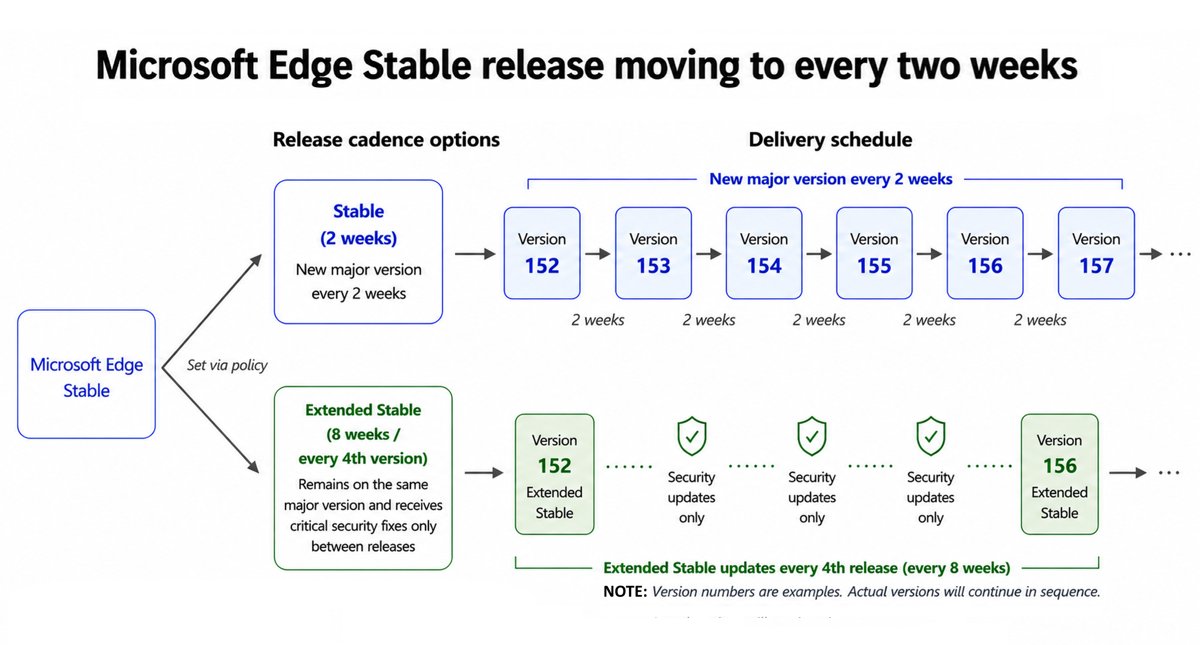
| Extended Stable | Enterprise option on the Stable app with a longer cycle | About every eight weeks | Yes |
| Beta | Validation by a sample of users | About every two weeks | Yes |
| Dev | Planning and developing with upcoming features | Weekly | No |
| Canary | Bleeding-edge builds | Daily | No |
Security and quality fixes reach Stable and Beta as needed between feature releases.
Starting with Stable version 152, Edge moved to a two-week major release cycle.
Edge Beta vs Dev vs Canary: which channel to install
| Your situation | Channel | Why |
|---|---|---|
| You want a browser that just works | Stable | Most tested channel and the one most users should run |
| You manage PCs and need time to test each release | Extended Stable | Feature updates only every fourth Stable release |
| You want next month's features with low risk | Beta | Supported, and it becomes the next Stable |
| You build sites or extensions against upcoming changes | Dev | Weekly builds with higher quality than Canary |
| You want features the day they land | Canary | Daily builds; expect problems and keep another channel installed |
How to find your Microsoft Edge build number
- Open the Edge channel you want to check.
- Type
edge://settings/helpin the address bar and press Enter. - Read the version line under About Microsoft Edge; it shows the build number and the channel.
- Wait while Edge checks for updates, then select Restart if it downloaded a newer build.
If an organisation moved the PC to Extended Stable through Edge Update, the version string names that channel too.
Install Edge Beta, Dev or Canary side by side with Stable
Installing a preview channel does not remove the released Edge, and more than one preview channel can be installed at once.
- Go to the Microsoft Edge Insider download page on microsoft.com.
- Pick Beta, Dev or Canary for your operating system.
- Run the installer from the vendor page and wait for the new Edge icon to appear.
- Open the new channel and sign in with your Microsoft account if you want your favourites synced.
Canary, Dev and Beta run on supported Windows and Windows Server versions, macOS and Linux. On phones, iOS has Beta and Dev, and Android has Beta.
To try new features in a daily build, you can test features in Edge Canary alongside your main browser.
Microsoft Edge release schedule for upcoming versions
Microsoft publishes target weeks for Beta, Stable and Extended Stable major releases. Dates are approximate and can move with build status.
| Version | Beta release | Stable release | Extended Stable |
|---|---|---|---|
| 157 | 20 October 2026 (157.0.4341.10) | Week of 5 November 2026 | Not applicable |
| 158 | Week of 3 November 2026 | Week of 19 November 2026 | Not applicable |
| 159 | Week of 17 November 2026 | Week of 10 December 2026 | Not applicable |
| 160 | Week of 8 December 2026 | Week of 7 January 2027 | Week of 7 January 2027 |
| 161 | Week of 5 January 2027 | Week of 21 January 2027 | Not applicable |
| 162 | Week of 19 January 2027 | Week of 4 February 2027 | Not applicable |
Each Beta and Stable major release follows the matching Chromium release.
Recent Microsoft Edge Stable versions and release dates
| Version | Beta build | Stable build | Stable release |
|---|---|---|---|
| 156 | 156.0.4314.8 | 156.0.4314.42 | 22 October 2026 |
| 155 | 155.0.4283.13 | 155.0.4283.45 | 8 October 2026 |
| 154 | 154.0.4258.9 | 154.0.4258.37 | 24 September 2026 |
| 153 | 153.0.4234.6 | 153.0.4234.32 | 10 September 2026 |
| 152 | 152.0.4191.10 | 152.0.4191.53 | 27 August 2026 |
| 151 | 151.0.4129.15 | 151.0.4129.59 | 31 July 2026 |
| 150 | 150.0.4078.5 | 150.0.4078.48 | 2 July 2026 |
Versions 152 and 156 were also Extended Stable releases on the same day as Stable.
Switch Microsoft Edge to Extended Stable or Beta with Target channel override
On managed Windows PCs, one Group Policy setting moves the Stable app to another channel without installing a second browser.
- Install the latest Microsoft Edge administrative templates.
- Open the Local Group Policy Editor.
- Go to Computer Configuration > Administrative Templates > Microsoft Edge Update > Applications > Microsoft Edge.
- Open Target Channel override and select Enabled.
- Under Options, choose Extended Stable or Beta from the list, then select OK.
The switch takes effect when that channel next publishes a version higher than the one installed. Edge does not downgrade itself.
Microsoft Edge build problems and fixes
Back on Target channel override = Stable, but Edge stopped updating
Beta and Dev builds have higher major versions than Stable, and Edge will not install a lower version.
- Use the Microsoft Edge rollback feature to return to a Stable build.
- Or wait until Stable publishes a version higher than the one installed; updates resume then.
edge://settings/help does not say Extended Stable
The page shows Extended Stable only when Edge Update applied it, not when Configuration Manager or an MSI did.
- Compare the version number with the Extended Stable column of the release schedule.
- Confirm Target Channel override is set to Extended Stable in Group Policy.
Release date passed but the new Stable build is not offered
Stable rolls out progressively over several days.
- Open
edge://settings/helpto trigger an update check. - Check again a few days later if no update appears.
Microsoft Edge channels and versions FAQ
What is the latest version of Microsoft Edge?
The latest Stable build is 156.0.4314.50, released on 26 October 2026 as the first update to version 156. Version 157 is in Beta and is targeted for Stable in the week of 5 November 2026.
How often does Microsoft Edge Stable update?
Stable gets new features about every two weeks, a cadence that started with version 152. Security and quality fixes arrive in between whenever they are needed, and they roll out progressively.
What is the difference between Edge Dev and Canary?
Dev updates weekly and is built for planning and development with upcoming features. Canary updates daily, gets new code first and has more problems. Neither channel is supported by Microsoft.
Is Microsoft Edge Beta safe to use?
Beta is a supported channel that Microsoft services until the next Beta arrives, and it is meant for real use by a sample of users. It is less tested than Stable, so keep Stable installed as a fallback.
Can I install Edge Canary and Stable at the same time?
Yes. Installing Beta, Dev or Canary does not remove the released Edge, and several preview channels can be installed together. Each shows up as its own app with its own icon.
What is Microsoft Edge Extended Stable?
Extended Stable is an enterprise option on the Stable app with an eight-week major release cycle. It gets feature updates every fourth Stable release, such as 152, 156 and 160, plus security fixes in between.
Which operating systems get Edge preview channels?
Canary, Dev and Beta are available on supported Windows and Windows Server versions, macOS and Linux. Edge Insider for iOS offers Beta and Dev, and Edge Insider for Android offers Beta.