USB OTG (USB On-The-Go) lets a phone or tablet act as the USB host, so you can plug a flash drive, card reader, keyboard or mouse straight into it without a computer.
This guide covers which adapter to buy, how to open OTG storage on Android and iPhone, when you need a powered hub, and how to fix a drive that does not show up.
What USB OTG does
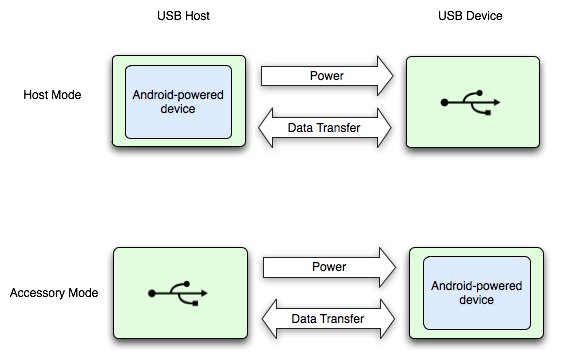
A USB link always has one host and one peripheral. The host runs the bus, supplies power and detects what is plugged in. A computer is always the host; a phone normally plays the peripheral when you connect it to a PC.
OTG flips that role. Android documentation describes USB host mode this way: the Android device acts as the host, powers the bus and enumerates the connected USB devices. Android has supported host mode since Android 3.1.
- Plug an OTG adapter or a USB-C flash drive into your phone's charging port.
- Connect the USB device (flash drive, card reader, keyboard) to the adapter.
- On Android, tap the USB available notification or open Files by Google and look under Storage devices.
- On an iPhone with USB-C, open the Files app, tap Browse and select the drive under Locations.
- Copy, move or open the files, then unplug the drive when the transfer has finished.
If nothing appears, jump to the troubleshooting section below. The usual causes are a charge-only adapter, a drive that needs more power than the phone supplies, or a phone without host support.
USB OTG versus USB-C: The distinction that prevents most buying mistakes
USB-C is a connector shape. OTG is a role the phone takes on. A USB-C port does not guarantee host support, and OTG worked for years on Micro-USB phones before USB-C existed.
| Term | What it describes | What it tells you when buying |
|---|---|---|
| USB-C | A reversible connector and port shape | Which plug fits, nothing about the phone's host role |
| USB OTG / USB host | The phone acting as the host that powers and controls the bus | Whether a flash drive or keyboard will work at all |
| USB 2 / USB 3.x | The data speed of the port and the cable | How fast large video files copy |
| USB Power Delivery | A standard for negotiating higher charging power | Whether a hub can charge the phone while a drive is attached |
| Alternate Mode | Non-USB signals such as DisplayPort or HDMI over USB-C | Whether an external monitor will work from the same port |
Apple notes that the cable included with iPhone supports charging and USB 2 speeds only. USB 3 speeds on iPhone 15 Pro and later Pro models need a separate cable rated for 10Gbit/s.
Which USB OTG adapter should you buy?
Match the adapter to the port on your phone first, then to the device you want to plug in. The table doubles as a USB OTG buying checklist.
| Your phone's port and goal | Buy this | Why |
|---|---|---|
| USB-C phone, one standard USB-A flash drive | USB-C (male) to USB-A (female) adapter or short cable | Cheapest route and draws only what the drive needs |
| USB-C phone, you want to skip adapters | A dual-connector flash drive with USB-C and USB-A plugs | Plugs straight into the phone and into an older PC |
| USB-C phone, several devices or charging while connected | USB-C hub with a USB-C power input (Power Delivery pass-through) | The wall charger powers the hub instead of the phone battery |
| Micro-USB phone | Micro-USB (male) to USB-A (female) OTG adapter | Micro-USB phones need the OTG wiring inside the adapter |
| Micro-USB phone, hard drive or several devices | Micro-USB OTG adapter with a separate power input, or a powered USB hub | Older phones supply less power than a portable hard drive needs |
| iPhone 15 or later (USB-C) | Any standards-compliant USB-C adapter, hub or drive | Apple warns that non-compliant devices and cables may not work as expected |
| SD or microSD camera cards | USB-C or Micro-USB card reader | Reads camera cards directly; Apple lists SD cards via an adapter as supported |
Look for the words OTG or USB host in the listing for Micro-USB adapters. A plain Micro-USB to USB-A cable is a charging and sync cable for connecting the phone to a computer, which is the opposite direction.
How to use OTG storage on Android
Google's Files by Google app reads USB storage on Android 7.0 (Nougat) and later. Samsung and other makers ship their own file managers that show the drive in a similar place.
- Connect the USB storage device to your phone through the OTG adapter.
- Open Files by Google. A notification that says USB available appears.
- Tap the storage device you want to open, then tap Allow.
- To browse later, scroll to Storage devices and tap your USB storage device.
- Touch and hold a file to move, copy, delete or rename it on the drive.
- When the copy has finished, close the file manager and unplug the drive.
If the notification does not open, Google's advice is to remove the USB storage device and connect it again.
Android permissions and accessory modes
Android has two separate USB roles, and only one of them is OTG. Apps also need your permission before they can talk to a USB device.
| Mode or prompt | Who is the host and powers the bus | Typical use |
|---|---|---|
| USB host mode (OTG) | The Android phone | Flash drives, keyboards, mice, game controllers, digital cameras |
| USB accessory mode | The external hardware | Docks, kiosks, diagnostic and musical equipment built for Android |
| App permission dialog | Not applicable | Android asks whether an app may use the device; access lasts until you unplug it |
| Use USB for: File Transfer | The computer | Phone connected to a PC; the phone is the peripheral, so this is not OTG |
Accessory mode lets phones that cannot act as a USB host still work with hardware designed for Android, and only one accessory connects at a time. If you tap Deny on a permission prompt, unplug the device and reconnect it to see the prompt again.
USB OTG on iPhone and other Apple USB-C devices
Apple does not use the term OTG, but iPhone 15 and later accept external storage, card readers, microphones, displays and USB-to-Ethernet adapters through the USB-C port. Older iPhones with Lightning need a Lightning-to-USB adapter.
- Connect the USB drive or SD card reader to the iPhone's USB-C port, using an adapter if the drive has a USB-A plug.
- Open the Files app.
- Tap Browse.
- Tap the drive's name below Locations to open it.
- To rename or erase it, touch and hold the drive name, then tap Rename, Erase or Get Info.
- To reformat, tap Erase, choose APFS, ExFAT or MS-DOS (FAT), then tap Erase again.
Formatting with the Files app is available on iPhone models with a USB-C port. Erasing deletes everything on the drive, so copy files off it first.
Micro-USB OTG: Still useful, but a legacy case
Micro-USB OTG adapters still work on older Android phones and tablets, and many budget devices kept the port for years. The limits are speed and power, not compatibility.
| Factor | Micro-USB OTG | USB-C OTG |
|---|---|---|
| Adapter needed | Always, with OTG wiring | Often none if the drive has a USB-C plug |
| Plug orientation | One way only | Reversible |
| Charging while a drive is connected | Only with an adapter that has a power input | Through a hub with Power Delivery pass-through |
| Large external drives | Often need external power | More likely to run from the phone, depending on the drive |
| Buying today | Only for an existing Micro-USB device | The default for any current phone or tablet |
Power limits: When you need a powered hub
In OTG the phone powers whatever you plug in. Flash drives and keyboards draw little; spinning hard drives, some SSD enclosures and multi-device hubs can draw more than a phone supplies.
| What you connect | Phone power alone | Powered hub or Y-adapter |
|---|---|---|
| USB flash drive | Usually fine | Not needed |
| Keyboard, mouse, game controller | Usually fine | Not needed |
| SD card reader | Usually fine | Not needed |
| Portable SSD | Depends on the enclosure | Use one if the drive disconnects during copies |
| 2.5-inch portable hard drive | Often too much | Recommended |
| Several devices at once | Often too much | Recommended, and it can charge the phone too |
Apple states that an iPhone with USB-C can power small devices that support USB Power Delivery at up to 4.5 watts. Windows shows a USB device might need more power message for the same problem on a PC and suggests external power for the device.
OTG for creators and video workflows
OTG lets you pull footage off a camera card or push it to a drive in the field without a laptop. iPhone 15 Pro and later Pro models can also record ProRes video straight to external storage at up to 4K at 60 fps.
- Connect an SD card reader or USB SSD to the phone through a USB-C hub with a power input, and plug the hub into a charger.
- Open Files by Google on Android or Files on iPhone and open the card or drive.
- Select the clips you want and copy them to the phone's internal storage.
- Edit or trim the clips in your editing app from internal storage, not from the drive.
- Copy the finished export back to the drive as a backup before you delete anything from the card.
Use a USB 3 cable and drive for large 4K files. The cable that ships with iPhone is limited to USB 2 speeds.
Keep a YouTube channel live after OTG file transfer
Once the video sits in the phone's storage, upload it from the YouTube app or the YouTube Studio app. OTG itself does not stream; it only moves the file onto the phone.
- Unplug the drive after the copy finishes so the upload reads from internal storage.
- Open the YouTube Studio app and tap Create at the top.
- Select the file you copied from the OTG drive.
- Add a title (up to 100 characters), privacy and monetization settings, then tap Next.
- Choose Yes, it's made for kids or No, it's not made for kids.
- Tap Upload video to publish it.
A square or vertical video of 3 minutes or less is uploaded as a Short. If you close the upload screen early, YouTube saves the video as a draft on your Content page.
How to check if your phone supports USB OTG
The most reliable test is a known-good flash drive and adapter. A phone that is not acting as host shows nothing at all when you connect storage.
- Connect a small flash drive that works on a computer, using an OTG adapter that matches your phone's port.
- Wait a few seconds for the USB available notification on Android, or open Files and Browse on iPhone.
- Open the drive and confirm you can see its folders.
- Copy one small file to the phone and open it to confirm reads work.
- If nothing appears, try a USB keyboard; if keys type in a text field, host mode works and the drive or its format is the problem.
USB OTG troubleshooting
USB OTG not working: the drive does not appear at all
A charge-only cable, a non-OTG Micro-USB cable, or a phone without host support.
- Unplug the drive and connect it again, then watch for the USB available notification.
- Try a different adapter; not all USB cables carry data.
- Test the drive on a computer to confirm it works.
- Connect a USB keyboard to check whether the phone's port works in host mode.
- Check the phone maker's specification page for OTG or USB host support.
The drive connects, then drops out during a copy
The device draws more power than the phone supplies.
- Connect the drive through a powered USB hub or an adapter with a power input.
- Plug the hub into a wall charger rather than a power bank.
- Unplug other USB devices sharing the hub.
- Copy in smaller batches if the drive is a portable hard drive.
The drive appears but files cannot be opened or written
A file system the phone cannot read, or a permission prompt that was denied.
- Unplug and reconnect the drive, then tap Allow when Android asks for access.
- Copy the files off the drive on a computer.
- Reformat the drive in a format both devices read; on iPhone with USB-C, choose ExFAT in Files > Browse > touch and hold the drive > Erase.
- Copy the files back and connect the drive to the phone again.
When a Windows computer is part of the problem
A PC is already a USB host, so phone-to-PC links use file transfer mode, not OTG.
- Connect the phone to the PC with a data-capable cable.
- On the phone, tap the Charging this device via USB notification.
- Under Use USB for, choose File Transfer.
- If Windows says These two PCs (mobile devices) can't communicate, connect the phone to a PC rather than to another phone; USB-C links between two phones are not supported.
- If Windows says USB device might need more power, use external power for the device and unplug unused USB devices.
Common USB OTG misconceptions
| Misconception | What is actually true |
|---|---|
| Every USB-C phone supports OTG | USB-C is only the connector; host support depends on the phone's hardware |
| An OTG cable is the same as a phone charging cable | A charging cable connects the phone to a host; an OTG adapter makes the phone the host |
| OTG lets a phone stream video to YouTube by itself | OTG moves files; streaming or uploading happens in the YouTube app |
| You need OTG to connect a USB drive to a laptop | Laptops are already USB hosts, so any drive plugs in directly |
| A powered hub fixes every OTG problem | It fixes power shortfalls only, not missing host support or an unreadable format |
| Two phones can swap files over one USB-C cable | Windows documents that USB-C connections between two phones are not supported |
Quick decision guide
| Your situation | Do this | Why |
|---|---|---|
| Move photos from phone to a flash drive | USB-C flash drive or a USB-C to USB-A adapter | No power concerns and no extra cables |
| Read a camera SD card on the phone | USB-C or Micro-USB card reader | Copies footage without a laptop |
| Back up large video files | USB 3 SSD through a powered USB-C hub | Faster copies and steady power |
| Type on a phone or tablet | USB keyboard through an OTG adapter | Keyboards draw little power |
| Move files between phone and Windows PC | Data cable and File Transfer mode | The PC is the host, so OTG is not involved |
| Older Micro-USB tablet | Micro-USB OTG adapter, powered if using a hard drive | Older ports supply less power |
Frequently asked questions
What is USB OTG?
USB OTG (On-The-Go) lets a phone or tablet act as the USB host. In that role it powers the connection and detects what is plugged in, so a flash drive, keyboard or card reader works without a computer.
How does USB OTG work?
The phone switches from peripheral to host. Android describes host mode as the device acting as the host, powering the bus and enumerating connected USB devices. The connected device then appears in a file manager or works as input.
What is a USB OTG cable or adapter?
It is a short cable or plug with your phone's connector on one end and a full-size USB-A socket on the other. Micro-USB versions are wired to tell the phone to act as host, which is why a normal charging cable does not do the same job.
How do I use OTG USB on Android?
Connect the drive through an OTG adapter, open Files by Google, tap the USB available notification and tap Allow. Afterwards, find the drive under Storage devices. Google's app needs Android 7.0 or later for USB storage.
How do I use OTG in a laptop?
A laptop does not need OTG because it is already a USB host. Plug the drive straight in, or use a USB-C to USB-A adapter if the laptop only has USB-C ports. To move files from a phone, use a data cable and choose File Transfer on the phone.
Does every USB-C phone support OTG?
No. USB-C describes only the connector, and Android documentation says USB host support ultimately depends on the device's hardware. Most current phones support it, but check the maker's specification page for USB host or OTG.
Do I need a USB-C OTG adapter or a powered hub?
A simple adapter is enough for flash drives, card readers and keyboards. Choose a hub with a power input for portable hard drives, several devices at once, or when you want to charge the phone while a drive is connected.
Will a powered USB hub fix OTG problems?
Only power problems, such as a drive that disconnects in the middle of a copy. A powered hub cannot add host support to a phone that lacks it, and it does not make an unreadable drive format readable.
Does Micro-USB OTG still work?
Yes. Micro-USB OTG adapters still work on older Android phones and tablets that support host mode. Expect slower copies and lower power output than USB-C, so use a powered adapter for hard drives.
Can I make a USB OTG cable myself?
It is possible to rewire a cable, but a ready-made OTG adapter costs little and avoids shorting the phone's port. Buy one that names OTG or USB host and matches your phone's connector.
Can USB OTG stream directly to YouTube?
No. OTG only moves files between the phone and a USB device. Copy the video to the phone, then upload it in the YouTube or YouTube Studio app by tapping Create and selecting the file.
The bottom line: Which USB OTG setup do you need?
For most people, a USB-C to USB-A adapter or a dual-connector flash drive is all the OTG kit they need; add a powered USB-C hub only for hard drives, several devices or charging while connected. Flash drives, card readers and keyboards draw little power and work through any compliant adapter, while the common failures, such as dropouts and drives that never appear, come from power shortfalls or a cable that does not carry data.