Open Yahoo's sign-up page at login.yahoo.com, fill in the form, pick an address and password, and verify your mobile number to create a Yahoo Mail account.
This guide covers what the form asks for, how to sign up with an email you already have, picking an @yahoo.com or @myyahoo.com address, and the security settings to turn on afterwards.
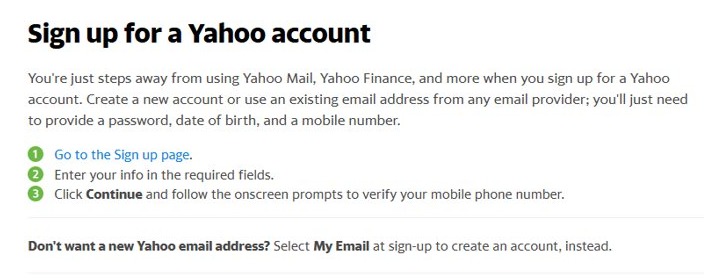
How to create a Yahoo Mail account
Sign-up is free and works the same in any desktop or mobile browser.
- Go to
https://login.yahoo.com/account/createin your browser. - Enter your first and last name.
- Type the Yahoo email address you want, and pick @yahoo.com or @myyahoo.com if both are offered.
- Create a password and enter your date of birth.
- Select Continue or Next.
- Enter your mobile number and follow the prompts to verify it with the code Yahoo sends.
- Finish the remaining on-screen prompts, then open Mail from the Yahoo home page to reach your new inbox.
Once you are in, the Yahoo Mail inbox loads in the browser or the Yahoo Mail desktop app.
What Yahoo asks for (and why)
| Field | Required? | What it is used for |
|---|---|---|
| Name | Yes | Shown as the sender name on email you send |
| Email address (account ID) | Yes, unless you use your own email | Your new @yahoo.com or @myyahoo.com address and sign-in ID |
| Password | Yes | Signs you in; needed before 2-step verification can be set up |
| Date of birth | Yes | Recorded on the account during sign-up |
| Mobile number | Yes | Verified during sign-up and used to recover the account |
Use your existing email instead
A Yahoo account does not need a Yahoo address. You can sign up with an email from any provider, such as a free Outlook address, and use Yahoo services with it.
- Open the Yahoo sign-up page.
- Select My Email instead of creating a new Yahoo address.
- Enter the email address you already use, plus the other required details.
- Verify your mobile number and complete the prompts.
This creates a Yahoo account, not a Yahoo mailbox. Choose a new Yahoo address if you want an @yahoo.com inbox.
Choosing your Yahoo address
| If you want | Pick | Why |
|---|---|---|
| The classic address | @yahoo.com | The standard Yahoo domain |
| A name already taken on @yahoo.com | @myyahoo.com | A second domain Yahoo offers for new account IDs |
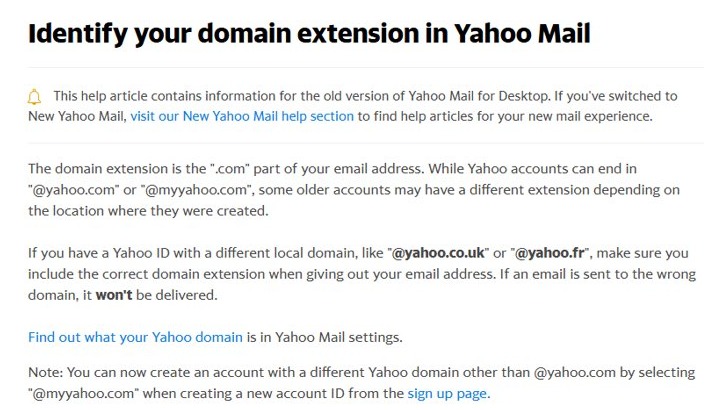
| An address you can share safely | Check the domain after @ | Mail sent to the wrong domain, such as @yahoo.co.uk instead of @yahoo.com, is not delivered |
Older accounts can carry regional domains such as @yahoo.co.uk or @yahoo.fr. Confirm your own domain in Yahoo Mail settings before you give the address out.
How to secure your new account
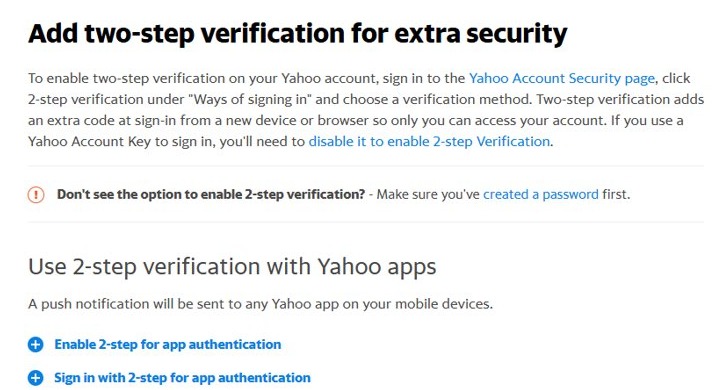
Turn on 2-step verification on the Yahoo Account Security page. If an Account Key is switched on, disable it first.
- Sign in and open the Yahoo Account Security page.
- Under Ways of signing in, select 2-step verification.
- Choose Push notification, Your phone number or Authenticator app.
- For an authenticator app, select Continue, scan the QR code, select Continue, enter the code and select Done.
- Follow the remaining prompts to finish setup.
The authenticator option needs at least two recovery methods on the account. A physical security key is another sign-in option on the same page.
After you sign up
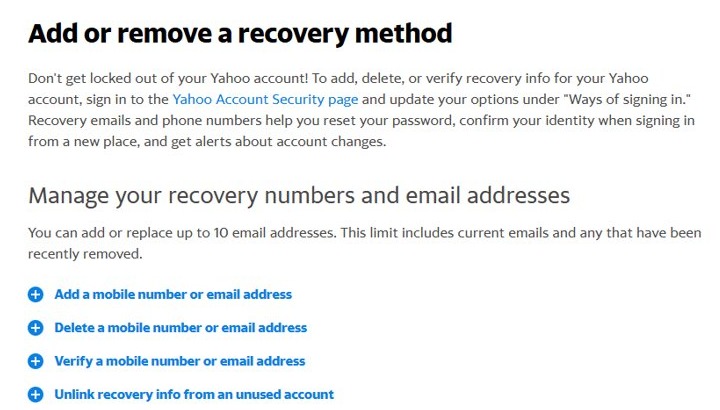
Add a second recovery method so you can get back in if you lose your phone.
- Open the Account Security page.
- Under Ways of signing in, add a phone number or email. If one already exists, open Phone numbers or Additional emails and add the new one there.
- Enter the number or address and complete the verification prompts.
- Send a test message to your new address from another account to confirm mail arrives.
In most Yahoo mobile apps, the same settings sit under your profile icon, then privacy controls, then Security. An account can hold up to 10 email addresses, counting recently removed ones.
Yahoo Mail sign-up problems
The Yahoo address you want is taken
Another account already uses that ID on the chosen domain.
- Switch the domain to @myyahoo.com if offered.
- Add a number or another word to the name and try again.
No 2-step verification option appears
The account has no password yet, or Account Key is on.
- Create a password on the Account Security page.
- Disable Account Key, then return to 2-step verification.
The authenticator app option is unavailable
The account has fewer than two recovery methods.
- Add a recovery phone number and a recovery email.
- Return to 2-step verification and choose Authenticator app.
Frequently asked questions about Yahoo Mail accounts
Is a Yahoo Mail account free?
Yes. Creating a Yahoo account and a Yahoo Mail address costs nothing. You sign up on Yahoo's sign-up page with your name, an address, a password, your date of birth and a mobile number.
Can I create a Yahoo account without a phone number?
No. Yahoo lists a mobile number as a required field and asks you to verify it during sign-up, so have a phone that can receive the code ready.
Can I use Gmail or Outlook to create a Yahoo account?
Yes. Select My Email during sign-up and enter an address from any provider. You get a Yahoo account for Yahoo services, but no new Yahoo inbox.
What is the difference between @yahoo.com and @myyahoo.com?
Both are domains for new Yahoo accounts. @myyahoo.com gives another chance at a name that is already taken on @yahoo.com. Mail sent with the wrong domain is not delivered.
How do I turn on 2-step verification for Yahoo?
Open the Account Security page, select 2-step verification under Ways of signing in, and choose push notification, phone number or an authenticator app. Then follow the prompts.
How many recovery emails can a Yahoo account have?
Up to 10 email addresses, and that count includes ones you removed recently. Add or change them on the Account Security page under Ways of signing in.
How do I delete a Yahoo Mail account I no longer want?
Save any mail you want to keep first, then delete the Yahoo Mail account. Closing it removes the mailbox and its contents.



![Blue Screen of Death Causes and Solutions [Guide]](https://techdows.com/wp-content/uploads/2026/10/Blue-Screen-of-Death-Causes-and-Solutions-Guide-600x338.jpg)