To delete a Yahoo Mail account permanently, sign in on Yahoo's account termination page at yahoo.mydashboard.oath.com/delete-my-account and follow the prompts, then stay signed out until the recovery window ends.
This guide covers the checks Yahoo requires first, what you lose, how long you can still reverse the closure, and what to do when you cannot sign in.
The quickest way to delete your Yahoo Mail account
Yahoo Mail has no separate delete button, because the mailbox belongs to your Yahoo account. Closing the account removes the mail with it.
- Open https://yahoo.mydashboard.oath.com/delete-my-account in a browser.
- Sign in with the Yahoo account you want to close.
- Read the account closure information Yahoo shows you.
- Follow the on-screen prompts to confirm the closure.
- Sign out and do not sign back in, because signing in during the recovery window reopens the account.
If the page refuses to close the account, you still have an active or recently ended paid subscription. The precautions below fix that.
Understanding Yahoo Mail and Account Deletion
Your Yahoo Mail address is one login for every Yahoo service. Closing it is an account-wide action, not a mail-only one.
| What you lose when the account closes | What that means in practice |
|---|---|
| Yahoo Mail messages and folders | Every email, folder and saved message goes with the account. |
| Yahoo Calendar events | Appointments and reminders stored in Yahoo Calendar are removed. |
| Yahoo Finance portfolios | Watchlists and portfolios saved to the account are lost. |
| Yahoo Fantasy teams | You lose access to any fantasy leagues and teams you run from this login. |
| The sign-in itself | Any other site where you log in with this address, or send password resets to it, loses that route. |
Deleting is different from signing out or removing the account from a phone's mail app. Those only disconnect one device, and the account keeps running.
Important Precautions Before Deleting Your Yahoo Mail Account
Yahoo blocks closure until your billing is clear. Match your situation to a row before you open the termination page.
| Your situation | Do this first | Why |
|---|---|---|
| You pay for Yahoo Mail Plus or another Yahoo subscription | Cancel it at https://login.yahoo.com/myaccount/subscriptions/ | Yahoo requires active subscriptions to be cancelled before closure. |
| You cancelled a subscription recently | Wait until 90 days have passed since the end of its paid term | Yahoo will not close the account inside that 90-day period. |
| You have an unpaid balance | Pay the outstanding amount | An outstanding balance blocks closure. |
| You want to keep emails, contacts or calendar data | Download it from the Yahoo Privacy Dashboard | Nothing is retrievable once the recovery window ends. |
| Banks, shops or social accounts use this address | Change the email on each of those accounts | Their password-reset emails would go to a closed mailbox. |
| You no longer know the password | Recover the account with the Sign-in Helper first | The termination page needs you to sign in. |
Step-by-Step Guide to Delete Yahoo Mail Account Permanently
This is the full safe sequence, including the checks that make the termination page accept your request.
- Sign in at https://login.yahoo.com with the account you plan to close.
- Open https://login.yahoo.com/myaccount/subscriptions/ and cancel any active subscription listed there.
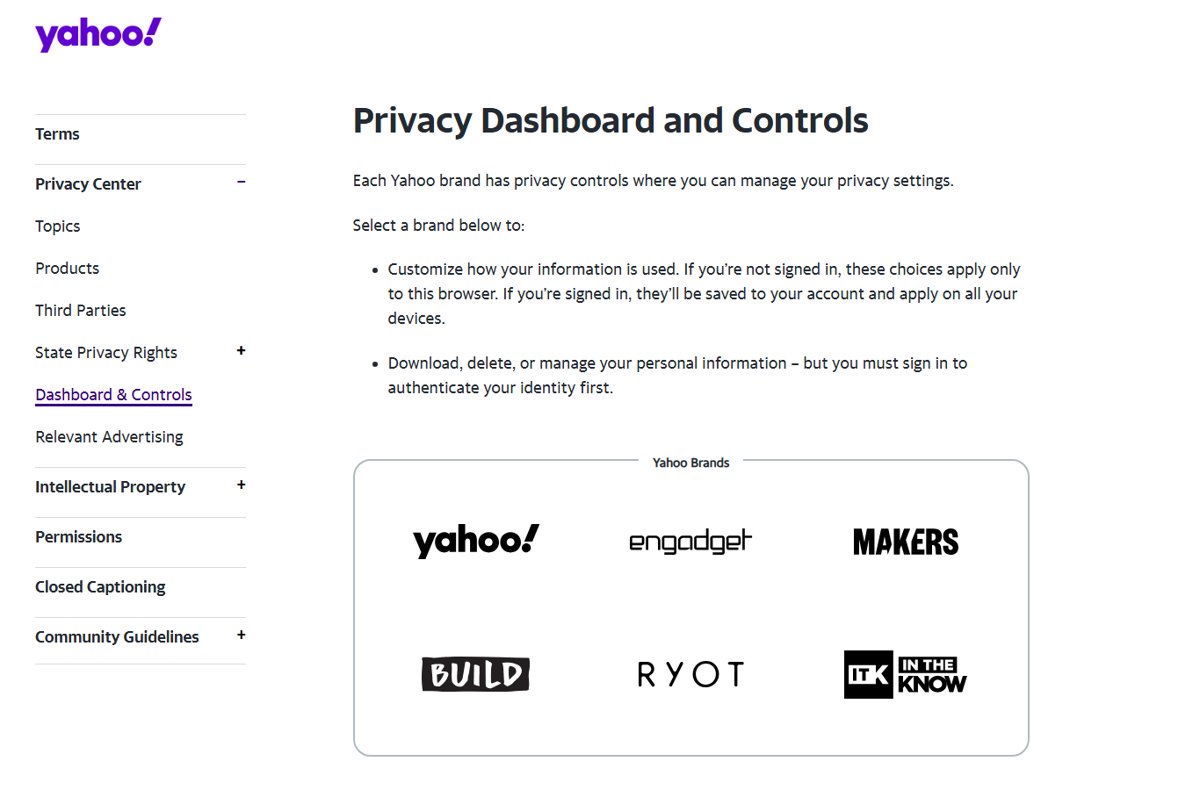
- Open the Yahoo Privacy Dashboard at https://legal.yahoo.com/us/en/yahoo/privacy/dashboard/index.html, choose the Yahoo dashboard and download the data you want to keep.
- Update the email address on outside accounts that still send mail to this Yahoo address.
- Go to https://yahoo.mydashboard.oath.com/delete-my-account and sign in again if asked, which confirms your identity.
- Read the closure information, including what you will lose access to.
- Follow the on-screen prompts to confirm that you want the account closed.
- Sign out of Yahoo on every browser, phone and mail app so nothing signs in again by itself.
Step 8 matters more than it looks. Yahoo treats a sign-in during the recovery window as a request to reopen the account, so remove it from any app that signs in for you.
How to check the account is really closed
- Confirm the termination page finished with a closure confirmation instead of an error about subscriptions or a balance.
- Remove the Yahoo account from the Mail, Outlook or Gmail app on each phone and computer where it was added.
- Leave the account alone for the full recovery window for your region, listed in the next section.
- Once the window has passed, treat the account as gone: Yahoo no longer lets you recover it.
Do not test the closure by signing in. A successful sign-in inside the window is exactly how Yahoo reactivates an account.
Post-Deletion Considerations
Closure is not instant and final. Yahoo keeps a grace period in which you can sign in and take the account back, and its length depends on where the account is registered.
| Where the account is registered | Time to sign back in and recover it |
|---|---|
| Most countries and regions, including the US | 30 days |
| Australia and New Zealand | 90 days |
| Brazil, Hong Kong, India and Taiwan | 180 days |
After that window, the mail, calendar, Finance portfolios and Fantasy teams cannot be restored. If you might need something, download it before you close the account, not after.
How to reactivate a Yahoo account you just closed
Recovery works only inside the window above, and it restores the account you closed rather than creating a new one.
- Go to https://login.yahoo.com and sign in with the closed account's address and password.
- Confirm your recovery information when Yahoo asks for it.
- Create a new password when prompted.
- Check that your mail and folders are back in Yahoo Mail.
Tips to Make the Transition Smooth
Most problems after a deletion come from services that still point at the old address. Work through this list before the recovery window closes.
- Set up the replacement email account first, so you have somewhere to move everything.
- Browse your inbox and folders for receipts, statements and account emails you still need; the Yahoo Mail inbox guide shows where each folder lives.
- Search the old inbox for words such as "welcome" and "verify" to find sites registered to the Yahoo address, then change the email on each one.
- Disconnect third-party apps linked to the account, such as Dropbox linked to Yahoo Mail.
- Send your contacts a short note with your new address.
- Download your data from the Yahoo Privacy Dashboard, then close the account.
Leaving Google as well? The same preparation applies, and the steps are in how to delete a Google account permanently.
Fix Yahoo account deletion when it does not work
You can't access your Yahoo account to delete it
The termination page requires a sign-in, and a forgotten password or old recovery details stops you.
- Go to the Sign-in Helper at https://login.yahoo.com/forgot.
- Enter your recovery email, or click Use recovery phone number.
- Click Next and follow the prompts to reset your password.
- Sign in, then open the termination page again.
Your recovery phone and email are out of date
Yahoo has no other way to confirm you own the account.
- Try every old phone number and alternate address you may have added in the Sign-in Helper.
- If none work, accept that Yahoo states you may not regain access to the account.
- Stop using the address and change it on every service that relies on it.
Yahoo won't close the account because of a subscription
An active subscription, an unpaid balance, or a cancellation less than 90 days past its paid term blocks closure.
- Open https://login.yahoo.com/myaccount/subscriptions/ and cancel any active subscription.
- Pay any outstanding balance on the account.
- Note the end date of the last paid term and wait 90 days after it.
- Return to the termination page and try again.
You can't change the password because Account Key is on
Yahoo requires Account Key to be turned off before you set a new password.
- Turn off Account Key in your Yahoo account security settings.
- Sign in to the Yahoo Account security page and, under Ways of signing in, click Password.
- Enter the new password and click Continue.
FAQs Regarding Yahoo Mail Account Deletion
Can I temporarily disable my Yahoo Mail account?
No. Yahoo's help pages describe closing the account, not pausing it. The nearest thing is the recovery window: after closure you can sign back in within 30 days in most regions to restore it. If you only want a break, sign out and remove the account from your devices instead.
How long does it take to delete my Yahoo Mail account?
The request takes a few minutes on Yahoo's termination page, but the account stays recoverable for 30 days in most regions. It is 90 days in Australia and New Zealand, and 180 days in Brazil, Hong Kong, India and Taiwan. After that, the deletion cannot be reversed.
Can I recover my Yahoo account after deletion?
Yes, but only inside the recovery window. Sign in at login.yahoo.com, confirm your recovery information and create a new password. Once 30 days pass (90 or 180 days in some countries), Yahoo no longer allows recovery and the data is gone.
What should I do if I can't access my Yahoo account for deletion?
Use Yahoo's Sign-in Helper at login.yahoo.com/forgot with your recovery phone number or email to reset the password, then open the termination page. If your recovery details are outdated, Yahoo says you may not regain access, so stop using the address instead.
Will deleting my Yahoo Mail affect my other Yahoo services?
Yes. Yahoo Mail is part of your Yahoo account, so closing it also removes access to Yahoo Calendar events, Yahoo Finance portfolios and Yahoo Fantasy teams. Any outside site that uses the address for sign-in or password resets is affected too.
Do I need to cancel Yahoo Mail Plus before deleting my account?
Yes. Yahoo requires every active subscription to be cancelled first, any balance to be paid, and at least 90 days to pass since the end of the last cancelled subscription's paid term. Manage subscriptions at login.yahoo.com/myaccount/subscriptions/.
What happens to my emails when I delete my Yahoo account?
Your Yahoo Mail messages and folders are lost when the account closes and cannot be restored after the recovery window. Download anything you want to keep from the Yahoo Privacy Dashboard before you start the deletion.
Does removing Yahoo Mail from my phone delete the account?
No. Removing the account from a phone's mail app only disconnects that device. The Yahoo account keeps working until you close it on Yahoo's termination page at yahoo.mydashboard.oath.com/delete-my-account.
Additional Resources
- Close or reactivate your Yahoo account — Yahoo's official closure rules and recovery windows.
- Yahoo account termination page — Where the closure is actually requested.
- Yahoo subscriptions — Cancel Yahoo Mail Plus and other paid plans.
- Yahoo Privacy Dashboard — Download or manage your personal data.
- Fix problems signing into your Yahoo account — Sign-in Helper and recovery options.
Final Words
Cancel your subscriptions, download your data and move your logins first, then close the account on Yahoo's termination page and stay signed out. The deletion itself takes minutes, but Yahoo blocks it while billing is open, and any sign-in during the 30-day window quietly undoes it.