To access a RocketMail account, go to the Yahoo sign-in page at login.yahoo.com, enter your full @rocketmail.com address and your password, and your mail opens in Yahoo Mail.
This guide covers signing in on the web, on a phone and in other mail apps, recovering a lost password or username, fixing login errors, and keeping the old address secure.
How to Sign In to RocketMail Through Yahoo Mail
RocketMail addresses are Yahoo accounts, so there is no separate RocketMail website. Type the whole address, including @rocketmail.com, because a username alone can match a different Yahoo account.
- Open a browser and go to login.yahoo.com.
- In Username, email or phone number, type your full address, for example [email protected].
- Select Next.
- Enter your password and select Next.
- If Yahoo asks for a verification code, enter the code sent to your recovery phone or email.
- Open Mail from the Yahoo page to see your RocketMail inbox.
Tick Stay signed in only on your own device. On a shared or public computer, sign out when you finish.
What Happened to RocketMail Accounts
RocketMail began as a webmail service from Four11. Yahoo bought Four11 in October 1997 and built Yahoo Mail on RocketMail's technology.
| Question | Answer |
|---|---|
| Who runs RocketMail today? | Yahoo. A @rocketmail.com address is a Yahoo Mail account |
| Do old addresses still work? | Yes. Yahoo preserves rocketmail.com and ymail.com suffixes for existing accounts |
| Can you create a new RocketMail address? | No. New Yahoo accounts use @yahoo.com or @myyahoo.com |
| Is there a separate RocketMail password? | No. One Yahoo password covers Mail and every other Yahoo service |
| Where is RocketMail mail stored? | In Yahoo Mail, reachable on the web, in the Yahoo Mail app and in other mail apps |
Which way to open RocketMail suits you?
| Your situation | Use this | Why |
|---|---|---|
| You are on a computer | Yahoo Mail in a browser | Nothing to install, full settings access |
| You want push alerts on a phone | Yahoo Mail app | Uses Yahoo's own sign-in page, so no app password is needed |
| You use the iPhone Mail app | Add Account > Yahoo | iOS sets up Yahoo accounts automatically |
| You use Outlook, Thunderbird or another desktop client | IMAP with an app password | Third-party apps need an app password from Yahoo |
| You cannot remember the password | Sign-in Helper | Resets the password through your recovery phone or email |
How to Access RocketMail on a Phone or Mail App
On a phone, the Yahoo Mail app or the iPhone Mail app both accept a RocketMail address. Sign in with the full address in either case.
- For the Yahoo Mail app, install it from the App Store or Google Play and open it.
- Select the option to sign in, type your full @rocketmail.com address, then enter your password.
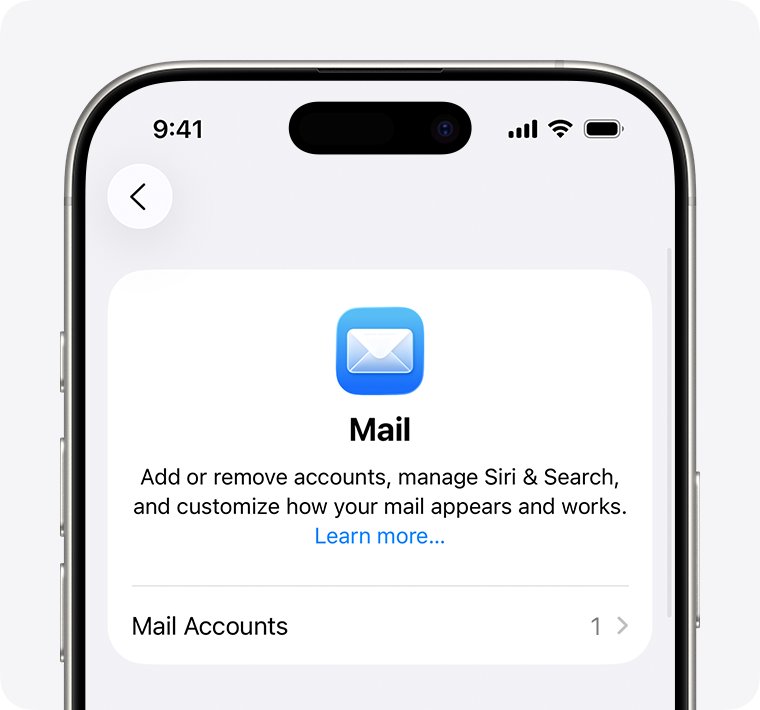
- For the iPhone Mail app, open Settings, tap Apps, then Mail, then Mail Accounts.
- Tap Add Account, choose Yahoo and enter your full RocketMail address.
- Follow the prompts, enter your password, then tap Next or Save when it appears.
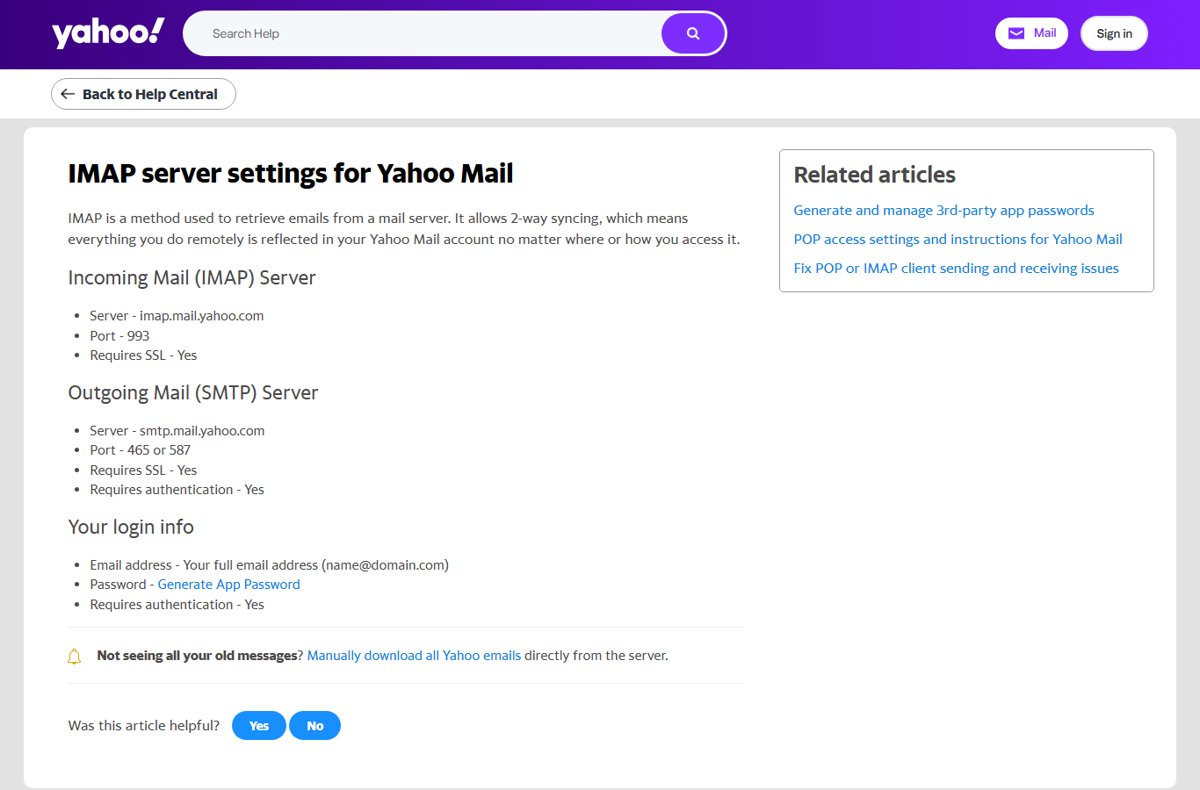
IMAP settings for RocketMail in Outlook and other mail apps
Desktop mail programs that do not use Yahoo's own sign-in page need an app password, not your normal password. Create it on the Yahoo Account security page under External connections by selecting Create app password.
| Setting | Value |
|---|---|
| Incoming mail (IMAP) server | imap.mail.yahoo.com |
| IMAP port | 993, SSL required |
| Outgoing mail (SMTP) server | smtp.mail.yahoo.com |
| SMTP port | 465 or 587, SSL and authentication required |
| Username | Your full address, [email protected] |
| Password | The app password generated in Yahoo, not your account password |
App passwords stay active even after you change your main password. Delete one from the same page when you stop using that app.
Recovering a Forgotten RocketMail Password or Username
Yahoo's Sign-in Helper resets the password and finds a forgotten Yahoo ID. It works only if your recovery phone number or recovery email is still current.
- Go to login.yahoo.com and select Forgot username, or open the Sign-in Helper directly.
- Enter the recovery email listed on your account, or select Use recovery phone number.
- Select Next.
- Enter the code Yahoo sends to that phone or email.
- Follow the prompts to see your Yahoo ID or set a new password.
Still signed in to the Yahoo Mail app? Tap the profile icon, Manage Accounts, Account, Security, then Change password at the bottom of the screen. If recovery info is wrong or no longer reachable, Yahoo says you may not be able to regain access.
How to check you are in the right account
- After signing in, select the profile icon in Yahoo Mail and check that the address shown ends in @rocketmail.com.
- Open the inbox and confirm older messages addressed to your RocketMail address are there.
- Send a short test email from another account to [email protected] and confirm it arrives.
- Reply to it to confirm sending also works.
Fixing Common RocketMail Login Problems
"Invalid ID or Password" error
The address and password do not match Yahoo's records, often because only the username or the wrong domain was typed.
- Type the full address with @rocketmail.com, not @yahoo.com.
- Check that Caps Lock is off and retype the password.
- If it still fails, reset the password through the Sign-in Helper.
Account is locked after several attempts
Yahoo locks an account temporarily after too many unsuccessful sign-ins.
- Stop trying to sign in.
- Wait 12 hours; the account unlocks automatically.
- Sign in again with the correct password, or reset it first with the Sign-in Helper.
"First time signing in here?" message
You are signing in from a device, program or location Yahoo has not seen before.
- Check the recovery phone or email on file for Yahoo's verification code.
- Enter the code to finish signing in.
Sign-in screen keeps reloading
A stale sign-in cookie is stuck in the browser.
- Clear the browser's cookies for Yahoo.
- Close and reopen the browser, then sign in again.
- Try a private window or another browser if the loop continues.
Mail app keeps rejecting the password
Outlook and other third-party apps need an app password.
- Sign in to the Yahoo Account security page in a browser.
- Under External connections, select Create app password and follow the prompts.
- Enter that code in the mail app instead of your normal password.
Keeping Your RocketMail Account Secure
An old address often protects banking and shopping accounts that use it for resets, so losing it costs more than the inbox.
| Action | Why it matters |
|---|---|
| Turn on two-step verification on the Account security page | Every sign-in from a new device or browser then needs a code as well as the password |
| Keep the recovery phone and email current | The Sign-in Helper cannot help without them |
| Use a strong password used nowhere else | Leaked passwords from other sites are tried against old mail accounts |
| Remove security questions and unknown recovery contacts | Yahoo lists both as risks in its security checklist |
| Delete app passwords you no longer use | They keep working after a password change until deleted |
| Ignore emails or calls asking for your password | Yahoo never asks for your password by email or phone |
Frequently Asked Questions
Is RocketMail a Yahoo account?
Yes. Yahoo bought RocketMail's parent company in 1997, and every @rocketmail.com address is a Yahoo Mail account. You sign in on Yahoo's sign-in page with the full address and your Yahoo password.
How do I access my RocketMail account?
Go to login.yahoo.com, type your full @rocketmail.com address, select Next, and enter your password. Your RocketMail inbox opens in Yahoo Mail on the web.
How do I log into a RocketMail account on a phone?
Install the Yahoo Mail app and sign in with your full RocketMail address and password. On iPhone you can instead add it in Settings > Apps > Mail > Mail Accounts > Add Account > Yahoo.
How do I get a RocketMail email address?
You cannot create a new one. Yahoo discontinued the rocketmail.com suffix for new accounts; new sign-ups get @yahoo.com or @myyahoo.com. Existing RocketMail addresses keep working.
Can I create a new RocketMail account?
No. The Yahoo sign-up page offers @yahoo.com and @myyahoo.com only. If you lost access to an old RocketMail address and cannot recover it, create a new Yahoo account instead.
What if I forgot my RocketMail password?
Use Yahoo's Sign-in Helper. Enter your recovery email or phone number, enter the code Yahoo sends, and set a new password. Without working recovery info, access may not be recoverable.
Why does my RocketMail account say it is locked?
Yahoo locks an account temporarily after too many wrong passwords. It unlocks automatically after 12 hours. Reset the password with the Sign-in Helper if you are unsure of it.
Bottom Line
Sign in at login.yahoo.com with the full @rocketmail.com address, then confirm your recovery phone and email are current before you need them. RocketMail has been part of Yahoo Mail since 1997, so Yahoo's sign-in and Sign-in Helper are the only official ways in, and recovery fails without current recovery details.