You contact Facebook through the Help & support menu inside your account, because Meta states that Facebook has no general public phone number for customer service.
This guide covers every channel Meta documents, from Report a problem and the hacked-account flow to Meta Verified and ads support, plus how to spot fake support numbers.
The fastest way to contact Facebook
Every documented route starts inside your own logged-in account. Use this path on a computer; the same Help & support menu sits under Menu in the mobile app.
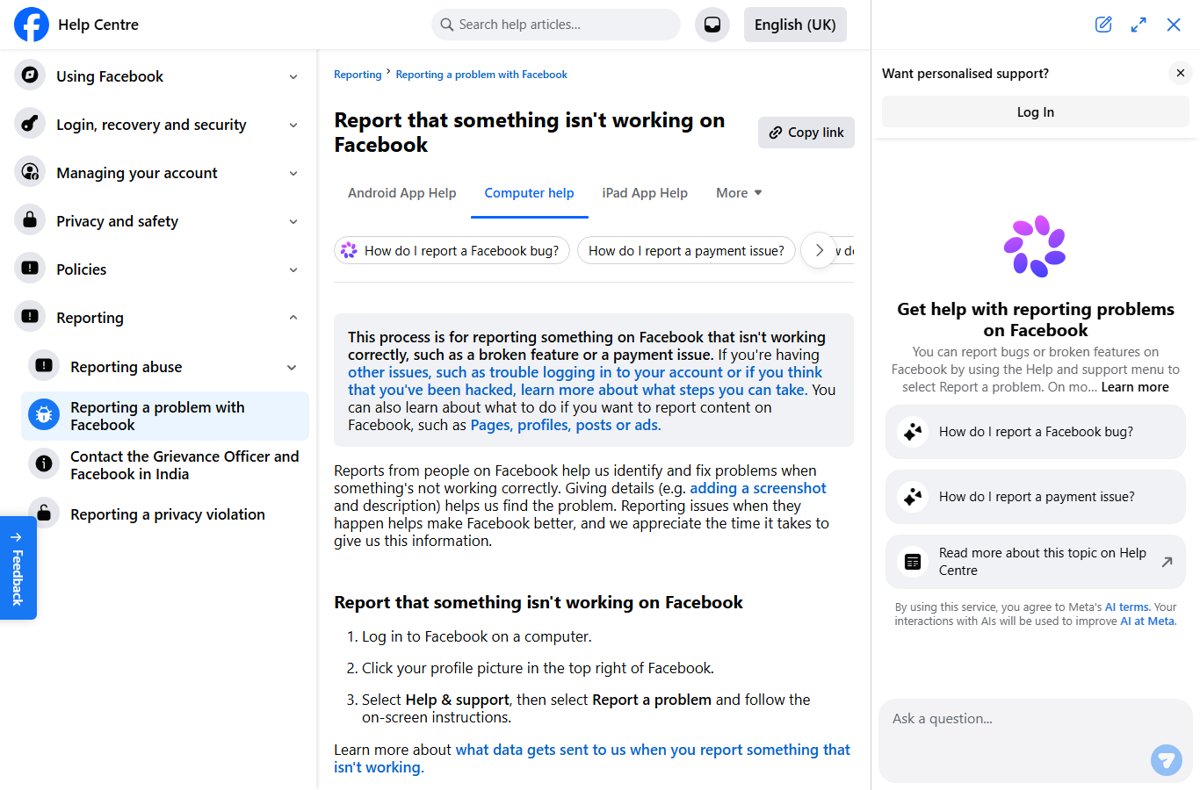
- Log in to Facebook on a computer.
- Click your profile picture in the top right.
- Select Help & support.
- Select Report a problem for a broken feature or payment issue, and follow the on-screen instructions.
- For account questions, open the Facebook Help Centre and choose Chat with Meta AI support assistant under Other ways to get help.
- If you are locked out because someone took over the account, skip the menu and go straight to facebook.com/hacked.
Meta describes the support assistant as a way to resolve issues, make changes and get support in real time. It is an AI assistant, not a human agent.
Understanding Facebook’s Support Structure
Facebook support is layered. Free accounts get self-service tools and report forms. Human agents are tied to paid Meta Verified plans and to advertiser accounts.
Meta's Help Centre lists an article titled "Phone support availability on Facebook and other Meta Company Products", summarised as: Meta, including Facebook, doesn't have a general public phone number available for customer service.
| Channel | Who can use it | What handles your request | Where it lives |
|---|---|---|---|
| Help Centre articles | Anyone, logged in or not | Self-service instructions | facebook.com/help |
| Meta AI support assistant | Anyone reading the Help Centre; more personalised when logged in | AI assistant | Chat with Meta AI support assistant on Help Centre pages |
| Report a problem | Logged-in users | Bug and payment reports reviewed by Facebook | Profile picture > Help & support > Report a problem |
| Report link on content | Logged-in users; a separate route exists for people without an account | Review against the Community Standards | The Report option next to a post, profile, Page, comment or ad |
| Hacked-account flow | Account owners who lost control | Guided recovery steps | facebook.com/hacked |
| Suspension appeal | Owners of a suspended account | Review of the suspension | Prompt shown when you log in |
| Meta Verified support | Paid Meta Verified subscribers | Human agents by chat or email; call requests on Premium and Max | Facebook or Instagram app |
| Meta Business Help Centre | Advertisers and Page managers | Personalised support after you log in | facebook.com/business/help/support |
Replies and report outcomes arrive in your Support Inbox, which holds your reports about others, alerts and messages from Facebook.
Effective Methods to Contact Facebook Directly
Match your problem to a row. Picking the right channel first saves more time than any follow-up.
| Your situation | Use this channel | Why |
|---|---|---|
| A feature is broken or a payment failed | Help & support > Report a problem | Meta says this process is for things that aren't working correctly, such as a broken feature or a payment issue |
| Someone hacked your account | facebook.com/hacked on a device you used before | The recovery flow is built for this and Report a problem is not |
| Your account shows We've suspended your account | The appeal prompt after you log in | Appeals must be made within 180 days |
| A post, profile, Page or ad breaks the rules | The Report link next to that content | Meta calls this the best way to report abusive content or spam |
| You have a question about a setting or feature | Meta AI support assistant or a Help Centre search | Fastest answer for how-to questions |
| You pay for Meta Verified | Meta Verified support in the app | Chat or email with agents 24/7, and call requests on higher plans |
| You run ads or a business Page | Meta Business Help Centre, logged in with Facebook | Meta offers personalised support for ad accounts there |
Use the Help Center and Report a Problem
Report a problem sends a bug or payment report straight to Facebook. Meta says a screenshot and description help it find the problem.
- Search the Facebook Help Centre for your issue first; many problems have a documented fix.
- If the fix fails, log in to Facebook on a computer.
- Click your profile picture in the top right.
- Select Help & support, then Report a problem.
- Describe what happened, what you expected and when it started.
- Add a screenshot that shows the error, then submit.
Report a problem is not the route for login trouble, a hacked account or abusive content. Meta points those cases to the recovery pages and the reporting tools instead, as described in its Report a problem article.
Submit Specific Support Forms for Critical Issues
Two critical cases have their own forms: a hacked account and a suspended account. Neither is handled by phone or email.
- Hacked account: on a device you have used to log in to Facebook before, go to facebook.com/hacked.
- Select Next and follow the security steps to recover the account.
- No access to the account's email or phone: follow Meta's article "Recover your Facebook account if you can't access your account email address or mobile phone number", linked from the Recover a hacked account page.
- Suspended account: log in to Facebook; you will be prompted to appeal the suspension.
- Submit the appeal within 180 days of the suspension.
- Watch your email and Support Inbox for the decision.
If you do not appeal within 180 days, or the appeal fails, Meta permanently disables the account and you cannot request another review. Meta can also disable an account without a suspension first for severe violations (Meta's suspension article).
Contact Facebook via Business or Ads Support
Advertisers and Page managers get a separate help centre. Personalised support there requires you to log in with the Facebook account that manages the ad account.
- Go to the Meta Business Help Centre support page.
- Select Log in with Facebook and sign in with the account that manages your ads.
- Check Common support topics for ad creation, billing and Ads Manager questions.
- Select Get support to see the support options available to your account.
- When you open a case, name the ad, campaign or Page affected and attach screenshots of any error.
The options shown after login depend on your account; Meta does not list a public advertiser phone number. Businesses can also subscribe to Meta Verified for businesses, which Meta lists separately from the creator plans.
Use Meta Verified Support for Chat, Email and Calls (For Subscribers)
Meta Verified is the only documented route to a human agent for a personal profile. Meta's page notes that Meta Verified features are now available in Meta One, a newer subscription that builds on it.
Plans, prices and availability vary by region, app and account. The US creator prices below come from Meta's Meta Verified page.
| If you need | Lowest plan that includes it | Price per profile | Where to sign up |
|---|---|---|---|
| Chat or email with agents 24/7 | Standard | $14.99/month | Web or mobile app |
| Issues resolved more quickly | Plus | $49.99/month | Mobile app only |
| To request a call from an agent | Premium | $149.99/month | Mobile app only |
| Active case monitoring | Max | $499.99/month | Mobile app only |
To reach support as a subscriber, open the Facebook app, go to Accounts Center, select Meta Verified and choose the support option. The Help Centre article "Contact Meta Verified Support for your verified account" covers the current steps. Creators must meet eligibility requirements, and the plan is not available in every region.
Tips to Maximize Your Chances of Success When Contacting Facebook
You rarely get a back-and-forth conversation, so the first report has to carry everything. A clear, complete report is the biggest factor you control. Never include your password or a login code.
| Tip | What to do | Why it helps |
|---|---|---|
| Be clear, concise and detailed | State what broke, what you expected, the device and app or browser, and when it started | Meta says details such as a description help it find the problem |
| Use the appropriate support channel | Pick the channel from the decision table above | A hacked account sent through Report a problem goes to the wrong queue |
| Keep a professional, factual tone | Describe events in order, without accusations or repetition | Reviewers act on facts they can check |
| Provide evidence and proof | Add screenshots of the error, the content or the suspicious message | Meta names screenshots as helpful for finding problems |
| Follow up systematically | Track the report in your Support Inbox instead of filing a new one | Report status and messages from Facebook appear there |
| Be persistent but avoid repeat submissions | Wait for a response before retrying; for password resets, wait 24 hours after hitting the daily limit | Facebook limits how many new-password requests you can make each day |
| Lean on official help pages, not strangers | Search the Help Centre or ask the Meta AI support assistant | People offering help in comments or messages are a common scam vector |
Additional Strategies for Specific Situations
These situations each have a dedicated route in the Help Centre. Use it instead of a general report.
| Situation | What to do | Official page |
|---|---|---|
| Recovering a hacked Facebook account | Use facebook.com/hacked from a device you logged in with before; review what was accessed afterwards | Recover a hacked account |
| Reporting violations or offending content | Use the Report link next to the post, photo, comment, profile, Page, group, event or ad | Report content on Facebook |
| You have no account or were blocked from the content | Use Meta's route for reporting without an account | Linked from Report content on Facebook |
| Someone is impersonating you | Report the profile or Page as pretending to be you | Help Centre: Report a Facebook profile or Page pretending to be you or someone else |
| Addressing business or advertising issues | Log in to the Meta Business Help Centre with Facebook | Meta Business Help Centre |
| A hacked Page you manage | Follow Meta's Page recovery steps | Help Centre: Recover a hacked Facebook Page that you manage |
| Dealing with account restrictions or bans | Check Account Status under Help & support, then appeal within 180 days if suspended | Suspended or disabled account |
| A Facebook Shop order went wrong | Contact the shop about the order | Help Centre: Contact a shop about an order on Facebook |
How to check Facebook received your request
Proof of contact lives inside your account, not in your inbox alone. Scam emails copy Facebook's look, so confirm everything from settings.
- Click your profile picture and select Help & support.
- Open Support inbox to see your reports, alerts and messages from Facebook.
- Open Account Status to check for Community Standards restrictions on your profile, Pages or groups.
- For any email that claims to be from Facebook, compare it with the list of recent emails from Facebook shown in your Facebook settings.
- Treat a message that is not in that list as suspicious, and do not click its links.
Common Challenges and How to Overcome Them
These are the problems readers hit most often when they try to reach Facebook.
Limited direct support options: you cannot find a phone number
Meta states that Facebook has no general public phone number for customer service.
- Stop searching for a number; any number presented as general Facebook support is a red flag.
- Use Help & support > Report a problem or the matching form from the decision table.
- If you need a human agent for your profile, check whether Meta Verified is offered in your region.
- If the issue is about ads, log in to the Meta Business Help Centre.
Automated responses and delays
Free accounts get no live agent, and replies arrive in the Support Inbox rather than by phone.
- Open Help & support > Support inbox and check for updates.
- Check the email address on your account for messages, then confirm them against the recent emails list in settings.
- Add missing details or screenshots to a new report only if the first one lacked them.
- For a suspension, keep the 180-day appeal window in mind rather than waiting on a reply.
You cannot reset your password or access your email or phone
Facebook only allows a certain number of new-password requests each day, and recovery codes go to your saved contact details.
- If you hit the reset limit, wait 24 hours before trying again.
- Start from facebook.com/hacked on a device you used to log in before.
- Follow Meta's steps for recovering an account when you can't access the account email address or mobile number.
- If two-factor authentication blocks you, use a saved recovery code or a device you logged in with before.
Language barriers or region-specific support
Some legal complaint routes exist only in certain countries.
- Switch the Help Centre language from the language selector at the top of any help page.
- EU: use the Help Centre page "Points of support and contact on Facebook", published under the Digital Services Act.
- UK: use the Help Centre page "UK Online Safety Act – Submitting a complaint".
- Australia: use the Help Centre pages on the Australia Online Safety Act and the Online Safety Codes, which also explain complaints to the eSafety Commissioner.
- India: use the Help Centre page "Contact the Grievance Officer and Facebook in India".
How to spot fake Facebook support numbers and recovery scams
Fake "Facebook support" numbers appear in search results, ads and comments because Meta has no general support line to compete with. Meta warns that scammers pretend to be from familiar organisations and create urgency by threatening your account.
Facebook will never ask you to pay to recover your account. If you already paid or shared a code, secure the account through facebook.com/hacked and report the profile or message.
| Red flag | Why it signals a scam |
|---|---|
| A phone number offered as general Facebook customer service | Meta states Facebook has no general public phone number for customer service |
| Someone offers to recover your hacked account for a fee | Recovery is free through facebook.com/hacked and the Help Centre |
| A request for your password, login code or card number | Meta says not to answer, and to report, messages asking for these |
| An urgent warning that your account will be deleted | Meta's scam guidance says scammers create urgency and threaten account loss |
| A message asking you to move the conversation off Facebook | Meta lists this among the signs of a scam |
| An email with links that is not in your recent Facebook emails list | Meta says to check your settings before clicking anything |
Meta's three rules from Avoiding scams on Facebook: slow down, spot check the details, and don't send money or information on demand.
Staying Updated and Preventive Measures
The easiest support case is the one you never have to open. These settings, all recommended by Meta, keep you out of the hacked-account queue.
- Turn on two-factor authentication; Meta calls it one of the most effective tools against account compromise.
- Save your login recovery codes somewhere offline for when your phone is unavailable.
- Turn on login alerts and review your previous sessions for devices you do not recognise.
- Run the Security Checkup tool.
- Keep the email address and mobile number on your account current, since recovery depends on them.
- Never reuse your Facebook password on another site.
- Businesses: enable business notifications so you are alerted to changes in your Meta business account.
Frequently Asked Questions
How do I contact Facebook directly?
Log in, click your profile picture and select Help & support. Use Report a problem for bugs or payments, facebook.com/hacked for a hacked account, and the Report link for abusive content. The Help Centre also offers a Meta AI support assistant for account questions.
How do I contact Facebook directly by email?
Meta's Help Centre lists no general customer-service email address. Meta Verified subscribers can email human agents from inside the app. Everyone else uses in-app reports, and Facebook's replies arrive in the Support Inbox. Confirm any email that claims to be from Facebook against the recent emails list in your settings.
How do I contact Facebook directly by phone?
You cannot call Facebook for general support. Meta states that Facebook has no general public phone number for customer service. The only documented calls are call-backs requested by Meta Verified subscribers on the Premium and Max plans, started from inside the app.
Can you contact Facebook by phone?
Only by requesting a call from an agent as a Meta Verified Premium or Max subscriber. Nobody can phone Facebook on a public number. Treat any number presented as Facebook customer service, and anyone who calls you claiming to be Facebook support, as a likely scam.
Can I contact Facebook directly?
Yes, but only through channels inside Facebook, not by phone. Report a problem, the hacked-account flow, suspension appeals and the Report link all reach Facebook directly. Human chat and email agents are available to Meta Verified subscribers, and advertisers get personalised support in the Meta Business Help Centre.
How do I get in contact with Facebook about a hacked account?
Go to facebook.com/hacked on a device you have used to log in to Facebook before, then follow the security steps. If you no longer have access to the account's email or phone, follow Meta's recovery steps for that case. Recovery is free, so ignore anyone charging for it.
How do I actually contact Facebook support and reach a human?
For a personal profile, the documented route to human agents is Meta Verified, which includes 24/7 chat or email. Advertisers can log in to the Meta Business Help Centre for personalised support. Free accounts rely on reports, appeals and the Meta AI support assistant.
How do I contact Facebook directly in Australia?
Use the same in-app channels as everywhere else: Help & support, the Report link and facebook.com/hacked. For complaints under Australian law, the Help Centre has pages on the Australia Online Safety Act and the Online Safety Codes, including how to complain to the eSafety Commissioner.
How do I contact Facebook directly in the UK?
UK users contact Facebook through Help & support and the reporting tools, like everyone else. For complaints under the UK Online Safety Act, use the Help Centre page titled UK Online Safety Act – Submitting a complaint. No UK phone line exists for general support.



How to switch back to a classic Facebook Page in 2026 (finally) - Techdows
[…] can help with access, hacked Pages and business account problems, and these are the routes that reach Facebook directly for a Page […]