To set up Google flight alerts, sign in to your Google Account, search a route on Google Flights and turn on Track prices.
This guide covers tracking a route, specific dates or a single flight on a computer, iPhone and Android, managing tracked flights, and fixing alerts that never arrive.
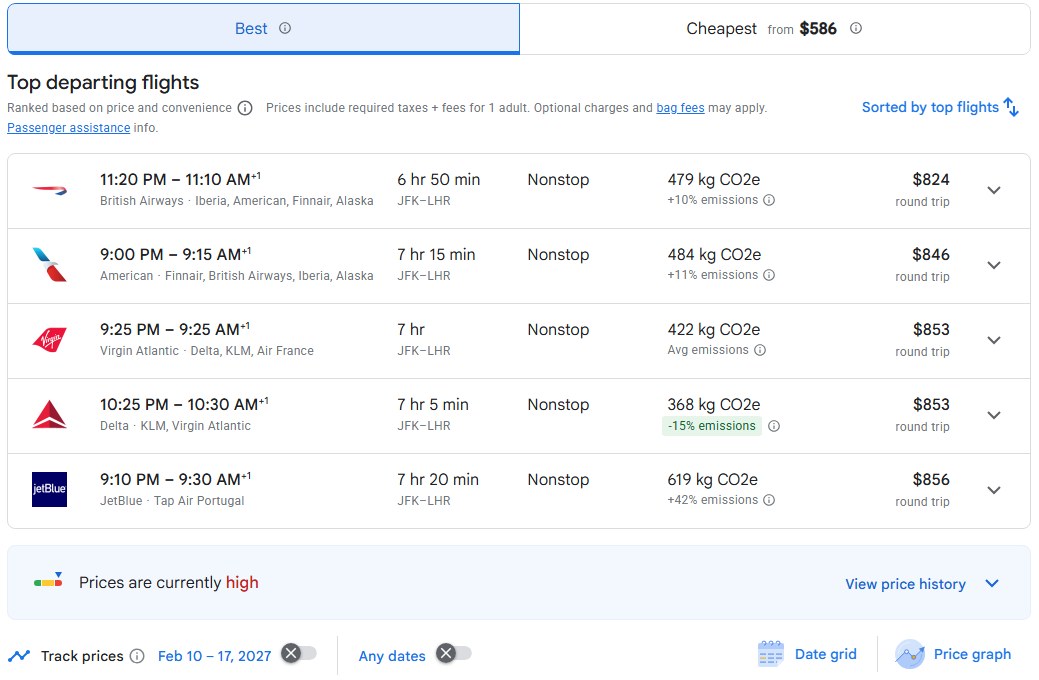
Step-by-step guide to setting up Google flight alerts
These steps use Google Flights in a desktop browser. Price tracking is tied to your Google Account, so sign in first, or create a Google account if you do not have one.
- Go to
google.com/travel/flightsand select Sign in at the top right if you are not signed in. - At the top, choose the trip type, the number of stops, the cabin class and how many tickets you need.
- Enter your departure airport and your destination.
- Click the calendar and pick your travel dates, or leave the dates open if your plans are flexible.
- Run the search, then turn on Track prices above the results to track the whole route.
- Choose your searched dates, or Any dates if you can travel whenever the fare is lowest.
- Optional: to track one particular flight, select that flight, then turn on Track prices for it.
Google Flights now emails you when the price for that route or flight changes significantly. The route also appears on the Tracked flights page.
What are Google flight alerts?
Google flight alerts are the price tracking emails and notifications Google Flights sends for routes and flights you choose to track. Google calls the feature Track prices.
| Alert type | When Google Flights sends it | Where it arrives |
|---|---|---|
| Price change on tracked dates | The price for a tracked route or flight changes significantly | Email; also mobile notifications when you track on a phone |
| Any dates price drop | The route's minimum price drops significantly over a month | |
| Any dates regular update | No large enough drop happened, so you get the best available prices instead | |
| Prices likely to go up | Prices for a route you track are likely to rise | Email, with an estimate of the increase and how confident Google is |
| Fare expiring soon | The current fare for a flight expires soon and the new fare is likely to cost more |
Alerts do not book anything or hold a fare. When you click Select on a ticket, you are usually sent to the airline or an online travel agency to pay.
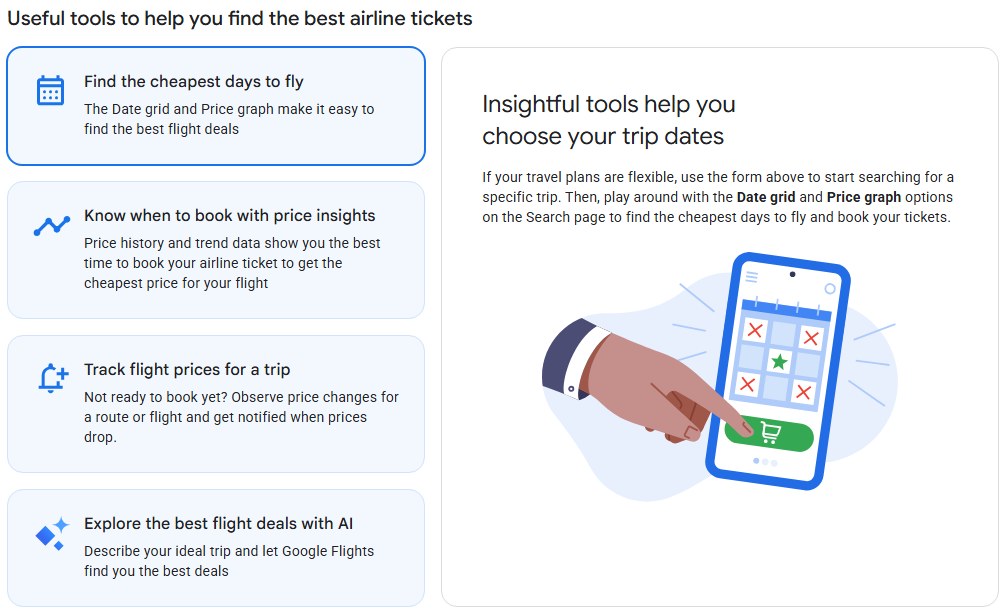
Prerequisites for setting up Google flight alerts
| Requirement | Why it matters |
|---|---|
| A Google Account you are signed in to | The Tracked flights page asks you to sign in before you can track prices or get notified |
| A departure airport and a destination | Tracking works on a searched route, so the search must name both ends |
| Travel dates, or flexible plans | Track your searched dates, or pick Any dates to watch the cheapest fare on the route |
| Access to the inbox of that Google Account | Price change updates arrive by email |
| A phone browser, if you want mobile notifications | The iPhone and Android routes add mobile notifications to the emails |
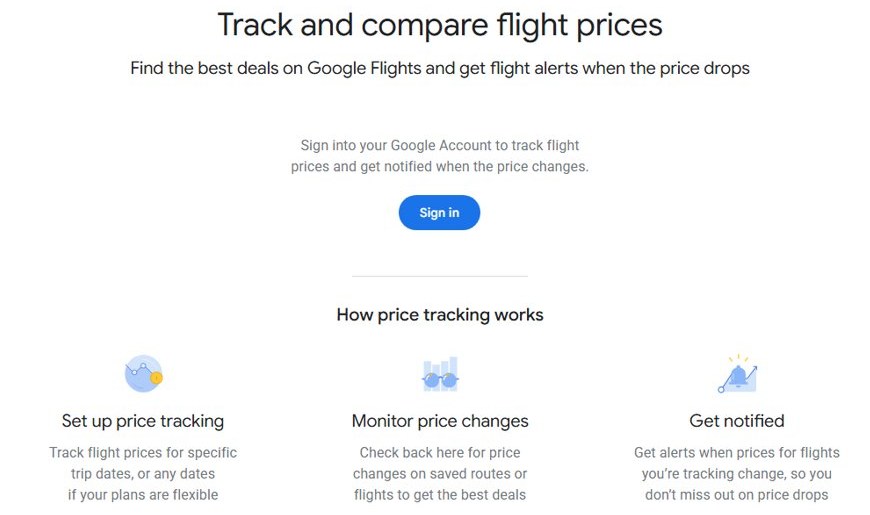
How to access Google Flights
Google Flights runs in a web browser on a computer, iPhone, iPad, Android phone or tablet. The same Google Account shows the same tracked flights on every device, so sign in to Google in Chrome or your other browsers with that one account.
- Open a web browser on your computer or phone.
- Go to
google.com/travel/flights. - Select Sign in at the top right and sign in with your Google Account.
- Check the Language, Location and Currency settings at the bottom of the page so prices show in your currency.
The Tracked flights page lives at google.com/travel/flights/saves. Bookmark it to open your alerts directly.
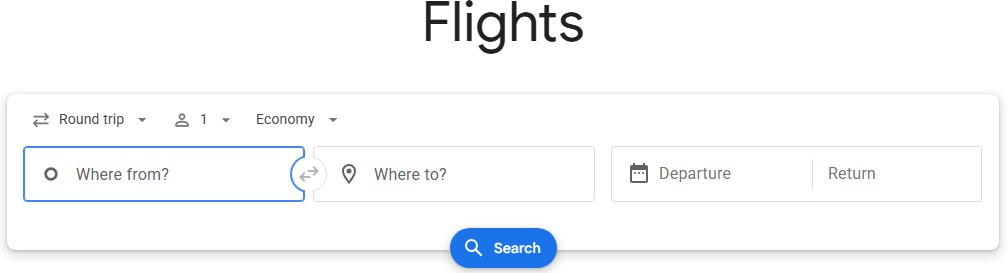
How to search for flights on Google Flights
- Go to Google Flights and enter your departure city or airport and your destination. You can also pick a destination from the popular destinations list or the world map.
- At the top, select the ticket type: one-way, round trip or multi-city.
- Select the number of passengers and the cabin class.
- Click the calendar to pick your dates. Each day shows the lowest total price to fly.
- Optional: filter the results with Stops, Airlines, Times or More.
- Switch between the Best and Cheapest tabs, or click Sort by to order flights by price, duration or departure time.
Best balances price against convenience. Cheapest puts low fares first and adds options from online travel agents, which may involve a self-transfer of luggage or a change of airports.

How to set up Google Flights price alerts on iPhone and Android
The phone route is almost the same as the computer route. The difference is that tracking on a phone sends mobile notifications as well as emails. If those alerts never show while the phone is locked, fix lock screen notifications on the device.
- Go to Google Flights on your iPhone, iPad or Android device and sign in.
- At the top, use the buttons to select the number of stops, the cabin class and the number of tickets you need.
- Select your departure airport and destination.
- Tap Calendar to select your flight dates.
- Tap Track prices to track the route, and choose your searched dates or Any dates.
- Optional: to track one flight instead, select that flight and tap Track prices.
Google Flights track prices for any dates vs specific dates
| Your situation | Track this | What you get |
|---|---|---|
| Dates are fixed, airline does not matter | The route on your searched dates | Emails when the route price for those dates changes significantly |
| Dates are flexible | The route with Any dates | An email when the route's minimum price drops significantly over a month, or a regular best-prices email |
| You already picked a flight | That specific flight | Updates on that one flight's fare, plus a warning when the fare is about to expire |
| You are weighing two trips | Each route separately | Separate entries on the Tracked flights page |
Managing and customizing your flight alerts
Every route and flight you track is listed on one page. From there you can open a saved route, pause its emails or delete it.
- Go to Tracked flights at
google.com/travel/flights/saves. - Click or tap a saved route to open the flights you are tracking on it.
- To turn tracking emails on or off for a route, select Add notification next to it.
- To change dates or cabin class, run a new search with the new details and turn on Track prices again.
- Remove the old entry with Remove so you do not get emails for both versions.
How to turn off Google Flights price alerts
- Open Tracked flights while signed in to the same Google Account.
- To keep the route but stop the emails, select Add notification to switch notifications off.
- To stop tracking a route or flight completely, select Remove next to it.
- Repeat for each route you no longer want alerts for.
You can also turn off Track prices from the search results page for that route.
Where to find tracked flights on Google Flights
- Go to
google.com/travel/flights/saveswhile signed in. - Look for the route you just tracked in the list. Its dates, or Any dates, show with it.
- Open the route to see the current price and the flights saved under it.
- Check that notifications are on for it. If they are off, select Add notification.
If the route is missing, the search was run while signed out or under a different Google Account. Sign in and turn on Track prices again, then make that Google account your default so future searches use it.
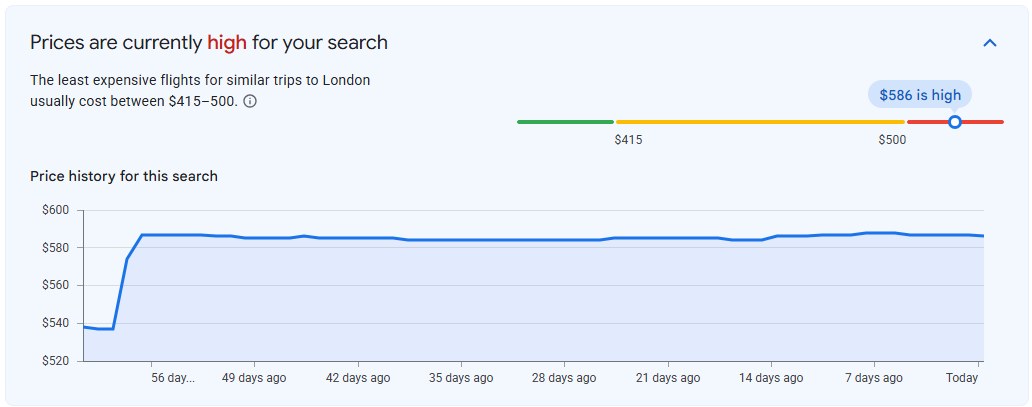
Google Flights price insights explained
Alerts tell you a price moved. The Tips, Dates, Airports and Price graph insights on the results page tell you whether to book now.
| Insight | What it means |
|---|---|
| Prices are less than usual | The fare is well below what similar trips cost in the past; click the tip to see the factors used |
| Prices are likely to increase | Google predicts with high confidence that prices will rise by roughly the amount shown (on mobile, under Book now) |
| Prices are unlikely to drop before you book | Google predicts with high confidence the fare will not drop before departure (on mobile, under Book soon) |
| Prices shown in green | The most affordable flights and booking options compared with the lowest-priced option |
| Dates | Which travel dates around your trip have the best fares |
| Airports | Cheaper fares from or to nearby alternative airports |
| Price graph | Fare trends by month or week; you can also turn on price tracking from here |
Predictions are based on past price trends. Future prices can still behave differently.
Best practices for maximizing flight price alerts
| Practice | Why it helps |
|---|---|
| Track the route with Any dates when your plans are flexible | You hear about the month's biggest drop on the route, not just one date pair |
| Track a specific flight once you have chosen it | You also get warned when its current fare is about to expire |
| Track nearby airports as separate routes | The Airports insight often shows cheaper fares from a different airport |
| Check the Cheapest tab before you book | It adds online travel agent fares, though some need a self-transfer |
| Compare the total, not the headline fare | The price covers the flight, VAT/GST and airport taxes, but baggage and card fees may be extra |
| Do not wait hours for a new alert | Flight prices on Google Flights update roughly once every 24 hours |
| Act on a likely-to-increase alert | The email includes the expected rise and a confidence level |
How to create a Google Alert for flight deals
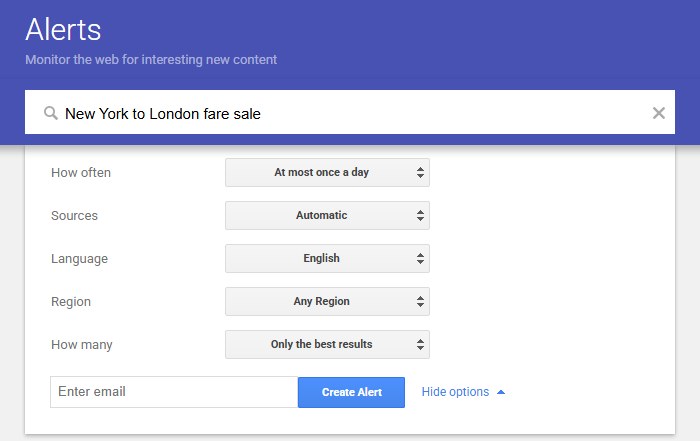
Google Alerts is a separate tool. It emails you new search results for a topic, such as fare sale news for your route, but it does not track prices.
- Go to
google.com/alertsand sign in. - In the box at the top, type a topic, for example
New York to London fare sale. - Click Show options to set how often you get emails, the sources, language, region and which account gets the alert.
- Click Create Alert.
- To change it later, click Edit next to the alert, make your changes and click Update Alert.
Troubleshooting common issues with Google flight alerts
Google Flights alerts are not arriving
Notifications are off for the route, or the emails are filtered out of your inbox.
- Open Tracked flights and check the route is listed.
- Select Add notification if notifications are off for it.
- In Gmail, click More > Spam in the left menu and look for Google Flights emails.
- If you find one, select it and click Not spam.
No alert even though the price changed a little
Tracked-date alerts fire on significant changes, and Any dates alerts look at the route's minimum price over a month.
- Open the route on Tracked flights to see the current price.
- Remember prices update about once every 24 hours.
- Track the specific flight as well if you need updates on one fare.
Track prices toggle is missing or does nothing
You are signed out, or the search is missing a destination or dates.
- Select Sign in at the top right of Google Flights.
- Enter both a departure airport and a destination.
- Pick dates in the calendar, or choose Any dates when you turn on tracking.
Tracked flights page is empty
Tracking was turned on under a different Google Account.
- Click your profile picture at the top right and switch to the other account.
- Reopen
google.com/travel/flights/saves. - If the routes appear there, remove them and track them again in the account you use.
Alert emails land under a Gmail label or get archived
A Gmail filter is moving them out of your inbox.
- In Gmail, click Settings > See all settings.
- Open Filters and Blocked Addresses.
- Find any filter that matches Google Flights emails and click Edit or Delete.
The price in the alert is different on the airline site
Fares change, and baggage or card fees can be added by the seller.
- Run the search again on Google Flights to get the latest fare.
- Compare the final total on the airline or travel agency checkout page.
- Report a mismatch with the feedback button in the lower-left corner of Google Flights.
Alternative strategies to use alongside Google flight alerts
| Strategy | Where to find it | What it adds |
|---|---|---|
| Price graph | Price graph in the search results | Fare trends by month or week for flexible trips |
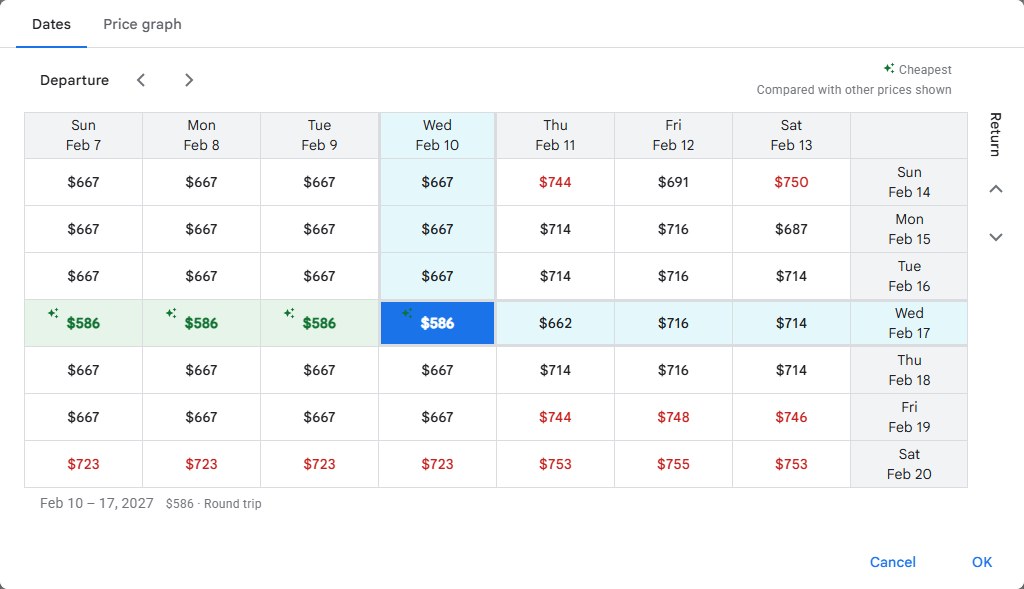
| Date grid | Dates in the search results | The cheapest days to depart and return |
| Alternative airports | Airports in the search results | Cheaper fares from nearby airports |
| Cheapest tab | Cheapest above the results | Online travel agent fares and self-transfer options |
| Destination browsing | The popular destinations list or world map on Google Flights | Ideas for cheaper places to fly |
| Google Alerts | google.com/alerts |
Emails about fare sale news for a topic you choose |
Google flight alerts FAQ
Do I need a Google Account to track flight prices?
Yes. The Google Flights Tracked flights page asks you to sign in to your Google Account before you can track prices or get notified about changes. Tracked routes are saved to that account, so sign in with the same one on every device.
How do I turn on price tracking on Google Flights?
Search a route on Google Flights with your departure airport and destination, then turn on Track prices above the results. Choose your searched dates or Any dates. To track one flight, select that flight first and turn on Track prices for it.
What does Any dates mean in Google Flights tracking?
Any dates watches the whole route rather than one date pair. You get an email when the route's minimum price drops significantly over a month. If no large drop happens, you get a regular email listing the best available flight prices instead.
Where do I see the flights I am tracking?
Open the Tracked flights page at google.com/travel/flights/saves while signed in. Every saved route and flight is listed there. Click or tap a route to open it, use Add notification to switch emails on or off, or use Remove to stop tracking.
How do I stop Google Flights emails?
Go to Tracked flights and select Add notification next to the route to switch its emails off while keeping the route saved. To stop tracking the route or flight completely, select Remove next to it instead.
Does Google Flights send notifications to my phone?
Yes. When you track a route or flight from an iPhone, iPad or Android device, Google Flights can send mobile notifications as well as emails when the price changes significantly. Tracking from a computer sends email updates.
How often does Google Flights update prices?
Flight prices on Google Flights are updated approximately once every 24 hours. A tracked route can therefore go a day without a change, and an alert reflects the latest daily update rather than a live, minute-by-minute fare.
Can I track a specific flight instead of a route?
Yes. Search the route, select the flight you want, then turn on Track prices for that flight. Tracking a single flight also gets you an email when its current fare is about to expire and the new fare is likely to cost more.
What does prices are likely to increase mean on Google Flights?
It means Google Flights predicts with high confidence that the fare will rise by roughly the amount shown in the coming days. The prediction comes from past price trends, so it can still be wrong. Tracked routes get this as an email too.
Do Google Flights prices include bag fees?
No. The price shown covers the flight itself, including VAT/GST and airport taxes. Baggage, credit card and other fees may be added and vary by airline or travel agency. Google Flights can show estimated bag fees, which may carry extra taxes.
Can I book a flight directly on Google Flights?
Usually not. When you click Select on a ticket, Google Flights normally sends you to the airline's website or an online travel agency to finish the booking. Changes, cancellations and booking problems are handled by that airline or agency.