If Find My was off before your iPhone was stolen, Apple cannot locate it, so the phone will not appear in the Find My app or at icloud.com/find.
What you can still do is confirm Find My really was off, give police and your carrier the serial number and IMEI, and secure your Apple Account before the thief gets into it.
Find a stolen iPhone when Find My is off
Work through these steps in order. The first one rules out the common case where Find My was on and the iPhone is just offline.
- Sign in at icloud.com/find with your Apple Account and look for the iPhone in the device list.
- If it is listed, select it and turn on Lost Mode with Mark As Lost.
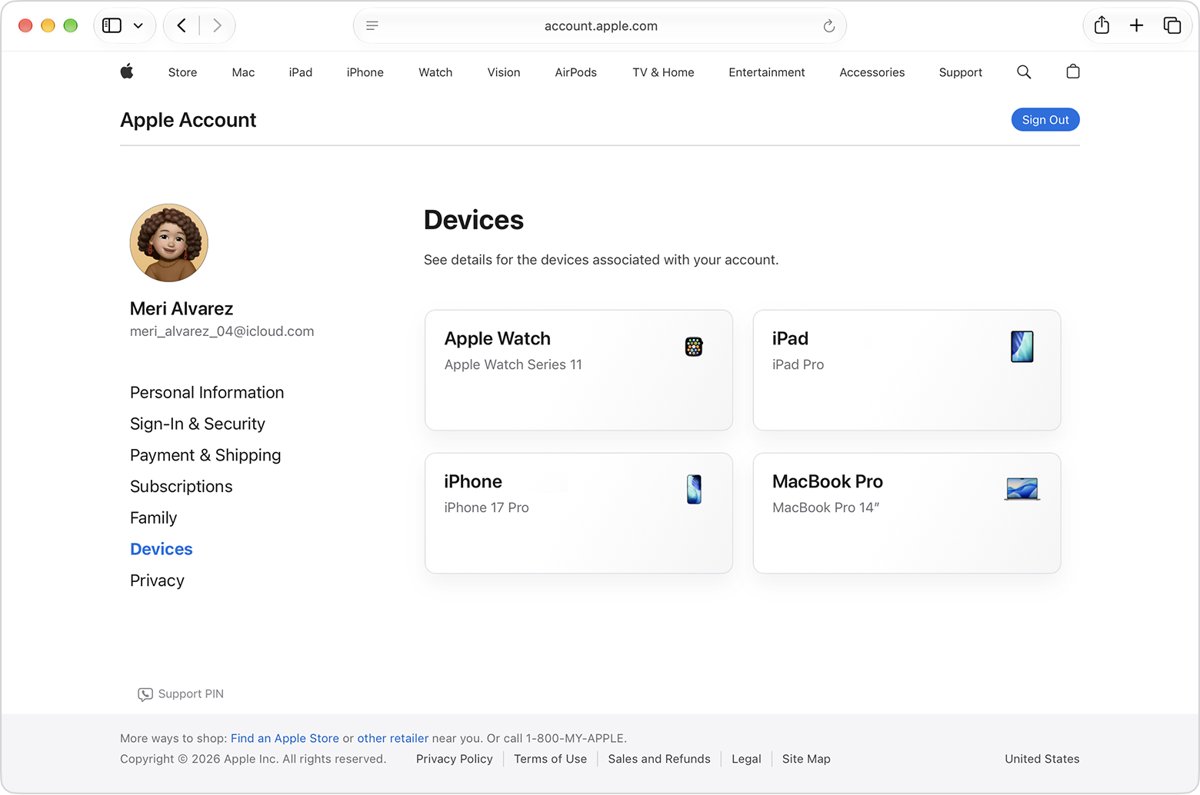
- If it is not listed, sign in at account.apple.com, open Devices and note the iPhone's serial number and IMEI.
- Report the theft to your local police and give them the serial number.
- Call your wireless carrier, ask it to disable your line and file a claim if your plan covers theft.
- Change your Apple Account password and review the account for changes you did not make.
Find My off vs iPhone offline in Find My
These two situations look alike at first, but only one of them leaves you without tracking.
| What you see | What it means | What you can do |
|---|---|---|
| iPhone is missing from icloud.com/find and the Find My app | Find My was not turned on before the iPhone was lost | Report it, block the line and secure your account; Apple cannot locate it |
| iPhone is listed with Offline under its name | Find My is on, but the iPhone is off or has no connection | See its last known location for up to 24 hours and select Notify me when found |
| iPhone is listed with a location on the map | Find My is on and the iPhone is online | Mark it as lost, play a sound or get directions |
| iPhone was listed earlier, then disappeared | Someone signed it out of your Apple Account on the device | Report it with the serial number and change your Apple Account password |
Check icloud.com/find for your stolen iPhone
You do not need a verification code to sign in to Find Devices, so you can check even when the stolen iPhone is your only trusted device.
- Open icloud.com/find in a browser on any computer or phone.
- Sign in with the Apple Account used on the stolen iPhone. If asked for a code, select Find Devices instead.
- Select the iPhone in the device list.
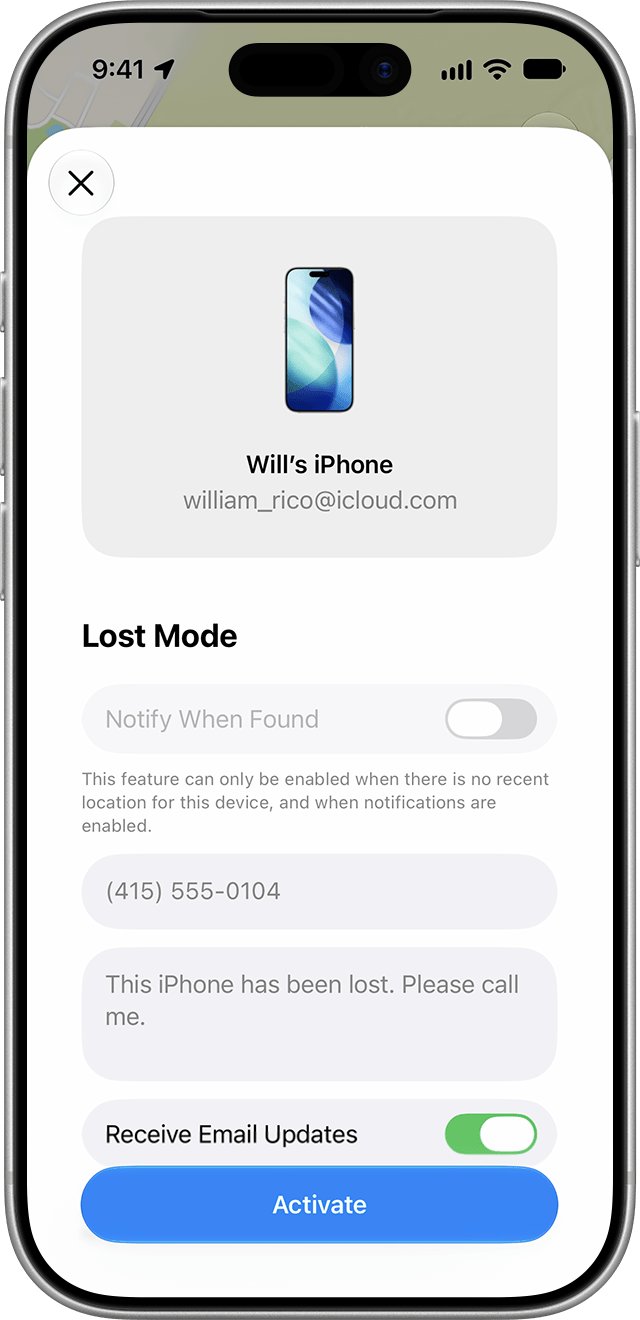
- If a location shows on the map, select Mark As Lost and add a contact number.
- If Offline shows, select Notify me when found to get an email when it reconnects.
- If the iPhone is not in the list at all, Find My was off and the remaining sections apply.
A family member in your Family Sharing group can also check from the Find My app on their own Apple device.
Find the serial number and IMEI of a stolen iPhone
Police and carriers ask for these numbers. You can get them without the phone.
| Where you look | Steps | What it shows |
|---|---|---|
| Apple Account website | Sign in at account.apple.com, select Devices, then select the stolen iPhone | Serial number, EID and IMEI/MEID |
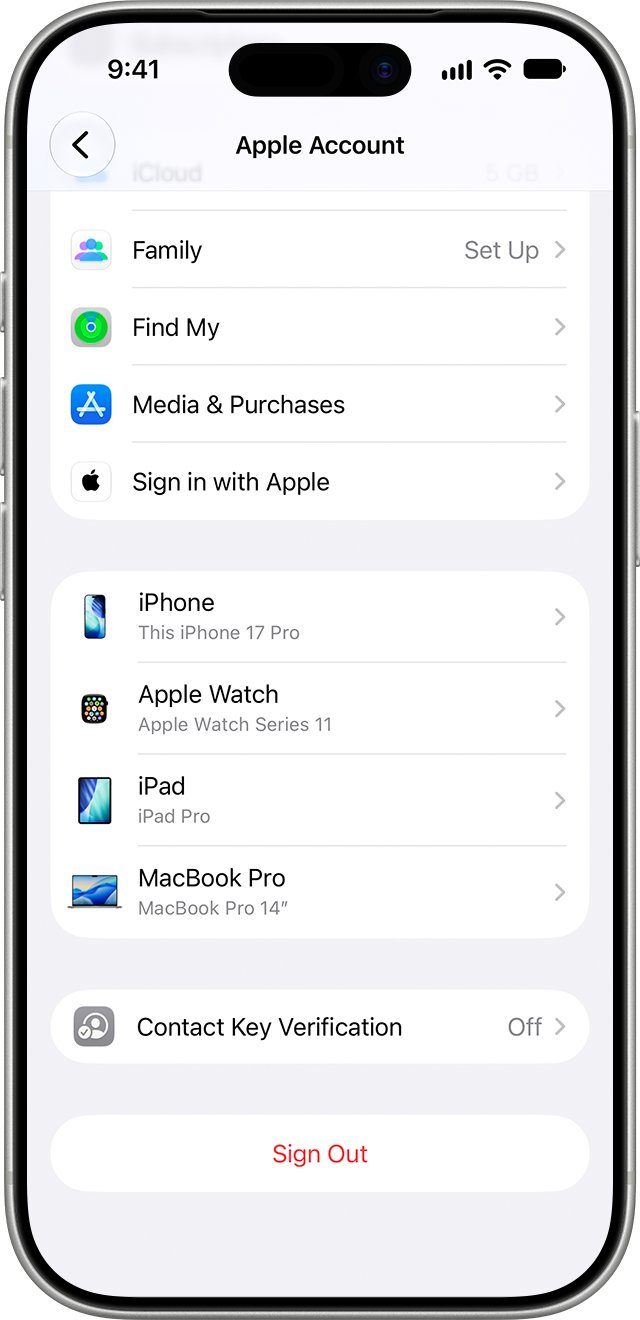
| Another iPhone or iPad on the same Apple Account | Open Settings, tap your name, then tap the stolen iPhone in the device list | Serial number and IMEI |
| Original box | Find the barcode label on the packaging | Serial number, EID and IMEI/MEID |
Report a stolen iPhone to police and your carrier
Apple's advice for a stolen iPhone without Find My is to involve the police and your carrier. Neither report locates the phone for you, but both create the record you need for a claim.
- File a report with your local police and give them the serial number and IMEI.
- Ask for a copy or reference number of the report.
- Call your wireless carrier and ask it to disable your account on the stolen iPhone.
- Ask the carrier to file a claim if your plan includes theft coverage.
- If you have AppleCare+ with Theft and Loss, file a claim with Apple as well.
Change Apple Account password after iPhone is stolen
A new password stops anyone who knows the old one from reaching your iCloud data, purchases and passwords.
| Device you have | Steps |
|---|---|
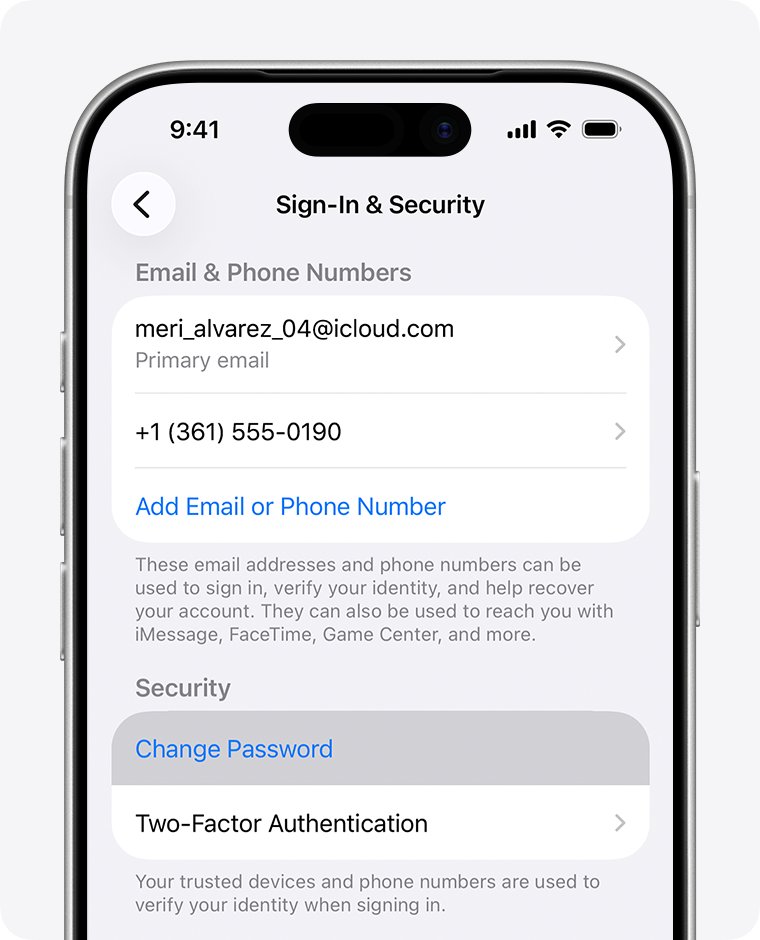
| Any browser | Go to account.apple.com, sign in, open Sign-In and Security and choose Password |
| Another iPhone or iPad | Open Settings, tap your name, tap Sign-In & Security, then tap Change Password |
| Mac | Open System Settings, click your name, select Sign-In & Security, then click Change Password |
On an iPhone, choose to sign out other devices when asked, so the stolen phone loses access.
Remove a stolen iPhone from your Apple Account
When Find My was off, removing the iPhone from your Apple Account signs it out remotely. Skip this step if the iPhone appears in Find My, because Apple advises keeping it there so Activation Lock stays on.
- Sign in at account.apple.com.
- Select Devices. Click View Details if your devices do not appear.
- Click the stolen iPhone's name.
- Click Remove from Account, review the message and confirm.
The iPhone can reappear in the list if it is still signed in and connects to the internet again, so change your password first.
Turn on Find My and Stolen Device Protection on iPhone
Neither setting can be switched on after a phone is gone. Set both up on your replacement iPhone the day you get it.
- Open Settings and tap your name.
- Tap Find My, then turn on Find My iPhone.
- Turn on Find My network so the iPhone can be located while offline.
- Turn on Send Last Location so the iPhone reports where it was when the battery runs low.
- Go back to Settings, tap Face ID & Passcode and enter your passcode.
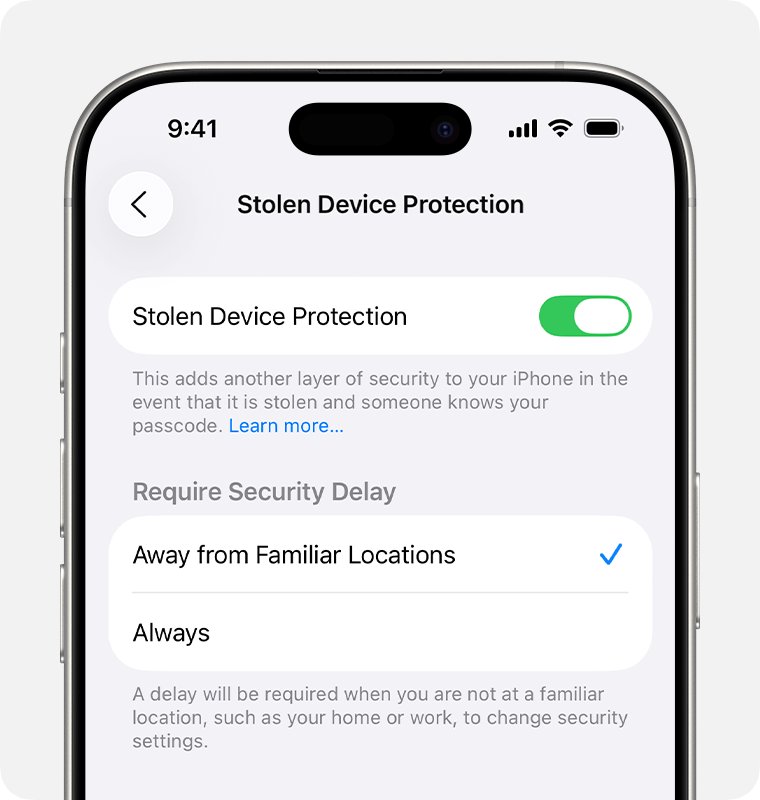
- Tap Stolen Device Protection and turn it on.
Stolen Device Protection needs iOS 17.3 or later, two-factor authentication, a passcode, Face ID or Touch ID, and Significant Locations turned on. While it is on, Find My cannot be turned off away from familiar places without Face ID or Touch ID.
Check that your stolen iPhone is locked out of your account
- Sign in at account.apple.com with your new password.
- Open Devices and confirm the stolen iPhone is no longer listed.
- Open Sign-In and Security and check the phone numbers and email addresses for changes you did not make.
- Confirm with your carrier that the line on the stolen iPhone is disabled.
Stolen iPhone tracking problems and fixes
Can I find my stolen phone by phone number?
Apple offers no tool that locates an iPhone from its phone number, and Find My works only when it was turned on in advance.
- Give the phone number, serial number and IMEI to the police with your report.
- Ask your carrier what it can do for a stolen device on your account.
- Avoid websites that promise to track a phone by number.
The thief turned off Find My on my iPhone
The thief had access to your unlocked iPhone or your account details, and Stolen Device Protection was not on to block the change.
- Change your Apple Account password from account.apple.com right away.
- Review Sign-In and Security for trusted phone numbers you did not add.
- Report the theft to police and your carrier with the serial number.
Someone says they found my iPhone and asks for a code
Apple never contacts owners to say a lost iPhone has been found, so the message is a phishing attempt.
- Do not reply with your passcode, password or any verification code.
- Do not open links in the message.
- Give the message to the police as part of your report.
Find My shows my iPhone as Offline
Find My is on, but the iPhone is powered off or has no connection.
- Note the last known location, which stays visible for up to 24 hours.
- Select Notify me when found in Find Devices.
- Mark it as lost so Lost Mode starts when it reconnects.
Stolen iPhone without Find My FAQ
How do I find my stolen iPhone?
Sign in at icloud.com/find or open the Find My app on another Apple device. If Find My was on, the iPhone shows on the map and you can mark it as lost. If it is not listed, report it to police and your carrier instead.
How do I find my stolen phone if Find My was off?
You cannot locate it with Apple's tools. Apple states that a device without Find My turned on will not appear at icloud.com/find or in the Find My app. Report it to police and your carrier, and change your Apple Account password.
How can I locate my stolen phone by its number?
There is no Apple service that locates an iPhone from its phone number. Give the number, serial number and IMEI to the police, and ask your carrier to disable the line. Find My is the only Apple tool that shows a location.
How do I find the location of a stolen mobile that is turned off?
If Find My was on, icloud.com/find shows the last known location for up to 24 hours after the phone goes offline. Turn on Notify me when found to get an email once it reconnects. With Find My off, no location is available.
What do I do right after my iPhone is stolen?
Check icloud.com/find first. Then get the serial number from account.apple.com, report the theft to police, ask your carrier to disable the line, and change your Apple Account password. File an AppleCare+ Theft and Loss claim if you have that plan.
Can Apple track a stolen iPhone for me?
No. Apple does not locate devices on request, and it states that it will never contact you to say your iPhone has been found. Location comes only from Find My, and only when it was on before the theft.
Can police track a stolen iPhone?
Police can use the serial number and IMEI you give them in their investigation and to identify the phone if it is recovered. Ask the officer what they need, and keep the report number for your carrier and any insurance claim.
How do I report a stolen iPhone?
Report it to your local police with the serial number, then contact your wireless carrier to disable your account and file a claim if covered. If you have AppleCare+ with Theft and Loss, file a claim with Apple too.