Apple USB power adapters run on 100-240V AC at 50-60Hz, so you can charge your iPhone overseas with no voltage converter and only the right plug shape for the outlet.
The sections below cover plug types by region, the Apple World Travel Adapter Kit, buying a charger abroad, wireless and portable options, and fixes when charging fails on a trip.
How to charge your iPhone overseas
These steps work in any country whose outlets supply 100-240V. The only part you normally need to change is the plug.
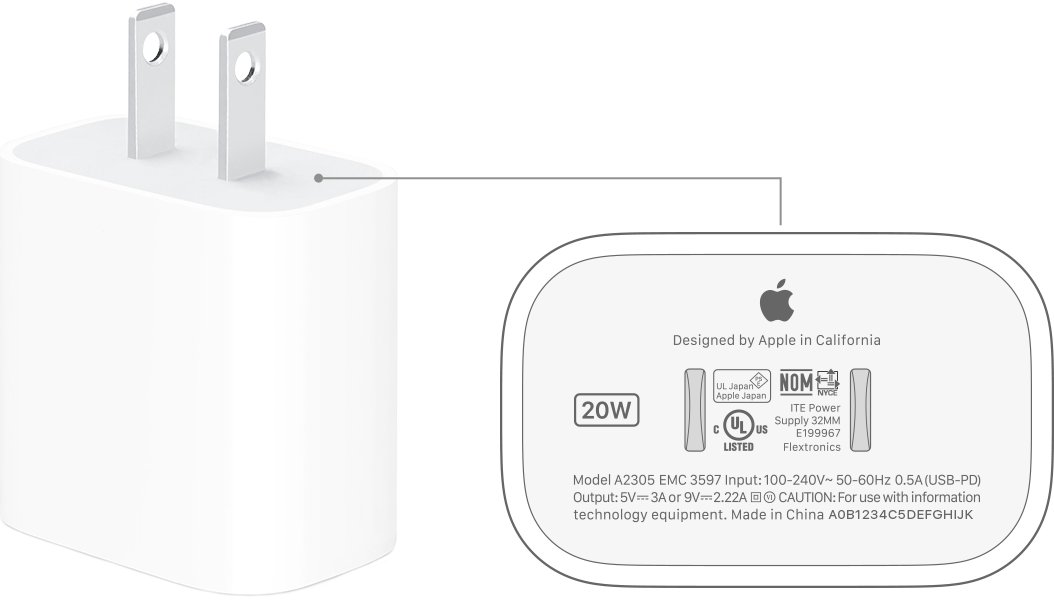
- Check your charger. Apple USB power adapters accept 100-240V AC at 50-60Hz; a non-Apple adapter must list the voltage used at your destination.
- Look up the outlet type at your destination, such as Type C for continental Europe or Type G for the United Kingdom.
- If the AC plug on your Apple adapter slides off, attach the matching adapter from the Apple World Travel Adapter Kit. If it does not, buy a USB-C power adapter made for local outlets.
- Fully insert the cable's USB connector into the power adapter.
- Plug the power adapter directly into the wall outlet.
- Connect the cable to your iPhone, then open Settings and tap Battery to see the charging status.
Can iPhone charge on 220V or 240V?
Yes. A 220V or 240V outlet sits inside the 100-240V line voltage Apple lists for its iPhone power adapters. The adapter converts that line voltage to the low USB output shown below, so the outlet voltage never reaches your iPhone directly.
| Apple adapter | Line voltage | Frequency | USB output |
|---|---|---|---|
| 40W Dynamic Power Adapter with 60W Max | 100 to 240V | 50 to 60Hz | 15-20V/2A or 9-15V/2.67A (AVS), 9V/3A, 5V/3A |
| 20W USB-C power adapter | 100 to 240V | 50 to 60Hz | 5V/3A or 9V/2.2A |
| 18W USB-C power adapter | 100 to 240V | 50 to 60Hz | 5V/3A or 9V/2A |
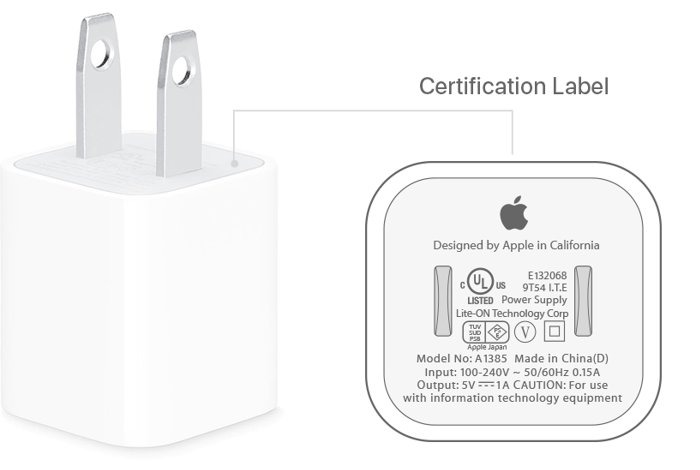
| 5W USB power adapter | 100 to 240V | 50 to 60Hz | 5V/1A |
Apple states the same 100-240V input for its USB power adapters as a group, so the small cube from an older iPhone qualifies too. The output column is easier to follow once you know what volts and amps mean on an Apple adapter.
Apple's 40W adapter is not sold in every country or region, so check availability before you plan to buy one on the trip.
Do I need a voltage converter for my iPhone overseas?
A plug adapter and a voltage converter do different jobs. Apple's travel adapters change the physical pin or blade shape of your power adapter, and they do not convert electrical voltage or frequency.
Leave the voltage converter at home when you charge through an Apple USB power adapter. The adapter already accepts 100-240V AC at 50-60Hz, so a plug that fits the outlet is the only missing part. Check the input rating on any non-Apple charger, because this range is only stated for Apple's own adapters.
International charger for iPhone: travel kit, local adapter or computer port
| Your situation | Use this | Why |
|---|---|---|
| Your Apple adapter has a removable AC plug | Apple World Travel Adapter Kit | Five plug types slide onto the adapter, so one charger covers the trip |
| Your adapter's plug does not slide off | A USB-C power adapter bought for the destination's outlets | The kit attaches only to a removable AC plug |
| You carry a non-Apple charger | Check its input rating, then a compliant local adapter if needed | Apple says the kit should only be used with genuine Apple power adapters |
| You have no adapter but do have a laptop | A USB-C cable to the computer's USB-C port | The laptop's own charger deals with the outlet, and your iPhone charges from its port |
| You own an iPhone Air and will be away from outlets | iPhone Air MagSafe Battery | It adds up to 65% more charge with no outlet |
Apple's safety guidance says to plug an Apple USB power adapter directly into a power outlet. Apple publishes no guidance on third-party plug converters, so a local adapter is the route that matches that wording when the kit does not fit.
iPhone charger for Europe, the UK and other countries
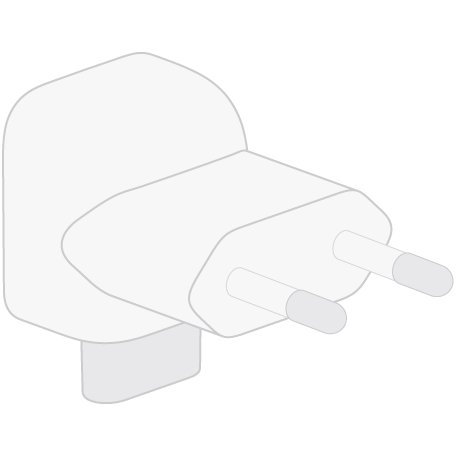
Charging a US iPhone in the UK or Europe only needs a different plug shape. These are the five types in Apple's kit and the places Apple lists for each.
| Plug type | Countries or regions | What the pins look like |
|---|---|---|
| Type A | North America, Japan | Two flat, parallel blades with holes |
| Type C | Continental Europe, Brazil | Two round, thin pins |
| Type D | India | Two round, thick pins |
| Type G | United Kingdom, United Arab Emirates, Saudi Arabia, Singapore | Three blades without holes |
| Type I | Australia, New Zealand | Two flat, angled blades without holes |
A plug type can work in more places than the packaging lists. Check the outlet design and electrical standards for your destination before you travel, because plug designs follow national or regional standards.
How to use the Apple World Travel Adapter Kit with iPhone
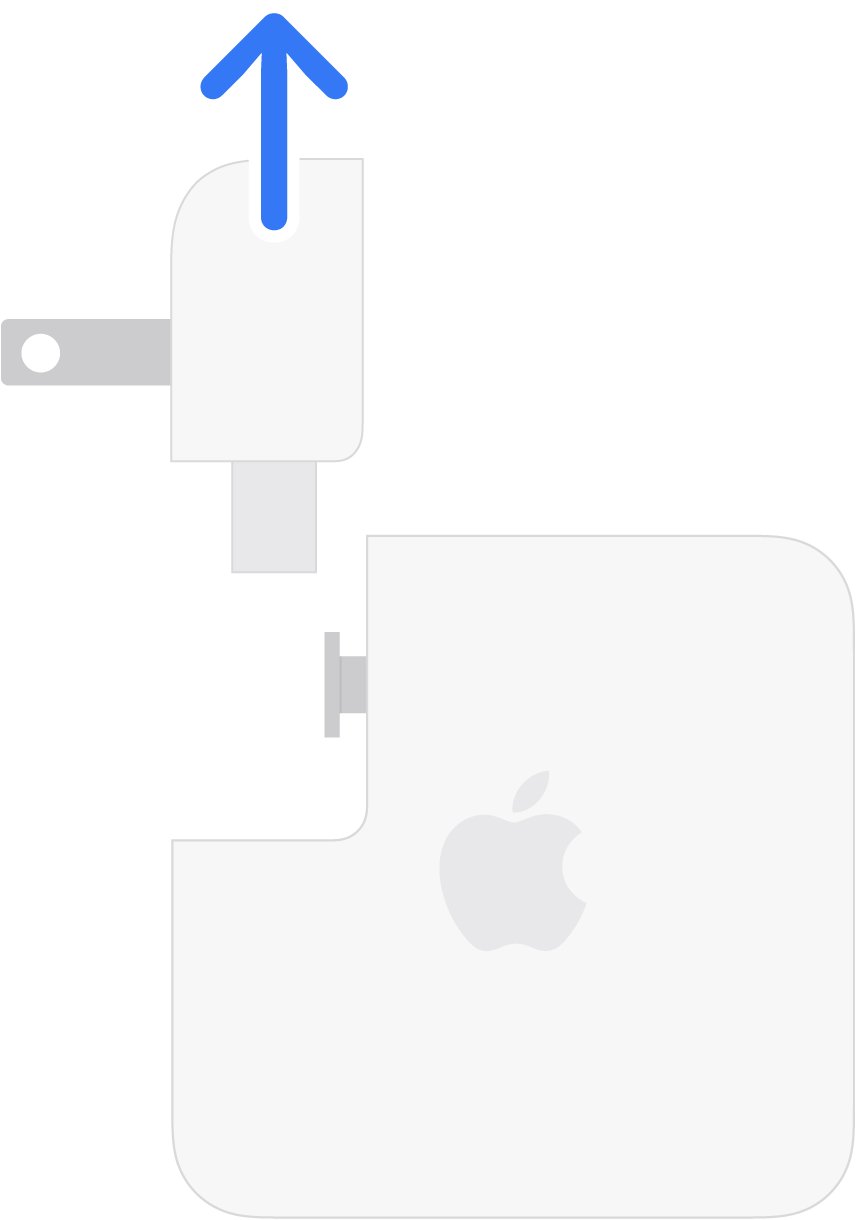
The kit works with Apple power adapters that have a removable AC plug, also called a duckhead. It uses AC Connector 2, the pill-shaped connection on newer adapters, and does not fit the notched AC Connector 1.
- Unplug the power adapter from the wall outlet and disconnect it from your iPhone.
- Slide the AC plug up and away from the power adapter. Do not twist it or pull it at an angle.
- Align the travel adapter with the track on your Apple power adapter.
- Slide the travel adapter securely into place.
- Plug the assembled power adapter into the wall outlet.
- Connect the power adapter to your iPhone with the charging cable.
Apple sells the kit in its online store, listed at $39 in the US as of November 2026.
Where to get an iPhone charger overseas
Apple USB power adapters are sold by Apple and authorized Apple resellers. Third-party adapters also work if they meet the safety standards that apply where you are.
- Look for an Apple Store or authorized Apple reseller at your destination, or choose a reputable local electronics seller.
- Pick a USB-C power adapter with the local plug built in. For a non-Apple adapter, check that it complies with USB 2.0 or later and with local and international safety standards.
- Read the input rating on the adapter and confirm it covers the local voltage.
- Match the wattage to your iPhone using the table in the next section.
- Buy a matching cable if yours is missing: USB-C for iPhone 15 and later, or USB-C to Lightning for iPhone 14 and earlier.
- Plug the adapter directly into the wall outlet and check for damage or heat before you leave it charging.
Travel charger for iPhone: wattage and cable by model
Any compliant adapter will charge your iPhone, but these are the figures Apple gives for fast charging. Lower wattage still works and simply takes longer.
| iPhone model | Cable | Adapter for fast charging | Apple's stated time |
|---|---|---|---|
| iPhone 18 Pro, iPhone 18 Pro Max | USB-C | Apple 40W Dynamic with 60W Max, or a comparable 60W-capable AVS adapter with USB-PD 3.2 | Up to 50% in around 15 minutes |
| iPhone Duo | USB-C | Apple 40W Dynamic with 60W Max, or a comparable 60W-capable AVS adapter with USB-PD 3.2 | Up to 50% in around 20 minutes |
| iPhone 17, iPhone 17 Pro, iPhone 17 Pro Max | USB-C | 40W or higher | Up to 50% in around 20 minutes |
| iPhone 17e, iPhone Air | USB-C | 20W or higher | Up to 50% in around 30 minutes |
| iPhone 15 and iPhone 16 models | USB-C | Apple 18W or greater USB-C, or a comparable USB-PD adapter | Varies by model |
| iPhone 8 to iPhone 14 models | USB-C to Lightning | Apple 18W or greater USB-C, or a comparable USB-PD adapter | Varies by model |
With a USB-A charger, iPhone 15 and later charge at a maximum of 7.5W. A dual-port charger splits its power too: on Apple's 35W Dual USB-C Port adapter, an iPhone and an iPad each get up to 17.5W.
If you own an iPhone 17 Pro Max, compare the wattage and cable to buy for that model before you pack.
iPhone wireless travel charger: how to use MagSafe abroad
A MagSafe Charger still draws power through a USB-C adapter, so the plug and voltage rules above apply to that adapter. Apple recommends 30W or greater for up to 25W on supported models, and 20W or greater for up to 15W on iPhone 15 and earlier.
- Connect the USB-C connector on the MagSafe Charger to a USB-C power adapter.
- Plug the adapter into the wall outlet before you put your iPhone on the charger, so MagSafe can verify it is safe to deliver maximum power.
- Place the charger face up on a flat surface, clear of metal objects.
- Remove credit cards, security badges, passports and key fobs from between your iPhone and the charger.
- Place your iPhone on the charger.
With iPhone 15 and later in the European Union or a European Free Trade Association country, the first wireless charge shows a notification. It is an EU-mandated notice that wireless charging might use more power than wired charging, not a fault.
Portable iPhone charger for travel: iPhone Air MagSafe Battery
Apple's iPhone Air MagSafe Battery pairs only with iPhone Air and adds up to 65% charge. For other iPhone models you need a third-party battery that meets the same safety standards.
- Plug a USB-C cable into the connector on the MagSafe Battery.
- Plug the other end into a 20W or higher USB power adapter, then plug the adapter into the outlet.
- Wait for the status light to flash green, which means the battery is fully charged. Amber means it needs more time.
- Attach the battery magnetically to the back of your iPhone Air; charging starts automatically and the status appears on the Lock Screen.
An adapter below 20W charges the battery more slowly, and Apple recommends 30W or higher for the fastest charge.
How to tell if your iPhone is charging properly abroad
- Connect your iPhone to the charger and wait a moment.
- Open Settings and tap Battery.
- On iOS 26 and later, read the estimate of how long your iPhone needs to reach 80 percent, or 100 percent or your charge limit if it is already past 80. The same estimate appears near the top of the Lock Screen.
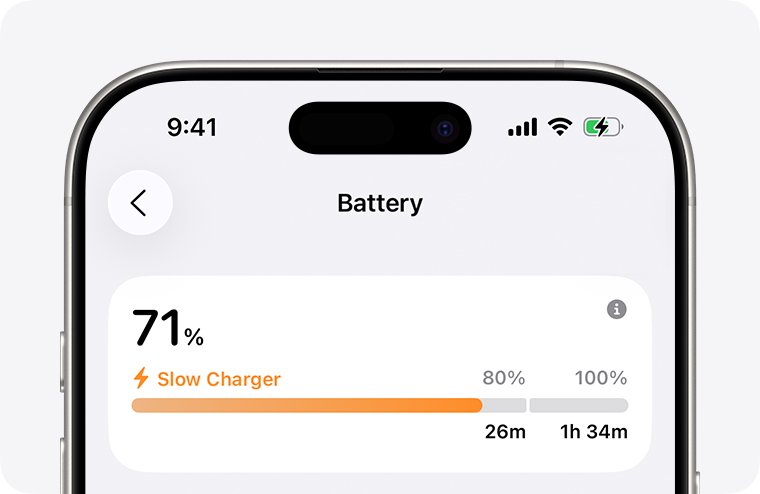
- Look for a Slow Charger or Incompatible Charger message on the same screen, and use the matching fix below if one appears.
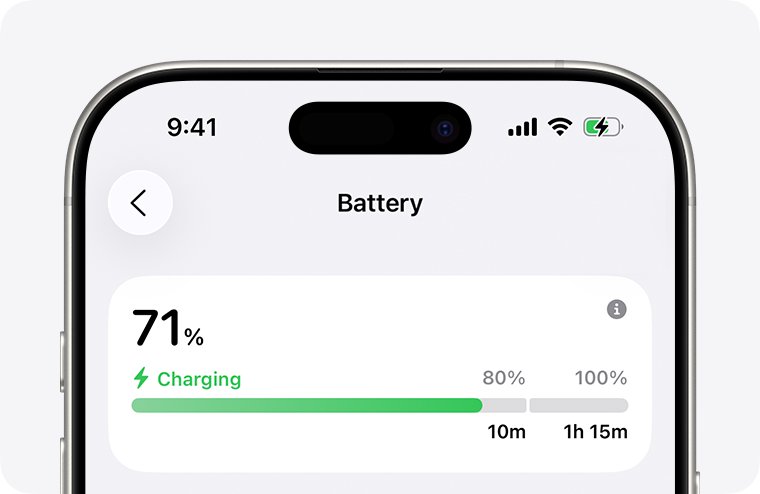
iPhone not charging overseas
Most travel charging problems come from the adapter, the plug or the room temperature rather than the outlet voltage. Match what you see to a group below. If none fits, you can fix an iPhone plugged in but not charging with the wider set of checks.
Slow Charger message on the Lock Screen
iOS 18 and later show this when a higher-wattage charger could improve charging. It does not mean your iPhone or charger is faulty.
- Open Settings, tap Battery and tap the Info button for details.
- Use a USB Power Delivery charger of 20W or more if you need a faster charge.
- Unplug the second device from a dual-port charger, or move away from a USB hub or car port.
Incompatible Charger message
iOS 26 shows this in Battery settings when a charger is connected but is not charging your iPhone.
- Unplug the charger from the wall and from your iPhone.
- Reconnect it with the USB connector fully inserted into the adapter before you plug in at the wall.
- Try a different compliant power adapter and cable.
- Open Settings and tap Battery to see whether the message has gone.
Charging stops or holds at 80 percent on a hot trip
iPhone can pause charging in extreme temperatures, and software might limit charging above 80 percent when recommended battery temperatures are exceeded.
- Move your iPhone and charger to a cooler place.
- Avoid charging in ambient temperatures above 95 degrees F (35 degrees C).
- Open Settings and tap Battery to see whether charging was on hold.
- Leave it connected; charging resumes when the battery returns to its normal range.
iPhone holds at 80 percent overnight before an early flight
Optimized Battery Charging delays charging past 80 percent when it predicts a long time on the charger.
- Find the Optimized Battery Charging notification on the Lock Screen.
- Touch and hold the notification.
- Tap Charge Now.
The travel adapter from the kit will not slide on
Your power adapter may use AC Connector 1, or it may have no removable plug. The kit uses AC Connector 2, and the two types are not cross-compatible.
- Compare the connection on your adapter: AC Connector 1 is notched and AC Connector 2 is pill-shaped.
- Stop if the parts do not match, and do not force the travel adapter on.
- Buy a travel adapter with the correct connector, or a USB-C adapter for local outlets.
A blade or prong is bent, loose or stuck in the outlet
Physical damage to the plug is a safety risk, and Apple treats it as a reason to stop using the adapter at once.
- Do not repair, touch or remove the stuck part, and do not use that outlet.
- Turn off power to the outlet at the circuit breaker or fuse box.
- Contact a qualified electrician if you cannot turn the power off or cannot confirm it is off, and tell your hotel or host.
- Stop using the damaged adapter and get a replacement.
The adapter stops working after a power cut or unstable supply
Electrical spikes and brown-outs can damage electrical equipment even when the stated voltage is within range.
- Unplug the adapter and inspect it for discoloration, visible damage or popping sounds.
- Stop using it if you see any of those signs, and arrange a replacement.
- Charge from a different outlet or location until the supply settles.
Cheap international cell phone charger: is it safe for iPhone?
Moisture is the other travel risk. Never charge when moisture is present, avoid using the adapter near a sink, bathtub or shower, and do not connect or disconnect it with wet hands.
Buy a cheap charger only if it complies with USB 2.0 or later and with the safety standards of the country you use it in. Apple warns that other adapters might not meet applicable safety standards and that charging with them could pose a risk of death or injury. Price says nothing about compliance, so an uncertified no-name adapter is not worth the saving.
Stop using any adapter if its plug or prongs are damaged, its cable is frayed, liquid has reached it, or its enclosure was damaged in a drop.
Charging iPhone overseas FAQ
Can iPhone charge on 240V?
Yes. Apple USB power adapters are designed for power sources rated at 100V AC to 240V AC, at 50Hz to 60Hz. A 240V outlet is within that range, so you only need a plug that fits the outlet.
Can iPhone be charged with 220V?
Yes. 220V falls inside the 100-240V range Apple states for its USB power adapters, so an Apple adapter works on a 220V supply with no converter. Check the input rating on a non-Apple charger before you plug it in.
Can iPhones be charged at 220 volts without a converter?
Yes, through an Apple USB power adapter. The adapter takes the 220-volt supply and delivers low-voltage USB power to your iPhone. Travel adapters from Apple's kit only change the plug shape and do not convert voltage or frequency.
How to charge an iPhone?
Connect the cable to your iPhone and to a compatible USB power adapter, then plug the adapter into a wall outlet. You can also connect to a computer's USB port, or place your iPhone on a MagSafe Charger or Qi-certified charger.
How to charge iPhone to iPhone?
iPhone 15 and later can charge small devices that support USB Power Delivery at up to 4.5 watts, over a USB-C cable. Apple describes this for AirPods, Apple Watch and other small devices, and it does not list charging another iPhone.
Where to get iPhone charger?
Buy one from Apple or an authorized Apple reseller, which sell Apple USB power adapters and cables separately. Third-party chargers also work if they comply with USB 2.0 or later and with applicable country regulations and safety standards.
Where to get iPhone charging port fixed?
Contact Apple or an Apple Authorized Service Provider. Apple says iPhone should only be serviced by a trained technician, and that repairs by untrained people or with non-genuine parts may affect the safety and functionality of the device.
Should I charge my iPhone to 80 or 100 percent?
Either is fine, and iPhone 15 and later let you set a limit from 80 to 100 percent in Settings under Battery and Charging. Choose 100 when you need a full day away from outlets. Your daily routine decides when to charge your iPhone the rest of the time.