Steamworks Common Redistributables are shared Windows runtimes, such as Microsoft Visual C++, .NET and DirectX 9, that Steam installs once so the games that need them can start.
This guide explains what the components are, why Steam installs them, whether you can remove them, and how to fix the errors they cause.
What Steamworks Common Redistributables are
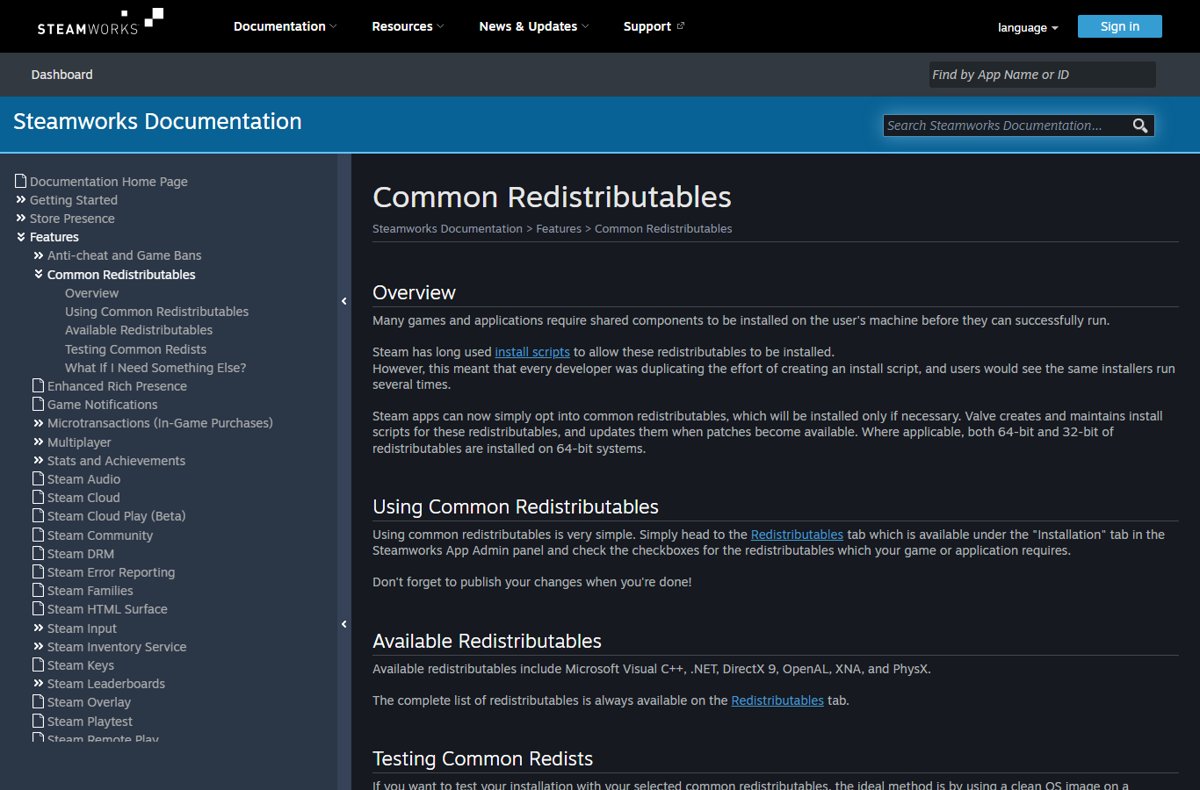
Many games need shared components on your PC before they can run. A game developer ticks the components a game needs in the Steamworks admin panel, and Steam installs them only if your PC lacks them.
Valve writes and maintains the install scripts for these components and updates them when patches become available. On 64-bit Windows, Steam installs both the 64-bit and 32-bit versions where applicable.
Leave Steamworks Common Redistributables alone. It is not a game and not malware; it is Valve's shared installer for runtimes that your games depend on. Removing these runtimes breaks every game that uses them, and Steam only reinstalls a component when its own record says it is missing.
Why Steam installs them with games
Before Valve offered common redistributables, every developer wrote an install script for the same runtimes. You saw the same installers run several times, once per game.
Now a game simply opts in, and Steam handles the shared components centrally.
| Stage | What Steam does | What you see |
|---|---|---|
| Developer setup | The developer checks the required runtimes on the Redistributables tab under Installation in Steamworks App Admin | Nothing; this happens before the game ships |
| You install the game | Steam installs the game and notes which redistributables it opted into | A normal game download |
| First launch | Steam runs the signed install scripts for the game before it starts | A short first-run step, often silent, before the game window opens |
| Already installed | Steam checks its registry record and skips any runtime marked as installed | No installer on later launches |
| Installer fails | A non-zero exit code means the runtime is not marked as installed, so Steam tries again next launch | The same installer reappears every time you launch |
Steam records each installed common redistributable as its own registry subkey. That record is why a second game does not reinstall Visual C++ when the first game already did.
Common components included in Steamworks redistributables
Valve's list of available redistributables includes Microsoft Visual C++, .NET, DirectX 9, OpenAL, XNA and PhysX. The full list lives on the developer's Redistributables tab, so a game may pull in others too.
| Component | What games use it for | Typical error when it is missing |
|---|---|---|
| Microsoft Visual C++ Redistributable | Microsoft C and C++ runtime libraries for games built with Visual Studio | A missing MSVCP or VCRUNTIME DLL message at launch |
| Microsoft .NET | The runtime for games and launchers written in .NET languages | A .NET Framework or runtime error before the game opens |
| DirectX 9 (legacy runtime) | Older D3DX helper libraries that are not part of modern Windows | A missing d3dx9 DLL, such as d3dx9_35.dll |
| OpenAL | Cross-platform 3D audio | No sound or an audio initialisation error |
| Microsoft XNA | Microsoft's older game framework, used by many indie titles | An XNA Framework error at launch |
| NVIDIA PhysX | Physics simulation for games built on PhysX | A PhysX error or crash on start |
Microsoft notes that Visual C++ 2017 and later share the same v14 files, while 2013 and earlier install side by side. That is why you can see several Visual C++ entries in Installed apps at once.
Can you uninstall or hide Steamworks Common Redistributables?
You can remove the runtimes through Windows, but there is rarely a reason to. Valve tells developers not to uninstall common redistributables such as DirectX and the MSVC runtime, because other games are likely to use them.
| Your situation | What to do | Why |
|---|---|---|
| You think it is malware | Keep it; it comes from Valve and installs Microsoft and vendor runtimes | Steam only runs install scripts that are cryptographically signed through Steamworks |
| You want it out of your library view | Hide it from your library if your Steam client offers that option, and leave the files alone | Hiding is a display change and does not remove any runtime |
| You want to free disk space | Uninstall games you no longer play instead | The shared runtimes are what every remaining game still needs |
| You removed a Visual C++ or .NET runtime in Windows and a game broke | Force Steam to reinstall it with the method below | Steam's record still says the runtime is installed, so it will not run the installer by itself |
| You uninstalled the only game that used a runtime | Leaving it installed is the safer choice | Another game may rely on the same runtime later, and Steam would install it again anyway |
How Steam redistributable updates and storage use work
Valve updates the install scripts for common redistributables when Microsoft or another vendor publishes a patch. Steam delivers those changes the same way it updates games.
| Question | How it works | Where to change it |
|---|---|---|
| When do updates download? | Steam downloads updates automatically based on your download settings | Steam > Settings > Downloads |
| Can you see what is downloading? | The Download Manager shows progress, the queue and completed updates | The Downloads link at the bottom of the Steam client |
| Can you limit update times? | Check Only auto-update games and set the hours | Steam > Settings > Downloads |
| Can you delay one game's updates? | Choose Only update this game when I launch it | Game page > Manage > Properties > Updates |
| Do two games keep two copies? | No; a runtime marked as installed is skipped for the next game | Nothing to change |
| Running short of space? | Move a game to another Steam Library folder without downloading it again | Properties > Installed Files > Move Install Folder |
Valve does not publish a fixed size for the redistributables, because each game pulls only the components it opted into.
Verify game files to reinstall Steam redistributables
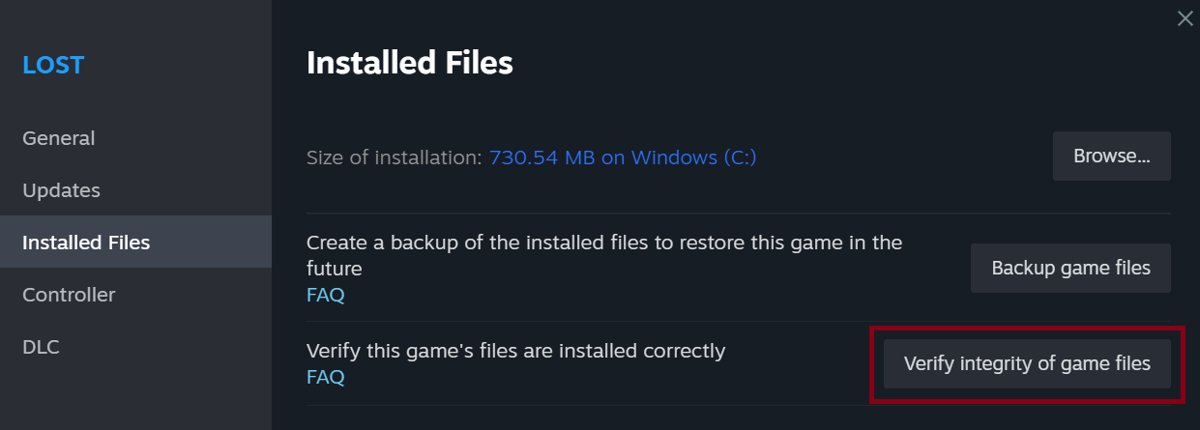
Start here when a single game reports a missing runtime. Steam checks the game's files, restores any missing redistributable installers, and runs its install scripts again on launch.
- Restart your computer and open Steam.
- Open your Library, then right-click the game or select the gear icon on its library page.
- Select Properties.
- Open the Installed Files tab and click Verify integrity of game files.
- Wait for the check to finish; a note that one or more files failed to verify is normal for local configuration files.
- Launch the game and let any first-run installer complete.
Do not verify several games at once, and avoid running it during a virus scan or a disk defragment.
Force Steam to reinstall common redistributables from the registry
Steam skips a redistributable when its registry record says the component is installed. Valve documents deleting that record to make Steam install the component again.
Use this when you removed a runtime in Windows yourself, or when verifying files did not help. Back up the key first.
- Close Steam completely.
- Press Win + R, type
regeditand press Enter, then select Yes at the prompt. - Paste
HKEY_LOCAL_MACHINE\SOFTWARE\Wow6432Node\Valve\Steam\Apps\CommonRedistinto the address bar and press Enter. On 32-bit Windows, useHKEY_LOCAL_MACHINE\SOFTWARE\Valve\Steam\Apps\CommonRedistinstead. - Right-click CommonRedist, select Export and save the backup file.
- Expand CommonRedist, right-click the subkey named after the failing component and select Delete, then confirm.
- Open Steam and launch the game so Steam installs that component again.
Each installed redistributable has its own subkey, so delete only the one you need. Double-click the exported file to restore the record if you change your mind.
Check that Steam installed the redistributables
- Launch the game again; the first-run installer should not reappear.
- Open Settings > Apps > Installed apps and search for Visual C++ to see the runtimes now present.
- In Registry Editor, confirm a new subkey exists under CommonRedist for the component you reinstalled.
- For DirectX, press Win + R, type
dxdiagand press Enter to read the DirectX version on the System tab.
The dxdiag version shows the built-in DirectX of Windows, such as DirectX 12. The legacy DirectX 9 files a game needs do not change that number.
Fixing common Steam redistributable-related errors
Each fix below starts with the least invasive step. Run the next one only if the error returns.
A Visual C++ error or missing MSVCP or VCRUNTIME DLL
The game needs a Visual C++ runtime that is missing, damaged or older than the one it was built with.
- Verify the game's files from Properties > Installed Files.
- Launch the game and let the first-run installer finish.
- If the error remains, delete the Visual C++ subkey under CommonRedist and launch again.
- Contact the game's developer if it still fails; Microsoft directs players fixing a specific app to the app vendor.
A DirectX error or missing d3dx9 DLL
Older games use legacy D3DX libraries that Windows 10 and Windows 11 do not include.
- Verify the game's files so Steam restores the DirectX 9 installer.
- Delete the DirectX subkey under CommonRedist if verifying alone does not help.
- Launch the game to rerun the installer; it adds the legacy files without changing your DirectX 12 install.
- Run Windows Update, since newer DirectX versions arrive only that way on Windows 10 and Windows 11.
A .NET Framework error before the game opens
The .NET runtime the game opted into is missing or did not finish installing.
- Restart Windows, then verify the game's files and launch it again.
- Delete the .NET subkey under CommonRedist and relaunch if the error repeats.
The same redistributable installer runs every time you launch the game
The installer returns a non-zero exit code, so Steam never marks it as installed.
- Let the installer finish once without cancelling it.
- Restart Windows, since a pending reboot can make an installer report failure.
- Verify the game's files.
- Report the loop to the game's developer; the fix sits in the game's install settings, not on your PC.
Steamworks Common Redistributables FAQ
Can I uninstall Steamworks Common Redistributables?
You can remove the individual runtimes in Windows, but it breaks the games that use them. Steam will not reinstall a runtime by itself while its registry record says it is installed. Keep them unless a specific runtime is damaged, and reinstall that one instead.
Why did Steamworks Common Redistributables appear in my library?
A game you installed opted into one or more shared runtimes, such as Visual C++ or DirectX 9. Steam installs those runtimes once for every game that needs them, so the item appears after your first such game.
Is Steamworks Common Redistributables a game or malware?
Neither. It is Valve's set of installers for Microsoft and vendor runtimes, such as Visual C++, .NET, DirectX 9, OpenAL, XNA and PhysX. Steam only runs install scripts that were signed during the developer's build.
Can I hide Steamworks Common Redistributables from my Steam library?
Hiding it only changes what your library shows. The runtimes stay installed and every game keeps working, so hiding is the safe way to tidy the list. Do not delete the runtimes to make the entry disappear.
What should I do if a game has a DirectX, Visual C++, or .NET error?
Verify the game's files first from Properties > Installed Files, then launch the game so Steam reruns its installers. If the error persists, delete that component's subkey under the CommonRedist registry key and launch the game again.
How does Steam work with these runtimes on first launch?
When you start a game, Steam scans its files for signed install scripts and runs them before the game opens. A runtime that exits successfully is recorded in the registry, so later launches and other games skip it.
Does Steam install redistributables on Mac, Linux or Steam Deck?
No. Install scripts are primarily a Windows feature. Valve states there is no Linux or SteamOS install script support and no support for Mac redistributables, so Mac games bundle their own installers.
How do I get to the Steam settings for updates?
Open the Steam client and select Steam > Settings > Downloads. There you can set a bandwidth limit and restrict automatic updates to set hours. Per-game update choices sit under Manage > Properties > Updates.
Bottom line: should you remove Steamworks Common Redistributables?
Keep Steamworks Common Redistributables installed, and repair a single runtime when a game reports it missing. They are shared, Valve-maintained runtimes that several games rely on. Verifying game files or deleting one CommonRedist subkey fixes almost every error without touching the rest.


![How to enable DLNA media server in Windows 11 [solution]](https://techdows.com/wp-content/uploads/2026/10/Windows-11-Network-folder-banner-offering-to-turn-on-network-discovery.jpg)