The 3G shutdown affects the iPhone 5s, iPhone 5c and every older iPhone, while the iPhone 6, iPhone 6 Plus and every later model keep working because they can make calls over LTE.
This guide lists the affected models, explains why the iPhone 5 generation is caught out even with LTE, gives the US carrier shutdown dates, and shows how to fix No Service on a phone that should still work.
What phones are affected by 3G shutdown
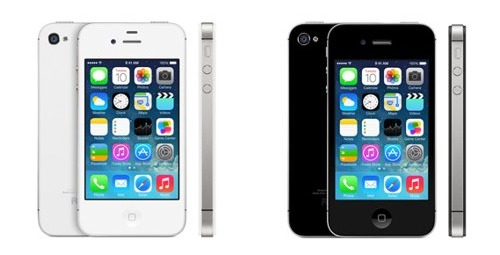
Apple's own guidance draws the line at the iPhone 6. If you see No Service on an iPhone 5s, iPhone 5c or earlier, Apple tells you to contact your carrier about your options. On an iPhone 6 or later, Apple tells you to check a setting instead, and it states that iPhones that support 5G are not affected at all.
| iPhone model | Year introduced | Affected by the 3G shutdown? | Why |
|---|---|---|---|
| iPhone (original) | 2007 | Yes | GSM/EDGE only, no 3G or LTE |
| iPhone 3G, iPhone 3GS | 2008, 2009 | Yes | 3G (UMTS) and 2G only |
| iPhone 4, iPhone 4s | 2010, 2011 | Yes | 3G (UMTS or CDMA EV-DO) and 2G only |
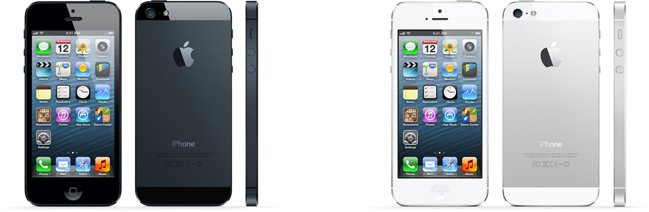
| iPhone 5, iPhone 5c, iPhone 5s | 2012, 2013 | Yes | LTE for data, but no Voice over LTE (VoLTE) for calls |
| iPhone 6, iPhone 6 Plus, iPhone 6s, iPhone SE (1st generation) | 2014 to 2016 | No | Supports Voice over LTE |
| iPhone 7 and later | 2016 onward | No | Supports Voice over LTE; iPhone 12 and later also use 5G |
An unaffected iPhone can still show No Service if LTE is switched off in Settings. The fix for that is further down.
Which iPhones are 3G only
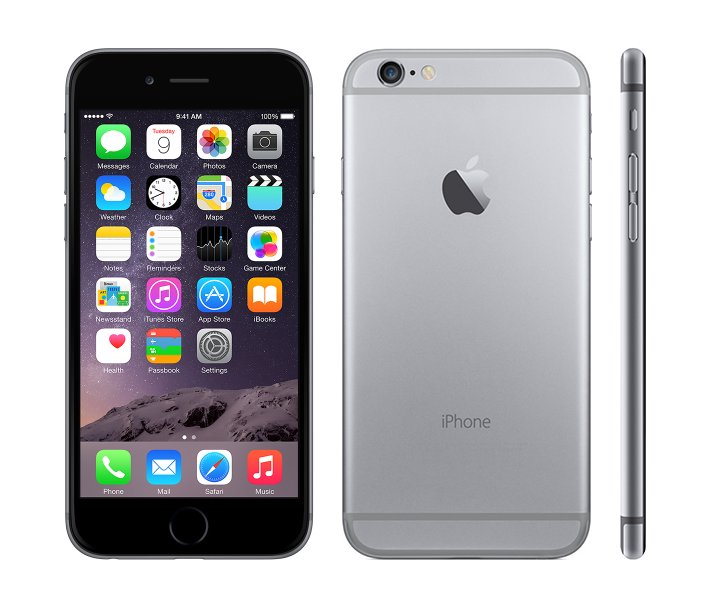
Five iPhone models have no LTE radio at all. Once a carrier retires its 3G network, these phones have nothing left to connect to except 2G, and T-Mobile retired its 2G network in August 2026.
| Model | Model number on the back | Cellular networks it supports |
|---|---|---|
| iPhone (original) | A1203 | GSM and EDGE (2G) |
| iPhone 3G | A1324, A1241 | UMTS/HSDPA (3G), GSM/EDGE (2G) |
| iPhone 3GS | A1325, A1303 | UMTS/HSDPA (3G), GSM/EDGE (2G) |
| iPhone 4 | A1349, A1332 | UMTS/HSDPA/HSUPA (3G), GSM/EDGE (2G), or CDMA EV-DO Rev. A on the CDMA model |
| iPhone 4s | A1431, A1387 | UMTS/HSDPA/HSUPA (3G), GSM/EDGE (2G), CDMA EV-DO Rev. A |
The name iPhone 3G refers to the network the phone launched with, so it is one of the models that loses service. The 3G in its name does not make it any more compatible.
Will iPhone 5s still work after the 3G shutdown
The iPhone 5, iPhone 5c and iPhone 5s confuse people because they have LTE. Their LTE is for data only: Apple's tech specs list Voice over LTE from the iPhone 6 onward, and not for the iPhone 5 generation.
Without VoLTE, these phones relied on 3G or 2G to make calls. Verizon states that a 4G LTE device that does not support HD Voice can no longer make or receive calls, send or receive texts, or use data after its 3G retirement.
| Model | Model numbers | LTE data | Voice over LTE |
|---|---|---|---|
| iPhone 5 | A1428, A1429, A1442 | Yes | No |
| iPhone 5c | A1456, A1507, A1516, A1529, A1532 | Yes | No |
| iPhone 5s | A1453, A1457, A1518, A1528, A1530, A1533 | Yes | No |
| iPhone 6 | A1549, A1586, A1589 | Yes | Yes |
What is happening to the 3G network
US carriers have retired their 3G networks and moved voice, text and data onto 4G LTE and 5G. The dates below come from the carriers' own network pages.
| Carrier network | Retired | What it means for older iPhones |
|---|---|---|
| Sprint 3G (CDMA) | March 31, 2022 | Phones that relied on Sprint 3G lost it |
| Sprint LTE | June 30, 2022 | Sprint's LTE network no longer carries service |
| T-Mobile 3G (UMTS) | July 1, 2022 | 3G-only iPhones lost T-Mobile 3G |
| Verizon 3G (CDMA) | Completed by December 31, 2022; decommissioned as of January 3, 2023 | 1X, 3G and 4G non-VoLTE devices stopped working |
| T-Mobile 2G (GSM) | August 3, 2026 | 2G-only phones, and 3G-era phones that fell back to 2G, lose T-Mobile service |
Other carriers, including AT&T and regional providers, publish their own notices. Ask your carrier if you are unsure what your line still supports.
Why is 3G being switched off
Carriers reuse the radio spectrum and equipment that 3G occupied to run faster 4G LTE and 5G networks for nearly everyone who already uses them.
| Reason the carrier gives | Source |
|---|---|
| Virtually all traffic is already on 4G LTE and 5G, which perform better than older networks | Verizon |
| Moving customers to 5G gives faster speeds and more reliable coverage | T-Mobile |
| Newer networks bring better public safety and 911 location accuracy | T-Mobile |
| Newer networks support capabilities such as satellite texting on compatible phones | T-Mobile |
How to check your iPhone model number
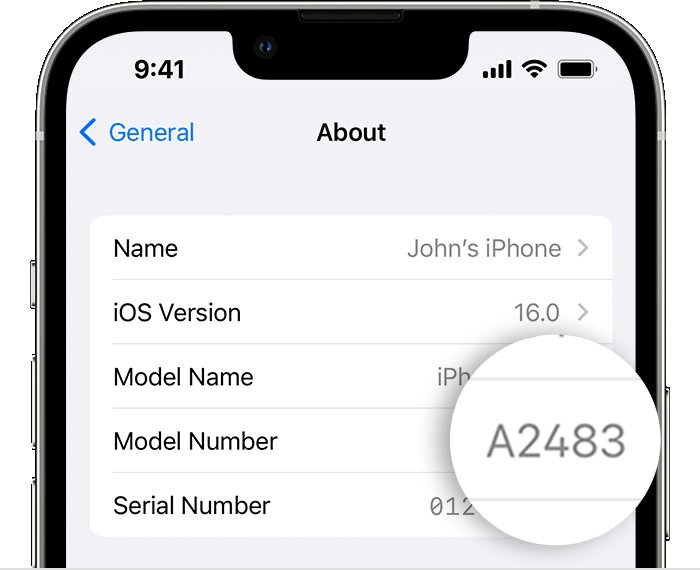
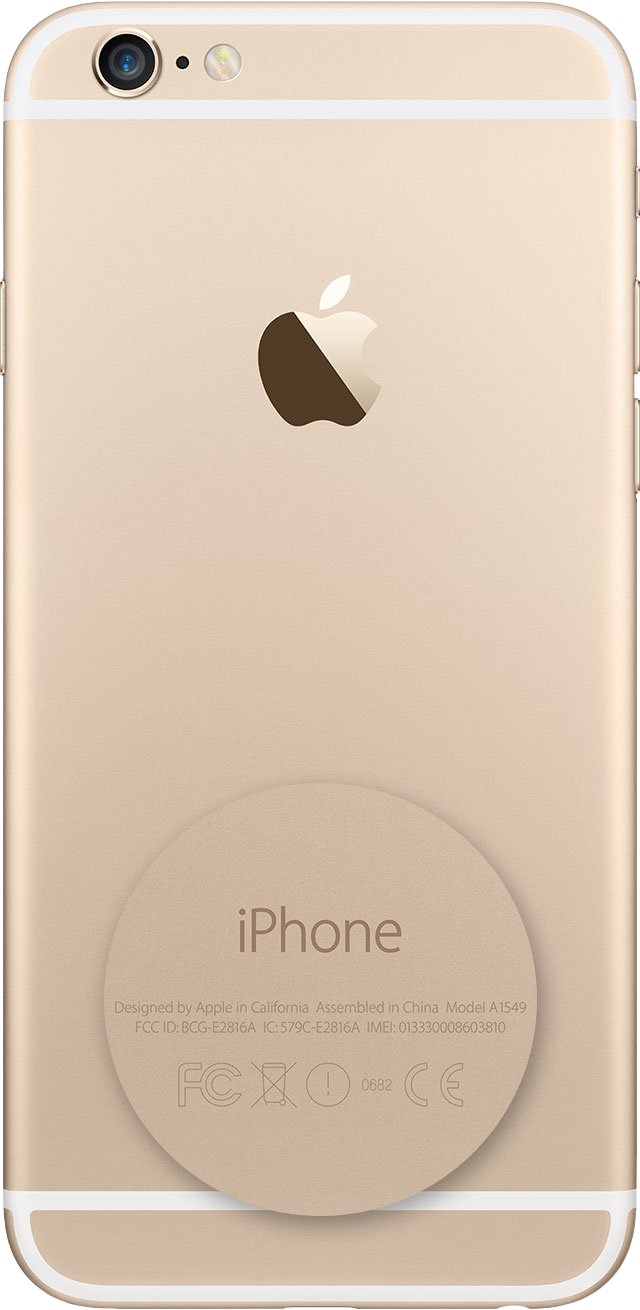
Match your iPhone model number to the tables above. On an iPhone 7 or earlier, the model number is also printed on the back of the phone.
- Open Settings and tap General.
- Tap About.
- Find Model Number. The value shown first is the part number.
- Tap the part number once to switch it to the model number, which starts with A.
- Compare that A number with the model lists in this guide.
- If the phone will not turn on, read the model number printed on the back cover instead.
How to turn on Enable LTE on iPhone
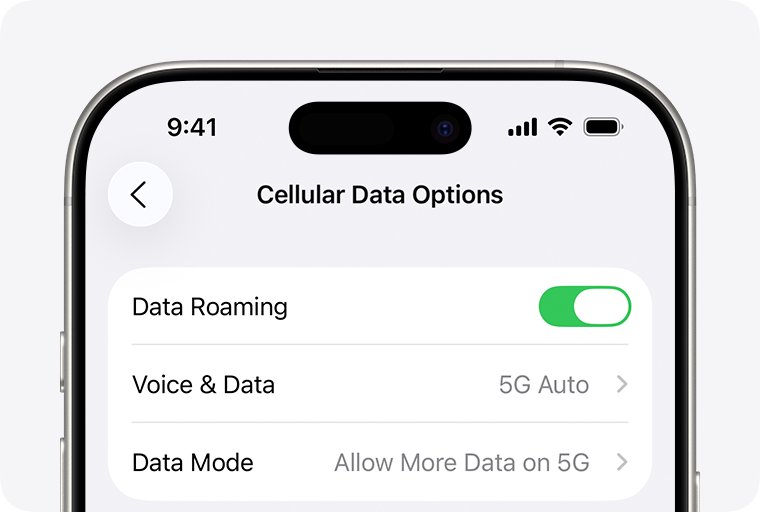
An iPhone 6 or later that shows No Service after a 3G shutdown is often still set to use the old network. Apple's fix is to update iOS and turn LTE on.
- Update the iPhone to the latest iOS version it supports.
- Open Settings and tap Cellular.
- Tap Cellular Data Options.
- Turn on Enable LTE.
- On an iPhone 12 or later, tap Voice & Data and choose 5G Auto, 5G On or LTE.
- If you still see No Service, contact your carrier.
What to do if your iPhone is affected by the 3G shutdown
An affected iPhone cannot be fixed with a setting or update, because the radio it needs no longer has a network. The only route back to calls and texts is a phone with Voice over LTE.
- Confirm the model with Settings > General > About or the number on the back.
- Back up the old iPhone to iCloud over Wi-Fi or to a computer.
- Contact your carrier to ask about upgrade offers for lines affected by the shutdown.
- Get an iPhone 6 or later, or any phone your carrier confirms supports HD Voice (VoLTE).
- Ask the carrier for a SIM or eSIM that works with the new phone.
- Transfer your data to the new iPhone from the backup.
Verizon's retirement notice gave affected lines a 60-day suspension period to upgrade and keep their number, after which the line was disconnected. Act before your carrier's deadline so you do not lose your phone number.
How to tell if your iPhone supports VoLTE
VoLTE support is what decides whether an iPhone survives the 3G shutdown, and it is fixed by the hardware.
- Find your model with Settings > General > About.
- If it is an iPhone 6, iPhone 6 Plus or any later model, it supports Voice over LTE.
- If it is an iPhone 5s, iPhone 5c, iPhone 5 or earlier, it does not.
- Open Settings > Cellular > Cellular Data Options and check that Enable LTE is on.
- Turn off Wi-Fi and Wi-Fi Calling, then place a test call to confirm the call goes through over the cellular network.
- Ask your carrier to confirm HD Voice is active on your line if calls still fail, or if you get a message that LTE calls are turned off on your account.
iPhone no service after 3G shutdown
No Service on an iPhone 5s, iPhone 5c or earlier
The phone needs a 3G or 2G network for calls, and the carrier has retired it.
- Contact your carrier to discuss your options, as Apple advises.
- Move the line to an iPhone 6 or later.
- Keep the old phone for Wi-Fi use only if you still want its apps.
No Service on an iPhone 6 or later
LTE is turned off, the software is old, or the carrier settings are out of date.
- Update iOS.
- Turn on Enable LTE in Settings > Cellular > Cellular Data Options.
- Connect to Wi-Fi, open Settings > General > About, and install a carrier settings update if one is offered.
- Turn on Airplane Mode for at least 15 seconds, then turn it off.
- Restart the iPhone and contact your carrier if it still says No Service.
Why is my phone on 3G
LTE or 5G is turned off in Cellular Data Options, so the phone looks for an older network.
- Open Settings > Cellular > Cellular Data Options.
- Turn on Enable LTE, or on iPhone 12 and later set Voice & Data to 5G Auto.
- If you are traveling, check that Data Roaming is on and ask your carrier which networks you can roam on.
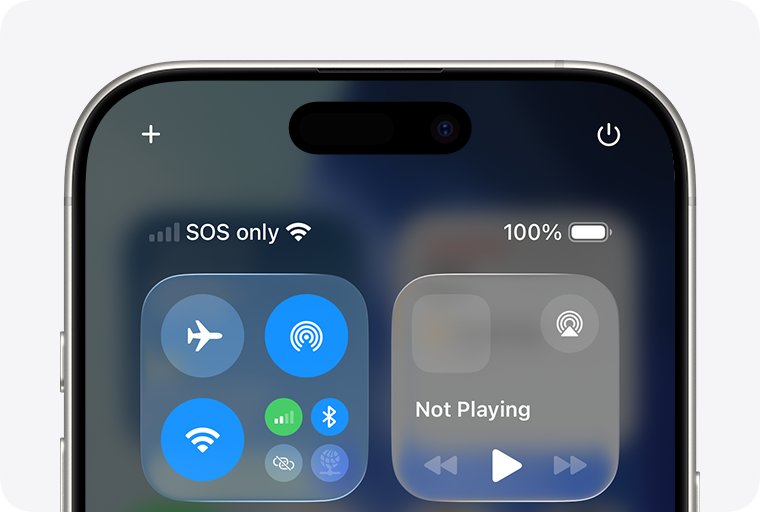
SOS or SOS only in the status bar
The iPhone cannot reach your carrier's network but can still place emergency calls through another carrier (US, Canada and Australia).
- Toggle Airplane Mode on for 15 seconds, then off.
- Check that your account is active and your line is turned on in Settings > Cellular.
- If the phone is an iPhone 5s or earlier, the shutdown is the cause and an upgrade is the fix.
Calls fail but Wi-Fi works
The phone has no usable cellular voice network.
- On an iPhone 6 or later, turn on Wi-Fi Calling in Settings > Cellular > Wi-Fi Calling if your carrier supports it.
- Tap Enable and confirm your emergency address.
- Ask your carrier to confirm VoLTE (HD Voice) is provisioned on your line.
3G shutdown iPhone FAQ
What phones are affected by the 3G shutdown?
Among iPhones, the original iPhone, iPhone 3G, iPhone 3GS, iPhone 4, iPhone 4s, iPhone 5, iPhone 5c and iPhone 5s are affected. Any phone that lacks Voice over LTE, also called HD Voice, loses calling on US carriers that retired 3G.
Which iPhones are 3G only?
The iPhone 3G, iPhone 3GS, iPhone 4 and iPhone 4s are 3G and 2G phones with no LTE, and the original iPhone is 2G only. The iPhone 5 was the first iPhone with LTE, but only for data.
What is happening to 3G cell phones?
3G phones lose calls, texts and data when their carrier retires its 3G network. Verizon completed its 3G shutdown by December 31, 2022, and T-Mobile retired its 3G UMTS network on July 1, 2022.
Will 3G phones still work?
Not on US carriers that have retired 3G. A 3G-only phone, or an LTE phone without VoLTE, can no longer make calls or send texts there. It can still use Wi-Fi for apps that work on its last supported software.
Will a 3G phone work on 4G?
No. A 3G-only phone has no 4G LTE radio, so it cannot connect to a 4G network. An LTE phone such as the iPhone 5s can use 4G data on some networks, but cannot make calls over 4G because it lacks VoLTE.
Is 3G still supported?
Verizon, T-Mobile and Sprint have retired their 3G networks in the US. Verizon decommissioned its CDMA network as of January 3, 2023. Some networks outside the US may still run 3G, so check with the local carrier when traveling.
Why is 3G being switched off?
Carriers are moving voice, text and data to 4G LTE and 5G, which carry virtually all traffic already and perform better. T-Mobile also cites faster speeds, more reliable coverage and better 911 location accuracy.
Can I still use a 3G phone?
You can use it on Wi-Fi for apps and media it still supports, but not as a phone on a US carrier that retired 3G. Apple advises owners of an iPhone 5s, iPhone 5c or earlier that shows No Service to contact their carrier about options.
Why is my phone on 3G?
On an iPhone 6 or later, LTE may be switched off. Open Settings > Cellular > Cellular Data Options and turn on Enable LTE, or set Voice & Data to 5G Auto on iPhone 12 and later. Update iOS and carrier settings too.
Will an iPhone 8 still work after the 3G shutdown?
Yes. Apple lists the iPhone 6 and later as models that only need LTE turned on, so an iPhone 8 keeps calling over LTE. Update the iPhone 8 to its latest iOS release and carrier settings to avoid No Service problems.