5G is the fifth generation of cellular technology, built to deliver higher speeds, lower latency and more capacity than 4G LTE.
This guide explains how 5G works, the three spectrum bands, standalone vs non-standalone 5G, what it changes for phones and home internet, and how to fix a 5G connection that is slow or missing.
What is 5G? The short answer
5G is the cellular standard that follows 4G LTE, and it runs on the same phones, towers and carriers you already use.
5G is a faster, lower-latency mobile network that you reach with a 5G phone (iPhone 12 or later, or a 5G Android phone), a carrier plan that includes 5G, and coverage at your location. Cisco puts the theoretical peak at 20 Gbps against 1 Gbps for 4G, with latency under 10 milliseconds. Real-world downloads have measured 1.4 to 14 times faster than 4G, depending on the band your carrier uses.
What does 5G stand for?
The "G" means generation. Each generation is a new set of radio and network standards, and 5G is the fifth.
| Term | What it means |
|---|---|
| 5G | Fifth generation of cellular technology |
| 5G NR (New Radio) | The global standard for the 5G air interface between your phone and the tower |
| 3GPP | The standards body behind 4G LTE and 5G; 5G networks are 3GPP-based systems |
| 4G LTE | The previous generation, which early 5G still leans on |
| 5G+, 5G UW, 5G UC | Carrier labels for their faster, higher-frequency 5G layers in the US |
How does 5G work?
5G sends data over radio like 4G does, but it changes the radio, the antennas and the network core behind the tower.
| Building block | What it does | Why you notice it |
|---|---|---|
| 5G New Radio | Uses spectrum that 4G did not use, including millimeter wave | More room for data means higher peak speeds |
| Massive MIMO antennas | Many transmitters and receivers move data at the same time | More users per tower before speeds drop |
| Software-defined core | Network functions run in software on cloud infrastructure | Carriers can add services and capacity faster |
| Edge computing | Moves processing closer to users | Lower latency for games, video calls and real-time apps |
| Network slices | Splits one physical network into virtual networks with their own rules | A slice can be tuned for speed, reliability or many small devices |
5G also mixes licensed and unlicensed wireless, so a phone can move between cellular and Wi-Fi coverage with less friction.
What are the three types of 5G spectrum?
Carriers run 5G on low, mid and high band spectrum. The band your phone lands on decides most of your speed.
| Band | Speed | Range and indoor reach | Typical carrier label |
|---|---|---|---|
| Low band | Slowest of the three, often close to good LTE | Longest range and best building penetration | Plain 5G |
| Mid band | Large step up from LTE | Balance of speed and distance | 5G+, 5G UW, 5G UC on many US networks |
| High band (mmWave, 24 to 100 GHz) | Fastest data rates | Short range; blocked by buildings, trees and other large objects | 5G+, 5G UW on supported phones |
Apple notes that higher-frequency 5G works only in the US on iPhones bought there. Many carriers hold more than one band to mix coverage with speed.
What is the difference between 5G and 4G LTE?
| Feature | 4G LTE | 5G |
|---|---|---|
| Theoretical peak download | About 1 Gbps | About 20 Gbps |
| Measured real-world download | Baseline | 1.4 to 14 times faster, depending on band |
| Upload | Baseline | Up to 30 percent faster |
| Latency | Higher | Under 10 milliseconds possible |
| Spectrum | Existing cellular bands | Low, mid and high band, including new mmWave spectrum 4G never used |
| Network core | Mostly hardware-based | Software-defined, cloud-based, supports slicing |
| Devices per radio | Fewer | More devices per radio, which eases congestion |
A 5G phone still falls back to 4G LTE wherever 5G is missing, so you never lose service by moving to 5G.
Why does 5G speed vary so much?
Two people with the same phone can see very different 5G speeds a block apart. Four factors explain nearly all of it.
| Factor | Effect on speed |
|---|---|
| Band in use | Low band is close to LTE; mid band is much faster; mmWave is fastest but short range |
| Standalone or non-standalone | Non-standalone 5G rides on the 4G network and runs slower than standalone |
| Distance and obstacles | Walls, glass, trees and distance from the tower cut high-band signals hard |
| Network load and plan | Busy cells share capacity; some plans get priority (premium) data when the network is busy |
What is 5G standalone versus non-standalone?
| 5G non-standalone (NSA) | 5G standalone (SA) | |
|---|---|---|
| How it is built | A 5G radio added on top of existing 4G LTE infrastructure | 5G radio plus a dedicated 5G core |
| Speed and latency | Faster than LTE, slower than SA | The target speeds and lowest latency |
| Features | Limited by the 4G core | Supports network slicing and other new services |
| When it arrived | First wave of 5G service | Commonly available from 2022 |
On iPhone 12, Low Power Mode also turns off 5G Standalone where it is available.
What is network slicing?
Network slicing lets a carrier carve one physical 5G network into separate virtual networks, each with its own speed, latency and reliability rules.
| Slice type | Built for | Examples |
|---|---|---|
| Enhanced mobile broadband (eMBB) | High bandwidth | Stadiums, in-car streaming, cloud services |
| Ultra-reliable low-latency communication (URLLC) | Response times targeted under 1 millisecond | Industrial robots, autonomous driving, emergency response |
| Massive Internet of Things (mIoT) | Huge numbers of low-power devices | Sensors that report occasionally from remote sites |
Slicing needs a standalone 5G core, so it reaches businesses and first responders before it touches a typical phone plan.
What can you do with 5G?
| Use | What 5G adds |
|---|---|
| Consumer: streaming and downloads | HD and 4K video on mobile, large app and movie downloads in less time |
| Consumer: gaming and video calls | Lower latency than 4G for cloud gaming and calls |
| Consumer: home internet | A wireless alternative to cable where 5G coverage is strong |
| Business: private 5G and IoT | Factories and campuses run their own low-latency networks for robots and sensors |
| Business: healthcare | Connected wearables stream heart rate and blood pressure readings |
| Business: smart cities and public safety | Real-time video for traffic analysis and first-responder coordination |
| Rural access | A 5G router can bring broadband to homes without wired service |
What does 5G mean for phones?
On a phone, 5G shows up as a status bar icon and a set of data options. The icon tells you which layer you are on.
| Status bar icon | What it means |
|---|---|
| 5G | Your carrier's 5G network is available and the phone can use it for internet access |
| 5G+, 5G UW, 5G UC, 5GA | Your carrier's higher-tier or higher-frequency 5G is available |
| LTE or 4G | No usable 5G here, or 5G is turned off in settings |
Apple warns that the plain 5G icon can occasionally appear even without real 5G coverage.
Do you need a new phone or plan to use 5G?
Yes to both, unless you already have them. 5G needs three things at once, and missing any one leaves you on LTE.
| Requirement | What counts | How to check |
|---|---|---|
| 5G phone | iPhone 12 or later, or an Android phone listed as 5G | The spec sheet lists 5G NR bands |
| 5G plan | A carrier plan that includes 5G; some charge an activation fee | Your carrier account or app |
| Coverage | 5G at your address or where you use the phone | Your carrier's coverage map |
If you change carriers to get better 5G, you can port your existing number instead of starting fresh.
Dual SIM 5G on iPhone 12 needs iOS 14.5 or later.
How to turn on 5G on iPhone
These steps apply to iPhone 12 and later with a carrier that supports 5G.
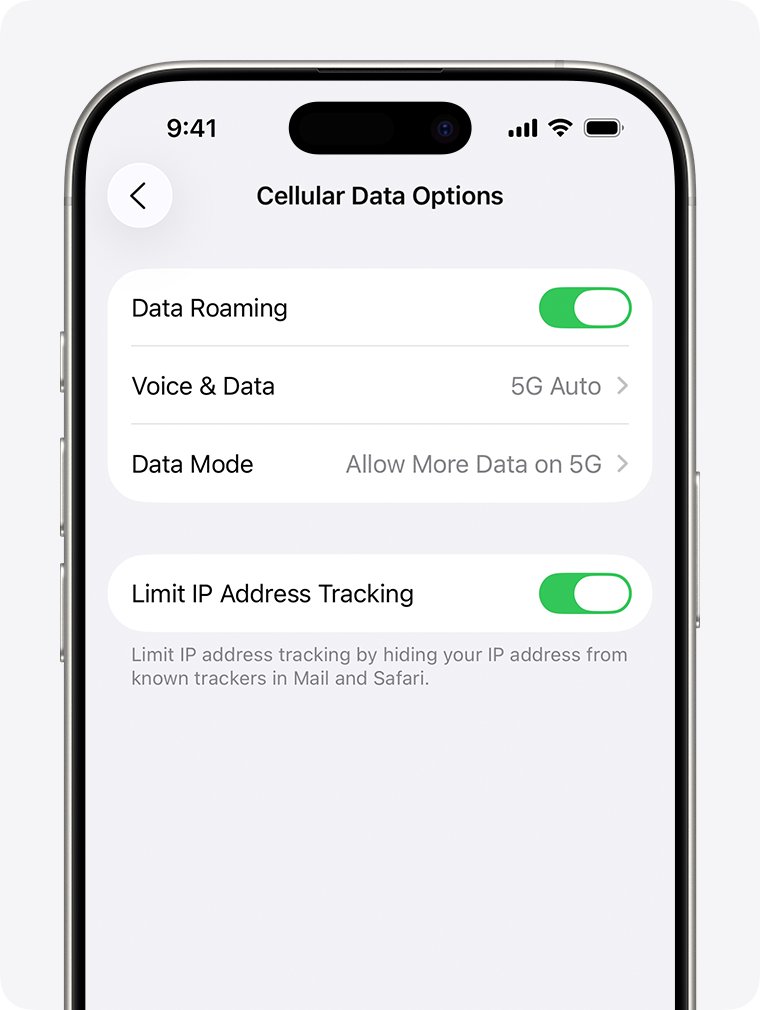
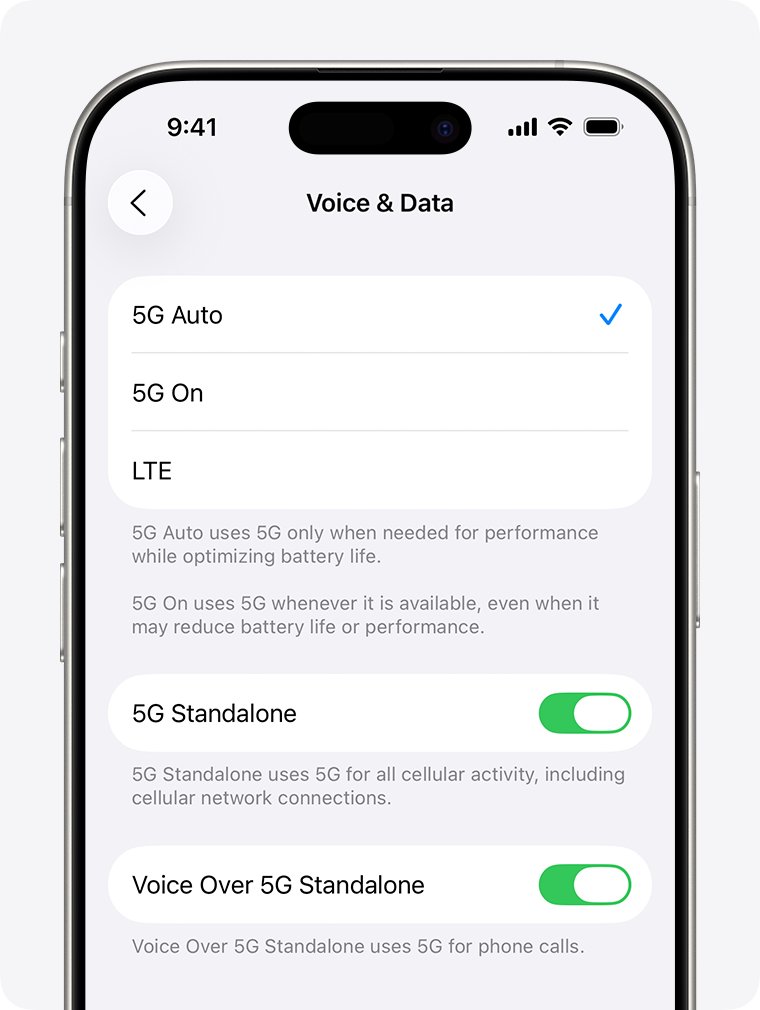
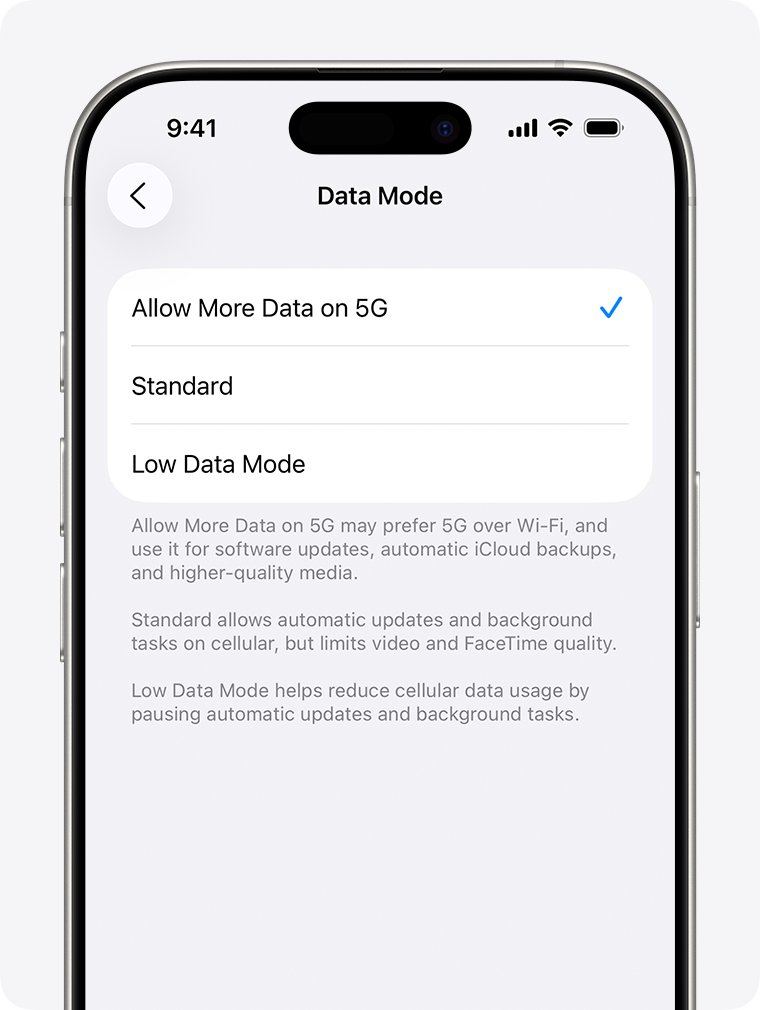
- Open Settings and tap Cellular (or Mobile Data in some regions).
- Tap Cellular Data Options. With Dual SIM, pick the line you want to change first.
- Tap Voice & Data.
- Choose 5G Auto to use 5G only when it helps, or 5G On to use it whenever available.
- Go back and tap Data Mode, then choose Allow More Data on 5G, Standard or Low Data Mode.
On Android, open Settings and type 5G in the search box to find the network mode option; the menu name differs by manufacturer.
How to check if your phone and area have 5G
- Look at the status bar for a 5G, 5G+, 5G UW or 5G UC icon.
- If you see LTE, open your carrier's coverage map and enter your address.
- Check your phone's spec sheet for 5G NR bands to confirm it is 5G capable.
- Run a speed test from Google search on mobile data with Wi-Fi off, then repeat on LTE to compare.
Does 5G improve phone battery life?
No. 5G does not extend battery life, and keeping it on all the time can shorten it.
| iPhone setting | Battery effect |
|---|---|
| 5G Auto | Uses Smart Data mode and switches to LTE when 5G would not help, which saves battery |
| 5G On | Uses 5G whenever available and may reduce battery life |
| LTE | Never uses 5G, even where it is available |
| Low Power Mode | Turns off 5G except in cases such as video streaming and large downloads on iPhone 12 and 13 |
What is 5G home internet?
5G home internet replaces a cable or fiber line with a receiver that connects to nearby 5G towers.
| Part | How it works |
|---|---|
| Receiver | Picks up the carrier's 5G signal and acts as modem and router |
| Wi-Fi | Your devices connect to the receiver over Wi-Fi like any home router |
| Setup | Plug-and-play self setup where offered; professional setup may cost extra |
| Availability | Decided per address, and not every 5G area offers home service |
| Equipment | Usually owned by the carrier and returned when you cancel |
Place the receiver near a window that faces the tower, since walls weaken the signal.
Is 5G home internet good for streaming, remote work, and gaming?
| Your use | Fit | Why |
|---|---|---|
| HD streaming | Good | Entry plans list 1080p streaming |
| 4K streaming | Good on higher tiers | Higher plans list Ultra HD; home network congestion and device support also matter |
| Remote work and video calls | Good with strong signal | Speeds depend on location and cell conditions, so test before you cancel cable |
| Online gaming | Fair to good | Lower latency than 4G, but busy towers add lag; fiber stays more consistent |
| Large households with many devices | Check the plan | Premium data tiers keep high speed when the network is busy |
How much does 5G home internet cost?
Prices differ by carrier and change often. Verizon's listed plans in October 2026 show the usual structure.
| Verizon plan | Listed price | Listed download speed | Notes |
|---|---|---|---|
| 5G Home | As low as $60/mo | Up to 100 Mbps | 3-year price lock, 1080p streaming |
| 5G Home Plus | As low as $70/mo | Up to 150 Mbps | 4-year price lock, premium data |
| 5G Home Ultimate | As low as $85/mo | Up to 300 Mbps | 5-year price lock, 4K streaming, one Wi-Fi extender |
The lowest rates need Auto Pay and a Verizon mobile plan. A $99 professional setup fee can apply where self setup is not offered.
Is 5G secure?
5G is as secure as a modern cellular network gets, but it only protects the link between your phone and the carrier.
| Situation | What to know |
|---|---|
| 5G vs public Wi-Fi | 5G runs on spectrum licensed to the carrier, while public Wi-Fi is shared and often open |
| Slow or insecure Wi-Fi | Allow More Data on 5G on iPhone lets the phone use 5G instead of a slow or insecure Wi-Fi network |
| After data leaves the carrier | Websites and apps still need HTTPS and strong passwords; 5G does not change that |
| Business use | Private 5G and network slicing let companies isolate their own traffic |
Is 5G safe?
5G uses radio waves, the same kind of non-ionizing radio energy that 4G, Wi-Fi and earlier phones use.
Phone makers publish radio frequency (RF) exposure information for each model; Apple lists it on its regulatory information site.
Treat 5G like any other phone radio: check your model's RF exposure information from the manufacturer if you want the measured figures. mmWave 5G is high frequency but short range and easily blocked by walls and trees, so it does not travel farther or deeper than earlier signals.
What are 5G’s main limitations?
| Limitation | Why it happens |
|---|---|
| Patchy fast 5G | mmWave and mid band need many more towers than low band |
| Weak indoor signal | High-band signals struggle to pass through walls and glass |
| Low band feels like LTE | Low band trades speed for range |
| Battery drain | Keeping 5G on full time can shorten battery life |
| Upload still lags download | Upload speeds stay well below download speeds |
| Non-standalone networks | 5G built on a 4G core cannot reach full speed or offer slicing |
Why is my 5G phone slow?
The phone shows 5G but performs slowly
The phone is on low band 5G, a busy cell, or the 5G icon is showing without real coverage.
- Check whether the icon says plain 5G or 5G+, 5G UW or 5G UC.
- Move closer to a window or outdoors and run the speed test again.
- On iPhone, set Voice & Data to 5G On to stop the phone dropping to LTE.
- Turn off Low Power Mode and Low Data Mode.
- Ask your carrier whether your plan includes premium or priority data.
Why does 5G work outside but not inside?
Strong 5G outdoors, LTE or weak 5G indoors
High-band and mid-band signals lose strength through walls, glass and trees.
- Use the phone near a window that faces the nearest tower.
- Turn on Wi-Fi calling and use home Wi-Fi indoors.
- For 5G home internet, move the receiver to an upper-floor window.
- Accept LTE or low band 5G indoors; both are designed for building penetration.
Why does 5G home internet slow down in the evening?
Fast in the morning, slow from early evening
More people share the same tower at peak hours, and plans without premium data get lower priority when the network is busy.
- Run a speed test at a quiet hour and at peak time to confirm the pattern.
- Connect the busiest device, such as a TV or PC, to the receiver by Ethernet if it has a port.
- Move the receiver to the spot with the strongest signal.
- Ask the carrier about a plan with premium data that keeps high speed when the network is busy.
Why can’t my compatible 5G phone access 5G?
5G phone only shows LTE
The plan lacks 5G, 5G is turned off, Low Power Mode is on, or there is no coverage.
- Confirm your plan includes 5G in your carrier account.
- On iPhone, open Settings > Cellular > Cellular Data Options > Voice & Data and make sure LTE is not selected.
- Turn off Low Power Mode.
- Check the carrier's coverage map for your exact location.
- When abroad, check whether your carrier supports 5G roaming, or use a local SIM or eSIM with 5G.
Is 5G worth it?
| Your situation | Verdict | Why |
|---|---|---|
| Buying a new phone anyway | Yes | Almost every current phone supports 5G, and it falls back to LTE when needed |
| Mid band or mmWave 5G where you live | Yes | This is where 5G is clearly faster than LTE |
| Only low band 5G nearby | Not a reason to upgrade | Speeds stay close to good LTE |
| Slow DSL or no wired broadband at home | Worth testing 5G home internet | It can replace a weak wired connection |
| Fiber at home | Keep fiber | Fiber stays more consistent for gaming and uploads |
Frequently overlooked 5G facts
| Fact | Why it matters |
|---|---|
| The 5G icon can appear without real 5G coverage | A 5G badge alone does not prove you are getting 5G speeds |
| Higher-frequency 5G on iPhone works only in the US on US-bought models | Imported iPhones may not show 5G UW or 5G+ |
| Low Power Mode turns off most 5G on iPhone | Battery saving can explain a sudden switch to LTE |
| Some carriers charge a 5G activation fee | Check the plan before you upgrade |
| Upload speed gains are modest | Up to 30 percent over 4G, well below the download gains |
| Allow More Data on 5G raises data use | Better FaceTime quality and iCloud backups on cellular burn through capped plans faster |
5G network frequently asked questions
Do you need a 5G phone to use 5G?
Yes. Only a phone with a 5G modem can connect to 5G. On iPhone that means iPhone 12 or later. A 4G phone keeps working on LTE but never shows a 5G icon.
Do I need 5G or is 4G enough?
4G LTE is enough for browsing, email, music and standard video. 5G helps when you download large files, stream in high quality, or rely on your phone in crowded places where LTE slows down.
How do I get 5G on my phone?
You need a 5G phone, a plan that includes 5G, and coverage. On iPhone, open Settings, tap Cellular, then Cellular Data Options, then Voice & Data, and pick 5G Auto or 5G On.
Is 5G available in my area?
Enter your address in your carrier's coverage map. Verizon and AT&T both publish one. Home 5G availability is checked separately, because not every 5G area offers home internet.
Does my phone support 5G?
Check the cellular section of the phone's spec sheet for 5G NR bands. iPhone 12 and later support 5G. If your plan and coverage support 5G, a 5G icon also appears in the status bar.
Should I use 5G standalone?
Use it if your carrier and phone support it, because standalone 5G has lower latency and full 5G features. The carrier decides whether you connect to SA or NSA; iPhone exposes 5G Auto, 5G On and LTE rather than an SA switch.
What are the advantages of 5G?
5G offers faster downloads, lower latency, more capacity per tower and support for far more connected devices than 4G. It also enables network slicing and fixed wireless home internet.
How do I use 5G data without running out?
On iPhone, choose Standard instead of Allow More Data on 5G, or turn on Low Data Mode. Both reduce background updates and high-quality video over cellular.
Can a 5G phone use 4G LTE?
Yes. Every 5G phone falls back to 4G LTE wherever 5G is missing, and iPhone lets you force LTE in Voice & Data settings.
Is 5G better than Wi-Fi?
Sometimes. In areas with strong mid band or mmWave 5G, cellular downloads can beat Wi-Fi, because carriers use licensed spectrum. A good home Wi-Fi network on fiber is still more consistent.
Do all 5G phones work on every carrier?
Not always. Each carrier uses its own 5G bands, so a phone must support those bands. Imported iPhones, for example, lack US higher-frequency 5G support.
The bottom line on 5G
Use 5G Auto on a 5G phone and let it pick 5G when it helps; only pay extra or switch carriers for 5G if the coverage map shows mid band or mmWave service where you live. The band you get decides the speed. Low band 5G feels like LTE, while mid band and mmWave deliver the big gains in speed and latency.