When The Weather Channel stops working, close and reopen the app, check your internet connection, and set its location access to While Using, which clears most radar, forecast and location faults.
This guide covers the app on iPhone and Android, the radar, local weather, widgets, notifications, the weather.com website, and The Weather Channel on TV.
How to fix Weather Channel not working
Work through these in order and test the app after each one. Most data, radar and location problems clear by step 4.
- Close The Weather Channel fully: on iPhone, swipe up from the bottom and hold to open the App Switcher, then swipe the app away.
- Open the app again and wait for Today to load.
- Check your internet connection by loading any website, then switch between Wi-Fi and cellular data to test both. If neither connects on iPhone, fix iPhone cellular data and Wi-Fi before you go further.
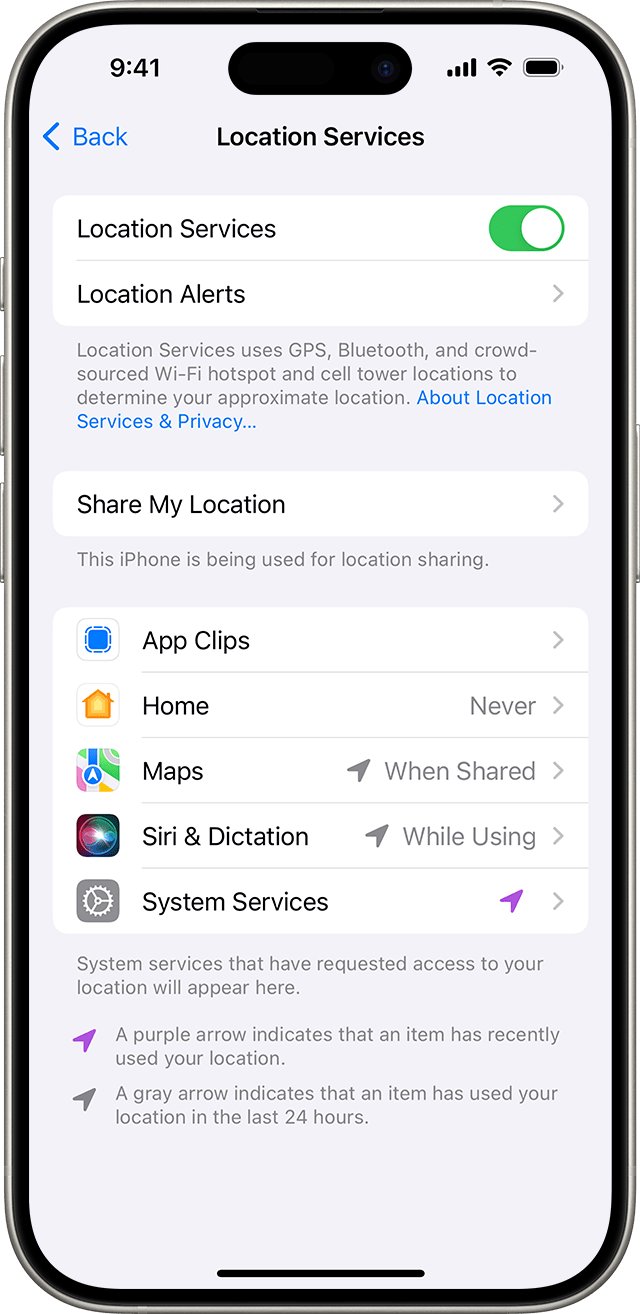
- On iPhone, go to Settings > Privacy & Security > Location Services > The Weather Channel and choose While Using.
- On Android, touch and hold the app icon, tap App info > Permissions > Location, and choose Allow only while using the app.
- Update The Weather Channel from the App Store or Google Play, because fixes for radar and location bugs ship in app updates.
- If it still fails, email the app team at [email protected], or use Email Us on support.weather.com, with your app version and phone model.
If the app closes as soon as you open it, the fix is different: work through the steps to stop the Weather Channel app crashing instead.
Why is the Weather Channel not working
Match what you see to a row, then jump to that section. Each cause has a different fix.
| What you see | Likely cause | Fix |
|---|---|---|
| Radar map stays blank or grey | No connection, or location access denied | Weather Channel radar not working section |
| Time range buttons (6HR, 24HR, 72HR) are gone | The 2026 radar redesign moved them | Look above the timeline at the bottom |
| Forecast is for the wrong town | Location set to Never, or Precise Location off | Weather Channel not showing local weather section |
| Forecast is hours old | Background App Refresh or cellular data is off for the app | Weather Channel app not refreshing on iPhone section |
| Widget is blank | Old iOS or old app version, or no location access | Weather Channel widget not working section |
| App will not update on an older iPhone | The current version requires iOS 26.0 or later | Update iOS, or use weather.com in Safari |
| Signed out of weather.com every visit | The browser clears cookies | Weather Channel website not working section |
| Premium does not work on another device | A VPN hides your US IP address | Allow weather.com in the VPN |
| TV streaming app or channel will not play | Streaming is run by a different company | Why is the Weather Channel not working on TV section |
Weather Channel radar not working
The Weather Channel rebuilt its radar in 2026, in app version 16.11 and later on iOS, 16.10 and later on Android, and on weather.com. Many radar not working reports are controls that moved.
- Close the app fully and open it again.
- Check that your phone has a working internet connection.
- On iPhone, confirm Settings > Privacy & Security > Location Services > The Weather Channel is set to While Using.
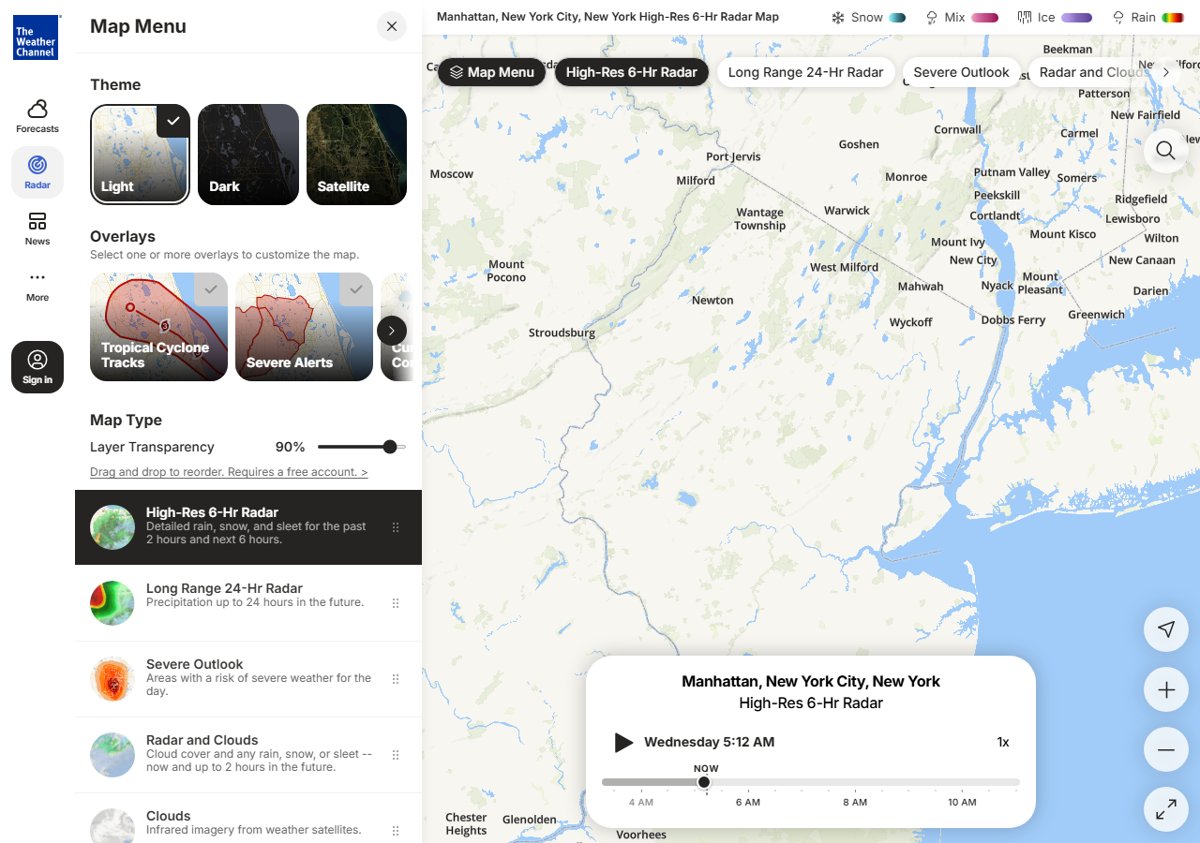
- Open the Radar tab. To change the time range, look above the timeline at the bottom of the screen, not the top, and tap 6HR, 24HR or 72HR.
- Tap the layer menu icon at the bottom of the screen to turn radar layers on or off. Every layer is now in one list.
- Tap the GPS re-center button to jump back to your location after you pan the map.
- If the time range selector is still missing, update the app to iOS version 16.11 or Android version 16.10 or later.
On Android, the GPS re-center button broke in version 16.10 and was fixed in 16.11, so an update fixes it. Layer order that keeps resetting also needs Android version 16.10 or later.
Weather Channel not showing local weather
The app uses your phone's location to pick the forecast. If access is set to Never, or Precise Location is off, it shows a saved place or a wider area instead of your town.
- On iPhone, go to Settings > Privacy & Security > Location Services and make sure Location Services is on.
- Tap The Weather Channel, choose While Using, and leave Precise Location turned on.
- On Android, open Settings > Location > App location permissions, tap The Weather Channel, and allow location while in use.
- On Android, turn on Use precise location on the same screen.
- In the app, tap the location pointer icon. A filled pointer means the forecast already follows your current location; an outlined pointer re-centers it when tapped.
- To pick a place by hand instead, tap the location search bar at the top and type the town or ZIP code.
Exact Android labels vary by phone maker. If the menus differ, open the app's App info page and look under Permissions.
Weather Channel app not refreshing on iPhone
A forecast that only updates while the app is on screen usually means iPhone is not allowed to refresh it in the background, or cellular data is blocked for it.
- Open Settings and tap General.
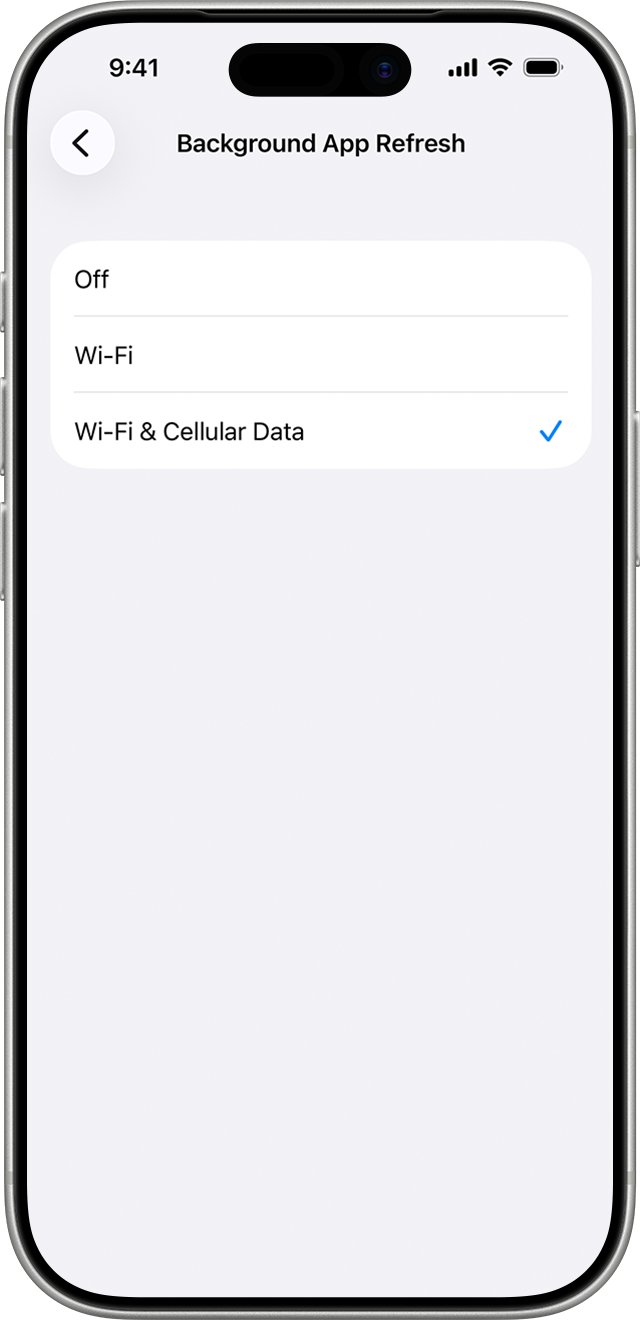
- Tap Background App Refresh, then tap Background App Refresh again and choose Wi-Fi & Cellular Data.
- Go back to the list and make sure The Weather Channel is turned on.
- Open Settings > Cellular and scroll to the list of apps.
- Turn on The Weather Channel so it can load forecasts away from Wi-Fi.
- Open the app once to pull fresh data.
Quitting the app from the App Switcher stops it checking for new content until you open it again, so avoid swiping it away out of habit. If background refresh then drains your battery, you can limit Weather Channel battery drain separately.
Weather Channel widget not working
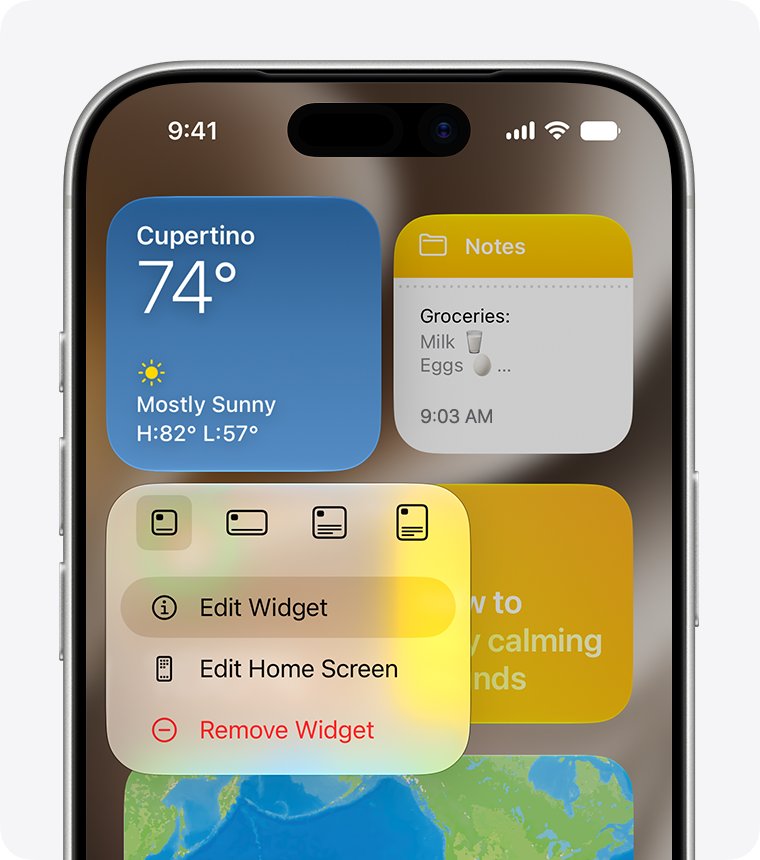
The Weather Channel widgets need iOS or iPadOS 16 or later and app version 15.0 or later. A widget added before an update can stay blank, so removing and adding it again often fixes it.
- Update iOS and The Weather Channel app to the latest versions.
- Touch and hold an empty area of the Home Screen until the icons jiggle.
- Remove the blank Weather Channel widget.
- Tap the + button at the top of the screen.
- Tap the widget search field and type
The Weather Channel. - Choose a widget size, tap Add Widget, then tap Done.
If the widget still shows no data, the cause is usually location or background refresh, and both are behind most cases of a blank Weather Channel widget on iPhone.
Weather Channel website not working
weather.com uses cookies to keep you signed in and remember favorite locations. A browser that clears cookies on exit makes the site forget you every visit.
- Open weather.com in a private window. If it loads there, an extension or old stored data in your normal window is the problem.
- Review your browser settings for a feature that clears cookies and stored data, and stop it removing them for weather.com.
- Sign in again, then add your favorite locations.
- Try a different browser to see if the problem follows you.
- On the website radar, look for the 6HR, 24HR and 72HR buttons above the timeline at the bottom of the map.
- If you use a VPN, add the weather.com domain to its permitted list so your account and subscription features load.
Why is the Weather Channel not working on TV
The Weather Company runs weather.com and The Weather Channel phone apps. Streaming video subscriptions on Roku, Amazon and the streaming website are sold by a different company, The Weather Group.
| Where you watch | Who supports it | Where to get help |
|---|---|---|
| The Weather Channel app on iPhone, iPad or Android | The Weather Company | support.weather.com or [email protected] |
| weather.com in a browser | The Weather Company | support.weather.com |
| Weather Channel streaming on Roku or Amazon devices | The Weather Group | support.streamtwc.com (submit a ticket) |
| The streaming website streamtwc.com | The Weather Group | support.streamtwc.com |
| Cable or satellite channel, such as on Spectrum | Your TV provider | Your provider's support team |
The Weather Company states that its Premium and Ad Free subscriptions work on weather.com and its phone apps, but not on Roku or other TV streaming platforms.
Weather Channel app requirements for iPhone and Android
An app that suddenly stops updating on an older phone is often a version problem rather than a fault.
| Feature | What it needs |
|---|---|
| Current App Store version of The Weather Channel | iOS 26.0 or later |
| Home Screen widgets | iOS or iPadOS 16 or later, app version 15.0 or later |
| New radar with bottom time range selector | App version 16.11 or later (iOS), 16.10 or later (Android) |
| Working GPS re-center on Android radar | App version 16.11 or later |
| Account and subscription across devices | A US IP address, so no VPN hiding it |
Is the Weather Channel having problems
Before changing more settings, find out whether the fault is on your phone or with the service.
- Open weather.com in a browser on the same phone. If the site loads but the app does not, the problem is the app or its settings.
- Switch from Wi-Fi to cellular data, or the other way round, and reload. If one works, the problem is that network.
- Try the app on a second device. If it fails everywhere, the service is likely having trouble.
- Open support.weather.com and check What's New for recent changes to the apps and website.
- Report the fault through Email Us on support.weather.com, with your device model and app version.
Weather Channel app problems and alerts
Weather Channel notifications or Activity alerts stopped
Activity alerts need the in-app toggle, an alert time, and system notifications all switched on.
- Tap the Activity card to open its Activity Detail page.
- Scroll to the bottom and turn on the Activity notifications toggle.
- Set an alert time between 15 minutes and 1 day before the activity. With no alert time set, no notification arrives.
- Check your phone's notification settings and allow notifications for The Weather Channel. If alerts only arrive while the phone is unlocked, fix notifications on a locked phone next.
The Weather Channel app won't update on an older iPhone
The current version requires iOS 26.0 or later.
- Open Settings > General > Software Update and install any update offered.
- If your iPhone cannot run iOS 26, use weather.com in Safari for forecasts and radar.
Premium features not working while signed in
Cross-platform account features only work from a US IP address, so a VPN or security app can block sign-in.
- Turn off the VPN briefly and sign in again.
- If the VPN supports per-site rules, add the weather.com domain to its permitted list.
- Open the app again and sign in with the same account you used on your other device.
Radar layer order keeps resetting on Android
Saved layer order needs app version 16.10 or later.
- Open Google Play and update The Weather Channel.
- Set the layer order again: open the layer menu, then press and hold a layer and drag it.
- If it still resets on 16.10 or later, report it to support with your exact version.
Weather Channel not working FAQ
Why is the Weather Channel app not working?
The most common causes are no internet connection, location access set to Never, and an outdated app. Close and reopen the app, test your connection, set location access to While Using, and update The Weather Channel from the App Store or Google Play.
Why is my Weather Channel radar not working?
Radar that will not load usually needs a fresh start: close and reopen the app, check your connection, and on iPhone set Location Services for The Weather Channel to While Using. If the 6HR, 24HR and 72HR buttons are missing, they moved above the timeline at the bottom.
Why doesn't the Weather Channel work anymore on my iPhone?
The current version of The Weather Channel requires iOS 26.0 or later. On an iPhone that cannot run iOS 26, the App Store will not install the latest app. Update iOS if you can, or use weather.com in Safari instead.
Why is the Weather Channel not showing my local weather?
The app needs your location to show local weather. Set its location access to While Using and leave Precise Location on. In the app, tap the location pointer to re-center on your current position, or search for your town in the location bar.
Is the Weather Channel having problems right now?
Test weather.com in a browser and the app on another device. If both fail on several networks, the service is likely having trouble. Check What's New on support.weather.com, and report the fault through Email Us with your app version.
Why is the Weather Channel not working on TV?
Weather Channel streaming on Roku, Amazon and streamtwc.com is sold by The Weather Group, not The Weather Company, which runs the phone apps. Get help for streaming at support.streamtwc.com. For a cable channel, such as on Spectrum, contact your TV provider.
Why is the Weather Channel widget not working?
Widgets need iOS or iPadOS 16 or later and app version 15.0 or later. Update both, remove the blank widget, then add it again from the Home Screen + button by searching for The Weather Channel.
Why is the Weather Channel website not working?
If weather.com keeps signing you out or forgetting favorite locations, your browser is clearing cookies, which the site uses to keep you signed in. Change that browser setting or try another browser. A VPN can also block account features.
Why can't I get the Weather Channel Premium features on another device?
The Weather Channel only supports cross-platform account features from a US IP address. A VPN or security software that hides your IP makes the service treat you as a non-US user. Allow weather.com in the VPN, or turn it off to sign in.