Background App Refresh controls only one kind of background work, so The Weather Channel and other apps can still drain your battery through location access, notifications, widgets and weak cellular signal.
This guide shows how to find the real cause in Settings > Battery, change the setting behind it on iPhone or Android, and tell an app problem from an aging battery.
How to stop Weather Channel app draining iPhone battery
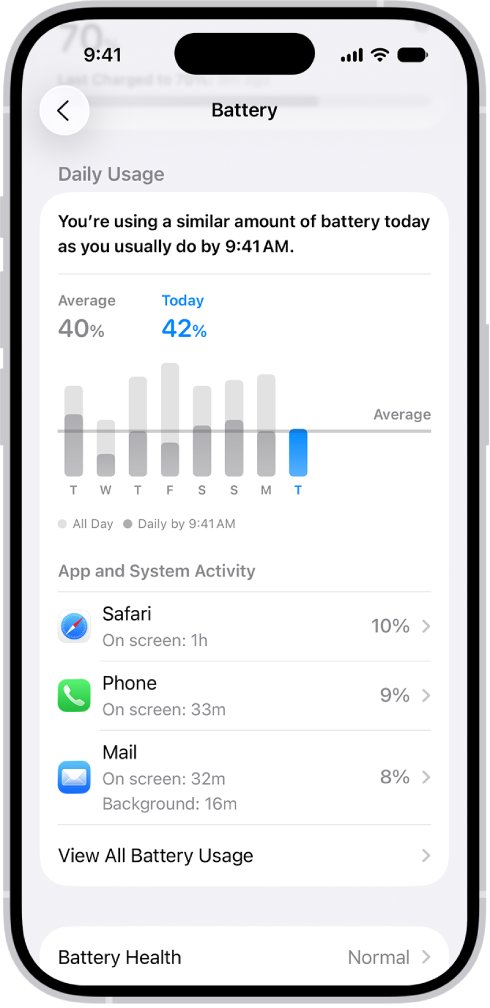
Start with the Battery screen, because it names the activity that used the power. Change only the setting that matches what it shows.
- Open Settings and tap Battery.
- Scroll to App and System Activity and find The Weather Channel or the other app using the most battery.
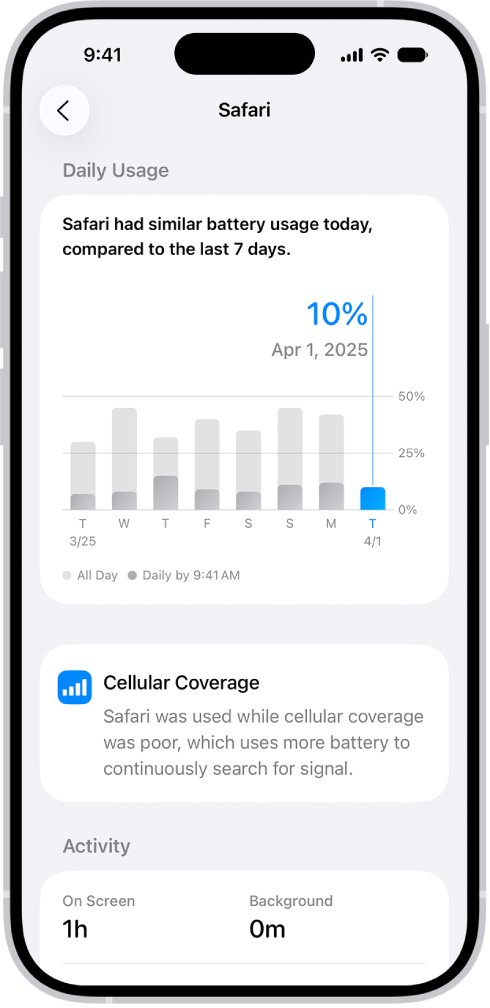
- Tap the app and read its On screen, Background, Cellular coverage and Notifications details.
- If location is the likely cause, open Settings > Privacy & Security > Location Services, tap the app and reduce its access.
- If Notifications appears, open Settings > Notifications, tap the app and turn off Allow Notifications or limit the alerts.
- Remove any Weather Channel widget you do not need from the Home Screen and Lock Screen.
- Check View All Battery Usage the next day to compare the app's share of the battery.
Why apps still drain battery with Background App Refresh off
Each Battery label points to a different setting. Turning off Background App Refresh again will not change a label that comes from somewhere else.
| What Settings > Battery shows | What it means | What to change |
|---|---|---|
| On screen | The app was open and visible, so usage is real screen time | Use the app less or lower screen brightness |
| Background | The app did work while you were elsewhere, such as directions, music, syncing or mail | Check Background App Refresh and the app's Location Services access |
| Notifications | The app woke the iPhone and used battery to check for new information | Limit or turn off notifications for that app |
| Cellular coverage | The app was used in a low-signal area, which costs more power | Use Wi-Fi or turn on Airplane Mode in poor coverage |
| Higher usage in orange | Today's use is above your usual level by this time of day | Check the top three apps or activities Apple highlights |
| No single app stands out | Overall battery capacity or general use may be the limit | Review Battery Health and iOS updates |
How to see which apps drain iPhone battery
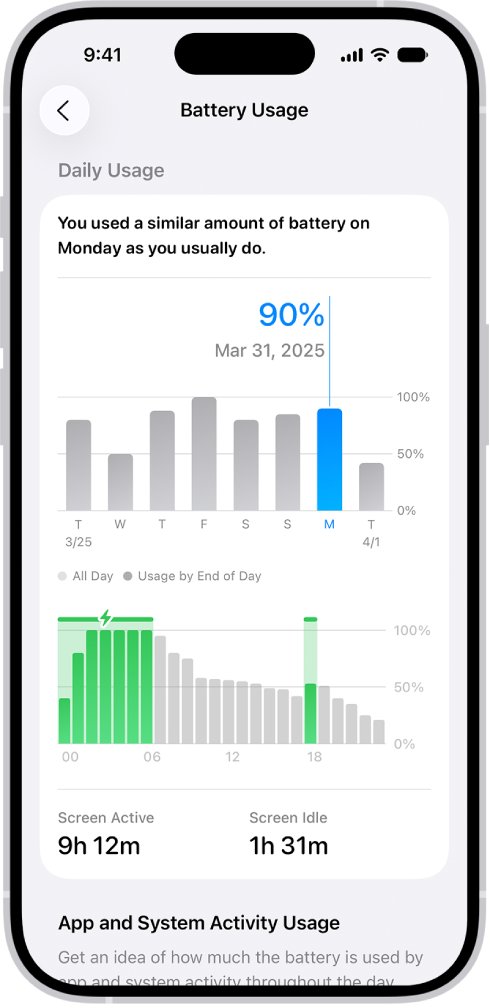
The Daily Usage section compares today with previous days. Blue means similar or lower usage, while orange means higher usage than usual by this time of day.
- Open Settings and tap Battery.
- Read the Daily Usage section and note the top apps or activities it highlights.
- Tap View All Battery Usage, then tap a day to see that day's figures.
- Scroll down to App and System Activity to see the percentage used by each app and system task.
- Tap an app to see its battery use and activity for each day.
A long Background time is the figure to compare with your Background App Refresh setting. A high percentage with mostly On screen time is ordinary use, not a fault.
How to turn off Background App Refresh on iPhone
Check the setting first, because the switch can be limited to Wi-Fi rather than fully off. Apple's battery guidance offers three choices: Wi-Fi, Wi-Fi & Cellular Data and Off.
- Open Settings and tap General.
- Tap Background App Refresh.
- Tap Background App Refresh at the top and choose Off to stop it for every app.
- To keep it for some apps, choose Wi-Fi instead and turn off The Weather Channel in the app list.
- Return to Settings > Battery the next day and compare the app's Background time.
With refresh off, an app updates its content when you open it. Low Power Mode also turns off Background App Refresh while it is active.
How to change Weather Channel location access on iPhone
Location Services has its own permission for each app, separate from Background App Refresh. Apps allowed to use your location in the background can trigger Apple's location alerts, which show what the app has accessed.
- Open Settings and tap Privacy & Security.
- Tap Location Services.
- Tap The Weather Channel in the app list.
- Choose access that shares your location only while you use the app, or Ask Next Time for a prompt.
- Turn off Precise Location if an approximate location is enough for your forecast.
- Repeat for other apps high on your Battery list that do not need your location constantly.
Alerts based on where you are depend on this permission, so less access can stop them. Add your home city in the app by hand if you still want its forecast.
How to turn off Weather Channel notifications on iPhone
Apple states that notifications can wake the iPhone and use battery to check for new information. Frequent weather alerts are worth trimming if Notifications appears on the Battery screen.
- Open Settings and tap Notifications.
- Tap The Weather Channel below Notification Style.
- Turn off Allow Notifications to stop all of its alerts.
- To keep some alerts, tap Customize Notifications if it appears and choose the types you want.
- Tap Scheduled Summary on the main Notifications screen to bundle routine alerts from several apps.
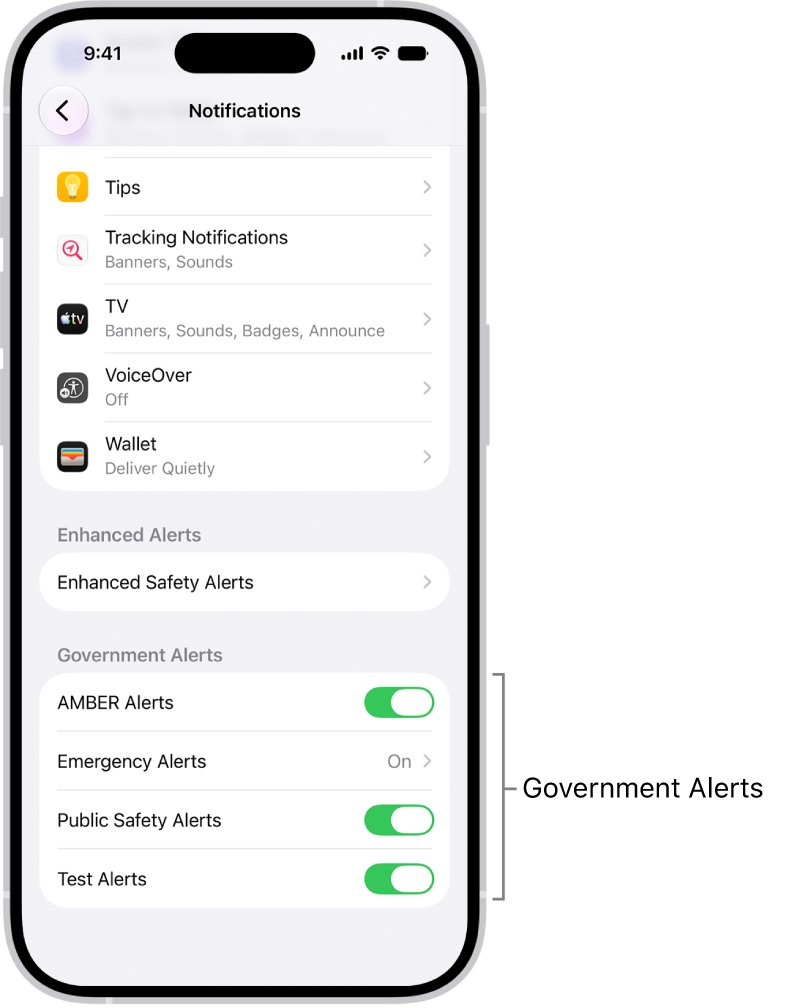
Keep severe weather alerts on if you rely on them. Government alerts such as AMBER, Public Safety and Emergency Alerts are managed separately under Government Alerts.
Weather Channel widget draining battery on iPhone
Apple's developer documentation states that reloading widgets causes battery drain through networking and processing. Each active widget gets its own daily budget, typically 40 to 70 refreshes for a frequently viewed widget.
Two weather widgets for two places therefore mean two separate budgets. Keep the one you actually read.
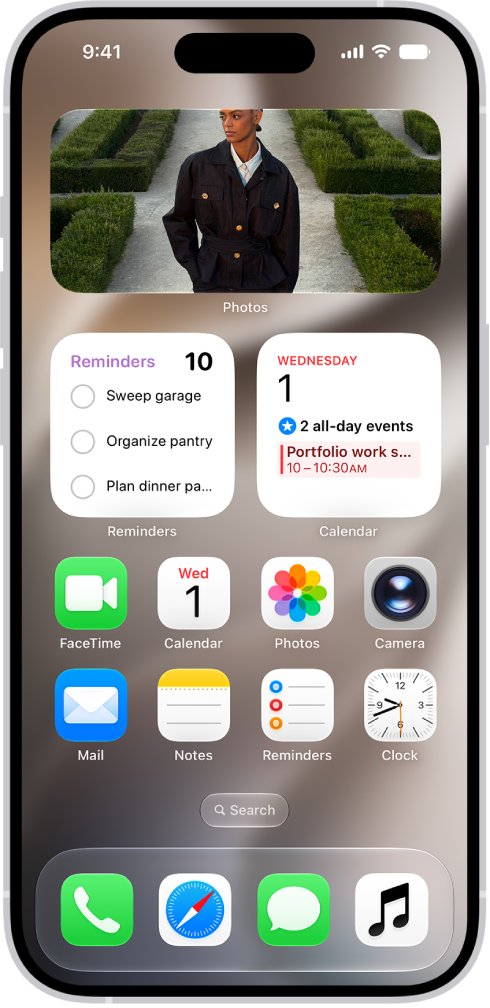
- Go to the Home Screen and find every Weather Channel widget, including any inside a Smart Stack.
- For a Smart Stack, touch and hold it, tap Edit Stack, then tap the remove button in the widget's upper-left corner.
- For a widget made from an app icon, touch and hold it, then tap the icon button to turn it back into an app icon.
- For a separate widget, touch and hold it and use the remove option in its menu.
- On the Lock Screen, touch and hold the screen, tap Customize, then tap your existing widgets to change them.
- Tap Done and check the app's usage the following day.
Weather Channel app data usage on iPhone
Mobile data and weak signal are linked to battery use, and Apple notes that Wi-Fi uses less power than a cellular network. These settings show the app's data use and limit it away from Wi-Fi.
- Open Settings and tap Cellular.
- Scroll to your app list and tap Show All to see the data each app has used.
- Turn off The Weather Channel in the list if you want it to use only Wi-Fi.
- Tap Cellular Data Options, tap Data Mode, then choose Low Data Mode to pause automatic updates and background tasks away from Wi-Fi.
- In a poor coverage area, open Control Center and turn on Airplane Mode if you do not need calls.
Does Low Power Mode stop background activity on iPhone?
Yes, Low Power Mode reduces background activity while it is on. Apple lists Background App Refresh, email fetch, automatic downloads and iCloud Photos among the features it turns off or pauses.
- On iPhone 15 or later, open Settings > Battery > Power Mode, then tap Low Power Mode.
- On iPhone 14 or earlier, open Settings > Battery, then tap Low Power Mode.
- Check that the battery icon in the status bar has turned yellow.
- On iPhone 15 Pro or later, turn on Adaptive Power in Power Mode so the iPhone limits background activity on heavy-use days.
Low Power Mode turns off automatically when the iPhone charges to 80% or higher. Adaptive Power is on by default on supported models and can turn on Low Power Mode at 20%.
How to update or reinstall the Weather Channel app
Update first, then reinstall if one app stays at the top of the list with no setting to explain it. Deleting an app removes its data from your iPhone, so saved locations stored only on the phone need adding again.
- Open the App Store, tap your picture, then tap App Updates.
- Tap Update next to The Weather Channel, or tap Update All.
- Open Settings > General > Software Update and install any iOS update.
- If usage stays high, touch and hold the app icon, tap Remove App, tap Delete App, then tap Delete.
- Open the App Store, tap your picture, tap Apps & Purchase History, then tap Your Apps.
- Find The Weather Channel, download it again and choose its location and notification access with care.
If the app starts closing on its own after this, fix the Weather Channel app crash on launch before you judge its battery use.
Weather Channel app draining battery on Android
Android labels differ by manufacturer, and these paths come from Google's Pixel help for Android 14 and later. On other phones, look for the same options under Battery or Apps.
- Open Settings, tap Apps, then tap See all apps.
- Tap The Weather Channel, then tap App battery usage.
- Tap Allow background usage and choose Optimized.
- Open Settings > Battery > Battery Saver > Adaptive Battery and turn on Use Adaptive Battery.
- Open the Google Play Store, tap your profile icon, tap Manage apps & devices, and install updates under Updates available.
- Restart the phone, then check the app's battery usage again the next day.
Google warns that an app with battery optimization turned off can run more while you are not using it. It is also normal for a Pixel to use a little more battery after a software update.
How to check iPhone battery usage after changing settings
Judge a change over a full day of normal use, because a single hour is too short to compare.
- Use the iPhone normally for at least one full day after the change.
- Open Settings > Battery and read the Daily Usage section.
- Tap View All Battery Usage, then compare today with an earlier day.
- Tap The Weather Channel and check that its Background time and percentage have fallen.
A falling share with similar On screen time means the setting helped. If the percentage holds steady but the app stays mostly on screen, the app is only reflecting how long you use it.
How to check iPhone battery health when apps drain battery
All rechargeable batteries lose capacity as they chemically age, so the same apps use a larger share of a smaller charge. Check this when many apps seem to drain the battery at once.
- Open Settings and tap Battery.
- On iPhone 15 or later, tap Battery Health. On iPhone 14 or earlier, tap Battery Health & Charging.
- Read the capacity figure, which measures the battery against its capacity when new.
- On iPhone 15 or later, review the cycle count, manufacture date and first use date.
- If capacity has dropped sharply, contact Apple or an Apple Authorized Service Provider about battery service.
For drain that is not tied to one app, work through these general iPhone battery drain fixes. Heat also matters, because Apple advises against charging or leaving an iPhone in hot places for long periods.
Weather Channel app problems that use more battery
Background time stays high with Background App Refresh off
Apple counts directions, music, photo syncing and mail as background activity, and location access has its own permission.
- Open Settings > Battery, tap the app and confirm which activity is listed.
- Open Settings > Privacy & Security > Location Services and reduce the app's access.
- Restart the iPhone and compare usage again the next day.
Weather Channel app not working after you limit its access
Reduced access can stop current-location forecasts and refreshes until you open the app.
- Open The Weather Channel and let it finish loading.
- Add your city by hand or return to Location Services and allow access while using the app.
- Turn Background App Refresh back on for this one app if you want updates waiting when you open it.
Weather Channel app won't load on Wi-Fi only
With cellular data off for the app, iPhone uses only Wi-Fi for it.
- Open Settings > Cellular.
- Scroll to the app list and turn The Weather Channel back on.
- Open the app again and wait for the forecast to load.
Weather Channel app not opening after a reinstall
The app or the iPhone is stuck and does not respond to a normal quit.
- Open the App Switcher, swipe right to the app, then swipe up to quit it.
- Force restart the iPhone if a normal restart does not work.
- Open the app again from the Home Screen or App Library.
Every app seems to drain the battery
A low-signal area or an aged battery affects the whole phone, not one app.
- Look for Cellular coverage under the top apps on the Battery screen.
- Connect to Wi-Fi where you can, because it uses less power than cellular.
- Check Battery Health and install any iOS update in Software Update.
Weather Channel app battery drain FAQ
Does turning off Background App Refresh stop all background activity?
No. It limits apps refreshing content in the background, but location access, notifications and widgets have their own controls. Apple also counts directions, music, photo syncing and mail fetching as background activity, so check the app's details in Settings > Battery.
Does closing apps save battery on iPhone?
No. Apple states that iPhone manages how apps run in the background, so quitting apps you are not using does not prolong battery life. Quit an app only when it stops responding, then reopen it from the Home Screen or App Library.
Why does the Weather Channel app not work with less location access?
A forecast for your current position needs access to your location. If you reduce that access, add your city by hand, or return to Settings > Privacy & Security > Location Services and allow access while you use the app.
What happened to the Weather Channel app?
The Weather Channel app is still offered on the App Store and Google Play, and The Weather Company runs its support site at support.weather.com. If the icon has gone from your Home Screen, check App Library or reinstall it from the App Store.
What is wrong with the Weather Channel app if it uses so much battery?
High use often comes from long on-screen time, location access, notifications or weak signal, rather than a fault. Tap the app in Settings > Battery to see which applies. If nothing explains it, update the app, then delete and reinstall it.
Is the Weather Channel app not working or just slow to update?
With Background App Refresh off, the app updates when you open it, so a brief wait is normal. Open weather.com in a browser to compare. If forecasts load there but not in the app, update or reinstall the app on your phone.
Does the Weather Channel have an app?
Yes. The Weather Channel app is available on iPhone and Android, and there is also a Weather Channel desktop version for PC and Mac. Battery settings differ by device, so use the steps for your phone in this guide.
How do I get the Weather Channel app back after deleting it?
Open the App Store, tap your picture, tap Apps & Purchase History, then tap Your Apps. Find The Weather Channel and tap the download button beside it. Choose its location and notification access when the app asks.