If your Apple ID is locked and you forgot everything, find the email address or phone number on the account first, then select Forgot password? and request account recovery if you cannot give any recovery factor.
Apple ID is now called Apple Account, and this guide covers a forgotten address, lost security answers, an old rescue email, Activation Lock and what to do if Apple denies access.
How to fix a locked Apple ID when you forgot everything
Work in this order, because each step needs what the one before it found. If you will soon get a trusted device or trusted phone number back, wait for it, because you regain access faster that way.
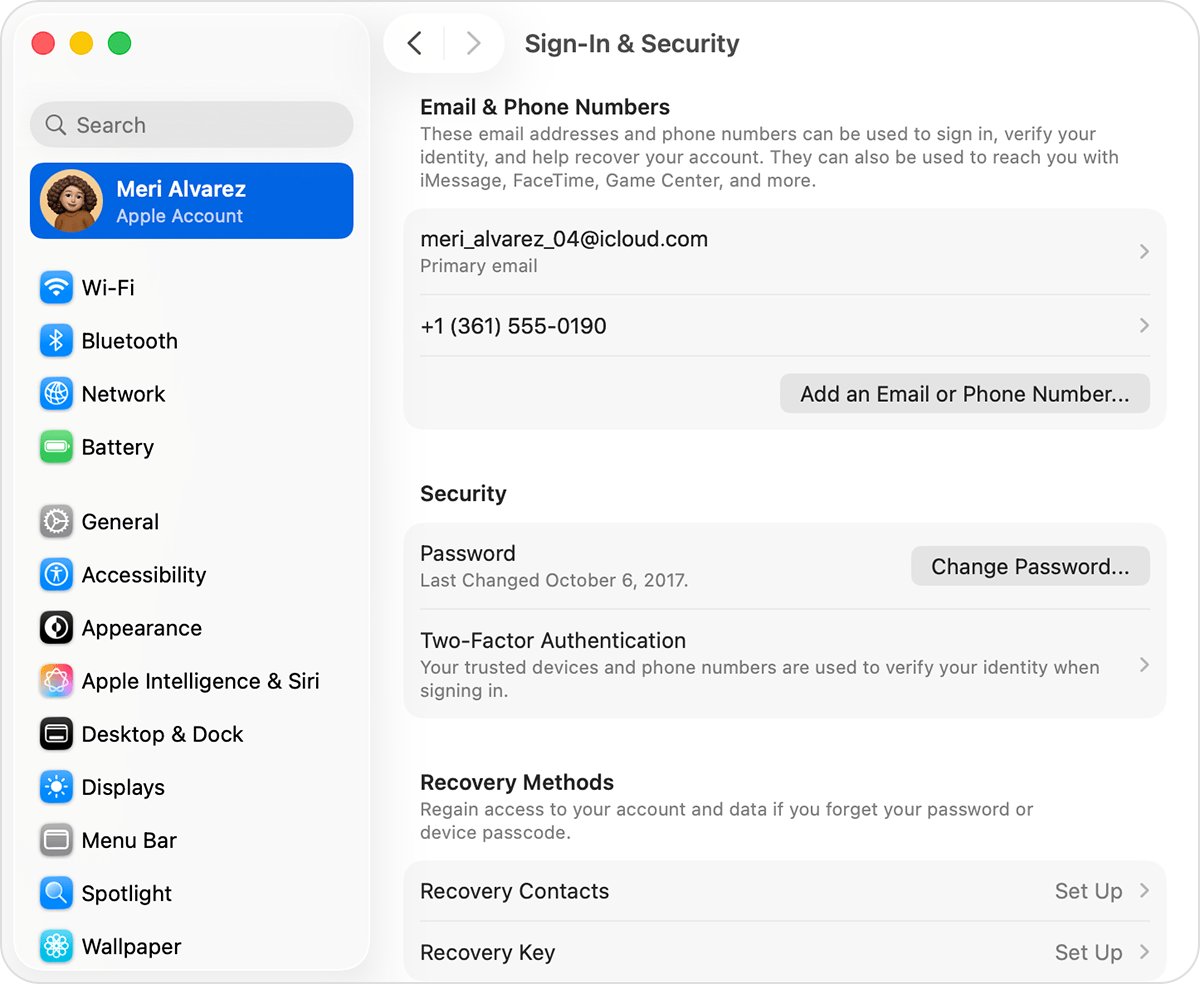
- Check any iPhone or iPad you still use: open Settings, tap your name, then Sign-In & Security to see the sign-in addresses.
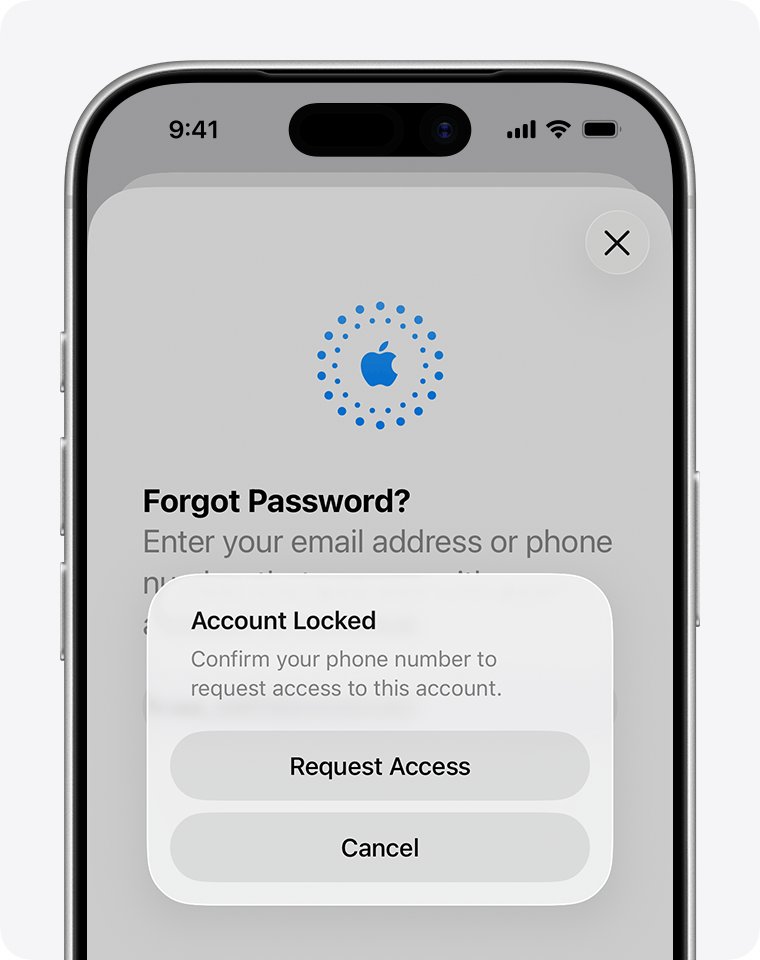
- If you see an alert that says the account is locked or not active, tap Request Access, or go to iforgot.apple.com/unlock.
- If the message says the account was disabled or locked for security reasons, select Forgot password? on the sign-in screen.
- Follow the onscreen prompts, and give any recovery factor you are asked for.
- If you cannot give one, start account recovery at iforgot.apple.com in Safari, or in the Apple Support app on a borrowed device.
- Wait for the confirmation email, which arrives within 72 hours and states when you can expect access.
Forgot Apple ID email, password or security questions: what to do
| What you forgot or lost | What to do | How long it takes |
|---|---|---|
| The email address or phone number | Look it up on a signed-in device, in Apple emails or at account.apple.com | As soon as you find it |
| The password, with a device still signed in | Change it on that trusted device | Immediate, though Stolen Device Protection can add a one-hour wait |
| The password, with your trusted phone number | Select Forgot password? and enter the code sent to that number | No account recovery wait |
| The security question answers | Use your rescue email address to reset them | Depends on reaching that mailbox |
| Everything, with no device, number or email | Request account recovery | Several days or longer |
| A recovery key you set up | Find your printed or written copy; Apple cannot provide it and standard recovery is off | Without it, you can be locked out permanently |
How to find your Apple ID email if you forgot it
Any email address or phone number on file signs you in, so you only need to find one. Try any iCloud address too, because iCloud uses your Apple ID.
- On iPhone or iPad, go to Settings, tap your name, then select Sign-In & Security.
- On a Mac, choose Apple menu > System Settings, click your name, then select Sign-In & Security.
- On a Windows PC, open iCloud for Windows and look under your name.
- Check whether you are signed in to the App Store, FaceTime or Messages on any Apple device.
- Go to account.apple.com and see whether the sign-in screen remembers your address.
- Search your inboxes for receipts and for repair, support or billing emails from Apple, which may show the address.
- Ask a family member in your Family Sharing group to check their Family Sharing settings.
A masked address such as j*@icloud.com may not show the true number of characters. Apple's page describes no separate lookup tool, so try addresses you regularly use for Apple services.
Forgot Apple ID password: reset it on a trusted device
A trusted device is an iPhone, iPad, Apple Watch, Apple Vision Pro or Mac already signed in with two-factor authentication. An old iPad in a drawer counts, and it skips the recovery wait. A device can also hold a saved Apple ID password you can look up instead.
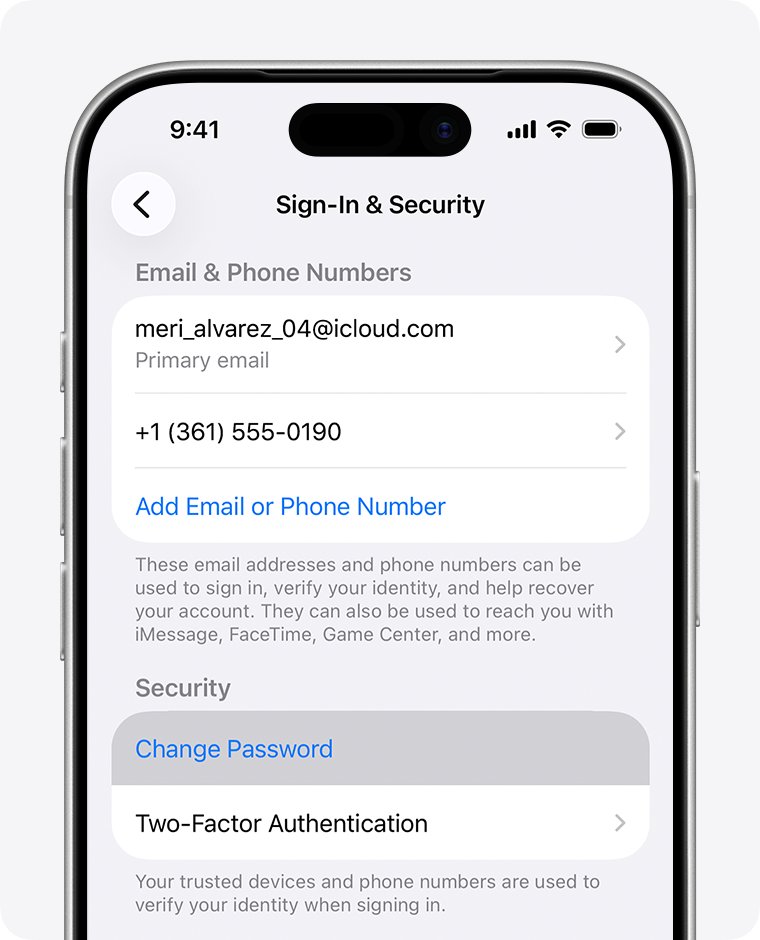
- On the iPhone or iPad, open Settings and tap your name.
- Tap Sign-In & Security, then Change Password.
- Follow the onscreen prompts to set a new password.
- Choose Remove Other Devices or Keep All Devices Signed In.
- On a Mac, choose Apple menu > System Settings, click your name, click Sign-In & Security, then Change Password.
Forgot Apple ID security questions and can't access the rescue email
Security questions apply only to accounts that have not moved to two-factor authentication. Apple's archived page says you need a rescue email address to reset forgotten answers.
- Go to iforgot.apple.com and enter the Apple ID address.
- If a rescue email option appears and you can reach that mailbox, use it to reset the answers.
- If the mailbox is an old one, try that email provider's own account recovery page first.
- If you still cannot get in, follow the prompts to request account recovery.
- Enter a phone number you can use now, because Apple contacts you there when the wait ends.
Once you are back in, set up two-factor authentication. Apple recommends it for anyone worried about forgetting the answers.
Locked out of Apple ID with no trusted device or phone number
When you have nothing to verify with, Apple Account recovery is the route, and it can take several days or longer.
- Use Safari on a device with iOS 17 or later or macOS 27 or later, and go to iforgot.apple.com.
- Or open the Apple Support app on a borrowed device or at an Apple Store, then tap Support Tools > Reset Password > Help Someone Else.
- Enter your Apple ID address and follow the instructions, and write down the details you entered.
- If you started on the web, turn off all your Apple devices during the wait.
- When Apple emails and texts or calls you, follow the instructions, or go to apple.com/recover after the time in the email.
Apple Support cannot shorten the wait, and a second request without new recovery factors can extend it. Signing in on any device that still holds your account cancels the request.
Apple ID locked for security reasons: what each message means
The wording decides your first move, and a denied request needs the extra steps to fix an Apple Account that is not active.
| Message | Why it appears | First move |
|---|---|---|
| "This Apple Account has been disabled for security reasons" | Too many wrong passwords or account details, from you or someone else | Reset the password |
| "This Apple Account has been locked for security reasons" | The account locked itself to protect you | Reset the password |
| Account is locked or not active | Access has to be requested | Tap Request Access |
| "This Apple Account is locked and can't be used" | The access request did not succeed | New account, or an Activation Lock request |
If a message reached you by email and you did not expect it, check the Apple ID security alert email before you click anything.
iPhone locked to owner and forgot Apple ID
Activation Lock links the device to your account once Find My is on. Apple warns that if you cannot find your account or reset the password, you might be unable to use or reactivate the device.
- On the Activation Lock screen, enter the Apple ID and password you used to set up the device, or the device passcode.
- If you do not remember the Apple ID, try an email address or phone number you regularly use for Apple services.
- If you forgot the password, reset it with the steps above, then enter the new one.
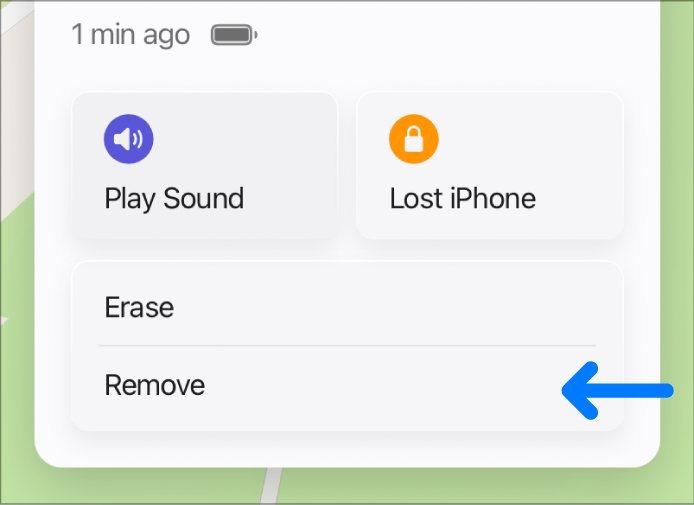
- If the device is offline or not with you, regain the account, sign in at icloud.com/find, select the device and click Remove This Device.
- If you still cannot remove the lock and have proof of purchase, start an Activation Lock support request with Apple.
- If the device belongs to a business or school, contact its IT department or manager.
If the iPhone was lost or stolen, mark it as lost in the Find My app straight away. Lost Mode shows a message with your phone number, and it keeps showing after a remote erase.
Apple ID permanently locked: how to start again
If access is denied, Apple offers two options: a new Apple Account, or an Activation Lock support request for a device you can prove you bought. A new account is separate, so it does not open anything stored under the old one.
- Keep the original receipt or other proof of purchase for each device tied to the old account.
- Start an Activation Lock support request for any device stuck on that screen.
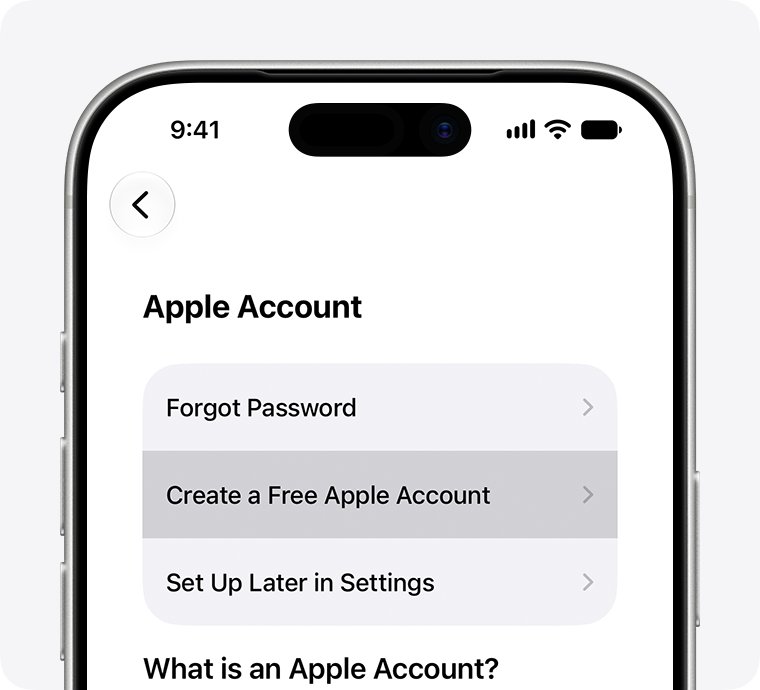
- On iPhone or iPad, tap Forgot password or don't have an account? during setup.
- Tap Create a Free Apple Account, then enter your birthday and name.
- Provide an email address you can reach, or tap Don't have an email address? to get a free iCloud address.
- Verify the email, create a password and set up two-factor authentication.
How to check if an Apple ID recovery request is active
- Open the confirmation email, or the iMessage for an account that uses only a phone number, and note the expected date.
- Go to iforgot.apple.com and enter the same email address and phone number you used to start the request.
- If the request is active, the site shows the expected recovery time.
- If it is not active, the request was not submitted or was canceled, so submit a new one.
Entering different details on the site can extend the wait, so use the ones you wrote down.
How to stop getting locked out of your Apple ID
Apple suggests visiting your Apple Account page periodically to review and update your details. Do these as soon as you are back in.
- Go to Settings, tap your name, then Sign-In & Security, and remove any old email or phone number.
- Add a phone number you will keep, so you have a working trusted number.
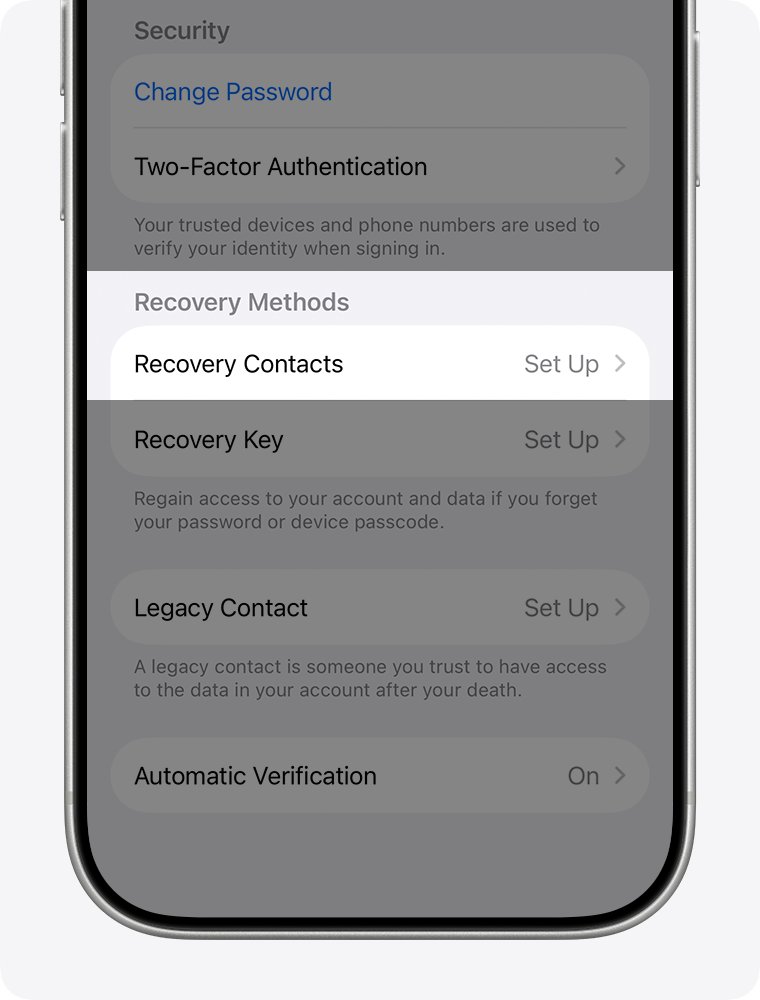
- Tap Recovery Contacts and invite a person you trust, who can give you a six-digit code later.
- Store your new password in a safe place outside your account.
- If you add a recovery key, print it or write it down and keep it out of Passwords, iCloud Photos, Notes and iCloud Drive.
Locked out of my Apple ID account: other problems
Forgot Apple ID and no device is signed in
Nothing nearby can show the address, so it has to come from your email or a person.
- Search each inbox you have used for receipts or billing emails from Apple.
- Try signing in with addresses and phone numbers you use regularly.
- Ask a family member to check their Family Sharing settings.
No account recovery confirmation email
The email can take up to 72 hours or land in spam.
- Wait the full 72 hours from when you started.
- Check your spam and junk folders.
- Check at iforgot.apple.com whether the request is active.
Recovery request disappeared after using a device
Activity on a device signed in to the account cancels the request.
- Submit a new request at iforgot.apple.com.
- Turn off any signed-in device whose passcode you have forgotten.
- Leave those devices off until the wait ends.
Credit card check says the information is incorrect
The card issuer can decline the check even when the CVV is right.
- Select Don't have access to this card.
- Continue with the other factors you are offered.
Can't create a new account with your email address
Apple says trouble creating an account can mean you already have one.
- Try Forgot password? with that same address.
- If it finds an account, continue with the reset or recovery steps.
- Otherwise use a different email address for the new account.
Apple ID locked and forgotten FAQ
How do I fix a locked Apple ID?
Reset your password if the message mentions security reasons, or tap Request Access if it says locked or not active. Without a trusted device or recovery factors, start account recovery at iforgot.apple.com or in the Apple Support app.
What if I forget my Apple ID?
Look in Settings under your name and Sign-In & Security on any signed-in device. You can also check account.apple.com, iCloud for Windows and Apple emails in your inbox. Any email address or phone number on file works for signing in.
What if I forgot my Apple ID password?
Change it on a trusted device if you have one, because that avoids any wait. Otherwise select Forgot password? and follow the prompts, which may ask for a code from your trusted phone number or start account recovery.
How do I recover a locked Apple ID account?
Request access or reset the password first. If you cannot verify yourself, start account recovery and wait for a confirmation within 72 hours. The wait can run several days or longer, and Apple then contacts you with instructions.
Can Apple Support unlock my Apple ID when I am locked out?
Apple Support cannot shorten the account recovery wait, because the waiting period is fixed. You can use the Apple Support app on a device at an Apple Store to start recovery, and the details you enter are not stored on that device.
Is an Apple ID ever permanently locked?
Yes. If your access request is denied, you may see that the account is locked and cannot be used. Losing a recovery key you set up can also lock you out permanently, because Apple cannot provide that key.
Is my iPhone locked to my Apple ID after I forget it?
It is if Find My was on, because Activation Lock then asks for your Apple ID and password or the device passcode. Recover the account first. With proof of purchase, you can also start an Activation Lock support request.