Hardware acceleration means software hands demanding work to hardware built for that job, usually the GPU, instead of doing all of it on the CPU, and that makes video, graphics and AI tasks faster and more efficient.
This guide explains the benefits and downsides, where you can use it, how to check whether it is on, and what to do when it causes problems.
What is hardware acceleration (simple edition)
Your CPU can do nearly any task, but it does not do every task quickly. A GPU, media engine or NPU does a narrower set of jobs much better, so software sends those jobs there.
Google's Android documentation puts it plainly: using your machine's hardware to improve performance, rather than running as pure software, is called hardware acceleration.
Leave hardware acceleration on. Turn it off only as a troubleshooting step when one app crashes, flickers or draws its window incorrectly. The setting exists to take work off the CPU. Microsoft Edge, for example, uses a hardware path by default for H.264 video when the driver supports it.
What hardware is used for hardware acceleration?
The term covers several different chips. The GPU is the best known, but it is not the only one.
| Hardware | Work it takes over | Where you meet it |
|---|---|---|
| GPU | Graphics, effects, video and gaming | Browsers, games, photo and video editors |
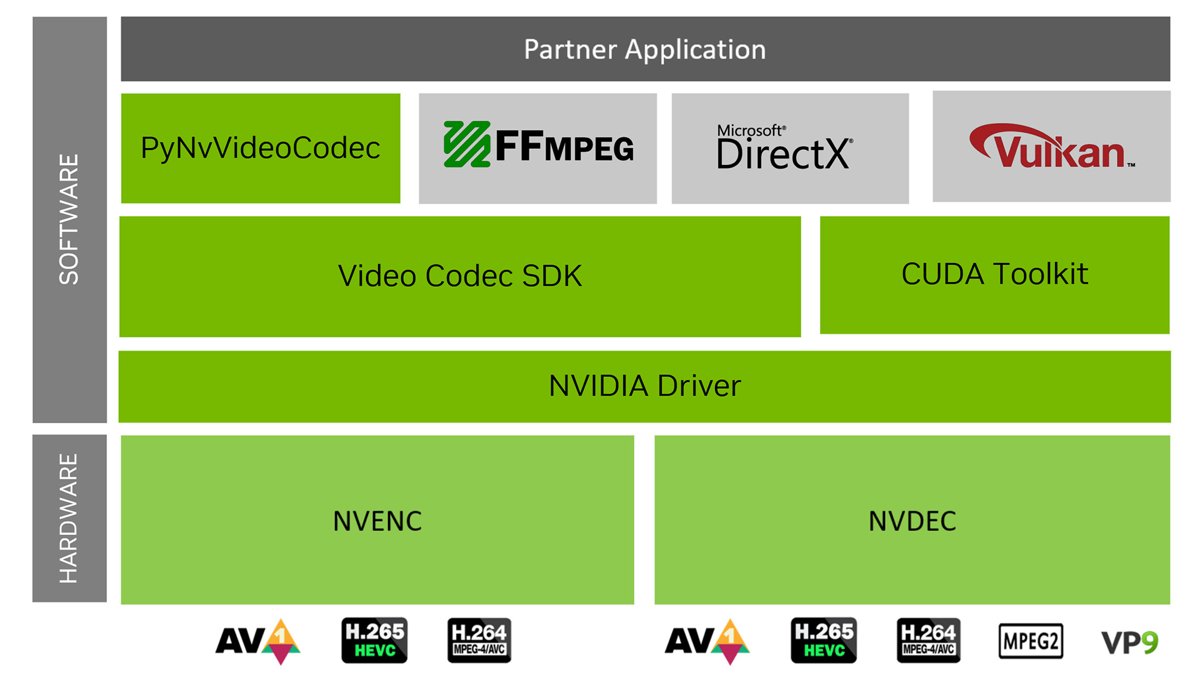
| Video encoders and decoders on the GPU | Compressing and playing video. NVIDIA builds these separately from the GPU's compute cores. | Streaming, game broadcasting, video export |
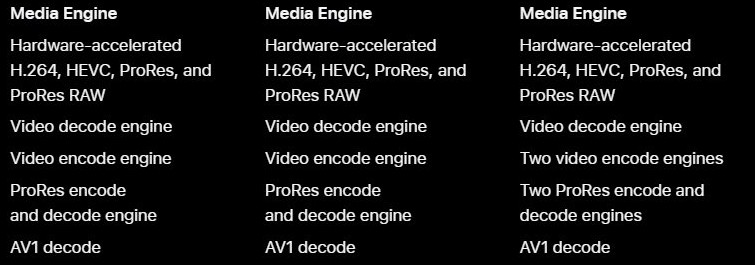
| Apple Media Engine | H.264, HEVC, ProRes and ProRes RAW video | MacBook Pro with Apple silicon |
| NPU | AI tasks such as voice commands and quick image creation | Windows PCs with a neural processing unit |
| CPU virtualization features | Faster execution inside a virtual machine | Android Emulator, Hyper-V |
Windows PCs have either an integrated GPU, a discrete GPU, or both. Many laptops use the integrated GPU for light graphics and the discrete GPU for heavy work.
What are the benefits of hardware acceleration?
The gain depends on the task, because each accelerator solves a different bottleneck. These are the benefits the hardware and software makers document.
| Benefit | What changes for you | Example |
|---|---|---|
| Less work for the CPU | CPU-intensive steps move elsewhere, so the processor has room for other tasks | DirectX Video Acceleration lets a video decoder offload operations such as the inverse discrete cosine transform to the GPU |
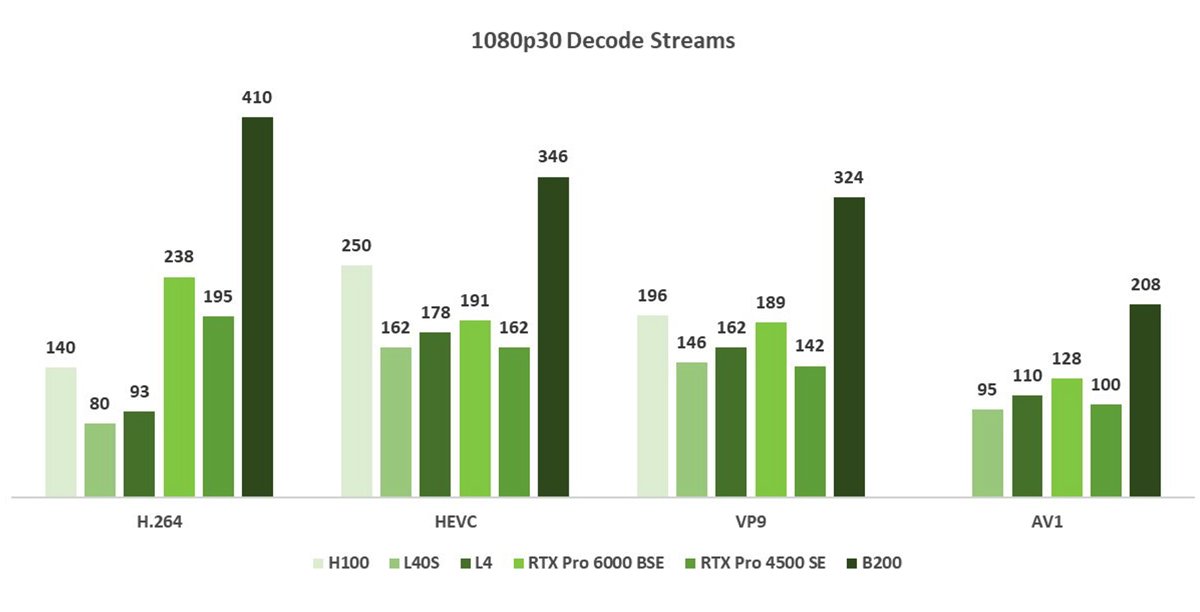
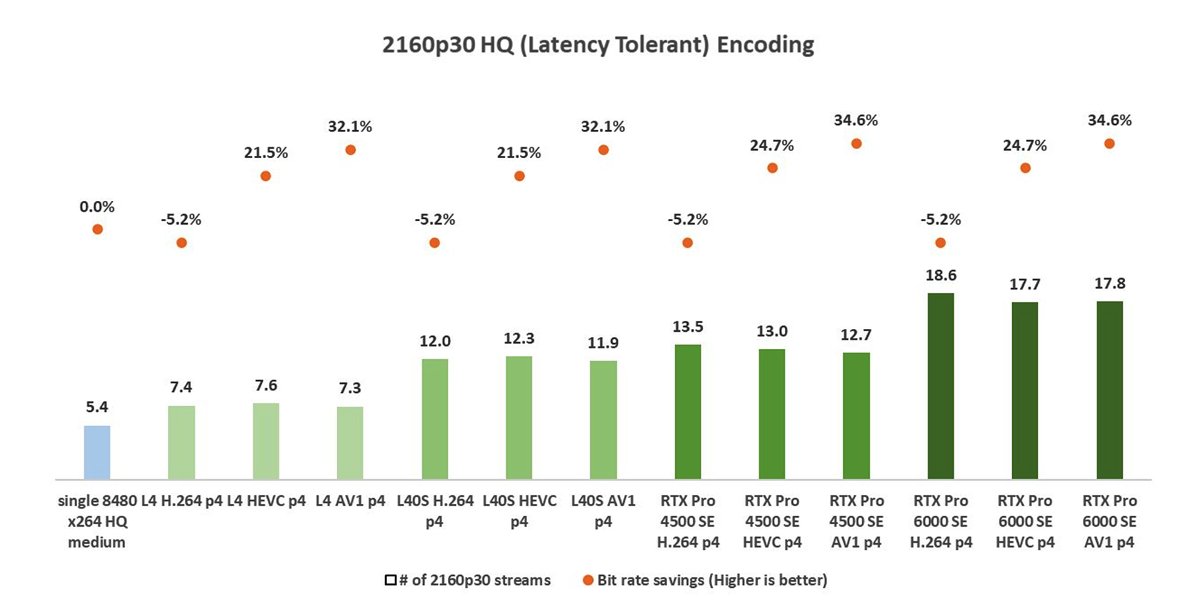
| Faster results | Jobs finish sooner than they would in software | NVIDIA rates its video encoders and decoders for faster-than-real-time processing |
| Better power efficiency | The dedicated chip uses less energy for the same job | Microsoft describes the NPU as far more efficient at AI tasks than a CPU or GPU |
| Smoother pages and scrolling | The browser prepares page tiles and sends finished frames to the GPU | Chrome stores rasterized tiles in GPU memory and sends a new compositor frame when you scroll |
| More usable virtual devices | Emulators and virtual machines stop crawling | Microsoft warns that the Android Emulator runs very slowly without hardware acceleration |
Are there downsides to hardware acceleration?
Yes, and nearly all of them come down to memory use, drivers or an app that does not get along with your hardware.
| Downside | Why it happens | What you notice |
|---|---|---|
| Higher memory use | Android's documentation says an app that turns it on consumes more RAM | Higher RAM use in that app |
| Drawing errors | Not every drawing operation is supported in hardware | Invisible elements or wrongly rendered pixels |
| Driver dependence | Hardware paths rely on the GPU driver and on the codecs your device supports | A video fails or the app drops back to software decoding |
| App crashes or freezes | Your computer's hardware can conflict with how an app uses it | Chrome crashes, freezes or will not start |
| Display glitches in slide shows | Slide transitions do not always display correctly with Slide Show acceleration | Flashing black screens in place of slide transitions |
None of these is a reason to turn the feature off in advance. Treat them as symptoms to check when something actually goes wrong.
Where can I use hardware acceleration?
Windows has no single master switch for hardware acceleration. Each app below controls its own setting, so changing one does not change the others.
| Software | Setting name | Where to find it |
|---|---|---|
| Google Chrome | Use hardware acceleration when available | More > Settings > System |
| Microsoft Edge | Use graphics acceleration when available | edge://settings/system |
| Microsoft PowerPoint | Disable Slide Show hardware graphics acceleration | File > Options > Advanced > Display |
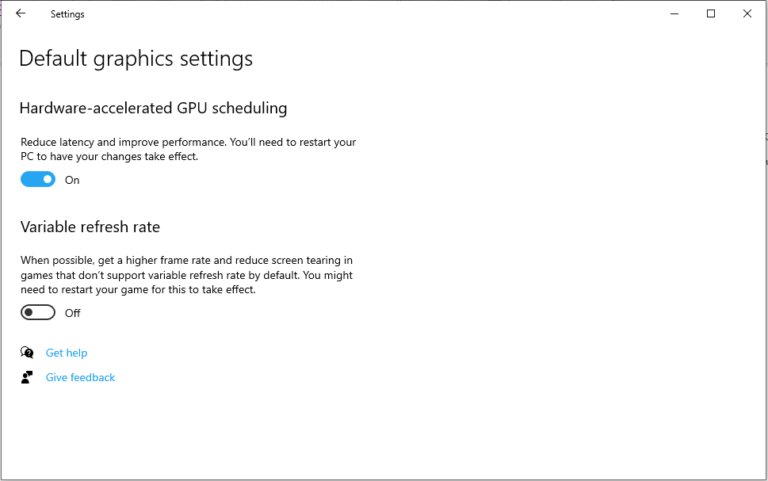
| Windows 11 and Windows 10 | Hardware-accelerated GPU scheduling | Settings > System > Display > Graphics |
| Android Emulator | Hardware or software rendering, plus VM acceleration | AVD Manager when you create the virtual device |
| Machine learning in WSL | NVIDIA CUDA or DirectML, set up by you | Windows Subsystem for Linux with the latest GPU driver |
Firefox has its own option too, and you can disable hardware acceleration in Firefox separately from your other browsers.
Should hardware acceleration be on or off?
Match what you are seeing to a row. In most cases the answer is to keep it on and fix the cause.
| Your situation | Hardware acceleration | Why |
|---|---|---|
| Everything runs normally | Leave it on | There is no fault to fix, and the CPU keeps its spare capacity |
| Chrome crashes, but the same page works in another browser | Turn it off in Chrome and test | Google lists this as a fix for hardware problems with Chrome |
| Video plays sound with no picture in Edge | Make sure it is on | Microsoft lists disabled hardware acceleration as a possible cause |
| PowerPoint transitions flash black | Turn off Slide Show acceleration only | Microsoft suggests this exact check box for that symptom |
| You run an Android Emulator on Windows | Leave it on | The emulator runs very slowly without it |
When one app is the problem, you can turn off hardware acceleration for that app and leave the rest of the PC alone.
How to check if hardware acceleration is on in Microsoft Edge
Edge has a built-in report that shows what your GPU is actually doing, so you do not need extra software.
- Open Microsoft Edge and go to
edge://settings/system. - Check that Use graphics acceleration when available is turned on.
- Open
edge://gpuin a new tab. - Find Video Decode and Video Encode, and look for Hardware accelerated next to each one.
- Review the Video Acceleration Information section to see which codecs your device accelerates.
To test one video, open edge://media-internals while it plays and check kVideoDecoderName. D3D11VideoDecoder or MediaFoundationVideoDecoder means hardware decoding, and FFmpegVideoDecoder means software decoding.
How to turn on hardware acceleration in Chrome
- Open Chrome and select More in the top-right corner.
- Select Settings.
- Select System.
- Turn on Use hardware acceleration when available.
- Restart Chrome so the change takes effect.
Use the same switch to turn the feature off when you are troubleshooting a crash.
How to turn on hardware acceleration in Microsoft Edge
- Open Microsoft Edge and go to
edge://settings/system. - Turn on Use graphics acceleration when available.
- Restart Microsoft Edge.
If your organization manages this setting through Group Policy, the policy controls the switch. An IT admin changes it with the HardwareAccelerationModeEnabled policy.
Is hardware-accelerated GPU scheduling the same as hardware acceleration?
No. Hardware acceleration moves app work to a chip, while hardware-accelerated GPU scheduling changes how Windows manages the queue of work already going to the GPU.
| Question | Hardware acceleration in an app | Hardware-accelerated GPU scheduling |
|---|---|---|
| What moves | Drawing, video or other app work | Most GPU scheduling, from a CPU thread to a dedicated processor on the GPU |
| Who controls it | Each app | Windows, for the whole PC |
| What it needs | Hardware and a driver the app can use | A supported GPU and a WDDM 2.7 or newer driver |
| What you notice | Depends on the app and the task | Microsoft says users should not notice significant changes |
The Windows switch appears only when your GPU and driver support it. You can enable hardware-accelerated GPU scheduling from the Graphics settings page.
Hardware acceleration is everywhere
You use it constantly even if you have never opened a setting for it. These devices and platforms ship with it as standard.
| Platform | How acceleration is built in | Do you need to turn it on? |
|---|---|---|
| Android apps | All View canvas drawing uses the GPU. It is on by default for apps that target API level 14 or higher. | No |
| MacBook Pro with Apple silicon | The Media Engine accelerates H.264, HEVC, ProRes and ProRes RAW | No |
| Windows video playback | Edge uses a Media Foundation decoder with Windows hardware acceleration as its default H.264 path | No, unless the browser setting was turned off |
| Android Emulator | Hardware acceleration is enabled by default on most machines | Only if your machine does not already have it |
| PCs with NVIDIA GPUs | Hardware-based encoders and decoders sit on the GPU | Only apps built to use them benefit |
Hardware acceleration problems and how to fix them
Video plays audio but shows no picture in Microsoft Edge
Hardware acceleration is off, the GPU driver cannot decode the video, or the format is not supported.
- Open
edge://settings/systemand turn on Use graphics acceleration when available. - Restart Microsoft Edge and open
edge://gpu. - Check that Video Decode shows Hardware accelerated.
- If playback still fails, update the GPU driver from your device manufacturer.
Chrome crashes, freezes or will not start
Your computer's hardware is not working well with Chrome.
- Open the same page in another browser to rule out a website or network fault.
- If it works there, select More > Settings > System in Chrome.
- Turn off Use hardware acceleration when available.
- Restart Chrome and test the page again.
PowerPoint shows flashing black screens between slides
Slide transitions are not displaying correctly with Slide Show hardware graphics acceleration.
- Select File > Options > Advanced in PowerPoint.
- Under Display, select Disable Slide Show hardware graphics acceleration.
- Select OK and run the slide show again.
Android Emulator runs very slowly on Windows
Hardware acceleration is not available or enabled, or the virtual device uses an Arm-based image.
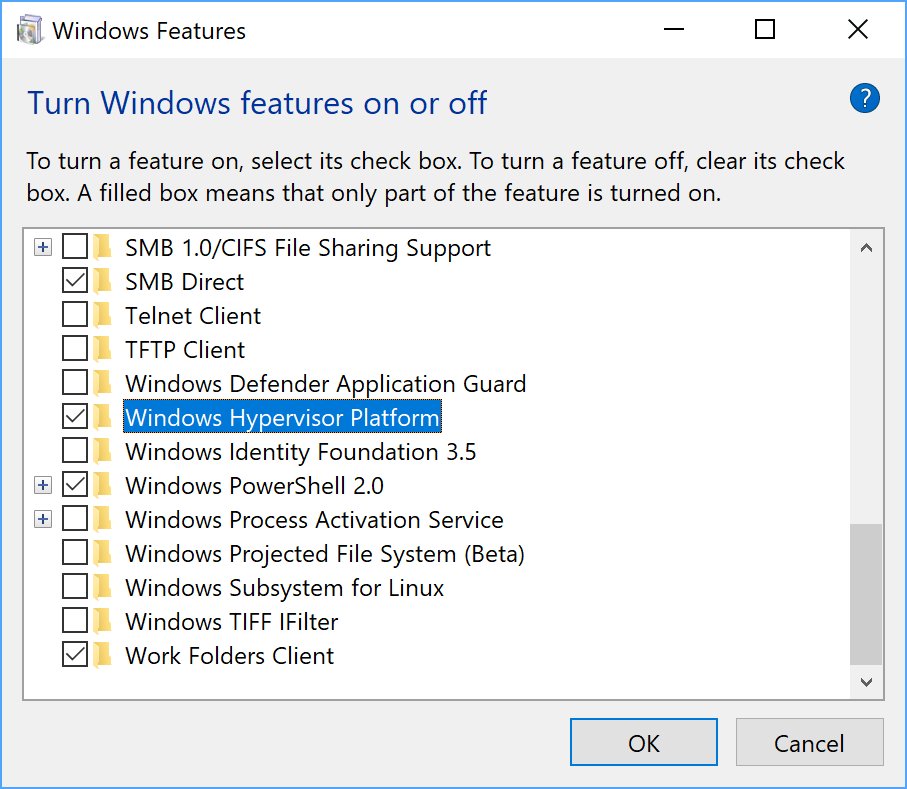
- Type windows features in the Windows search box and select Turn Windows features on or off.
- On Windows Pro, Enterprise or Education, select Hyper-V and Windows Hypervisor Platform, then restart the PC.
- Make sure the virtual device uses an x86-64 or x86-based system image.
Hardware acceleration FAQ
What happens when you turn off hardware acceleration?
The app does that work in software on the CPU instead. In Microsoft Edge, for example, H.264 video falls back to a software decoder when acceleration is off, so the CPU takes over the decoding unless that fallback also fails.
Does hardware acceleration use more RAM?
It can. Android's developer documentation states that an app with hardware acceleration turned on consumes more RAM because of the extra resources it needs. Treat that as a general trade-off, and check the app in Task Manager if memory is a concern.
Is hardware acceleration the same as a GPU?
No. A GPU is a chip, and hardware acceleration is the practice of sending work to a specialized chip. The GPU is the most common target, but media engines, NPUs and CPU virtualization features also provide hardware acceleration.
Do I need a dedicated graphics card for hardware acceleration?
No. Integrated GPUs handle graphics-related work too, including some gaming and light photo and video editing. A discrete GPU helps with heavier tasks such as intense video editing, design work and gaming, though it uses more power.
Is it safe to turn off hardware acceleration?
Yes, it is safe to turn off in an app such as Chrome or Edge. The setting only changes which hardware does the work, and you can switch it back on at any time and restart the app.
Does hardware-accelerated GPU scheduling increase FPS in games?
Microsoft does not promise a frame rate gain. Its DirectX team says the new scheduler reduces scheduling overhead, but most apps already hide that cost through buffering, so users should not notice significant changes.
Why would an app turn off hardware acceleration by itself?
An app drops back to software when the GPU driver does not support what it needs. Edge, for example, uses its software decoder when the driver lacks the required H.264 decode profile, and the emulator falls back for similar compatibility reasons.