In Firefox 55, Mozilla has introduced a new performance section in Settings, which lets you control number of running content processes. The more the content processes, the better the Firefox performance with multiple tabs, but more memory will be consumed. So you should leave those settings enabled unless you’re an advanced user having a lot of RAM and you know what you’re doing.
These Performance settings include hardware acceleration option also, which you need to disable to troubleshoot Firefox issues you’re having like the browser doesn’t open or shows black screen on startup, these can be fixed by turning off hardware acceleration.
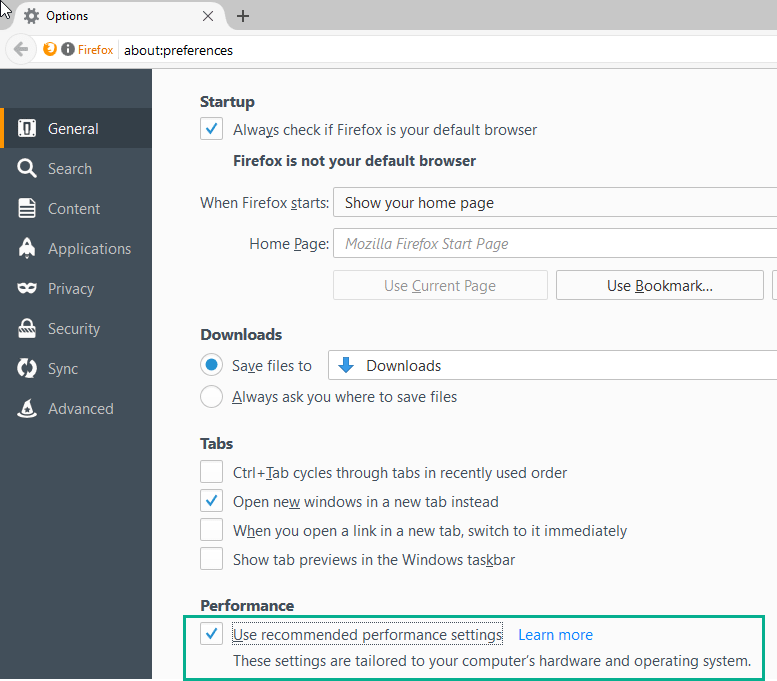
Disabling Hardware Acceleration in Firefox 55/56/57
1. Visit General Panel in Settings
2. Scroll down until you see Performance, uncheck ‘ Use recommended Performance Settings’
3. Uncheck ‘ Use hardware acceleration when available’.
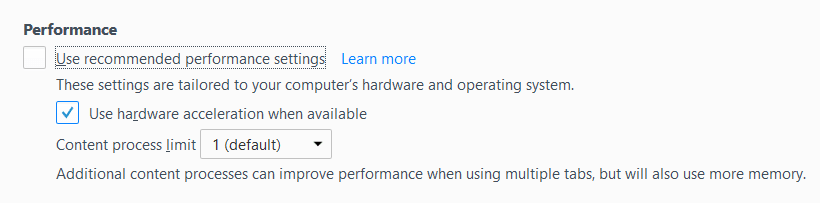
Note: The Performance settings will remain in General Settings even after preferences reorganization change.
Please share this article





