Microsoft raised list prices on most commercial Microsoft 365 suites on July 1, 2026, taking Microsoft 365 E3 to $39 and E5 to $60 per user per month while adding AI, security and device management features.
Existing customers pay the new price at their first renewal after that date. This article lists every price change, what each suite gained, the Copilot bundles and how to control the cost.
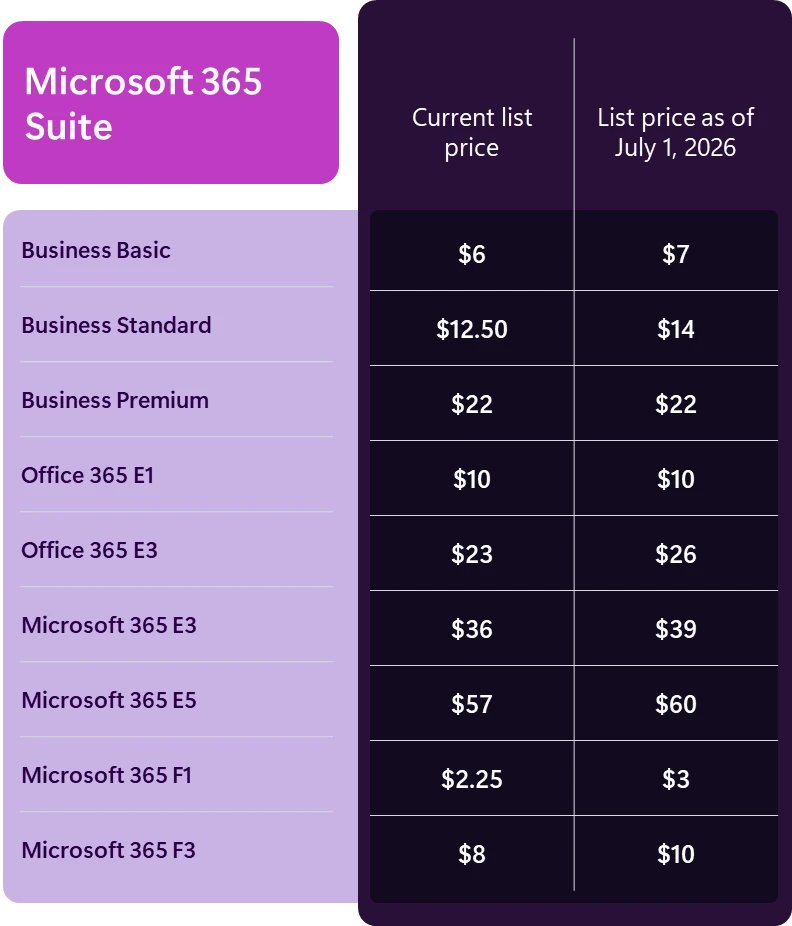
The concrete price changes (U.S. list price, per-user/month)
These are Microsoft's published U.S. list prices for the versions that include Microsoft Teams. Versions without Teams rise by an equivalent dollar amount.
| Suite | Before July 1, 2026 | From July 1, 2026 | Dollar change | Percent change |
|---|---|---|---|---|
| Microsoft 365 Business Basic | $6 | $7 | +$1 | +16.7% |
| Microsoft 365 Business Standard | $12.50 | $14 | +$1.50 | +12% |
| Microsoft 365 Business Premium | $22 | $22 | None | 0% |
| Office 365 E1 | $10 | $10 | None | 0% |
| Office 365 E3 | $23 | $26 | +$3 | +13% |
| Microsoft 365 E3 | $36 | $39 | +$3 | +8.3% |
| Microsoft 365 E5 | $57 | $60 | +$3 | +5.3% |
| Microsoft 365 F1 | $2.25 | $3 | +$0.75 | +33.3% |
| Microsoft 365 F3 | $8 | $10 | +$2 | +25% |
Percentages are calculated from the list prices above. Your actual price depends on your agreement, your partner and your market.
Background / overview
The pricing update arrived as a set of dated changes rather than one event, so this timeline is the quickest way to see where your organization stands.
| Date | What happened |
|---|---|
| November 18, 2025 | Security Copilot rollout began for existing Security Copilot customers with Microsoft 365 E5 |
| December 1, 2025 | Microsoft 365 Copilot Business became available to partners at $21 per user per month |
| December 4, 2025 | Microsoft announced the new capabilities and the July 2026 price changes |
| February 1, 2026 | Commercial cloud prices were adjusted in five European currencies |
| July 1, 2026 | New list prices took effect, and Business Standard and Business Premium with Copilot became permanent plans |
| December 31, 2026 | Current Copilot Business promotions end |
| July 1, 2027 | Second step of the phased increase for Office 365 G3 and Office 365 E3 in government clouds |
What Microsoft announced (the facts)
| Question | What Microsoft stated |
|---|---|
| What changed | Commercial list prices for Microsoft 365 suite subscriptions, along with added AI, security and management capabilities |
| When | July 1, 2026 |
| Which channels | All purchasing channels |
| Who pays it first | New and renewing customers from July 1, 2026 |
| Existing customers | The new price applies at the next renewal after July 1, 2026 |
| Suites without Teams | An equivalent dollar increase |
| Where it applies | Globally, with local market adjustments for certain regions |
| Nonprofit pricing | Adjusted in line with commercial pricing, because it is a fixed percentage discount from commercial rates |
Key headline items from the Microsoft announcement
| Headline | Detail |
|---|---|
| Largest percentage rises | Microsoft 365 F1 at 33.3% and F3 at 25%, both frontline plans |
| Largest dollar rises | $3 per user per month on Office 365 E3, Microsoft 365 E3 and Microsoft 365 E5 |
| No list price change | Microsoft 365 Business Premium and Office 365 E1 |
| Most new features | Microsoft 365 E5, including Microsoft Security Copilot, Microsoft Cloud PKI and two Intune capabilities no other suite gains |
| Email security | Microsoft Defender for Office 365 Plan 1 added to Office 365 E3 and Microsoft 365 E3 |
| Storage | An extra 50 GB of email storage for the three Business plans |
| AI for everyone | Copilot Chat enhancements across every suite in Microsoft's feature table |
What’s being added to suites (feature-level verification)
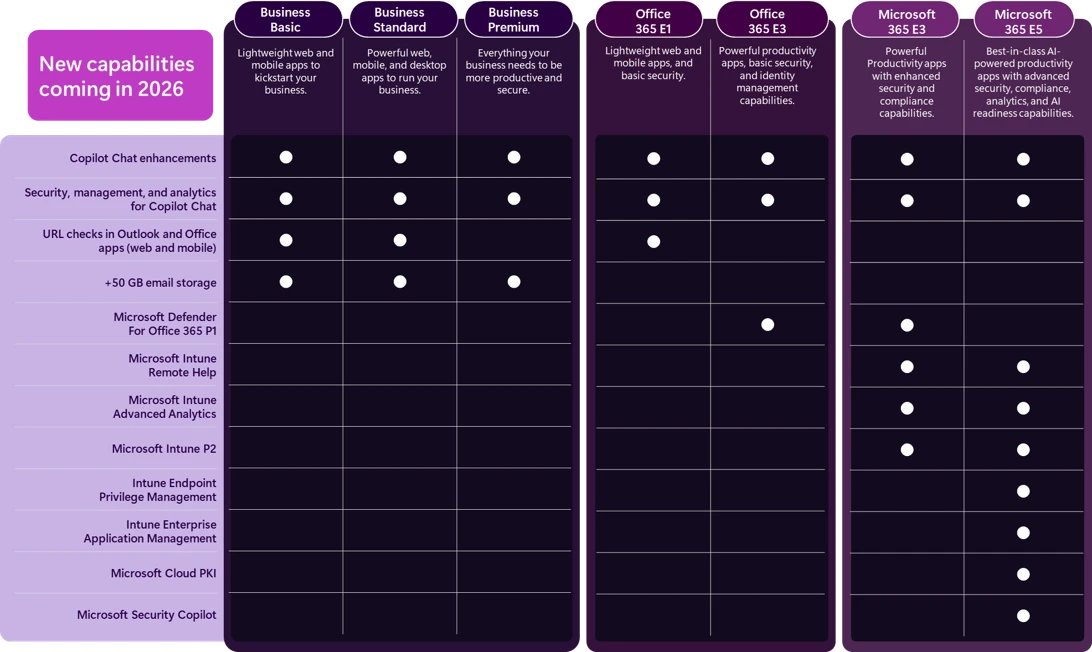
This table follows Microsoft's own capability chart. Check your suite's column against what you already pay for, because several items were previously sold as add-ons or as part of the Intune Suite.
| Capability | Suites that gain it |
|---|---|
| Copilot Chat enhancements | Business Basic, Business Standard, Business Premium, Office 365 E1, Office 365 E3, Microsoft 365 E3, Microsoft 365 E5 |
| Security, management and analytics for Copilot Chat | Business Basic, Business Standard, Business Premium, Office 365 E1, Office 365 E3, Microsoft 365 E3, Microsoft 365 E5 |
| URL checks in Outlook and Office apps (web and mobile) | Business Basic, Business Standard, Office 365 E1 |
| 50 GB more email storage | Business Basic, Business Standard, Business Premium |
| Microsoft Defender for Office 365 Plan 1 | Office 365 E3, Microsoft 365 E3 |
| Intune Remote Help | Microsoft 365 E3, Microsoft 365 E5 |
| Intune Advanced Analytics | Microsoft 365 E3, Microsoft 365 E5 |
| Intune Plan 2 | Microsoft 365 E3, Microsoft 365 E5 |
| Intune Endpoint Privilege Management | Microsoft 365 E5 |
| Intune Enterprise Application Management | Microsoft 365 E5 |
| Microsoft Cloud PKI | Microsoft 365 E5 |
| Microsoft Security Copilot | Microsoft 365 E5 |
Copilot Chat enhancements include inbox and calendar awareness and access to Word, Excel and PowerPoint agents. Agent Mode availability can vary by tenant eligibility and rollout status.
Microsoft 365 Copilot price: add-on, Copilot Business and bundles
The suite increase does not put full Copilot into most plans. Copilot in the apps is still a separate purchase or a specific bundle, and Copilot in Business Standard depends on which version you buy.
| Offer | U.S. price per user per month | Conditions |
|---|---|---|
| Microsoft 365 Copilot (add-on) | $30 | Annual subscription; eligible Microsoft 365 plan required |
| Microsoft 365 Copilot Business (add-on) | $21 list, $18 with the promotion | Up to 300 users; promotion runs July 1 to December 31, 2026 and covers the first year only |
| Microsoft 365 Business Standard with Copilot | $23.50 | Permanent plan since July 1, 2026; up to 300 users |
| Microsoft 365 Business Premium with Copilot | $32 | Permanent plan since July 1, 2026; up to 300 users |
| Business Basic + Copilot Business | $21 after a 25% promotion | Through December 31, 2026; 1 to 300 licenses |
| Microsoft 365 E7 | $99 | Includes Microsoft 365 E5, Copilot, Agent 365 and Microsoft Entra Suite |
| Agent 365 | $15 | Standalone; included in Microsoft 365 E7 |
Microsoft notes that some advanced AI features on Business plans use usage-based billing, which can add charges beyond the license fee. Once you have a license, the Copilot setup and settings are the next thing to review.
Is Security Copilot included in Microsoft 365 E5?
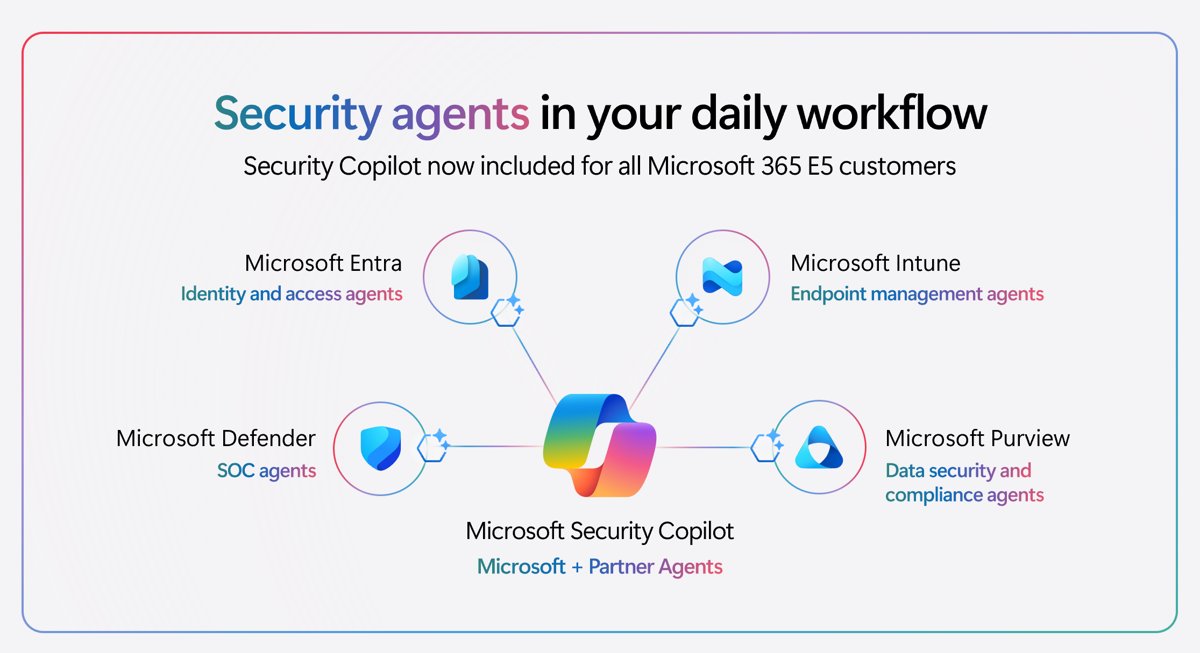
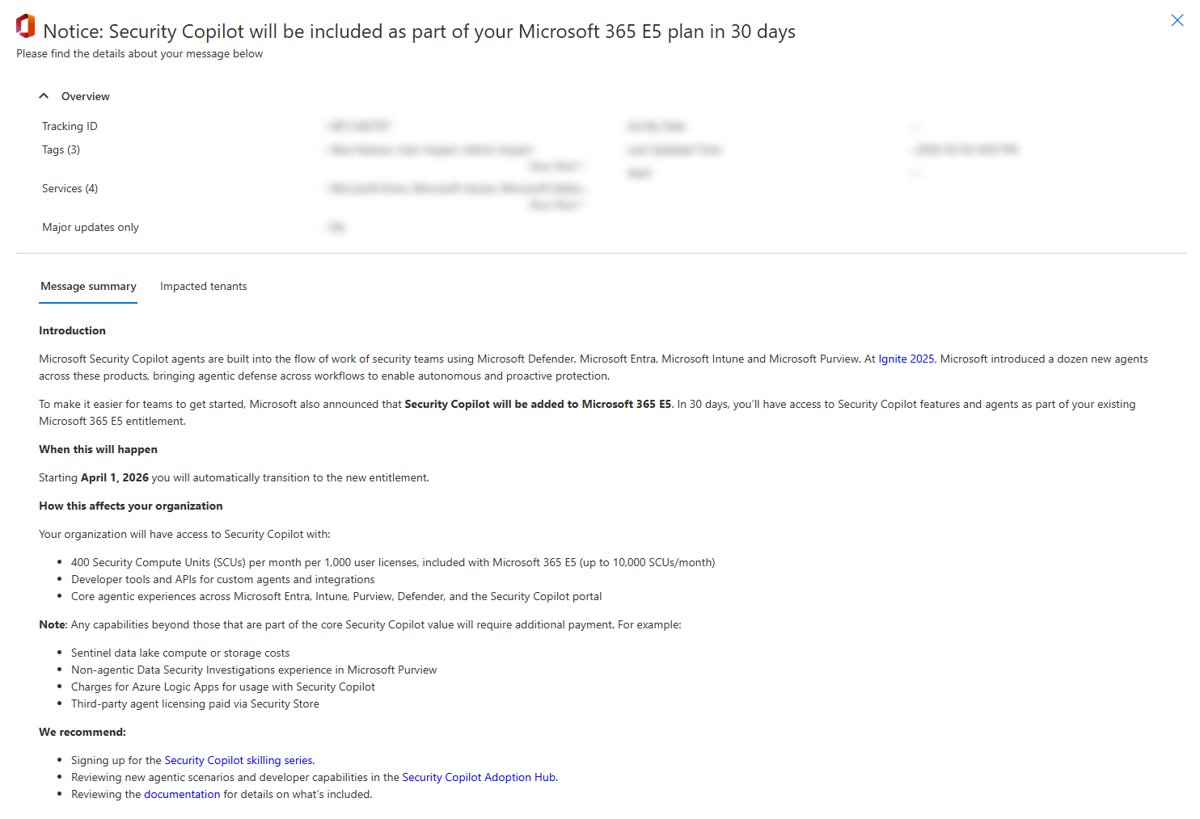
Yes. Security Copilot is included for eligible Microsoft 365 E5 and E7 customers at no additional cost, within a monthly capacity allowance.
| Item | Detail |
|---|---|
| Included capacity | 400 Security Compute Units (SCUs) a month per 1,000 paid user licenses, up to 10,000 SCUs a month |
| Smaller organizations | Scales with licenses, so 400 licenses get 160 SCUs a month |
| Unused capacity | Resets monthly and does not roll over |
| Going over | Usage beyond the allowance will be throttled at a future date, with an option to buy more at $6 per SCU on 30 days' notice |
| Setup | Provisioned automatically for eligible tenants, with no Azure setup |
| Agents | Not switched on automatically; your organization sets them up and deploys them |
Government customers: the specific wrinkle
Government suites follow a separate schedule. Under federal regulations, a total increase above 10% is phased over several years, with no more than 10% applied each year.
| Government suite | Total increase | July 1, 2026 | July 1, 2027 |
|---|---|---|---|
| Microsoft 365 G3 (GCC, GCC High, DoD) | 8% | +8% | None |
| Microsoft 365 G5 (GCC, GCC High, DoD) | 5% | +5% | None |
| Office 365 G3 (GCC) | 13% | +10% | +3% |
| Office 365 E3 (GCC High, DoD) | 13% | +10% | +3% |
| Office 365 G1 (GCC), Office 365 E1 (GCC High, DoD) | None | None | None |
| Business Premium (GCC High) | None | None | None |
Microsoft expected the new features in at least one government cloud during 2026, with the others following as they pass validation. Web-grounded Copilot Chat in Word, PowerPoint and OneNote is off by default in government environments.
Why Microsoft says it’s doing this — and what that means
| What Microsoft says | What that means for you |
|---|---|
| Organizations face a more complex threat landscape and rising IT demands | The price rise is tied to bundled security and management, so its value depends on whether you use those tools |
| Customers need help with AI-powered transformation | Copilot Chat improvements reach every listed suite, while Copilot in the apps remains a paid step up |
| More than 1,100 features were released across Microsoft 365, Security, Copilot and SharePoint in the last year | Microsoft is justifying the price by accumulated features, so audit which ones your organization has actually turned on |
| The update was shared early to give customers time to plan | Renewals after July 1, 2026 are at the new price, so planning now means planning for your next renewal date |
Immediate risks and practical impacts
| Risk | Practical impact | What to do |
|---|---|---|
| Renewal surprise | The new price appears at your next renewal, not on July 1 itself | List every renewal date and budget for the increase |
| Frontline cost | F1 and F3 have the steepest percentage rises of any suite | Recalculate frontline budgets first |
| Paying twice | An add-on you already buy can overlap with what the suite now includes | Compare your add-ons with the feature table |
| Usage-based AI charges | Select advanced AI features on Business plans bill by usage on top of the license | Decide who can use them before they spread |
| Security Copilot limits | Usage beyond the included SCUs will be throttled at a future date | Track usage in the Security Copilot usage dashboard |
| Data handling | Security Copilot can copy, process and store Microsoft 365 data to generate responses | Review the settings chosen during auto-provisioning |
Opportunities and strategic upsides
| Opportunity | Who benefits | Why |
|---|---|---|
| Retire overlapping add-ons | Microsoft 365 E3 and E5 customers | Remote Help, Advanced Analytics and Intune Plan 2 now sit inside the suite |
| Better email protection | Office 365 E3 and Microsoft 365 E3 customers | Defender for Office 365 Plan 1 helps detect phishing, malware and malicious links |
| Safer links on basic plans | Business Basic, Business Standard and Office 365 E1 customers | URL checks protect against known malicious websites when people click links in email and Office apps |
| Security agents without new contracts | Microsoft 365 E5 customers | Security Copilot arrives with included capacity and no separate Azure setup |
| Cheaper route to Copilot | Organizations with up to 300 users | Business Standard with Copilot costs $23.50, against $32 for Business Standard plus promotional Copilot Business |
| Flat price on Business Premium | Small businesses weighing a security upgrade | Business Premium stayed at $22 while Business Standard rose to $14 |
How to prepare now: a practical playbook
The window to renew at the old price closed on June 30, 2026, so the job now is to reduce what your next renewal costs. You need a billing role in the Microsoft 365 admin center for most of these steps.
- In the Microsoft 365 admin center, go to Billing > Your products and record the expiration date of every subscription.
- Multiply licenses by the dollar change by 12 to get the yearly increase for each suite.
- Go to Billing > Licenses and count the assigned and unassigned licenses.
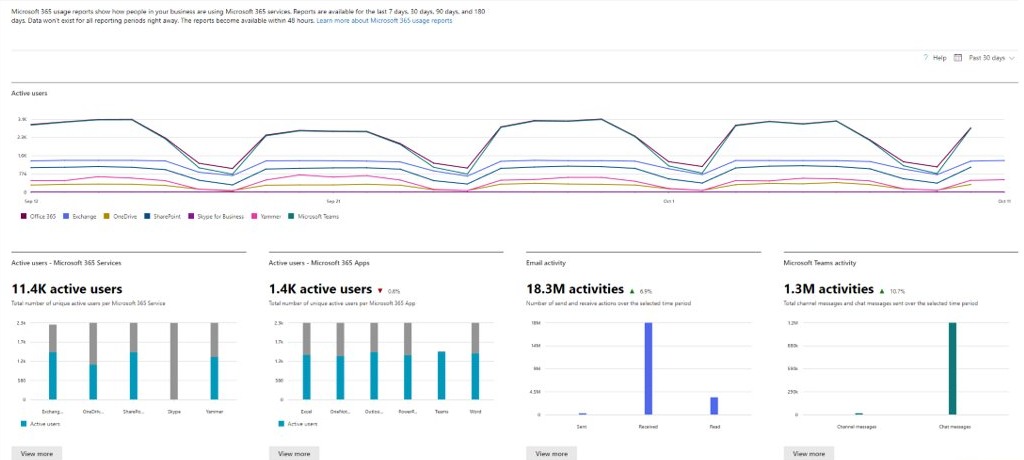
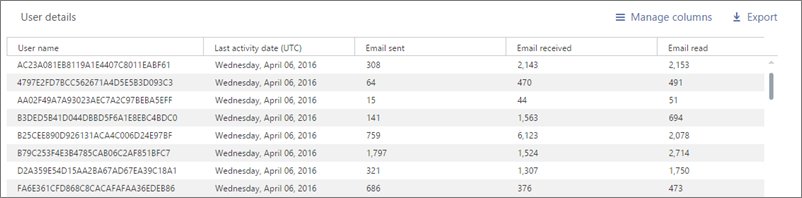
- Go to Reports > Usage and review the last 180 days to find people who barely use their license.
- List your add-ons and mark each one that your suite now includes.
- Compare your current suite with the Copilot bundles and with Microsoft 365 E7 if you plan to buy Copilot.
- Contact your account executive or partner for the details of your own pricing, as Microsoft advises existing customers to do.
- Change plans or remove licenses before the renewal date, then recheck Your products.
Turn off recurring billing only if you plan to leave a subscription. Turning it off cancels any scheduled changes on that subscription, and you must then pay the bill manually to keep it active.
Licensing considerations: optimization techniques that work
| Your situation | Technique | Why it helps |
|---|---|---|
| Usage reports show someone barely uses Microsoft 365 | Remove the license at renewal | Microsoft's usage reports exist to find people who might not need one |
| Some users need a cheaper plan | Buy the new plan for those users and move only them | Changing a whole plan moves every user assigned to it |
| Frontline staff hold Microsoft 365 E3 | Compare E3 at $39 with F3 at $10 or F1 at $3 | The gap is large, but check that the frontline plan covers what those staff use |
| You pay for Defender for Office 365 Plan 1 on top of E3 | Drop the add-on once the suite includes it | Plan 1 is now part of Office 365 E3 and Microsoft 365 E3 |
| You pay for the Intune Suite on top of E5 | Compare the suite's contents with the new E5 list | E5 gained six Intune and Cloud PKI capabilities |
| You hold standalone Security Copilot on E5 | Confirm that standalone billing has stopped, and keep your existing capacity | Billing stops automatically on inclusion, and Microsoft advises against deleting capacity you provisioned |
| You want Copilot on Business Standard | Price the $23.50 with Copilot plan first | It is cheaper than $14 plus $18 or $21 for separate Copilot Business |
To change a Microsoft Customer Agreement subscription, select it under Your products, then select Change to a different subscription option. On a Microsoft Online Services Agreement, select View upgrades recommended for your org.
The compliance, governance, and security angle
Bundled security features change what runs in your tenant, so treat them as a configuration review as well as a price change.
| Area | What changes | What to check |
|---|---|---|
| Security Copilot data | Relevant customer data can be copied, processed and stored to provide responses | Choose whether to share Microsoft 365 service data in the Owner settings page, knowing that turning it off stops Copilot working with products such as Purview |
| Auto-provisioning defaults | Microsoft preselects data geography, GPU processing location, data sharing (off) and Microsoft 365 data access (on) | Check that each default meets your policy |
| Security Copilot roles | Default roles inherit owner and contributor access | Review who holds those roles |
| Copilot Chat | Administrators have controls to secure, manage and measure it | Set your policy before people rely on it |
| Notifications | Eligible tenants receive message center posts and in-product banners | Make sure the right admin roles see them |
| Government clouds | Features arrive in phases as they pass validation | Check availability in your specific cloud before you plan around a feature |
Cost vs value: how to evaluate whether the change is worth it
The extra cost is simple arithmetic: licenses, multiplied by the dollar change, multiplied by 12. For example, 500 Microsoft 365 E3 users add $18,000 a year, 1,000 E5 users add $36,000 and 200 F3 users add $4,800.
| If this is true | Your likely decision | Why |
|---|---|---|
| You already pay for the features your suite gained | Stay on the suite and remove the add-ons | The added features can offset some or all of the increase |
| You will not use the added Intune or Defender features | Treat the increase as a pure cost and cut unused licenses | No new value offsets the higher price |
| You have frontline staff on enterprise plans | Test a move to F1 or F3 | Even after their rises, frontline plans cost far less than E3 |
| You were adding security to Business Standard | Compare Business Premium at $22 | The price gap narrowed to $8 per user per month |
| You want Copilot, Agent 365 and Entra Suite on top of E5 | Price Microsoft 365 E7 at $99 | It bundles all of them into one license |
| You use less than what your plan offers | Change to a lower plan | Back up data first if the new plan has fewer data-related services |
International customers: currency adjustments and what to watch
The U.S. figures above are not a global price sheet, because Microsoft applies local market adjustments for certain regions. A separate change on February 1, 2026 also lowered commercial cloud prices in five currencies to align them more closely with global levels.
| Currency | Cloud price adjustment, February 1, 2026 |
|---|---|
| Swiss franc (CHF) | -9.5% |
| Danish krone (DKK) | -7.4% |
| Euro (EUR) | -7.4% |
| Norwegian krone (NOK) | -7.2% |
| Swedish krona (SEK) | -13.5% |
On-premises software prices were not adjusted, and individual products can vary slightly because of rounding. From July 1, select plans in EEA currencies can also change by a few cents for EU settlement compliance, which Microsoft says is not a new price increase. Ask your partner for your local price list.
Side-effects vendors and partners should plan for
| Side-effect | What partners should do |
|---|---|
| New plans replaced promotions | Update quotes and proposals to the permanent Business Standard and Business Premium with Copilot plans |
| Promotions end on December 31, 2026 | Schedule Copilot Business and Business Basic bundle conversations before that date |
| Long renewal cycles | Start early, because Microsoft says successful renewal efforts can take up to three months |
| Security Copilot inclusion | Check that eligible customers are not charged twice for standalone capacity |
| Managed service customers | Note that eligible E5 and E7 customers are no longer billed separately for Security Copilot |
| Usage-based AI billing | Explain to customers that licenses do not cover every advanced AI feature |
Common questions IT leaders are asking (and short answers)
When did the Microsoft 365 price increase take effect?
The new commercial list prices took effect on July 1, 2026, across all purchasing channels. They apply to new customers from that date, and existing customers see them at their next renewal after July 1, 2026.
How much is Microsoft 365 E3 now?
Microsoft 365 E3 lists at $39 per user per month, paid yearly, up from $36. The July 2026 update also added Defender for Office 365 Plan 1, Intune Plan 2, Intune Remote Help and Intune Advanced Analytics.
How much is Microsoft 365 E5 now?
Microsoft 365 E5 lists at $60 per user per month, paid yearly, up from $57. It gained Microsoft Security Copilot with included monthly capacity, along with extra Intune capabilities and Microsoft Cloud PKI.
Which Microsoft 365 plans did not go up in price?
Microsoft 365 Business Premium stayed at $22 and Office 365 E1 stayed at $10 per user per month. Both still gained features, including Copilot Chat enhancements, and Office 365 E1 also gained URL checks.
Is Copilot now included in Microsoft 365 Business plans?
Copilot Chat is, but Copilot in the apps is not part of the standard plans. You need the Business Standard with Copilot plan at $23.50, the Business Premium with Copilot plan at $32, or the Copilot Business add-on.
Does the price rise affect Microsoft 365 Personal and Family?
No, this update covers commercial suites, and consumer plans do not appear in Microsoft's price table. Nonprofit pricing does move with commercial pricing, because it is a fixed percentage discount from commercial rates.
Can I still get the old Microsoft 365 price?
Not on a new purchase or a new renewal, because the new list prices have applied since July 1, 2026. A subscription that renewed before that date keeps its price until its next renewal. Ask your partner about current promotions.
Does Microsoft 365 E7 replace E5?
No, E7 is a separate plan at $99 per user per month, and E5 remains on sale at $60. E7 includes E5 along with Copilot, Agent 365 and Microsoft Entra Suite, so it suits organizations that want all of them together.
Bottom line guidance for CIOs and IT leaders
Budget for the new list price at your first renewal after July 1, 2026, and remove overlapping add-ons and unused licenses before that renewal. The increase is fixed per license, so license count and overlap are the two costs you still control. Value depends on adoption, so turn on and configure what you now pay for, starting with Defender for Office 365 Plan 1 on E3 and Security Copilot on E5.